Markdown 语法及 reco 主题 md 能力扩展

Markdown 语法及 reco 主题 md 能力扩展

Cellinlab
发布于 2023-05-17 18:02:14
发布于 2023-05-17 18:02:14
一些基础的 Markdown 语法实例,以及 reco 主题中的扩展语法实例
# 基础语法
# 扩展
# 代码
输入
::: demo [vanilla]
```html
<html>
  <body id="demo0">hello</body>
</html>
<script>
</script>
<style>
#demo0 {

}
</style>
```
:::
输出
<html>
  <body>
    <div class="demo0">

    </div>
  </body>
</html>
<script>
</script>
<style>
.demo0 {

}
</style>
# Github 风格的表格
输入
| Tables        | Are           | Cool  |
| ------------- |:-------------:| -----:|
| col 3 is      | right-aligned | $1600 |
| col 2 is      | centered      |   $12 |
| zebra stripes | are neat      |    $1 |
输出
Tables | Are | Cool |
|---|---|---|
col 3 is | right-aligned | $1600 |
col 2 is | centered | $12 |
zebra stripes | are neat | $1 |
# Emoji
输入
:tada: :100:
输出
🎉 💯
可以在这个列表 (opens new window)找到所有可用的 Emoji。
# 自定义容器
输入
::: tip
这是一个提示
:::

::: warning
这是一个警告
:::

::: danger
这是一个危险警告
:::

::: details
这是一个详情块,在 IE / Edge 中不生效
:::
输出
这是一个提示
这是一个警告
这是一个危险警告
See More
这是一个详情块,在 IE / Edge 中不生效
你也可以自定义块中的标题:
::: danger STOP
危险区域,禁止通行
:::

::: details 点击查看代码
```js
console.log('你好,VuePress!')
```
:::
STOP
危险区域,禁止通行
点击查看代码
console.log('你好,VuePress!')# 思维导图 markmap
- 使用 Markmap (opens new window) (VsCode 插件 markmap (opens new window) 也可以)生成思维导图文件
- 将 html 文件放在
docs/.vuepress/public/markmap/ - 通过
<iframe>插入到 Markdown
<iframe :src="$withBase('/markmap/markmap.html')" width="100%" height="400" frameborder="0" scrolling="No" leftmargin="0" topmargin="0"></iframe>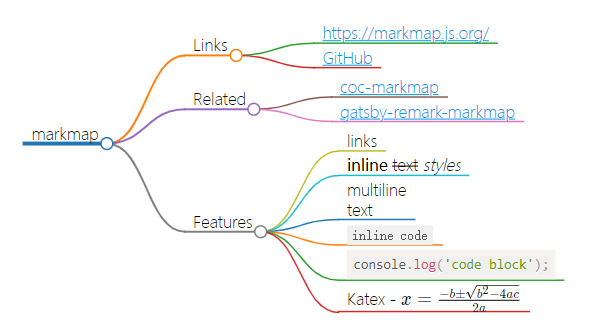
# mermaid
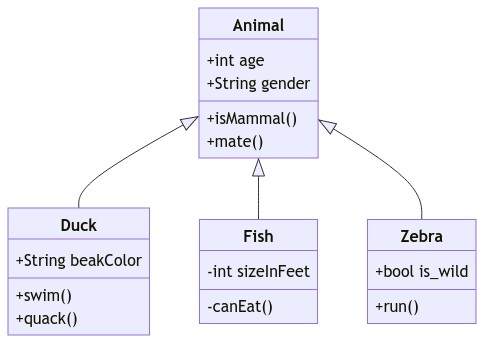
Mermaid Live Editor (opens new window)
本文参与 腾讯云自媒体同步曝光计划,分享自作者个人站点/博客。
原始发表:2022/3/25,如有侵权请联系 cloudcommunity@tencent.com 删除
目录
腾讯云开发者

Copyright © 2013 - 2026 Tencent Cloud. All Rights Reserved. 腾讯云 版权所有
深圳市腾讯计算机系统有限公司 ICP备案/许可证号:粤B2-20090059  粤公网安备44030502008569号
腾讯云计算(北京)有限责任公司 京ICP证150476号 | 京ICP备11018762号