基于SSM的教务管理系统设计与实现(附源码下载地址)

基于SSM的教务管理系统设计与实现(附源码下载地址)

C you again
发布于 2023-10-24 09:48:16
发布于 2023-10-24 09:48:16
01 项目背景
教务管理是大学的主要日常管理工作之一,涉及到校、系、师、生的诸多方面,随着教学体制的不断改革,尤其是学分制、选课制的展开和深入,教务日常管理工作日趋复杂繁重。如何把教务工作信息化,模块化,便捷化是现代高校发展的重点,因此研制开发一套综合教务管理软件,建成一个完整统一、技术先进、高效稳定、安全可靠的教务管理系统变得尤为重要。
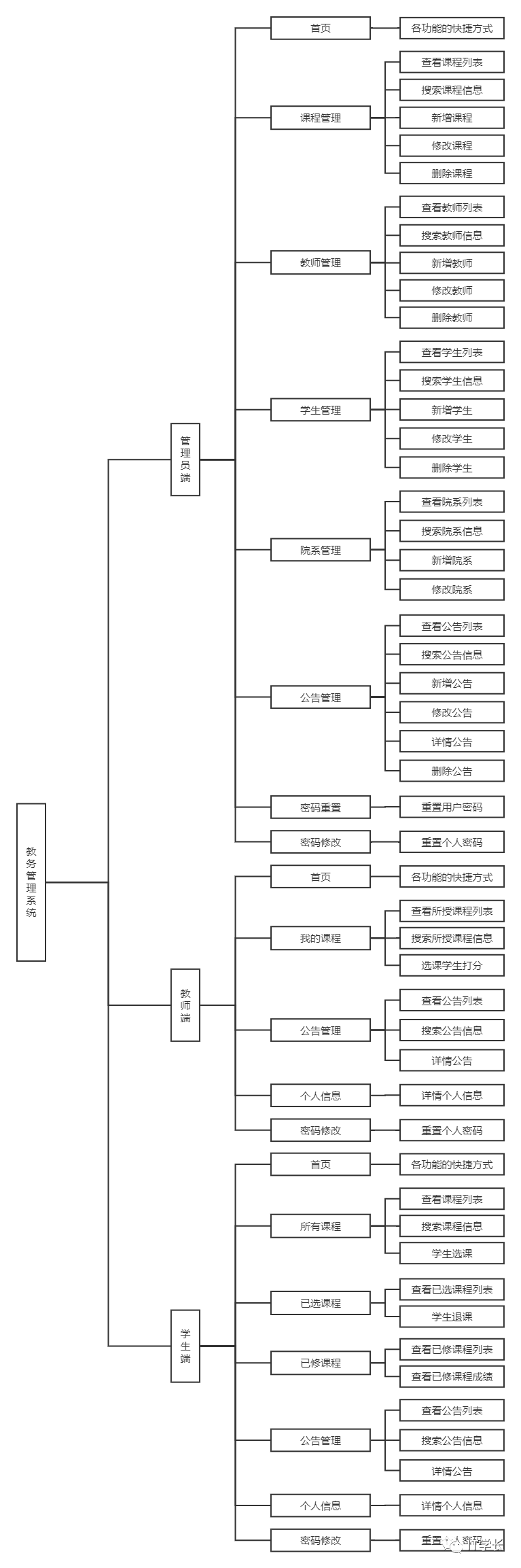
本系统基于B/S结构,运用MVC(Model-View-Controller)模式,采用先进的Spring、SpringMVC、MyBatis等技术框架 ,实现了课程管理、教师管理、学生管理、院系管理、公告管理、个人信息管理等功能模块,为高校数字化校园建设提供先进实用、安全可靠、便于操作、易干扩展的应用解决方案。
02 使用技术
- 数据表现层:Jsp+JavaScript+CSS+Bootstrap+JQuery
- 业务逻辑层:Java+Spring+SpringMVC
- 数据持久层:MySQL+MyBatis
- 开发工具:Eclipse/IDEA
- 安全框架:Shiro
- 日志:log4j
03 运行环境
JDK1.8 + Maven3.6.3 + MySQL5.7 + Tomcat9.0
04 功能分析
管理员:
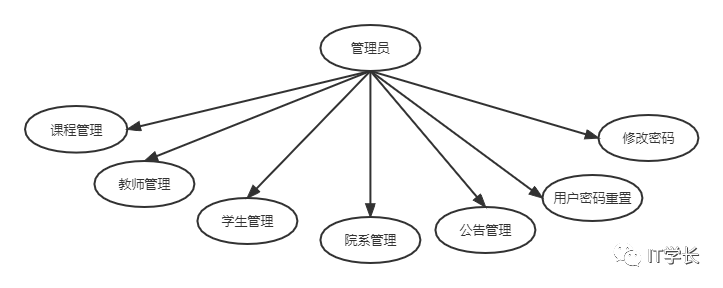
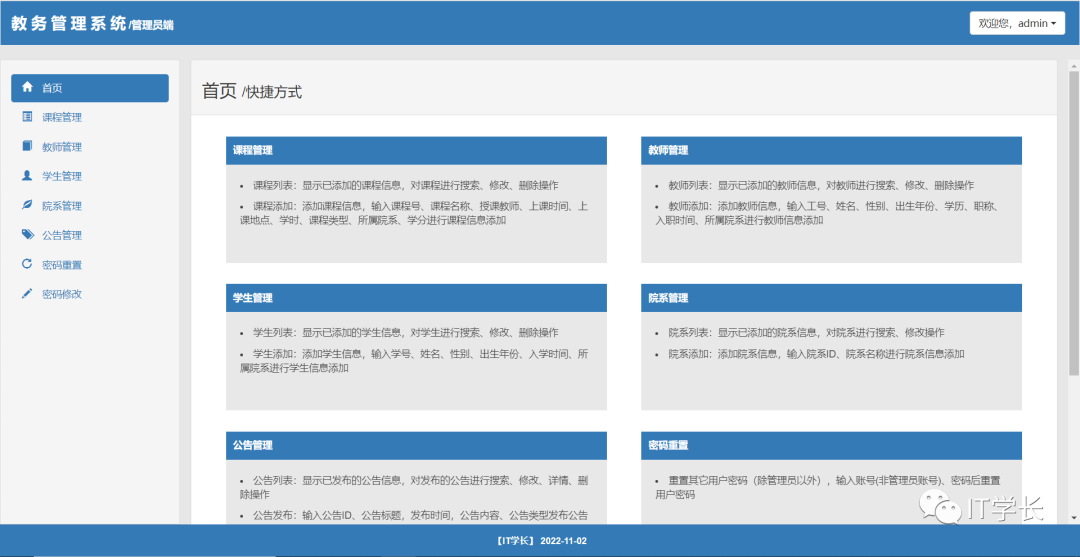
- 首页
- 卡片方式展示系统管理员拥有的权限,点击卡片可快捷跳转到对应的功能模块
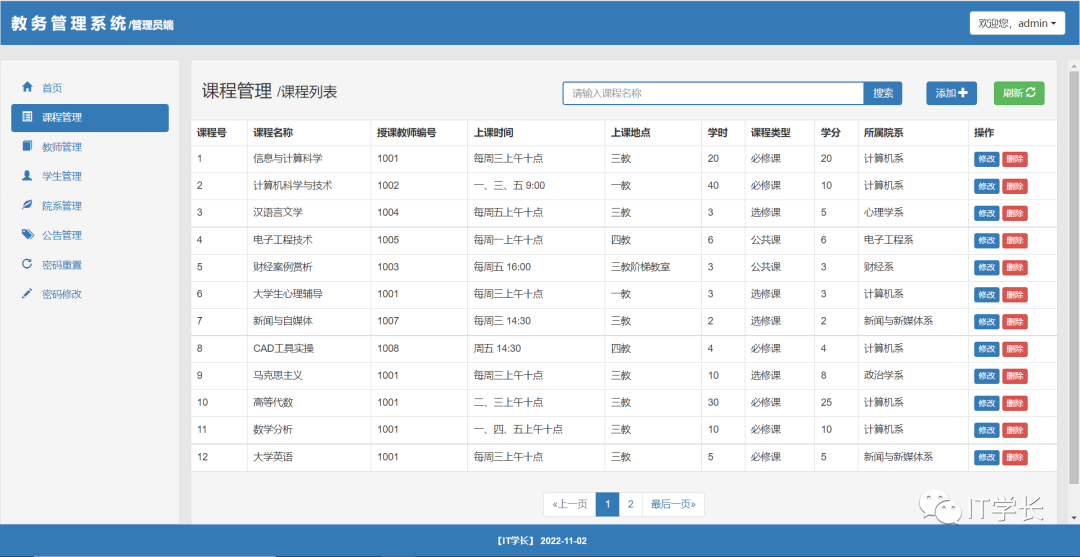
- 课程管理
- 课程列表:显示已添加的课程信息,对课程进行搜索、修改、删除操作
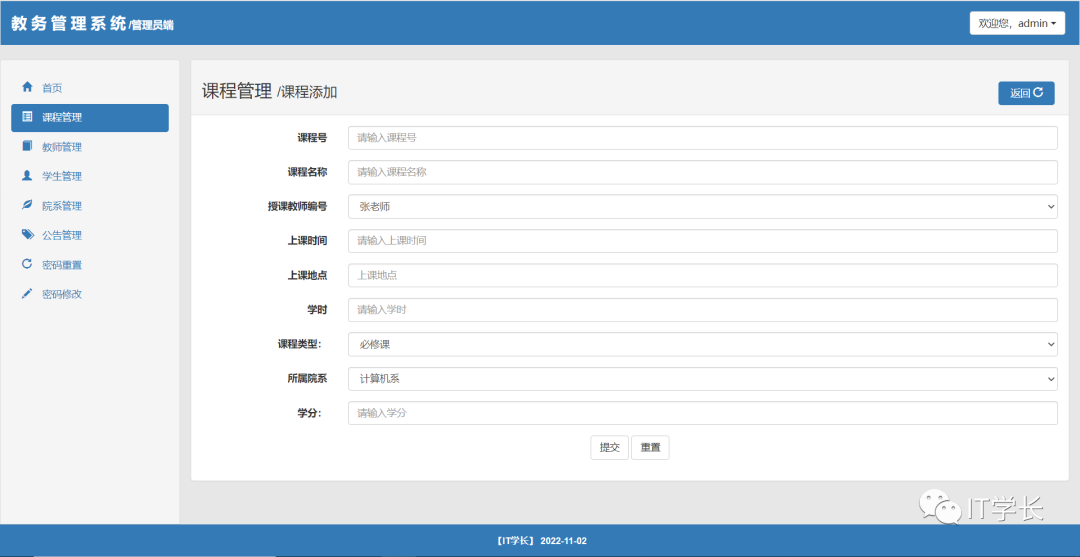
- 课程添加:添加课程信息,输入课程号、课程名称、授课教师、上课时间、上课地点、学时、课程类型、所属院系、学分进行课程信息添加
- 教师管理
- 教师列表:显示已添加的教师信息,对教师进行搜索、修改、删除操作
- 教师添加:添加教师信息,输入工号、姓名、性别、出生年份、学历、职称、入职时间、所属院系进行教师信息添加
- 学生管理
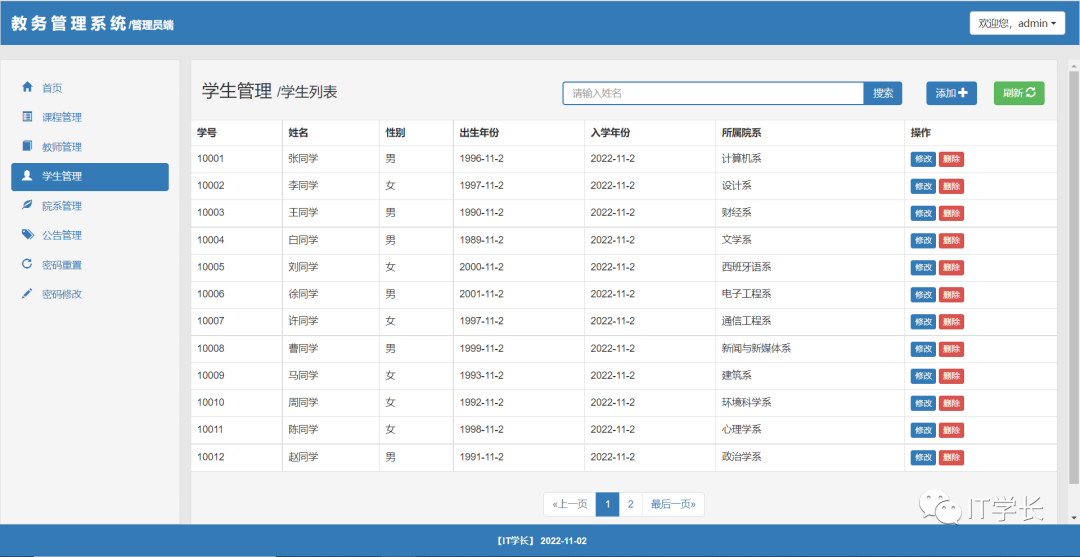
- 学生列表:显示已添加的学生信息,对学生进行搜索、修改、删除操作
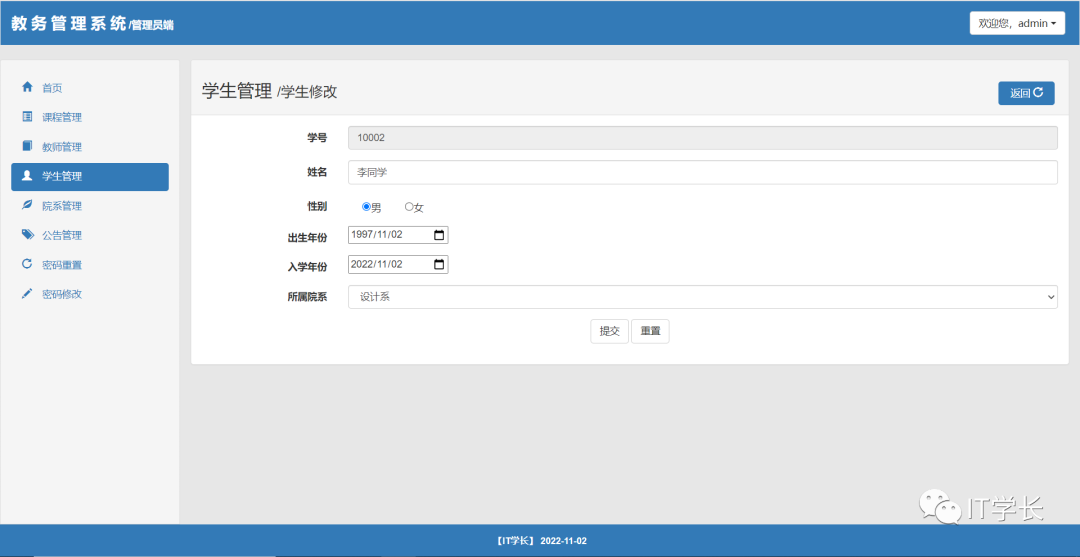
- 学生添加:添加学生信息,输入学号、姓名、性别、出生年份、入学时间、所属院系进行学生信息添加
- 院系管理
- 院系列表:显示已添加的院系信息,对院系进行搜索、修改操作
- 院系添加:添加院系信息,输入院系ID、院系名称进行院系信息添加
- 公告管理
- 公告列表:显示已发布的公告信息,对发布的公告进行搜索、修改、详情、删除操作
- 公告发布:输入公告ID、公告标题,发布时间,公告内容、公告类型发布公告信息
- 密码重置
- 重置其它用户密码(除管理员以外),输入账号(非管理员账号)、旧密码后重置用户密码
- 密码修改
- 修改登录用户的密码
教师:
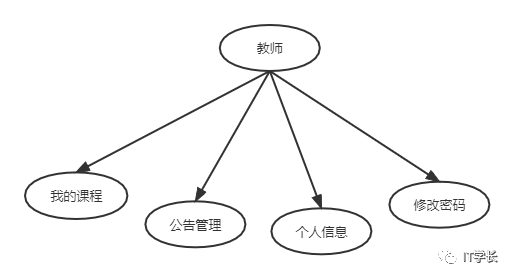
- 首页
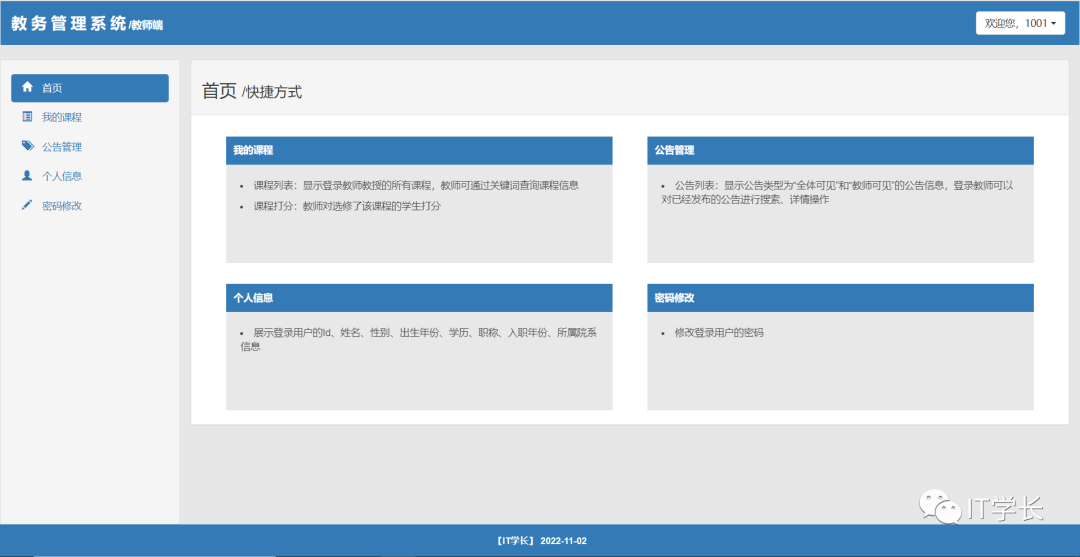
- 卡片方式展示教师拥有的权限,点击卡片可快捷跳转到对应的功能模块
- 我的课程
- 课程列表:显示登录教师教授的所有课程,教师可通过关键词查询课程信息
- 课程打分:教师对选修了该课程的学生打分
- 公告管理
- 公告列表:显示公告类型为“全体可见”和“教师可见”的公告信息,登录教师可以对已经发布的公告进行搜索、详情操作
- 个人信息
- 展示登录用户的Id、姓名、性别、出生年份、学历、职称、入职年份、所属院系信息
- 密码修改
- 修改登录用户的密码
学生:
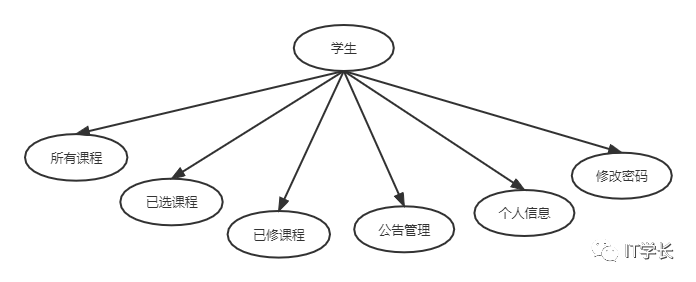
- 首页
- 卡片方式展示学生拥有的权限,点击卡片可快捷跳转到对应的功能模块
- 所有课程
- 课程列表:显示所有的课程信息,可通过关键词搜索课程,登录学生进行选课
- 已选课程
- 课程列表:显示登录学生选修的课程信息,并且可以对非必修课进行退课操作
- 已修课程
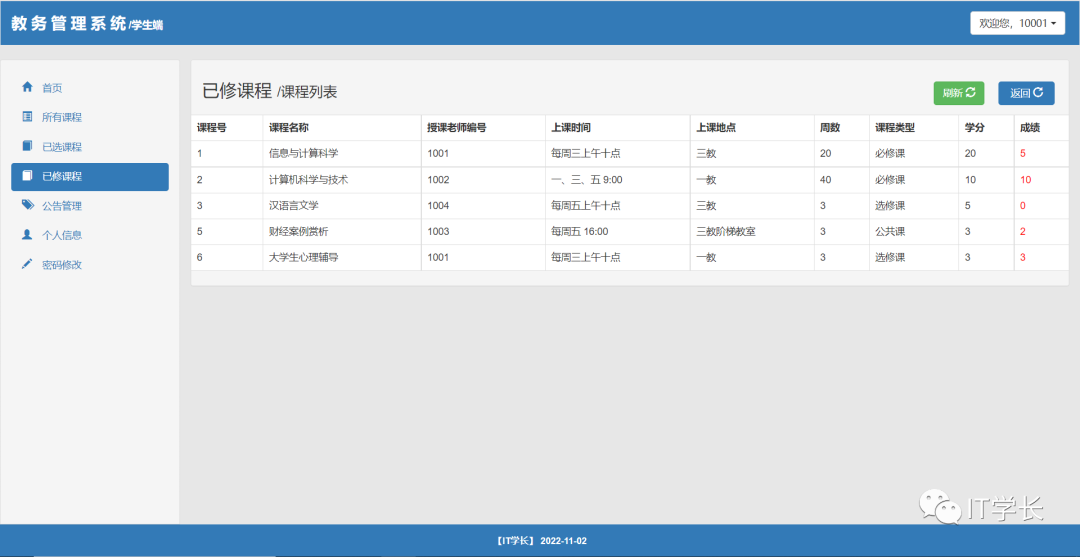
- 课程列表:显示登录学生已修的课程信息,查看成绩
- 公告管理
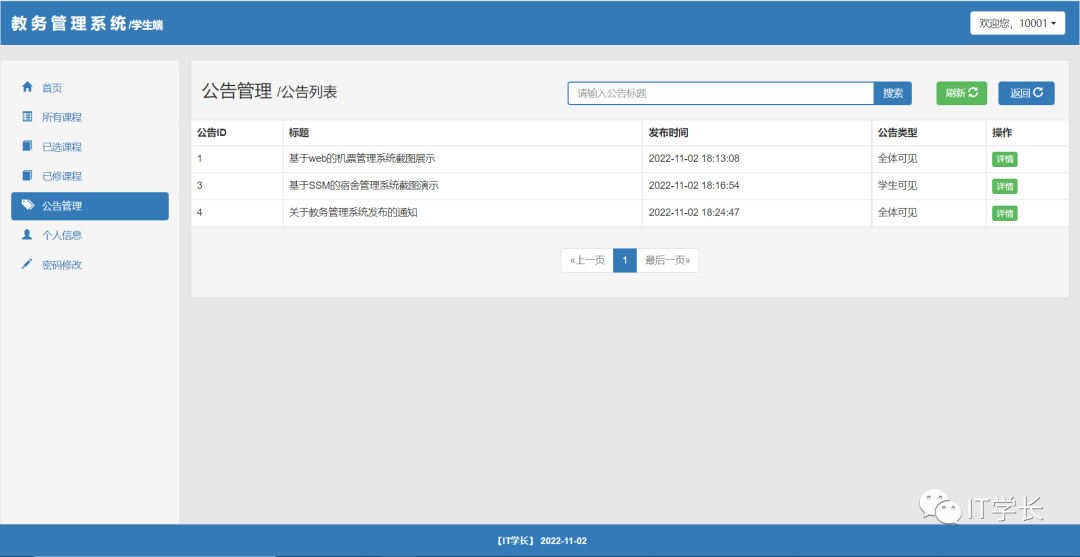
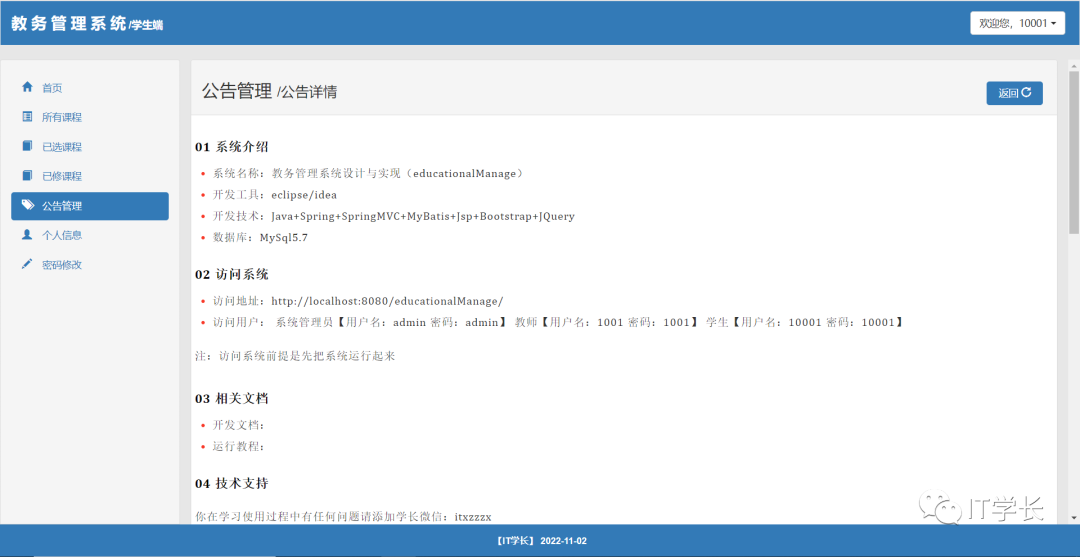
- 公告列表:显示公告类型为“全体可见”和“学生可见”的公告信息,登录学生可以对已经发布的公告进行搜索、详情操作
- 个人信息
- 展示登录用户的Id、姓名、性别、出生年份、入学时间、所属院系信息
- 密码修改
- 修改登录用户的密码
05 数据库设计
院系表(college): 用于存储院系信息
字段名称 | 类型 | 是否为null | 是否主键 | 说明 |
|---|---|---|---|---|
collegeID | int | 否 | 是 | 院系Id |
collegeName | varchar | 否 | 否 | 院系名 |
课程表(course): 用于存储课程信息
字段名称 | 类型 | 是否为null | 是否主键 | 说明 |
|---|---|---|---|---|
courseID | int | 否 | 是 | 课程Id |
courseName | varchar | 否 | 否 | 课程名称 |
teacherID | int | 否 | 否 | 授课教师编号 |
courseTime | varchar | 是 | 否 | 上课时间 |
classRoom | varchar | 是 | 否 | 上课地点 |
courseWeek | int | 是 | 否 | 学时 |
courseType | varchar | 是 | 否 | 课程类型 |
collegeID | int | 否 | 否 | 所属院系编号 |
score | int | 否 | 否 | 学分 |
公告表(notice): 用于存储公告信息
字段名称 | 类型 | 是否为null | 是否主键 | 说明 |
|---|---|---|---|---|
id | int | 否 | 是 | 公告Id |
title | varchar | 否 | 否 | 公告标题 |
date | datetime | 否 | 否 | 发布日期 |
content | text | 否 | 否 | 公告内容 |
type | varchar | 否 | 否 | 公告类型 0:全体可见 1:教师可见 2:学生可见 |
角色表(role): 用于存储角色信息
字段名称 | 类型 | 是否为null | 是否主键 | 说明 |
|---|---|---|---|---|
roleID | int | 否 | 是 | 角色Id |
roleName | varchar | 否 | 否 | 角色名称 |
permissions | varchar | 是 | 否 | 角色权限 |
选课表(selectedcourse): 用于存储已选课程、已修课程信息
字段名称 | 类型 | 是否为null | 是否主键 | 说明 |
|---|---|---|---|---|
courseID | int | 否 | 否 | 课程Id |
studentID | int | 否 | 否 | 学生Id |
mark | int | 是 | 否 | 成绩 null:已选课程 not null:已修课程 |
学生表(student): 用于存储学生信息
字段名称 | 类型 | 是否为null | 是否主键 | 说明 |
|---|---|---|---|---|
userID | int | 否 | 是 | 学生Id/学号 |
userName | varchar | 否 | 否 | 姓名 |
sex | varchar | 是 | 否 | 性别 |
birthYear | date | 是 | 否 | 出生年份 |
grade | date | 是 | 否 | 入学时间 |
collegeID | int | 否 | 否 | 所属院系编号 |
教师表(teacher): 用于存储教师信息
字段名称 | 类型 | 是否为null | 是否主键 | 说明 |
|---|---|---|---|---|
userID | int | 否 | 是 | 教师Id/教师编号 |
userName | varchar | 否 | 否 | 姓名 |
sex | varchar | 是 | 否 | 性别 |
birthYear | date | 否 | 否 | 出生年份 |
degree | varchar | 是 | 否 | 学历 |
title | varchar | 是 | 否 | 职称 |
grade | date | 是 | 否 | 入职年份 |
collegeID | int | 否 | 否 | 所属院系Id |
用户表(userlogin): 用于存储用户登录信息
字段名称 | 类型 | 是否为null | 是否主键 | 说明 |
|---|---|---|---|---|
userID | int | 否 | 是 | 用户Id |
userName | varchar | 否 | 否 | 用户名 |
password | varchar | 否 | 否 | 密码 |
role | int | 否 | 否 | 角色 0:管理员 1:教师 2:学生 |
06 项目工程结构及说明
下载本项目源码并导入到开发工具后(下图为导入到Eclipse中的目录结构),项目的目录结构如下图所示:
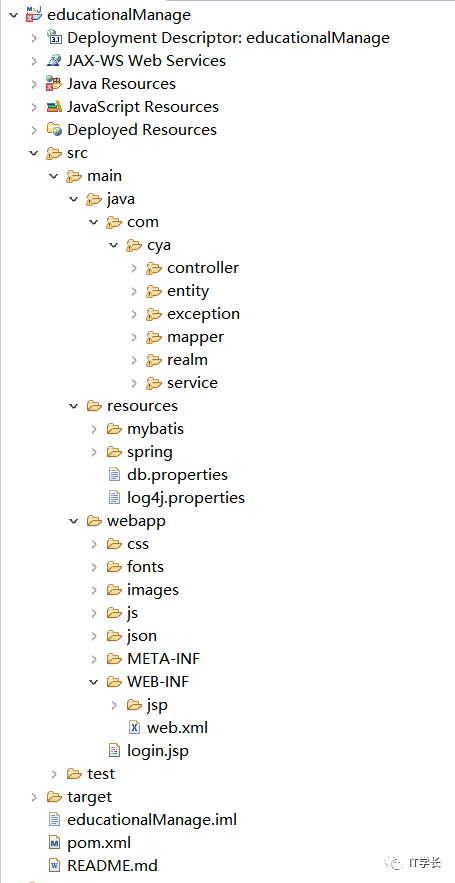
项目结构解释说明:
包名 | 说明 |
|---|---|
com.cya.controller | 用于存放接收请求的Controller类,前后端交互的“桥梁” |
com.cya.controller.converter | 自定义参数绑定组件 |
com.cya.entity | 存放实体类 |
com.cya.exception | 存放自定义异常类 |
com.cya.realm | 存放登录认证授权类 |
com.cya.service | 存放业务逻辑层接口 |
com.cya.service.impl | 存放业务逻辑层实现类 |
src/main/resources/mybatis | MyBatis配置文件 |
src/main/resources/spring | Spring配置文件 |
src/main/resources/db.properties | MySQL数据库配置文件 |
src/main/resources/log4j.properties | 日志打印配置文件 |
src/main/webapp | 存放前端页面文件,如:jsp、css、JavaScript、image |
07 部分功能展示及源码
7.1 登录页
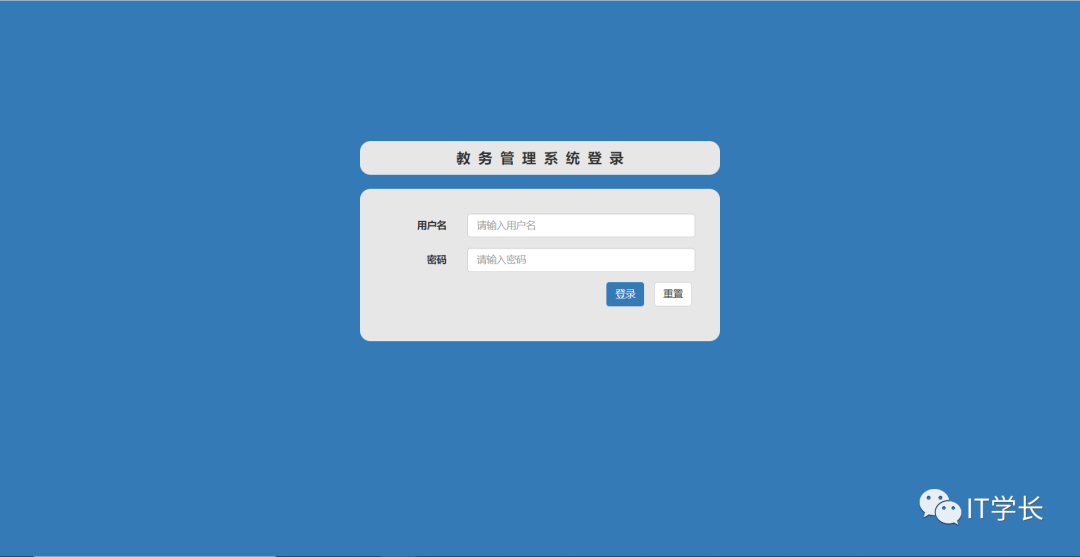
部分代码:
package com.cya.controller;

import org.apache.shiro.SecurityUtils;
import org.apache.shiro.authc.UsernamePasswordToken;
import org.apache.shiro.subject.Subject;
import org.springframework.stereotype.Controller;
import org.springframework.web.bind.annotation.RequestMapping;
import org.springframework.web.bind.annotation.RequestMethod;

import com.cya.entity.Userlogin;

/**
 * @author 公众号【IT学长】
 * @version 微信搜索“IT学长”,30多套项目源码、百G Java大厂面试题免费领取 2022-10-6
 */

@Controller
public class LoginController {

 // 登录跳转
 @RequestMapping(value = "/login", method = { RequestMethod.GET })
 public String loginUI() throws Exception {
  return "../../login";
 }

 // 登录表单处理
 @RequestMapping(value = "/login", method = { RequestMethod.POST })
 public String login(Userlogin userlogin) throws Exception {

  // Shiro实现登录
  UsernamePasswordToken token = new UsernamePasswordToken(userlogin.getUsername(), userlogin.getPassword());
  Subject subject = SecurityUtils.getSubject();

  subject.login(token);

  if (subject.hasRole("admin")) {
   return "redirect:/admin/index";
  } else if (subject.hasRole("teacher")) {
   return "redirect:/teacher/index";
  } else if (subject.hasRole("student")) {
   return "redirect:/student/index";
  }

  return "/login";
 }

}
7.2 管理员端--首页
7.3 管理员端--课程管理
课程列表:
课程添加:
部分代码:
package com.cya.service.impl;

import com.cya.entity.*;
import com.cya.mapper.CollegeMapper;
import com.cya.mapper.CourseMapper;
import com.cya.mapper.CourseMapperCustom;
import com.cya.mapper.SelectedcourseMapper;
import com.cya.service.CourseService;

import org.apache.commons.beanutils.BeanUtils;
import org.springframework.beans.factory.annotation.Autowired;
import org.springframework.stereotype.Service;

import java.util.ArrayList;
import java.util.HashMap;
import java.util.List;
import java.util.Map;

/**
 * @author 公众号【IT学长】
 * @version 微信搜索“IT学长”,30多套项目源码、百G Java大厂面试题免费领取 2022-10-6
 */

@Service
public class CourseServiceImpl implements CourseService {

 @Autowired
 private CourseMapper courseMapper;

 @Autowired
 private CourseMapperCustom courseMapperCustom;

 @Autowired
 private CollegeMapper collegeMapper;

 @Autowired
 private SelectedcourseMapper selectedcourseMapper;

 public void upadteById(Integer id, CourseCustom courseCustom) throws Exception {
  courseMapper.updateByPrimaryKey(courseCustom);
 }

 public Map<String, Object> removeById(Integer id) throws Exception {

  Map<String, Object> resMap = new HashMap<String, Object>();
  // 自定义查询条件
  SelectedcourseExample example = new SelectedcourseExample();
  SelectedcourseExample.Criteria criteria = example.createCriteria();
  criteria.andCourseidEqualTo(id);
  criteria.andMarkIsNull();
  List<Selectedcourse> list = selectedcourseMapper.selectByExample(example);

  if (list.size() == 0) {
   courseMapper.deleteByPrimaryKey(id);
   resMap.put("status", true);
   resMap.put("message", "删除成功");
  } else {
   List<String> tempList = new ArrayList<String>();
   for (Selectedcourse selectedcourse : list) {
    tempList.add(selectedcourse.getStudentid().toString());
   }
   // 根据课程号查授课教师
   Course course = courseMapper.selectByPrimaryKey(id);
   resMap.put("status", false);
   resMap.put("message", tempList);
   if (course != null) {
    resMap.put("teacherID", course.getTeacherid());
   }
  }

  return resMap;
 }

 public List<CourseCustom> findByPaging(Integer toPageNo) throws Exception {
  PagingVO pagingVO = new PagingVO();
  pagingVO.setToPageNo(toPageNo);

  List<CourseCustom> list = courseMapperCustom.findByPaging(pagingVO);
  return list;
 }

 public Boolean save(CourseCustom couseCustom) throws Exception {
  Course course = courseMapper.selectByPrimaryKey(couseCustom.getCourseid());
  if (course == null) {
   courseMapper.insert(couseCustom);
   return true;
  }
  return false;
 }

 public int getCountCouse() throws Exception {
  // 自定义查询对象
  CourseExample courseExample = new CourseExample();
  // 通过criteria构造查询条件
  CourseExample.Criteria criteria = courseExample.createCriteria();
  criteria.andCoursenameIsNotNull();

  return courseMapper.countByExample(courseExample);
 }

 public CourseCustom findById(Integer id) throws Exception {
  Course course = courseMapper.selectByPrimaryKey(id);
  CourseCustom courseCustom = null;
  if (course != null) {
   courseCustom = new CourseCustom();
   BeanUtils.copyProperties(courseCustom, course);
  }

  return courseCustom;
 }

 public List<CourseCustom> findByName(String name, Integer teacherId) throws Exception {
  CourseExample courseExample = new CourseExample();
  // 自定义查询条件
  CourseExample.Criteria criteria = courseExample.createCriteria();

  criteria.andCoursenameLike("%" + name + "%");

  if (teacherId != null) {
   criteria.andTeacheridEqualTo(teacherId);
  }

  List<Course> list = courseMapper.selectByExample(courseExample);

  List<CourseCustom> courseCustomList = null;

  if (list != null) {
   courseCustomList = new ArrayList<CourseCustom>();
   for (Course c : list) {
    CourseCustom courseCustom = new CourseCustom();
    // 类拷贝
    org.springframework.beans.BeanUtils.copyProperties(c, courseCustom);
    // 获取课程名
    College college = collegeMapper.selectByPrimaryKey(c.getCollegeid());
    courseCustom.setcollegeName(college.getCollegename());

    courseCustomList.add(courseCustom);
   }
  }

  return courseCustomList;
 }

 public List<CourseCustom> findByTeacherID(Integer id) throws Exception {
  CourseExample courseExample = new CourseExample();
  // 自定义查询条件
  CourseExample.Criteria criteria = courseExample.createCriteria();
  // 根据教师id查课程
  criteria.andTeacheridEqualTo(id);

  List<Course> list = courseMapper.selectByExample(courseExample);
  List<CourseCustom> courseCustomList = null;

  if (list.size() > 0) {
   courseCustomList = new ArrayList<CourseCustom>();
   for (Course c : list) {
    CourseCustom courseCustom = new CourseCustom();
    // 类拷贝
    BeanUtils.copyProperties(courseCustom, c);
    // 获取课程名
    College college = collegeMapper.selectByPrimaryKey(c.getCollegeid());
    courseCustom.setcollegeName(college.getCollegename());

    courseCustomList.add(courseCustom);
   }
  }

  return courseCustomList;
 }
}
7.4 管理员端--学生管理
学生列表:
学生修改:
7.5 教师端--首页
7.6 教师端--个人信息
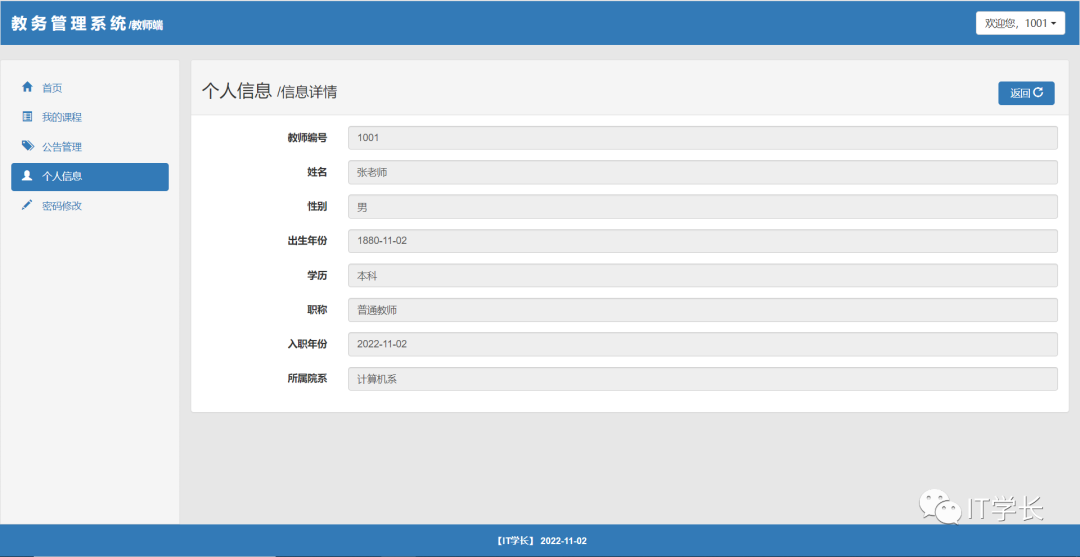
部分源码:
 //查询个人信息
    @RequestMapping(value = "/teacherInfo")
    public String teacherInfo(Model model) throws Exception {

     Subject subject = SecurityUtils.getSubject();
        String username = (String) subject.getPrincipal();
        TeacherCustom teacherCustom = teacherService.findById(Integer.parseInt(username));

        if (teacherCustom == null) {
            throw new CustomException("未找到此教师信息") ;
        }
        model.addAttribute("teacher", teacherCustom);

        return "teacher/teacherInfo";
    }
7.7 学生端--已修课程
7.8 学生端--公告管理
公告列表:
公告详情:
部分源码:
<?xml version="1.0" encoding="UTF-8" ?>
<!DOCTYPE mapper PUBLIC "-//mybatis.org//DTD Mapper 3.0//EN" "http://mybatis.org/dtd/mybatis-3-mapper.dtd" >
<mapper namespace="com.cya.mapper.NoticeMapper">

 <resultMap id="BaseResultMap" type="com.cya.entity.Notice">
  <id column="id" property="id" jdbcType="INTEGER" />
  <result column="title" property="title" jdbcType="VARCHAR" />
  <result column="date" property="date" jdbcType="TIMESTAMP" />
  <result column="content" property="content"
   jdbcType="LONGVARCHAR" />
  <result column="type" property="type" jdbcType="VARCHAR" />
 </resultMap>

 <sql id="Example_Where_Clause">
  <where>
   <foreach collection="oredCriteria" item="criteria"
    separator="or">
    <if test="criteria.valid">
     <trim prefix="(" suffix=")" prefixOverrides="and">
      <foreach collection="criteria.criteria" item="criterion">
       <choose>
        <when test="criterion.singleValue">
         and ${criterion.condition} #{criterion.value}
        </when>
        <when test="criterion.betweenValue">
         and ${criterion.condition} #{criterion.value} and
         #{criterion.secondValue}
        </when>
        <when test="criterion.listValue">
         and ${criterion.condition}
         <foreach collection="criterion.value" item="listItem"
          open="(" close=")" separator=",">
          #{listItem}
         </foreach>
        </when>
       </choose>
      </foreach>
     </trim>
    </if>
   </foreach>
  </where>
 </sql>

 <sql id="Base_Column_List">
  id, title, date, content, type
 </sql>

 <select id="selectByExample" resultMap="BaseResultMap"
  parameterType="com.cya.entity.NoticeExample">
  select
  <if test="distinct">
   distinct
  </if>
  <include refid="Base_Column_List" />
  from notice
  <if test="_parameter != null">
   <include refid="Example_Where_Clause" />
  </if>
  <if test="orderByClause != null">
   order by ${orderByClause}
  </if>
 </select>

 <select id="selectByPrimaryKey" resultMap="BaseResultMap"
  parameterType="java.lang.Integer">
  select
  <include refid="Base_Column_List" />
  from notice
  where id = #{id,jdbcType=INTEGER}
 </select>


 <delete id="deleteByPrimaryKey"
  parameterType="java.lang.Integer">
  delete from notice
  where id = #{id,jdbcType=INTEGER}
 </delete>

 <insert id="insert" parameterType="com.cya.entity.Notice">
  insert into notice (id, title, date, content, type)
  values (
  #{id,jdbcType=INTEGER},
  #{title,jdbcType=VARCHAR},
  #{date,jdbcType=TIMESTAMP},
  #{content,jdbcType=LONGVARCHAR},
  #{type,jdbcType=VARCHAR}
  )
 </insert>
 <insert id="insertSelective"
  parameterType="com.cya.entity.Notice">
  insert into notice
  <trim prefix="(" suffix=")" suffixOverrides=",">
   <if test="id != null">
    id,
   </if>
   <if test="title != null">
    title,
   </if>
   <if test="date != null">
    date,
   </if>
   <if test="content != null">
    content,
   </if>
   <if test="type != null">
    type,
   </if>
  </trim>
  <trim prefix="values (" suffix=")" suffixOverrides=",">
   <if test="id != null">
    #{id,jdbcType=INTEGER},
   </if>
   <if test="title != null">
    #{title,jdbcType=VARCHAR},
   </if>
   <if test="date != null">
    #{date,jdbcType=TIMESTAMP},
   </if>
   <if test="content != null">
    #{content,jdbcType=LONGVARCHAR},
   </if>
   <if test="type != null">
    #{type,jdbcType=VARCHAR},
   </if>
  </trim>
 </insert>

 <select id="countByExample"
  parameterType="com.cya.entity.NoticeExample"
  resultType="java.lang.Integer">
  select count(*) from notice
  <if test="_parameter != null">
   <include refid="Example_Where_Clause" />
  </if>
 </select>

 <update id="updateByPrimaryKeySelective"
  parameterType="com.cya.entity.Notice">
  update notice
  <set>
   <if test="title != null">
    title = #{title,jdbcType=VARCHAR},
   </if>
   <if test="date != null">
    date = #{date,jdbcType=TIMESTAMP},
   </if>
   <if test="content != null">
    content = #{content,jdbcType=LONGVARCHAR},
   </if>
   <if test="type != null">
    type = #{type,jdbcType=VARCHAR},
   </if>
  </set>
  where id = #{id,jdbcType=INTEGER}
 </update>
 <update id="updateByPrimaryKey"
  parameterType="com.cya.entity.Notice">
  update notice
  set title = #{title,jdbcType=VARCHAR},
  date = #{date,jdbcType=TIMESTAMP},
  content = #{content,jdbcType=LONGVARCHAR},
  type = #{type,jdbcType=VARCHAR}
  where id = #{id,jdbcType=INTEGER}
 </update>
</mapper>
08 源码下载
微信搜索公众号【IT学长】,回复关键词“20221102”或者“教务管理系统”下载教务管理系统(educationalManage)源码包。
09 运行教程
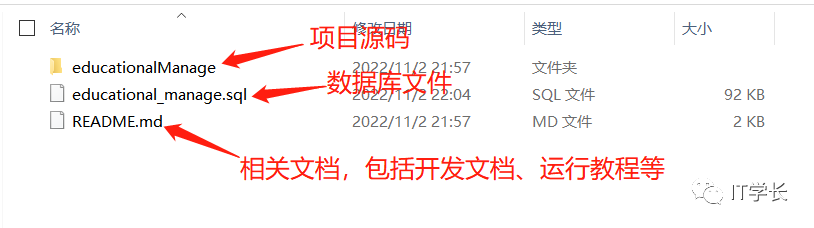
详细运行步骤及常见问题解答请看“教务管理系统设计与实现(SSM+MySQL+JSP)”源码包中 README.md 文件。
通过第08章节下载源码包并解压后如下图所示:
本期内容就到这里,感谢你的阅读。
10 相关说明
- 创作不易,记得点赞+收藏+转发
- 本人技术有限,若有错误欢迎指正
- 本文章属于【IT学长】原创,转载请注明出处
本文参与 腾讯云自媒体同步曝光计划,分享自微信公众号。
原始发表:2023-10-15,如有侵权请联系 cloudcommunity@tencent.com 删除
目录
腾讯云开发者

Copyright © 2013 - 2026 Tencent Cloud. All Rights Reserved. 腾讯云 版权所有
深圳市腾讯计算机系统有限公司 ICP备案/许可证号:粤B2-20090059  粤公网安备44030502008569号
腾讯云计算(北京)有限责任公司 京ICP证150476号 | 京ICP备11018762号