Linux系统高拍仪二次开发(WebSocket+多浏览器)FastSnap

Linux系统高拍仪二次开发(WebSocket+多浏览器)FastSnap

用户11057749
修改于 2026-05-06 09:37:42
修改于 2026-05-06 09:37:42
首先引入高拍仪js接口,然后根据需求对照函数对功能进行删减。
<!-- 引入高拍仪JS接口-->
<script src="wdgpy.js"  type="text/javascript" charset="utf-8"></script>
<script src="upload.js" type="text/javascript" ></script>

<script type="text/javascript">

    var fileBase64Str = "";
    var file_path = "";

    //时间格式化显示
    function formatDate(time) {
        var date = new Date(time);
        var year = date.getFullYear(),
            month = date.getMonth() + 1,
            day = date.getDate(),
            hour = date.getHours(),
            min = date.getMinutes(),
            sec = date.getSeconds();
        var newTime = year +
                    (month < 10 ? '0' + month : month) +
                    (day < 10 ? '0' + day : day) +
                    (hour < 10 ? '0' + hour : hour) +
                    (min < 10 ? '0' + min : min) +
                    (sec < 10 ? '0' + sec : sec) ;
        return newTime;
    }


    function sleep(milliSeconds) {
        var startTime = new Date().getTime();
        while (new Date().getTime() < startTime + milliSeconds);
    }

    function ShowInfo(op) {
        var obj = document.getElementById("TextInfo");
        obj.value = obj.value + "\r\n" + op
    }


    /*----------------------------------------------------
    ---返回获取的设备数目及设备名称  ---
    -----------------------------------------------------*/
    function GetDevCountAndNameResultCB(devCount, devNameArr) {

        if (devCount > 0) {

            var obj = document.getElementById("DevName");
            obj.options.length = 0;
            for (var i = 0; i < devCount; i++) {
                var objOption = document.createElement("option");
                objOption.text = devNameArr[i];
                objOption.value = i;
                obj.options.add(objOption);
            }
            obj.selectedIndex = 0;
            var CamID = obj.selectedIndex;

            //获取分辨率
            Cam_GetDevResolution(CamID);

        }
        else {
            ShowInfo("没有发现合适的设备!");
         }

</script>
实例截图:
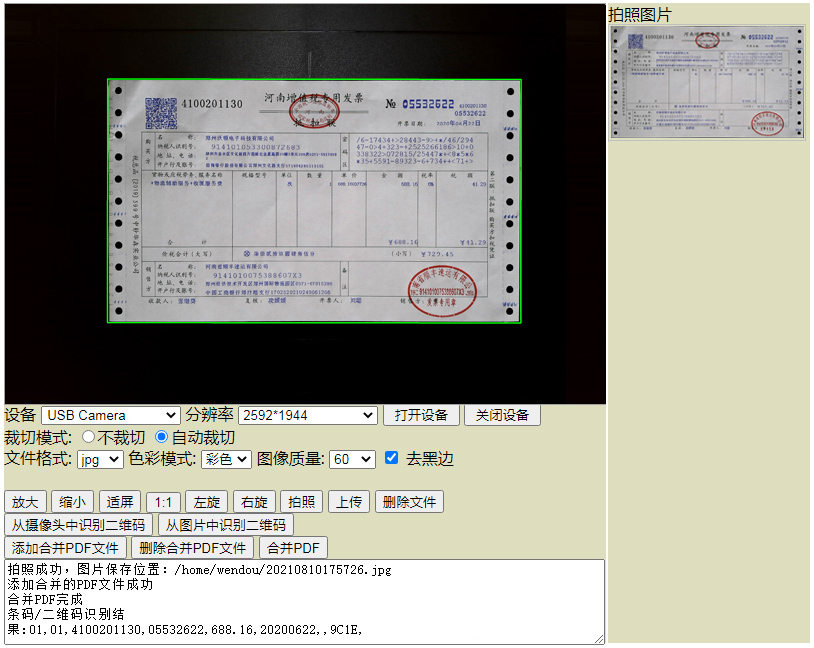
高拍仪Linux系统二次开发sdk样例截图
添加画布
<script type="text/javascript">
function releaseSocketPro() {
    var data = JSON.stringify({ 'function': 'releaseSocketPro' });
    connected ? sendMessage(data) : ConnectServer(sendMessage, data)
}

window.onbeforeunload = function () {

    Cam_Close();  //关闭高拍仪
    try {
        releaseSocketPro();
        websocket.close();
        websocket = null;
    }
    catch (ex) {
    }
};

function $(id) {
    return document.getElementById(id);
}

function toSleep(milliSeconds) {
    var startTime = new Date().getTime();
    while (new Date().getTime() < startTime + milliSeconds);
}


function addEvent(obj, xEvent, fn) {
    if (obj.attachEvent) {
        obj.attachEvent('on' + xEvent, fn);
    } else {
        obj.addEventListener(xEvent, fn, false);
    }
}

function InitCanvas(DivMainBox, mX, mY, mwidth, mheight) {
    if (mwidth != 0 && mheight != 0) {
        MainCanvas = document.createElement("canvas");
        MainCanvas.style.border = "solid 1px #A0A0A0";
        MainCanvas.id = "MainCamCanvas";
        MainCanvas.width = mwidth;
        MainCanvas.height = mheight;
        MainContext = MainCanvas.getContext("2d");
        DivMainBox.appendChild(MainCanvas);      //添加画布
        MainCanvas.onmousedown = MainCanvasMouseDown;
        MainCanvas.onmousemove = MainCanvasMouseMove;
        MainCanvas.onmouseup = MainCanvasMouseUp;
        MainCanvas.onmouseout = MainCanvasMouseOut;
        addEvent(MainCanvas, 'mousewheel', onMouseWheel);
        addEvent(MainCanvas, 'DOMMouseScroll', onMouseWheel);

    }
}
</script>
上传
function URLtoFile(dataurl, filename) {
    try {
        // 处理 Base64 数据解码,支持纯 Base64 和带前缀的 data URL
        var bstr;
        if (dataurl.indexOf(',') !== -1) {
            // 处理带前缀的 data URL 格式:data:;base64,xxx
            var arr = dataurl.split(',');
            bstr = atob(arr[arr.length - 1]);
        } else {
            // 处理纯 Base64 数据
            bstr = atob(dataurl);
        }

        var n = bstr.length;
        var u8arr = new Uint8Array(n);
        while (n--) {
            u8arr[n] = bstr.charCodeAt(n);
        }

        // 简化的文件后缀提取逻辑
        // TestDemo.html 只有 JPG / PNG / TIF / PDF 四种格式,后缀都是3位
        var pos = filename.lastIndexOf('.');
        var suffix = "";
        if (pos > -1 && filename.length - pos >= 2) {
            suffix = filename.substring(pos + 1).toLowerCase();
        }

    // 根据文件后缀设置 MIME 类型
    // 注意:JPG 和 JPEG 是同一种格式,MIME 类型都是 image/jpeg
    if (suffix == "jpg" || suffix == "JPG")
        return new File([u8arr], filename, { type: 'image/jpeg' });
    if (suffix == "png" || suffix == "PNG")
        return new File([u8arr], filename, { type: 'image/png' });
    if (suffix == "tif" || suffix == "TIF")
        return new File([u8arr], filename, { type: 'image/tiff' });
    if (suffix == "pdf" || suffix == "PDF")
        return new File([u8arr], filename, { type: 'application/pdf' });

    // 默认使用标准 JPEG MIME 类型
    	return new File([u8arr], filename, { type: 'image/jpeg' });

    } catch (e) {
        console.error("Base64 解码失败:", e);
        return null;
    }
}


function progressFunction(evt) {

    var progressBar = document.getElementById("progressBar");
    var percentageDiv = document.getElementById("percentage");
    // event.total是需要传输的总字节,event.loaded是已经传输的字节。如果event.lengthComputable不为真,则event.total等于0
    if (evt.lengthComputable) {//
        progressBar.max = evt.total;
        progressBar.value = evt.loaded;
        percentageDiv.innerHTML = Math.round(evt.loaded / evt.total * 100) + "%";
}本文系转载,前往查看
如有侵权,请联系 cloudcommunity@tencent.com 删除。
腾讯云开发者

Copyright © 2013 - 2026 Tencent Cloud. All Rights Reserved. 腾讯云 版权所有
深圳市腾讯计算机系统有限公司 ICP备案/许可证号:粤B2-20090059  粤公网安备44030502008569号
腾讯云计算(北京)有限责任公司 京ICP证150476号 | 京ICP备11018762号