Electron 与 OpenHarmony 的实战入门:经典猜数字

Electron 与 OpenHarmony 的实战入门:经典猜数字

@VON
发布于 2025-12-21 12:20:59
发布于 2025-12-21 12:20:59

在这里插入图片描述
- 个人首页: VON
- 鸿蒙系列专栏: 鸿蒙开发小型案例总结
- 综合案例 :鸿蒙综合案例开发
- 鸿蒙6.0:从0开始的开源鸿蒙6.0.0
- 鸿蒙5.0:鸿蒙5.0零基础入门到项目实战
- 本文章所属专栏:Electron for OpenHarmony

在这里插入图片描述
Electron 与 OpenHarmony 的实战入门:经典猜数字
作者:VON HarmonyOS 初级开发者|CSDN 新星创作者(Java/Web 领域) 专栏链接:Electron for OpenHarmony
在编程学习的旅程中,“猜数字”游戏常被作为逻辑训练的第一课。它规则简单、代码精炼,却完整涵盖了输入处理、条件判断、循环控制和用户反馈四大核心要素。
本文将带你用 纯 Web 技术 构建一个现代化的“猜数字”游戏,并部署到 Electron 桌面端,同时验证其在 OpenHarmony 中的无缝运行能力。整个项目无需任何 Node.js 调用、不依赖主进程通信、零外部依赖,是跨端小游戏开发的理想起点。
一、为什么选择“猜数字”?
优势 | 说明 |
|---|---|
✅ 极简逻辑 | 仅需随机数生成 + 条件判断 |
✅ 纯前端实现 | 完全基于 HTML/CSS/JavaScript |
✅ 无安全风险 | 不涉及文件、系统或网络操作 |
✅ 天然跨平台 | 可直接在浏览器、Electron、OpenHarmony Web 组件中运行 |
💡 这个项目证明了:最简单的游戏,也能成为最通用的跨端载体。
二、项目结构
guess-number-game/
├── main.js          # 最简主进程(仅加载页面)
├── index.html       # 游戏核心:UI + 逻辑
└── package.json     # 启动配置
⚠️ 注意:本项目不需要
preload.js,因为不调用任何主进程 API。
三、完整代码实现
1. 初始化项目
mkdir guess-number-game && cd guess-number-game
npm init -y
npm install electron --save-dev
2. package.json
{
  "name": "guess-number-game",
  "version": "1.0.0",
  "main": "main.js",
  "scripts": {
    "start": "electron ."
  },
  "devDependencies": {
    "electron": "^33.0.0"
  }
}
3. main.js —— 最小化主进程
const { app, BrowserWindow } = require('electron');
const path = require('path');

function createWindow() {
  const win = new BrowserWindow({
    width: 400,
    height: 450,
    resizable: false,
    webPreferences: {
      nodeIntegration: false,
      contextIsolation: true
    }
  });
  win.loadFile('index.html');
}

app.whenReady().then(createWindow);
app.on('window-all-closed', () => {
  if (process.platform !== 'darwin') app.quit();
});
🔒 即使不使用 Node,也保持安全配置。
4. index.html —— 游戏核心(纯 Web)
<!DOCTYPE html>
<html lang="zh-CN">
<head>
  <meta charset="UTF-8" />
  <title>猜数字</title>
  <style>
    body {
      font-family: -apple-system, BlinkMacSystemFont, sans-serif;
      display: flex;
      flex-direction: column;
      align-items: center;
      justify-content: center;
      height: 100vh;
      margin: 0;
      background: linear-gradient(135deg, #6a11cb 0%, #2575fc 100%);
      color: white;
    }
    .game-container {
      background: rgba(0, 0, 0, 0.3);
      padding: 30px;
      border-radius: 16px;
      text-align: center;
      backdrop-filter: blur(10px);
      width: 90%;
      max-width: 350px;
    }
    h1 {
      margin-top: 0;
      font-size: 28px;
      text-shadow: 0 2px 4px rgba(0,0,0,0.3);
    }
    input {
      width: 80%;
      padding: 12px;
      font-size: 18px;
      border: none;
      border-radius: 8px;
      margin: 10px 0;
      text-align: center;
    }
    button {
      padding: 10px 24px;
      font-size: 16px;
      background: #ffcc00;
      color: #333;
      border: none;
      border-radius: 8px;
      cursor: pointer;
      font-weight: bold;
      transition: transform 0.1s;
    }
    button:hover {
      background: #ffd633;
    }
    button:active {
      transform: scale(0.98);
    }
    #hint {
      margin-top: 16px;
      min-height: 24px;
      font-size: 18px;
      font-weight: bold;
    }
    #attempts {
      margin-top: 8px;
      font-size: 14px;
      opacity: 0.9;
    }
  </style>
</head>
<body>
  <div class="game-container">
    <h1>🔢 猜数字</h1>
    <p>我想了一个 1 到 100 之间的整数,你来猜!</p>
    <input type="number" id="guessInput" min="1" max="100" placeholder="输入你的猜测" />
    <br />
    <button onclick="makeGuess()">提交</button>
    <div id="hint"></div>
    <div id="attempts">已尝试 0 次</div>
  </div>

  <script>
    let targetNumber = Math.floor(Math.random() * 100) + 1;
    let attempts = 0;

    function makeGuess() {
      const input = document.getElementById('guessInput');
      const hint = document.getElementById('hint');
      const attemptsEl = document.getElementById('attempts');
      const value = parseInt(input.value);

      // 输入验证
      if (isNaN(value) || value < 1 || value > 100) {
        hint.textContent = '请输入 1~100 之间的整数!';
        hint.style.color = '#ff6b6b';
        return;
      }

      attempts++;
      attemptsEl.textContent = `已尝试 ${attempts} 次`;

      if (value === targetNumber) {
        hint.textContent = `🎉 恭喜你!答案就是 ${targetNumber}!`;
        hint.style.color = '#00ffaa';
        input.disabled = true;
        setTimeout(() => {
          if (confirm('再玩一局?')) resetGame();
        }, 500);
      } else if (value < targetNumber) {
        hint.textContent = '太小了!';
        hint.style.color = '#ffd166';
      } else {
        hint.textContent = '太大了!';
        hint.style.color = '#ffd166';
      }

      input.value = '';
      input.focus();
    }

    function resetGame() {
      targetNumber = Math.floor(Math.random() * 100) + 1;
      attempts = 0;
      document.getElementById('hint').textContent = '';
      document.getElementById('attempts').textContent = '已尝试 0 次';
      document.getElementById('guessInput').disabled = false;
      document.getElementById('guessInput').focus();
    }

    // 支持回车提交
    document.getElementById('guessInput').addEventListener('keypress', (e) => {
      if (e.key === 'Enter') makeGuess();
    });

    // 初始聚焦
    window.addEventListener('DOMContentLoaded', () => {
      document.getElementById('guessInput').focus();
    });
  </script>
</body>
</html>
🎨 特性:
- 渐变背景 + 毛玻璃效果(
backdrop-filter) - 响应式布局,适配不同窗口大小
- 回车键支持,提升体验
- 游戏结束后可一键重开
四、运行效果
npm start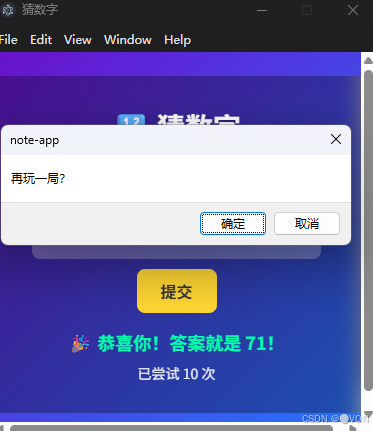
在这里插入图片描述
- 系统随机生成一个 1~100 的数字;
- 玩家输入猜测值并提交;
- 根据结果提示“太大”、“太小”或“恭喜”;
- 显示尝试次数;
- 猜中后可选择重新开始。
✅ 简单,但令人上瘾!
五、向 OpenHarmony 无缝迁移
由于本项目完全基于 Web 标准,迁移到 OpenHarmony 仅需两步:
Step 1:放入鸿蒙资源目录
将 index.html 复制到鸿蒙工程的:
entry/src/main/resources/rawfile/guess_number.htmlStep 2:在 ArkTS 页面中加载
// MainUI.ets
Web({ src: 'guess_number.html' })
  .width('100%')
  .height('100%')
✅ 无需修改一行代码! ✅ 所有交互、样式、逻辑全部保留! ✅ 在鸿蒙 PC、平板、智慧屏上均可流畅运行!
0成本迁移
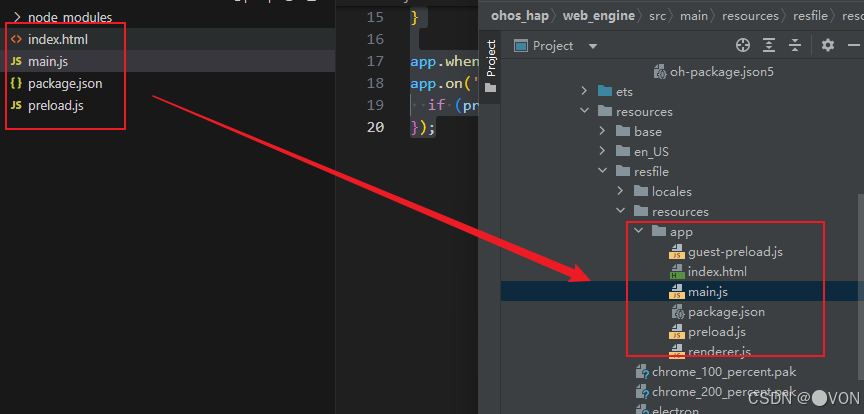
在这里插入图片描述
真机测试成功

在这里插入图片描述
六、扩展建议(进阶玩法)
- 难度分级:增加 1~1000 模式,或限时挑战;
- 历史记录:使用
localStorage保存最佳成绩; - 音效反馈:添加成功/失败音效(Web Audio API);
- 多语言支持:通过 JSON 切换中英文提示;
- 分享功能:生成战绩图片(Canvas + toDataURL)。
七、结语:从“Hello World”到“Hello Game”
“猜数字”虽小,却是编程思维的缩影——它教会我们如何将现实规则转化为代码逻辑,如何与用户建立有效反馈,以及如何在限制中创造乐趣。
更重要的是,它展示了 Web 技术的强大跨端潜力:同一份代码,既能运行在 Electron 桌面应用中,也能嵌入 OpenHarmony 生态,成为鸿蒙设备上的原生体验。
下一次,当你面对一个复杂需求时,不妨先问自己: “能不能先做一个‘猜数字’?”
💡 源码获取:关注作者 CSDN 主页,回复 “Guess Number” 获取完整项目 ZIP。 📌 下期预告:《Electron 与 OpenHarmony 的实战入门:2048 数字合并》
最简单的游戏,往往藏着最通用的真理。
本文参与 腾讯云自媒体同步曝光计划,分享自作者个人站点/博客。
原始发表:2025-12-12,如有侵权请联系 cloudcommunity@tencent.com 删除
评论
登录后参与评论
推荐阅读
目录
腾讯云开发者

Copyright © 2013 - 2026 Tencent Cloud. All Rights Reserved. 腾讯云 版权所有
深圳市腾讯计算机系统有限公司 ICP备案/许可证号:粤B2-20090059  粤公网安备44030502008569号
腾讯云计算(北京)有限责任公司 京ICP证150476号 | 京ICP备11018762号