在 vLLM 中优雅地中断推理:同步与异步实战

在 vLLM 中优雅地中断推理:同步与异步实战

Michael阿明
发布于 2026-03-25 13:55:03
发布于 2026-03-25 13:55:03
文章目录
- 0. 启动大模型
- 1. http请求 同步
- 2. http请求异步
- 3. openai client
- 4. 总结
许多在线推理服务都会提供“停止生成 / Stop”按钮。
然而,如果后台仍在 GPU 上继续计算,显卡资源就被白白浪费了。
本文记录了我在 vLLM 上探索「真正让 GPU 停下来」的全过程,并提供同步 / 异步 / 官方 OpenAI SDK 三种实现方式的可运行示例。
运行环境 vllm 0.9.2
0. 启动大模型
我们先用vllm启动大模型服务
vllm serve $MODEL_NAME \
  --served-model-name llm \
  --port 8009 \
  --max-model-len 10240 \
  --gpu-memory-utilization 0.85 \
  --max_num_seqs 2
1. http请求 同步
import requests
import json
import time

def user_clicked_stop(idx):
    return idx > 200

url = "http://localhost:8009/v1/chat/completions"
headers = {
    "Content-Type": "application/json",
    "Authorization": "Bearer YOUR_API_KEY"
}
payload = {
    "model": "llm",  # 替换成你实际使用的模型
    "messages": [{"role": "user", "content": "你好,帮我证明贝叶斯定理,给出详细的推导过程,及其应用领域的案例"}],
    "stream": True,
    "max_tokens": 2048,
    "temperature": 0,
}

resp = requests.post(url, headers=headers, json=payload, stream=True, timeout=None)
try:
    idx = 0
    for line in resp.iter_lines(decode_unicode=True):
        if not line:
            continue
        if line.startswith("data: "):
            body = line[len("data: "):]
            if body.strip() == "[DONE]":
                break
            chunk = json.loads(body)
            delta = chunk["choices"][0]["delta"]
            content = delta.get("content", "")
            print(content, end="", flush=True)
            idx += 1
        if user_clicked_stop(idx):
            print("\n🔴 已终止生成")
            # resp.close()
            break
finally:
    # resp.close()
    while 1:
        print('sleep')
        time.sleep(0.2)
    print("程序结束")
我们通过vllm的日志可以看到 Aborted request,vllm停止了请求,GPU利用率也下降了
INFO 07-10 18:41:40 [async_llm.py:270] Added request chatcmpl-92d1e14da77b409cbf885d8acdcbb1fe.
INFO 07-10 18:41:41 [async_llm.py:431] Aborted request chatcmpl-92d1e14da77b409cbf885d8acdcbb1fe.
INFO 07-10 18:41:41 [async_llm.py:339] Request chatcmpl-92d1e14da77b409cbf885d8acdcbb1fe aborted.
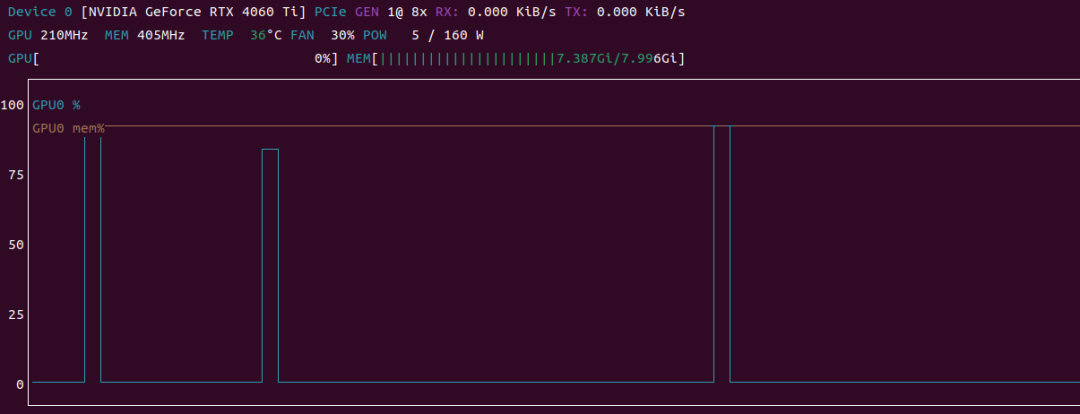
通过运行代码,并使用 nvtop 观察 GPU 时序图,发现不管写不写 resp.close() 效果基本是一样的,如图中的两个阶跃波形是发生请求的时刻,时长基本相等
在这里插入图片描述
在这里插入图片描述
2. http请求异步
用 httpx.AsyncClient 改造成异步版本,逻辑与同步几乎一致。
import asyncio
import httpx
import json

def user_clicked_stop(idx):
    return idx > 200

async def main():
    url = "http://localhost:8009/v1/chat/completions"
    headers = {
        "Content-Type": "application/json",
        "Authorization": "Bearer YOUR_API_KEY"
    }
    payload = {
        "model": "llm",  # 替换成你实际使用的模型
        "messages": [{"role": "user", "content": "你好,帮我证明贝叶斯定理,给出详细的推导过程,及其应用领域的案例"}],
        "stream": True,
        "max_tokens": 2048,
        "temperature": 0,
    }

    idx = 0
    async with httpx.AsyncClient(timeout=None) as client:  # 使用异步上下文管理器
        resp_cm = client.stream("POST", url, headers=headers, json=payload)
        async with resp_cm as resp:
            async for line in resp.aiter_lines():
                if not line or not line.startswith("data: "):
                    continue
                chunk = json.loads(line[len("data: "):])
                if chunk.get("choices"):
                    content = chunk["choices"][0]["delta"].get("content", "")
                    print(content, end="", flush=True)
                    idx += 1
                if user_clicked_stop(idx):
                    print("\n🔴 停止生成")
                    break
            # await resp.aclose()
            while 1:
                print("wait michael to stop program")
                await asyncio.sleep(0.2)

if __name__ == "__main__":
    asyncio.run(main())
结果跟上面 http同步请求一样,写不写 await resp.aclose() 没有影响
3. openai client
- 同步
from openai import OpenAI
import time

def user_clicked_stop(idx):
    return idx > 200

# 创建 OpenAI 客户端对象
client = OpenAI(
    base_url="http://127.0.0.1:8009/v1",  # 注意:使用 127.0.0.1 而不是 0.0.0.0
    api_key="YOUR_API_KEY"
)

try:
    response = client.chat.completions.create(
        model="llm",
        messages=[{"role": "user", "content": "你好,帮我证明贝叶斯定理,给出详细的推导过程,及其应用领域的案例"}],
        stream=True,
        temperature=0
    )

    idx = 0
    for chunk in response:
        content = chunk.choices[0].delta.content or ""
        print(content, end="", flush=True)
        idx += 1
        if user_clicked_stop(idx):
            print("\n🔴 停止生成")
            break
except Exception as e:
    print(f"发生错误: {e}")
finally:
    # response.close()
    while 1:
        print('sleep')
        time.sleep(0.2)
    print("程序结束")
- 异步
import asyncio
import openai
import time

def user_clicked_stop(idx):
    return idx > 200

openai.api_base = "http://localhost:8009/v1"
openai.api_key = "YOUR_API_KEY"

async def main():
    client = openai.AsyncOpenAI(base_url="http://127.0.0.1:8009/v1", api_key=openai.api_key)
    response = await client.chat.completions.create(
        model="llm",
        messages=[{"role": "user", "content": "你好,帮我证明贝叶斯定理,给出详细的推导过程,及其应用领域的案例"}],
        stream=True,
        temperature=0,
    )

    idx = 0
    try:
        async for chunk in response:
            content = chunk.choices[0].delta.content or ""
            print(content, end="", flush=True)
            idx += len(content)
            if user_clicked_stop(idx):
                # await response.close()
                print("\n🔴 停止生成")
                break
    finally:
        # await response.close()
        while 1:
            print('sleep')
            time.sleep(0.2)
    print("程序结束")

if __name__ == "__main__":
    asyncio.run(main())
在这里插入图片描述
在这里插入图片描述
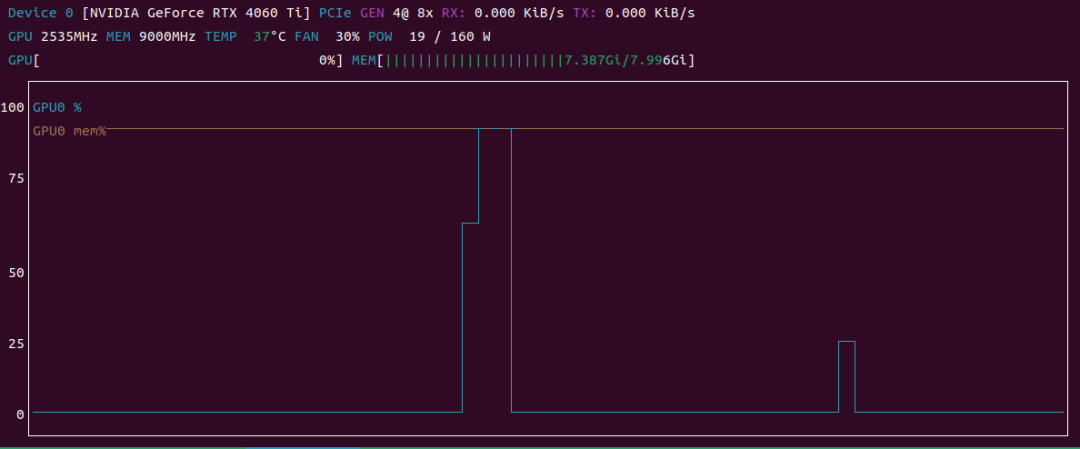
如上图所示,第一个波形 没有resp.close() ,后者 有
可以看到:
- 未调用 close():打印 sleep 后 GPU 仍有短暂尾巴(即使break了,LLM推理还在后台继续)、看 vllm日志也 没有
Aborted request - 调用 close():连接立即释放,显卡占用瞬间掉到 0, vllm日志 有
Aborted request
4. 总结
最佳实践:
- 随手 close() —— 无论同步 / 异步,手动关闭永远没错
- 采用 openai client 时,终止对话 必须写 close,否则会造成 GPU 资源浪费
- 用
nvtop观测 —— 不要凭感觉判断,显卡曲线是最直观的真相 - 前端按钮必须“真停” —— 点停了却还在算,就是纯浪费
通过以上实测,我们验证了:
vLLM 会在 HTTP 连接关闭时主动 Abort Request,从而释放 GPU 计算资源。
显式调用 close() 可以让资源回收更快、更可控。
本文参与 腾讯云自媒体同步曝光计划,分享自微信公众号。
原始发表:2025-07-11,如有侵权请联系 cloudcommunity@tencent.com 删除
评论
登录后参与评论
推荐阅读
目录
腾讯云开发者

Copyright © 2013 - 2026 Tencent Cloud. All Rights Reserved. 腾讯云 版权所有
深圳市腾讯计算机系统有限公司 ICP备案/许可证号:粤B2-20090059  粤公网安备44030502008569号
腾讯云计算(北京)有限责任公司 京ICP证150476号 | 京ICP备11018762号