DBA排坑实录:网络正常&防火墙关闭,SSH却连不上


作为DBA或运维同学,远程服务器是日常操作的刚需。但总有一些报错,能让你在排查许久后发现元凶竟是一个不起眼的配置文件。
最近我就遇到了一个经典案例:远程连接服务器时,终端抛出
kex_exchange_identification: read: Connection reset by peer今天就结合这次完整的排查过程,给大家拆解这个极易被忽略的SSH报错问题,全程干货,看完就能避坑!
一、报错现场
先还原一下报错场景,相信很多人都有共鸣:
[root@vbox ~]# ssh root@192.168.56.102
kex_exchange_identification: read: Connection reset by peer
第一反应是防火墙没关,但执行ping 192.168.56.102发现丢包率 0%,再探测端口也正常,防火墙也已经关闭,为什么SSH还是被重置?

先给大家划重点:kex_exchange_identification: read: Connection reset by peer的核心不是网络不通,而是服务器在SSH协议的密钥交换阶段,主动拒绝了你的连接请求。
二、排查实录
为了让大家少走弯路,我把这次的排查逻辑按从易到难的顺序进行排查,每一步都是日常排查的常规操作,大家遇到也可以直接对照参考。
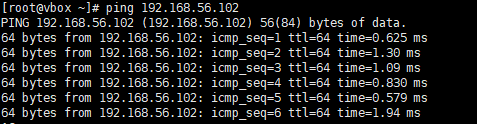
1. 网络连通性
[root@vbox ~]# ping 192.168.56.102
PING 192.168.56.102 (192.168.56.102) 56(84) bytes of data.
64 bytes from 192.168.56.102: icmp_seq=1 ttl=64 time=0.625 ms
64 bytes from 192.168.56.102: icmp_seq=2 ttl=64 time=1.30 ms
64 bytes from 192.168.56.102: icmp_seq=3 ttl=64 time=1.09 ms
64 bytes from 192.168.56.102: icmp_seq=4 ttl=64 time=0.830 ms
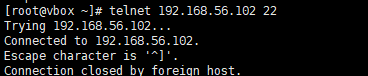
2. 目标端口验证
[root@vbox ~]# telnet 192.168.56.102 22
Trying 192.168.56.102...
Connected to 192.168.56.102.
Escape character is '^]'.
Connection closed by foreign host.
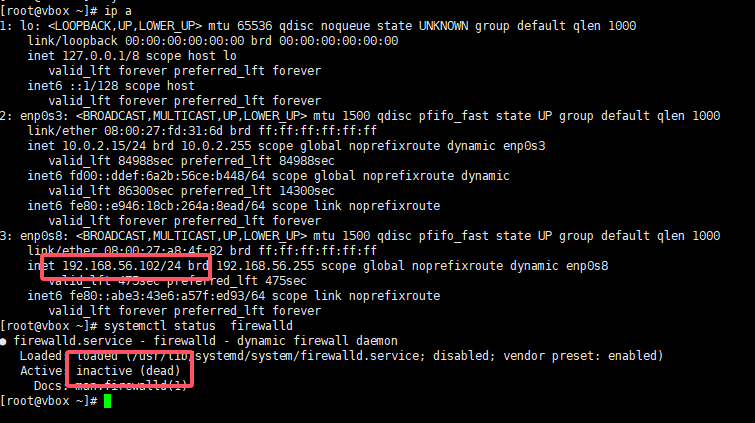
3. 防火墙状态检查
查看目标服务器防火墙状态
[root@vbox ~]# systemctl status  firewalld
● firewalld.service - firewalld - dynamic firewall daemon
   Loaded: loaded (/usr/lib/systemd/system/firewalld.service; disabled; vendor preset: enabled)
   Active: inactive (dead)
     Docs: man:firewalld(1)
4. SSH 服务状态
查看目标服务器sshd状态
[root@vbox ~]# systemctl status  sshd
● sshd.service - OpenSSH server daemon
   Loaded: loaded (/usr/lib/systemd/system/sshd.service; enabled; vendor preset: enabled)
   Active: active (running) since Wed 2026-03-11 16:32:21 CST; 25min ago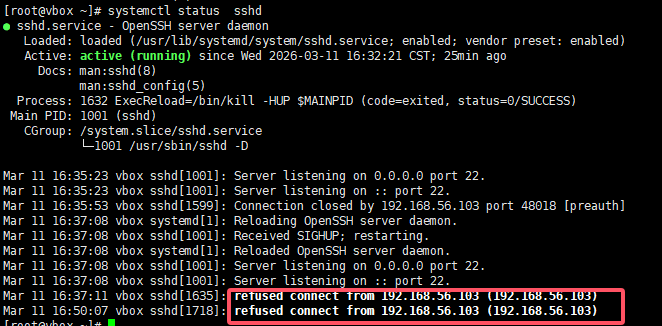
可见,服务运行中;里面也显示了拒绝192.168.56.103的请求。
5. SSH配置语法检查
检查目标端ssh的配置是否有异常
[root@vbox ~]# sshd -t
6. 客户端日志调试
在192.168.56.103上进行日志调试
[root@vbox ~]# ssh -vv root@192.168.56.102
OpenSSH_7.4p1, OpenSSL 1.0.2k-fips  26 Jan 2017
debug1: Reading configuration data /etc/ssh/ssh_config
debug1: /etc/ssh/ssh_config line 58: Applying options for *
debug2: resolving "192.168.56.102" port 22
debug2: ssh_connect_direct: needpriv 0
debug1: Connecting to 192.168.56.102 [192.168.56.102] port 22.
debug1: Connection established.
debug1: permanently_set_uid: 0/0
debug1: key_load_public: No such file or directory
debug1: identity file /root/.ssh/id_rsa type -1
debug1: key_load_public: No such file or directory
debug1: identity file /root/.ssh/id_rsa-cert type -1
debug1: key_load_public: No such file or directory
debug1: identity file /root/.ssh/id_dsa type -1
debug1: key_load_public: No such file or directory
debug1: identity file /root/.ssh/id_dsa-cert type -1
debug1: key_load_public: No such file or directory
debug1: identity file /root/.ssh/id_ecdsa type -1
debug1: key_load_public: No such file or directory
debug1: identity file /root/.ssh/id_ecdsa-cert type -1
debug1: key_load_public: No such file or directory
debug1: identity file /root/.ssh/id_ed25519 type -1
debug1: key_load_public: No such file or directory
debug1: identity file /root/.ssh/id_ed25519-cert type -1
debug1: Enabling compatibility mode for protocol 2.0
debug1: Local version string SSH-2.0-OpenSSH_7.4
ssh_exchange_identification: read: Connection reset by peer
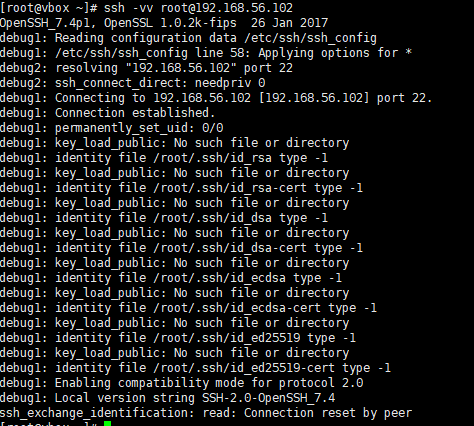
客户端已经准备好和服务器交换SSH协议版本信息(进入密钥交换阶段),但服务器端直接发送了TCP RST包,强制重置了连接。
7. 核心配置排查
查看目标服务器/etc/hosts.allow及/etc/hosts.deny文件
[root@vbox ~]# cat /etc/hosts.allow
#
# hosts.allow	This file contains access rules which are used to
#		allow or deny connections to network services that
#		either use the tcp_wrappers library or that have been
#		started through a tcp_wrappers-enabled xinetd.
#
#		See 'man 5 hosts_options' and 'man 5 hosts_access'
#		for information on rule syntax.
#		See 'man tcpd' for information on tcp_wrappers

sshd:192.168.56.1:allow
[root@vbox ~]# cat /etc/hosts.deny
#
# hosts.deny	This file contains access rules which are used to
#		deny connections to network services that either use
#		the tcp_wrappers library or that have been
#		started through a tcp_wrappers-enabled xinetd.
#
#		The rules in this file can also be set up in
#		/etc/hosts.allow with a 'deny' option instead.
#
#		See 'man 5 hosts_options' and 'man 5 hosts_access'
#		for information on rule syntax.
#		See 'man tcpd' for information on tcp_wrappers
sshd:all:deny
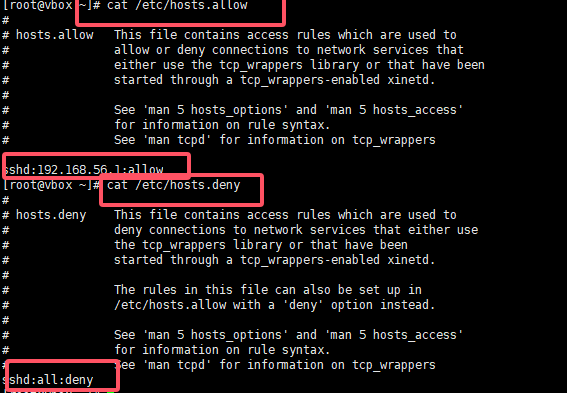
至此发现了原因,目标端仅允许192.168.56.1连接,其他的来源均被拒绝,至此找到了元凶。这两个文件的核心规则是:
- /etc/hosts.allow:允许列表,定义允许访问的IP/主机/服务
- /etc/hosts.deny:拒绝列表,定义禁止访问的IP/主机/服务
这么配置是为了安全考虑,例如,我们的生产环境仅允许堡垒机及集群内的节点ssh方式登录,其他节点不允许登录。
8. 添加配置测试
添加上当前客户端机器的IP,在进行测试
[root@vbox ~]# vim  /etc/hosts.allow
[root@vbox ~]# systemctl reload   sshd
[root@vbox ~]# cat /etc/hosts.allow
#
# hosts.allow	This file contains access rules which are used to
#		allow or deny connections to network services that
#		either use the tcp_wrappers library or that have been
#		started through a tcp_wrappers-enabled xinetd.
#
#		See 'man 5 hosts_options' and 'man 5 hosts_access'
#		for information on rule syntax.
#		See 'man tcpd' for information on tcp_wrappers

sshd:192.168.56.1:allow
sshd:192.168.56.103:allow
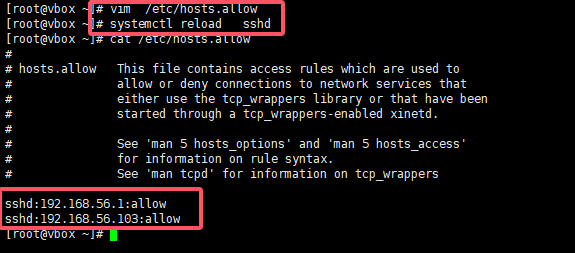
配置完毕后,终于可以连接成功了。

三、 总结
这次的SSH报错排查,看似复杂,实则遵循了网络层→端口层→服务层→配置层的排查逻辑。很多时候,我们容易被"Connection reset by peer"的字面意思误导,以为是网络问题,却忽略了系统层面的访问控制配置。
对于DBA和运维同学来说,这类“小配置、大影响”的坑还有很多,而解决问题的关键,就是养成 “按步骤排查、抓核心逻辑” 的习惯,同时重视配置文件的备份与验证。
本文参与 腾讯云自媒体同步曝光计划,分享自微信公众号。
原始发表:2026-03-11,如有侵权请联系 cloudcommunity@tencent.com 删除
评论
登录后参与评论
推荐阅读
腾讯云开发者

Copyright © 2013 - 2026 Tencent Cloud. All Rights Reserved. 腾讯云 版权所有
深圳市腾讯计算机系统有限公司 ICP备案/许可证号:粤B2-20090059  粤公网安备44030502008569号
腾讯云计算(北京)有限责任公司 京ICP证150476号 | 京ICP备11018762号