个人可视化知识图谱构建器和案例展示

个人可视化知识图谱构建器和案例展示

人月聊IT
发布于 2026-04-13 12:54:33
发布于 2026-04-13 12:54:33
大家好,我是人月聊IT。
今天继续分析对我个人历史文章进行知识图谱整理。并通过AI编程构建一个可视化的知识图谱应用。在文章最后有详细的参考提示词分享,大家可以针对自己的历史文章做相应的AI编程来实现这个可视化的知识图谱。
在进行AI编程前,实际我们还是做如下工作。
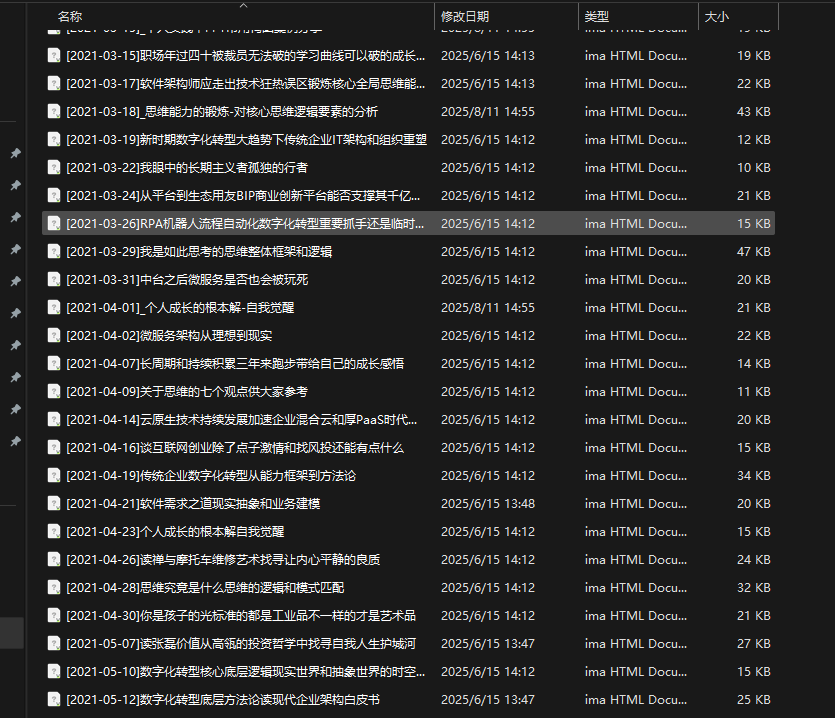
首先还是要有完整的个人历史文章Markdown格式文件导出。比如我将个人公众号历史文章全部导出为一个个的独立的Markdown格式文件。
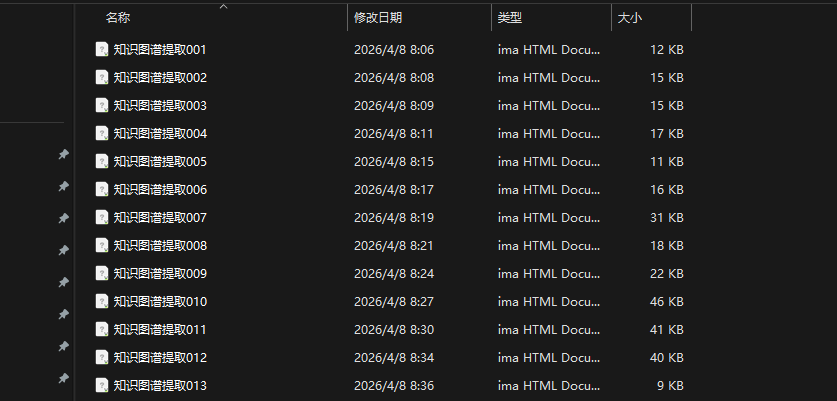
其次第二个关键步骤,首先让AI做一遍历史文章处理,即针对每一篇文章都提取核心的知识点,知识概要,知识点的关系梳理。也可以简单理解为对历史长文章进行知识蒸馏,输出一个个独立的蒸馏后的知识图谱文件。
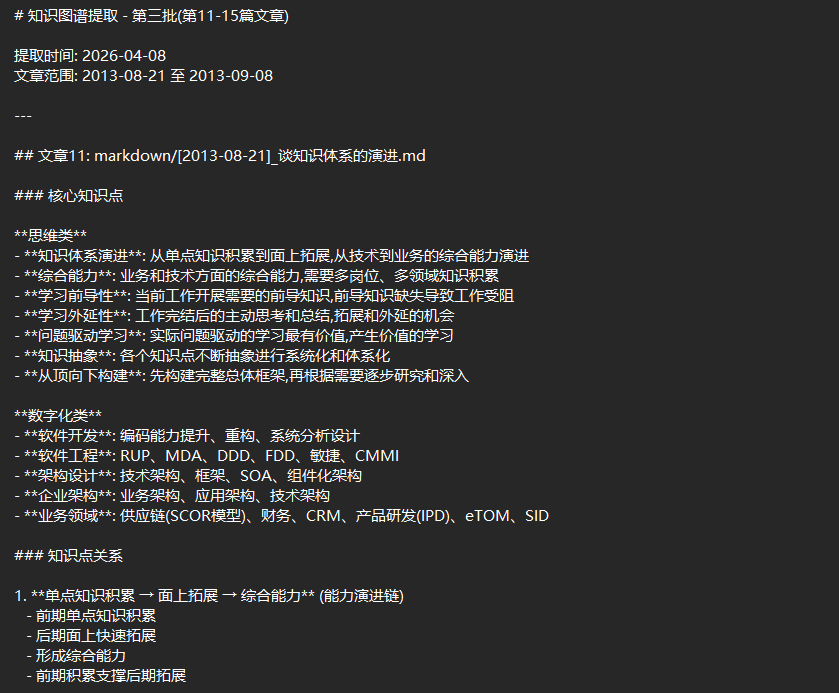
在逐步好了知识图谱文件后,我们即可以开始AI编程,输出完整的应用程序。
这样我说下我的需求。我当前已经按时间顺序提取了我个人历史文章的知识元模型。类似我附加的文件格式实例,实际有100个左右的文件。我希望是让AI帮我按顺序阅读这些文件帮我来构建动态的知识图谱,每阅读一个文件,可视化的知识图谱展示就刷新一下,后续阅读的内容如果有重复就不要去重复新增。在阅读完成所有内容后形成一个完整的知识图谱。我最初思路是自己编程程序,让AI大模型来阅读,然后前端通过AI编程实现,通过引入类似echart里面的力导向图来展示。那么我问题是这种场景,我是否引入时序知识图谱来实现效果更好?
我整个程序是在本地,注意程序是按顺序读取本体目录下的文件进行可视化图谱构建。我准备是前端采用react+typescript来实现。对于AI大模型阅读我文件内容我采用deepseek,你可以通过配置文件预留 apikey填写地址。附件是一个我画的原型草图。我点击读取的时候,程序自动读取我指定目录下的所有知识图谱摘要文件(在这里点击按钮后出现一个目录选择框进行目录选取),注意按顺序读取,每读取一个刷新一次知识图谱显示。点击知识图谱某个节点的时候,右上方显示对应文章信息和摘要信息。右下方显示相关关联和依赖文章列表信息。先不要具体区实现,你是否能够很好理解我的需求。
基于以上提示词,让Claude输出完整系统构建提示词。AI编程完成后允许构建按钮输出整个知识图谱。
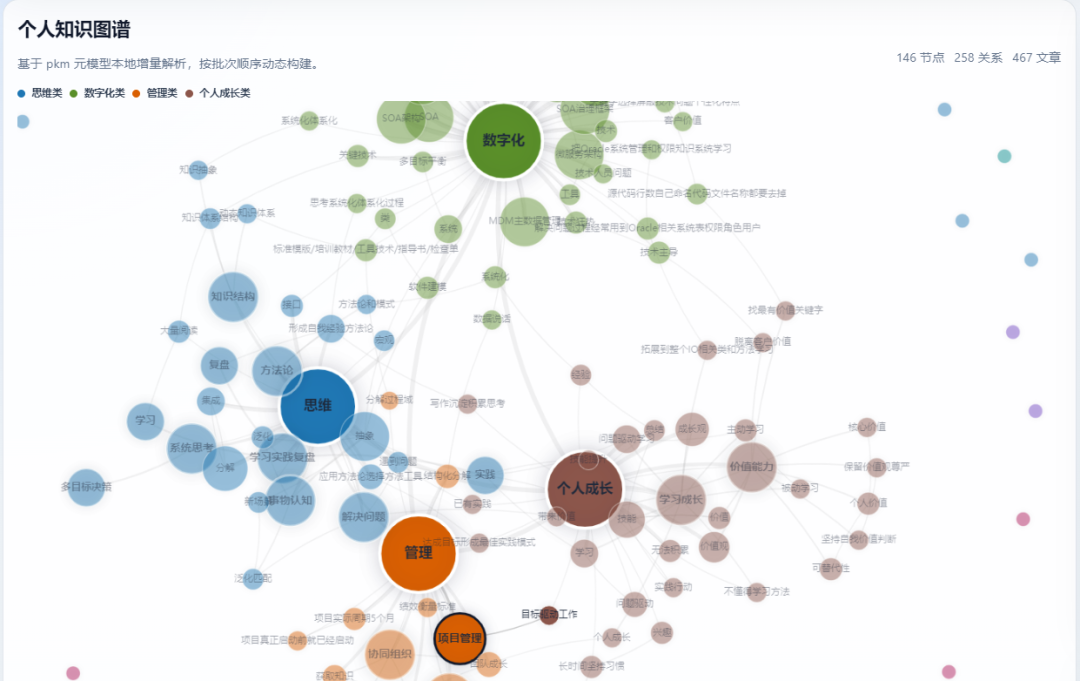
从上面的图也可以清楚的看到,我个人的知识体系围绕思维,管理,数字化,个人成长四个方面展开,形成一个完整的知识网络。
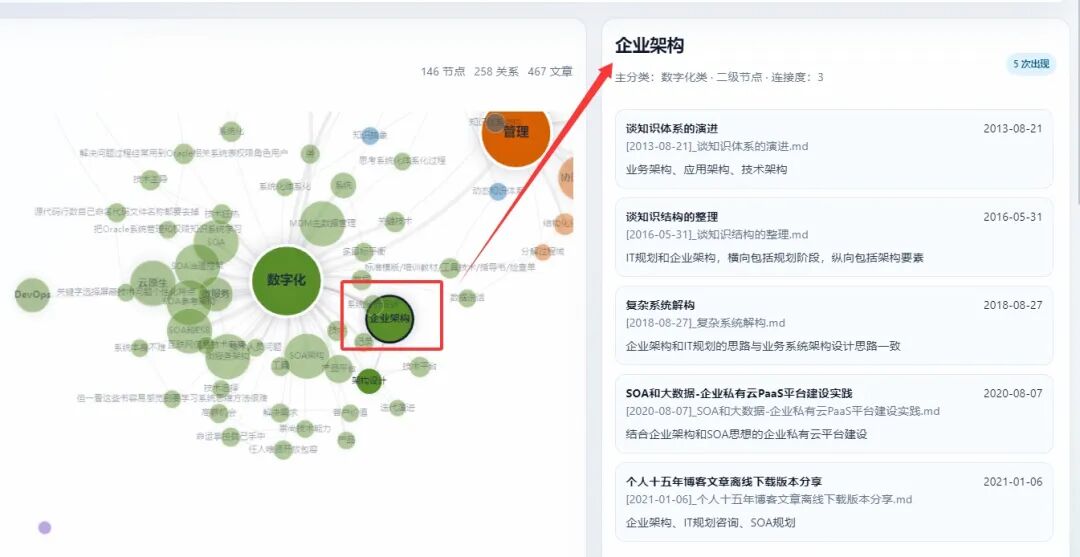
同时点击某一个知识节点的时候,比如点击企业架构,那么企业架构相关的文章又会在右边侧边栏展示方便浏览。
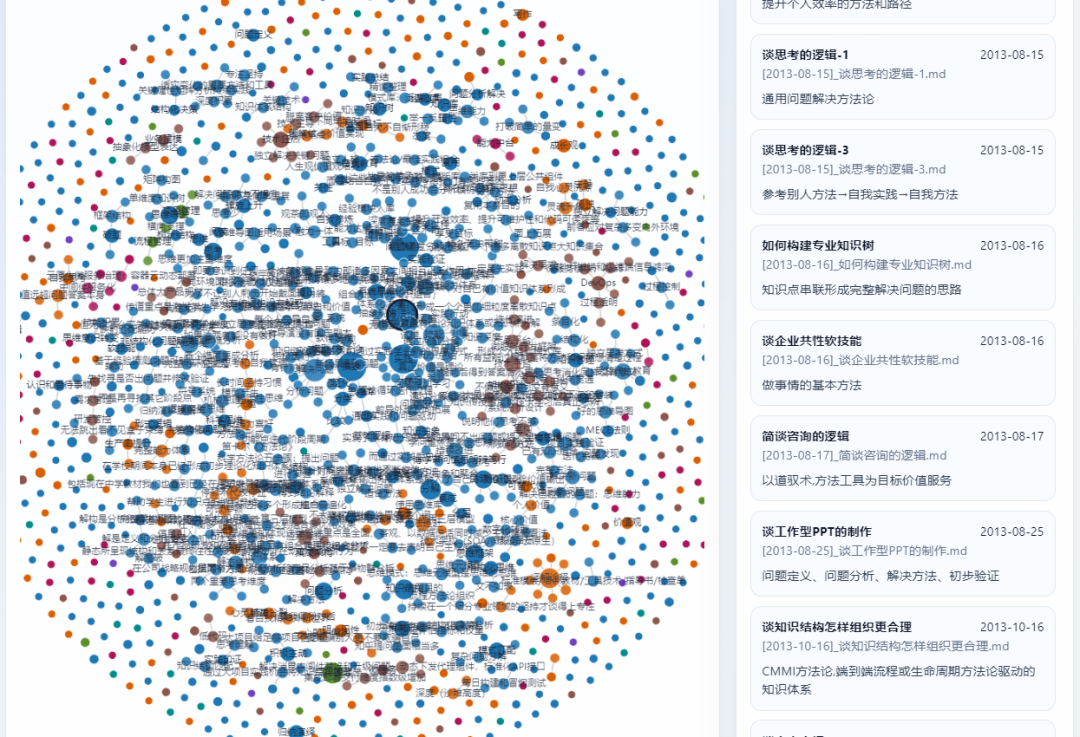
进一步展开细化:
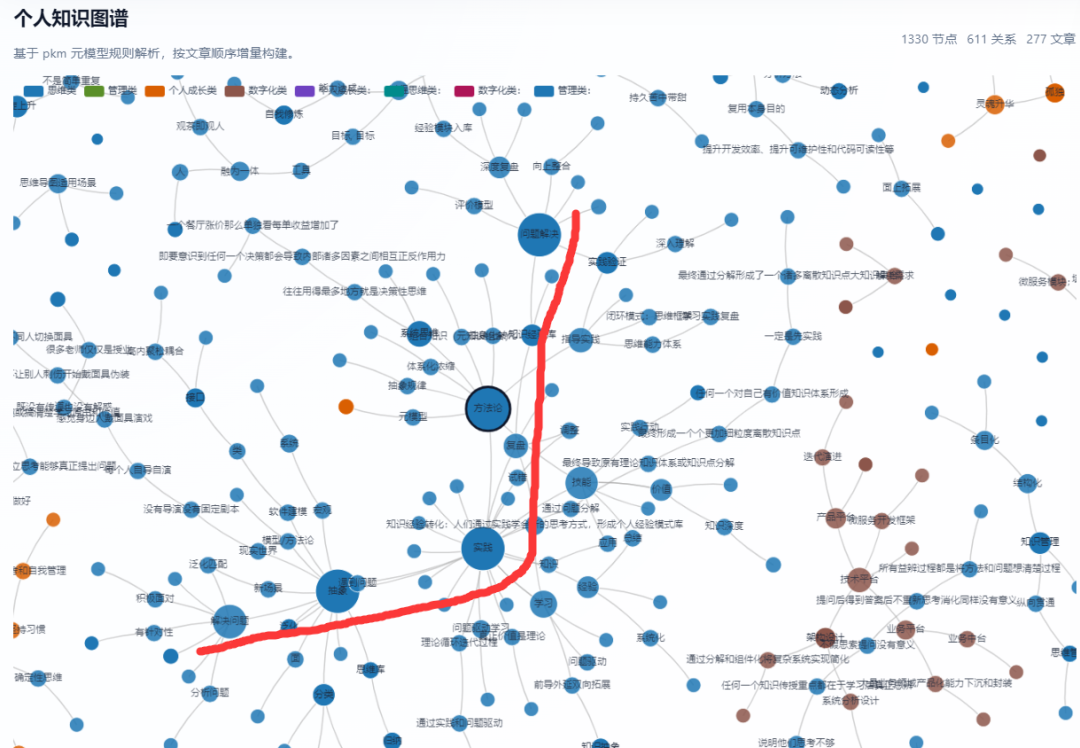
当然在第一个版本由于赚取到最细的子节点上面,导致整个知识图谱异常复杂,后续又进行了优化和调整,对应底层节点先收缩不展示,点击后再展开。
通过上面这种方式可以更好的看到个人知识图谱和能力知识的全景图,感兴趣的可以参考我这个方法构建自己的知识图谱。
具体的完整AI编程提示词参考如下:
本提示词用于指导 AI 编程助手(如 Codex,Cursor、Claude Code 等)从零构建本地知识图谱可视化应用。
一、项目概述
构建一个本地运行的知识图谱可视化 Web 应用。该应用按时间顺序读取pkm目录下的文件,这个文件里面已经是我提取后的知识图谱三元组信息清单。在提取了这些信息后构建可视化知识图谱,提取节点和关系。并实时渲染为可交互的力导向图。注意暂时不需要接打模型AI。所有我后续提示词里面涉及到deepseek打模型对接的仅仅作为能力预留。当前迭代不用实现。
技术栈
- 前端框架:React 18 + TypeScript
- 构建工具:Vite
- 图表库:ECharts 5(力导向图)
- 样式方案:Tailwind CSS
- 文件读取:浏览器 File System Access API
- AI 接口:暂时不需要接打模型AI
- 配置管理:本地
config.json
二、项目结构
knowledge-graph/
├── public/
│   └── config.json          # 用户配置文件(API Key 等)
├── src/
│   ├── types/
│   │   └── index.ts         # 全局类型定义
│   ├── services/
│   │   ├── fileService.ts   # 文件系统读取服务
│   │   └── deepseekService.ts  # DeepSeek API 调用服务
│   ├── utils/
│   │   └── graphUtils.ts    # 图谱数据合并去重工具
│   ├── components/
│   │   ├── Toolbar.tsx      # 顶部工具栏
│   │   ├── GraphViewer.tsx  # ECharts 力导向图
│   │   ├── NodeDetail.tsx   # 右上节点详情面板
│   │   └── RelatedArticles.tsx  # 右下相关文章面板
│   ├── App.tsx
│   ├── main.tsx
│   └── index.css
├── config.json              # 根目录配置文件(备用)
├── package.json
├── tsconfig.json
├── vite.config.ts
└── tailwind.config.js
三、配置文件
public/config.json — 此文件不打包进代码,用户自行填写:
{
  "deepseek": {
    "apiKey": "YOUR_DEEPSEEK_API_KEY_HERE",
    "baseUrl": "https://api.deepseek.com/v1",
    "model": "deepseek-chat",
    "maxTokens": 2000
  },
"graph": {
    "categories": ["思维类", "个人成长类", "管理类", "数字化类"],
    "categoryColors": {
      "思维类": "#5B8FF9",
      "个人成长类": "#5AD8A6",
      "管理类": "#F6BD16",
      "数字化类": "#E8684A"
    }
  }
}
**Vite 配置 vite.config.ts**:
import { defineConfig } from 'vite'
import react from '@vitejs/plugin-react'

export default defineConfig({
  plugins: [react()],
  server: {
    port: 5173,
    open: true
  }
})
四、类型定义
src/types/index.ts
// 知识图谱节点
exportinterface GraphNode {
  id: string                    // 概念名称,全局唯一(如"实践")
  label: string                 // 显示名称
  category: string              // 分类:思维类/个人成长类/管理类/数字化类
  weight: number                // 出现权重(出现次数,影响节点大小)
  sources: ArticleSource[]      // 来源文章列表
}

// 知识图谱边(关系)
exportinterface GraphEdge {
  source: string                // 源节点 id
  target: string                // 目标节点 id
  relation: string              // 关系描述(如"转化为"、"支撑")
  weight: number                // 关系权重
  articleIds: string[]          // 此关系来源文章 id 列表
}

// 文章来源信息
exportinterface ArticleSource {
  articleId: string             // 文章唯一 id(文件名)
  articleTitle: string          // 文章标题
  summary: string               // 该节点在此文章中的核心描述(1-2句)
}

// 文章元信息
exportinterface Article {
  id: string                    // 文件名(不含扩展名)
  title: string                 // 提取的文章标题
  date: string                  // 从文件名提取的日期(如"2013-08-14")
  filename: string              // 完整文件名
  content: string               // 文件原始内容
}

// DeepSeek 返回的增量数据结构
exportinterface IncrementalGraphData {
  newNodes: {
    id: string
    label: string
    category: string
    summary: string             // 该节点核心描述
  }[]
  newEdges: {
    source: string
    target: string
    relation: string
  }[]
  articleTitle: string          // 文章标题
}

// 应用全局状态
exportinterface AppState {
  status: 'idle' | 'running' | 'done' | 'error'
  nodes: GraphNode[]
  edges: GraphEdge[]
  articles: Article[]
  currentFileIndex: number
  totalFiles: number
  selectedNodeId: string | null
  errorMessage: string | null
}
五、文件服务
src/services/fileService.ts
实现以下功能:
- **
selectDirectory()**:调用window.showDirectoryPicker(),返回目录句柄 - **
readMarkdownFiles(dirHandle: FileSystemDirectoryHandle)**:- 遍历目录下所有
.md文件 - 按文件名升序排列(文件名含日期,天然排序)
- 返回
Article[]数组,每项包含文件名、内容、从文件名解析的日期
- 遍历目录下所有
- **
parseArticleDate(filename: string)**:- 从文件名如
[2013-08-14]_谈个人技能.md提取日期字符串
- 从文件名如
- **
parseArticleTitle(filename: string)**:- 从文件名提取中文标题部分
// 核心实现要点
exportasyncfunction selectDirectory(): Promise<FileSystemDirectoryHandle> {
returnawaitwindow.showDirectoryPicker({ mode: 'read' })
}

exportasyncfunction readMarkdownFiles(
  dirHandle: FileSystemDirectoryHandle
): Promise<Article[]> {
const articles: Article[] = []

forawait (const [name, handle] of dirHandle.entries()) {
    if (handle.kind === 'file' && name.endsWith('.md')) {
      const file = await handle.getFile()
      const content = await file.text()
      articles.push({
        id: name.replace('.md', ''),
        filename: name,
        title: parseArticleTitle(name),
        date: parseArticleDate(name),
        content
      })
    }
  }

// 按文件名升序排序(日期在文件名前缀)
return articles.sort((a, b) => a.filename.localeCompare(b.filename))
}
六、DeepSeek API 服务
src/services/deepseekService.ts
核心功能:给定当前已有节点列表和新文章内容,返回增量的节点和关系。
System Prompt(固定不变):
你是一个专业的知识图谱构建助手。你的任务是从给定的知识摘要文章中提取知识节点和关系,并以严格的 JSON 格式返回。

规则:
1. 只返回纯 JSON,不要有任何其他文字、解释或 markdown 代码块标记
2. 只返回【新增】的节点和关系,已存在的节点(通过 existing_nodes 列表判断)不要重复返回
3. 节点 id 必须是简洁的中文概念词(如"实践"、"归纳"),不要带标点
4. 节点 category 必须是以下四类之一:思维类、个人成长类、管理类、数字化类
5. 关系的 source 和 target 必须是已存在或本次新增的节点 id
6. summary 是该节点在本文中最核心的 1-2 句描述
7. 每篇文章最多提取 15 个新节点、20 条新关系

返回 JSON 格式:
{
"articleTitle": "文章标题",
"newNodes": [
    { "id": "节点id", "label": "节点名称", "category": "思维类", "summary": "核心描述" }
  ],
"newEdges": [
    { "source": "源节点id", "target": "目标节点id", "relation": "关系描述" }
  ]
}
User Prompt 模板(每次调用动态生成):
已存在节点列表(这些节点不要再新增):
{{existing_node_ids}}

当前文章内容:
{{article_content}}

请从上面的文章中提取新的知识节点和关系。
实现要点:
export asyncfunction extractGraphData(
  articleContent: string,
  existingNodeIds: string[],
  config: Config
): Promise<IncrementalGraphData> {
const response = await fetch(`${config.deepseek.baseUrl}/chat/completions`, {
    method: 'POST',
    headers: {
      'Content-Type': 'application/json',
      'Authorization': `Bearer ${config.deepseek.apiKey}`
    },
    body: JSON.stringify({
      model: config.deepseek.model,
      max_tokens: config.deepseek.maxTokens,
      temperature: 0.3,           // 低温度确保输出稳定
      messages: [
        { role: 'system', content: SYSTEM_PROMPT },
        { role: 'user', content: buildUserPrompt(articleContent, existingNodeIds) }
      ]
    })
  })

const data = await response.json()
const text = data.choices[0].message.content
returnJSON.parse(text) as IncrementalGraphData
}
七、图谱数据合并工具
src/utils/graphUtils.ts
// 将增量数据合并到现有图谱,处理去重和权重累加
exportfunction mergeGraphData(
  current: { nodes: GraphNode[], edges: GraphEdge[], articles: Article[] },
  increment: IncrementalGraphData,
  article: Article
): { nodes: GraphNode[], edges: GraphEdge[] } {
const nodes = [...current.nodes]
const edges = [...current.edges]

// 合并节点(去重 + 权重累加)
for (const newNode of increment.newNodes) {
    const existing = nodes.find(n => n.id === newNode.id)
    if (existing) {
      // 已存在:权重 +1,追加来源
      existing.weight += 1
      existing.sources.push({
        articleId: article.id,
        articleTitle: increment.articleTitle,
        summary: newNode.summary
      })
    } else {
      // 新增节点
      nodes.push({
        id: newNode.id,
        label: newNode.label,
        category: newNode.category,
        weight: 1,
        sources: [{
          articleId: article.id,
          articleTitle: increment.articleTitle,
          summary: newNode.summary
        }]
      })
    }
  }

// 合并边(去重:source+target+relation 三元组唯一)
for (const newEdge of increment.newEdges) {
    const edgeKey = `${newEdge.source}->${newEdge.target}::${newEdge.relation}`
    const existing = edges.find(
      e =>`${e.source}->${e.target}::${e.relation}` === edgeKey
    )
    if (existing) {
      existing.weight += 1
      if (!existing.articleIds.includes(article.id)) {
        existing.articleIds.push(article.id)
      }
    } else {
      edges.push({
        source: newEdge.source,
        target: newEdge.target,
        relation: newEdge.relation,
        weight: 1,
        articleIds: [article.id]
      })
    }
  }

return { nodes, edges }
}
八、组件实现
8.1 App.tsx — 主状态管理
App 组件负责:
- 持有全局
AppState - 协调文件读取 → API 调用 → 数据合并 → 图谱刷新的完整流程
- 在启动时
fetch('/config.json')加载配置
主流程(handleStart):
async function handleStart() {
// 1. 打开目录选择
const dirHandle = await selectDirectory()

// 2. 读取所有 md 文件并排序
const articles = await readMarkdownFiles(dirHandle)
  setState(s => ({ ...s, status: 'running', totalFiles: articles.length, articles }))

// 3. 逐个处理
for (let i = 0; i < articles.length; i++) {
    setState(s => ({ ...s, currentFileIndex: i }))

    const existingNodeIds = currentNodes.map(n => n.id)

    // 4. 调用 DeepSeek
    const increment = await extractGraphData(articles[i].content, existingNodeIds, config)

    // 5. 合并数据
    const { nodes, edges } = mergeGraphData({ nodes: currentNodes, edges: currentEdges, articles }, increment, articles[i])

    // 6. 刷新状态(触发图谱重渲染)
    setState(s => ({ ...s, nodes, edges }))

    // 7. 适当延迟,避免 API 限流
    await sleep(500)
  }

  setState(s => ({ ...s, status: 'done' }))
}
8.2 Toolbar.tsx — 顶部工具栏
布局:水平排列,左侧进度区域,右侧操作按钮。
┌─────────────────────────────────────────────────────────────────┐
│  [进度条████████░░░░] 正在处理: 谈个人技能.md (3/10)  [读取] [重置] │
└─────────────────────────────────────────────────────────────────┘
- 进度条:
<progress>元素,显示currentFileIndex / totalFiles - 状态文字:当前文件名和进度数字
- 「读取」按钮:idle/done 状态可点击,running 状态禁用并显示 loading spinner
- 「重置」按钮:清空所有状态回到 idle
8.3 GraphViewer.tsx — ECharts 力导向图
使用 ECharts graph 类型(力引导布局)渲染知识图谱。
ECharts 配置要点:
const option = {
  backgroundColor: 'transparent',
  tooltip: {
    formatter: (params) => {
      if (params.dataType === 'node') return`${params.name}<br/>分类:${params.data.category}<br/>关联度:${params.data.weight}`
      return`${params.data.source} → ${params.data.target}<br/>${params.data.relation}`
    }
  },
  legend: [{
    data: categories.map(c => c.name)
  }],
  series: [{
    type: 'graph',
    layout: 'force',
    roam: true,                  // 支持拖拽和缩放
    draggable: true,             // 节点可拖动
    force: {
      repulsion: 150,
      gravity: 0.1,
      edgeLength: [80, 200],
      layoutAnimation: true
    },
    categories: categories,      // 按 category 着色
    data: nodes.map(n => ({
      id: n.id,
      name: n.label,
      category: categoryIndex(n.category),
      symbolSize: Math.min(10 + n.weight * 5, 50),  // 权重决定大小
      label: { show: n.weight >= 2 },               // 高权重节点显示标签
      ...n
    })),
    links: edges.map(e => ({
      source: e.source,
      target: e.target,
      lineStyle: { width: Math.min(e.weight * 0.8, 4) },
      label: { show: false, formatter: e.relation }
    })),
    emphasis: {
      focus: 'adjacency',        // 点击高亮相邻节点
      lineStyle: { width: 4 }
    }
  }]
}
节点点击事件:
chart.on('click', 'series.graph', (params) => {
  if (params.dataType === 'node') {
    onNodeSelect(params.data.id)   // 通知父组件更新右侧面板
  }
})
图谱刷新策略:每次 nodes/edges 数据更新时,调用 chart.setOption(newOption, { notMerge: false }) 增量更新,保持力导向动画连续性。
8.4 NodeDetail.tsx — 右上节点详情面板
当 selectedNodeId 非空时展示:
┌─────────────────────────────────────┐
│ 💡 实践                    [思维类] │
│ ─────────────────────────────────── │
│ 出现于 8 篇文章                     │
│                                     │
│ 📄 谈个人技能 (2013-08-14)          │
│    知识通过实践转化为技能,实践是   │
│    知识转化的关键路径。             │
│                                     │
│ 📄 谈个人意识 (2013-08-14)          │
│    实践行动锻炼技能,思维意识决定   │
│    实践行动方向。                   │
└─────────────────────────────────────┘
数据来源:selectedNode.sources 数组。
8.5 RelatedArticles.tsx — 右下相关文章面板
展示与选中节点直接相连的其他节点所在的文章(去重合并):
┌─────────────────────────────────────┐
│ 🔗 相关文章                         │
│ ─────────────────────────────────── │
│ 通过「知识」→实践 关联               │
│  · 谈个人技能                        │
│  · 谈思考的逻辑-2                    │
│                                     │
│ 通过「技能」←实践 关联               │
│  · 谈个人技能                        │
│  · 谈个人意识                        │
└─────────────────────────────────────┘
数据计算逻辑:
- 找到所有与
selectedNodeId相连的边(source 或 target 为该节点) - 通过边的
articleIds找到对应文章 - 按相邻节点分组展示
九、页面整体布局
整体布局结构(响应式,最小宽度 1200px):
┌──────────────────────────────────────────────────────────────────┐
│ HEADER:应用标题 + 副标题                                         │
├──────────────────────────────────────────────────────────────────┤
│ TOOLBAR:进度条 ████████░░  正在处理(3/10)      [读取]  [重置]   │
├─────────────────────────────────────┬────────────────────────────┤
│                                     │                            │
│                                     │  NodeDetail                │
│     GraphViewer                     │  (节点详情)              │
│     (力导向图,可拖拽缩放)        │                            │
│                                     ├────────────────────────────┤
│                                     │                            │
│                                     │  RelatedArticles           │
│                                     │  (相关文章)              │
└─────────────────────────────────────┴────────────────────────────┘
CSS Grid 布局:
.app-container {
display: grid;
grid-template-rows: auto auto 1fr;
grid-template-columns: 1fr 320px;
height: 100vh;
gap: 0;
}

.header    { grid-column: 1 / -1; }
.toolbar   { grid-column: 1 / -1; }
.graph     { grid-column: 1; grid-row: 3; }
.sidebar   { grid-column: 2; grid-row: 3; display: grid; grid-template-rows: 1fr 1fr; }
设计规范:
- 背景色:
#F8F9FA(极浅灰,主流系统配色) - 卡片/面板:纯白
#FFFFFF,圆角8px,边框1px solid #E9ECEF - 主色调:
#4F6EF7(蓝紫色,用于按钮、进度条、高亮) - 文字主色:
#212529,次要色:#6C757D - 节点分类颜色:
- 思维类:
#4F6EF7(蓝) - 个人成长类:
#20C997(青绿) - 管理类:
#FCC419(琥珀) - 数字化类:
#F76707(橙)
- 思维类:
- 进度条:主色填充 + 灰色轨道
- 按钮:主色背景,悬停加深 10%,禁用状态 50% 透明
十、初始化和运行
安装依赖:
npm create vite@latest knowledge-graph -- --template react-ts
cd knowledge-graph
npm install echarts tailwindcss @tailwindcss/vite
npx tailwindcss init
package.json 关键依赖:
{
  "dependencies": {
    "react": "^18.3.0",
    "react-dom": "^18.3.0",
    "echarts": "^5.5.0"
  },
"devDependencies": {
    "@vitejs/plugin-react": "^4.3.0",
    "typescript": "^5.5.0",
    "vite": "^5.4.0",
    "tailwindcss": "^4.0.0",
    "@tailwindcss/vite": "^4.0.0"
  }
}
运行:
# 1. 填写 public/config.json 中的 API Key
# 2. 启动开发服务
npm run dev
# 3. 浏览器打开 http://localhost:5173
# 4. 点击「读取」选择包含 .md 文件的目录
十一、关键注意事项
错误处理
- DeepSeek API 调用失败:显示错误提示,提供「跳过当前文件」和「重试」选项,不中断整体流程
- JSON 解析失败:对 API 返回做 try/catch,失败时跳过该文件并记录到日志
- 目录读取失败:用户取消选择时静默处理
性能
- 每个文件处理后加
await sleep(500)防止 API 限流 - ECharts 使用
setOption({ notMerge: false })增量更新,避免全量重绘 - 节点数量超过 200 个时,隐藏低权重节点标签(
label.show = weight >= 3)
浏览器兼容性
- File System Access API 需要 Chrome 86+ 或 Edge 86+
- 建议在应用启动时检测 API 可用性,不支持时显示明确提示
DeepSeek API
- 使用 OpenAI 兼容格式(
/v1/chat/completions) temperature: 0.3确保输出稳定性- 若返回内容包含 markdown 代码块(
json...),需要在解析前去除
十二、扩展建议(可选实现)
- 导出功能:将完整图谱数据导出为 JSON 或图片
- 搜索功能:在图谱中高亮搜索节点
- 时间轴筛选:按日期范围过滤显示的节点
- 节点聚合:按分类折叠/展开节点组
- 本地缓存:将处理结果存储到
localStorage,下次打开可直接恢复
本文参与 腾讯云自媒体同步曝光计划,分享自微信公众号。
原始发表:2026-04-08,如有侵权请联系 cloudcommunity@tencent.com 删除
评论
登录后参与评论
推荐阅读
目录
腾讯云开发者

Copyright © 2013 - 2026 Tencent Cloud. All Rights Reserved. 腾讯云 版权所有
深圳市腾讯计算机系统有限公司 ICP备案/许可证号:粤B2-20090059  粤公网安备44030502008569号
腾讯云计算(北京)有限责任公司 京ICP证150476号 | 京ICP备11018762号