从 0 到 1 精通 Flowable:让你的业务流程自动化如丝般顺滑

从 0 到 1 精通 Flowable:让你的业务流程自动化如丝般顺滑

果酱带你啃java
发布于 2026-04-14 13:01:48
发布于 2026-04-14 13:01:48
引言:为什么 Flowable 是现代企业流程引擎的首选?
在数字化转型的浪潮中,企业业务流程的自动化与智能化已成为提升效率的关键。想象一下,当你需要处理请假审批、报销流程、客户工单时,一个高效的流程引擎能为企业节省多少时间和人力成本?Flowable 作为目前最流行的开源流程引擎之一,凭借其开源免费、功能强大、易于集成的特点,已成为众多企业的首选。
本文将带你从零基础到实战专家,全面掌握 Flowable 流程引擎的核心技术与最佳实践。无论你是需要为现有系统添加流程能力,还是从零构建一个完整的工作流平台,本指南都能为你提供清晰的路线图和可直接复用的代码实例。
一、Flowable 核心概念与架构解析
1.1 什么是 Flowable?
Flowable 是一个开源的业务流程引擎,它实现了 BPMN 2.0 规范,可以将业务流程用标准化的图形方式描述,并自动执行这些流程。简单来说,Flowable 就像是一个 "流程操作系统",负责管理流程的创建、执行、监控和优化。
1.2 Flowable 的核心组件
Flowable 由多个服务组件构成,每个组件负责不同的功能:

1.3 Flowable 的数据库设计
Flowable 需要一系列数据库表来存储流程定义、实例、任务等数据。这些表名均以 "ACT_" 开头,按功能分为几大类:
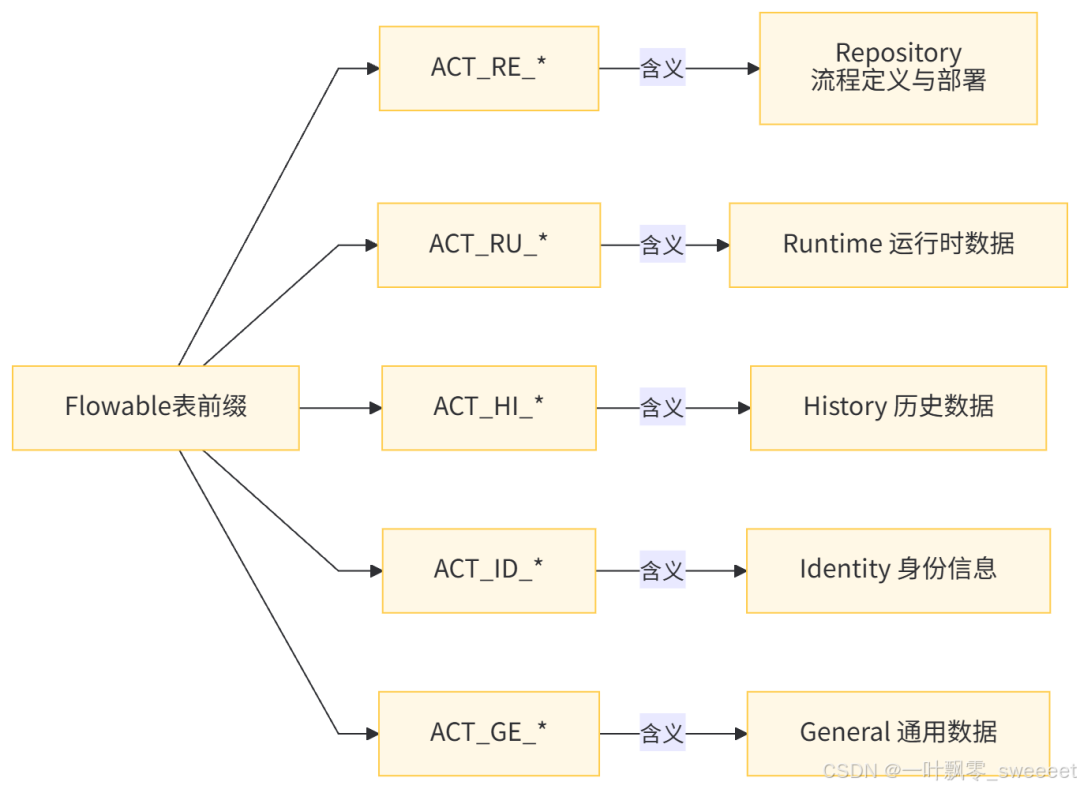
MySQL 数据库初始化脚本示例(关键表):
-- 流程定义表
CREATE TABLE ACT_RE_PROCDEF (
    ID_ VARCHAR(64) NOT NULL,
    REV_ INT NOT NULL,
    CATEGORY_ VARCHAR(255),
    NAME_ VARCHAR(255),
    KEY_ VARCHAR(255) NOT NULL,
    VERSION_ INT NOT NULL,
    DEPLOYMENT_ID_ VARCHAR(64),
    RESOURCE_NAME_ VARCHAR(4000),
    DGRM_RESOURCE_NAME_ VARCHAR(4000),
    DESCRIPTION_ VARCHAR(4000),
    HAS_START_FORM_KEY_ BOOLEAN,
    HAS_GRAPHICAL_NOTATION_ BOOLEAN,
    SUSPENSION_STATE_ INT,
    TENANT_ID_ VARCHAR(64) DEFAULT '',
    ENGINE_VERSION_ VARCHAR(255),
    PRIMARY KEY (ID_)
) ENGINE=InnoDB DEFAULT CHARSET=utf8mb4 COLLATE=utf8mb4_unicode_ci;

-- 流程实例表
CREATE TABLE ACT_RU_EXECUTION (
    ID_ VARCHAR(64) NOT NULL,
    REV_ INT NOT NULL,
    PROC_INST_ID_ VARCHAR(64),
    BUSINESS_KEY_ VARCHAR(255),
    PARENT_ID_ VARCHAR(64),
    PROC_DEF_ID_ VARCHAR(64),
    SUPER_EXEC_ VARCHAR(64),
    ACT_ID_ VARCHAR(255),
    IS_ACTIVE_ BOOLEAN,
    IS_CONCURRENT_ BOOLEAN,
    IS_SCOPE_ BOOLEAN,
    IS_EVENT_SCOPE_ BOOLEAN,
    SUSPENSION_STATE_ INT,
    CACHED_ENT_STATE_ INT,
    TENANT_ID_ VARCHAR(64) DEFAULT '',
    NAME_ VARCHAR(255),
    LOCK_TIME_ DATETIME(3),
    PRIMARY KEY (ID_)
) ENGINE=InnoDB DEFAULT CHARSET=utf8mb4 COLLATE=utf8mb4_unicode_ci;

-- 用户任务表
CREATE TABLE ACT_RU_TASK (
    ID_ VARCHAR(64) NOT NULL,
    REV_ INT NOT NULL,
    NAME_ VARCHAR(255) NOT NULL,
    PARENT_TASK_ID_ VARCHAR(64),
    DESCRIPTION_ VARCHAR(4000),
    PRIORITY_ INT,
    CREATE_TIME_ DATETIME(3) NOT NULL,
    OWNER_ VARCHAR(64),
    ASSIGNEE_ VARCHAR(64),
    DELEGATION_ VARCHAR(64),
    EXECUTION_ID_ VARCHAR(64),
    PROC_INST_ID_ VARCHAR(64),
    PROC_DEF_ID_ VARCHAR(64),
    TASK_DEF_KEY_ VARCHAR(255),
    DUE_DATE_ DATETIME(3),
    CATEGORY_ VARCHAR(255),
    SUSPENSION_STATE_ INT,
    TENANT_ID_ VARCHAR(64) DEFAULT '',
    FORM_KEY_ VARCHAR(255),
    CLAIM_TIME_ DATETIME(3),
    PRIMARY KEY (ID_)
) ENGINE=InnoDB DEFAULT CHARSET=utf8mb4 COLLATE=utf8mb4_unicode_ci;
二、环境搭建:从零开始配置 Flowable
2.1 Maven 依赖配置
要在 Spring Boot 项目中使用 Flowable,需要添加以下 Maven 依赖:
<?xml version="1.0" encoding="UTF-8"?>
<project xmlns="http://maven.apache.org/POM/4.0.0" xmlns:xsi="http://www.w3.org/2001/XMLSchema-instance"
         xsi:schemaLocation="http://maven.apache.org/POM/4.0.0 https://maven.apache.org/xsd/maven-4.0.0.xsd">
    <modelVersion>4.0.0</modelVersion>
    <parent>
        <groupId>org.springframework.boot</groupId>
        <artifactId>spring-boot-starter-parent</artifactId>
        <version>3.2.5</version>
        <relativePath/>
    </parent>
    <groupId>com.example</groupId>
    <artifactId>flowable-demo</artifactId>
    <version>0.0.1-SNAPSHOT</version>
    <name>flowable-demo</name>
    <description>Flowable实战示例项目</description>

    <properties>
        <java.version>17</java.version>
        <flowable.version>7.0.1</flowable.version>
        <mybatis-plus.version>3.5.6</mybatis-plus.version>
        <fastjson2.version>2.0.48</fastjson2.version>
        <lombok.version>1.18.30</lombok.version>
        <guava.version>33.2.1-jre</guava.version>
        <springdoc.version>2.3.0</springdoc.version>
    </properties>

    <dependencies>
        <!-- Spring Boot核心 -->
        <dependency>
            <groupId>org.springframework.boot</groupId>
            <artifactId>spring-boot-starter-web</artifactId>
        </dependency>
        <dependency>
            <groupId>org.springframework.boot</groupId>
            <artifactId>spring-boot-starter-jdbc</artifactId>
        </dependency>

        <!-- Flowable -->
        <dependency>
            <groupId>org.flowable</groupId>
            <artifactId>flowable-spring-boot-starter</artifactId>
            <version>${flowable.version}</version>
        </dependency>
        <dependency>
            <groupId>org.flowable</groupId>
            <artifactId>flowable-spring-boot-starter-rest-api</artifactId>
            <version>${flowable.version}</version>
        </dependency>

        <!-- 数据库 -->
        <dependency>
            <groupId>com.mysql</groupId>
            <artifactId>mysql-connector-j</artifactId>
            <scope>runtime</scope>
        </dependency>

        <!-- MyBatis-Plus -->
        <dependency>
            <groupId>com.baomidou</groupId>
            <artifactId>mybatis-plus-boot-starter</artifactId>
            <version>${mybatis-plus.version}</version>
        </dependency>

        <!-- 工具类 -->
        <dependency>
            <groupId>org.projectlombok</groupId>
            <artifactId>lombok</artifactId>
            <version>${lombok.version}</version>
            <scope>provided</scope>
        </dependency>
        <dependency>
            <groupId>com.google.guava</groupId>
            <artifactId>guava</artifactId>
            <version>${guava.version}</version>
        </dependency>
        <dependency>
            <groupId>com.alibaba.fastjson2</groupId>
            <artifactId>fastjson2</artifactId>
            <version>${fastjson2.version}</version>
        </dependency>

        <!-- API文档 -->
        <dependency>
            <groupId>org.springdoc</groupId>
            <artifactId>springdoc-openapi-starter-webmvc-ui</artifactId>
            <version>${springdoc.version}</version>
        </dependency>

        <!-- 测试 -->
        <dependency>
            <groupId>org.springframework.boot</groupId>
            <artifactId>spring-boot-starter-test</artifactId>
            <scope>test</scope>
        </dependency>
    </dependencies>

    <build>
        <plugins>
            <plugin>
                <groupId>org.springframework.boot</groupId>
                <artifactId>spring-boot-maven-plugin</artifactId>
                <configuration>
                    <excludes>
                        <exclude>
                            <groupId>org.projectlombok</groupId>
                            <artifactId>lombok</artifactId>
                        </exclude>
                    </excludes>
                </configuration>
            </plugin>
        </plugins>
    </build>
</project>
2.2 配置文件
application.yml 配置文件:
spring:
  datasource:
    url: jdbc:mysql://localhost:3306/flowable_demo?useUnicode=true&characterEncoding=utf8&serverTimezone=Asia/Shanghai&nullCatalogMeansCurrent=true
    username: root
    password: root
    driver-class-name: com.mysql.cj.jdbc.Driver

  # Flowable配置
  flowable:
    # 自动部署流程定义
    check-process-definitions: true
    # 流程定义部署路径
    process-definition-location-prefix: classpath:/processes/
    # 数据库升级策略
    database-schema-update: true
    # 历史级别:full表示记录所有历史数据
    history-level: full
    # 异步执行器配置
    async-executor-activate: true

# 日志配置
logging:
  level:
    org.flowable: INFO
    com.example.flowabledemo: DEBUG

# 服务器配置
server:
  port: 8080

# MyBatis-Plus配置
mybatis-plus:
  mapper-locations: classpath*:/mapper/**/*.xml
  type-aliases-package: com.example.flowabledemo.entity
  configuration:
    map-underscore-to-camel-case: true
    log-impl: org.apache.ibatis.logging.stdout.StdOutImpl

# SpringDoc配置
springdoc:
  api-docs:
    path: /api-docs
  swagger-ui:
    path: /swagger-ui.html
    operationsSorter: method
2.3 启动类
package com.example.flowabledemo;

import org.mybatis.spring.annotation.MapperScan;
import org.springframework.boot.SpringApplication;
import org.springframework.boot.autoconfigure.SpringBootApplication;
import org.springframework.context.annotation.ComponentScan;

/**
 * Flowable示例项目启动类
 *
 * @author ken
 */
@SpringBootApplication
@MapperScan("com.example.flowabledemo.mapper")
@ComponentScan("com.example.flowabledemo")
public class FlowableDemoApplication {

    public static void main(String[] args) {
        SpringApplication.run(FlowableDemoApplication.class, args);
    }

}
三、Flowable 基础操作:流程定义与实例管理
3.1 流程定义的创建与部署
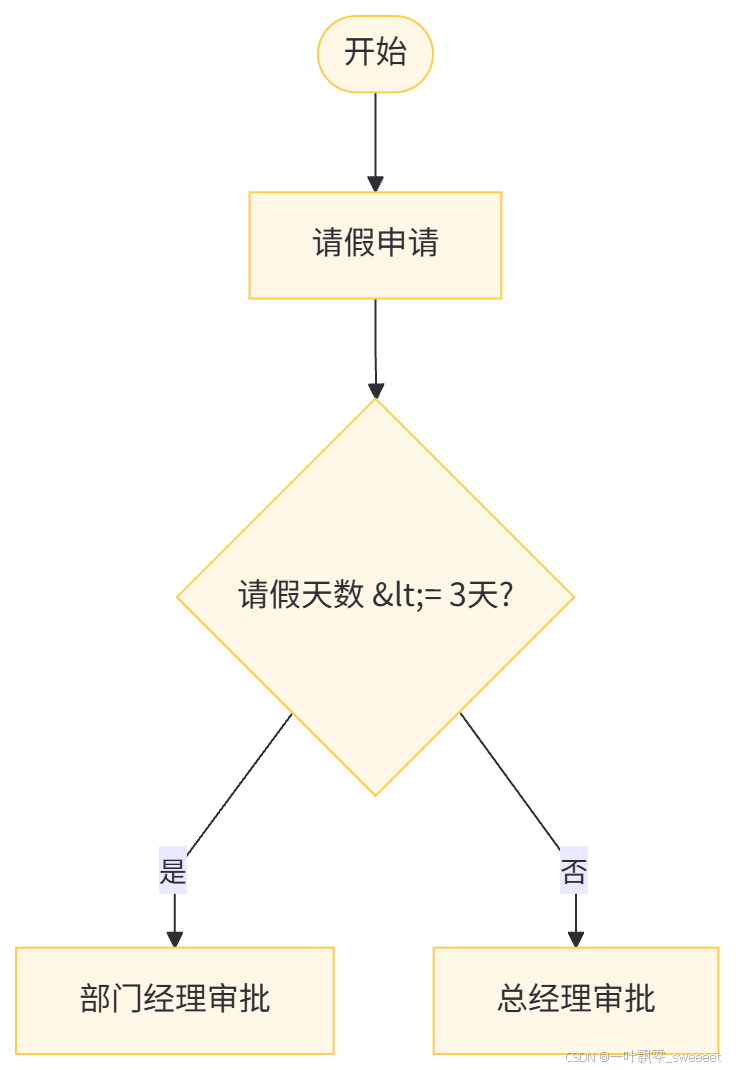
流程定义是 Flowable 的核心,通常使用 BPMN 2.0 格式的 XML 文件来描述。我们以一个简单的请假流程为例:
请假流程 BPMN 定义(src/main/resources/processes/leave-process.bpmn20.xml):
<?xml version="1.0" encoding="UTF-8"?>
<definitions xmlns="http://www.omg.org/spec/BPMN/20100524/MODEL"
             xmlns:xsi="http://www.w3.org/2001/XMLSchema-instance"
             xmlns:xsd="http://www.w3.org/2001/XMLSchema"
             xmlns:bpmndi="http://www.omg.org/spec/BPMN/20100524/DI"
             xmlns:omgdc="http://www.omg.org/spec/DD/20100524/DC"
             xmlns:omgdi="http://www.omg.org/spec/DD/20100524/DI"
             xmlns:flowable="http://flowable.org/bpmn"
             typeLanguage="http://www.w3.org/2001/XMLSchema"
             expressionLanguage="http://www.w3.org/1999/XPath"
             targetNamespace="http://flowable.org/examples">

    <process id="leaveProcess" name="请假流程" isExecutable="true">

        <!-- 开始事件 -->
        <startEvent id="startEvent1" flowable:formKey="leaveApplyForm"/>

        <!-- 请假申请任务 -->
        <userTask id="applyTask" name="请假申请" flowable:assignee="${applyUserId}">
            <extensionElements>
                <flowable:formData>
                    <flowable:formField id="startDate" name="开始日期" type="date"/>
                    <flowable:formField id="endDate" name="结束日期" type="date"/>
                    <flowable:formField id="reason" name="请假原因" type="string"/>
                    <flowable:formField id="days" name="请假天数" type="long"/>
                </flowable:formData>
            </extensionElements>
        </userTask>

        <!-- 排他网关 - 判断请假天数 -->
        <exclusiveGateway id="decisionGateway"/>

        <!-- 部门经理审批 -->
        <userTask id="deptManagerApproval" name="部门经理审批" flowable:assignee="${deptManagerId}">
            <extensionElements>
                <flowable:formData>
                    <flowable:formField id="approvalResult" name="审批结果" type="enum">
                        <flowable:value id="approve" name="同意"/>
                        <flowable:value id="reject" name="拒绝"/>
                    </flowable:formField>
                    <flowable:formField id="comment" name="审批意见" type="string"/>
                </flowable:formData>
            </extensionElements>
        </userTask>

        <!-- 总经理审批 -->
        <userTask id="generalManagerApproval" name="总经理审批" flowable:assignee="${generalManagerId}">
            <extensionElements>
                <flowable:formData>
                    <flowable:formField id="approvalResult" name="审批结果" type="enum">
                        <flowable:value id="approve" name="同意"/>
                        <flowable:value id="reject" name="拒绝"/>
                    </flowable:formField>
                    <flowable:formField id="comment" name="审批意见" type="string"/>
                </flowable:formData>
            </extensionElements>
        </userTask>

        <!-- 流程结束 -->
        <endEvent id="endEvent1"/>

        <!-- 拒绝结束 -->
        <endEvent id="rejectEndEvent"/>

        <!-- 流程连线 -->
        <sequenceFlow id="flow1" sourceRef="startEvent1" targetRef="applyTask"/>
        <sequenceFlow id="flow2" sourceRef="applyTask" targetRef="decisionGateway"/>

        <!-- 请假天数小于等于3天,直接部门经理审批 -->
        <sequenceFlow id="flow3" sourceRef="decisionGateway" targetRef="deptManagerApproval">
            <conditionExpression xsi:type="tFormalExpression">${days <= 3}</conditionExpression>
        </sequenceFlow>

        <!-- 请假天数大于3天,需要总经理审批 -->
        <sequenceFlow id="flow4" sourceRef="decisionGateway" targetRef="generalManagerApproval">
            <conditionExpression xsi:type="tFormalExpression">${days > 3}</conditionExpression>
        </sequenceFlow>

        <!-- 部门经理审批同意 -->
        <sequenceFlow id="flow5" sourceRef="deptManagerApproval" targetRef="endEvent1">
            <conditionExpression xsi:type="tFormalExpression">${approvalResult == 'approve'}</conditionExpression>
        </sequenceFlow>

        <!-- 部门经理审批拒绝 -->
        <sequenceFlow id="flow6" sourceRef="deptManagerApproval" targetRef="rejectEndEvent">
            <conditionExpression xsi:type="tFormalExpression">${approvalResult == 'reject'}</conditionExpression>
        </sequenceFlow>

        <!-- 总经理审批同意 -->
        <sequenceFlow id="flow7" sourceRef="generalManagerApproval" targetRef="endEvent1">
            <conditionExpression xsi:type="tFormalExpression">${approvalResult == 'approve'}</conditionExpression>
        </sequenceFlow>

        <!-- 总经理审批拒绝 -->
        <sequenceFlow id="flow8" sourceRef="generalManagerApproval" targetRef="rejectEndEvent">
            <conditionExpression xsi:type="tFormalExpression">${approvalResult == 'reject'}</conditionExpression>
        </sequenceFlow>
    </process>

    <!-- 流程图形信息 -->
    <bpmndi:BPMNDiagram id="BPMNDiagram_leaveProcess">
        <bpmndi:BPMNPlane bpmnElement="leaveProcess" id="BPMNPlane_leaveProcess">
            <bpmndi:BPMNShape bpmnElement="startEvent1" id="BPMNShape_startEvent1">
                <omgdc:Bounds height="30.0" width="30.0" x="100.0" y="160.0"/>
            </bpmndi:BPMNShape>
            <bpmndi:BPMNShape bpmnElement="applyTask" id="BPMNShape_applyTask">
                <omgdc:Bounds height="80.0" width="100.0" x="200.0" y="135.0"/>
            </bpmndi:BPMNShape>
            <bpmndi:BPMNShape bpmnElement="decisionGateway" id="BPMNShape_decisionGateway">
                <omgdc:Bounds height="40.0" width="40.0" x="360.0" y="155.0"/>
            </bpmndi:BPMNShape>
            <bpmndi:BPMNShape bpmnElement="deptManagerApproval" id="BPMNShape_deptManagerApproval">
                <omgdc:Bounds height="80.0" width="120.0" x="460.0" y="75.0"/>
            </bpmndi:BPMNShape>
            <bpmndi:BPMNShape bpmnElement="generalManagerApproval" id="BPMNShape_generalManagerApproval">
                <omgdc:Bounds height="80.0" width="120.0" x="460.0" y="235.0"/>
            </bpmndi:BPMNShape>
            <bpmndi:BPMNShape bpmnElement="endEvent1" id="BPMNShape_endEvent1">
                <omgdc:Bounds height="30.0" width="30.0" x="640.0" y="105.0"/>
            </bpmndi:BPMNShape>
            <bpmndi:BPMNShape bpmnElement="rejectEndEvent" id="BPMNShape_rejectEndEvent">
                <omgdc:Bounds height="30.0" width="30.0" x="640.0" y="265.0"/>
            </bpmndi:BPMNShape>

            <bpmndi:BPMNEdge bpmnElement="flow1" id="BPMNEdge_flow1">
                <omgdi:waypoint x="130.0" y="175.0"/>
                <omgdi:waypoint x="200.0" y="175.0"/>
            </bpmndi:BPMNEdge>
            <bpmndi:BPMNEdge bpmnElement="flow2" id="BPMNEdge_flow2">
                <omgdi:waypoint x="300.0" y="175.0"/>
                <omgdi:waypoint x="360.0" y="175.0"/>
            </bpmndi:BPMNEdge>
            <bpmndi:BPMNEdge bpmnElement="flow3" id="BPMNEdge_flow3">
                <omgdi:waypoint x="380.0" y="155.0"/>
                <omgdi:waypoint x="380.0" y="115.0"/>
                <omgdi:waypoint x="520.0" y="115.0"/>
            </bpmndi:BPMNEdge>
            <bpmndi:BPMNEdge bpmnElement="flow4" id="BPMNEdge_flow4">
                <omgdi:waypoint x="380.0" y="195.0"/>
                <omgdi:waypoint x="380.0" y="275.0"/>
                <omgdi:waypoint x="520.0" y="275.0"/>
            </bpmndi:BPMNEdge>
            <bpmndi:BPMNEdge bpmnElement="flow5" id="BPMNEdge_flow5">
                <omgdi:waypoint x="580.0" y="115.0"/>
                <omgdi:waypoint x="640.0" y="120.0"/>
            </bpmndi:BPMNEdge>
            <bpmndi:BPMNEdge bpmnElement="flow6" id="BPMNEdge_flow6">
                <omgdi:waypoint x="520.0" y="155.0"/>
                <omgdi:waypoint x="520.0" y="265.0"/>
                <omgdi:waypoint x="655.0" y="265.0"/>
            </bpmndi:BPMNEdge>
            <bpmndi:BPMNEdge bpmnElement="flow7" id="BPMNEdge_flow7">
                <omgdi:waypoint x="580.0" y="275.0"/>
                <omgdi:waypoint x="655.0" y="275.0"/>
            </bpmndi:BPMNEdge>
            <bpmndi:BPMNEdge bpmnElement="flow8" id="BPMNEdge_flow8">
                <omgdi:waypoint x="520.0" y="275.0"/>
                <omgdi:waypoint x="520.0" y="290.0"/>
                <omgdi:waypoint x="655.0" y="290.0"/>
            </bpmndi:BPMNEdge>
        </bpmndi:BPMNPlane>
    </bpmndi:BPMNDiagram>
</definitions>
上述流程定义描述了一个完整的请假流程,其流程图如下:
3.2 流程部署服务
虽然 Flowable 会自动部署 processes 目录下的流程定义,但我们也可以通过代码手动部署:
package com.example.flowabledemo.service.impl;

import cn.hutool.core.io.resource.ResourceUtil;
import com.example.flowabledemo.service.ProcessDeployService;
import lombok.extern.slf4j.Slf4j;
import org.flowable.engine.RepositoryService;
import org.flowable.engine.repository.Deployment;
import org.springframework.stereotype.Service;
import org.springframework.util.StringUtils;

import javax.annotation.Resource;
import java.io.InputStream;

/**
 * 流程部署服务实现类
 *
 * @author ken
 */
@Slf4j
@Service
public class ProcessDeployServiceImpl implements ProcessDeployService {

    @Resource
    private RepositoryService repositoryService;

    /**
     * 部署流程定义
     *
     * @param processName 流程名称
     * @param resourcePath 流程定义文件路径
     * @return 部署ID
     */
    @Override
    public String deployProcess(String processName, String resourcePath) {
        // 校验参数
        if (!StringUtils.hasText(processName, "流程名称不能为空")) {
            throw new IllegalArgumentException("流程名称不能为空");
        }
        if (!StringUtils.hasText(resourcePath, "流程定义文件路径不能为空")) {
            throw new IllegalArgumentException("流程定义文件路径不能为空");
        }

        // 获取流程定义文件输入流
        InputStream inputStream = ResourceUtil.getStream(resourcePath);
        if (inputStream == null) {
            log.error("流程定义文件不存在: {}", resourcePath);
            throw new IllegalArgumentException("流程定义文件不存在");
        }

        // 部署流程
        Deployment deployment = repositoryService.createDeployment()
                .name(processName)
                .addInputStream(resourcePath.substring(resourcePath.lastIndexOf("/") + 1), inputStream)
                .deploy();

        log.info("流程部署成功,部署ID: {}, 流程名称: {}", deployment.getId(), deployment.getName());
        return deployment.getId();
    }

    /**
     * 删除流程部署
     *
     * @param deploymentId 部署ID
     * @param cascade 是否级联删除(删除相关的流程实例、历史数据等)
     */
    @Override
    public void deleteDeployment(String deploymentId, boolean cascade) {
        if (!StringUtils.hasText(deploymentId, "部署ID不能为空")) {
            throw new IllegalArgumentException("部署ID不能为空");
        }

        repositoryService.deleteDeployment(deploymentId, cascade);
        log.info("流程部署删除成功,部署ID: {}", deploymentId);
    }
}
3.3 流程实例管理
流程实例是流程定义的一次执行。下面是管理流程实例的服务类:
package com.example.flowabledemo.service.impl;

import com.example.flowabledemo.service.ProcessInstanceService;
import com.google.common.collect.Maps;
import lombok.extern.slf4j.Slf4j;
import org.flowable.engine.RuntimeService;
import org.flowable.engine.runtime.ProcessInstance;
import org.springframework.stereotype.Service;
import org.springframework.util.CollectionUtils;
import org.springframework.util.StringUtils;

import javax.annotation.Resource;
import java.util.List;
import java.util.Map;

/**
 * 流程实例服务实现类
 *
 * @author ken
 */
@Slf4j
@Service
public class ProcessInstanceServiceImpl implements ProcessInstanceService {

    @Resource
    private RuntimeService runtimeService;

    /**
     * 启动流程实例
     *
     * @param processDefinitionKey 流程定义Key
     * @param businessKey 业务Key,通常是业务表的主键
     * @param variables 流程变量
     * @return 流程实例ID
     */
    @Override
    public String startProcessInstance(String processDefinitionKey, String businessKey, Map<String, Object> variables) {
        // 校验参数
        if (!StringUtils.hasText(processDefinitionKey, "流程定义Key不能为空")) {
            throw new IllegalArgumentException("流程定义Key不能为空");
        }

        // 处理变量
        Map<String, Object> processVariables = CollectionUtils.isEmpty(variables) ? Maps.newHashMap() : variables;

        // 启动流程实例
        ProcessInstance processInstance;
        if (StringUtils.hasText(businessKey)) {
            processInstance = runtimeService.startProcessInstanceByKey(processDefinitionKey, businessKey, processVariables);
        } else {
            processInstance = runtimeService.startProcessInstanceByKey(processDefinitionKey, processVariables);
        }

        log.info("流程实例启动成功,流程实例ID: {}, 流程定义ID: {}, 业务Key: {}",
                processInstance.getId(), processInstance.getProcessDefinitionId(), businessKey);
        return processInstance.getId();
    }

    /**
     * 暂停流程实例
     *
     * @param processInstanceId 流程实例ID
     */
    @Override
    public void suspendProcessInstance(String processInstanceId) {
        if (!StringUtils.hasText(processInstanceId, "流程实例ID不能为空")) {
            throw new IllegalArgumentException("流程实例ID不能为空");
        }

        runtimeService.suspendProcessInstanceById(processInstanceId);
        log.info("流程实例暂停成功,流程实例ID: {}", processInstanceId);
    }

    /**
     * 激活流程实例
     *
     * @param processInstanceId 流程实例ID
     */
    @Override
    public void activateProcessInstance(String processInstanceId) {
        if (!StringUtils.hasText(processInstanceId, "流程实例ID不能为空")) {
            throw new IllegalArgumentException("流程实例ID不能为空");
        }

        runtimeService.activateProcessInstanceById(processInstanceId);
        log.info("流程实例激活成功,流程实例ID: {}", processInstanceId);
    }

    /**
     * 根据业务Key查询流程实例
     *
     * @param businessKey 业务Key
     * @return 流程实例列表
     */
    @Override
    public List<ProcessInstance> getProcessInstancesByBusinessKey(String businessKey) {
        if (!StringUtils.hasText(businessKey, "业务Key不能为空")) {
            throw new IllegalArgumentException("业务Key不能为空");
        }

        return runtimeService.createProcessInstanceQuery()
                .processInstanceBusinessKey(businessKey)
                .list();
    }

    /**
     * 结束流程实例
     *
     * @param processInstanceId 流程实例ID
     * @param deleteReason 结束原因
     */
    @Override
    public void endProcessInstance(String processInstanceId, String deleteReason) {
        if (!StringUtils.hasText(processInstanceId, "流程实例ID不能为空")) {
            throw new IllegalArgumentException("流程实例ID不能为空");
        }

        runtimeService.deleteProcessInstance(processInstanceId, deleteReason);
        log.info("流程实例结束成功,流程实例ID: {}, 结束原因: {}", processInstanceId, deleteReason);
    }
}
四、任务管理:用户任务的创建、分配与完成
4.1 任务服务接口
任务是 Flowable 中人与系统交互的主要方式。下面是任务管理的核心服务:
package com.example.flowabledemo.service;

import org.flowable.task.api.Task;

import java.util.List;
import java.util.Map;

/**
 * 任务服务接口
 *
 * @author ken
 */
public interface TaskService {

    /**
     * 获取用户的待办任务
     *
     * @param assignee 任务处理人
     * @return 待办任务列表
     */
    List<Task> getTodoTasks(String assignee);

    /**
     * 获取用户的已办任务
     *
     * @param assignee 任务处理人
     * @param pageNum 页码
     * @param pageSize 每页条数
     * @return 已办任务列表
     */
    List<org.flowable.task.api.history.HistoricTaskInstance> getDoneTasks(String assignee, int pageNum, int pageSize);

    /**
     * 认领任务
     *
     * @param taskId 任务ID
     * @param userId 用户ID
     */
    void claimTask(String taskId, String userId);

    /**
     * 完成任务
     *
     * @param taskId 任务ID
     * @param variables 任务变量
     */
    void completeTask(String taskId, Map<String, Object> variables);

    /**
     * 委派任务
     *
     * @param taskId 任务ID
     * @param userId 被委派人ID
     */
    void delegateTask(String taskId, String userId);

    /**
     * 转办任务
     *
     * @param taskId 任务ID
     * @param userId 接收人ID
     */
    void transferTask(String taskId, String userId);

    /**
     * 根据任务ID查询任务
     *
     * @param taskId 任务ID
     * @return 任务对象
     */
    Task getTaskById(String taskId);

    /**
     * 根据流程实例ID查询当前活跃任务
     *
     * @param processInstanceId 流程实例ID
     * @return 任务列表
     */
    List<Task> getActiveTasksByProcessInstanceId(String processInstanceId);
}
4.2 任务服务实现类
package com.example.flowabledemo.service.impl;

import com.example.flowabledemo.service.TaskService;
import lombok.extern.slf4j.Slf4j;
import org.flowable.engine.TaskService;
import org.flowable.task.api.Task;
import org.flowable.task.api.history.HistoricTaskInstance;
import org.springframework.stereotype.Service;
import org.springframework.util.CollectionUtils;
import org.springframework.util.StringUtils;

import javax.annotation.Resource;
import java.util.List;
import java.util.Map;

/**
 * 任务服务实现类
 *
 * @author ken
 */
@Slf4j
@Service
public class TaskServiceImpl implements TaskService {

    @Resource
    private TaskService flowableTaskService;

    @Resource
    private org.flowable.engine.HistoryService historyService;

    @Override
    public List<Task> getTodoTasks(String assignee) {
        if (!StringUtils.hasText(assignee, "处理人不能为空")) {
            throw new IllegalArgumentException("处理人不能为空");
        }

        return flowableTaskService.createTaskQuery()
                .taskAssignee(assignee)
                .orderByTaskCreateTime().desc()
                .list();
    }

    @Override
    public List<HistoricTaskInstance> getDoneTasks(String assignee, int pageNum, int pageSize) {
        if (!StringUtils.hasText(assignee, "处理人不能为空")) {
            throw new IllegalArgumentException("处理人不能为空");
        }

        int firstResult = (pageNum - 1) * pageSize;

        return historyService.createHistoricTaskInstanceQuery()
                .taskAssignee(assignee)
                .finished()
                .orderByHistoricTaskInstanceEndTime().desc()
                .listPage(firstResult, pageSize);
    }

    @Override
    public void claimTask(String taskId, String userId) {
        if (!StringUtils.hasText(taskId, "任务ID不能为空")) {
            throw new IllegalArgumentException("任务ID不能为空");
        }
        if (!StringUtils.hasText(userId, "用户ID不能为空")) {
            throw new IllegalArgumentException("用户ID不能为空");
        }

        flowableTaskService.claim(taskId, userId);
        log.info("任务认领成功,任务ID: {}, 用户ID: {}", taskId, userId);
    }

    @Override
    public void completeTask(String taskId, Map<String, Object> variables) {
        if (!StringUtils.hasText(taskId, "任务ID不能为空")) {
            throw new IllegalArgumentException("任务ID不能为空");
        }

        if (CollectionUtils.isEmpty(variables)) {
            flowableTaskService.complete(taskId);
        } else {
            flowableTaskService.complete(taskId, variables);
        }
        log.info("任务完成成功,任务ID: {}", taskId);
    }

    @Override
    public void delegateTask(String taskId, String userId) {
        if (!StringUtils.hasText(taskId, "任务ID不能为空")) {
            throw new IllegalArgumentException("任务ID不能为空");
        }
        if (!StringUtils.hasText(userId, "被委派人ID不能为空")) {
            throw new IllegalArgumentException("被委派人ID不能为空");
        }

        flowableTaskService.delegateTask(taskId, userId);
        log.info("任务委派成功,任务ID: {}, 被委派人ID: {}", taskId, userId);
    }

    @Override
    public void transferTask(String taskId, String userId) {
        if (!StringUtils.hasText(taskId, "任务ID不能为空")) {
            throw new IllegalArgumentException("任务ID不能为空");
        }
        if (!StringUtils.hasText(userId, "接收人ID不能为空")) {
            throw new IllegalArgumentException("接收人ID不能为空");
        }

        flowableTaskService.setAssignee(taskId, userId);
        log.info("任务转办成功,任务ID: {}, 接收人ID: {}", taskId, userId);
    }

    @Override
    public Task getTaskById(String taskId) {
        if (!StringUtils.hasText(taskId, "任务ID不能为空")) {
            throw new IllegalArgumentException("任务ID不能为空");
        }

        return flowableTaskService.createTaskQuery()
                .taskId(taskId)
                .singleResult();
    }

    @Override
    public List<Task> getActiveTasksByProcessInstanceId(String processInstanceId) {
        if (!StringUtils.hasText(processInstanceId, "流程实例ID不能为空")) {
            throw new IllegalArgumentException("流程实例ID不能为空");
        }

        return flowableTaskService.createTaskQuery()
                .processInstanceId(processInstanceId)
                .active()
                .list();
    }
}
五、流程变量与表达式:动态控制流程走向
5.1 流程变量的使用
流程变量是 Flowable 中非常重要的概念,它可以在流程执行过程中传递数据,影响流程的走向。下面是管理流程变量的服务类:
package com.example.flowabledemo.service.impl;

import com.example.flowabledemo.service.VariableService;
import com.google.common.collect.Maps;
import lombok.extern.slf4j.Slf4j;
import org.flowable.engine.RuntimeService;
import org.flowable.engine.TaskService;
import org.springframework.stereotype.Service;
import org.springframework.util.StringUtils;

import javax.annotation.Resource;
import java.util.Map;

/**
 * 流程变量服务实现类
 *
 * @author ken
 */
@Slf4j
@Service
public class VariableServiceImpl implements VariableService {

    @Resource
    private RuntimeService runtimeService;

    @Resource
    private TaskService flowableTaskService;

    /**
     * 设置流程实例变量
     *
     * @param processInstanceId 流程实例ID
     * @param variables 变量Map
     */
    @Override
    public void setProcessVariables(String processInstanceId, Map<String, Object> variables) {
        if (!StringUtils.hasText(processInstanceId, "流程实例ID不能为空")) {
            throw new IllegalArgumentException("流程实例ID不能为空");
        }
        if (variables == null || variables.isEmpty()) {
            log.warn("设置流程变量时,变量为空,流程实例ID: {}", processInstanceId);
            return;
        }

        runtimeService.setVariables(processInstanceId, variables);
        log.info("设置流程实例变量成功,流程实例ID: {}, 变量数量: {}", processInstanceId, variables.size());
    }

    /**
     * 获取流程实例变量
     *
     * @param processInstanceId 流程实例ID
     * @return 变量Map
     */
    @Override
    public Map<String, Object> getProcessVariables(String processInstanceId) {
        if (!StringUtils.hasText(processInstanceId, "流程实例ID不能为空")) {
            throw new IllegalArgumentException("流程实例ID不能为空");
        }

        return runtimeService.getVariables(processInstanceId);
    }

    /**
     * 获取流程实例的某个变量
     *
     * @param processInstanceId 流程实例ID
     * @param variableName 变量名
     * @return 变量值
     */
    @Override
    public Object getProcessVariable(String processInstanceId, String variableName) {
        if (!StringUtils.hasText(processInstanceId, "流程实例ID不能为空")) {
            throw new IllegalArgumentException("流程实例ID不能为空");
        }
        if (!StringUtils.hasText(variableName, "变量名不能为空")) {
            throw new IllegalArgumentException("变量名不能为空");
        }

        return runtimeService.getVariable(processInstanceId, variableName);
    }

    /**
     * 设置任务变量
     *
     * @param taskId 任务ID
     * @param variables 变量Map
     * @param isLocal 是否为本地变量(仅当前任务可见)
     */
    @Override
    public void setTaskVariables(String taskId, Map<String, Object> variables, boolean isLocal) {
        if (!StringUtils.hasText(taskId, "任务ID不能为空")) {
            throw new IllegalArgumentException("任务ID不能为空");
        }
        if (variables == null || variables.isEmpty()) {
            log.warn("设置任务变量时,变量为空,任务ID: {}", taskId);
            return;
        }

        if (isLocal) {
            flowableTaskService.setVariablesLocal(taskId, variables);
        } else {
            flowableTaskService.setVariables(taskId, variables);
        }
        log.info("设置任务变量成功,任务ID: {}, 变量数量: {}, 是否本地变量: {}", taskId, variables.size(), isLocal);
    }

    /**
     * 获取任务变量
     *
     * @param taskId 任务ID
     * @param isLocal 是否获取本地变量
     * @return 变量Map
     */
    @Override
    public Map<String, Object> getTaskVariables(String taskId, boolean isLocal) {
        if (!StringUtils.hasText(taskId, "任务ID不能为空")) {
            throw new IllegalArgumentException("任务ID不能为空");
        }

        if (isLocal) {
            return flowableTaskService.getVariablesLocal(taskId);
        } else {
            return flowableTaskService.getVariables(taskId);
        }
    }
}
5.2 表达式的使用
Flowable 支持使用 UEL(Unified Expression Language)表达式来动态控制流程。常见的表达式用法包括:
- 流程变量表达式:
${variableName} - 方法调用表达式:
${serviceBean.method(param)} - 列表、映射访问:{variable.list[0]} 或 {variable.map.key}
下面是一个使用 Spring Bean 的示例,用于在流程中获取用户的部门经理:
package com.example.flowabledemo.service.impl;

import com.example.flowabledemo.service.IdentityService;
import lombok.extern.slf4j.Slf4j;
import org.springframework.stereotype.Service;

/**
 * 身份服务实现类,用于流程表达式中获取用户信息
 *
 * @author ken
 */
@Slf4j
@Service("identityService")
public class IdentityServiceImpl implements IdentityService {

    /**
     * 获取用户的部门经理ID
     *
     * @param userId 用户ID
     * @return 部门经理ID
     */
    @Override
    public String getDeptManagerId(String userId) {
        log.info("获取用户[{}]的部门经理ID", userId);

        // 实际应用中,这里应该从数据库或其他服务获取真实的部门经理ID
        // 这里为了示例,使用固定的映射关系
        if ("user1".equals(userId)) {
            return "manager1";
        } else if ("user2".equals(userId)) {
            return "manager1";
        } else if ("user3".equals(userId)) {
            return "manager2";
        }

        return "admin";
    }

    /**
     * 获取总经理ID
     *
     * @return 总经理ID
     */
    @Override
    public String getGeneralManagerId() {
        log.info("获取总经理ID");

        // 实际应用中,这里应该从数据库或其他服务获取真实的总经理ID
        return "generalManager";
    }
}
在 BPMN 文件中使用这个服务:
<userTask id="deptManagerApproval" name="部门经理审批"
          flowable:assignee="${identityService.getDeptManagerId(applyUserId)}">
    <!-- 其他配置 -->
</userTask>

<userTask id="generalManagerApproval" name="总经理审批"
          flowable:assignee="${identityService.getGeneralManagerId()}">
    <!-- 其他配置 -->
</userTask>
六、实战案例:完整的请假流程实现
6.1 实体类设计
首先定义请假单实体类:
package com.example.flowabledemo.entity;

import com.baomidou.mybatisplus.annotation.IdType;
import com.baomidou.mybatisplus.annotation.TableId;
import com.baomidou.mybatisplus.annotation.TableName;
import io.swagger.v3.oas.annotations.media.Schema;
import lombok.Data;

import java.time.LocalDate;
import java.time.LocalDateTime;

/**
 * 请假单实体类
 *
 * @author ken
 */
@Data
@TableName("t_leave")
@Schema(description = "请假单实体")
public class Leave {

    @TableId(type = IdType.AUTO)
    @Schema(description = "主键ID")
    private Long id;

    @Schema(description = "申请人ID")
    private String applyUserId;

    @Schema(description = "申请人姓名")
    private String applyUserName;

    @Schema(description = "开始日期")
    private LocalDate startDate;

    @Schema(description = "结束日期")
    private LocalDate endDate;

    @Schema(description = "请假天数")
    private Integer days;

    @Schema(description = "请假原因")
    private String reason;

    @Schema(description = "流程实例ID")
    private String processInstanceId;

    @Schema(description = "流程状态:0-草稿,1-审批中,2-已通过,3-已拒绝")
    private Integer status;

    @Schema(description = "创建时间")
    private LocalDateTime createTime;

    @Schema(description = "更新时间")
    private LocalDateTime updateTime;
}
6.2 Mapper 接口
package com.example.flowabledemo.mapper;

import com.baomidou.mybatisplus.core.mapper.BaseMapper;
import com.example.flowabledemo.entity.Leave;
import org.apache.ibatis.annotations.Mapper;

/**
 * 请假单Mapper接口
 *
 * @author ken
 */
@Mapper
public interface LeaveMapper extends BaseMapper<Leave> {
}
6.3 服务层实现
package com.example.flowabledemo.service.impl;

import com.baomidou.mybatisplus.core.conditions.query.LambdaQueryWrapper;
import com.baomidou.mybatisplus.extension.service.impl.ServiceImpl;
import com.example.flowabledemo.entity.Leave;
import com.example.flowabledemo.mapper.LeaveMapper;
import com.example.flowabledemo.service.IdentityService;
import com.example.flowabledemo.service.LeaveService;
import com.example.flowabledemo.service.ProcessInstanceService;
import com.example.flowabledemo.service.TaskService;
import com.google.common.collect.Maps;
import lombok.extern.slf4j.Slf4j;
import org.flowable.task.api.Task;
import org.springframework.stereotype.Service;
import org.springframework.transaction.annotation.Transactional;
import org.springframework.util.ObjectUtils;
import org.springframework.util.StringUtils;

import javax.annotation.Resource;
import java.time.LocalDateTime;
import java.util.List;
import java.util.Map;

/**
 * 请假单服务实现类
 *
 * @author ken
 */
@Slf4j
@Service
public class LeaveServiceImpl extends ServiceImpl<LeaveMapper, Leave> implements LeaveService {

    // 流程定义Key
    private static final String PROCESS_DEFINITION_KEY = "leaveProcess";

    // 流程状态:0-草稿,1-审批中,2-已通过,3-已拒绝
    public static final int STATUS_DRAFT = 0;
    public static final int STATUS_IN_PROGRESS = 1;
    public static final int STATUS_APPROVED = 2;
    public static final int STATUS_REJECTED = 3;

    @Resource
    private LeaveMapper leaveMapper;

    @Resource
    private ProcessInstanceService processInstanceService;

    @Resource
    private TaskService taskService;

    @Resource
    private IdentityService identityService;

    @Override
    @Transactional(rollbackFor = Exception.class)
    public Leave createLeave(Leave leave) {
        // 参数校验
        if (ObjectUtils.isEmpty(leave)) {
            throw new IllegalArgumentException("请假单信息不能为空");
        }
        if (!StringUtils.hasText(leave.getApplyUserId(), "申请人ID不能为空")) {
            throw new IllegalArgumentException("申请人ID不能为空");
        }
        if (ObjectUtils.isEmpty(leave.getStartDate())) {
            throw new IllegalArgumentException("开始日期不能为空");
        }
        if (ObjectUtils.isEmpty(leave.getEndDate())) {
            throw new IllegalArgumentException("结束日期不能为空");
        }
        if (leave.getStartDate().isAfter(leave.getEndDate())) {
            throw new IllegalArgumentException("开始日期不能晚于结束日期");
        }

        // 计算请假天数
        long days = leave.getEndDate().toEpochDay() - leave.getStartDate().toEpochDay() + 1;
        leave.setDays((int) days);

        // 设置默认值
        leave.setStatus(STATUS_DRAFT);
        leave.setCreateTime(LocalDateTime.now());
        leave.setUpdateTime(LocalDateTime.now());

        // 保存请假单
        leaveMapper.insert(leave);
        log.info("创建请假单成功,请假单ID: {}", leave.getId());

        return leave;
    }

    @Override
    @Transactional(rollbackFor = Exception.class)
    public String submitLeave(Long leaveId) {
        // 参数校验
        if (ObjectUtils.isEmpty(leaveId)) {
            throw new IllegalArgumentException("请假单ID不能为空");
        }

        // 查询请假单
        Leave leave = leaveMapper.selectById(leaveId);
        if (ObjectUtils.isEmpty(leave)) {
            throw new IllegalArgumentException("请假单不存在,ID: " + leaveId);
        }

        // 检查状态
        if (leave.getStatus() != STATUS_DRAFT) {
            throw new IllegalArgumentException("只有草稿状态的请假单可以提交,请假单ID: " + leaveId);
        }

        // 准备流程变量
        Map<String, Object> variables = Maps.newHashMap();
        variables.put("applyUserId", leave.getApplyUserId());
        variables.put("deptManagerId", identityService.getDeptManagerId(leave.getApplyUserId()));
        variables.put("generalManagerId", identityService.getGeneralManagerId());
        variables.put("startDate", leave.getStartDate());
        variables.put("endDate", leave.getEndDate());
        variables.put("reason", leave.getReason());
        variables.put("days", leave.getDays());

        // 启动流程实例,业务Key设置为请假单ID
        String businessKey = leaveId.toString();
        String processInstanceId = processInstanceService.startProcessInstance(PROCESS_DEFINITION_KEY, businessKey, variables);

        // 更新请假单状态和流程实例ID
        leave.setProcessInstanceId(processInstanceId);
        leave.setStatus(STATUS_IN_PROGRESS);
        leave.setUpdateTime(LocalDateTime.now());
        leaveMapper.updateById(leave);

        log.info("提交请假单成功,请假单ID: {}, 流程实例ID: {}", leaveId, processInstanceId);

        return processInstanceId;
    }

    @Override
    @Transactional(rollbackFor = Exception.class)
    public void approveLeave(String taskId, String approvalResult, String comment, String userId) {
        // 参数校验
        if (!StringUtils.hasText(taskId, "任务ID不能为空")) {
            throw new IllegalArgumentException("任务ID不能为空");
        }
        if (!StringUtils.hasText(approvalResult, "审批结果不能为空")) {
            throw new IllegalArgumentException("审批结果不能为空");
        }
        if (!StringUtils.hasText(userId, "审批人ID不能为空")) {
            throw new IllegalArgumentException("审批人ID不能为空");
        }

        // 查询任务
        Task task = taskService.getTaskById(taskId);
        if (ObjectUtils.isEmpty(task)) {
            throw new IllegalArgumentException("任务不存在,ID: " + taskId);
        }

        // 检查任务是否属于当前用户
        if (!userId.equals(task.getAssignee())) {
            throw new IllegalArgumentException("当前用户不是该任务的处理人,任务ID: " + taskId + ", 用户ID: " + userId);
        }

        // 准备审批变量
        Map<String, Object> variables = Maps.newHashMap();
        variables.put("approvalResult", approvalResult);
        variables.put("comment", comment);

        // 完成审批任务
        taskService.completeTask(taskId, variables);
        log.info("审批请假单成功,任务ID: {}, 审批结果: {}, 审批人: {}", taskId, approvalResult, userId);

        // 更新请假单状态(如果流程已结束)
        updateLeaveStatusAfterApproval(task.getProcessInstanceId(), approvalResult);
    }

    /**
     * 审批后更新请假单状态
     *
     * @param processInstanceId 流程实例ID
     * @param approvalResult 审批结果
     */
    private void updateLeaveStatusAfterApproval(String processInstanceId, String approvalResult) {
        // 查询流程实例是否还有活跃任务
        List<Task> activeTasks = taskService.getActiveTasksByProcessInstanceId(processInstanceId);
        if (activeTasks.isEmpty()) {
            // 流程已结束,更新请假单状态
            LambdaQueryWrapper<Leave> queryWrapper = new LambdaQueryWrapper<>();
            queryWrapper.eq(Leave::getProcessInstanceId, processInstanceId);
            Leave leave = leaveMapper.selectOne(queryWrapper);

            if (!ObjectUtils.isEmpty(leave)) {
                // 根据审批结果设置状态
                if ("approve".equals(approvalResult)) {
                    leave.setStatus(STATUS_APPROVED);
                } else {
                    leave.setStatus(STATUS_REJECTED);
                }
                leave.setUpdateTime(LocalDateTime.now());
                leaveMapper.updateById(leave);

                log.info("流程结束,更新请假单状态,请假单ID: {}, 状态: {}", leave.getId(), leave.getStatus());
            }
        }
    }

    @Override
    public List<Leave> getLeaveListByUserId(String userId, Integer status) {
        if (!StringUtils.hasText(userId, "用户ID不能为空")) {
            throw new IllegalArgumentException("用户ID不能为空");
        }

        LambdaQueryWrapper<Leave> queryWrapper = new LambdaQueryWrapper<>();
        queryWrapper.eq(Leave::getApplyUserId, userId);

        if (!ObjectUtils.isEmpty(status)) {
            queryWrapper.eq(Leave::getStatus, status);
        }

        queryWrapper.orderByDesc(Leave::getCreateTime);

        return leaveMapper.selectList(queryWrapper);
    }

    @Override
    public Leave getLeaveById(Long id) {
        if (ObjectUtils.isEmpty(id)) {
            return null;
        }
        return leaveMapper.selectById(id);
    }
}
6.4 控制层实现
package com.example.flowabledemo.controller;

import com.example.flowabledemo.entity.Leave;
import com.example.flowabledemo.service.LeaveService;
import com.example.flowabledemo.service.TaskService;
import io.swagger.v3.oas.annotations.Operation;
import io.swagger.v3.oas.annotations.Parameter;
import io.swagger.v3.oas.annotations.tags.Tag;
import lombok.extern.slf4j.Slf4j;
import org.flowable.task.api.Task;
import org.springframework.http.ResponseEntity;
import org.springframework.web.bind.annotation.*;

import javax.annotation.Resource;
import java.util.List;
import java.util.Map;

/**
 * 请假流程控制器
 *
 * @author ken
 */
@Slf4j
@RestController
@RequestMapping("/api/leave")
@Tag(name = "请假流程接口", description = "提供请假申请、审批等功能")
public class LeaveController {

    @Resource
    private LeaveService leaveService;

    @Resource
    private TaskService taskService;

    @PostMapping
    @Operation(summary = "创建请假单", description = "创建草稿状态的请假单")
    public ResponseEntity<Leave> createLeave(@RequestBody Leave leave) {
        Leave createdLeave = leaveService.createLeave(leave);
        return ResponseEntity.ok(createdLeave);
    }

    @PutMapping("/{id}/submit")
    @Operation(summary = "提交请假单", description = "将草稿状态的请假单提交到审批流程")
    public ResponseEntity<String> submitLeave(
            @Parameter(description = "请假单ID", required = true) @PathVariable Long id) {
        String processInstanceId = leaveService.submitLeave(id);
        return ResponseEntity.ok(processInstanceId);
    }

    @PutMapping("/task/{taskId}/approve")
    @Operation(summary = "审批请假单", description = "处理请假审批任务")
    public ResponseEntity<Void> approveLeave(
            @Parameter(description = "任务ID", required = true) @PathVariable String taskId,
            @Parameter(description = "审批结果(approve-同意, reject-拒绝)", required = true) @RequestParam String approvalResult,
            @Parameter(description = "审批意见") @RequestParam(required = false) String comment,
            @Parameter(description = "审批人ID", required = true) @RequestParam String userId) {
        leaveService.approveLeave(taskId, approvalResult, comment, userId);
        return ResponseEntity.noContent().build();
    }

    @GetMapping("/my")
    @Operation(summary = "查询我的请假单", description = "查询当前用户创建的请假单")
    public ResponseEntity<List<Leave>> getMyLeaveList(
            @Parameter(description = "用户ID", required = true) @RequestParam String userId,
            @Parameter(description = "状态:0-草稿,1-审批中,2-已通过,3-已拒绝") @RequestParam(required = false) Integer status) {
        List<Leave> leaveList = leaveService.getLeaveListByUserId(userId, status);
        return ResponseEntity.ok(leaveList);
    }

    @GetMapping("/todo")
    @Operation(summary = "查询待审批请假单", description = "查询当前用户需要审批的请假单")
    public ResponseEntity<List<Task>> getTodoLeaveTasks(
            @Parameter(description = "用户ID", required = true) @RequestParam String userId) {
        List<Task> todoTasks = taskService.getTodoTasks(userId);
        return ResponseEntity.ok(todoTasks);
    }

    @GetMapping("/{id}")
    @Operation(summary = "查询请假单详情", description = "根据ID查询请假单详情")
    public ResponseEntity<Leave> getLeaveDetail(
            @Parameter(description = "请假单ID", required = true) @PathVariable Long id) {
        Leave leave = leaveService.getLeaveById(id);
        return ResponseEntity.ok(leave);
    }
}
七、Flowable 高级特性
7.1 监听器的使用
Flowable 提供了多种监听器,可以在流程执行的不同阶段执行自定义逻辑:
- 执行监听器(Execution Listener):在流程实例、活动、网关等元素的生命周期事件上触发
- 任务监听器(Task Listener):在用户任务的生命周期事件上触发
下面是一个任务创建监听器的示例,用于在任务创建时发送通知:
package com.example.flowabledemo.listener;

import lombok.extern.slf4j.Slf4j;
import org.flowable.engine.delegate.DelegateTask;
import org.flowable.engine.delegate.TaskListener;
import org.springframework.stereotype.Component;

/**
 * 任务创建监听器,用于发送任务通知
 *
 * @author ken
 */
@Slf4j
@Component("taskCreateListener")
public class TaskCreateListener implements TaskListener {

    @Override
    public void notify(DelegateTask delegateTask) {
        String taskId = delegateTask.getId();
        String taskName = delegateTask.getName();
        String assignee = delegateTask.getAssignee();
        String processInstanceId = delegateTask.getProcessInstanceId();

        log.info("任务创建监听器触发,任务ID: {}, 任务名称: {}, 处理人: {}, 流程实例ID: {}",
                taskId, taskName, assignee, processInstanceId);

        // 这里可以实现发送通知的逻辑,如邮件、短信、消息推送等
        // sendNotification(assignee, "您有一个新的任务需要处理:" + taskName);
    }
}
在 BPMN 文件中配置监听器:
<userTask id="deptManagerApproval" name="部门经理审批" flowable:assignee="${deptManagerId}">
    <extensionElements>
        <flowable:taskListener event="create" class="com.example.flowabledemo.listener.TaskCreateListener"/>
        <!-- 或者引用Spring Bean -->
        <!-- <flowable:taskListener event="create" expression="${taskCreateListener.notify(task)}"/> -->
    </extensionElements>
</userTask>
7.2 流程历史查询
流程历史记录对于审计和跟踪非常重要。下面是一个查询流程历史的服务类:
package com.example.flowabledemo.service.impl;

import com.example.flowabledemo.service.HistoryService;
import lombok.extern.slf4j.Slf4j;
import org.flowable.engine.history.HistoricActivityInstance;
import org.flowable.engine.history.HistoricProcessInstance;
import org.flowable.engine.history.HistoricTaskInstance;
import org.flowable.engine.history.HistoricVariableInstance;
import org.springframework.stereotype.Service;
import org.springframework.util.StringUtils;

import javax.annotation.Resource;
import java.util.List;

/**
 * 流程历史服务实现类
 *
 * @author ken
 */
@Slf4j
@Service
public class HistoryServiceImpl implements HistoryService {

    @Resource
    private org.flowable.engine.HistoryService flowableHistoryService;

    /**
     * 查询流程实例历史
     *
     * @param processInstanceId 流程实例ID
     * @return 流程实例历史
     */
    @Override
    public HistoricProcessInstance getHistoricProcessInstance(String processInstanceId) {
        if (!StringUtils.hasText(processInstanceId, "流程实例ID不能为空")) {
            throw new IllegalArgumentException("流程实例ID不能为空");
        }

        return flowableHistoryService.createHistoricProcessInstanceQuery()
                .processInstanceId(processInstanceId)
                .singleResult();
    }

    /**
     * 查询流程活动历史
     *
     * @param processInstanceId 流程实例ID
     * @return 活动历史列表
     */
    @Override
    public List<HistoricActivityInstance> getHistoricActivities(String processInstanceId) {
        if (!StringUtils.hasText(processInstanceId, "流程实例ID不能为空")) {
            throw new IllegalArgumentException("流程实例ID不能为空");
        }

        return flowableHistoryService.createHistoricActivityInstanceQuery()
                .processInstanceId(processInstanceId)
                .orderByHistoricActivityInstanceStartTime().asc()
                .list();
    }

    /**
     * 查询任务历史
     *
     * @param processInstanceId 流程实例ID
     * @return 任务历史列表
     */
    @Override
    public List<HistoricTaskInstance> getHistoricTasks(String processInstanceId) {
        if (!StringUtils.hasText(processInstanceId, "流程实例ID不能为空")) {
            throw new IllegalArgumentException("流程实例ID不能为空");
        }

        return flowableHistoryService.createHistoricTaskInstanceQuery()
                .processInstanceId(processInstanceId)
                .orderByHistoricTaskInstanceCreateTime().asc()
                .list();
    }

    /**
     * 查询流程变量历史
     *
     * @param processInstanceId 流程实例ID
     * @return 变量历史列表
     */
    @Override
    public List<HistoricVariableInstance> getHistoricVariables(String processInstanceId) {
        if (!StringUtils.hasText(processInstanceId, "流程实例ID不能为空")) {
            throw new IllegalArgumentException("流程实例ID不能为空");
        }

        return flowableHistoryService.createHistoricVariableInstanceQuery()
                .processInstanceId(processInstanceId)
                .list();
    }

    /**
     * 根据业务Key查询流程实例历史
     *
     * @param businessKey 业务Key
     * @return 流程实例历史列表
     */
    @Override
    public List<HistoricProcessInstance> getHistoricProcessInstancesByBusinessKey(String businessKey) {
        if (!StringUtils.hasText(businessKey, "业务Key不能为空")) {
            throw new IllegalArgumentException("业务Key不能为空");
        }

        return flowableHistoryService.createHistoricProcessInstanceQuery()
                .processInstanceBusinessKey(businessKey)
                .orderByProcessInstanceStartTime().desc()
                .list();
    }
}
7.3 流程催办与超时处理
在实际应用中,常常需要处理任务超时的情况。Flowable 提供了定时器事件来处理这类需求:
<userTask id="deptManagerApproval" name="部门经理审批" flowable:assignee="${deptManagerId}">
    <extensionElements>
        <!-- 任务创建后24小时未处理,发送催办通知 -->
        <flowable:boundaryEvent attachedToRef="deptManagerApproval" id="reminderTimer" cancelActivity="false">
            <timerEventDefinition>
                <timeDuration>PT24H</timeDuration>
            </timerEventDefinition>
        </flowable:boundaryEvent>

        <!-- 任务创建后48小时未处理,自动转交给上级 -->
        <flowable:boundaryEvent attachedToRef="deptManagerApproval" id="escalationTimer" cancelActivity="true">
            <timerEventDefinition>
                <timeDuration>PT48H</timeDuration>
            </timerEventDefinition>
        </flowable:boundaryEvent>
    </extensionElements>
</userTask>

<!-- 催办通知 -->
<serviceTask id="sendReminderTask" name="发送催办通知"
             flowable:delegateExpression="${reminderService.sendReminder}"/>

<!-- 升级处理 -->
<serviceTask id="escalationTask" name="任务升级处理"
             flowable:delegateExpression="${escalationService.escalateTask}"/>

<!-- 连接线 -->
<sequenceFlow sourceRef="reminderTimer" targetRef="sendReminderTask"/>
<sequenceFlow sourceRef="sendReminderTask" targetRef="deptManagerApproval"/>
<sequenceFlow sourceRef="escalationTimer" targetRef="escalationTask"/>
<sequenceFlow sourceRef="escalationTask" targetRef="generalManagerApproval"/>
催办服务实现:
package com.example.flowabledemo.service.impl;

import lombok.extern.slf4j.Slf4j;
import org.flowable.engine.delegate.DelegateExecution;
import org.flowable.engine.delegate.JavaDelegate;
import org.springframework.stereotype.Service;

/**
 * 催办服务
 *
 * @author ken
 */
@Slf4j
@Service("reminderService")
public class ReminderServiceImpl {

    /**
     * 发送催办通知
     */
    public void sendReminder(DelegateExecution execution) {
        String processInstanceId = execution.getProcessInstanceId();
        String taskId = (String) execution.getVariable("triggeredTaskId");

        log.info("发送催办通知,流程实例ID: {}, 任务ID: {}", processInstanceId, taskId);

        // 实际应用中,这里可以实现发送催办通知的逻辑
        // 如:发送邮件、短信或系统消息给任务处理人
    }
}
八、Flowable 与 Spring Boot 集成最佳实践
8.1 配置优化
为了提高 Flowable 的性能,可以进行以下配置优化:
spring:
  flowable:
    # 异步执行器配置
    async-executor-activate: true
    async-executor-core-pool-size: 5
    async-executor-max-pool-size: 10
    async-executor-queue-capacity: 100

    # 历史级别设置为适当的级别
    history-level: audit  # 只记录关键历史数据,比full性能更好

    # 流程定义缓存
    process-definition-cache-limit: 100

    # 数据库配置优化
    jdbc-batch-size: 100
    jdbc-fetch-size: 50
8.2 事务管理
Flowable 与 Spring 的事务管理无缝集成,在 Service 层方法上添加@Transactional注解即可保证流程操作的事务一致性:
@Transactional(rollbackFor = Exception.class)
public String submitLeave(Long leaveId) {
    // 业务逻辑和流程操作
}
8.3 安全控制
可以通过 Spring Security 与 Flowable 集成,实现对流程操作的安全控制:
package com.example.flowabledemo.config;

import org.flowable.spring.security.SecurityConfiguration;
import org.springframework.context.annotation.Configuration;
import org.springframework.security.config.annotation.web.builders.HttpSecurity;
import org.springframework.security.config.annotation.web.configuration.EnableWebSecurity;
import org.springframework.security.config.http.SessionCreationPolicy;

/**
 * Flowable安全配置
 *
 * @author ken
 */
@Configuration
@EnableWebSecurity
public class FlowableSecurityConfig extends SecurityConfiguration {

    @Override
    protected void configure(HttpSecurity http) throws Exception {
        http
            .sessionManagement()
                .sessionCreationPolicy(SessionCreationPolicy.STATELESS)
                .and()
            .authorizeHttpRequests()
                .requestMatchers("/api/leave/**").authenticated()
                .requestMatchers("/flowable-rest/**").hasRole("ADMIN")
                .anyRequest().permitAll()
                .and()
            .csrf().disable();

        super.configure(http);
    }
}
九、常见问题与解决方案
9.1 流程部署失败
问题:流程部署时出现FlowableException,提示流程定义无效。
解决方案:
- 检查 BPMN 文件的 XML 语法是否正确
- 确保流程定义中所有的元素 ID 唯一
- 检查流程定义是否符合 BPMN 2.0 规范
- 使用 Flowable Modeler 或其他 BPMN 工具验证流程定义
9.2 任务分配错误
问题:任务没有分配给正确的用户,或者提示 "未知的表达式"。
解决方案:
- 检查表达式语法是否正确,如{assignee}而不是assignee
- 确保表达式中引用的变量或 Bean 存在且可用
- 检查 Spring 容器中是否正确配置了相关的 Bean
- 通过
runtimeService.getVariables(processInstanceId)检查流程变量是否正确设置
9.3 流程实例启动失败
问题:启动流程实例时失败,没有任何错误信息。
解决方案:
- 检查流程定义是否已正确部署
- 查看 Flowable 的日志,通常会有详细的错误信息
- 检查数据库连接是否正常
- 确保流程定义的
isExecutable属性设置为true
9.4 性能问题
问题:随着流程实例增多,系统性能下降明显。
解决方案:
- 定期清理历史数据,或配置自动清理策略
- 优化数据库索引,特别是 ACT_RU_和 ACT_HI_表
- 调整 Flowable 的缓存配置
- 考虑使用异步执行器处理耗时操作
- 对长时间运行的流程进行拆分
十、总结与展望
Flowable 作为一款强大的流程引擎,为企业应用提供了灵活、可靠的流程自动化能力。本文从核心概念、环境搭建、基础操作到高级特性,全面介绍了 Flowable 的使用方法,并通过一个完整的请假流程案例展示了实际应用。
本文参与 腾讯云自媒体同步曝光计划,分享自微信公众号。
原始发表:2025-10-08,如有侵权请联系 cloudcommunity@tencent.com 删除
评论
登录后参与评论
推荐阅读
目录
腾讯云开发者

Copyright © 2013 - 2026 Tencent Cloud. All Rights Reserved. 腾讯云 版权所有
深圳市腾讯计算机系统有限公司 ICP备案/许可证号:粤B2-20090059  粤公网安备44030502008569号
腾讯云计算(北京)有限责任公司 京ICP证150476号 | 京ICP备11018762号