别再混淆!@JsonFormat、@DateTimeFormat、@JSONField 深度剖析与 DTO 实战指南

别再混淆!@JsonFormat、@DateTimeFormat、@JSONField 深度剖析与 DTO 实战指南

果酱带你啃AI
发布于 2026-04-14 13:13:22
发布于 2026-04-14 13:13:22
在 Java 开发中,日期时间的序列化与反序列化一直是令人头疼的问题。当我们在 DTO(数据传输对象)中处理日期时间字段时,总会遇到三个注解:@JsonFormat、@DateTimeFormat 和 @JSONField。它们看似功能相似,实则各有侧重,使用场景也大不相同。
很多开发者在实际项目中常常混淆这三个注解的用法,导致出现诸如 "前端传的日期后端解析报错"、"接口返回的日期格式不符合要求"、"不同框架下日期处理不一致" 等问题。本文将从底层原理到实际应用,全方位解析这三个注解的区别与联系,并通过大量可运行的实例,教会你在 DTO 中如何正确使用它们,彻底解决日期时间处理的痛点。
一、三个注解的 "前世今生":底层原理与设计初衷
要真正理解这三个注解的区别,首先需要了解它们各自的 "出身" 和设计目的。不同的注解来自不同的框架,服务于不同的场景,这是它们最本质的区别。
1.1 @JsonFormat:Jackson 框架的 "日期格式化大师"
@JsonFormat 注解来自于 Jackson 库,这是一个在 Java 生态中广泛使用的 JSON 处理库。Spring Boot 默认集成了 Jackson 作为 JSON 消息转换器,因此在 Spring 生态中,@JsonFormat 的使用非常普遍。
设计初衷:主要用于控制 JSON 数据与 Java 对象之间的序列化(Java 对象→JSON)和反序列化(JSON→Java 对象)过程中日期时间字段的格式转换。
权威来源:根据 Jackson 官方文档(https://fasterxml.github.io/jackson-annotations/javadoc/2.15/com/fasterxml/jackson/annotation/JsonFormat.html),@JsonFormat 是 Jackson 提供的核心注解之一,用于指定字段的序列化和反序列化格式。
1.2 @DateTimeFormat:Spring 框架的 "前端参数解析专家"
@DateTimeFormat 注解来自于 Spring Framework,是 Spring Web 模块中的一个重要注解。
设计初衷:主要用于将前端(如 HTML 表单、URL 参数)传递的字符串类型的日期时间参数,正确解析为 Java 中的日期时间对象(如 java.util.Date、java.time.LocalDateTime 等)。
权威来源:Spring 官方文档(https://docs.spring.io/spring-framework/docs/current/javadoc-api/org/springframework/format/annotation/DateTimeFormat.html)明确指出,@DateTimeFormat 用于指定日期时间类型字段的格式化方式,主要用于 Web 请求参数的绑定。
1.3 @JSONField:Fastjson 框架的 "JSON 字段控制器"
@JSONField 注解来自于阿里巴巴的 Fastjson 库,这是国内广泛使用的另一个高性能 JSON 处理库。
设计初衷:功能类似于 @JsonFormat,但它是 Fastjson 框架提供的注解,用于控制 Fastjson 在序列化和反序列化过程中对字段的处理,包括日期格式化、字段名称映射等。
权威来源:Fastjson 官方文档(https://github.com/alibaba/fastjson/wiki/JSONField)详细说明了 @JSONField 的用法,它是 Fastjson 进行 JSON 处理时的核心注解之一。
1.4 三者关系的直观展示
下面的流程图清晰展示了三个注解在请求处理流程中的作用位置:
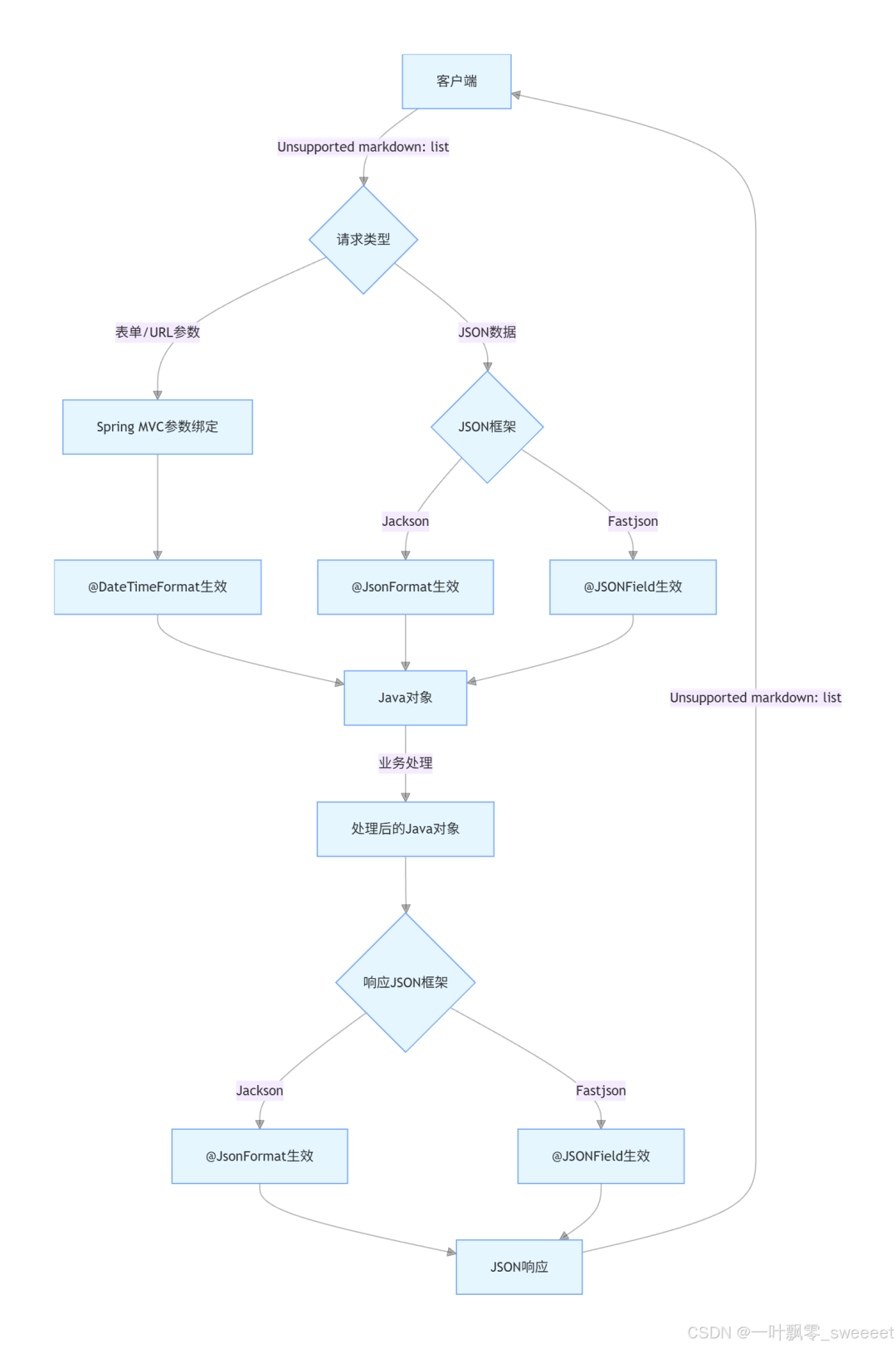
注:
[客户端]-->1. 发送请求 {请求类型}[JSON响应]-->2. 接收响应 [客户端]
从流程图中可以清晰地看到:
- @DateTimeFormat 主要在处理表单或 URL 参数时发挥作用
- @JsonFormat 在使用 Jackson 处理 JSON 数据时(请求和响应阶段)发挥作用
- @JSONField 在使用 Fastjson 处理 JSON 数据时(请求和响应阶段)发挥作用
二、依赖配置:搭建实验环境
在开始具体示例之前,我们需要先搭建一个标准的 Spring Boot 项目,并引入相关依赖。以下是必要的 Maven 配置:
<?xml version="1.0" encoding="UTF-8"?>
<project xmlns="http://maven.apache.org/POM/4.0.0" xmlns:xsi="http://www.w3.org/2001/XMLSchema-instance"
         xsi:schemaLocation="http://maven.apache.org/POM/4.0.0 https://maven.apache.org/xsd/maven-4.0.0.xsd">
    <modelVersion>4.0.0</modelVersion>
    <parent>
        <groupId>org.springframework.boot</groupId>
        <artifactId>spring-boot-starter-parent</artifactId>
        <version>3.2.0</version>
        <relativePath/>
    </parent>
    <groupId>com.jam.example</groupId>
    <artifactId>date-annotation-demo</artifactId>
    <version>0.0.1-SNAPSHOT</version>
    <name>date-annotation-demo</name>
    <description>Demo project for date annotation comparison</description>

    <properties>
        <java.version>17</java.version>
        <fastjson.version>2.0.32</fastjson.version>
        <mybatis-plus.version>3.5.5</mybatis-plus.version>
        <mysql.version>8.0.33</mysql.version>
        <lombok.version>1.18.30</lombok.version>
        <commons-lang3.version>3.14.0</commons-lang3.version>
        <springdoc.version>2.1.0</springdoc.version>
    </properties>

    <dependencies>
        <!-- Spring Boot Web -->
        <dependency>
            <groupId>org.springframework.boot</groupId>
            <artifactId>spring-boot-starter-web</artifactId>
        </dependency>

        <!-- Lombok -->
        <dependency>
            <groupId>org.projectlombok</groupId>
            <artifactId>lombok</artifactId>
            <version>${lombok.version}</version>
            <optional>true</optional>
        </dependency>

        <!-- Commons Lang3 -->
        <dependency>
            <groupId>org.apache.commons</groupId>
            <artifactId>commons-lang3</artifactId>
            <version>${commons-lang3.version}</version>
        </dependency>

        <!-- Jackson Datetime -->
        <dependency>
            <groupId>com.fasterxml.jackson.datatype</groupId>
            <artifactId>jackson-datatype-jsr310</artifactId>
        </dependency>

        <!-- Fastjson -->
        <dependency>
            <groupId>com.alibaba.fastjson2</groupId>
            <artifactId>fastjson2</artifactId>
            <version>${fastjson.version}</version>
        </dependency>

        <!-- MyBatis-Plus -->
        <dependency>
            <groupId>com.baomidou</groupId>
            <artifactId>mybatis-plus-boot-starter</artifactId>
            <version>${mybatis-plus.version}</version>
        </dependency>

        <!-- MySQL Driver -->
        <dependency>
            <groupId>com.mysql</groupId>
            <artifactId>mysql-connector-j</artifactId>
            <version>${mysql.version}</version>
            <scope>runtime</scope>
        </dependency>

        <!-- SpringDoc OpenAPI (Swagger3) -->
        <dependency>
            <groupId>org.springdoc</groupId>
            <artifactId>springdoc-openapi-starter-webmvc-ui</artifactId>
            <version>${springdoc.version}</version>
        </dependency>

        <!-- Test -->
        <dependency>
            <groupId>org.springframework.boot</groupId>
            <artifactId>spring-boot-starter-test</artifactId>
            <scope>test</scope>
        </dependency>
    </dependencies>

    <build>
        <plugins>
            <plugin>
                <groupId>org.springframework.boot</groupId>
                <artifactId>spring-boot-maven-plugin</artifactId>
                <configuration>
                    <excludes>
                        <exclude>
                            <groupId>org.projectlombok</groupId>
                            <artifactId>lombok</artifactId>
                        </exclude>
                    </excludes>
                </configuration>
            </plugin>
        </plugins>
    </build>
</project>
以上配置包含了我们示例中需要用到的所有依赖,包括 Spring Boot Web、Lombok、Jackson、Fastjson、MyBatis-Plus、MySQL 驱动以及 Swagger3 等,并使用了各组件的最新稳定版本。
三、@JsonFormat 详解与实战
3.1 @JsonFormat 的核心属性
@JsonFormat 注解有多个属性,其中最常用的有:
- pattern指定日期时间的格式字符串,如 "yyyy-MM-dd HH:mm:ss"
- timezone指定时区,如 "GMT+8"(中国标准时间)
- shape指定序列化后的形状,对于日期时间类型,通常使用 Shape.STRING
3.2 @JsonFormat 的使用场景
@JsonFormat 主要用于以下两个场景:
- 请求阶段将前端传递的 JSON 格式的日期时间字符串,反序列化为 Java 对象中的日期时间类型字段
- 响应阶段将 Java 对象中的日期时间类型字段,序列化为指定格式的 JSON 字符串返回给前端
3.3 实战示例:在 DTO 中使用 @JsonFormat
首先,我们创建一个使用 @JsonFormat 注解的 DTO 类:
package com.jam.example.dto;

import com.fasterxml.jackson.annotation.JsonFormat;
import io.swagger.v3.oas.annotations.media.Schema;
import lombok.Data;
import java.time.LocalDateTime;
import java.util.Date;

/**
 * 演示@JsonFormat注解使用的DTO类
 *
 * @author 果酱
 */
@Data
@Schema(description = "JsonFormat演示DTO")
public class JsonFormatDemoDTO {

    @Schema(description = "使用java.util.Date类型的日期时间字段")
    @JsonFormat(pattern = "yyyy-MM-dd HH:mm:ss", timezone = "GMT+8")
    private Date dateField;

    @Schema(description = "使用java.time.LocalDateTime类型的日期时间字段")
    @JsonFormat(pattern = "yyyy年MM月dd日 HH时mm分ss秒", timezone = "GMT+8")
    private LocalDateTime localDateTimeField;
}
接下来,创建一个控制器来测试这个 DTO:
package com.jam.example.controller;

import com.jam.example.dto.JsonFormatDemoDTO;
import io.swagger.v3.oas.annotations.Operation;
import io.swagger.v3.oas.annotations.tags.Tag;
import lombok.extern.slf4j.Slf4j;
import org.springframework.web.bind.annotation.PostMapping;
import org.springframework.web.bind.annotation.RequestBody;
import org.springframework.web.bind.annotation.RequestMapping;
import org.springframework.web.bind.annotation.RestController;

/**
 * 演示@JsonFormat注解使用的控制器
 *
 * @author 果酱
 */
@RestController
@RequestMapping("/json-format")
@Tag(name = "JsonFormat演示接口", description = "用于测试@JsonFormat注解的功能")
@Slf4j
public class JsonFormatDemoController {

    /**
     * 测试@JsonFormat的反序列化功能
     *
     * @param dto 包含日期时间字段的DTO对象
     * @return 接收到的DTO对象,用于展示序列化效果
     */
    @PostMapping("/test")
    @Operation(summary = "测试@JsonFormat注解", description = "接收包含日期时间的JSON数据,并返回处理后的结果")
    public JsonFormatDemoDTO testJsonFormat(@RequestBody JsonFormatDemoDTO dto) {
        log.info("接收到的dateField: {}", dto.getDateField());
        log.info("接收到的localDateTimeField: {}", dto.getLocalDateTimeField());
        return dto;
    }
}
3.4 测试与结果分析
启动应用后,我们可以通过 Swagger UI(访问http://localhost:8080/swagger-ui.html)来测试这个接口。
测试步骤:
- 发送如下 JSON 请求体:
{
"dateField":"2023-12-01 12:34:56",
"localDateTimeField":"2023年12月01日 12时34分56秒"
}
- 观察控制台输出的日志:
接收到的dateField: Fri Dec 01 12:34:56 CST 2023
接收到的localDateTimeField: 2023-12-01T12:34:56
- 观察接口返回的 JSON 数据:
{
"dateField":"2023-12-01 12:34:56",
"localDateTimeField":"2023年12月01日 12时34分56秒"
}
结果分析:
- 反序列化成功:前端传递的字符串被正确转换为 Java 的 Date 和 LocalDateTime 对象
- 序列化成功:Java 的日期时间对象被按照 @JsonFormat 指定的格式转换为字符串返回
特别注意:
- 对于 Java 8 新的日期时间 API(如 LocalDateTime),需要确保引入了 jackson-datatype-jsr310 依赖,否则可能会出现序列化 / 反序列化失败的情况。
- 时区设置非常重要,特别是在分布式系统中。如果不指定 timezone 属性,Jackson 会使用默认的 UTC 时区,可能导致时间相差 8 小时(对于中国地区)。
- @JsonFormat 注解不仅可以用于日期时间类型,还可以用于其他类型(如数字、枚举等)的格式化,但最常用的场景还是日期时间处理。
3.5 与 MyBatis-Plus 结合使用
在实际项目中,我们经常需要将 DTO 中的日期时间字段与数据库中的日期时间字段进行映射。MyBatis-Plus 提供了自动映射功能,结合 @JsonFormat 可以很方便地处理这种场景。
首先,创建一个实体类:
package com.jam.example.entity;

import com.baomidou.mybatisplus.annotation.IdType;
import com.baomidou.mybatisplus.annotation.TableId;
import com.baomidou.mybatisplus.annotation.TableField;
import com.baomidou.mybatisplus.annotation.TableName;
import lombok.Data;
import java.time.LocalDateTime;
import java.util.Date;

/**
 * 演示日期时间字段的实体类
 *
 * @author 果酱
 */
@Data
@TableName("date_demo")
public class DateDemoEntity {

    @TableId(type = IdType.AUTO)
    private Long id;

    @TableField("date_column")
    private Date dateColumn;

    @TableField("local_date_time_column")
    private LocalDateTime localDateTimeColumn;
}
然后,创建一个 Mapper 接口:
package com.jam.example.mapper;

import com.baomidou.mybatisplus.core.mapper.BaseMapper;
import com.jam.example.entity.DateDemoEntity;
import org.apache.ibatis.annotations.Mapper;

/**
 * DateDemoEntity的Mapper接口
 *
 * @author 果酱
 */
@Mapper
public interface DateDemoMapper extends BaseMapper<DateDemoEntity> {
}
接下来,创建一个 Service 类:
package com.jam.example.service;

import com.baomidou.mybatisplus.extension.service.impl.ServiceImpl;
import com.jam.example.entity.DateDemoEntity;
import com.jam.example.mapper.DateDemoMapper;
import com.jam.example.dto.JsonFormatDemoDTO;
import lombok.extern.slf4j.Slf4j;
import org.springframework.stereotype.Service;
import java.util.Objects;

/**
 * 日期时间处理的服务类
 *
 * @author 果酱
 */
@Service
@Slf4j
public class DateDemoService extends ServiceImpl<DateDemoMapper, DateDemoEntity> {

    /**
     * 将DTO转换为实体并保存
     *
     * @param dto 包含日期时间的DTO
     * @return 保存后的实体ID
     */
    public Long saveFromJsonFormatDemoDTO(JsonFormatDemoDTO dto) {
        Objects.requireNonNull(dto, "DTO对象不能为空");

        DateDemoEntity entity = new DateDemoEntity();
        entity.setDateColumn(dto.getDateField());
        entity.setLocalDateTimeColumn(dto.getLocalDateTimeField());

        baseMapper.insert(entity);
        log.info("保存实体成功,ID: {}", entity.getId());
        return entity.getId();
    }

    /**
     * 根据ID查询实体并转换为DTO
     *
     * @param id 实体ID
     * @return 转换后的DTO对象
     */
    public JsonFormatDemoDTO getJsonFormatDemoDTOById(Long id) {
        Objects.requireNonNull(id, "ID不能为空");

        DateDemoEntity entity = baseMapper.selectById(id);
        if (Objects.isNull(entity)) {
            log.warn("未找到ID为{}的实体", id);
            return null;
        }

        JsonFormatDemoDTO dto = new JsonFormatDemoDTO();
        dto.setDateField(entity.getDateColumn());
        dto.setLocalDateTimeField(entity.getLocalDateTimeColumn());

        return dto;
    }
}
最后,在控制器中添加相关接口:
@Autowired
private DateDemoService dateDemoService;

/**
 * 测试@JsonFormat与MyBatis-Plus结合使用
 *
 * @param dto 包含日期时间字段的DTO对象
 * @return 保存后的DTO对象
 */
@PostMapping("/save")
@Operation(summary = "保存日期时间数据", description = "将DTO数据保存到数据库,并返回结果")
public JsonFormatDemoDTO saveJsonFormatDemoDTO(@RequestBody JsonFormatDemoDTO dto) {
    Long id = dateDemoService.saveFromJsonFormatDemoDTO(dto);
    return dateDemoService.getJsonFormatDemoDTOById(id);
}
数据库表结构(MySQL):
CREATE TABLE `date_demo` (
  `id` bigint NOT NULL AUTO_INCREMENT COMMENT '主键ID',
  `date_column` datetime DEFAULT NULL COMMENT '日期时间字段(java.util.Date)',
  `local_date_time_column` datetime DEFAULT NULL COMMENT '日期时间字段(java.time.LocalDateTime)',
  PRIMARY KEY (`id`)
) ENGINE=InnoDB DEFAULT CHARSET=utf8mb4 COLLATE=utf8mb4_unicode_ci COMMENT='日期时间处理演示表';
通过这个示例,我们可以看到 @JsonFormat 注解在从 JSON 到 DTO、DTO 到实体、实体到数据库的整个流程中,都能正确处理日期时间的格式转换。
四、@DateTimeFormat 详解与实战
4.1 @DateTimeFormat 的核心属性
@DateTimeFormat 注解的主要属性有:
- pattern指定日期时间的格式字符串,如 "yyyy-MM-dd"、"HH:mm:ss"
- iso指定 ISO 标准格式,如 ISO.DATE(yyyy-MM-dd)、ISO.TIME(HH:mm:ss)、ISO.DATE_TIME(yyyy-MM-ddTHH:mm:ss)
- style指定短格式或长格式,使用两个字符的字符串,第一个表示日期风格,第二个表示时间风格(S:短,M:中,L:长,F:完整,-:忽略)
4.2 @DateTimeFormat 的使用场景
@DateTimeFormat 主要用于将前端通过表单提交或 URL 参数传递的日期时间字符串,正确解析为 Java 中的日期时间对象。它通常用于处理application/x-www-form-urlencoded类型的请求数据,而不是 JSON 格式的数据。
权威来源:Spring 官方文档(https://docs.spring.io/spring-framework/docs/current/reference/html/web.html#mvc-ann-initbinder)指出,@DateTimeFormat 注解需要配合 Spring 的格式化机制使用,通常在控制器方法的参数上使用。
4.3 实战示例:在 DTO 中使用 @DateTimeFormat
创建一个使用 @DateTimeFormat 注解的 DTO 类:
package com.jam.example.dto;

import io.swagger.v3.oas.annotations.media.Schema;
import lombok.Data;
import org.springframework.format.annotation.DateTimeFormat;
import java.time.LocalDate;
import java.time.LocalTime;
import java.time.LocalDateTime;
import java.util.Date;

/**
 * 演示@DateTimeFormat注解使用的DTO类
 *
 * @author 果酱
 */
@Data
@Schema(description = "DateTimeFormat演示DTO")
public class DateTimeFormatDemoDTO {

    @Schema(description = "使用pattern的Date类型字段")
    @DateTimeFormat(pattern = "yyyy-MM-dd")
    private Date datePattern;

    @Schema(description = "使用ISO的LocalDate类型字段")
    @DateTimeFormat(iso = DateTimeFormat.ISO.DATE)
    private LocalDate localDateIso;

    @Schema(description = "使用pattern的LocalTime类型字段")
    @DateTimeFormat(pattern = "HH:mm:ss")
    private LocalTime localTimePattern;

    @Schema(description = "使用ISO的LocalDateTime类型字段")
    @DateTimeFormat(iso = DateTimeFormat.ISO.DATE_TIME)
    private LocalDateTime localDateTimeIso;

    @Schema(description = "使用style的LocalDate类型字段")
    @DateTimeFormat(style = "S-") // 短日期,忽略时间
    private LocalDate localDateStyle;
}
创建对应的控制器:
package com.jam.example.controller;

import com.jam.example.dto.DateTimeFormatDemoDTO;
import io.swagger.v3.oas.annotations.Operation;
import io.swagger.v3.oas.annotations.Parameter;
import io.swagger.v3.oas.annotations.tags.Tag;
import lombok.extern.slf4j.Slf4j;
import org.springframework.format.annotation.DateTimeFormat;
import org.springframework.web.bind.annotation.GetMapping;
import org.springframework.web.bind.annotation.PostMapping;
import org.springframework.web.bind.annotation.RequestMapping;
import org.springframework.web.bind.annotation.RestController;
import org.springframework.web.bind.annotation.ModelAttribute;
import java.time.LocalDate;

/**
 * 演示@DateTimeFormat注解使用的控制器
 *
 * @author 果酱
 */
@RestController
@RequestMapping("/date-time-format")
@Tag(name = "DateTimeFormat演示接口", description = "用于测试@DateTimeFormat注解的功能")
@Slf4j
public class DateTimeFormatDemoController {

    /**
     * 测试@DateTimeFormat在表单提交中的使用
     *
     * @param dto 包含日期时间字段的DTO对象
     * @return 接收到的DTO对象
     */
    @PostMapping("/form")
    @Operation(summary = "测试表单提交的日期解析", description = "接收表单格式的日期时间数据")
    public DateTimeFormatDemoDTO testFormSubmit(@ModelAttribute DateTimeFormatDemoDTO dto) {
        log.info("表单提交的datePattern: {}", dto.getDatePattern());
        log.info("表单提交的localDateIso: {}", dto.getLocalDateIso());
        log.info("表单提交的localTimePattern: {}", dto.getLocalTimePattern());
        log.info("表单提交的localDateTimeIso: {}", dto.getLocalDateTimeIso());
        log.info("表单提交的localDateStyle: {}", dto.getLocalDateStyle());
        return dto;
    }

    /**
     * 测试@DateTimeFormat在URL参数中的使用
     *
     * @param date 参数日期
     * @return 接收到的日期
     */
    @GetMapping("/param")
    @Operation(summary = "测试URL参数的日期解析", description = "接收URL参数中的日期时间数据")
    public LocalDate testUrlParam(
            @Parameter(description = "日期参数,格式为yyyy-MM-dd")
            @DateTimeFormat(pattern = "yyyy-MM-dd") LocalDate date) {
        log.info("URL参数中的date: {}", date);
        return date;
    }
}
4.4 测试与结果分析
测试表单提交:
发送一个application/x-www-form-urlencoded类型的 POST 请求,参数如下:
datePattern=2023-12-01
localDateIso=2023-12-02
localTimePattern=12:34:56
localDateTimeIso=2023-12-03T13:45:22
localDateStyle=23-12-04
观察控制台输出:
表单提交的datePattern: Fri Dec 01 00:00:00 CST 2023
表单提交的localDateIso: 2023-12-02
表单提交的localTimePattern: 12:34:56
表单提交的localDateTimeIso: 2023-12-03T13:45:22
表单提交的localDateStyle: 2023-12-04
测试 URL 参数:
发送一个 GET 请求:http://localhost:8080/date-time-format/param?date=2023-12-05
观察控制台输出:
URL参数中的date: 2023-12-05
结果分析:
- @DateTimeFormat 成功将各种格式的字符串参数解析为对应的日期时间对象
- pattern 属性允许我们自定义日期时间格式
- iso 属性可以直接使用 ISO 标准格式,简化配置
- style 属性提供了另一种格式化方式,适用于一些特定场景
特别注意:
- @DateTimeFormat 主要用于解析表单或 URL 参数中的日期时间字符串,对于 JSON 格式的数据,它不会生效。
- 如果前端传递的日期时间格式与 @DateTimeFormat 指定的格式不匹配,会抛出
MethodArgumentTypeMismatchException异常。在实际项目中,我们应该添加全局异常处理器来处理这种情况。 - 对于 Java 8 的日期时间类型(如 LocalDate、LocalTime、LocalDateTime 等),Spring 默认支持它们的格式化,不需要额外配置。但对于 java.util.Date 等旧类型,可能需要一些额外的配置。
4.5 全局异常处理
如前所述,当日期格式不匹配时,Spring 会抛出异常。我们可以添加一个全局异常处理器来友好地处理这种情况:
package com.jam.example.exception;

import lombok.extern.slf4j.Slf4j;
import org.springframework.http.HttpStatus;
import org.springframework.web.bind.MethodArgumentNotValidException;
import org.springframework.web.bind.MissingServletRequestParameterException;
import org.springframework.web.bind.annotation.ExceptionHandler;
import org.springframework.web.bind.annotation.ResponseStatus;
import org.springframework.web.bind.annotation.RestControllerAdvice;
import org.springframework.web.method.annotation.MethodArgumentTypeMismatchException;
import java.util.HashMap;
import java.util.Map;

/**
 * 全局异常处理器
 *
 * @author 果酱
 */
@RestControllerAdvice
@Slf4j
public class GlobalExceptionHandler {

    /**
     * 处理方法参数类型不匹配异常(包括日期格式错误)
     *
     * @param ex 异常对象
     * @return 错误信息
     */
    @ExceptionHandler(MethodArgumentTypeMismatchException.class)
    @ResponseStatus(HttpStatus.BAD_REQUEST)
    public Map<String, String> handleMethodArgumentTypeMismatch(MethodArgumentTypeMismatchException ex) {
        log.error("方法参数类型不匹配: {}", ex.getMessage(), ex);

        Map<String, String> error = new HashMap<>(2);
        error.put("code", "INVALID_PARAM_TYPE");

        String message = String.format(
            "参数 '%s' 的值 '%s' 格式不正确,期望类型: %s",
            ex.getName(), ex.getValue(), ex.getRequiredType().getSimpleName()
        );
        error.put("message", message);

        return error;
    }

    /**
     * 处理请求参数缺失异常
     *
     * @param ex 异常对象
     * @return 错误信息
     */
    @ExceptionHandler(MissingServletRequestParameterException.class)
    @ResponseStatus(HttpStatus.BAD_REQUEST)
    public Map<String, String> handleMissingServletRequestParameter(MissingServletRequestParameterException ex) {
        log.error("请求参数缺失: {}", ex.getMessage(), ex);

        Map<String, String> error = new HashMap<>(2);
        error.put("code", "MISSING_PARAM");
        error.put("message", String.format("缺少必要参数: %s", ex.getParameterName()));

        return error;
    }

    /**
     * 处理方法参数验证异常
     *
     * @param ex 异常对象
     * @return 错误信息
     */
    @ExceptionHandler(MethodArgumentNotValidException.class)
    @ResponseStatus(HttpStatus.BAD_REQUEST)
    public Map<String, String> handleMethodArgumentNotValid(MethodArgumentNotValidException ex) {
        log.error("方法参数验证失败: {}", ex.getMessage(), ex);

        Map<String, String> error = new HashMap<>(2);
        error.put("code", "INVALID_PARAM");

        String message = ex.getBindingResult().getFieldError() != null
            ? ex.getBindingResult().getFieldError().getDefaultMessage()
            : "参数验证失败";
        error.put("message", message);

        return error;
    }

    /**
     * 处理其他未捕获的异常
     *
     * @param ex 异常对象
     * @return 错误信息
     */
    @ExceptionHandler(Exception.class)
    @ResponseStatus(HttpStatus.INTERNAL_SERVER_ERROR)
    public Map<String, String> handleOtherExceptions(Exception ex) {
        log.error("发生未预期的异常: {}", ex.getMessage(), ex);

        Map<String, String> error = new HashMap<>(2);
        error.put("code", "SYSTEM_ERROR");
        error.put("message", "系统内部错误,请联系管理员");

        return error;
    }
}
这个全局异常处理器不仅处理了日期格式不匹配的异常,还处理了其他常见的请求参数相关异常,使我们的应用更加健壮。
五、@JSONField 详解与实战
5.1 @JSONField 的核心属性
@JSONField 注解来自 Fastjson,它的常用属性有:
- format指定日期时间的格式字符串,如 "yyyy-MM-dd HH:mm:ss"
- name指定 JSON 字段的名称,用于 Java 字段与 JSON 字段的映射
- serialize指定该字段是否需要被序列化
- deserialize指定该字段是否需要被反序列化
- ordinal指定字段在 JSON 中的顺序
5.2 @JSONField 的使用场景
@JSONField 是 Fastjson 提供的注解,用于控制 Fastjson 在序列化和反序列化过程中对字段的处理。它的使用场景与 @JsonFormat 类似,但依赖于 Fastjson 框架。
5.3 配置 Fastjson 为默认 JSON 处理器
Spring Boot 默认使用 Jackson 作为 JSON 处理器,要使用 Fastjson,我们需要进行一些配置:
package com.jam.example.config;

import com.alibaba.fastjson2.support.config.FastJsonConfig;
import com.alibaba.fastjson2.support.spring.http.converter.FastJsonHttpMessageConverter;
import org.springframework.context.annotation.Configuration;
import org.springframework.http.MediaType;
import org.springframework.http.converter.HttpMessageConverter;
import org.springframework.web.servlet.config.annotation.WebMvcConfigurer;
import java.nio.charset.StandardCharsets;
import java.util.ArrayList;
import java.util.List;

/**
 * Web MVC配置类,用于配置Fastjson作为默认JSON处理器
 *
 * @author 果酱
 */
@Configuration
public class WebMvcConfig implements WebMvcConfigurer {

    /**
     * 配置Fastjson作为HTTP消息转换器
     *
     * @param converters 消息转换器列表
     */
    @Override
    public void configureMessageConverters(List<HttpMessageConverter<?>> converters) {
        // 创建Fastjson消息转换器
        FastJsonHttpMessageConverter converter = new FastJsonHttpMessageConverter();

        // 配置Fastjson
        FastJsonConfig config = new FastJsonConfig();
        config.setCharset(StandardCharsets.UTF_8);

        // 设置支持的媒体类型
        List<MediaType> mediaTypes = new ArrayList<>();
        mediaTypes.add(MediaType.APPLICATION_JSON);
        mediaTypes.add(MediaType.APPLICATION_JSON_UTF8);
        mediaTypes.add(MediaType.APPLICATION_FORM_URLENCODED);

        converter.setSupportedMediaTypes(mediaTypes);
        converter.setFastJsonConfig(config);

        // 将Fastjson消息转换器添加到列表最前面,使其优先使用
        converters.add(0, converter);
    }
}
5.4 实战示例:在 DTO 中使用 @JSONField
创建一个使用 @JSONField 注解的 DTO 类:
package com.jam.example.dto;

import com.alibaba.fastjson2.annotation.JSONField;
import io.swagger.v3.oas.annotations.media.Schema;
import lombok.Data;
import java.time.LocalDateTime;
import java.util.Date;

/**
 * 演示@JSONField注解使用的DTO类
 *
 * @author 果酱
 */
@Data
@Schema(description = "JSONField演示DTO")
public class JSONFieldDemoDTO {

    @Schema(description = "使用java.util.Date类型的日期时间字段")
    @JSONField(format = "yyyy-MM-dd HH:mm:ss", name = "date_field")
    private Date dateField;

    @Schema(description = "使用java.time.LocalDateTime类型的日期时间字段")
    @JSONField(format = "yyyy年MM月dd日 HH时mm分ss秒", ordinal = 1)
    private LocalDateTime localDateTimeField;

    @Schema(description = "不序列化的字段")
    @JSONField(serialize = false)
    private String secretInfo;

    @Schema(description = "不反序列化的字段")
    @JSONField(deserialize = false)
    private String readOnlyInfo;
}
创建对应的控制器:
package com.jam.example.controller;

import com.jam.example.dto.JSONFieldDemoDTO;
import io.swagger.v3.oas.annotations.Operation;
import io.swagger.v3.oas.annotations.tags.Tag;
import lombok.extern.slf4j.Slf4j;
import org.springframework.web.bind.annotation.PostMapping;
import org.springframework.web.bind.annotation.RequestBody;
import org.springframework.web.bind.annotation.RequestMapping;
import org.springframework.web.bind.annotation.RestController;

/**
 * 演示@JSONField注解使用的控制器
 *
 * @author 果酱
 */
@RestController
@RequestMapping("/json-field")
@Tag(name = "JSONField演示接口", description = "用于测试@JSONField注解的功能")
@Slf4j
public class JSONFieldDemoController {

    /**
     * 测试@JSONField的序列化和反序列化功能
     *
     * @param dto 包含日期时间字段的DTO对象
     * @return 处理后的DTO对象
     */
    @PostMapping("/test")
    @Operation(summary = "测试@JSONField注解", description = "接收包含日期时间的JSON数据,并返回处理后的结果")
    public JSONFieldDemoDTO testJSONField(@RequestBody JSONFieldDemoDTO dto) {
        log.info("接收到的dateField: {}", dto.getDateField());
        log.info("接收到的localDateTimeField: {}", dto.getLocalDateTimeField());
        log.info("接收到的secretInfo: {}", dto.getSecretInfo());
        log.info("接收到的readOnlyInfo: {}", dto.getReadOnlyInfo());

        // 设置一些值,用于测试序列化
        dto.setSecretInfo("这是敏感信息,不应该被序列化");
        dto.setReadOnlyInfo("这是只读信息,应该被序列化但不应该被反序列化");

        return dto;
    }
}
5.5 测试与结果分析
发送如下 JSON 请求体:
{
  "date_field": "2023-12-01 12:34:56",
  "localDateTimeField": "2023年12月01日 12时34分56秒",
  "secretInfo": "客户端发送的敏感信息",
  "readOnlyInfo": "客户端尝试修改的只读信息"
}
观察控制台输出:
接收到的dateField: Fri Dec 01 12:34:56 CST 2023
接收到的localDateTimeField: 2023-12-01T12:34:56
接收到的secretInfo: 客户端发送的敏感信息
接收到的readOnlyInfo: null
观察接口返回的 JSON 数据:
{
"localDateTimeField":"2023年12月01日 12时34分56秒",
"date_field":"2023-12-01 12:34:56",
"readOnlyInfo":"这是只读信息,应该被序列化但不应该被反序列化"
}
结果分析:
- 日期格式化:@JSONField 的 format 属性成功将 JSON 字符串转换为 Java 日期对象,并在序列化时按照指定格式输出。
- 字段名称映射:name 属性将 Java 字段 dateField 映射为 JSON 字段 date_field。
- 序列化控制:secretInfo 字段由于设置了 serialize = false,没有出现在返回的 JSON 中。
- 反序列化控制:readOnlyInfo 字段由于设置了 deserialize = false,即使客户端发送了该字段,服务器也没有接收到(值为 null)。
- 字段顺序:ordinal 属性控制了字段在 JSON 中的顺序,localDateTimeField 的 ordinal = 1,所以它出现在 date_field 之前。
特别注意:
- @JSONField 的功能比 @JsonFormat 更丰富,除了日期格式化,还可以控制字段名称、序列化 / 反序列化开关、字段顺序等。
- 使用 @JSONField 需要确保项目中使用的是 Fastjson 作为 JSON 处理器,否则该注解不会生效。
- Fastjson 对 Java 8 日期时间 API 的支持需要额外配置,我们在 WebMvcConfig 中已经进行了适当配置。
六、三个注解的对比与选择指南
经过前面的详细介绍和实战示例,我们已经对 @JsonFormat、@DateTimeFormat 和 @JSONField 有了深入的了解。现在,我们来对这三个注解进行全面对比,并给出在实际项目中如何选择的指南。
6.1 功能对比表格
特性 | @JsonFormat | @DateTimeFormat | @JSONField |
|---|---|---|---|
所属框架 | Jackson | Spring Framework | Fastjson |
主要用途 | JSON 序列化 / 反序列化 | 表单 / URL 参数解析 | JSON 序列化 / 反序列化 |
日期格式化 | 支持(pattern) | 支持(pattern、iso、style) | 支持(format) |
时区设置 | 支持(timezone) | 不支持 | 支持(timezone) |
字段名称映射 | 不支持 | 不支持 | 支持(name) |
序列化控制 | 支持 | 不支持 | 支持(serialize) |
反序列化控制 | 支持 | 不支持 | 支持(deserialize) |
字段顺序控制 | 不支持 | 不支持 | 支持(ordinal) |
适用数据格式 | JSON | 表单 / URL 参数 | JSON |
Java 8 日期支持 | 需要 jackson-datatype-jsr310 | 原生支持 | 原生支持 |
6.2 适用场景对比
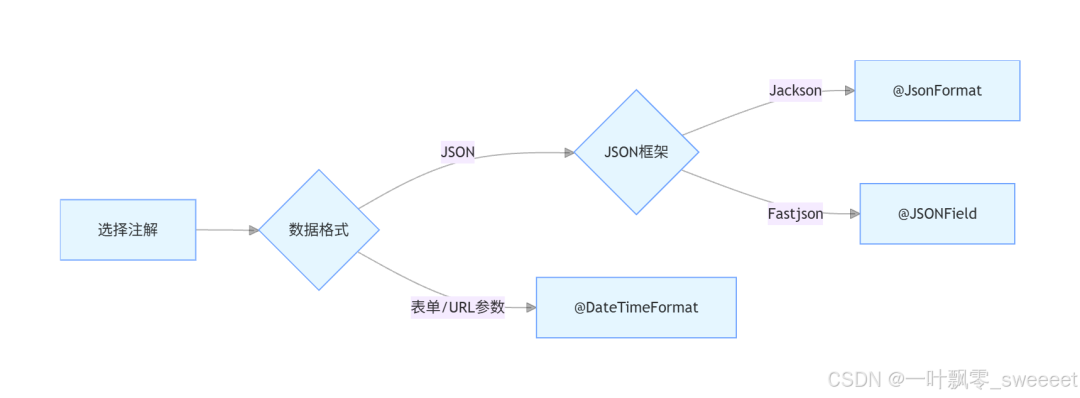
- @JsonFormat 适用场景:
- 使用 Jackson 作为 JSON 处理器的项目
- 需要在 JSON 序列化 / 反序列化时控制日期格式
- 需要设置时区的场景
- @DateTimeFormat 适用场景:
- 处理表单提交的数据(application/x-www-form-urlencoded)
- 处理 URL 参数中的日期时间字符串
- 需要使用 ISO 标准格式或风格化格式的场景
- @JSONField 适用场景:
- 使用 Fastjson 作为 JSON 处理器的项目
- 除了日期格式化外,还需要控制字段名称、序列化 / 反序列化开关、字段顺序等
- 国内项目,更习惯使用阿里系技术栈的场景
6.3 组合使用策略
在实际项目中,我们经常需要组合使用这些注解。例如,一个 DTO 可能既需要接收表单提交的数据,又需要接收 JSON 数据,这时就需要同时使用 @DateTimeFormat 和 @JsonFormat(或 @JSONField)。
下面是一个组合使用的示例:
package com.jam.example.dto;

import com.fasterxml.jackson.annotation.JsonFormat;
import com.alibaba.fastjson2.annotation.JSONField;
import io.swagger.v3.oas.annotations.media.Schema;
import lombok.Data;
import org.springframework.format.annotation.DateTimeFormat;
import java.time.LocalDateTime;

/**
 * 演示多个注解组合使用的DTO类
 *
 * @author 果酱
 */
@Data
@Schema(description = "多注解组合使用演示DTO")
public class CombinedAnnotationDTO {

    @Schema(description = "同时使用三个注解的日期时间字段")
    // 处理表单/URL参数
    @DateTimeFormat(pattern = "yyyy-MM-dd HH:mm:ss")
    // 处理Jackson的JSON序列化/反序列化
    @JsonFormat(pattern = "yyyy-MM-dd HH:mm:ss", timezone = "GMT+8")
    // 处理Fastjson的JSON序列化/反序列化
    @JSONField(format = "yyyy-MM-dd HH:mm:ss")
    private LocalDateTime dateTime;
}
这个 DTO 中的 dateTime 字段可以同时处理三种情况:
- 表单提交的 "yyyy-MM-dd HH:mm:ss" 格式字符串
- Jackson 处理的 JSON 中的 "yyyy-MM-dd HH:mm:ss" 格式字符串
- Fastjson 处理的 JSON 中的 "yyyy-MM-dd HH:mm:ss" 格式字符串
6.4 最佳实践建议
- 统一日期格式:在项目中统一日期时间格式,如 "yyyy-MM-dd HH:mm:ss",避免混乱。
- 明确 JSON 框架:一个项目中尽量只使用一种 JSON 框架(Jackson 或 Fastjson),避免混用导致的问题。
- 注意时区问题:在分布式系统中,始终显式指定时区(如 GMT+8),避免因服务器时区不同导致的时间偏差。
- 优先使用 Java 8 日期时间 API:LocalDateTime、LocalDate 等新 API 比旧的 Date、Calendar 更易用,且线程安全。
- 全局配置与局部注解结合:可以在框架层面进行全局的日期格式配置,对于特殊需求,再使用注解进行局部调整。
- 添加充分的测试:日期时间处理容易出错,需要添加充分的单元测试和集成测试。
七、全局配置方案
虽然使用注解可以灵活地控制日期时间的格式化,但在实际项目中,我们通常会采用全局配置的方式来统一处理日期时间格式,减少重复代码。下面介绍几种常用的全局配置方案。
7.1 Jackson 全局配置
package com.jam.example.config;

import com.fasterxml.jackson.databind.ObjectMapper;
import com.fasterxml.jackson.datatype.jsr310.deser.LocalDateDeserializer;
import com.fasterxml.jackson.datatype.jsr310.deser.LocalDateTimeDeserializer;
import com.fasterxml.jackson.datatype.jsr310.deser.LocalTimeDeserializer;
import com.fasterxml.jackson.datatype.jsr310.ser.LocalDateSerializer;
import com.fasterxml.jackson.datatype.jsr310.ser.LocalDateTimeSerializer;
import com.fasterxml.jackson.datatype.jsr310.ser.LocalTimeSerializer;
import org.springframework.context.annotation.Bean;
import org.springframework.context.annotation.Configuration;
import org.springframework.http.converter.json.Jackson2ObjectMapperBuilder;
import java.time.format.DateTimeFormatter;

/**
 * Jackson全局配置,统一日期时间格式化
 *
 * @author 果酱
 */
@Configuration
public class JacksonConfig {

    // 日期时间格式
    public static final String DATE_TIME_FORMAT = "yyyy-MM-dd HH:mm:ss";
    // 日期格式
    public static final String DATE_FORMAT = "yyyy-MM-dd";
    // 时间格式
    public static final String TIME_FORMAT = "HH:mm:ss";

    /**
     * 配置Jackson的ObjectMapper
     *
     * @param builder Jackson2ObjectMapperBuilder
     * @return 配置好的ObjectMapper
     */
    @Bean
    public ObjectMapper objectMapper(Jackson2ObjectMapperBuilder builder) {
        ObjectMapper objectMapper = builder.createXmlMapper(false).build();

        // 配置Java 8日期时间类型的序列化器和反序列化器
        // LocalDateTime
        objectMapper.registerModule(new com.fasterxml.jackson.datatype.jsr310.JavaTimeModule()
                .addSerializer(LocalDateTime.class, new LocalDateTimeSerializer(DateTimeFormatter.ofPattern(DATE_TIME_FORMAT)))
                .addDeserializer(LocalDateTime.class, new LocalDateTimeDeserializer(DateTimeFormatter.ofPattern(DATE_TIME_FORMAT)))
                // LocalDate
                .addSerializer(LocalDate.class, new LocalDateSerializer(DateTimeFormatter.ofPattern(DATE_FORMAT)))
                .addDeserializer(LocalDate.class, new LocalDateDeserializer(DateTimeFormatter.ofPattern(DATE_FORMAT)))
                // LocalTime
                .addSerializer(LocalTime.class, new LocalTimeSerializer(DateTimeFormatter.ofPattern(TIME_FORMAT)))
                .addDeserializer(LocalTime.class, new LocalTimeDeserializer(DateTimeFormatter.ofPattern(TIME_FORMAT))));

        return objectMapper;
    }
}
7.2 Fastjson 全局配置
如果使用 Fastjson,可以通过修改前面的 WebMvcConfig 来进行全局配置:
@Override
public void configureMessageConverters(List<HttpMessageConverter<?>> converters) {
    // 创建Fastjson消息转换器
    FastJsonHttpMessageConverter converter = new FastJsonHttpMessageConverter();

    // 配置Fastjson
    FastJsonConfig config = new FastJsonConfig();
    config.setCharset(StandardCharsets.UTF_8);

    // 设置全局日期格式化
    config.setDateFormat("yyyy-MM-dd HH:mm:ss");

    // 配置序列化特性
    config.setSerializerFeatures(
        SerializerFeature.PrettyFormat,
        SerializerFeature.WriteMapNullValue,
        SerializerFeature.WriteNullStringAsEmpty,
        SerializerFeature.WriteNullNumberAsZero,
        SerializerFeature.WriteNullListAsEmpty,
        SerializerFeature.WriteNullBooleanAsFalse,
        SerializerFeature.DisableCircularReferenceDetect
    );

    // 设置支持的媒体类型
    List<MediaType> mediaTypes = new ArrayList<>();
    mediaTypes.add(MediaType.APPLICATION_JSON);
    mediaTypes.add(MediaType.APPLICATION_JSON_UTF8);
    mediaTypes.add(MediaType.APPLICATION_FORM_URLENCODED);

    converter.setSupportedMediaTypes(mediaTypes);
    converter.setFastJsonConfig(config);

    // 将Fastjson消息转换器添加到列表最前面,使其优先使用
    converters.add(0, converter);
}
7.3 Spring DateTimeFormat 全局配置
可以通过注册 Formatter 来全局配置 @DateTimeFormat 的默认格式:
package com.jam.example.config;

import org.springframework.context.annotation.Bean;
import org.springframework.context.annotation.Configuration;
import org.springframework.format.FormatterRegistry;
import org.springframework.format.datetime.standard.DateTimeFormatterRegistrar;
import org.springframework.web.servlet.config.annotation.WebMvcConfigurer;
import java.time.format.DateTimeFormatter;

/**
 * Spring日期时间格式化全局配置
 *
 * @author 果酱
 */
@Configuration
public class DateTimeFormatConfig implements WebMvcConfigurer {

    /**
     * 注册全局日期时间格式化器
     *
     * @param registry FormatterRegistry
     */
    @Override
    public void addFormatters(FormatterRegistry registry) {
        DateTimeFormatterRegistrar registrar = new DateTimeFormatterRegistrar();

        // 配置LocalDateTime格式
        registrar.setDateTimeFormatter(DateTimeFormatter.ofPattern("yyyy-MM-dd HH:mm:ss"));
        // 配置LocalDate格式
        registrar.setDateFormatter(DateTimeFormatter.ofPattern("yyyy-MM-dd"));
        // 配置LocalTime格式
        registrar.setTimeFormatter(DateTimeFormatter.ofPattern("HH:mm:ss"));

        registrar.registerFormatters(registry);
    }
}
7.4 全局配置与注解的关系
全局配置和注解可以结合使用,它们的优先级关系是:注解配置 > 全局配置。
这意味着:
- 如果某个字段没有使用注解,则使用全局配置的格式
- 如果某个字段使用了注解,则使用注解中指定的格式,忽略全局配置
这种机制既保证了项目中日期格式的统一性(通过全局配置),又保留了灵活性(通过注解进行特殊处理)。
八、常见问题与解决方案
在使用这三个注解的过程中,开发者经常会遇到一些问题。下面列举一些常见问题及解决方案。
8.1 日期时间转换异常
问题描述:前端传递的日期时间字符串无法被正确解析,抛出转换异常。
可能原因:
- 前端传递的格式与后端注解中指定的格式不匹配
- 时区设置不正确
- 缺少必要的依赖(如 Jackson 处理 Java 8 日期的依赖)
- 使用了错误的注解(如用 @DateTimeFormat 处理 JSON 数据)
解决方案:
- 检查前后端日期格式是否一致
- 显式指定时区(如 GMT+8)
- 确保引入了正确的依赖(如 jackson-datatype-jsr310)
- 根据数据格式选择正确的注解(JSON 用 @JsonFormat 或 @JSONField,表单用 @DateTimeFormat)
8.2 时间相差 8 小时
问题描述:解析后的时间比实际时间少 8 小时,或返回给前端的时间比实际时间少 8 小时。
可能原因:
- 后端使用了 UTC 时区,而前端期望的是北京时间(GMT+8)
- 数据库存储的是 UTC 时间,取出时没有转换为本地时间
解决方案:
- 在 @JsonFormat 或 @JSONField 中显式设置 timezone = "GMT+8"
- 统一系统中的时区设置,避免混合使用不同时区
8.3 注解不生效
问题描述:添加了注解,但日期格式没有按照预期进行转换。
可能原因:
- 注解与使用的框架不匹配(如用 @JsonFormat 但项目中使用的是 Fastjson)
- 全局配置覆盖了注解配置(虽然这种情况很少见)
- 注解添加的位置不正确(如添加在字段的 getter 方法上,但框架默认扫描字段)
- 依赖版本不兼容
解决方案:
- 确保注解与 JSON 框架匹配
- 检查全局配置是否正确,注解配置应优先于全局配置
- 将注解添加在字段上,或确保框架支持在方法上使用注解
- 检查依赖版本,确保兼容性
8.4 Java 8 日期类型序列化问题
问题描述:使用 LocalDateTime 等 Java 8 日期类型时,序列化后得到的是一个包含年月日等字段的对象,而不是期望的字符串。
可能原因:
- 缺少处理 Java 8 日期类型的依赖
- 没有正确配置 JSON 框架以支持 Java 8 日期类型
解决方案:
- 引入 jackson-datatype-jsr310(Jackson)
- 确保 Fastjson 版本支持 Java 8 日期类型(Fastjson 2.x 默认支持)
- 配置 JSON 框架,指定 Java 8 日期类型的序列化格式
九、总结与展望
9.1 核心知识点回顾
本文详细介绍了 @JsonFormat、@DateTimeFormat 和 @JSONField 三个注解的区别与使用方法,核心知识点包括:
- 注解来源@JsonFormat 来自 Jackson,@DateTimeFormat 来自 Spring,@JSONField 来自 Fastjson。
- 主要用途@JsonFormat 和 @JSONField 用于 JSON 的序列化和反序列化,@DateTimeFormat 用于表单和 URL 参数的解析。
- 格式控制三个注解都支持自定义日期时间格式,但各有不同的属性(pattern、format 等)。
- 适用场景根据数据格式(JSON 或表单)和使用的框架选择合适的注解。
- 全局配置可以通过全局配置统一日期格式,注解配置可以覆盖全局配置。
9.2 实际项目中的应用建议
在实际项目中,建议按照以下步骤处理日期时间:
- 选择合适的 JSON 框架根据项目需求和团队习惯选择 Jackson 或 Fastjson,并在整个项目中保持一致。
- 统一日期格式在项目初期就确定统一的日期时间格式,如 "yyyy-MM-dd HH:mm:ss"。
- 配置全局格式化通过全局配置设置默认的日期时间格式,减少重复代码。
- 特殊情况使用注解对于需要特殊格式的字段,使用相应的注解进行局部配置。
- 充分测试编写单元测试和集成测试,确保日期时间处理在各种场景下都能正常工作。
本文参与 腾讯云自媒体同步曝光计划,分享自微信公众号。
原始发表:2025-09-11,如有侵权请联系 cloudcommunity@tencent.com 删除
目录
腾讯云开发者

Copyright © 2013 - 2026 Tencent Cloud. All Rights Reserved. 腾讯云 版权所有
深圳市腾讯计算机系统有限公司 ICP备案/许可证号:粤B2-20090059  粤公网安备44030502008569号
腾讯云计算(北京)有限责任公司 京ICP证150476号 | 京ICP备11018762号