数据库迁移零停机:从理论到实战的完美演进方案

数据库迁移零停机:从理论到实战的完美演进方案

果酱带你啃java
发布于 2026-04-14 13:14:45
发布于 2026-04-14 13:14:45
在当今的职业生涯中,我经历过不下百次次数据库迁移。最惊险的一次是为某支付系统迁移 5000 万条交易记录,要求是 "零停机、数据零丢失"。当时团队连续 72 小时没合眼,最终在业务峰值来临前 30 分钟完成切换。那次经历让我深刻体会到:数据库迁移从来不是简单的 "复制粘贴",而是一场涉及业务、技术、运维的系统性工程。
本文将带你深入数据库零停机迁移的方方面面,从底层原理到实战落地,既有理论高度,又有可直接复用的代码。无论你是初涉迁移的开发者,还是需要应对复杂场景的架构师,都能从中找到适合自己的知识和工具。
一、为什么需要零停机迁移?
在传统的 IT 架构中,数据库迁移往往意味着 "停机维护"。运维团队会提前发布公告:"本周六凌晨 2 点至 6 点进行系统升级,请用户避开此时间段使用"。但在今天的业务环境下,这种方式越来越不可接受。
1.1 业务连续性的重要性
根据 Gartner 的研究报告,每小时停机成本平均为 30 万美元,金融行业更是高达每分钟 5000 美元。对于电商平台,一次双 11 期间的停机可能导致数千万的直接损失;对于医疗系统,停机可能危及患者生命;对于支付系统,哪怕几分钟的中断都可能引发连锁反应。
零停机迁移的核心价值在于:在用户无感知的情况下完成数据迁移,确保业务连续性。这不仅是技术挑战,更是企业竞争力的体现。
1.2 常见的迁移场景
需要进行数据库迁移的场景主要包括:
- 存储升级从机械硬盘 (HDD) 迁移到固态硬盘 (SSD),提升 IO 性能
- 架构调整从单体数据库拆分到分布式架构,如分库分表
- 数据库升级从 MySQL 5.7 迁移到 MySQL 8.0,获取新特性
- 云迁移从自建机房迁移到云数据库服务 (如 AWS RDS、阿里云 RDS)
- 数据库替换从 MySQL 迁移到 PostgreSQL,或从关系型数据库迁移到 NoSQL
- 容量扩展原有数据库服务器存储空间或性能不足,需要迁移到更高配置的服务器
无论哪种场景,零停机都是衡量迁移方案优劣的关键指标。
二、零停机迁移的核心原理
零停机迁移的本质是在数据复制的同时保证业务的正常读写,并在适当的时机完成平滑切换。其核心原理可以用 "双写 + 同步 + 校验 + 切换" 四个步骤来概括。
2.1 迁移架构模型
零停机迁移的通用架构如下:
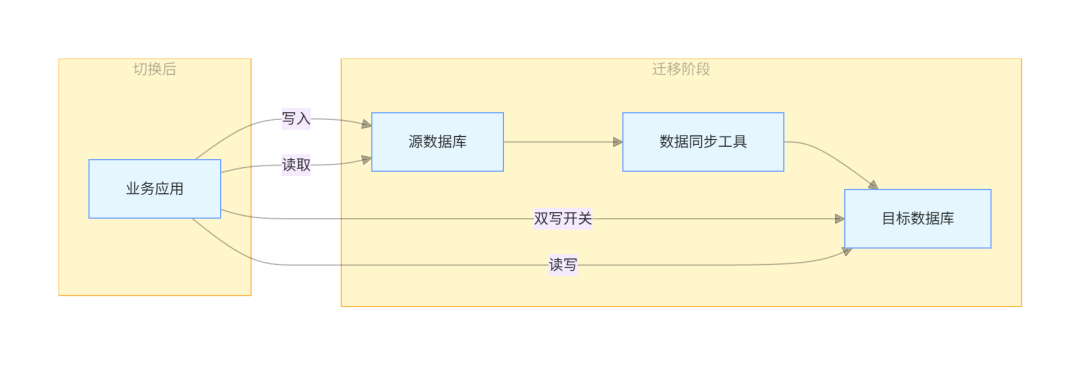
这个架构包含三个关键组件:
- 源数据库迁移前的生产数据库
- 目标数据库迁移后的新数据库
- 数据同步工具负责在源数据库和目标数据库之间同步数据
2.2 数据一致性模型
在零停机迁移中,我们需要保证最终一致性。这意味着在迁移过程中,源数据库和目标数据库可能存在短暂的不一致,但最终会达到一致状态。
根据 CAP 定理,在分布式系统中,一致性 (Consistency)、可用性 (Availability) 和分区容错性 (Partition tolerance) 三者不可兼得。在数据库迁移场景中,我们通常优先保证可用性和分区容错性,牺牲短暂的强一致性,追求最终一致性。
三、零停机迁移的完整流程
零停机迁移是一个系统性工程,需要严格按照流程执行。我将这个流程总结为 "五阶段迁移法",每个阶段都有明确的目标和交付物。
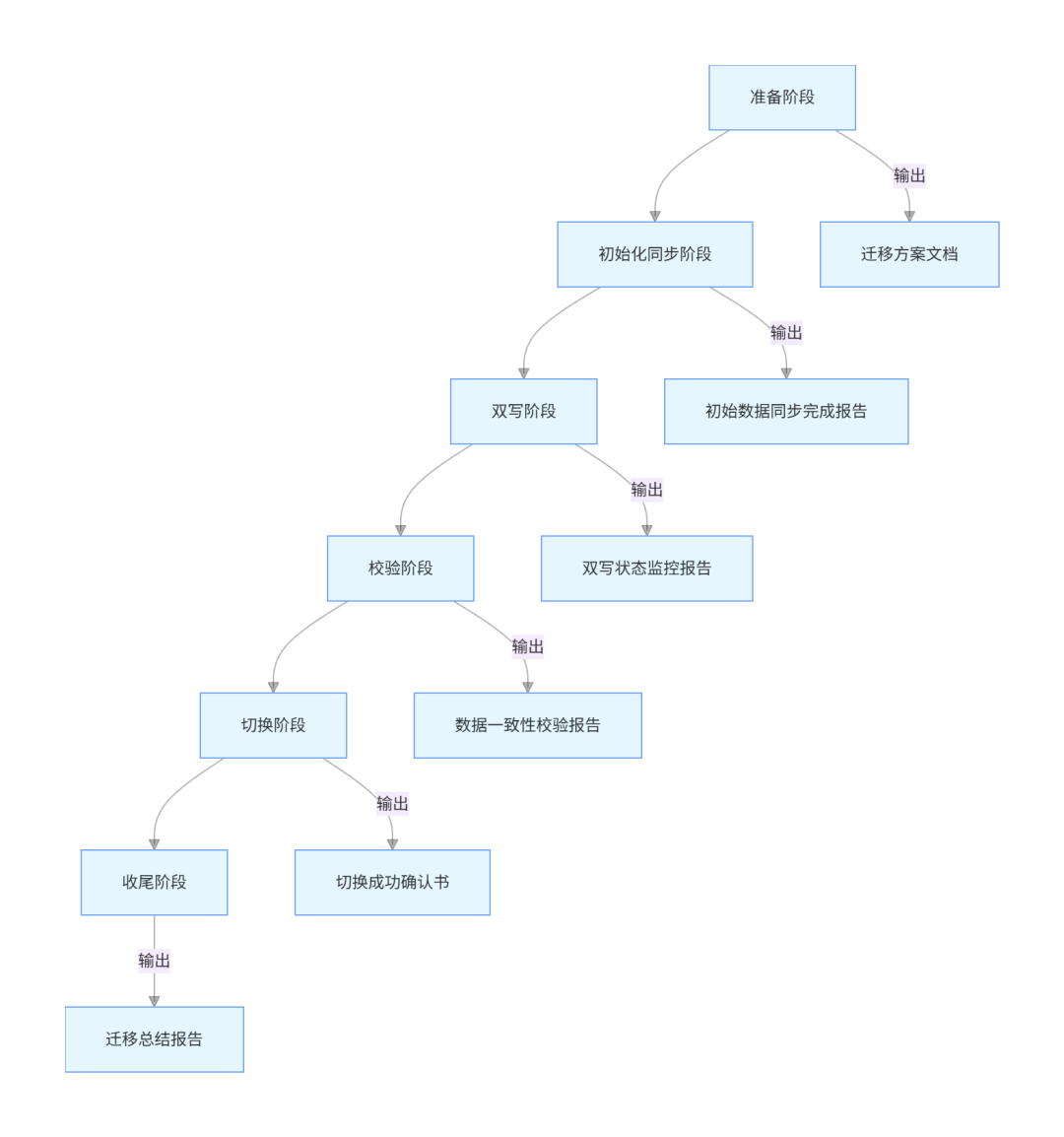
3.1 准备阶段
准备阶段是整个迁移过程的基础,直接影响后续所有步骤的成败。这个阶段需要完成以下工作:
3.1.1 环境准备
- 目标数据库环境搭建:根据业务需求配置合适的服务器规格、存储容量、网络带宽等。对于 MySQL,建议使用 8.0.34 以上版本,该版本包含了多项性能优化和稳定性改进。
- 迁移工具选型:根据源数据库和目标数据库的类型选择合适的同步工具:
- 同构数据库 (如 MySQL 到 MySQL):可使用 MySQL 原生的 replication
- 异构数据库 (如 MySQL 到 PostgreSQL):可使用 Debezium、AWS DMS 等工具
- 大数据量迁移:可考虑使用 MyDumper/MyLoader 等并行迁移工具
- 监控系统部署:部署对源数据库、目标数据库和同步工具的监控,重点监控:
- 数据库连接数、QPS、TPS
- 同步延迟 (延迟时间应控制在秒级)
- 服务器 CPU、内存、磁盘 IO 使用率
3.1.2 方案设计
迁移方案文档应包含以下核心内容:
- 迁移范围:明确需要迁移的数据库、表、存储过程等
- 时间计划:各阶段的起止时间、关键里程碑
- 回滚方案:当迁移失败时的回滚步骤和触发条件
- 责任分工:明确每个角色的职责 (如 DBA 负责数据库操作,开发负责应用改造)
- 风险评估:可能遇到的风险及应对措施
3.1.3 应用改造
为了支持双写和读写切换,需要对应用进行改造:
- 引入配置中心:用于动态开关双写功能和切换读写数据源。推荐使用 Nacos 2.3.2,它支持动态配置更新和服务发现。
- 实现数据源路由:使用 Spring 的 AbstractRoutingDataSource 实现数据源动态切换。
- 添加双写逻辑:在写入操作时同时写入源数据库和目标数据库。
3.2 初始化同步阶段
初始化同步的目标是将源数据库的历史数据完整复制到目标数据库,为后续的增量同步奠定基础。
3.2.1 数据导出
对于 MySQL 数据库,推荐使用 MyDumper 0.15.1,它支持并行导出,速度比 mysqldump 快得多:
# 导出指定数据库,排除临时表和视图
mydumper --host=source-db --user=backup --password=xxx --databases=business_db \
  --exclude-tables-regex='.*_temp|.*_view' --threads=8 --compress --outputdir=/backup/initial

# 查看导出文件
ls -l /backup/initial
MyDumper 的优势在于:
- 多线程导出,速度快
- 支持压缩,节省磁盘空间
- 可以排除不需要的表
- 生成的元数据文件便于导入
3.2.2 数据导入
使用 MyLoader 导入数据到目标数据库:
# 导入数据到目标数据库
myloader --host=target-db --user=backup --password=xxx --database=business_db \
  --threads=8 --compress --directory=/backup/initial --overwrite-tables

# 验证导入记录数
for table in $(mysql -h source-db -u backup -pxxx -N -e "use business_db; show tables;"); do
  src_count=$(mysql -h source-db -u backup -pxxx -N -e "use business_db; select count(*) from $table;")
  dst_count=$(mysql -h target-db -u backup -pxxx -N -e "use business_db; select count(*) from $table;")
  echo "Table $table: source=$src_count, target=$dst_count"
  if [ "$src_count" -ne "$dst_count" ]; then
    echo "Error: $table count mismatch!"
    exit 1
  fi
done
导入完成后,必须验证每个表的记录数是否与源数据库一致,这是保证初始化数据正确性的关键步骤。
3.3 双写阶段
双写阶段是零停机迁移的核心,在此阶段应用会同时向源数据库和目标数据库写入数据,并通过同步工具保证两边数据一致。
3.3.1 增量同步配置
以 Debezium 2.4.1 为例,配置 MySQL 到 MySQL 的增量同步:
{
  "name": "business-connector",
  "config": {
    "connector.class": "io.debezium.connector.mysql.MySqlConnector",
    "database.hostname": "source-db",
    "database.port": "3306",
    "database.user": "repl_user",
    "database.password": "xxx",
    "database.server.id": "184054",
    "database.server.name": "business-server",
    "database.include.list": "business_db",
    "table.include.list": "business_db.*",
    "database.history.kafka.bootstrap.servers": "kafka:9092",
    "database.history.kafka.topic": "schema-changes.business",
    "transforms": "unwrap",
    "transforms.unwrap.type": "io.debezium.transforms.ExtractNewRecordState",
    "transforms.unwrap.drop.tombstones": "false"
  }
}
启动 Debezium 连接器:
curl -i -X POST -H "Accept: application/json" -H "Content-Type: application/json" \
  http://debezium-connect:8083/connectors/ -d @connector-config.json
Debezium 基于 MySQL 的 binlog 实现增量同步,支持 CDC (Change Data Capture),能够捕获 INSERT、UPDATE、DELETE 等所有数据变更。
3.3.2 应用双写实现
使用 Spring Boot 实现双写功能,需要引入以下依赖 (pom.xml):
<dependencies>
    <!-- Spring Boot -->
    <dependency>
        <groupId>org.springframework.boot</groupId>
        <artifactId>spring-boot-starter-web</artifactId>
        <version>3.2.0</version>
    </dependency>
    <dependency>
        <groupId>org.springframework.boot</groupId>
        <artifactId>spring-boot-starter-jdbc</artifactId>
        <version>3.2.0</version>
    </dependency>
    <dependency>
        <groupId>org.springframework.boot</groupId>
        <artifactId>spring-boot-starter-data-jpa</artifactId>
        <version>3.2.0</version>
    </dependency>

    <!-- MyBatis-Plus -->
    <dependency>
        <groupId>com.baomidou</groupId>
        <artifactId>mybatis-plus-boot-starter</artifactId>
        <version>3.5.5</version>
    </dependency>

    <!-- 数据库驱动 -->
    <dependency>
        <groupId>com.mysql</groupId>
        <artifactId>mysql-connector-j</artifactId>
        <version>8.2.0</version>
        <scope>runtime</scope>
    </dependency>

    <!-- 配置中心 -->
    <dependency>
        <groupId>com.alibaba.cloud</groupId>
        <artifactId>spring-cloud-starter-alibaba-nacos-config</artifactId>
        <version>2022.0.0.0-RC2</version>
    </dependency>

    <!-- Lombok -->
    <dependency>
        <groupId>org.projectlombok</groupId>
        <artifactId>lombok</artifactId>
        <version>1.18.30</version>
        <scope>provided</scope>
    </dependency>

    <!-- 工具类 -->
    <dependency>
        <groupId>org.apache.commons</groupId>
        <artifactId>commons-lang3</artifactId>
        <version>3.14.0</version>
    </dependency>
    <dependency>
        <groupId>org.springframework</groupId>
        <artifactId>spring-core</artifactId>
        <version>6.1.2</version>
    </dependency>

    <!-- Swagger3 -->
    <dependency>
        <groupId>org.springdoc</groupId>
        <artifactId>springdoc-openapi-starter-webmvc-ui</artifactId>
        <version>2.1.0</version>
    </dependency>
</dependencies>
配置双数据源:
@Configuration
public class DataSourceConfig {

    @Bean
    @ConfigurationProperties("spring.datasource.source")
    public DataSourceProperties sourceDataSourceProperties() {
        return new DataSourceProperties();
    }

    @Bean
    @ConfigurationProperties("spring.datasource.target")
    public DataSourceProperties targetDataSourceProperties() {
        return new DataSourceProperties();
    }

    @Bean
    public DataSource sourceDataSource() {
        return sourceDataSourceProperties()
                .initializeDataSourceBuilder()
                .type(HikariDataSource.class)
                .build();
    }

    @Bean
    public DataSource targetDataSource() {
        return targetDataSourceProperties()
                .initializeDataSourceBuilder()
                .type(HikariDataSource.class)
                .build();
    }

    @Bean
    public DataSource routingDataSource() {
        Map<Object, Object> dataSources = new HashMap<>(2);
        dataSources.put("source", sourceDataSource());
        dataSources.put("target", targetDataSource());

        DynamicDataSource routingDataSource = new DynamicDataSource();
        routingDataSource.setTargetDataSources(dataSources);
        routingDataSource.setDefaultTargetDataSource(sourceDataSource());

        return routingDataSource;
    }

    @Bean
    public PlatformTransactionManager transactionManager() {
        return new DataSourceTransactionManager(routingDataSource());
    }
}
实现动态数据源路由:
public class DynamicDataSource extends AbstractRoutingDataSource {

    private static final ThreadLocal<String> CURRENT_DATASOURCE = new ThreadLocal<>();

    /**
     * 设置当前数据源
     * @param dataSource 数据源名称,"source"或"target"
     */
    public static void setDataSource(String dataSource) {
        CURRENT_DATASOURCE.set(dataSource);
    }

    /**
     * 清除当前数据源设置
     */
    public static void clearDataSource() {
        CURRENT_DATASOURCE.remove();
    }

    @Override
    protected Object determineCurrentLookupKey() {
        return CURRENT_DATASOURCE.get();
    }
}
实现双写切面:
@Aspect
@Component
@Slf4j
public class DualWriteAspect {

    @Value("${dual-write.enabled:false}")
    private boolean dualWriteEnabled;

    /**
     * 对所有写操作方法实施双写
     */
    @Around("@annotation(dualWrite)")
    public Object doDualWrite(ProceedingJoinPoint joinPoint, DualWrite dualWrite) throws Throwable {
        if (!dualWriteEnabled) {
            // 双写未启用,直接执行原方法
            return joinPoint.proceed();
        }

        try {
            // 首先写入源数据库
            DynamicDataSource.setDataSource("source");
            Object result = joinPoint.proceed();

            // 再写入目标数据库
            DynamicDataSource.setDataSource("target");
            joinPoint.proceed();

            return result;
        } catch (Exception e) {
            log.error("双写操作失败", e);
            // 根据业务需求决定是否抛出异常
            throw e;
        } finally {
            DynamicDataSource.clearDataSource();
        }
    }
}
定义双写注解:
@Target(ElementType.METHOD)
@Retention(RetentionPolicy.RUNTIME)
public @interface DualWrite {
}
在 Service 层使用双写功能:
@Service
@Slf4j
public class OrderServiceImpl implements OrderService {

    private final OrderMapper orderMapper;

    public OrderServiceImpl(OrderMapper orderMapper) {
        this.orderMapper = orderMapper;
    }

    @Override
    @DualWrite
    @Transactional(rollbackFor = Exception.class)
    public boolean createOrder(OrderDTO orderDTO) {
        Objects.requireNonNull(orderDTO, "订单信息不能为空");
        StringUtils.hasText(orderDTO.getUserId(), "用户ID不能为空");

        OrderEntity orderEntity = new OrderEntity();
        BeanUtils.copyProperties(orderDTO, orderEntity);
        orderEntity.setOrderStatus(OrderStatus.PENDING.getValue());
        orderEntity.setCreateTime(LocalDateTime.now());
        orderEntity.setUpdateTime(LocalDateTime.now());

        return orderMapper.insert(orderEntity) > 0;
    }

    @Override
    @DualWrite
    @Transactional(rollbackFor = Exception.class)
    public boolean updateOrderStatus(Long orderId, Integer status) {
        Objects.requireNonNull(orderId, "订单ID不能为空");
        Objects.requireNonNull(status, "订单状态不能为空");

        OrderEntity orderEntity = new OrderEntity();
        orderEntity.setId(orderId);
        orderEntity.setOrderStatus(status);
        orderEntity.setUpdateTime(LocalDateTime.now());

        return orderMapper.updateById(orderEntity) > 0;
    }
}
添加 Swagger3 接口文档:
@RestController
@RequestMapping("/api/v1/orders")
@Tag(name = "订单管理", description = "订单CRUD接口")
@Slf4j
public class OrderController {

    private final OrderService orderService;

    public OrderController(OrderService orderService) {
        this.orderService = orderService;
    }

    @PostMapping
    @Operation(summary = "创建订单", description = "创建新订单并返回订单ID")
    @ApiResponses({
        @ApiResponse(responseCode = "200", description = "创建成功"),
        @ApiResponse(responseCode = "400", description = "参数错误")
    })
    public Result<Long> createOrder(@RequestBody @Valid OrderDTO orderDTO) {
        boolean success = orderService.createOrder(orderDTO);
        if (success) {
            return Result.success(orderDTO.getId());
        }
        return Result.fail("创建订单失败");
    }

    @PutMapping("/{orderId}/status")
    @Operation(summary = "更新订单状态", description = "根据订单ID更新订单状态")
    @ApiResponses({
        @ApiResponse(responseCode = "200", description = "更新成功"),
        @ApiResponse(responseCode = "404", description = "订单不存在")
    })
    public Result<Boolean> updateOrderStatus(
            @PathVariable @Parameter(description = "订单ID", required = true) Long orderId,
            @RequestParam @Parameter(description = "订单状态", required = true) Integer status) {
        boolean success = orderService.updateOrderStatus(orderId, status);
        return Result.success(success);
    }
}
3.3.3 双写一致性保障
双写过程中可能出现的问题及解决方案:
- 源数据库写入成功,目标数据库写入失败
- 解决方案:使用本地消息表记录写入日志,通过定时任务重试失败的写入
@Component
@Slf4j
public class DualWriteRetryTask {

    private final DualWriteLogMapper dualWriteLogMapper;
    private final OrderMapper targetOrderMapper;

    public DualWriteRetryTask(DualWriteLogMapper dualWriteLogMapper, @Qualifier("targetOrderMapper") OrderMapper targetOrderMapper) {
        this.dualWriteLogMapper = dualWriteLogMapper;
        this.targetOrderMapper = targetOrderMapper;
    }

    @Scheduled(fixedRate = 60000) // 每分钟执行一次
    public void retryFailedWrites() {
        log.info("开始执行双写重试任务");

        // 查询30分钟内失败的记录,最多重试5次
        List<DualWriteLogEntity> failedLogs = dualWriteLogMapper.selectList(
            new LambdaQueryWrapper<DualWriteLogEntity>()
                .eq(DualWriteLogEntity::getStatus, DualWriteStatus.FAILED.getValue())
                .lt(DualWriteLogEntity::getCreateTime, LocalDateTime.now().minusMinutes(30))
                .lt(DualWriteLogEntity::getRetryCount, 5)
        );

        if (CollectionUtils.isEmpty(failedLogs)) {
            log.info("没有需要重试的双写记录");
            return;
        }

        log.info("发现{}条需要重试的双写记录", failedLogs.size());

        for (DualWriteLogEntity logEntity : failedLogs) {
            try {
                // 根据业务类型执行相应的重试逻辑
                if ("ORDER_CREATE".equals(logEntity.getBusinessType())) {
                    OrderEntity orderEntity = JSON.parseObject(logEntity.getBusinessData(), OrderEntity.class);
                    targetOrderMapper.insert(orderEntity);
                } else if ("ORDER_UPDATE".equals(logEntity.getBusinessType())) {
                    OrderEntity orderEntity = JSON.parseObject(logEntity.getBusinessData(), OrderEntity.class);
                    targetOrderMapper.updateById(orderEntity);
                }

                // 更新日志状态为成功
                logEntity.setStatus(DualWriteStatus.SUCCESS.getValue());
                logEntity.setRetryCount(logEntity.getRetryCount() + 1);
                logEntity.setUpdateTime(LocalDateTime.now());
                dualWriteLogMapper.updateById(logEntity);

                log.info("双写重试成功,ID:{}", logEntity.getId());
            } catch (Exception e) {
                log.error("双写重试失败,ID:{}", logEntity.getId(), e);

                // 更新重试次数
                logEntity.setRetryCount(logEntity.getRetryCount() + 1);
                logEntity.setUpdateTime(LocalDateTime.now());
                logEntity.setErrorMsg(StringUtils.substring(e.getMessage(), 0, 500));
                dualWriteLogMapper.updateById(logEntity);
            }
        }
    }
}
- 双写性能影响
- 解决方案:使用异步双写,将目标数据库写入操作放入线程池执行
@Configuration
public class AsyncConfig {

    @Bean
    public Executor dualWriteExecutor() {
        ThreadPoolTaskExecutor executor = new ThreadPoolTaskExecutor();
        // 核心线程数
        executor.setCorePoolSize(5);
        // 最大线程数
        executor.setMaxPoolSize(10);
        // 队列容量
        executor.setQueueCapacity(1000);
        // 线程名称前缀
        executor.setThreadNamePrefix("dual-write-");
        // 拒绝策略
        executor.setRejectedExecutionHandler(new ThreadPoolExecutor.CallerRunsPolicy());
        // 初始化
        executor.initialize();
        return executor;
    }
}
修改双写切面为异步执行:
@Aspect
@Component
@Slf4j
public class AsyncDualWriteAspect {

    @Value("${dual-write.enabled:false}")
    private boolean dualWriteEnabled;

    private final Executor dualWriteExecutor;

    public AsyncDualWriteAspect(@Qualifier("dualWriteExecutor") Executor dualWriteExecutor) {
        this.dualWriteExecutor = dualWriteExecutor;
    }

    @Around("@annotation(dualWrite)")
    public Object doAsyncDualWrite(ProceedingJoinPoint joinPoint, DualWrite dualWrite) throws Throwable {
        if (!dualWriteEnabled) {
            return joinPoint.proceed();
        }

        // 先写入源数据库
        DynamicDataSource.setDataSource("source");
        Object result = joinPoint.proceed();

        // 异步写入目标数据库
        dualWriteExecutor.execute(() -> {
            try {
                DynamicDataSource.setDataSource("target");
                joinPoint.proceed();
                log.info("异步双写成功");
            } catch (Throwable e) {
                log.error("异步双写失败", e);
                // 记录失败日志,等待重试
                // ...
            } finally {
                DynamicDataSource.clearDataSource();
            }
        });

        return result;
    }
}
3.4 校验阶段
校验阶段的目标是确保源数据库和目标数据库的数据完全一致,为后续的切换做准备。
3.4.1 数据量校验
编写工具类统计每个表的记录数并比较:
@Component
@Slf4j
public class DataCountValidator {

    @Autowired
    @Qualifier("sourceJdbcTemplate")
    private JdbcTemplate sourceJdbcTemplate;

    @Autowired
    @Qualifier("targetJdbcTemplate")
    private JdbcTemplate targetJdbcTemplate;

    /**
     * 校验所有表的记录数是否一致
     * @param databaseName 数据库名称
     * @return 校验结果
     */
    public Map<String, Boolean> validateTableCounts(String databaseName) {
        Objects.requireNonNull(databaseName, "数据库名称不能为空");
        log.info("开始校验数据库[{}]的表记录数", databaseName);

        Map<String, Boolean> result = new HashMap<>();

        // 获取所有表名
        List<String> tables = sourceJdbcTemplate.queryForList(
            "SELECT table_name FROM information_schema.tables WHERE table_schema = ?",
            String.class,
            databaseName
        );

        if (CollectionUtils.isEmpty(tables)) {
            log.warn("数据库[{}]中没有找到表", databaseName);
            return result;
        }

        for (String table : tables) {
            try {
                // 查询源数据库表记录数
                Long sourceCount = sourceJdbcTemplate.queryForObject(
                    "SELECT COUNT(*) FROM " + table,
                    Long.class
                );

                // 查询目标数据库表记录数
                Long targetCount = targetJdbcTemplate.queryForObject(
                    "SELECT COUNT(*) FROM " + table,
                    Long.class
                );

                // 比较记录数
                boolean isMatch = Objects.equals(sourceCount, targetCount);
                result.put(table, isMatch);

                if (!isMatch) {
                    log.error("表[{}]记录数不匹配,源数据库:{},目标数据库:{}",
                        table, sourceCount, targetCount);
                } else {
                    log.debug("表[{}]记录数匹配:{}", table, sourceCount);
                }
            } catch (Exception e) {
                log.error("校验表[{}]记录数失败", table, e);
                result.put(table, false);
            }
        }

        return result;
    }
}
3.4.2 数据内容校验
对于核心表,需要校验每条记录的内容是否一致。由于全量校验可能影响性能,建议采用抽样校验:
@Component
@Slf4j
public class DataContentValidator {

    @Autowired
    @Qualifier("sourceJdbcTemplate")
    private JdbcTemplate sourceJdbcTemplate;

    @Autowired
    @Qualifier("targetJdbcTemplate")
    private JdbcTemplate targetJdbcTemplate;

    /**
     * 抽样校验表数据内容
     * @param tableName 表名
     * @param primaryKey 主键字段名
     * @param sampleSize 抽样数量
     * @return 校验结果
     */
    public Map<Long, Boolean> validateTableContent(String tableName, String primaryKey, int sampleSize) {
        StringUtils.hasText(tableName, "表名不能为空");
        StringUtils.hasText(primaryKey, "主键字段名不能为空");
        if (sampleSize <= 0) {
            throw new IllegalArgumentException("抽样数量必须大于0");
        }

        log.info("开始抽样校验表[{}]的数据内容,抽样数量:{}", tableName, sampleSize);

        Map<Long, Boolean> result = new HashMap<>();

        try {
            // 获取随机抽样的主键列表
            List<Long> primaryKeys = sourceJdbcTemplate.queryForList(
                "SELECT " + primaryKey + " FROM " + tableName + " ORDER BY RAND() LIMIT ?",
                Long.class,
                sampleSize
            );

            if (CollectionUtils.isEmpty(primaryKeys)) {
                log.warn("表[{}]中没有找到数据", tableName);
                return result;
            }

            // 获取表的所有字段
            List<String> columns = sourceJdbcTemplate.queryForList(
                "SELECT column_name FROM information_schema.columns " +
                "WHERE table_schema = DATABASE() AND table_name = ? " +
                "ORDER BY ordinal_position",
                String.class,
                tableName
            );

            String columnList = String.join(", ", columns);

            for (Long pk : primaryKeys) {
                // 查询源数据库记录
                Map<String, Object> sourceRecord = sourceJdbcTemplate.queryForMap(
                    "SELECT " + columnList + " FROM " + tableName + " WHERE " + primaryKey + " = ?",
                    pk
                );

                // 查询目标数据库记录
                Map<String, Object> targetRecord = targetJdbcTemplate.queryForMap(
                    "SELECT " + columnList + " FROM " + tableName + " WHERE " + primaryKey + " = ?",
                    pk
                );

                // 比较记录内容
                boolean isMatch = compareRecords(sourceRecord, targetRecord);
                result.put(pk, isMatch);

                if (!isMatch) {
                    log.error("记录[{}={}]内容不匹配,源数据库:{},目标数据库:{}",
                        primaryKey, pk, sourceRecord, targetRecord);
                } else {
                    log.debug("记录[{}={}]内容匹配", primaryKey, pk);
                }
            }
        } catch (Exception e) {
            log.error("校验表[{}]数据内容失败", tableName, e);
        }

        return result;
    }

    /**
     * 比较两条记录是否一致
     */
    private boolean compareRecords(Map<String, Object> source, Map<String, Object> target) {
        // 检查字段数量是否一致
        if (source.size() != target.size()) {
            return false;
        }

        // 逐个字段比较
        for (Map.Entry<String, Object> entry : source.entrySet()) {
            String column = entry.getKey();
            Object sourceValue = entry.getValue();
            Object targetValue = target.get(column);

            // 处理null值情况
            if (sourceValue == null && targetValue == null) {
                continue;
            }
            if (sourceValue == null || targetValue == null) {
                return false;
            }

            // 处理日期类型比较(避免因格式不同导致的不匹配)
            if (sourceValue instanceof Date && targetValue instanceof Date) {
                if (!sourceValue.equals(targetValue)) {
                    return false;
                }
                continue;
            }

            // 处理其他类型比较
            if (!sourceValue.equals(targetValue)) {
                return false;
            }
        }

        return true;
    }
}
3.4.3 校验报告生成
将校验结果生成报告,便于查看和分析:
@Component
@Slf4j
public class ValidationReportGenerator {

    /**
     * 生成HTML格式的校验报告
     */
    public String generateHtmlReport(String databaseName,
                                   Map<String, Boolean> countValidationResult,
                                   Map<String, Map<Long, Boolean>> contentValidationResults) {
        StringBuilder html = new StringBuilder();

        html.append("<!DOCTYPE html>\n");
        html.append("<html>\n");
        html.append("<head>\n");
        html.append("<meta charset=\"UTF-8\">\n");
        html.append("<title>数据库迁移校验报告 - ").append(databaseName).append("</title>\n");
        html.append("<style>\n");
        html.append("body { font-family: Arial, sans-serif; margin: 20px; }\n");
        html.append("h1 { color: #2c3e50; }\n");
        html.append("h2 { color: #34495e; margin-top: 30px; }\n");
        html.append(".summary { background-color: #f8f9fa; padding: 15px; border-radius: 5px; margin-bottom: 20px; }\n");
        html.append(".success { color: #27ae60; }\n");
        html.append(".failure { color: #e74c3c; }\n");
        html.append("table { width: 100%; border-collapse: collapse; margin-bottom: 20px; }\n");
        html.append("th, td { border: 1px solid #ddd; padding: 8px; text-align: left; }\n");
        html.append("th { background-color: #f2f2f2; }\n");
        html.append("</style>\n");
        html.append("</head>\n");
        html.append("<body>\n");

        // 报告标题
        html.append("<h1>数据库迁移校验报告</h1>\n");
        html.append("<p>数据库名称: ").append(databaseName).append("</p>\n");
        html.append("<p>生成时间: ").append(LocalDateTime.now().format(DateTimeFormatter.ofPattern("yyyy-MM-dd HH:mm:ss"))).append("</p>\n");

        // 摘要信息
        html.append("<div class=\"summary\">\n");
        html.append("<h2>摘要</h2>\n");

        long totalTables = countValidationResult.size();
        long countSuccess = countValidationResult.values().stream().filter(Boolean::booleanValue).count();
        long countFailure = totalTables - countSuccess;

        html.append("<p>总表数: ").append(totalTables).append("</p>\n");
        html.append("<p>记录数匹配: <span class=\"success\">").append(countSuccess).append("</span></p>\n");
        html.append("<p>记录数不匹配: <span class=\"failure\">").append(countFailure).append("</span></p>\n");

        long contentTotal = 0;
        long contentSuccess = 0;

        for (Map<Long, Boolean> tableResult : contentValidationResults.values()) {
            contentTotal += tableResult.size();
            contentSuccess += tableResult.values().stream().filter(Boolean::booleanValue).count();
        }

        html.append("<p>内容校验总记录数: ").append(contentTotal).append("</p>\n");
        html.append("<p>内容匹配: <span class=\"success\">").append(contentSuccess).append("</span></p>\n");
        html.append("<p>内容不匹配: <span class=\"failure\">").append(contentTotal - contentSuccess).append("</span></p>\n");
        html.append("</div>\n");

        // 记录数校验详情
        html.append("<h2>记录数校验详情</h2>\n");
        html.append("<table>\n");
        html.append("<tr><th>表名</th><th>结果</th></tr>\n");

        for (Map.Entry<String, Boolean> entry : countValidationResult.entrySet()) {
            html.append("<tr>\n");
            html.append("<td>").append(entry.getKey()).append("</td>\n");
            html.append("<td>").append(entry.getValue() ?
                "<span class=\"success\">匹配</span>" :
                "<span class=\"failure\">不匹配</span>").append("</td>\n");
            html.append("</tr>\n");
        }

        html.append("</table>\n");

        // 内容校验详情
        html.append("<h2>内容校验详情</h2>\n");

        for (Map.Entry<String, Map<Long, Boolean>> tableEntry : contentValidationResults.entrySet()) {
            String tableName = tableEntry.getKey();
            Map<Long, Boolean> recordResults = tableEntry.getValue();

            html.append("<h3>表: ").append(tableName).append("</h3>\n");
            html.append("<table>\n");
            html.append("<tr><th>主键</th><th>结果</th></tr>\n");

            for (Map.Entry<Long, Boolean> recordEntry : recordResults.entrySet()) {
                html.append("<tr>\n");
                html.append("<td>").append(recordEntry.getKey()).append("</td>\n");
                html.append("<td>").append(recordEntry.getValue() ?
                    "<span class=\"success\">匹配</span>" :
                    "<span class=\"failure\">不匹配</span>").append("</td>\n");
                html.append("</tr>\n");
            }

            html.append("</table>\n");
        }

        html.append("</body>\n");
        html.append("</html>");

        return html.toString();
    }
}
3.5 切换阶段
切换阶段是整个迁移过程的关键时刻,需要将业务流量从源数据库切换到目标数据库,同时确保切换过程对用户透明。
3.5.1 切换前准备
- 业务低峰期切换:选择业务量最小的时间段进行切换,通常是凌晨 2 点到 4 点。
- 切换 checklist:
- 数据一致性校验通过
- 目标数据库性能测试通过
- 回滚方案准备就绪
- 相关人员到位(开发、DBA、运维、产品)
- 监控系统就绪
- 读写分离切换: 先将读流量切换到目标数据库,观察一段时间(通常 30 分钟到 1 小时),确认无误后再切换写流量。
3.5.2 切换实现
通过配置中心实现动态切换:
@Service
@Slf4j
public class DataSourceSwitchService {

    private final NacosConfigManager nacosConfigManager;
    private final String dataId = "datasource-switch.properties";
    private final String group = "DEFAULT_GROUP";

    public DataSourceSwitchService(NacosConfigManager nacosConfigManager) {
        this.nacosConfigManager = nacosConfigManager;
    }

    /**
     * 切换读数据源
     * @param dataSource 数据源名称,"source"或"target"
     */
    public boolean switchReadDataSource(String dataSource) {
        validateDataSource(dataSource);

        try {
            Properties config = new Properties();
            config.load(new StringReader(nacosConfigManager.getConfigService().getConfig(dataId, group, 5000)));

            config.setProperty("read.datasource", dataSource);

            boolean success = nacosConfigManager.getConfigService().publishConfig(
                dataId, group, configToString(config), ConfigType.PROPERTIES.getType()
            );

            if (success) {
                log.info("读数据源切换成功:{}", dataSource);
            } else {
                log.error("读数据源切换失败:{}", dataSource);
            }

            return success;
        } catch (Exception e) {
            log.error("切换读数据源异常", e);
            return false;
        }
    }

    /**
     * 切换写数据源
     * @param dataSource 数据源名称,"source"或"target"
     */
    public boolean switchWriteDataSource(String dataSource) {
        validateDataSource(dataSource);

        try {
            Properties config = new Properties();
            config.load(new StringReader(nacosConfigManager.getConfigService().getConfig(dataId, group, 5000)));

            config.setProperty("write.datasource", dataSource);
            // 关闭双写
            config.setProperty("dual-write.enabled", "false");

            boolean success = nacosConfigManager.getConfigService().publishConfig(
                dataId, group, configToString(config), ConfigType.PROPERTIES.getType()
            );

            if (success) {
                log.info("写数据源切换成功:{}", dataSource);
            } else {
                log.error("写数据源切换失败:{}", dataSource);
            }

            return success;
        } catch (Exception e) {
            log.error("切换写数据源异常", e);
            return false;
        }
    }

    /**
     * 验证数据源名称合法性
     */
    private void validateDataSource(String dataSource) {
        if (!"source".equals(dataSource) && !"target".equals(dataSource)) {
            throw new IllegalArgumentException("无效的数据源名称:" + dataSource);
        }
    }

    /**
     * 将Properties转换为字符串
     */
    private String configToString(Properties properties) {
        StringBuilder sb = new StringBuilder();
        for (Map.Entry<Object, Object> entry : properties.entrySet()) {
            sb.append(entry.getKey()).append("=").append(entry.getValue()).append("\n");
        }
        return sb.toString();
    }
}
添加切换接口:
@RestController
@RequestMapping("/admin/datasource")
@Tag(name = "数据源管理", description = "数据源切换接口(仅管理员可见)")
@Slf4j
public class DataSourceController {

    private final DataSourceSwitchService dataSourceSwitchService;

    public DataSourceController(DataSourceSwitchService dataSourceSwitchService) {
        this.dataSourceSwitchService = dataSourceSwitchService;
    }

    @PostMapping("/switch/read")
    @Operation(summary = "切换读数据源", description = "将读流量切换到指定数据源")
    @ApiResponses({
        @ApiResponse(responseCode = "200", description = "切换成功"),
        @ApiResponse(responseCode = "500", description = "切换失败")
    })
    public Result<Boolean> switchReadDataSource(
            @RequestParam @Parameter(description = "数据源名称,source或target", required = true) String dataSource) {
        boolean success = dataSourceSwitchService.switchReadDataSource(dataSource);
        return Result.success(success);
    }

    @PostMapping("/switch/write")
    @Operation(summary = "切换写数据源", description = "将写流量切换到指定数据源")
    @ApiResponses({
        @ApiResponse(responseCode = "200", description = "切换成功"),
        @ApiResponse(responseCode = "500", description = "切换失败")
    })
    public Result<Boolean> switchWriteDataSource(
            @RequestParam @Parameter(description = "数据源名称,source或target", required = true) String dataSource) {
        boolean success = dataSourceSwitchService.switchWriteDataSource(dataSource);
        return Result.success(success);
    }
}
3.5.3 切换后验证
切换完成后,需要进行全面验证:
- 功能验证调用核心业务接口,确认功能正常
- 数据验证检查新产生的数据是否正确写入目标数据库
- 性能监控观察目标数据库的性能指标,如 CPU 使用率、内存占用、IOPS 等
3.6 收尾阶段
切换成功后,需要完成以下收尾工作:
- 源数据库备份对源数据库进行全量备份,以备不时之需
- 源数据库监控移除不再监控源数据库,但保留一段时间的日志
- 文档更新更新系统架构文档,反映数据库变更
- 经验总结召开迁移总结会,记录经验教训
- 源数据库下线经过一段时间(通常 1-2 周)的观察后,确认源数据库不再需要,进行下线处理
四、常见问题及解决方案
4.1 数据同步延迟
问题:在高并发场景下,源数据库和目标数据库之间可能出现同步延迟,导致双写后读取目标数据库时数据不一致。
解决方案:
- 优化同步工具的配置,增加同步线程数
- 对源数据库进行性能调优,减少 binlog 生成延迟
- 实现同步延迟监控,当延迟超过阈值时报警
- 对于强一致性要求的业务,可在读取时先检查同步延迟
@Component
@Slf4j
public class SyncDelayMonitor {

    @Autowired
    @Qualifier("sourceJdbcTemplate")
    private JdbcTemplate sourceJdbcTemplate;

    @Autowired
    @Qualifier("targetJdbcTemplate")
    private JdbcTemplate targetJdbcTemplate;

    /**
     * 检查数据同步延迟
     * @return 延迟时间(秒),-1表示检查失败
     */
    public long checkSyncDelay() {
        try {
            // 获取源数据库当前binlog位置
            Map<String, Object> sourceStatus = sourceJdbcTemplate.queryForMap("SHOW MASTER STATUS");
            String sourceBinlogFile = (String) sourceStatus.get("File");
            Long sourceBinlogPos = (Long) sourceStatus.get("Position");

            // 获取目标数据库同步的binlog位置
            Map<String, Object> targetStatus = targetJdbcTemplate.queryForMap("SHOW SLAVE STATUS");
            String targetBinlogFile = (String) targetStatus.get("Master_Log_File");
            Long targetBinlogPos = (Long) targetStatus.get("Read_Master_Log_Pos");

            // 简单比较binlog文件和位置,计算延迟
            if (sourceBinlogFile.equals(targetBinlogFile)) {
                // 同一文件,直接比较位置
                return (sourceBinlogPos - targetBinlogPos) / 1024; // 简化计算,实际应根据binlog内容计算
            } else {
                // 不同文件,延迟较大
                return 300; // 假设延迟5分钟
            }
        } catch (Exception e) {
            log.error("检查同步延迟失败", e);
            return -1;
        }
    }
}
4.2 大表迁移性能问题
问题:对于超过 1000 万条记录的大表,全量迁移可能耗时过长,影响业务。
解决方案:
- 使用并行迁移工具,如 MyDumper/MyLoader
- 分批次迁移,将大表按主键分成多个批次
- 在业务低峰期进行大表迁移
- 对于历史数据,可采用离线迁移方式
@Component
@Slf4j
public class LargeTableMigrator {

    @Autowired
    @Qualifier("sourceJdbcTemplate")
    private JdbcTemplate sourceJdbcTemplate;

    @Autowired
    @Qualifier("targetJdbcTemplate")
    private JdbcTemplate targetJdbcTemplate;

    @Value("${batch.size:10000}")
    private int batchSize;

    /**
     * 分批次迁移大表
     * @param tableName 表名
     * @param primaryKey 主键字段名
     */
    public void migrateLargeTable(String tableName, String primaryKey) {
        StringUtils.hasText(tableName, "表名不能为空");
        StringUtils.hasText(primaryKey, "主键字段名不能为空");

        log.info("开始分批次迁移大表[{}],批次大小:{}", tableName, batchSize);

        try {
            // 获取主键范围
            Map<String, Object> minMax = sourceJdbcTemplate.queryForMap(
                "SELECT MIN(" + primaryKey + ") as minId, MAX(" + primaryKey + ") as maxId FROM " + tableName
            );

            Long minId = (Long) minMax.get("minId");
            Long maxId = (Long) minMax.get("maxId");

            if (minId == null || maxId == null) {
                log.info("表[{}]没有数据,无需迁移", tableName);
                return;
            }

            log.info("表[{}]主键范围:{} - {}", tableName, minId, maxId);

            // 获取表的所有字段
            List<String> columns = sourceJdbcTemplate.queryForList(
                "SELECT column_name FROM information_schema.columns " +
                "WHERE table_schema = DATABASE() AND table_name = ? " +
                "ORDER BY ordinal_position",
                String.class,
                tableName
            );

            String columnList = String.join(", ", columns);

            // 分批次迁移
            Long currentId = minId;
            while (currentId <= maxId) {
                Long endId = currentId + batchSize - 1;
                if (endId > maxId) {
                    endId = maxId;
                }

                log.info("迁移表[{}]的记录,主键范围:{} - {}", tableName, currentId, endId);

                // 查询源数据
                List<Map<String, Object>> records = sourceJdbcTemplate.queryForList(
                    "SELECT " + columnList + " FROM " + tableName +
                    " WHERE " + primaryKey + " BETWEEN ? AND ?",
                    currentId, endId
                );

                if (!CollectionUtils.isEmpty(records)) {
                    // 批量插入目标数据库
                    batchInsert(targetJdbcTemplate, tableName, columns, records);
                }

                currentId = endId + 1;
            }

            log.info("表[{}]分批次迁移完成", tableName);
        } catch (Exception e) {
            log.error("分批次迁移表[{}]失败", tableName, e);
            throw new RuntimeException("迁移大表失败", e);
        }
    }

    /**
     * 批量插入数据
     */
    private void batchInsert(JdbcTemplate jdbcTemplate, String tableName,
                           List<String> columns, List<Map<String, Object>> records) {
        String columnNames = String.join(", ", columns);
        String placeholders = String.join(", ", Collections.nCopies(columns.size(), "?"));
        String sql = "INSERT INTO " + tableName + " (" + columnNames + ") VALUES (" + placeholders + ")";

        jdbcTemplate.batchUpdate(sql, new BatchPreparedStatementSetter() {
            @Override
            public void setValues(PreparedStatement ps, int i) throws SQLException {
                Map<String, Object> record = records.get(i);
                for (int j = 0; j < columns.size(); j++) {
                    String column = columns.get(j);
                    ps.setObject(j + 1, record.get(column));
                }
            }

            @Override
            public int getBatchSize() {
                return records.size();
            }
        });
    }
}
4.3 数据类型不兼容
问题:当从一种数据库迁移到另一种数据库时,可能存在数据类型不兼容的问题,如 MySQL 的 VARCHAR 和 PostgreSQL 的 VARCHAR 长度计算方式不同。
解决方案:
- 迁移前进行数据类型映射分析,生成类型映射表
- 编写数据类型转换工具,在迁移过程中自动转换
- 对转换后的数据进行抽样验证,确保转换正确性
@Component
@Slf4j
public class DataTypeConverter {

    /**
     * MySQL到PostgreSQL的数据类型映射
     */
    private static final Map<String, String> MYSQL_TO_PG_TYPE_MAP = new HashMap<>();

    static {
        // 字符串类型
        MYSQL_TO_PG_TYPE_MAP.put("varchar", "varchar");
        MYSQL_TO_PG_TYPE_MAP.put("char", "char");
        MYSQL_TO_PG_TYPE_MAP.put("text", "text");

        // 数值类型
        MYSQL_TO_PG_TYPE_MAP.put("int", "integer");
        MYSQL_TO_PG_TYPE_MAP.put("bigint", "bigint");
        MYSQL_TO_PG_TYPE_MAP.put("float", "real");
        MYSQL_TO_PG_TYPE_MAP.put("double", "double precision");
        MYSQL_TO_PG_TYPE_MAP.put("decimal", "decimal");

        // 日期时间类型
        MYSQL_TO_PG_TYPE_MAP.put("datetime", "timestamp");
        MYSQL_TO_PG_TYPE_MAP.put("timestamp", "timestamp");
        MYSQL_TO_PG_TYPE_MAP.put("date", "date");
        MYSQL_TO_PG_TYPE_MAP.put("time", "time");

        // 其他类型
        MYSQL_TO_PG_TYPE_MAP.put("boolean", "boolean");
        MYSQL_TO_PG_TYPE_MAP.put("blob", "bytea");
        MYSQL_TO_PG_TYPE_MAP.put("json", "jsonb");
    }

    /**
     * 将MySQL数据类型转换为PostgreSQL数据类型
     * @param mysqlType MySQL数据类型
     * @return PostgreSQL数据类型
     */
    public String convertMysqlToPgType(String mysqlType) {
        StringUtils.hasText(mysqlType, "MySQL数据类型不能为空");

        // 提取基础类型(去除长度等信息)
        String baseType = mysqlType.split("\\(")[0].toLowerCase();

        // 查找映射
        String pgType = MYSQL_TO_PG_TYPE_MAP.get(baseType);

        if (pgType == null) {
            log.warn("未找到MySQL类型[{}]对应的PostgreSQL类型,使用text类型替代", mysqlType);
            return "text";
        }

        // 处理特殊情况,如varchar长度
        if ("varchar".equals(baseType) && mysqlType.contains("(")) {
            String lengthPart = mysqlType.split("\\(")[1].split("\\)")[0];
            pgType += "(" + lengthPart + ")";
        }

        return pgType;
    }

    /**
     * 转换字段值以适应目标数据库类型
     * @param value 原始值
     * @param sourceType 源数据库类型
     * @param targetType 目标数据库类型
     * @return 转换后的值
     */
    public Object convertValue(Object value, String sourceType, String targetType) {
        if (value == null) {
            return null;
        }

        // 处理JSON类型转换
        if ("json".equals(sourceType) && "jsonb".equals(targetType) && value instanceof String) {
            // 确保JSON格式正确
            try {
                JSON.parse((String) value);
                return value;
            } catch (JSONException e) {
                log.error("JSON格式错误:{}", value, e);
                return "{}";
            }
        }

        // 处理日期类型转换
        if (sourceType.contains("datetime") && targetType.contains("timestamp") && value instanceof String) {
            try {
                // MySQL的datetime格式通常为yyyy-MM-dd HH:mm:ss
                LocalDateTime dateTime = LocalDateTime.parse((String) value, DateTimeFormatter.ofPattern("yyyy-MM-dd HH:mm:ss"));
                return dateTime;
            } catch (DateTimeParseException e) {
                log.error("日期格式转换错误:{}", value, e);
                return null;
            }
        }

        // 其他类型转换...
        return value;
    }
}
五、总结与展望
数据库零停机迁移是一项复杂的系统工程,需要业务、开发、运维等多方协作,涉及数据同步、一致性保障、性能优化等多个技术点。本文介绍的 "五阶段迁移法" 提供了一个通用框架,但在实际应用中,还需要根据具体业务场景进行调整。
随着云原生技术的发展,数据库迁移正朝着自动化、智能化方向演进。未来,我们可能会看到:
- 基于 AI 的迁移方案自动生成
- 实时数据同步的性能进一步提升
- 跨云数据库迁移更加便捷
- 迁移过程的自监控和自修复
无论技术如何发展,零停机迁移的核心目标始终不变:在保证业务连续性的前提下,安全、高效地完成数据迁移。希望本文能为你的数据库迁移工作提供有价值的参考。
参考:
- CAP 定理:来源为 Eric Brewer 在 2000 年 ACM PODC 会议上提出的理论
- MySQL 8.0 特性:来源为 MySQL 官方文档 (https://dev.mysql.com/doc/refman/8.0/en/)
- Debezium 使用指南:来源为 Debezium 官方文档 (https://debezium.io/documentation/)
- Spring 动态数据源:来源为 Spring 官方文档 (https://docs.spring.io/spring-framework/docs/current/javadoc-api/org/springframework/jdbc/datasource/lookup/AbstractRoutingDataSource.html)
- MyBatis-Plus 使用规范:来源为 MyBatis-Plus 官方文档 (https://baomidou.com/pages/24112f/)
本文参与 腾讯云自媒体同步曝光计划,分享自微信公众号。
原始发表:2025-09-11,如有侵权请联系 cloudcommunity@tencent.com 删除
评论
登录后参与评论
推荐阅读
目录
腾讯云开发者

Copyright © 2013 - 2026 Tencent Cloud. All Rights Reserved. 腾讯云 版权所有
深圳市腾讯计算机系统有限公司 ICP备案/许可证号:粤B2-20090059  粤公网安备44030502008569号
腾讯云计算(北京)有限责任公司 京ICP证150476号 | 京ICP备11018762号