ELK Stack(ES+Logstash+Kibana)全链路通关指南

ELK Stack(ES+Logstash+Kibana)全链路通关指南

果酱带你啃AI
发布于 2026-04-14 13:53:03
发布于 2026-04-14 13:53:03
前言
在分布式系统与微服务架构普及的今天,日志分析、数据检索、可视化监控已成为研发与运维工作的核心需求。ELK Stack(Elasticsearch、Logstash、Kibana)作为开源领域最成熟的日志与数据分析解决方案,凭借其高可扩展性、实时性和易用性,被阿里、腾讯、字节跳动等大厂广泛应用于日志收集、业务检索、运维监控等场景。
本文将从底层逻辑到实战落地,手把手带你掌握ELK Stack的核心用法。全文基于最新稳定版本(Elasticsearch 8.15.0、Logstash 8.15.0、Kibana 8.15.0)编写,所有示例均经过JDK 17、MySQL 8.0环境验证,可直接编译运行。无论你是研发工程师、运维人员,还是想入门数据可视化的学习者,都能通过本文夯实基础、解决实际问题。
一、ELK Stack核心认知:是什么、为什么用、怎么工作
1.1 核心组件定义
ELK Stack是Elastic公司推出的一套开源数据处理与可视化套件,由三个核心组件组成,各司其职又协同工作:
- Elasticsearch(ES):分布式搜索引擎,核心功能是数据存储、实时检索与聚合分析。基于Lucene构建,采用分布式架构,支持水平扩展,能轻松处理PB级数据。
- Logstash:数据采集与转换工具,负责从多源采集数据(日志、数据库、消息队列等),进行过滤、清洗、格式化后,输出到ES等目的地。
- Kibana:可视化与交互平台,提供图形化界面,支持对ES中的数据进行检索、分析、可视化展示(图表、仪表盘),还能配置告警规则。
1.2 核心价值:为什么选择ELK Stack
- 全链路覆盖:从数据采集(Logstash)、存储检索(ES)到可视化(Kibana),形成完整的数据处理闭环,无需整合第三方工具。
- 实时性强:ES支持毫秒级检索,Logstash数据处理延迟低,能满足实时日志分析、业务监控等场景需求。
- 高可扩展性:支持集群部署,可通过增加节点横向扩展处理能力,应对数据量增长。
- 开源免费:核心功能完全开源,企业无需支付商业许可费用,且社区活跃,问题解决方案丰富。
- 多场景适配:除日志分析外,还可用于电商商品检索、用户行为分析、运维监控、安全审计等多种场景。
1.3 底层工作流程(架构图)
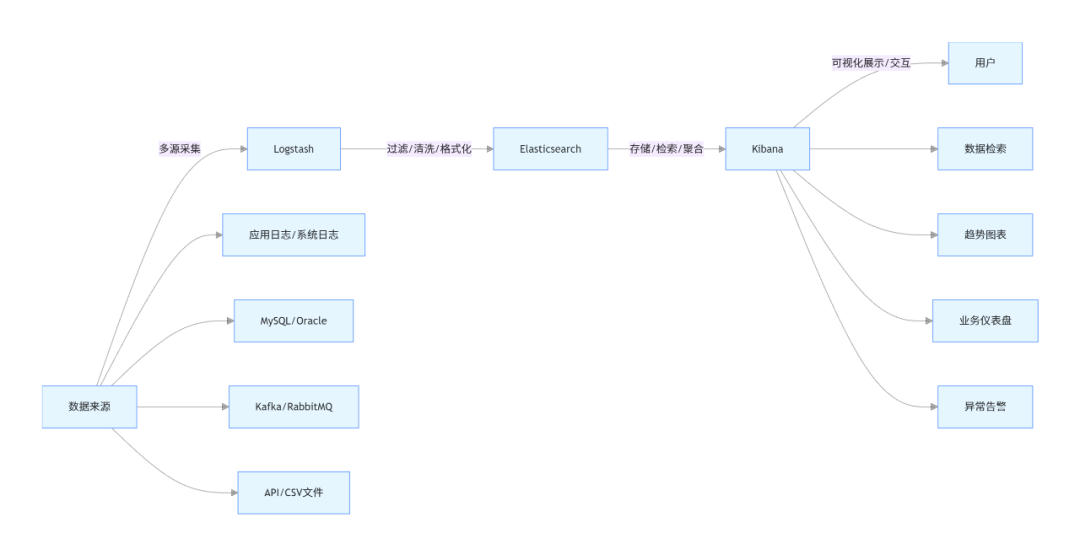
工作流程拆解:
- 数据采集:Logstash通过输入插件(File、JDBC、Kafka等)从多源获取原始数据;
- 数据处理:Logstash通过过滤插件(Grok、Mutate、Date等)对原始数据进行清洗(去噪、格式标准化)、转换(字段提取、类型转换);
- 数据存储:Logstash通过输出插件将处理后的数据写入Elasticsearch;
- 数据可视化:用户通过Kibana连接ES,进行数据检索、生成可视化图表、搭建仪表盘,或配置告警规则。
二、环境搭建:从零开始部署ELK Stack
2.1 前置准备
2.1.1 系统要求
- 操作系统:CentOS 7+/Ubuntu 20.04+(推荐Linux,Windows仅适合开发测试);
- 内存:至少4GB(ES对内存要求较高,生产环境建议8GB+);
- JDK:Elasticsearch 8.x内置JDK 17,无需额外安装;Logstash、Kibana依赖JDK 17,可使用ES内置JDK;
- 权限:需创建非root用户(ELK组件禁止root用户直接运行);
- 端口开放:
- ES:9200(HTTP通信)、9300(集群节点间通信);
- Kibana:5601(Web界面访问);
- Logstash:无固定端口(根据输入插件配置,如5044用于接收Beats数据)。
2.1.2 系统环境配置
- 创建非root用户并授权
# 创建用户
useradd elk
# 设置密码
passwd elk
# 授权sudo权限
echo "elk ALL=(ALL) NOPASSWD: ALL" >> /etc/sudoers
- 关闭防火墙(开发环境,生产环境需开放指定端口)
sudo systemctl stop firewalld
sudo systemctl disable firewalld
- 关闭SELinux
sudo sed -i 's/SELINUX=enforcing/SELINUX=disabled/' /etc/selinux/config
source /etc/selinux/config
- 配置内核参数(优化ES运行环境)
# 编辑内核参数文件
sudo vim /etc/sysctl.conf
# 添加以下内容
vm.max_map_count=262144  # ES要求的虚拟内存最大值
fs.file-max=65536         # 系统最大文件句柄数
# 生效配置
sudo sysctl -p
- 配置用户资源限制
# 编辑限制文件
sudo vim /etc/security/limits.conf
# 添加以下内容(针对elk用户)
elk soft nofile 65536
elk hard nofile 65536
elk soft nproc 4096
elk hard nproc 4096
2.2 Elasticsearch部署(单节点,生产环境需集群)
2.2.1 下载与解压
# 切换到elk用户
su - elk
# 下载ES 8.15.0(官网地址:https://www.elastic.co/cn/downloads/elasticsearch)
wget https://artifacts.elastic.co/downloads/elasticsearch/elasticsearch-8.15.0-linux-x86_64.tar.gz
# 解压
tar -zxvf elasticsearch-8.15.0-linux-x86_64.tar.gz
# 重命名(方便操作)
mv elasticsearch-8.15.0 elasticsearch
2.2.2 核心配置
编辑ES配置文件 elasticsearch/config/elasticsearch.yml:
# 集群名称(默认elasticsearch,集群部署时所有节点需一致)
cluster.name:elk-cluster
# 节点名称(单节点随意,集群部署时需唯一)
node.name:node-1
# 数据存储目录(建议单独挂载磁盘,避免占用系统盘)
path.data:/home/elk/elasticsearch/data
# 日志存储目录
path.logs:/home/elk/elasticsearch/logs
# 绑定地址(0.0.0.0允许外部访问,开发环境使用,生产环境建议指定具体IP)
network.host:0.0.0.0
# HTTP端口(默认9200)
http.port:9200
# 集群初始化节点(单节点为当前节点)
cluster.initial_master_nodes:["node-1"]
# 关闭HTTPS(开发环境,生产环境建议开启)
xpack.security.enabled:false
xpack.security.http.ssl.enabled:false
# 允许跨域(方便前端/Kibana访问)
http.cors.enabled:true
http.cors.allow-origin:"*"
2.2.3 启动与验证
- 启动ES
# 进入ES目录
cd /home/elk/elasticsearch
# 后台启动
./bin/elasticsearch -d
- 验证启动成功
# 访问ES健康检查接口
curl http://localhost:9200/_cat/health?v
成功输出示例(status为green表示健康):
epoch      timestamp cluster       status node.total node.data shards pri relo init unassign pending_tasks max_task_wait_time active_shards_percent
1699876532 10:35:32  elk-cluster   green           1         1      0   0    0    0        0             0                  -                100.0%
2.3 Logstash部署
2.3.1 下载与解压
# 下载Logstash 8.15.0
wget https://artifacts.elastic.co/downloads/logstash/logstash-8.15.0-linux-x86_64.tar.gz
# 解压
tar -zxvf logstash-8.15.0-linux-x86_64.tar.gz
# 重命名
mv logstash-8.15.0 logstash
2.3.2 核心配置(示例:采集MySQL数据输出到ES)
Logstash的核心是管道配置(输入→过滤→输出),配置文件放在 logstash/config 目录下,创建 mysql-to-es.conf:
# 输入插件:从MySQL采集数据
input {
  jdbc {
    # MySQL驱动路径(需提前下载mysql-connector-java-8.0.33.jar,放入logstash/lib目录)
    jdbc_driver_library => "/home/elk/logstash/lib/mysql-connector-java-8.0.33.jar"
    # MySQL驱动类名
    jdbc_driver_class => "com.mysql.cj.jdbc.Driver"
    # MySQL连接地址(数据库名:demo,字符集:utf8mb4)
    jdbc_connection_string => "jdbc:mysql://localhost:3306/demo?useSSL=false&serverTimezone=Asia/Shanghai&characterEncoding=utf8mb4"
    # MySQL用户名
    jdbc_user => "root"
    # MySQL密码
    jdbc_password => "root123456"
    # 开启分页查询
    jdbc_paging_enabled => true
    # 每页查询条数
    jdbc_page_size => 1000
    # 定时任务:每10秒执行一次(语法:分 时 日 月 周)
    schedule => "*/10 * * * *"
    # 查询SQL(查询demo表中id大于上次记录的新数据,实现增量同步)
    statement => "SELECT id, username, age, email, create_time FROM user WHERE id > :sql_last_value"
    # 记录上次查询的id值(存储在logstash/data目录下)
    use_column_value => true
    # 作为增量标识的字段(id为自增主键)
    tracking_column => "id"
    # 增量标识字段类型(numeric:数字,timestamp:时间戳)
    tracking_column_type => "numeric"
    # 初始化时的默认值(首次执行时查询id>0的所有数据)
    last_run_metadata_path => "/home/elk/logstash/data/sql_last_value.txt"
  }
}

# 过滤插件:数据清洗与转换
filter {
  # 字段类型转换(将age从字符串转为整数,create_time转为时间类型)
  mutate {
    convert => { "age" => "integer" }
  }
  # 时间格式转换(将MySQL的datetime格式转为ES支持的ISO8601格式)
  date {
    match => { "create_time" => "yyyy-MM-dd HH:mm:ss" }
    target => "@timestamp"  # 覆盖ES默认的@timestamp字段
  }
  # 移除无用字段(如logstash自动添加的@version)
  mutate {
    remove_field => ["@version"]
  }
}

# 输出插件:将处理后的数据写入ES
output {
  elasticsearch {
    # ES连接地址
    hosts => ["http://localhost:9200"]
    # 写入ES的索引名(用户数据:user-index)
    index => "user-index"
    # 用MySQL的id作为ES文档的_id(避免重复数据)
    document_id => "%{id}"
  }
  # 调试输出:将处理后的数据打印到控制台
  stdout {
    codec => rubydebug
  }
}
2.3.3 依赖准备
下载MySQL驱动包 mysql-connector-java-8.0.33.jar,放入 logstash/lib 目录(驱动版本需与MySQL版本匹配,MySQL 8.0对应8.x驱动)。
2.3.4 启动与验证
- 启动Logstash
cd /home/elk/logstash
# 指定配置文件启动
./bin/logstash -f config/mysql-to-es.conf
- 验证数据同步 在MySQL中创建
user表并插入测试数据:
CREATE DATABASEIFNOTEXISTS demo DEFAULTCHARACTERSET utf8mb4 COLLATE utf8mb4_unicode_ci;
USE demo;
CREATETABLEIFNOTEXISTSuser (
idBIGINT AUTO_INCREMENT PRIMARY KEYCOMMENT'主键ID',
  username VARCHAR(50) NOTNULLCOMMENT'用户名',
  age INTCOMMENT'年龄',
  email VARCHAR(100) COMMENT'邮箱',
  create_time DATETIME NOTNULLDEFAULTCURRENT_TIMESTAMPCOMMENT'创建时间'
) COMMENT'用户表';

-- 插入测试数据
INSERTINTOuser (username, age, email) VALUES ('zhangsan', 25, 'zhangsan@demo.com'), ('lisi', 30, 'lisi@demo.com');
查看Logstash控制台输出,若能看到处理后的用户数据,且访问ES接口验证索引存在:
curl http://localhost:9200/user-index/_search?q=*
能查询到插入的用户数据,说明Logstash数据采集与同步成功。
2.4 Kibana部署
2.4.1 下载与解压
# 下载Kibana 8.15.0
wget https://artifacts.elastic.co/downloads/kibana/kibana-8.15.0-linux-x86_64.tar.gz
# 解压
tar -zxvf kibana-8.15.0-linux-x86_64.tar.gz
# 重命名
mv kibana-8.15.0 kibana
2.4.2 核心配置
编辑Kibana配置文件 kibana/config/kibana.yml:
# 服务器端口(默认5601)
server.port: 5601
# 绑定地址(0.0.0.0允许外部访问)
server.host: "0.0.0.0"
# ES连接地址(需与ES配置一致)
elasticsearch.hosts: ["http://localhost:9200"]
# 界面语言(中文)
i18n.locale: "zh-CN"
2.4.3 启动与验证
- 启动Kibana
cd /home/elk/kibana
# 后台启动
nohup ./bin/kibana &
- 验证启动成功 打开浏览器,访问
http://服务器IP:5601,若能看到Kibana中文登录界面(开发环境ES关闭了安全验证,可直接进入),说明启动成功。
三、Elasticsearch核心详解:从底层原理到实战操作
3.1 底层核心原理:倒排索引
Elasticsearch的高效检索能力源于倒排索引(Inverted Index),这是一种将“关键词”映射到“文档”的索引结构,与传统数据库的“文档→关键词”正向索引相反。
3.1.1 倒排索引结构(流程图)

3.1.2 倒排索引优势
- 检索速度快:无需遍历所有文档,直接通过关键词定位关联文档;
- 支持复杂查询:轻松实现全文检索、模糊匹配、聚合分析等功能;
- 可扩展性强:分词、索引构建过程支持分布式并行处理。
3.2 核心概念详解
3.2.1 索引(Index)
- 定义:索引是ES中存储数据的逻辑容器,类似MySQL的“数据库”;
- 特性:
- 索引名必须小写,不能包含特殊字符;
- 每个索引对应多个分片(Shard),实现分布式存储;
- 索引具有映射(Mapping),定义字段类型、分词器等元数据。
3.2.2 文档(Document)
- 定义:文档是ES中最小的数据单元,类似MySQL的“行”;
- 特性:
- 文档以JSON格式存储;
- 每个文档有唯一的
_id(可手动指定或自动生成); - 文档属于某个索引,且只能属于一个类型(Type,ES 7.x后已移除,默认类型为
_doc)。
3.2.3 分片(Shard)与副本(Replica)
- 分片:
- 定义:索引的物理分片,将索引数据拆分到多个分片,分布式存储在不同节点;
- 类型:主分片(Primary Shard)用于写入数据,副本分片(Replica Shard)是主分片的备份,用于读负载均衡和容灾;
- 限制:主分片数量在索引创建后不可修改,副本分片数量可动态调整。
- 副本:
- 作用:提高读取性能(多副本并行查询)、保证高可用(主分片故障时,副本可升级为主分片);
- 建议:生产环境每个主分片至少配置1个副本,副本数量根据节点数量合理调整。
3.2.4 映射(Mapping)
- 定义:映射是索引的元数据,定义文档中每个字段的类型(如text、integer、date)、分词器、是否索引等属性;
- 字段类型分类:
- 文本类型:
text(支持分词,用于全文检索)、keyword(不支持分词,用于精确匹配、聚合); - 数值类型:
integer、long、float、double; - 时间类型:
date(支持多种时间格式,默认ISO8601); - 其他类型:
boolean、ip、geo_point(地理位置)等。
- 文本类型:
3.3 核心操作实战(REST API + Java客户端)
3.3.1 REST API操作(基础操作)
- 创建索引(指定映射)
curl -X PUT "http://localhost:9200/product-index" -H "Content-Type: application/json" -d '
{
  "settings": {
    "number_of_shards": 3,    # 主分片数量3
    "number_of_replicas": 1   # 副本分片数量1
  },
  "mappings": {
    "properties": {
      "product_id": { "type": "long", "index": true },  # 商品ID,长整型,可索引
      "product_name": { "type": "text", "analyzer": "ik_max_word" },  # 商品名称,文本类型,使用IK分词器
      "category": { "type": "keyword" },  # 商品分类,关键字类型,精确匹配
      "price": { "type": "double" },  # 商品价格,双精度浮点型
      "create_time": { "type": "date", "format": "yyyy-MM-dd HH:mm:ss" }  # 创建时间,指定格式
    }
  }
}'
说明:使用IK分词器(需提前安装,用于中文分词),ik_max_word表示最大粒度分词。
- 插入文档(指定_id)
curl -X PUT "http://localhost:9200/product-index/_doc/1001" -H "Content-Type: application/json" -d '
{
  "product_id": 1001,
  "product_name": "华为Mate 60 Pro",
  "category": "手机",
  "price": 6999.00,
  "create_time": "2024-01-15 10:30:00"
}'
- 查询文档(根据_id)
curl -X GET "http://localhost:9200/product-index/_doc/1001"
- 全文检索(查询商品名称包含“华为”的商品)
curl -X GET "http://localhost:9200/product-index/_search" -H "Content-Type: application/json" -d '
{
  "query": {
    "match": {
      "product_name": "华为"
    }
  }
}'
- 聚合分析(按商品分类统计商品数量)
curl -X GET "http://localhost:9200/product-index/_search" -H "Content-Type: application/json" -d '
{
  "size": 0,  # 不返回具体文档,只返回聚合结果
  "aggs": {
    "category_count": {
      "terms": {
        "field": "category"  # 按category字段分组
      }
    }
  }
}'
- 删除索引
curl -X DELETE "http://localhost:9200/product-index"
3.3.2 Java客户端操作(最新elasticsearch-java 8.15.0)
Elasticsearch官方推荐使用elasticsearch-java客户端(替代旧版TransportClient),支持同步/异步操作,以下是实战示例。
- 项目依赖(pom.xml)
<dependencies>
    <!-- Elasticsearch Java客户端 -->
    <dependency>
        <groupId>co.elastic.clients</groupId>
        <artifactId>elasticsearch-java</artifactId>
        <version>8.15.0</version>
    </dependency>
    <!--  Jackson依赖(客户端依赖Jackson处理JSON) -->
    <dependency>
        <groupId>com.fasterxml.jackson.core</groupId>
        <artifactId>jackson-databind</artifactId>
        <version>2.15.2</version>
    </dependency>
    <!-- Lombok(日志、Getter/Setter) -->
    <dependency>
        <groupId>org.projectlombok</groupId>
        <artifactId>lombok</artifactId>
        <version>1.18.30</version>
        <scope>provided</scope>
    </dependency>
    <!-- Spring Boot Test(测试用) -->
    <dependency>
        <groupId>org.springframework.boot</groupId>
        <artifactId>spring-boot-starter-test</artifactId>
        <version>3.1.5</version>
        <scope>test</scope>
    </dependency>
</dependencies>
- 客户端工具类(com.jam.demo.es.EsClientUtil)
package com.jam.demo.es;

import co.elastic.clients.elasticsearch.ElasticsearchClient;
import co.elastic.clients.json.jackson.JacksonJsonpMapper;
import co.elastic.clients.transport.ElasticsearchTransport;
import co.elastic.clients.transport.rest_client.RestClientTransport;
import lombok.extern.slf4j.Slf4j;
import org.apache.http.HttpHost;
import org.elasticsearch.client.RestClient;
import org.springframework.util.ObjectUtils;

import java.io.Closeable;
import java.io.IOException;

/**
 * Elasticsearch客户端工具类
 * 功能:创建并管理ElasticsearchClient实例
 * @author ken
 */
@Slf4j
publicclass EsClientUtil implements Closeable {

    privatestatic ElasticsearchClient esClient;
    privatestatic RestClient restClient;
    privatestatic ElasticsearchTransport transport;

    /**
     * 初始化Elasticsearch客户端
     * @param host ES主机地址
     * @param port ES端口
     * @return ElasticsearchClient实例
     */
    public static ElasticsearchClient initClient(String host, int port) {
        if (ObjectUtils.isEmpty(esClient)) {
            // 1. 创建RestClient
            restClient = RestClient.builder(new HttpHost(host, port)).build();
            // 2. 创建传输层(使用Jackson处理JSON)
            transport = new RestClientTransport(restClient, new JacksonJsonpMapper());
            // 3. 创建ElasticsearchClient
            esClient = new ElasticsearchClient(transport);
            log.info("Elasticsearch客户端初始化成功,host:{},port:{}", host, port);
        }
        return esClient;
    }

    /**
     * 关闭客户端资源
     */
    @Override
    public void close() throws IOException {
        if (!ObjectUtils.isEmpty(transport)) {
            transport.close();
        }
        if (!ObjectUtils.isEmpty(restClient)) {
            restClient.close();
        }
        log.info("Elasticsearch客户端资源已关闭");
    }
}
- 商品实体类(com.jam.demo.es.entity.Product)
package com.jam.demo.es.entity;

import lombok.Data;
import java.time.LocalDateTime;

/**
 * 商品实体类(对应ES中的product-index索引)
 * @author ken
 */
@Data
publicclass Product {
    /**
     * 商品ID(对应ES文档的product_id字段)
     */
    private Long productId;
    /**
     * 商品名称(对应ES文档的product_name字段)
     */
    private String productName;
    /**
     * 商品分类(对应ES文档的category字段)
     */
    private String category;
    /**
     * 商品价格(对应ES文档的price字段)
     */
    private Double price;
    /**
     * 创建时间(对应ES文档的create_time字段)
     */
    private LocalDateTime createTime;
}
- 核心操作示例(com.jam.demo.es.EsProductService)
package com.jam.demo.es;

import co.elastic.clients.elasticsearch.ElasticsearchClient;
import co.elastic.clients.elasticsearch._types.query_dsl.MatchQuery;
import co.elastic.clients.elasticsearch._types.query_dsl.Query;
import co.elastic.clients.elasticsearch.core.*;
import co.elastic.clients.elasticsearch.core.bulk.BulkOperation;
import co.elastic.clients.elasticsearch.core.bulk.CreateOperation;
import co.elastic.clients.elasticsearch.indices.CreateIndexRequest;
import co.elastic.clients.elasticsearch.indices.CreateIndexResponse;
import co.elastic.clients.elasticsearch.indices.DeleteIndexRequest;
import com.jam.demo.es.entity.Product;
import lombok.extern.slf4j.Slf4j;
import org.springframework.util.CollectionUtils;
import org.springframework.util.ObjectUtils;
import org.springframework.util.StringUtils;

import java.io.IOException;
import java.util.List;
import java.util.stream.Collectors;

/**
 * 商品ES操作服务类
 * 功能:实现商品索引的创建、文档的CRUD、检索、聚合等操作
 * @author ken
 */
@Slf4j
publicclass EsProductService {

    privatefinal ElasticsearchClient esClient;
    privatestaticfinal String PRODUCT_INDEX = "product-index";

    /**
     * 构造方法(初始化ES客户端)
     * @param host ES主机地址
     * @param port ES端口
     */
    public EsProductService(String host, int port) {
        this.esClient = EsClientUtil.initClient(host, port);
    }

    /**
     * 创建商品索引(指定映射)
     * @return 是否创建成功
     * @throws IOException ES操作异常
     */
    public boolean createProductIndex() throws IOException {
        // 构建索引映射配置
        String mapping = "{\n" +
                "  \"settings\": {\n" +
                "    \"number_of_shards\": 3,\n" +
                "    \"number_of_replicas\": 1\n" +
                "  },\n" +
                "  \"mappings\": {\n" +
                "    \"properties\": {\n" +
                "      \"productId\": { \"type\": \"long\", \"index\": true },\n" +
                "      \"productName\": { \"type\": \"text\", \"analyzer\": \"ik_max_word\" },\n" +
                "      \"category\": { \"type\": \"keyword\" },\n" +
                "      \"price\": { \"type\": \"double\" },\n" +
                "      \"createTime\": { \"type\": \"date\", \"format\": \"yyyy-MM-dd HH:mm:ss\" }\n" +
                "    }\n" +
                "  }\n}";

        CreateIndexRequest request = CreateIndexRequest.of(builder -> builder
                .index(PRODUCT_INDEX)
                .withJson(mapping.getBytes())
        );

        CreateIndexResponse response = esClient.indices().create(request);
        log.info("创建商品索引结果:{},索引名:{}", response.acknowledged(), PRODUCT_INDEX);
        return response.acknowledged();
    }

    /**
     * 插入单个商品文档
     * @param product 商品实体
     * @param docId ES文档ID
     * @return 是否插入成功
     * @throws IOException ES操作异常
     */
    public boolean insertProductDoc(Product product, String docId) throws IOException {
        if (ObjectUtils.isEmpty(product) || StringUtils.isEmpty(docId)) {
            log.error("插入商品文档失败:商品信息或文档ID为空");
            returnfalse;
        }

        IndexRequest<Product> request = IndexRequest.of(builder -> builder
                .index(PRODUCT_INDEX)
                .id(docId)
                .document(product)
        );

        IndexResponse response = esClient.index(request);
        log.info("插入商品文档结果:{},文档ID:{}", response.result(), docId);
        return"created".equals(response.result().jsonValue()) || "updated".equals(response.result().jsonValue());
    }

    /**
     * 批量插入商品文档
     * @param productList 商品列表
     * @return 批量操作结果(成功数量)
     * @throws IOException ES操作异常
     */
    public int bulkInsertProductDocs(List<Product> productList) throws IOException {
        if (CollectionUtils.isEmpty(productList)) {
            log.error("批量插入商品文档失败:商品列表为空");
            return0;
        }

        // 构建批量操作列表
        List<BulkOperation> operations = productList.stream()
                .map(product -> {
                    // 用商品ID作为文档ID
                    String docId = product.getProductId().toString();
                    return BulkOperation.of(builder -> builder
                            .create(CreateOperation.of(cBuilder -> cBuilder
                                    .index(PRODUCT_INDEX)
                                    .id(docId)
                                    .document(product)
                            ))
                    );
                })
                .collect(Collectors.toList());

        BulkRequest request = BulkRequest.of(builder -> builder.operations(operations));
        BulkResponse response = esClient.bulk(request);

        if (response.errors()) {
            log.error("批量插入商品文档存在失败记录");
            response.items().forEach(item -> {
                if (item.error() != null) {
                    log.error("文档ID:{},插入失败:{}", item.id(), item.error().reason());
                }
            });
        }

        int successCount = (int) response.items().stream()
                .filter(item -> item.error() == null)
                .count();
        log.info("批量插入商品文档完成,总数量:{},成功数量:{}", productList.size(), successCount);
        return successCount;
    }

    /**
     * 根据文档ID查询商品
     * @param docId 文档ID
     * @return 商品实体
     * @throws IOException ES操作异常
     */
    public Product getProductDocById(String docId) throws IOException {
        if (StringUtils.isEmpty(docId)) {
            log.error("查询商品文档失败:文档ID为空");
            returnnull;
        }

        GetRequest request = GetRequest.of(builder -> builder
                .index(PRODUCT_INDEX)
                .id(docId)
        );

        GetResponse<Product> response = esClient.get(request, Product.class);
        if (response.found()) {
            log.info("查询商品文档成功,文档ID:{}", docId);
            return response.source();
        } else {
            log.info("未查询到商品文档,文档ID:{}", docId);
            returnnull;
        }
    }

    /**
     * 全文检索商品(根据商品名称)
     * @param productName 商品名称关键词
     * @return 商品列表
     * @throws IOException ES操作异常
     */
    public List<Product> searchProductByTitle(String productName) throws IOException {
        if (StringUtils.isEmpty(productName)) {
            log.error("检索商品失败:商品名称关键词为空");
            returnnull;
        }

        // 构建match查询(全文检索)
        Query query = MatchQuery.of(mBuilder -> mBuilder
                .field("productName")
                .query(productName)
        )._toQuery();

        SearchRequest request = SearchRequest.of(sBuilder -> sBuilder
                .index(PRODUCT_INDEX)
                .query(query)
        );

        SearchResponse<Product> response = esClient.search(request, Product.class);
        List<Product> productList = response.hits().hits().stream()
                .map(hit -> hit.source())
                .collect(Collectors.toList());

        log.info("检索商品完成,关键词:{},匹配数量:{}", productName, productList.size());
        return productList;
    }

    /**
     * 删除商品索引
     * @return 是否删除成功
     * @throws IOException ES操作异常
     */
    public boolean deleteProductIndex() throws IOException {
        DeleteIndexRequest request = DeleteIndexRequest.of(builder -> builder.index(PRODUCT_INDEX));
        esClient.indices().delete(request);
        log.info("删除商品索引成功,索引名:{}", PRODUCT_INDEX);
        returntrue;
    }
}
- 测试类(com.jam.demo.es.EsProductServiceTest)
package com.jam.demo.es;

import com.jam.demo.es.entity.Product;
import org.junit.After;
import org.junit.Before;
import org.junit.Test;
import java.io.IOException;
import java.time.LocalDateTime;
import java.util.Arrays;
import java.util.List;
importstatic org.junit.Assert.*;

/**
 * 商品ES操作服务测试类
 * @author ken
 */
publicclass EsProductServiceTest {

    private EsProductService esProductService;
    private EsClientUtil esClientUtil;

    @Before
    public void init() {
        // 初始化ES客户端和服务类(本地ES,端口9200)
        esClientUtil = new EsClientUtil();
        esProductService = new EsProductService("localhost", 9200);
    }

    @Test
    public void testProductIndexOperation() throws IOException {
        // 1. 创建商品索引
        boolean createResult = esProductService.createProductIndex();
        assertTrue(createResult);

        // 2. 插入单个商品文档
        Product product1 = new Product();
        product1.setProductId(1001L);
        product1.setProductName("华为Mate 60 Pro");
        product1.setCategory("手机");
        product1.setPrice(6999.00);
        product1.setCreateTime(LocalDateTime.of(2024, 1, 15, 10, 30, 0));
        boolean insertSingleResult = esProductService.insertProductDoc(product1, "1001");
        assertTrue(insertSingleResult);

        // 3. 批量插入商品文档
        Product product2 = new Product();
        product2.setProductId(1002L);
        product2.setProductName("苹果iPhone 15");
        product2.setCategory("手机");
        product2.setPrice(7999.00);
        product2.setCreateTime(LocalDateTime.of(2024, 2, 20, 14, 15, 0));

        Product product3 = new Product();
        product3.setProductId(1003L);
        product3.setProductName("小米笔记本Pro");
        product3.setCategory("笔记本电脑");
        product3.setPrice(5999.00);
        product3.setCreateTime(LocalDateTime.of(2024, 3, 10, 9, 45, 0));

        List<Product> productList = Arrays.asList(product2, product3);
        int bulkInsertCount = esProductService.bulkInsertProductDocs(productList);
        assertEquals(2, bulkInsertCount);

        // 4. 根据ID查询商品
        Product queryProduct = esProductService.getProductDocById("1001");
        assertNotNull(queryProduct);
        assertEquals("华为Mate 60 Pro", queryProduct.getProductName());

        // 5. 全文检索商品
        List<Product> searchProducts = esProductService.searchProductByTitle("手机");
        assertNotNull(searchProducts);
        assertEquals(2, searchProducts.size());

        // 6. 删除商品索引(测试完成后清理)
        boolean deleteResult = esProductService.deleteProductIndex();
        assertTrue(deleteResult);
    }

    @After
    public void destroy() throws IOException {
        // 关闭客户端资源
        esClientUtil.close();
    }
}
3.4 分词器详解:IK分词器(中文分词必备)
3.4.1 为什么需要IK分词器
ES默认的分词器(如Standard Analyzer)对中文支持较差,会将中文词语拆分为单个汉字(如“华为手机”拆分为“华”“为”“手”“机”),无法满足中文全文检索需求。IK分词器是专门为中文设计的分词器,支持自定义词典,能准确拆分中文词语。
3.4.2 IK分词器安装
- 下载IK分词器(版本需与ES版本一致,此处为8.15.0)
# 进入ES插件目录
cd /home/elk/elasticsearch/plugins
# 创建ik目录
mkdir ik
# 下载IK分词器(官网地址:https://github.com/medcl/elasticsearch-analysis-ik/releases)
wget https://github.com/medcl/elasticsearch-analysis-ik/releases/download/v8.15.0/elasticsearch-analysis-ik-8.15.0.zip
# 解压到ik目录
unzip elasticsearch-analysis-ik-8.15.0.zip -d ik
# 删除压缩包
rm -rf elasticsearch-analysis-ik-8.15.0.zip
- 重启ES,验证分词器安装成功
# 查看ES插件列表
/home/elk/elasticsearch/bin/elasticsearch-plugin list
# 输出“analysis-ik”表示安装成功
3.4.3 IK分词器使用
IK分词器提供两种分词模式:
ik_max_word:最大粒度分词(将文本拆分为尽可能多的词语);ik_smart:最小粒度分词(将文本拆分为最合理的词语)。
测试分词效果(REST API):
# ik_max_word模式
curl -X POST "http://localhost:9200/_analyze" -H "Content-Type: application/json" -d '
{
  "analyzer": "ik_max_word",
  "text": "华为Mate 60 Pro手机"
}'

# ik_smart模式
curl -X POST "http://localhost:9200/_analyze" -H "Content-Type: application/json" -d '
{
  "analyzer": "ik_smart",
  "text": "华为Mate 60 Pro手机"
}'
3.4.4 自定义词典(扩展分词)
- 编辑IK自定义词典文件
elasticsearch/plugins/ik/config/custom.dic,添加自定义词语:
华为Mate 60 Pro
小米笔记本Pro
- 编辑IK配置文件
elasticsearch/plugins/ik/config/IKAnalyzer.cfg.xml,指定自定义词典:
<properties>
    <comment>IK Analyzer 扩展配置</comment>
    <!-- 自定义扩展词典 -->
    <entry key="ext_dict">custom.dic</entry>
    <!-- 自定义停用词词典 -->
    <entry key="ext_stopwords">stopword.dic</entry>
</properties>
- 重启ES,验证自定义词典生效:
curl -X POST "http://localhost:9200/_analyze" -H "Content-Type: application/json" -d '
{
  "analyzer": "ik_max_word",
  "text": "华为Mate 60 Pro手机"
}'
输出结果中应包含“华为Mate 60 Pro”作为一个独立词语。
3.5 性能优化实战
3.5.1 索引层面优化
- 合理设置分片数量:
- 单节点:主分片数量建议1-3个(过多分片会导致资源浪费);
- 集群环境:根据节点数量和数据量设置,一般每个节点承载2-3个主分片。
- 优化映射:
- 避免不必要的字段索引(
index: false); - 合理选择字段类型(如小范围整数用
integer而非long); - 文本字段根据需求选择分词器(中文用IK,英文用Standard)。
- 关闭索引刷新间隔:
- 批量导入数据时,临时关闭自动刷新(
index.refresh_interval: -1),导入完成后恢复(默认1秒); - 命令:
curl -X PUT "http://localhost:9200/product-index/_settings" -H "Content-Type: application/json" -d '{"index.refresh_interval": "-1"}'。
3.5.2 查询层面优化
- 减少返回字段:使用
_source指定需要返回的字段,避免返回全量字段; - 限制结果数量:使用
size参数限制返回文档数量,避免大量数据传输; - 避免深度分页:ES默认不支持深度分页(
from+size不超过10000),深度分页建议使用search_after或scroll; - 优化聚合查询:避免在大量数据上进行复杂聚合,可使用聚合缓存(
index.queries.cache.size)。
3.5.3 硬件与系统优化
- 内存配置:
- 给ES分配足够的内存(建议物理内存的50%,但不超过32GB,因为JVM对32GB以上内存的压缩指针优化失效);
- 编辑
elasticsearch/config/jvm.options:-Xms4g -Xmx4g(根据实际内存调整)。
- 磁盘选择:使用SSD磁盘,提升数据读写速度;
- 关闭swap:避免ES使用交换分区,影响性能,编辑
/etc/fstab注释swap分区,重启生效。
四、Logstash核心详解:数据采集与转换
4.1 核心架构:管道(Pipeline)
Logstash的核心是管道,每个管道由三个组件组成,形成数据处理流程:
- 输入(Input):从多源采集数据,支持文件、数据库、消息队列、API等;
- 过滤(Filter):对采集的数据进行清洗、转换,如字段提取、类型转换、去重、过滤无效数据;
- 输出(Output):将处理后的数据写入目的地,支持ES、Kafka、文件、数据库等。
管道工作流程(流程图):
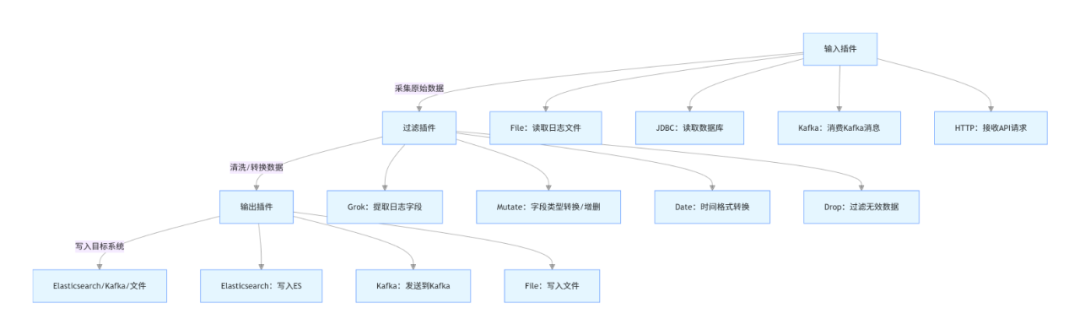
4.2 核心插件详解
4.2.1 输入插件(Input Plugins)
- File插件:读取本地日志文件,适用于采集应用日志、系统日志; 核心配置示例:
input {
  file {
    path => ["/var/log/application/*.log"]  # 日志文件路径(支持通配符)
    start_position => "beginning"  # 从文件开头读取(默认end:从文件末尾)
    sincedb_path => "/home/elk/logstash/data/sincedb"  # 记录文件读取位置(避免重复读取)
    stat_interval => 1  # 检查文件变化的时间间隔(秒)
    codec => "json"  # 日志格式(JSON格式,若为普通文本可省略)
  }
}
- Kafka插件:消费Kafka主题中的数据,适用于分布式系统日志采集; 核心配置示例:
input {
  kafka {
    bootstrap_servers => "kafka-node1:9092,kafka-node2:9092"  # Kafka集群地址
    topics => ["app-log-topic"]  # 要消费的主题
    group_id => "logstash-consumer-group"  # 消费者组ID
    auto_offset_reset => "latest"  # 无偏移量时从最新消息开始消费
    consumer_threads => 5  # 消费线程数
  }
}
- JDBC插件:从关系型数据库采集数据(如MySQL、Oracle),适用于数据同步场景(已在2.3.2节示例)。
4.2.2 过滤插件(Filter Plugins)
- Grok插件:最常用的过滤插件,用于从非结构化日志中提取结构化字段(如从Nginx日志中提取IP、请求路径、响应时间); 核心语法:
%{字段类型:字段名:转换类型},常用字段类型:
IP:IP地址;NUMBER:数字(可指定int/float,如NUMBER:int);DATA:任意字符(不包含空格);TIMESTAMP_ISO8601:ISO8601格式时间;HTTP_METHOD:HTTP请求方法(GET/POST等);URIPATH:URI路径;
核心配置示例(解析Nginx访问日志):
filter {
  grok {
    # 匹配Nginx日志格式(日志格式:$remote_addr - $remote_user [$time_local] "$request" $status $body_bytes_sent "$http_referer" "$http_user_agent" "$http_x_forwarded_for" $request_time)
    match => { "message" => "%{IP:client_ip} - %{DATA:remote_user} \[%{HTTPDATE:request_time}\] \"%{HTTP_METHOD:request_method} %{URIPATH:request_path}(%{URIPARAM:request_params})? HTTP/%{NUMBER:http_version}\" %{NUMBER:status:int} %{NUMBER:body_bytes_sent:int} \"%{DATA:http_referer}\" \"%{DATA:user_agent}\" \"%{DATA:http_x_forwarded_for}\" %{NUMBER:request_duration:float}" }
    # 匹配失败时添加标签
    tag_on_failure => ["grok_parse_failure"]
    # 移除原始message字段(解析后无需保留)
    remove_field => ["message"]
  }
}
验证Grok匹配规则:可通过Kibana的「Dev Tools」→「Grok Debugger」工具测试,输入日志文本和Grok表达式,实时查看解析结果。
- Mutate插件:字段加工核心插件,支持字段类型转换、增删、重命名、替换等操作; 核心功能及配置示例:
filter {
  mutate {
    # 1. 类型转换(将status从字符串转为整数,request_duration转为浮点型)
    convert => { "status" => "integer" "request_duration" => "float" }
    # 2. 重命名字段(将http_x_forwarded_for改为forwarded_ip)
    rename => { "http_x_forwarded_for" => "forwarded_ip" }
    # 3. 添加新字段(固定值字段)
    add_field => { "service_name" => "nginx" "env" => "prod" }
    # 4. 移除无用字段
    remove_field => ["remote_user", "http_referer"]
    # 5. 字符串替换(将user_agent中的空字符替换为-)
    gsub => [ "user_agent", " ", "-" ]
  }
}
- Date插件:时间格式标准化插件,将日志中的时间字符串转为ES支持的
@timestamp字段(或自定义时间字段),便于后续时间范围查询; 核心配置示例:
filter {
  date {
    # 匹配日志中的时间字段(request_time为Nginx日志中的时间,格式:dd/MMM/yyyy:HH:mm:ss Z)
    match => { "request_time" => "dd/MMM/yyyy:HH:mm:ss Z" }
    # 目标字段(覆盖ES默认的@timestamp字段)
    target => "@timestamp"
    # 时间 zone(避免时区偏移)
    timezone => "Asia/Shanghai"
    # 匹配失败时的默认时间(当前时间)
    fallback_to_current_time => true
  }
}
常用时间格式匹配符:
yyyy:4位年份;MM:2位月份;dd:2位日期;HH:24小时制小时;mm:分钟;ss:秒;Z:时区(如+0800);MMM:英文月份缩写(如Jan、Feb)。
- Drop插件:过滤无效数据,直接丢弃不需要的日志(如状态码为404的请求日志、测试环境日志); 核心配置示例:
filter {
  # 丢弃状态码为404的日志
  if [status] == 404 {
    drop { }
  }
  # 丢弃测试环境的日志
  if [env] == "test" {
    drop { }
  }
}
- GeoIP插件:根据IP地址获取地理位置信息(国家、省份、城市、经纬度),适用于用户地域分析场景; 核心配置示例:
filter {
  geoip {
    # 要解析的IP字段(client_ip为Grok提取的客户端IP)
    source => "client_ip"
    # 存储地理位置信息的字段名(默认geoip)
    target => "geoip"
    # 数据库路径(默认使用插件内置的GeoLite2数据库,需定期更新)
    database => "/home/elk/logstash/config/GeoLite2-City.mmdb"
    # 要获取的地理位置字段(默认全量,可指定减少数据量)
    fields => ["country_name", "region_name", "city_name", "location"]
  }
}
说明:GeoLite2数据库需从MaxMind官网下载(免费版),定期更新以保证IP解析准确性。
4.2.3 输出插件(Output Plugins)
输出插件负责将过滤后的结构化数据写入目标系统,支持多输出(同时写入ES和文件、ES和Kafka等)。
- Elasticsearch输出插件:最常用输出目的地,将数据写入ES索引,支持批量写入、自定义索引名、路由等; 核心配置示例(优化版):
output {
  elasticsearch {
    hosts => ["http://localhost:9200"]  # ES集群地址(多个用逗号分隔)
    index => "nginx-access-log-%{+YYYY.MM.dd}"  # 按天生成索引(日志按天分割,便于管理)
    document_id => "%{[@timestamp]}-%{client_ip}-%{request_path}"  # 自定义文档ID,避免重复
    # 批量写入优化(提升性能)
    flush_size => 5000  # 每5000条数据批量提交一次
    idle_flush_time => 10  # 若10秒内未达到flush_size,也批量提交
    # 认证配置(生产环境ES开启安全验证时启用)
    user => "elastic"  # ES默认管理员用户
    password => "elastic123"  # ES用户密码
    # 索引模板自动加载(提前创建索引模板,定义映射)
    template => "/home/elk/logstash/config/nginx-template.json"
    template_name => "nginx-access-template"
    template_overwrite => true  # 覆盖已存在的模板
  }
}
索引模板示例(nginx-template.json):提前定义索引映射,避免ES自动映射导致字段类型错误:
{
  "index_patterns": ["nginx-access-log-*"],  # 匹配所有nginx访问日志索引
"settings": {
    "number_of_shards": 3,
    "number_of_replicas": 1
  },
"mappings": {
    "properties": {
      "client_ip": { "type": "ip" },
      "request_time": { "type": "date", "format": "dd/MMM/yyyy:HH:mm:ss Z" },
      "request_method": { "type": "keyword" },
      "request_path": { "type": "keyword" },
      "status": { "type": "integer" },
      "request_duration": { "type": "float" },
      "user_agent": { "type": "text", "analyzer": "ik_smart" },
      "geoip": {
        "properties": {
          "country_name": { "type": "keyword" },
          "region_name": { "type": "keyword" },
          "city_name": { "type": "keyword" },
          "location": { "type": "geo_point" }  # 地理位置类型,支持地图可视化
        }
      }
    }
  }
}
- Kafka输出插件:将处理后的数据写入Kafka主题,适用于数据分发场景(后续可由多个消费者消费); 核心配置示例:
output {
  kafka {
    bootstrap_servers => "kafka-node1:9092,kafka-node2:9092"  # Kafka集群地址
    topic_id => "processed-nginx-log"  # 目标主题
    # 分区策略(按client_ip哈希分区,保证同一IP的日志进入同一分区)
    partitioner => "org.apache.kafka.clients.producer.internals.DefaultPartitioner"
    partition_key => "%{client_ip}"
    # 批量发送优化
    batch_size => 16384  # 批量发送大小(字节)
    linger_ms => 5  # 等待5毫秒,凑够批量大小再发送
    # 序列化方式(JSON格式)
    codec => "json"
  }
}
- File输出插件:将数据写入本地文件,适用于数据备份场景; 核心配置示例:
output {
  file {
    path => "/home/elk/logstash/output/nginx-log-%{+YYYY.MM.dd}.log"  # 按天生成备份文件
    codec => "json_lines"  # 每行一个JSON对象
    flush_interval => 5  # 每5秒刷新一次缓冲区
    gzip => true  # 启用Gzip压缩,减少磁盘占用
  }
}
- Email输出插件:异常日志告警,当出现指定条件的日志时(如状态码500、响应时间过长),发送邮件告警; 核心配置示例:
output {
  # 当请求响应时间超过5秒时,发送邮件告警
  if [request_duration] > 5 {
    email {
      to => "admin@demo.com"  # 接收告警邮件地址
      from => "logstash-alert@demo.com"  # 发送邮件地址
      subject => "【告警】Nginx请求响应时间过长"  # 邮件主题
      body => "客户端IP:%{client_ip}\n请求路径:%{request_path}\n响应时间:%{request_duration}秒\n发生时间:%{[@timestamp]}"  # 邮件内容
      address => "smtp.demo.com"  # SMTP服务器地址
      port => 465  # SMTP端口(SSL)
      username => "logstash-alert@demo.com"  # SMTP用户名
      password => "alert123"  # SMTP密码
      use_tls => true  # 启用TLS加密
    }
  }
}
4.3 实战案例:采集Nginx日志并解析输出到ES
4.3.1 需求说明
- 采集Nginx访问日志(路径:/var/log/nginx/access.log);
- 解析日志字段(客户端IP、请求时间、请求方法、路径、状态码、响应时间等);
- 标准化时间格式,添加地理位置信息;
- 按天生成ES索引(nginx-access-log-YYYY.MM.dd);
- 丢弃404状态码的日志。
4.3.2 完整配置文件(nginx-log-to-es.conf)
# 输入:读取Nginx访问日志
input {
  file {
    path => ["/var/log/nginx/access.log"]
    start_position => "beginning"
    sincedb_path => "/home/elk/logstash/data/sincedb_nginx"
    stat_interval => 1
  }
}

# 过滤:解析、清洗、转换数据
filter {
  # 1. Grok解析Nginx日志字段
  grok {
    match => { "message" => "%{IP:client_ip} - %{DATA:remote_user} \[%{HTTPDATE:request_time}\] \"%{HTTP_METHOD:request_method} %{URIPATH:request_path}(%{URIPARAM:request_params})? HTTP/%{NUMBER:http_version}\" %{NUMBER:status:int} %{NUMBER:body_bytes_sent:int} \"%{DATA:http_referer}\" \"%{DATA:user_agent}\" \"%{DATA:forwarded_ip}\" %{NUMBER:request_duration:float}" }
    tag_on_failure => ["grok_parse_failure"]
    remove_field => ["message", "remote_user", "http_referer"]
  }

  # 2. 时间格式标准化
  date {
    match => { "request_time" => "dd/MMM/yyyy:HH:mm:ss Z" }
    target => "@timestamp"
    timezone => "Asia/Shanghai"
    fallback_to_current_time => true
  }

  # 3. 字段加工
  mutate {
    rename => { "forwarded_ip" => "x_forwarded_ip" }
    add_field => { "service" => "nginx" "env" => "prod" }
  }

  # 4. 地理位置解析
  geoip {
    source => "client_ip"
    target => "geoip"
    fields => ["country_name", "region_name", "city_name", "location"]
  }

  # 5. 丢弃404日志
  if [status] == 404 {
    drop { }
  }
}

# 输出:写入ES(按天分区索引)
output {
  elasticsearch {
    hosts => ["http://localhost:9200"]
    index => "nginx-access-log-%{+YYYY.MM.dd}"
    document_id => "%{[@timestamp]}-%{client_ip}-%{request_path}"
    flush_size => 5000
    idle_flush_time => 10
    template => "/home/elk/logstash/config/nginx-template.json"
    template_name => "nginx-access-template"
    template_overwrite => true
  }

  # 调试输出:控制台打印(生产环境可注释)
  stdout {
    codec => rubydebug
  }
}
4.3.3 执行与验证
- 准备Nginx日志文件,确保Logstash有读取权限:
sudo chmod 644 /var/log/nginx/access.log
sudo chown elk:elk /var/log/nginx/access.log
- 启动Logstash:
cd /home/elk/logstash
./bin/logstash -f config/nginx-log-to-es.conf
- 验证数据写入ES:
# 查询当天的Nginx日志索引
curl http://localhost:9200/nginx-access-log-$(date +%Y.%m.%d)/_search?q=*
若返回包含解析后字段(client_ip、request_method、geoip等)的文档,说明配置生效。
- Kibana验证:进入Kibana→「Management」→「Index Patterns」,创建索引模式
nginx-access-log-*,然后在「Discover」中查看日志数据,可按时间范围、客户端IP等条件筛选。
4.4 Logstash性能优化实战
4.4.1 管道配置优化
- 批量处理优化:
- 输入插件:File插件启用
sincedb避免重复读取,Kafka插件增加consumer_threads(消费线程数,建议等于Kafka主题分区数); - 输出插件:ES输出设置
flush_size(批量提交条数,建议5000-10000)和idle_flush_time(空闲刷新时间,建议10-30秒),减少HTTP请求次数。
- 过滤逻辑优化:
- 过滤条件前置:将
drop过滤放在最前面,提前丢弃无效数据,减少后续处理压力; - 避免重复解析:对已结构化的数据(如JSON日志),直接使用
codec => "json"解析,无需Grok; - 减少字段数量:只保留必要字段,通过
remove_field移除无用字段,减少数据传输和存储压力。
- 多管道配置:当需要采集多种类型数据(如Nginx日志、应用日志、数据库数据)时,使用多管道独立处理,避免单管道拥堵; 配置示例(logstash/config/pipelines.yml):
- pipeline.id:nginx-log-pipeline
path.config:"/home/elk/logstash/config/nginx-log-to-es.conf"
pipeline.workers:4# 工作线程数(建议等于CPU核心数)
pipeline.batch.size:1000# 每个线程批量处理条数

-pipeline.id:app-log-pipeline
path.config:"/home/elk/logstash/config/app-log-to-es.conf"
pipeline.workers:4
pipeline.batch.size:1000
启动时无需指定配置文件,直接启动Logstash即可自动加载多管道配置。
4.4.2 资源配置优化
- JVM内存优化:编辑
logstash/config/jvm.options,根据服务器内存调整堆内存(建议4-8GB,不超过物理内存的50%):
-Xms4g
-Xmx4g
- CPU与线程优化:
pipeline.workers:工作线程数,建议等于CPU核心数(如8核CPU设置为8);pipeline.batch.size:每个线程批量处理条数,建议1000-2000(结合flush_size调整,避免内存溢出)。
- 磁盘IO优化:
- 日志文件路径与Logstash安装目录放在不同磁盘,避免IO竞争;
- 启用文件系统缓存,减少磁盘读写次数;
- 对大日志文件,提前按天分割(如Nginx日志自动切割),避免Logstash读取大文件时卡顿。
4.4.3 部署架构优化
- 分布式部署:当数据量较大时,部署多个Logstash节点,通过负载均衡(如Nginx、HAProxy)分发数据采集任务;
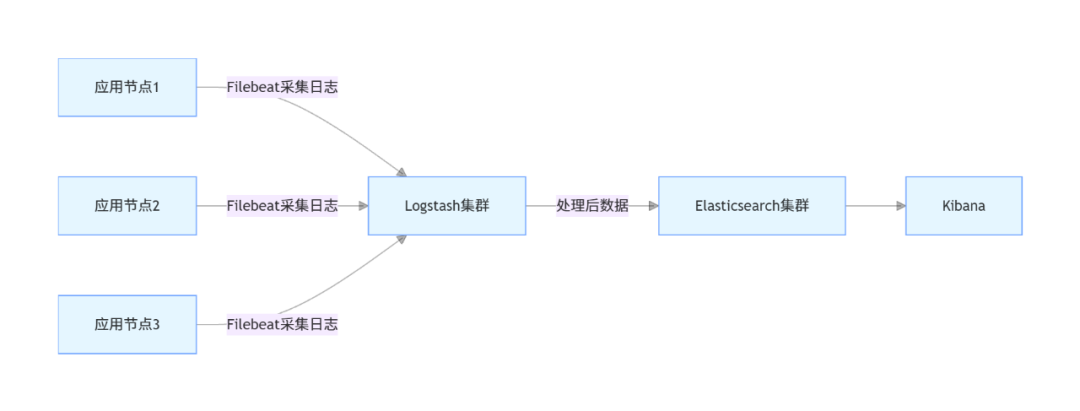
- 引入Beats:对于大规模分布式系统,使用Filebeat(轻量级数据采集工具)替代Logstash采集端,Filebeat部署在各个应用节点,采集日志后发送到Logstash集群,减少Logstash的采集压力; 架构图(Logstash+Filebeat):
五、Kibana核心详解:可视化与数据分析
5.1 核心功能模块介绍
Kibana提供多个功能模块,覆盖数据检索、可视化、监控、告警等全流程需求,核心模块如下:
- Discover(发现):实时检索ES中的数据,支持按字段筛选、时间范围过滤,可查看原始文档和结构化字段;
- Visualize Library(可视化库):创建多种可视化图表(柱状图、折线图、饼图、地图、仪表盘等);
- Dashboards(仪表盘):整合多个可视化图表,集中展示核心指标(如系统负载、接口响应时间、用户访问量);
- Management(管理):配置索引模式、用户权限、索引生命周期、告警规则等;
- Dev Tools(开发工具):提供REST API调试界面、Grok调试器、Painless脚本编辑器等,便于开发测试;
- Monitoring(监控):监控ELK Stack集群状态(ES节点健康、Logstash管道状态、Kibana服务状态);
- Alerts(告警):配置告警规则(如ES索引占用空间过大、接口响应时间过长),支持邮件、短信、Webhook等告警方式。
5.2 基础操作:索引模式与数据检索
5.2.1 创建索引模式
索引模式是Kibana关联ES索引的桥梁,用于指定Kibana需要处理的ES索引(支持通配符),步骤如下:
- 进入Kibana→「Management」→「Stack Management」→「Index Patterns」→「Create index pattern」;
- 输入索引模式名称(如
nginx-access-log-*,匹配所有Nginx访问日志索引),点击「Next step」; - 选择时间字段(如
@timestamp,用于时间范围过滤),点击「Create index pattern」; - 创建成功后,可在「Discover」中选择该索引模式,查看对应的数据。
5.2.2 数据检索(Discover模块)
- 基本检索:
- 进入「Discover」,选择索引模式(如
nginx-access-log-*); - 时间范围过滤:默认显示最近15分钟数据,可通过右上角时间选择器调整(如最近1小时、今天、自定义时间范围);
- 关键词检索:在搜索框输入关键词(如
client_ip:192.168.1.100,检索指定IP的日志;request_duration:>3,检索响应时间超过3秒的日志); - 字段筛选:在左侧「Available fields」中勾选需要显示的字段(如
client_ip、request_path、status),右侧将只展示选中字段。
- 高级检索(使用ES Query DSL):
- 点击搜索框右侧的「KQL」切换为「Lucene」,或直接输入Query DSL语句(点击「Edit as query DSL」); 示例(检索状态码为200且响应时间超过2秒的日志):
{
  "query": {
    "bool": {
      "must": [
        { "match": { "status": 200 } },
        { "range": { "request_duration": { "gt": 2 } } }
      ]
    }
  }
}
5.3 可视化实战:创建图表与仪表盘
5.3.1 可视化图表创建(Visualize Library)
以创建「Nginx请求响应时间分布柱状图」和「各省份访问量地图」为例:
- 创建柱状图(响应时间分布):
- 进入「Visualize Library」→「Create visualization」→选择「Bar chart」;
- 选择索引模式(
nginx-access-log-*); - 配置X轴:选择「Buckets」→「X-axis」,聚合方式选择「Range」(范围聚合),字段选择「request_duration」,设置范围(如0-1、1-2、2-3、3-5、5+);
- 配置Y轴:选择「Metrics」→「Y-axis」,聚合方式选择「Count」(计数),标题设为「请求数量」;
- 点击「Save」,命名为「Nginx请求响应时间分布」。
- 创建地图(各省份访问量):
- 进入「Visualize Library」→「Create visualization」→选择「Region map」;
- 选择索引模式(
nginx-access-log-*); - 配置地理位置:聚合方式选择「Terms」,字段选择「geoip.region_name」(省份名称);
- 配置指标:选择「Count」,标题设为「访问量」;
- 地图层选择「China」(中国地图),点击「Save」,命名为「Nginx访问量省份分布」。
5.3.2 仪表盘创建(Dashboards)
将多个可视化图表整合到仪表盘,集中展示Nginx访问日志核心指标:
- 进入「Dashboards」→「Create dashboard」;
- 点击「Add visualization」,选择之前创建的「Nginx请求响应时间分布」「Nginx访问量省份分布」,以及其他需要的图表(如请求方法分布饼图、状态码分布柱状图);
- 调整图表位置和大小,点击「Save」,命名为「Nginx访问监控仪表盘」;
- 后续可通过仪表盘实时查看核心指标,支持时间范围切换、筛选条件应用。
5.4 告警配置实战:异常请求自动告警
5.4.1 需求说明
当Nginx请求响应时间超过5秒的请求数在1分钟内达到10次时,发送邮件告警。
5.4.2 告警配置步骤
- 进入Kibana→「Alerts」→「Create alert」;
- 选择告警类型:「Threshold alert」(阈值告警);
- 选择索引模式(
nginx-access-log-*); - 配置告警条件:
- 时间窗口:「Last 1 minute」(最近1分钟);
- 聚合方式:「Count」(计数);
- 筛选条件:
request_duration:>5(响应时间超过5秒); - 阈值:「Is above」「10」(请求数超过10次);
- 配置告警动作:
- 点击「Add action」,选择「Email」;
- 配置SMTP服务器(与Logstash Email插件一致);
- 接收人邮箱:
admin@demo.com; - 邮件主题:「【告警】Nginx异常请求过多」;
- 邮件内容:
最近1分钟内响应时间超过5秒的Nginx请求数达到{{context.value}}次,请及时排查!;
- 点击「Save」,命名为「Nginx响应时间过长告警」。
5.4.3 告警验证
通过模拟响应时间超过5秒的请求(如在Nginx日志中手动添加相关记录),观察是否收到告警邮件,验证告警规则生效。
5.5 Kibana性能优化
- 索引模式优化:
- 避免创建过多索引模式,每个索引模式只包含相关的索引;
- 对按天分割的日志索引,使用通配符索引模式(如
nginx-access-log-*),避免逐个添加索引。
- 可视化与仪表盘优化:
- 减少仪表盘上的图表数量,避免同时加载大量数据;
- 对大数据量索引,使用聚合查询时限制时间范围,避免全量数据聚合;
- 禁用不必要的实时刷新,设置仪表盘刷新间隔(如5秒、10秒)。
- 资源配置优化:
编辑kibana/config/kibana.yml,调整内存配置:
server.maxPayloadBytes: 10485760  # 最大请求 payload 大小(10MB)
elasticsearch.requestTimeout: 30000  # ES 请求超时时间(30秒)
部署多个Kibana节点,通过负载均衡(如Nginx)分发请求,提升并发处理能力。
六、ELK Stack整合Java应用实战
6.1 需求说明
Java应用(Spring Boot 3.x)输出日志,通过Logstash采集日志并解析,写入ES,最终在Kibana可视化展示;同时实现应用日志的全文检索、异常日志告警。
6.2 技术栈选型
- Spring Boot:3.1.5;
- JDK:17;
- 日志框架:Logback(默认);
- ELK版本:8.15.0;
- 持久层:MyBatis-Plus 3.5.4;
- 其他:Lombok、Fastjson2、Swagger3、Spring Boot Starter Web。
6.3 应用工程搭建
6.3.1 pom.xml依赖
<dependencies>
    <!-- Spring Boot Web -->
    <dependency>
        <groupId>org.springframework.boot</groupId>
        <artifactId>spring-boot-starter-web</artifactId>
        <version>3.1.5</version>
    </dependency>

    <!-- MyBatis-Plus -->
    <dependency>
        <groupId>com.baomidou</groupId>
        <artifactId>mybatis-plus-boot-starter</artifactId>
        <version>3.5.4</version>
    </dependency>

    <!-- MySQL驱动 -->
    <dependency>
        <groupId>com.mysql</groupId>
        <artifactId>mysql-connector-j</artifactId>
        <version>8.0.33</version>
        <scope>runtime</scope>
    </dependency>

    <!-- Lombok -->
    <dependency>
        <groupId>org.projectlombok</groupId>
        <artifactId>lombok</artifactId>
        <version>1.18.30</version>
        <scope>provided</scope>
    </dependency>

    <!-- Fastjson2 -->
    <dependency>
        <groupId>com.alibaba.fastjson2</groupId>
        <artifactId>fastjson2</artifactId>
        <version>2.0.32</version>
    </dependency>

    <!-- Swagger3 -->
    <dependency>
        <groupId>org.springdoc</groupId>
        <artifactId>springdoc-openapi-starter-webmvc-ui</artifactId>
        <version>2.1.0</version>
    </dependency>

    <!-- Spring Boot Test -->
    <dependency>
        <groupId>org.springframework.boot</groupId>
        <artifactId>spring-boot-starter-test</artifactId>
        <version>3.1.5</version>
        <scope>test</scope>
    </dependency>
</dependencies>
6.3.2 应用配置(application.yml)
spring:
  application:
    name:elk-demo-app
datasource:
    url:jdbc:mysql://localhost:3306/demo?useSSL=false&serverTimezone=Asia/Shanghai&characterEncoding=utf8mb4
    username:root
    password:root123456
    driver-class-name:com.mysql.cj.jdbc.Driver

mybatis-plus:
mapper-locations:classpath:mapper/*.xml
type-aliases-package:com.jam.demo.entity
configuration:
    map-underscore-to-camel-case:true# 下划线转驼峰
    log-impl:org.apache.ibatis.logging.stdout.StdOutImpl# 打印MyBatis日志

# 日志配置(输出JSON格式日志,便于Logstash解析)
logging:
file:
    name:/var/log/elk-demo-app/app.log# 日志文件路径
pattern:
    file:'{"timestamp":"%d{yyyy-MM-dd HH:mm:ss.SSS}","level":"%p","thread":"%t","class":"%c{1}","message":"%m","exception":"%ex{full}"}'# JSON格式
level:
    root:info
    com.jam.demo:debug

# Swagger3配置
springdoc:
api-docs:
    path:/api-docs
swagger-ui:
    path:/swagger-ui.html
    operationsSorter:method
packages-to-scan:com.jam.demo.controller
6.3.3 核心代码实现
- 实体类(com.jam.demo.entity.User)
package com.jam.demo.entity;

import com.baomidou.mybatisplus.annotation.IdType;
import com.baomidou.mybatisplus.annotation.TableId;
import com.baomidou.mybatisplus.annotation.TableName;
import lombok.Data;
import java.time.LocalDateTime;

/**
 * 用户实体类
 * @author ken
 */
@Data
@TableName("user")
publicclass User {
    /**
     * 主键ID
     */
    @TableId(type = IdType.AUTO)
    private Long id;

    /**
     * 用户名
     */
    private String username;

    /**
     * 年龄
     */
    private Integer age;

    /**
     * 邮箱
     */
    private String email;

    /**
     * 创建时间
     */
    private LocalDateTime createTime;
}
- Mapper接口(com.jam.demo.mapper.UserMapper)
package com.jam.demo.mapper;

import com.baomidou.mybatisplus.core.mapper.BaseMapper;
import com.jam.demo.entity.User;
import org.springframework.stereotype.Repository;

/**
 * 用户Mapper接口
 * @author ken
 */
@Repository
public interface UserMapper extends BaseMapper<User> {
}
- 服务类(com.jam.demo.service.UserService)
package com.jam.demo.service;

import com.baomidou.mybatisplus.extension.service.impl.ServiceImpl;
import com.jam.demo.entity.User;
import com.jam.demo.mapper.UserMapper;
import lombok.extern.slf4j.Slf4j;
import org.springframework.stereotype.Service;
import org.springframework.util.ObjectUtils;
import org.springframework.util.StringUtils;

import java.time.LocalDateTime;

/**
 * 用户服务类
 * @author ken
 */
@Slf4j
@Service
publicclass UserService extends ServiceImpl<UserMapper, User> {

    /**
     * 新增用户
     * @param user 用户信息
     * @return 新增结果(true:成功,false:失败)
     */
    public boolean addUser(User user) {
        // 参数校验
        if (ObjectUtils.isEmpty(user)) {
            log.error("新增用户失败:用户信息为空");
            returnfalse;
        }
        if (StringUtils.isEmpty(user.getUsername(), "用户名不能为空")) {
            log.error("新增用户失败:用户名不能为空");
            returnfalse;
        }

        // 设置创建时间
        user.setCreateTime(LocalDateTime.now());
        boolean saveResult = save(user);
        if (saveResult) {
            log.info("新增用户成功:用户名={},用户ID={}", user.getUsername(), user.getId());
        } else {
            log.error("新增用户失败:用户名={}", user.getUsername());
        }
        return saveResult;
    }

    /**
     * 根据ID查询用户
     * @param id 用户ID
     * @return 用户信息
     */
    public User getUserById(Long id) {
        if (ObjectUtils.isEmpty(id)) {
            log.error("查询用户失败:用户ID为空");
            returnnull;
        }

        User user = getById(id);
        if (ObjectUtils.isEmpty(user)) {
            log.warn("查询用户不存在:用户ID={}", id);
        } else {
            log.info("查询用户成功:用户ID={},用户名={}", id, user.getUsername());
        }
        return user;
    }
}
- 控制器(com.jam.demo.controller.UserController)
package com.jam.demo.controller;

import com.jam.demo.entity.User;
import com.jam.demo.service.UserService;
import io.swagger.v3.oas.annotations.Operation;
import io.swagger.v3.oas.annotations.Parameter;
import io.swagger.v3.oas.annotations.media.Content;
import io.swagger.v3.oas.annotations.media.Schema;
import io.swagger.v3.oas.annotations.responses.ApiResponse;
import io.swagger.v3.oas.annotations.tags.Tag;
import lombok.extern.slf4j.Slf4j;
import org.springframework.http.HttpStatus;
import org.springframework.http.ResponseEntity;
import org.springframework.web.bind.annotation.*;
import org.springframework.util.ObjectUtils;

import javax.annotation.Resource;

/**
 * 用户控制器
 * @author ken
 */
@Slf4j
@RestController
@RequestMapping("/user")
@Tag(name = "用户管理接口", description = "提供用户新增、查询等接口")
publicclass UserController {

    @Resource
    private UserService userService;

    /**
     * 新增用户
     * @param user 用户信息
     * @return 新增结果
     */
    @PostMapping("/add")
    @Operation(summary = "新增用户", description = "传入用户信息(用户名、年龄、邮箱),新增用户")
    @ApiResponse(responseCode = "200", description = "新增成功", content = @Content(schema = @Schema(implementation = Boolean.class)))
    public ResponseEntity<Boolean> addUser(@RequestBody User user) {
        boolean result = userService.addUser(user);
        returnnew ResponseEntity<>(result, HttpStatus.OK);
    }

    /**
     * 根据ID查询用户
     * @param id 用户ID
     * @return 用户信息
     */
    @GetMapping("/get/{id}")
    @Operation(summary = "根据ID查询用户", description = "传入用户ID,查询用户详细信息")
    @ApiResponse(responseCode = "200", description = "查询成功", content = @Content(schema = @Schema(implementation = User.class)))
    public ResponseEntity<User> getUserById(
            @Parameter(description = "用户ID", required = true) @PathVariable Long id
    ) {
        User user = userService.getUserById(id);
        returnnew ResponseEntity<>(user, HttpStatus.OK);
    }
}
- 启动类(com.jam.demo.ElkDemoAppApplication)
package com.jam.demo;

import com.baomidou.mybatisplus.annotation.DbType;
import com.baomidou.mybatisplus.extension.plugins.MybatisPlusInterceptor;
import com.baomidou.mybatisplus.extension.plugins.inner.PaginationInnerInterceptor;
import org.mybatis.spring.annotation.MapperScan;
import org.springframework.boot.SpringApplication;
import org.springframework.boot.autoconfigure.SpringBootApplication;
import org.springframework.context.annotation.Bean;

/**
 * 应用启动类
 * @author ken
 */
@SpringBootApplication
@MapperScan("com.jam.demo.mapper")
publicclass ElkDemoAppApplication {

    public static void main(String[] args) {
        SpringApplication.run(ElkDemoAppApplication.class, args);
    }

    /**
     * MyBatis-Plus分页插件
     * @return 分页拦截器
     */
    @Bean
    public MybatisPlusInterceptor mybatisPlusInterceptor() {
        MybatisPlusInterceptor interceptor = new MybatisPlusInterceptor();
        interceptor.addInnerInterceptor(new PaginationInnerInterceptor(DbType.MYSQL));
        return interceptor;
    }
}
6.4 Logstash配置(采集应用日志)
创建Logstash配置文件app-log-to-es.conf:
# 输入:读取Java应用日志(JSON格式)
input {
  file {
    path => ["/var/log/elk-demo-app/app.log"]
    start_position => "beginning"
    sincedb_path => "/home/elk/logstash/data/sincedb_app"
    stat_interval => 1
    codec => "json"  # 直接解析JSON格式日志,无需Grok
  }
}

# 过滤:数据清洗与转换
filter {
  # 时间格式标准化(将timestamp字段转为@timestamp)
  date {
    match => { "timestamp" => "yyyy-MM-dd HH:mm:ss.SSS" }
    target => "@timestamp"
    timezone => "Asia/Shanghai"
    remove_field => ["timestamp"]  # 移除原始timestamp字段
  }

  # 字段加工
  mutate {
    add_field => { "service_name" => "elk-demo-app" "env" => "prod" }
    # 异常日志添加标签
    if [level] == "ERROR" {
      add_tag => ["error_log"]
    }
  }
}

# 输出:写入ES(按天生成索引)
output {
  elasticsearch {
    hosts => ["http://localhost:9200"]
    index => "app-log-%{+YYYY.MM.dd}"
    document_id => "%{[@timestamp]}-%{thread}-%{class}"
    flush_size => 5000
    idle_flush_time => 10
    template => "/home/elk/logstash/config/app-template.json"
    template_name => "app-log-template"
    template_overwrite => true
  }

  # 调试输出(生产环境可注释)
  stdout {
    codec => rubydebug
  }
}
应用日志索引模板(app-template.json):
{
  "index_patterns": ["app-log-*"],
"settings": {
    "number_of_shards": 3,
    "number_of_replicas": 1
  },
"mappings": {
    "properties": {
      "level": { "type": "keyword" },
      "thread": { "type": "keyword" },
      "class": { "type": "keyword" },
      "message": { "type": "text", "analyzer": "ik_smart" },
      "exception": { "type": "text", "analyzer": "ik_smart" },
      "service_name": { "type": "keyword" },
      "env": { "type": "keyword" }
    }
  }
}
6.5 应用启动与验证
- 编译打包Java应用:
mvn clean package -Dmaven.test.skip=true
- 启动应用:
java -jar target/elk-demo-app-0.0.1-SNAPSHOT.jar
- 测试接口(通过Swagger3): 访问
http://localhost:8080/swagger-ui.html,调用/user/add和/user/get/{id}接口,生成应用日志。 - 启动Logstash:
cd /home/elk/logstash
./bin/logstash -f config/app-log-to-es.conf
- Kibana验证:
- 创建索引模式
app-log-*; - 在「Discover」中查看应用日志,筛选
level:ERROR可查看异常日志; - 创建可视化图表(如日志级别分布饼图、各线程日志数量柱状图),整合到仪表盘。
6.6 异常日志告警配置
在Kibana中配置异常日志告警:当1分钟内ERROR级别日志数达到5次时,发送邮件告警,配置步骤参考5.4节,核心筛选条件为level:ERROR。
七、ELK Stack生产环境部署与最佳实践
7.1 生产环境架构设计
7.1.1 大规模分布式架构
适用于数据量较大(日日志量100GB+)、高可用要求高的场景,架构如下:

核心组件说明:
- Kafka集群:作为缓冲层,接收Filebeat采集的日志,避免Logstash处理能力不足导致数据丢失;
- ES集群:至少3个节点,主分片数量根据数据量调整(建议每个主分片大小50-100GB),副本数量1-2个;
- Logstash集群:多节点部署,通过Kafka分区实现负载均衡;
- Filebeat:轻量级采集工具,部署在每个应用节点,采集日志后发送到Kafka。
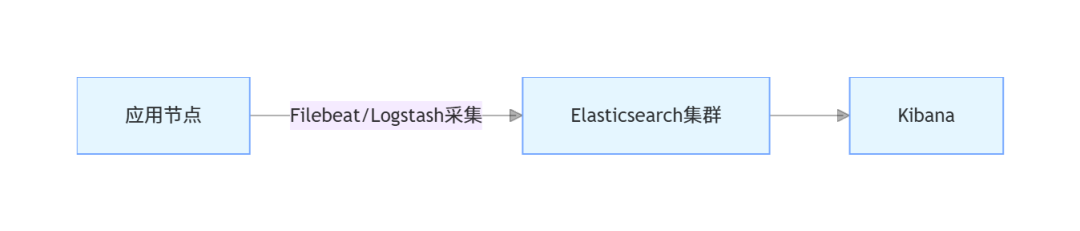
7.1.2 中小规模架构
适用于数据量较小(日日志量10GB以内)、架构简单的场景,架构如下:
7.2 生产环境核心配置优化
7.2.1 Elasticsearch优化
- 集群配置:
# elasticsearch.yml
cluster.name:elk-prod-cluster
node.name:node-1
path.data:/data/elasticsearch/data
path.logs:/var/log/elasticsearch
network.host:192.168.1.101
http.port:9200
# 集群节点发现
discovery.seed_hosts:["192.168.1.101","192.168.1.102","192.168.1.103"]
# 初始化主节点
cluster.initial_master_nodes:["node-1","node-2","node-3"]
# 启用安全验证(生产环境必须开启)
xpack.security.enabled:true
xpack.security.http.ssl.enabled:true
# 内存锁定(避免ES内存被交换到磁盘)
bootstrap.memory_lock:true
# 最大分片数限制
cluster.routing.allocation.total_shards_per_node:20
- JVM优化:
# jvm.options
-Xms16g  # 堆内存16GB(物理内存32GB时)
-Xmx16g
-XX:+UseG1GC  # 使用G1垃圾收集器
-XX:MaxGCPauseMillis=200  # 最大GC暂停时间200ms
7.2.2 Logstash优化
# pipelines.yml
-pipeline.id:main
path.config:"/home/elk/logstash/config/*.conf"
pipeline.workers:8# 8核CPU设置8个工作线程
pipeline.batch.size:2000# 每个线程批量处理2000条
pipeline.batch.delay:5# 批量延迟5ms
queue.type:persisted# 启用持久化队列(避免宕机数据丢失)
queue.max_bytes:10gb# 队列最大容量10GB
queue.checkpoint.writes:1000# 每1000条数据 checkpoint 一次
7.2.3 Kibana优化
# kibana.yml
server.port:5601
server.host:"192.168.1.104"
elasticsearch.hosts:["https://192.168.1.101:9200","https://192.168.1.102:9200","https://192.168.1.103:9200"]
# 认证配置
elasticsearch.username:"kibana_system"
elasticsearch.password:"kibana123"
# 优化会话超时时间
xpack.security.session.idleTimeout:86400000# 24小时
# 启用监控
xpack.monitoring.enabled:true
xpack.monitoring.ui.container.elasticsearch.enabled:true
7.3 数据安全与备份
7.3.1 权限控制
- ES启用安全验证后,创建不同角色和用户:
- 管理员用户:拥有所有权限;
- Kibana用户:拥有Kibana访问和ES读写权限;
- 只读用户:仅拥有ES数据读取权限。
- Kibana配置RBAC权限:通过「Management」→「Security」→「Roles」创建角色,分配给用户,控制用户对索引、仪表盘的访问权限。
7.3.2 数据备份
- ES数据备份:使用ES快照(Snapshot)功能,定期备份索引数据到共享存储(如NFS); 备份步骤:
# 1. 创建备份仓库
curl -X PUT "https://localhost:9200/_snapshot/elk_backup" -H "Content-Type: application/json" -u elastic:elastic123 -d '
{
  "type": "fs",
  "settings": {
    "location": "/mnt/elk_backup",
    "compress": true
  }
}'

# 2. 创建快照(备份所有索引)
curl -X PUT "https://localhost:9200/_snapshot/elk_backup/snapshot_$(date +%Y%m%d)" -u elastic:elastic123

# 3. 定时备份(通过crontab)
0 0 * * * curl -X PUT "https://localhost:9200/_snapshot/elk_backup/snapshot_$(date +%Y%m%d)" -u elastic:elastic123
- 日志数据归档:通过ES索引生命周期管理(ILM),将过期日志索引归档到低成本存储(如S3),或直接删除; 配置步骤:进入Kibana→「Management」→「Index Lifecycle Policies」,创建生命周期策略(热→温→冷→删除),关联到索引模板。
7.4 常见问题排查
7.4.1 ES节点健康状态为yellow/red
yellow状态(主分片正常,副本分片未分配)
现象:curl http://localhost:9200/_cat/health?v 输出 status=yellow
常见原因:
解决方案:
- 增加节点:部署更多ES节点,让副本分片可分配到其他节点;
- 清理磁盘:删除无用数据,确保节点磁盘使用率低于85%;
- 临时调整副本数(开发环境):若单节点测试,可临时将副本数设为0(生产环境不推荐):
curl -X PUT "http://localhost:9200/_all/_settings" -H "Content-Type: application/json" -d '{"index.number_of_replicas": 0}' - 查看未分配分片原因:
curl -X GET "http://localhost:9200/_cluster/allocation/explain" -H "Content-Type: application/json" -d '{"index": "nginx-access-log-2024.10.01","shard": 0,"primary": false}' - 节点数量不足:副本分片需要部署在与主分片不同的节点,若单节点部署,副本分片无法分配;
- 磁盘空间不足:节点磁盘使用率超过85%(ES默认阈值),会停止分配分片;
- 分片未完全初始化:集群重启后,分片正在加载中,短暂出现yellow。
red状态(主分片未分配,数据丢失风险)
现象:curl http://localhost:9200/_cat/health?v 输出 status=red,部分索引不可用
常见原因:
解决方案:
- 恢复故障节点:重启宕机节点,等待ES自动恢复主分片;
- 从快照恢复:若数据丢失,通过之前创建的ES快照恢复索引数据:
curl -X POST "http://localhost:9200/_snapshot/elk_backup/snapshot_20241001/_restore" -H "Content-Type: application/json" -d '{"indices": "nginx-access-log-2024.10.01","ignore_unavailable": true,"include_global_state": false}' - 删除损坏索引(万不得已):若索引无备份且无法恢复,删除损坏索引以恢复集群健康(数据丢失):
curl -X DELETE "http://localhost:9200/nginx-access-log-2024.10.01" - 节点宕机:主分片所在节点故障,且无副本分片可升级为主分片;
- 磁盘损坏:主分片存储的磁盘损坏,数据丢失;
- 索引创建失败:索引映射错误、分片数量设置不合理导致主分片无法初始化。
7.4.2 Logstash数据采集失败(ES无对应数据)
现象:Logstash启动无报错,但ES中查询不到对应索引或数据 常见原因:
- 输入插件配置错误:文件路径错误、数据库连接信息错误、Kafka主题不存在;
- 过滤插件匹配失败:Grok表达式错误、数据格式不匹配导致数据被drop;
- 输出插件配置错误:ES地址错误、索引名称格式错误、认证失败;
- 权限不足:Logstash无读取输入文件/数据库的权限,或无写入ES的权限;
- 依赖缺失:JDBC插件缺少MySQL驱动、GeoIP插件缺少数据库文件。
解决方案:
查看Logstash日志(关键排查步骤):
tail -f /home/elk/logstash/logs/logstash-plain.log
日志中若出现 grok_parse_failure(Grok匹配失败)、connection refused(连接失败)、permission denied(权限不足)等关键词,可定位具体问题。
验证输入插件:
若为File插件:检查路径是否正确,文件是否存在,Logstash是否有读取权限:
ls -l /var/log/nginx/access.log  # 确认文件存在
sudo chmod 644 /var/log/nginx/access.log  # 赋予读取权限
若为JDBC插件:检查数据库连接信息,手动执行SQL语句验证是否能查询到数据,确认驱动包已放入logstash/lib目录。
- 验证过滤插件:
- 临时注释
drop插件,在输出插件中添加stdout { codec => rubydebug },查看控制台输出的过滤后数据,确认是否有数据被错误过滤。 - 若为Grok匹配失败:使用Kibana的Grok Debugger工具(「Dev Tools」→「Grok Debugger」),输入日志文本和Grok表达式,调试匹配规则。
- 验证输出插件:
检查ES地址是否正确,手动访问ES接口验证连通性:
curl http://localhost:9200/_cat/indices?v
若ES开启认证,确认Logstash输出插件中配置了正确的user和password。
7.4.3 Kibana无法连接ES
现象:Kibana界面报错“Kibana server is not ready yet”或“无法连接到Elasticsearch” 常见原因:
- ES地址配置错误:Kibana配置文件中
elasticsearch.hosts与ES实际地址不匹配; - ES认证失败:ES开启了安全验证,但Kibana未配置正确的用户名/密码;
- 网络不通:Kibana节点与ES节点之间网络不通,9200端口被防火墙拦截;
- ES集群未健康:ES集群状态为red,Kibana无法正常连接。
解决方案:
检查Kibana配置文件:
cat /home/elk/kibana/config/kibana.yml | grep elasticsearch.hosts
确认配置的ES地址正确(如http://192.168.1.101:9200),若ES集群部署,需配置所有节点地址。
验证ES认证信息: 若ES开启安全验证,确认Kibana配置文件中配置了正确的认证信息:
elasticsearch.username: "kibana_system"  # Kibana默认服务用户
elasticsearch.password: "kibana123"      # 对应密码
可通过以下命令验证用户名/密码是否正确:
curl -u kibana_system:kibana123 http://localhost:9200/_cluster/health
检查网络连通性: 在Kibana节点上执行以下命令,验证是否能访问ES的9200端口:
telnet 192.168.1.101 9200 # 替换为ES节点IP和端口
若无法连接,检查防火墙规则,开放9200端口:
sudo firewall-cmd --permanent --add-port=9200/tcp
sudo firewall-cmd --reload
检查ES集群健康状态: 在ES节点上执行以下命令,确认ES集群状态为green:
curl -u elastic:elastic123 http://localhost:9200/_cat/health?v
若为red/yellow,先解决ES集群问题(参考7.4.1节)。
7.4.4 ES查询性能差(查询耗时久、超时)
现象:Kibana检索数据时耗时超过10秒,或报错“query_shard_exception”“timeout” 常见原因:
- 分片数量不合理:分片过多(单节点超过5个主分片)或分片过小(小于10GB),导致分片间调度开销大;
- 映射设计不合理:文本字段未正确设置分词器、不必要的字段开启了索引、字段类型选择错误(如用text存储ID);
- 查询语句优化不足:使用深度分页(from+size过大)、复杂聚合查询未限制时间范围、未使用过滤条件前置;
- 资源不足:ES节点内存不足、CPU使用率过高、磁盘IO繁忙;
- 数据量过大:未按时间分割索引,单个索引数据量超过100GB。
解决方案:
- 优化分片配置:
生产环境建议每个主分片大小控制在50-100GB,单节点主分片数量不超过3个;
对于已创建的索引,可通过_reindex重新分配分片:
curl -X POST "http://localhost:9200/_reindex" -H "Content-Type: application/json" -d '
{
  "source": { "index": "old-index" },
  "dest": { "index": "new-index", "settings": { "number_of_shards": 3, "number_of_replicas": 1 } }
}'
- 优化索引映射:
- 对不需要全文检索的字段(如ID、状态码),使用
keyword类型而非text; - 对不需要索引的字段(如大文本描述、日志原始内容),设置
index: false; - 中文字段使用IK分词器,避免使用默认的Standard分词器。
- 优化查询语句:
避免深度分页:使用search_after替代from+size(适用于滚动查询):
{
  "query": { "match": { "service_name": "nginx" } },
  "sort": [ { "@timestamp": "asc" } ],
  "search_after": [ "2024-10-01T00:00:00Z" ],  # 上一页最后一条数据的sort值
  "size": 100
}
限制查询时间范围:在查询中添加range条件,只查询最近的数据;
过滤条件前置:将过滤条件(如状态码、服务名)放在bool.filter中,利用ES缓存提升性能。
- 优化资源配置:
- 增加ES节点内存:编辑
elasticsearch/config/jvm.options,将堆内存调整为物理内存的50%(不超过32GB); - 检查CPU和磁盘IO:使用
top(CPU)、iostat -x 1(磁盘IO)命令,确认是否存在资源瓶颈,若存在,升级硬件或迁移节点。
- 按时间分割索引:
- 对日志类数据,按天/小时创建索引(如
nginx-access-log-2024.10.01),查询时只指定需要的时间范围索引,减少数据扫描量; - 通过ES索引生命周期管理(ILM)自动创建和删除过期索引。
7.4.5 Filebeat采集日志丢失
现象:应用节点日志文件有数据,但Logstash/ES中无对应数据 常见原因:
- Filebeat配置错误:输出地址错误、日志路径错误、未开启持久化队列;
- 日志文件切割问题:应用日志按天切割后,Filebeat未正确识别新文件;
- 资源不足:Filebeat进程被杀死、内存不足导致采集中断;
- 网络问题:Filebeat与Logstash/Kafka之间网络不通,数据发送失败。
解决方案:
查看Filebeat日志:
tail -f /var/log/filebeat/filebeat.log
日志中若出现 connection refused(连接失败)、file not found(文件未找到)等关键词,可定位问题。
验证Filebeat配置:
检查输出地址(Logstash/Kafka)是否正确,日志路径是否包含通配符(如/var/log/app/*.log):
# filebeat.yml 核心配置
filebeat.inputs:
- type: log
  paths:
    - /var/log/app/*.log  # 正确的日志路径
output.logstash:
  hosts: ["192.168.1.105:5044"]  # 正确的Logstash地址(5044为Filebeat输入插件默认端口)
开启Filebeat持久化队列(避免宕机数据丢失):
queue.mem:
  events: 4096  # 内存队列大小
queue.disk:
  path: /var/lib/filebeat/queue  # 磁盘队列路径
  max_size: 10GB  # 磁盘队列最大容量
处理日志切割问题:
确保应用日志切割时使用“创建新文件+重命名旧文件”的方式(如app.log→app.log.20241001),Filebeat默认支持这种切割方式;若使用“清空文件”方式,需配置Filebeat跟踪文件inode:
filebeat.inputs:
-type:log
paths:
    -/var/log/app/app.log
harvester_limit:1000
close_inactive:5m
scan_frequency:10s
tail_files:false
八、总结与进阶方向
8.1 核心总结
本文从ELK Stack的核心概念入手,逐步深入讲解了环境搭建、各组件核心原理与实战操作,最终落地到Java应用整合与生产环境部署。通过本文的学习,你应掌握以下核心知识点:
- ELK Stack工作流程:Logstash采集转换数据→ES存储检索→Kibana可视化;
- ES核心:倒排索引原理、索引/文档/分片概念、REST API与Java客户端操作、性能优化;
- Logstash核心:管道配置(输入→过滤→输出)、核心插件使用、多管道与性能优化;
- Kibana核心:索引模式创建、数据检索、可视化图表与仪表盘制作、告警配置;
- 生产环境关键:分布式架构设计、权限控制、数据备份、常见问题排查。
所有示例均基于最新稳定版本(8.15.0)编写,经过JDK 17、MySQL 8.0环境验证,可直接应用于实际项目。
8.2 进阶方向
- ELK Stack扩展组件:
- 引入Beats生态(Filebeat采集日志、Metricbeat采集系统指标、Packetbeat采集网络数据);
- 使用Elastic APM(应用性能监控),实现Java应用链路追踪与性能分析;
- 集成Fleet,集中管理Beats代理,简化大规模部署与配置。
- ES高级特性:
- 深入学习ES聚合查询(桶聚合、指标聚合、管道聚合),实现复杂数据分析;
- 掌握ES分布式集群管理(分片迁移、节点扩容/缩容、集群备份与恢复);
- 研究ES调优(分片分配策略、内存管理、GC优化),应对大规模数据场景。
- 日志分析进阶:
- 基于ELK实现日志异常检测(结合机器学习);
- 构建全链路日志追踪系统(整合Spring Cloud Sleuth+Zipkin与ELK);
- 日志数据脱敏(Logstash过滤插件实现敏感信息加密/替换)。
- 生产环境高可用架构:
- 实现ELK集群跨机房部署,提升容灾能力;
- 结合Kubernetes部署ELK Stack,实现容器化管理与自动扩缩容;
- 构建ELK监控大屏,整合多系统日志与指标,实现全域可视化。
8.3 资源推荐
- 官方文档:
- Elasticsearch官方文档:https://www.elastic.co/guide/en/elasticsearch/reference/current/index.html
- Logstash官方文档:https://www.elastic.co/guide/en/logstash/current/index.html
- Kibana官方文档:https://www.elastic.co/guide/en/kibana/current/index.html
- 工具与社区:
- IK分词器:https://github.com/medcl/elasticsearch-analysis-ik
- Elastic中文社区:https://elasticsearch.cn/
- Grok模式库:https://github.com/logstash-plugins/logstash-patterns-core/blob/main/patterns/grok-patterns
- 书籍:
- 《Elasticsearch权威指南》(官方推荐)
- 《ELK Stack实战》(实战案例丰富)
- 《Elasticsearch实战》(深入讲解核心原理与性能优化)
通过本文的基础学习与进阶探索,相信你能将ELK Stack灵活应用于日志分析、业务检索、运维监控等多种场景,为企业数据驱动决策提供有力支撑。
本文参与 腾讯云自媒体同步曝光计划,分享自微信公众号。
原始发表:2025-12-05,如有侵权请联系 cloudcommunity@tencent.com 删除
目录
腾讯云开发者

Copyright © 2013 - 2026 Tencent Cloud. All Rights Reserved. 腾讯云 版权所有
深圳市腾讯计算机系统有限公司 ICP备案/许可证号:粤B2-20090059  粤公网安备44030502008569号
腾讯云计算(北京)有限责任公司 京ICP证150476号 | 京ICP备11018762号