从单机到集群:Redis部署全攻略

从单机到集群:Redis部署全攻略

果酱带你啃java
发布于 2026-04-14 14:14:26
发布于 2026-04-14 14:14:26
一、前言
在分布式系统架构中,Redis作为高性能的键值对数据库,其部署方式直接决定了系统的可用性、可靠性和扩展性。不同的业务场景(如单机测试、高并发读写、海量数据存储)需要匹配不同的Redis部署方案。本文将从底层逻辑出发,全面拆解Redis的4种核心部署方式(单机版、主从复制、哨兵模式、Redis Cluster集群),结合实战配置与Java代码示例,帮你理清每种部署方式的适用场景、优缺点及落地要点,兼顾基础夯实与实际问题解决。
二、单机版部署:最简单的入门方案
2.1 核心原理
单机版是Redis最基础的部署方式,即单个Redis进程独立运行,所有的读写操作都在同一个节点上完成。其架构简单,无额外依赖,本质是“单进程+单线程(IO多路复用)”处理请求,适合对可用性要求不高的场景。
2.2 部署步骤(Linux环境)
2.2.1 环境准备
- 系统:CentOS 8.x
- Redis版本:7.2.5(最新稳定版)
- 依赖安装:
yum install -y gcc gcc-c++ make
2.2.2 安装与配置
# 下载并解压Redis
wget https://download.redis.io/releases/redis-7.2.5.tar.gz
tar -zxvf redis-7.2.5.tar.gz -C /usr/local/
cd /usr/local/redis-7.2.5/

# 编译安装
make && make install

# 修改配置文件(redis.conf)
vim /usr/local/redis-7.2.5/redis.conf
# 核心配置项
bind 0.0.0.0  # 允许所有IP访问(生产环境需指定具体IP)
protected-mode no  # 关闭保护模式
port 6379  # 端口
daemonize yes  # 后台运行
requirepass 123456  # 密码(生产环境必须设置)
appendonly yes  # 开启AOF持久化(默认RDB,结合使用更安全)
appendfsync everysec  # AOF同步策略:每秒同步

# 启动Redis
redis-server /usr/local/redis-7.2.5/redis.conf

# 验证启动
redis-cli -h 127.0.0.1 -p 6379 -a 123456 ping
# 输出PONG则启动成功
2.3 Java实战代码(Spring Boot整合)
2.3.1 pom.xml依赖
<dependencies>
    <!-- Spring Boot核心依赖 -->
    <dependency>
        <groupId>org.springframework.boot</groupId>
        <artifactId>spring-boot-starter-web</artifactId>
        <version>3.2.5</version>
    </dependency>
    <!-- Redis依赖 -->
    <dependency>
        <groupId>org.springframework.boot</groupId>
        <artifactId>spring-boot-starter-data-redis</artifactId>
        <version>3.2.5</version>
    </dependency>
    <!-- Lombok -->
    <dependency>
        <groupId>org.projectlombok</groupId>
        <artifactId>lombok</artifactId>
        <version>1.18.30</version>
        <scope>provided</scope>
    </dependency>
    <!-- FastJSON2 -->
    <dependency>
        <groupId>com.alibaba.fastjson2</groupId>
        <artifactId>fastjson2</artifactId>
        <version>2.0.45</version>
    </dependency>
    <!-- Spring Util工具类 -->
    <dependency>
        <groupId>org.springframework</groupId>
        <artifactId>spring-core</artifactId>
        <version>6.1.6</version>
    </dependency>
    <!-- Google Collections -->
    <dependency>
        <groupId>com.google.guava</groupId>
        <artifactId>guava</artifactId>
        <version>33.2.1-jre</version>
    </dependency>
    <!-- Swagger3 -->
    <dependency>
        <groupId>org.springdoc</groupId>
        <artifactId>springdoc-openapi-starter-webmvc-ui</artifactId>
        <version>2.2.0</version>
    </dependency>
</dependencies>
2.3.2 Redis配置类
package com.jam.demo.config;

import com.alibaba.fastjson2.support.spring.data.redis.FastJson2RedisSerializer;
import lombok.extern.slf4j.Slf4j;
import org.springframework.context.annotation.Bean;
import org.springframework.context.annotation.Configuration;
import org.springframework.data.redis.connection.RedisConnectionFactory;
import org.springframework.data.redis.core.RedisTemplate;
import org.springframework.data.redis.serializer.StringRedisSerializer;
import org.springframework.util.ObjectUtils;

/**
 * Redis配置类
 * @author ken
 */
@Configuration
@Slf4j
publicclass RedisConfig {

    /**
     * 自定义RedisTemplate,使用FastJSON2序列化
     * @param connectionFactory Redis连接工厂
     * @return RedisTemplate<String, Object>
     */
    @Bean
    public RedisTemplate<String, Object> redisTemplate(RedisConnectionFactory connectionFactory) {
        if (ObjectUtils.isEmpty(connectionFactory)) {
            log.error("RedisConnectionFactory is null");
            thrownew IllegalArgumentException("RedisConnectionFactory cannot be null");
        }
        RedisTemplate<String, Object> redisTemplate = new RedisTemplate<>();
        redisTemplate.setConnectionFactory(connectionFactory);

        // 字符串序列化器(key)
        StringRedisSerializer stringRedisSerializer = new StringRedisSerializer();
        // FastJSON2序列化器(value)
        FastJson2RedisSerializer<Object> fastJson2RedisSerializer = new FastJson2RedisSerializer<>(Object.class);

        // 设置key序列化方式
        redisTemplate.setKeySerializer(stringRedisSerializer);
        redisTemplate.setHashKeySerializer(stringRedisSerializer);
        // 设置value序列化方式
        redisTemplate.setValueSerializer(fastJson2RedisSerializer);
        redisTemplate.setHashValueSerializer(fastJson2RedisSerializer);

        redisTemplate.afterPropertiesSet();
        log.info("RedisTemplate initialized successfully");
        return redisTemplate;
    }
}
2.3.3 业务服务类
package com.jam.demo.service;

import com.google.common.collect.Maps;
import com.jam.demo.entity.User;
import lombok.extern.slf4j.Slf4j;
import org.springframework.data.redis.core.RedisTemplate;
import org.springframework.stereotype.Service;
import org.springframework.transaction.annotation.Transactional;
import org.springframework.util.CollectionUtils;
import org.springframework.util.ObjectUtils;
import org.springframework.util.StringUtils;

import javax.annotation.Resource;
import java.util.Map;
import java.util.concurrent.TimeUnit;

/**
 * Redis单机版业务服务
 * @author ken
 */
@Service
@Slf4j
publicclass RedisSingleService {

    @Resource
    private RedisTemplate<String, Object> redisTemplate;

    privatestaticfinal String USER_KEY_PREFIX = "user:";
    privatestaticfinallong USER_EXPIRE_TIME = 30L; // 30分钟

    /**
     * 保存用户信息到Redis
     * @param user 用户实体
     * @return boolean 保存结果
     */
    public boolean saveUser(User user) {
        if (ObjectUtils.isEmpty(user) || StringUtils.isEmpty(user.getId())) {
            log.error("保存用户失败:用户信息为空或ID为空");
            returnfalse;
        }
        try {
            String key = USER_KEY_PREFIX + user.getId();
            redisTemplate.opsForValue().set(key, user, USER_EXPIRE_TIME, TimeUnit.MINUTES);
            log.info("保存用户成功,key:{}", key);
            returntrue;
        } catch (Exception e) {
            log.error("保存用户失败", e);
            returnfalse;
        }
    }

    /**
     * 根据用户ID查询用户信息
     * @param userId 用户ID
     * @return User 用户实体
     */
    public User getUserById(String userId) {
        if (StringUtils.isEmpty(userId)) {
            log.error("查询用户失败:用户ID为空");
            returnnull;
        }
        String key = USER_KEY_PREFIX + userId;
        return (User) redisTemplate.opsForValue().get(key);
    }

    /**
     * 批量查询用户信息
     * @param userIds 用户ID列表
     * @return Map<String, User> 用户ID-用户实体映射
     */
    public Map<String, User> batchGetUsers(String... userIds) {
        if (ObjectUtils.isEmpty(userIds)) {
            log.error("批量查询用户失败:用户ID数组为空");
            return Maps.newHashMap();
        }
        Map<String, User> userMap = Maps.newHashMap();
        for (String userId : userIds) {
            if (StringUtils.hasText(userId)) {
                String key = USER_KEY_PREFIX + userId;
                User user = (User) redisTemplate.opsForValue().get(key);
                if (!ObjectUtils.isEmpty(user)) {
                    userMap.put(userId, user);
                }
            }
        }
        return userMap;
    }

    /**
     * 删除用户信息
     * @param userId 用户ID
     * @return boolean 删除结果
     */
    public boolean deleteUser(String userId) {
        if (StringUtils.isEmpty(userId)) {
            log.error("删除用户失败:用户ID为空");
            returnfalse;
        }
        String key = USER_KEY_PREFIX + userId;
        Boolean delete = redisTemplate.delete(key);
        return Boolean.TRUE.equals(delete);
    }
}
2.3.4 控制器类
package com.jam.demo.controller;

import com.jam.demo.entity.User;
import com.jam.demo.service.RedisSingleService;
import io.swagger.v3.oas.annotations.Operation;
import io.swagger.v3.oas.annotations.Parameter;
import io.swagger.v3.oas.annotations.tags.Tag;
import lombok.extern.slf4j.Slf4j;
import org.springframework.http.HttpStatus;
import org.springframework.http.ResponseEntity;
import org.springframework.web.bind.annotation.*;
import org.springframework.util.ObjectUtils;

import javax.annotation.Resource;
import java.util.Map;

/**
 * Redis单机版控制器
 * @author ken
 */
@RestController
@RequestMapping("/redis/single")
@Slf4j
@Tag(name = "Redis单机版接口", description = "基于Redis单机版的用户信息操作接口")
publicclass RedisSingleController {

    @Resource
    private RedisSingleService redisSingleService;

    @PostMapping("/user")
    @Operation(summary = "保存用户信息", description = "将用户信息存入Redis,设置30分钟过期")
    public ResponseEntity<Boolean> saveUser(@RequestBody User user) {
        boolean result = redisSingleService.saveUser(user);
        returnnew ResponseEntity<>(result, HttpStatus.OK);
    }

    @GetMapping("/user/{userId}")
    @Operation(summary = "查询用户信息", description = "根据用户ID从Redis查询用户信息")
    public ResponseEntity<User> getUserById(
            @Parameter(description = "用户ID", required = true) @PathVariable String userId) {
        User user = redisSingleService.getUserById(userId);
        returnnew ResponseEntity<>(user, HttpStatus.OK);
    }

    @GetMapping("/users")
    @Operation(summary = "批量查询用户信息", description = "根据多个用户ID批量查询Redis中的用户信息")
    public ResponseEntity<Map<String, User>> batchGetUsers(
            @Parameter(description = "用户ID列表(多个用逗号分隔)", required = true) @RequestParam String userIds) {
        if (ObjectUtils.isEmpty(userIds)) {
            returnnew ResponseEntity<>(HttpStatus.BAD_REQUEST);
        }
        String[] userIdArray = userIds.split(",");
        Map<String, User> userMap = redisSingleService.batchGetUsers(userIdArray);
        returnnew ResponseEntity<>(userMap, HttpStatus.OK);
    }

    @DeleteMapping("/user/{userId}")
    @Operation(summary = "删除用户信息", description = "根据用户ID删除Redis中的用户信息")
    public ResponseEntity<Boolean> deleteUser(
            @Parameter(description = "用户ID", required = true) @PathVariable String userId) {
        boolean result = redisSingleService.deleteUser(userId);
        returnnew ResponseEntity<>(result, HttpStatus.OK);
    }
}
2.3.5 实体类
package com.jam.demo.entity;

import io.swagger.v3.oas.annotations.media.Schema;
import lombok.Data;

import java.io.Serializable;

/**
 * 用户实体类
 * @author ken
 */
@Data
@Schema(description = "用户实体")
publicclass User implements Serializable {

    privatestaticfinallong serialVersionUID = 1L;

    @Schema(description = "用户ID")
    private String id;

    @Schema(description = "用户名")
    private String username;

    @Schema(description = "用户年龄")
    private Integer age;

    @Schema(description = "用户邮箱")
    private String email;
}
2.4 优缺点与适用场景
优点
- 部署简单,无额外架构设计成本;
- 运维成本低,无需维护多个节点;
- 性能损耗小,无数据同步、集群通信等开销。
缺点
- 单点故障风险:节点宕机后整个Redis服务不可用;
- 扩展性差:无法通过横向扩展提升性能和存储容量;
- 持久化风险:若节点硬件故障,可能导致数据丢失(依赖RDB/AOF恢复)。
适用场景
- 开发/测试环境;
- 对可用性要求不高的小型应用(如个人项目、内部工具);
- 临时数据缓存(如验证码、临时会话,可容忍数据丢失)。
三、主从复制部署:读写分离与数据备份
3.1 核心原理
主从复制是Redis高可用的基础方案,通过“一主多从”的架构实现:
- 主节点(Master):负责接收写请求,同步数据到从节点;
- 从节点(Slave):负责接收读请求,从主节点同步数据(只读,默认不允许写)。
核心价值:
- 读写分离:分摊主节点读压力,提升系统并发读能力;
- 数据备份:从节点存储主节点数据副本,降低数据丢失风险;
- 故障转移基础:主节点故障后,可手动将从节点提升为主节点(需配合人工操作)。
底层同步逻辑:
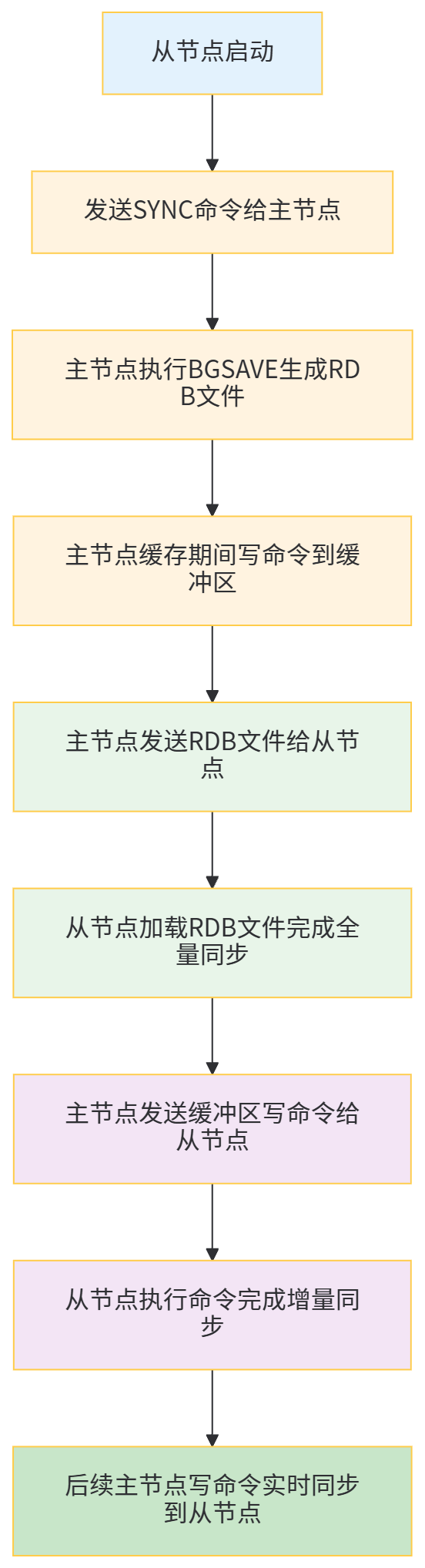
3.2 部署步骤(一主两从)
3.2.1 环境准备
- 3台服务器(或同一服务器不同端口,本文用不同端口演示):
- 主节点:127.0.0.1:6379
- 从节点1:127.0.0.1:6380
- 从节点2:127.0.0.1:6381
- Redis版本:7.2.5
3.2.2 配置与启动
# 1. 复制3份配置文件
cd /usr/local/redis-7.2.5/
cp redis.conf redis-6379.conf
cp redis.conf redis-6380.conf
cp redis.conf redis-6381.conf

# 2. 配置主节点(redis-6379.conf)
vim redis-6379.conf
# 核心配置(同单机版,确保以下配置)
bind 0.0.0.0
protected-mode no
port 6379
daemonize yes
requirepass 123456
appendonly yes

# 3. 配置从节点1(redis-6380.conf)
vim redis-6380.conf
# 核心配置
bind 0.0.0.0
protected-mode no
port 6380
daemonize yes
requirepass 123456
appendonly yes
# 关键:指定主节点信息
replicaof 127.0.0.1 6379  # 主节点IP:端口
masterauth 123456  # 主节点密码(主节点有密码时必须配置)
replica-read-only yes  # 从节点只读(默认开启)

# 4. 配置从节点2(redis-6381.conf)
vim redis-6381.conf
# 核心配置(同从节点1,仅端口不同)
port 6381
replicaof 127.0.0.1 6379
masterauth 123456

# 5. 启动所有节点
redis-server redis-6379.conf
redis-server redis-6380.conf
redis-server redis-6381.conf

# 6. 验证主从关系
# 连接主节点
redis-cli -h 127.0.0.1 -p 6379 -a 123456 info replication
# 输出结果中应包含:role:master,connected_slaves:2,及两个从节点信息

# 连接从节点验证
redis-cli -h 127.0.0.1 -p 6380 -a 123456 info replication
# 输出结果中应包含:role:slave,master_host:127.0.0.1,master_port:6379
3.3 读写分离实战(Java代码)
3.3.1 扩展Redis配置(读写分离模板)
package com.jam.demo.config;

import com.alibaba.fastjson2.support.spring.data.redis.FastJson2RedisSerializer;
import lombok.extern.slf4j.Slf4j;
import org.springframework.context.annotation.Bean;
import org.springframework.context.annotation.Configuration;
import org.springframework.data.redis.connection.RedisConnectionFactory;
import org.springframework.data.redis.connection.RedisStandaloneConfiguration;
import org.springframework.data.redis.connection.jedis.JedisClientConfiguration;
import org.springframework.data.redis.connection.jedis.JedisConnectionFactory;
import org.springframework.data.redis.core.RedisTemplate;
import org.springframework.data.redis.serializer.StringRedisSerializer;
import org.springframework.util.ObjectUtils;
import redis.clients.jedis.JedisPoolConfig;

import java.time.Duration;

/**
 * Redis主从复制配置(读写分离)
 * @author ken
 */
@Configuration
@Slf4j
publicclass RedisMasterSlaveConfig {

    // 主节点配置
    privatestaticfinal String MASTER_HOST = "127.0.0.1";
    privatestaticfinalint MASTER_PORT = 6379;
    privatestaticfinal String MASTER_PASSWORD = "123456";

    // 从节点1配置
    privatestaticfinal String SLAVE1_HOST = "127.0.0.1";
    privatestaticfinalint SLAVE1_PORT = 6380;
    privatestaticfinal String SLAVE1_PASSWORD = "123456";

    // 从节点2配置
    privatestaticfinal String SLAVE2_HOST = "127.0.0.1";
    privatestaticfinalint SLAVE2_PORT = 6381;
    privatestaticfinal String SLAVE2_PASSWORD = "123456";

    /**
     * 连接池配置
     * @return JedisPoolConfig
     */
    @Bean
    public JedisPoolConfig jedisPoolConfig() {
        JedisPoolConfig poolConfig = new JedisPoolConfig();
        poolConfig.setMaxTotal(100); // 最大连接数
        poolConfig.setMaxIdle(20); // 最大空闲连接数
        poolConfig.setMinIdle(5); // 最小空闲连接数
        poolConfig.setMaxWait(Duration.ofMillis(3000)); // 最大等待时间
        poolConfig.setTestOnBorrow(true); // 借连接时测试可用性
        return poolConfig;
    }

    /**
     * 主节点连接工厂
     * @param poolConfig 连接池配置
     * @return JedisConnectionFactory
     */
    @Bean(name = "masterRedisConnectionFactory")
    public JedisConnectionFactory masterRedisConnectionFactory(JedisPoolConfig poolConfig) {
        RedisStandaloneConfiguration config = new RedisStandaloneConfiguration();
        config.setHostName(MASTER_HOST);
        config.setPort(MASTER_PORT);
        config.setPassword(MASTER_PASSWORD);

        JedisClientConfiguration clientConfig = JedisClientConfiguration.builder()
                .usePooling()
                .poolConfig(poolConfig)
                .build();

        returnnew JedisConnectionFactory(config, clientConfig);
    }

    /**
     * 从节点1连接工厂
     * @param poolConfig 连接池配置
     * @return JedisConnectionFactory
     */
    @Bean(name = "slave1RedisConnectionFactory")
    public JedisConnectionFactory slave1RedisConnectionFactory(JedisPoolConfig poolConfig) {
        RedisStandaloneConfiguration config = new RedisStandaloneConfiguration();
        config.setHostName(SLAVE1_HOST);
        config.setPort(SLAVE1_PORT);
        config.setPassword(SLAVE1_PASSWORD);

        JedisClientConfiguration clientConfig = JedisClientConfiguration.builder()
                .usePooling()
                .poolConfig(poolConfig)
                .build();

        returnnew JedisConnectionFactory(config, clientConfig);
    }

    /**
     * 主节点RedisTemplate(写操作)
     * @return RedisTemplate<String, Object>
     */
    @Bean(name = "masterRedisTemplate")
    public RedisTemplate<String, Object> masterRedisTemplate() {
        RedisTemplate<String, Object> redisTemplate = new RedisTemplate<>();
        redisTemplate.setConnectionFactory(masterRedisConnectionFactory(jedisPoolConfig()));
        setSerializer(redisTemplate);
        redisTemplate.afterPropertiesSet();
        return redisTemplate;
    }

    /**
     * 从节点RedisTemplate(读操作)
     * @return RedisTemplate<String, Object>
     */
    @Bean(name = "slaveRedisTemplate")
    public RedisTemplate<String, Object> slaveRedisTemplate() {
        RedisTemplate<String, Object> redisTemplate = new RedisTemplate<>();
        // 简单轮询选择从节点(生产环境可使用更复杂的负载均衡策略)
        redisTemplate.setConnectionFactory(slave1RedisConnectionFactory(jedisPoolConfig()));
        setSerializer(redisTemplate);
        redisTemplate.afterPropertiesSet();
        return redisTemplate;
    }

    /**
     * 设置序列化器
     * @param redisTemplate RedisTemplate
     */
    private void setSerializer(RedisTemplate<String, Object> redisTemplate) {
        StringRedisSerializer stringSerializer = new StringRedisSerializer();
        FastJson2RedisSerializer<Object> fastJsonSerializer = new FastJson2RedisSerializer<>(Object.class);

        redisTemplate.setKeySerializer(stringSerializer);
        redisTemplate.setHashKeySerializer(stringSerializer);
        redisTemplate.setValueSerializer(fastJsonSerializer);
        redisTemplate.setHashValueSerializer(fastJsonSerializer);
    }
}
3.3.2 读写分离服务类
package com.jam.demo.service;

import com.google.common.collect.Maps;
import com.jam.demo.entity.User;
import lombok.extern.slf4j.Slf4j;
import org.springframework.data.redis.core.RedisTemplate;
import org.springframework.stereotype.Service;
import org.springframework.util.CollectionUtils;
import org.springframework.util.ObjectUtils;
import org.springframework.util.StringUtils;

import javax.annotation.Resource;
import java.util.Map;
import java.util.concurrent.TimeUnit;

/**
 * Redis主从复制服务(读写分离)
 * @author ken
 */
@Service
@Slf4j
publicclass RedisMasterSlaveService {

    // 主节点Template(写操作)
    @Resource(name = "masterRedisTemplate")
    private RedisTemplate<String, Object> masterRedisTemplate;

    // 从节点Template(读操作)
    @Resource(name = "slaveRedisTemplate")
    private RedisTemplate<String, Object> slaveRedisTemplate;

    privatestaticfinal String USER_KEY_PREFIX = "user:";
    privatestaticfinallong USER_EXPIRE_TIME = 30L;

    /**
     * 保存用户(写操作,走主节点)
     * @param user 用户实体
     * @return boolean
     */
    public boolean saveUser(User user) {
        if (ObjectUtils.isEmpty(user) || StringUtils.isEmpty(user.getId())) {
            log.error("保存用户失败:用户信息无效");
            returnfalse;
        }
        try {
            String key = USER_KEY_PREFIX + user.getId();
            masterRedisTemplate.opsForValue().set(key, user, USER_EXPIRE_TIME, TimeUnit.MINUTES);
            log.info("主节点保存用户成功,key:{}", key);
            returntrue;
        } catch (Exception e) {
            log.error("主节点保存用户失败", e);
            returnfalse;
        }
    }

    /**
     * 查询用户(读操作,走从节点)
     * @param userId 用户ID
     * @return User
     */
    public User getUserById(String userId) {
        if (StringUtils.isEmpty(userId)) {
            log.error("查询用户失败:用户ID为空");
            returnnull;
        }
        try {
            String key = USER_KEY_PREFIX + userId;
            User user = (User) slaveRedisTemplate.opsForValue().get(key);
            log.info("从节点查询用户,key:{},结果:{}", key, ObjectUtils.isEmpty(user) ? "空" : "存在");
            return user;
        } catch (Exception e) {
            log.error("从节点查询用户失败", e);
            // 从节点故障时降级到主节点查询
            String key = USER_KEY_PREFIX + userId;
            return (User) masterRedisTemplate.opsForValue().get(key);
        }
    }

    /**
     * 批量查询用户(读操作,走从节点)
     * @param userIds 用户ID列表
     * @return Map<String, User>
     */
    public Map<String, User> batchGetUsers(String... userIds) {
        if (ObjectUtils.isEmpty(userIds)) {
            log.error("批量查询用户失败:用户ID数组为空");
            return Maps.newHashMap();
        }
        Map<String, User> userMap = Maps.newHashMap();
        try {
            for (String userId : userIds) {
                if (StringUtils.hasText(userId)) {
                    String key = USER_KEY_PREFIX + userId;
                    User user = (User) slaveRedisTemplate.opsForValue().get(key);
                    if (!ObjectUtils.isEmpty(user)) {
                        userMap.put(userId, user);
                    }
                }
            }
            log.info("从节点批量查询用户完成,查询数量:{},成功数量:{}", userIds.length, userMap.size());
        } catch (Exception e) {
            log.error("从节点批量查询用户失败,降级到主节点", e);
            // 降级到主节点
            for (String userId : userIds) {
                if (StringUtils.hasText(userId)) {
                    String key = USER_KEY_PREFIX + userId;
                    User user = (User) masterRedisTemplate.opsForValue().get(key);
                    if (!ObjectUtils.isEmpty(user)) {
                        userMap.put(userId, user);
                    }
                }
            }
        }
        return userMap;
    }

    /**
     * 删除用户(写操作,走主节点)
     * @param userId 用户ID
     * @return boolean
     */
    public boolean deleteUser(String userId) {
        if (StringUtils.isEmpty(userId)) {
            log.error("删除用户失败:用户ID为空");
            returnfalse;
        }
        try {
            String key = USER_KEY_PREFIX + userId;
            Boolean delete = masterRedisTemplate.delete(key);
            log.info("主节点删除用户,key:{},结果:{}", key, delete);
            return Boolean.TRUE.equals(delete);
        } catch (Exception e) {
            log.error("主节点删除用户失败", e);
            returnfalse;
        }
    }
}
3.4 主从复制核心问题与解决方案
3.4.1 数据延迟问题
- 问题:主节点写操作后,数据同步到从节点存在延迟,可能导致从节点查询到旧数据;
- 解决方案:
- 优化同步策略:主节点开启
repl-diskless-sync yes(无盘同步),减少RDB文件写入磁盘的耗时; - 控制从节点数量:从节点过多会增加主节点同步压力,建议不超过3个;
- 关键读场景路由主节点:对数据一致性要求高的读操作(如支付结果查询),直接走主节点。
- 优化同步策略:主节点开启
3.4.2 主节点故障后的数据一致性问题
- 问题:主节点故障时,可能存在部分写操作未同步到从节点,导致数据丢失;
- 解决方案:
- 开启AOF持久化:主节点配置
appendonly yes,appendfsync everysec,确保写操作持久化到磁盘; - 配置从节点同步确认:主节点开启
min-replicas-to-write 1(至少1个从节点同步完成才确认写成功),min-replicas-max-lag 10(同步延迟不超过10秒),牺牲部分性能换数据一致性。
- 开启AOF持久化:主节点配置
3.5 优缺点与适用场景
优点
- 读写分离,提升并发读能力;
- 数据备份,降低数据丢失风险;
- 部署相对简单,在单机版基础上扩展即可。
缺点
- 主节点故障后需人工干预切换,无法自动故障转移;
- 无法解决主节点单点故障导致的写服务不可用问题;
- 不支持横向扩展存储容量(所有节点存储全量数据)。
适用场景
- 读多写少的场景(如电商商品详情、新闻资讯);
- 对可用性有一定要求,但可容忍短时间人工干预的中小型应用;
- 需要数据备份,但预算有限的场景。
四、哨兵模式部署:自动故障转移
4.1 核心原理
哨兵模式(Sentinel)是在主从复制基础上实现的“自动故障转移”方案,通过引入“哨兵节点”监控主从节点状态:
- 哨兵节点(Sentinel):独立于主从节点的进程,负责监控主从节点健康状态、执行故障转移、通知客户端;
- 核心功能:
- 监控(Monitoring):持续检查主从节点是否正常运行;
- 通知(Notification):当节点故障时,通过API通知管理员或其他应用;
- 自动故障转移(Automatic Failover):主节点故障时,自动将最优从节点提升为主节点,更新其他从节点的主节点信息,并通知客户端。
故障转移流程:
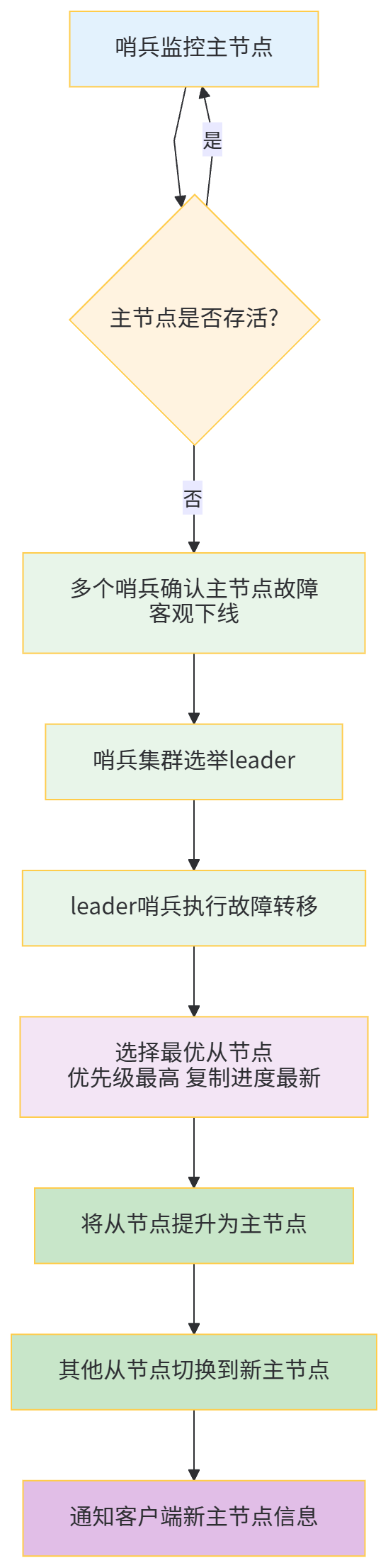
哨兵集群原理:
- 哨兵节点之间通过 gossip 协议交换节点状态信息;
- 主节点故障判断需满足“主观下线”+“客观下线”:
- 主观下线(SDOWN):单个哨兵认为主节点不可用;
- 客观下线(ODOWN):超过
quorum(配置的阈值)个哨兵认为主节点不可用,才确认主节点故障。
4.2 部署步骤(一主两从三哨兵)
4.2.1 环境准备
- 主从节点:同3.2.1(主6379,从6380、6381);
- 哨兵节点:3个(端口26379、26380、26381);
- Redis版本:7.2.5。
4.2.2 哨兵配置与启动
# 1. 复制3份哨兵配置文件
cd /usr/local/redis-7.2.5/
cp sentinel.conf sentinel-26379.conf
cp sentinel.conf sentinel-26380.conf
cp sentinel.conf sentinel-26381.conf

# 2. 配置哨兵节点1(sentinel-26379.conf)
vim sentinel-26379.conf
# 核心配置
bind 0.0.0.0
protected-mode no
port 26379
daemonize yes
logfile "/var/log/redis/sentinel-26379.log"# 日志文件
# 监控主节点:sentinel monitor <主节点名称> <主节点IP> <主节点端口> <quorum阈值>
sentinel monitor mymaster 127.0.0.1 6379 2  # 2个哨兵确认即客观下线
# 主节点密码
sentinel auth-pass mymaster 123456
# 主节点无响应超时时间(默认30秒,单位毫秒)
sentinel down-after-milliseconds mymaster 30000
# 故障转移超时时间(默认180秒)
sentinel failover-timeout mymaster 180000
# 故障转移时,最多有多少个从节点同时同步新主节点(默认1,避免占用过多带宽)
sentinel parallel-syncs mymaster 1

# 3. 配置哨兵节点2(sentinel-26380.conf)
vim sentinel-26380.conf
# 核心配置(仅端口、日志文件不同)
port 26380
logfile "/var/log/redis/sentinel-26380.log"
sentinel monitor mymaster 127.0.0.1 6379 2
sentinel auth-pass mymaster 123456

# 4. 配置哨兵节点3(sentinel-26381.conf)
vim sentinel-26381.conf
# 核心配置(仅端口、日志文件不同)
port 26381
logfile "/var/log/redis/sentinel-26381.log"
sentinel monitor mymaster 127.0.0.1 6379 2
sentinel auth-pass mymaster 123456

# 5. 创建日志目录
mkdir -p /var/log/redis/

# 6. 启动哨兵节点
redis-sentinel sentinel-26379.conf
redis-sentinel sentinel-26380.conf
redis-sentinel sentinel-26381.conf

# 7. 验证哨兵状态
redis-cli -h 127.0.0.1 -p 26379 info sentinel
# 输出结果中应包含:sentinel_masters:1,sentinel_monitored_slaves:2,sentinel_running_sentinels:3
4.3 Java实战代码(连接哨兵集群)
4.3.1 依赖补充(同3.3.1,无需额外依赖)
4.3.2 哨兵模式配置类
package com.jam.demo.config;

import com.alibaba.fastjson2.support.spring.data.redis.FastJson2RedisSerializer;
import lombok.extern.slf4j.Slf4j;
import org.springframework.context.annotation.Bean;
import org.springframework.context.annotation.Configuration;
import org.springframework.data.redis.connection.RedisNode;
import org.springframework.data.redis.connection.RedisSentinelConfiguration;
import org.springframework.data.redis.connection.jedis.JedisClientConfiguration;
import org.springframework.data.redis.connection.jedis.JedisConnectionFactory;
import org.springframework.data.redis.core.RedisTemplate;
import org.springframework.data.redis.serializer.StringRedisSerializer;
import org.springframework.util.ObjectUtils;
import redis.clients.jedis.JedisPoolConfig;

import java.time.Duration;
import java.util.HashSet;
import java.util.Set;

/**
 * Redis哨兵模式配置
 * @author ken
 */
@Configuration
@Slf4j
publicclass RedisSentinelConfig {

    // 主节点名称(需与哨兵配置一致)
    privatestaticfinal String MASTER_NAME = "mymaster";
    // 哨兵节点列表
    privatestaticfinal String SENTINEL_NODES = "127.0.0.1:26379,127.0.0.1:26380,127.0.0.1:26381";
    // Redis密码
    privatestaticfinal String REDIS_PASSWORD = "123456";

    /**
     * 连接池配置
     * @return JedisPoolConfig
     */
    @Bean
    public JedisPoolConfig jedisPoolConfig() {
        JedisPoolConfig poolConfig = new JedisPoolConfig();
        poolConfig.setMaxTotal(100);
        poolConfig.setMaxIdle(20);
        poolConfig.setMinIdle(5);
        poolConfig.setMaxWait(Duration.ofMillis(3000));
        poolConfig.setTestOnBorrow(true);
        return poolConfig;
    }

    /**
     * 哨兵配置
     * @return RedisSentinelConfiguration
     */
    @Bean
    public RedisSentinelConfiguration redisSentinelConfiguration() {
        RedisSentinelConfiguration sentinelConfig = new RedisSentinelConfiguration();
        sentinelConfig.setMasterName(MASTER_NAME);
        sentinelConfig.setPassword(REDIS_PASSWORD);

        // 解析哨兵节点
        Set<RedisNode> sentinelNodeSet = new HashSet<>();
        String[] sentinelNodeArray = SENTINEL_NODES.split(",");
        for (String node : sentinelNodeArray) {
            if (ObjectUtils.isEmpty(node)) {
                continue;
            }
            String[] hostPort = node.split(":");
            if (hostPort.length != 2) {
                log.error("哨兵节点格式错误:{}", node);
                continue;
            }
            sentinelNodeSet.add(new RedisNode(hostPort[0], Integer.parseInt(hostPort[1])));
        }
        sentinelConfig.setSentinels(sentinelNodeSet);
        return sentinelConfig;
    }

    /**
     * 哨兵模式连接工厂
     * @return JedisConnectionFactory
     */
    @Bean
    public JedisConnectionFactory jedisConnectionFactory() {
        RedisSentinelConfiguration sentinelConfig = redisSentinelConfiguration();
        JedisClientConfiguration clientConfig = JedisClientConfiguration.builder()
                .usePooling()
                .poolConfig(jedisPoolConfig())
                .build();

        JedisConnectionFactory connectionFactory = new JedisConnectionFactory(sentinelConfig, clientConfig);
        connectionFactory.afterPropertiesSet();
        return connectionFactory;
    }

    /**
     * 哨兵模式RedisTemplate
     * @return RedisTemplate<String, Object>
     */
    @Bean
    public RedisTemplate<String, Object> sentinelRedisTemplate() {
        RedisTemplate<String, Object> redisTemplate = new RedisTemplate<>();
        redisTemplate.setConnectionFactory(jedisConnectionFactory());

        // 序列化配置
        StringRedisSerializer stringSerializer = new StringRedisSerializer();
        FastJson2RedisSerializer<Object> fastJsonSerializer = new FastJson2RedisSerializer<>(Object.class);

        redisTemplate.setKeySerializer(stringSerializer);
        redisTemplate.setHashKeySerializer(stringSerializer);
        redisTemplate.setValueSerializer(fastJsonSerializer);
        redisTemplate.setHashValueSerializer(fastJsonSerializer);

        redisTemplate.afterPropertiesSet();
        log.info("Redis哨兵模式Template初始化成功");
        return redisTemplate;
    }
}
4.3.3 哨兵模式服务类
package com.jam.demo.service;

import com.google.common.collect.Maps;
import com.jam.demo.entity.User;
import lombok.extern.slf4j.Slf4j;
import org.springframework.data.redis.core.RedisTemplate;
import org.springframework.stereotype.Service;
import org.springframework.util.ObjectUtils;
import org.springframework.util.StringUtils;

import javax.annotation.Resource;
import java.util.Map;
import java.util.concurrent.TimeUnit;

/**
 * Redis哨兵模式服务
 * @author ken
 */
@Service
@Slf4j
publicclass RedisSentinelService {

    @Resource
    private RedisTemplate<String, Object> sentinelRedisTemplate;

    privatestaticfinal String USER_KEY_PREFIX = "user:";
    privatestaticfinallong USER_EXPIRE_TIME = 30L;

    /**
     * 保存用户(自动路由到主节点)
     * @param user 用户实体
     * @return boolean
     */
    public boolean saveUser(User user) {
        if (ObjectUtils.isEmpty(user) || StringUtils.isEmpty(user.getId())) {
            log.error("保存用户失败:用户信息无效");
            returnfalse;
        }
        try {
            String key = USER_KEY_PREFIX + user.getId();
            sentinelRedisTemplate.opsForValue().set(key, user, USER_EXPIRE_TIME, TimeUnit.MINUTES);
            log.info("保存用户成功,key:{}", key);
            returntrue;
        } catch (Exception e) {
            log.error("保存用户失败", e);
            returnfalse;
        }
    }

    /**
     * 查询用户(自动路由到从节点,故障时路由到新主节点)
     * @param userId 用户ID
     * @return User
     */
    public User getUserById(String userId) {
        if (StringUtils.isEmpty(userId)) {
            log.error("查询用户失败:用户ID为空");
            returnnull;
        }
        try {
            String key = USER_KEY_PREFIX + userId;
            User user = (User) sentinelRedisTemplate.opsForValue().get(key);
            log.info("查询用户,key:{},结果:{}", key, ObjectUtils.isEmpty(user) ? "空" : "存在");
            return user;
        } catch (Exception e) {
            log.error("查询用户失败", e);
            returnnull;
        }
    }

    /**
     * 批量查询用户
     * @param userIds 用户ID列表
     * @return Map<String, User>
     */
    public Map<String, User> batchGetUsers(String... userIds) {
        if (ObjectUtils.isEmpty(userIds)) {
            log.error("批量查询用户失败:用户ID数组为空");
            return Maps.newHashMap();
        }
        Map<String, User> userMap = Maps.newHashMap();
        try {
            for (String userId : userIds) {
                if (StringUtils.hasText(userId)) {
                    String key = USER_KEY_PREFIX + userId;
                    User user = (User) sentinelRedisTemplate.opsForValue().get(key);
                    if (!ObjectUtils.isEmpty(user)) {
                        userMap.put(userId, user);
                    }
                }
            }
            log.info("批量查询用户完成,查询数量:{},成功数量:{}", userIds.length, userMap.size());
        } catch (Exception e) {
            log.error("批量查询用户失败", e);
        }
        return userMap;
    }

    /**
     * 删除用户(自动路由到主节点)
     * @param userId 用户ID
     * @return boolean
     */
    public boolean deleteUser(String userId) {
        if (StringUtils.isEmpty(userId)) {
            log.error("删除用户失败:用户ID为空");
            returnfalse;
        }
        try {
            String key = USER_KEY_PREFIX + userId;
            Boolean delete = sentinelRedisTemplate.delete(key);
            log.info("删除用户,key:{},结果:{}", key, delete);
            return Boolean.TRUE.equals(delete);
        } catch (Exception e) {
            log.error("删除用户失败", e);
            returnfalse;
        }
    }
}
4.4 哨兵模式核心参数优化
4.4.1 quorum阈值配置
- 配置:
sentinel monitor mymaster 127.0.0.1 6379 2; - 优化建议:quorum值建议设置为“哨兵节点数量/2 + 1”,确保故障判断的准确性;
- 3个哨兵:quorum=2;
- 5个哨兵:quorum=3。
4.4.2 超时时间配置
down-after-milliseconds:主节点无响应超时时间,默认30秒;- 优化建议:根据业务响应时间调整,如高并发场景可设为10秒(10000毫秒);
failover-timeout:故障转移超时时间,默认180秒;- 优化建议:网络环境好的场景可设为60秒(60000毫秒),避免故障转移耗时过长。
4.4.3 并行同步数量配置
parallel-syncs:故障转移时同时同步新主节点的从节点数量,默认1;- 优化建议:从节点数量多、带宽充足时,可设为2-3,加快同步速度;带宽有限时保持默认1,避免带宽占用过高。
4.5 优缺点与适用场景
优点
- 自动故障转移,无需人工干预,提升系统可用性;
- 继承主从复制的读写分离、数据备份优势;
- 哨兵集群部署,避免哨兵单点故障。
缺点
- 不支持横向扩展存储容量(所有节点存储全量数据);
- 故障转移期间存在短暂的写服务不可用(毫秒级到秒级);
- 部署和运维复杂度高于主从复制(需维护哨兵集群)。
适用场景
- 对可用性要求较高,无法容忍人工干预故障转移的场景;
- 读多写少,需要数据备份和自动容错的中小型到中大型应用;
- 不要求存储容量横向扩展的场景(如缓存、会话存储)。
五、Redis Cluster 集群部署:分片存储与高可用
5.1 核心原理
Redis Cluster 是 Redis 官方提供的分布式解决方案,核心解决「海量数据存储」和「高并发读写」两大痛点,通过「分片存储」+「自动高可用」的设计,实现横向扩展和容错能力。其核心逻辑基于「哈希槽(Hash Slot)」和「主从分片」:
5.1.1 哈希槽机制
Redis Cluster 将整个键空间划分为 16384 个哈希槽(编号 0-16383),数据存储的核心规则:
- 每个节点负责一部分哈希槽(如 3 主节点时,每个主节点约负责 5461 个槽);
- 数据路由:通过
CRC16(key) % 16384计算键对应的哈希槽,将数据存储到负责该槽的主节点; - 槽迁移:支持动态迁移哈希槽,实现集群扩容/缩容,不影响业务运行。
5.1.2 主从分片架构
为保证高可用,Redis Cluster 要求每个主节点必须配置至少 1 个从节点,形成「主从分片」:
- 主节点(Master):负责哈希槽的读写操作,同步数据到从节点;
- 从节点(Slave):仅作为备份,主节点故障时自动升级为主节点,接管哈希槽;
- 集群最小部署单元:3 主 3 从(确保任意主节点故障后,集群仍能正常运行)。
5.1.3 核心通信机制
集群节点间通过「Gossip 协议」实时交换节点状态信息(如节点存活、哈希槽分配、故障状态),无需中心化协调节点,保证集群去中心化特性。
5.1.4 故障转移流程
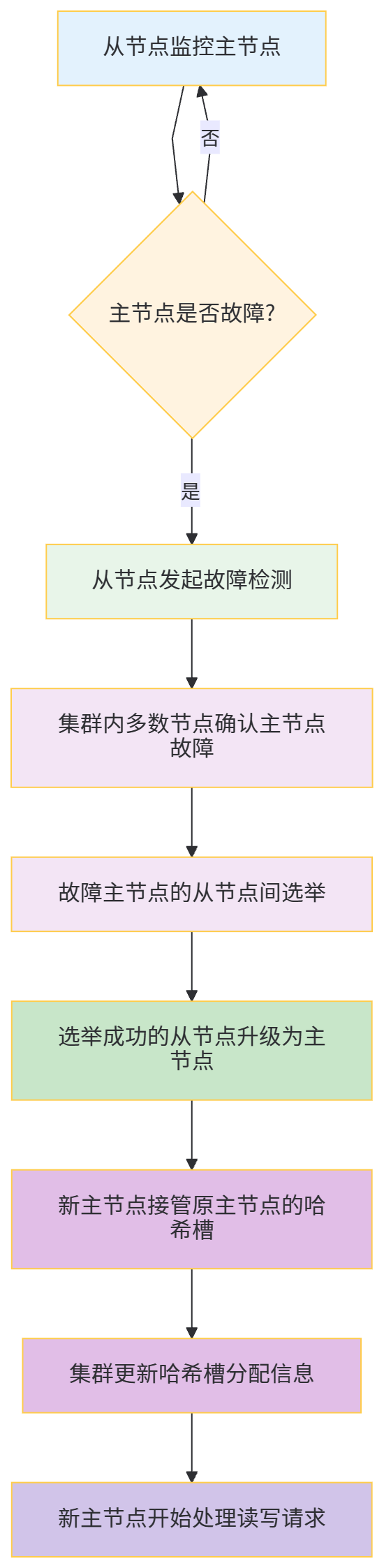
5.1.5 集群架构图
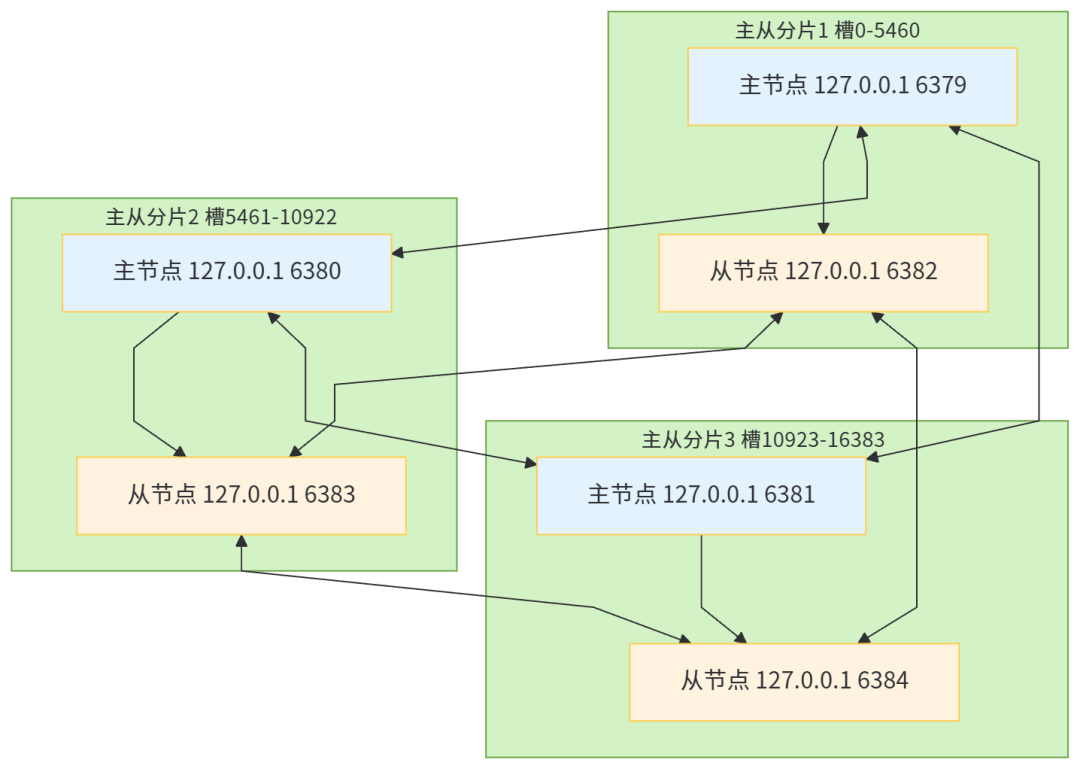
5.2 部署步骤(3 主 3 从)
5.2.1 环境准备
- 6 个节点(同一服务器不同端口,生产环境建议独立服务器):
- 主节点:6379、6380、6381
- 从节点:6382(对应 6379)、6383(对应 6380)、6384(对应 6381)
- Redis 版本:7.2.5(最新稳定版)
- 关闭防火墙或开放对应端口:6379-6384、16379-16384(Redis Cluster 节点间通信端口为节点端口+10000)
5.2.2 配置与启动
# 1. 创建节点配置目录
mkdir -p /usr/local/redis-cluster/{6379,6380,6381,6382,6383,6384}

# 2. 复制 Redis 核心文件到各节点目录
cd /usr/local/redis-7.2.5/
cp redis.conf /usr/local/redis-cluster/6379/
cp redis.conf /usr/local/redis-cluster/6380/
cp redis.conf /usr/local/redis-cluster/6381/
cp redis.conf /usr/local/redis-cluster/6382/
cp redis.conf /usr/local/redis-cluster/6383/
cp redis.conf /usr/local/redis-cluster/6384/

# 3. 统一修改所有节点配置(以 6379 为例,其他节点仅端口不同)
vim /usr/local/redis-cluster/6379/redis.conf
# 核心配置项
bind 0.0.0.0
protected-mode no
port 6379
daemonize yes
requirepass 123456  # 节点密码
masterauth 123456   # 主从同步密码(与 requirepass 一致)
appendonly yes      # 开启 AOF 持久化
cluster-enabled yes  # 开启集群模式
cluster-config-file nodes-6379.conf  # 集群配置文件(自动生成)
cluster-node-timeout 15000  # 节点超时时间(15 秒,故障转移判断依据)
cluster-require-full-coverage no  # 非全槽覆盖时集群仍可用(避免部分槽故障导致集群不可用)

# 4. 批量修改其他节点配置(替换端口)
for port in 6380 6381 6382 6383 6384; do
    sed "s/6379/$port/g" /usr/local/redis-cluster/6379/redis.conf > /usr/local/redis-cluster/$port/redis.conf
done

# 5. 启动所有节点
for port in 6379 6380 6381 6382 6383 6384; do
    redis-server /usr/local/redis-cluster/$port/redis.conf
done

# 6. 验证节点启动状态
ps -ef | grep redis-server | grep -v grep
# 应显示 6 个 redis-server 进程,分别对应 6379-6384 端口

# 7. 创建 Redis Cluster 集群
redis-cli --cluster create \
127.0.0.1:6379 127.0.0.1:6380 127.0.0.1:6381 \
127.0.0.1:6382 127.0.0.1:6383 127.0.0.1:6384 \
--cluster-replicas 1 \
-a 123456

# 参数说明:
# --cluster-replicas 1:每个主节点对应 1 个从节点
# -a 123456:节点密码(所有节点密码必须一致)

# 执行后会提示哈希槽分配方案,输入 yes 确认
# 示例输出:
# [OK] All 16384 slots covered. 表示集群创建成功

# 8. 验证集群状态
redis-cli -h 127.0.0.1 -p 6379 -a 123456 cluster info
# 关键输出:cluster_state:ok(集群正常)、cluster_slots_assigned:16384(所有槽已分配)

# 9. 查看节点信息
redis-cli -h 127.0.0.1 -p 6379 -a 123456 cluster nodes
# 输出包含各节点角色(master/slave)、哈希槽分配、主从对应关系
5.3 Java 实战代码(连接 Redis Cluster)
5.3.1 依赖补充(同 3.3.1,无需额外依赖)
5.3.2 Redis Cluster 配置类
package com.jam.demo.config;

import com.alibaba.fastjson2.support.spring.data.redis.FastJson2RedisSerializer;
import lombok.extern.slf4j.Slf4j;
import org.springframework.context.annotation.Bean;
import org.springframework.context.annotation.Configuration;
import org.springframework.data.redis.connection.RedisClusterConfiguration;
import org.springframework.data.redis.connection.RedisNode;
import org.springframework.data.redis.connection.jedis.JedisClientConfiguration;
import org.springframework.data.redis.connection.jedis.JedisConnectionFactory;
import org.springframework.data.redis.core.RedisTemplate;
import org.springframework.data.redis.serializer.StringRedisSerializer;
import org.springframework.util.ObjectUtils;
import redis.clients.jedis.JedisPoolConfig;

import java.time.Duration;
import java.util.HashSet;
import java.util.Set;

/**
 * Redis Cluster 集群配置
 * @author ken
 */
@Configuration
@Slf4j
publicclass RedisClusterConfig {

    // 集群节点列表(格式:ip:port)
    privatestaticfinal String CLUSTER_NODES = "127.0.0.1:6379,127.0.0.1:6380,127.0.0.1:6381,127.0.0.1:6382,127.0.0.1:6383,127.0.0.1:6384";
    // Redis 密码
    privatestaticfinal String REDIS_PASSWORD = "123456";
    // 集群最大重定向次数(默认 5)
    privatestaticfinalint MAX_REDIRECTS = 3;

    /**
     * 连接池配置(优化性能)
     * @return JedisPoolConfig
     */
    @Bean
    public JedisPoolConfig jedisPoolConfig() {
        JedisPoolConfig poolConfig = new JedisPoolConfig();
        poolConfig.setMaxTotal(200);         // 最大连接数(根据业务调整)
        poolConfig.setMaxIdle(50);          // 最大空闲连接数
        poolConfig.setMinIdle(10);          // 最小空闲连接数
        poolConfig.setMaxWait(Duration.ofMillis(5000)); // 最大等待时间(5 秒)
        poolConfig.setTestOnBorrow(true);   // 借连接时验证可用性
        poolConfig.setTestOnReturn(true);   // 还连接时验证可用性
        poolConfig.setTestWhileIdle(true);  // 空闲时验证可用性(避免死连接)
        return poolConfig;
    }

    /**
     * Redis Cluster 配置
     * @return RedisClusterConfiguration
     */
    @Bean
    public RedisClusterConfiguration redisClusterConfiguration() {
        RedisClusterConfiguration clusterConfig = new RedisClusterConfiguration();
        clusterConfig.setPassword(REDIS_PASSWORD);
        clusterConfig.setMaxRedirects(MAX_REDIRECTS);

        // 解析集群节点
        Set<RedisNode> nodeSet = new HashSet<>();
        String[] nodes = CLUSTER_NODES.split(",");
        for (String node : nodes) {
            if (ObjectUtils.isEmpty(node)) {
                continue;
            }
            String[] hostPort = node.split(":");
            if (hostPort.length != 2) {
                log.error("Redis Cluster 节点格式错误:{}", node);
                thrownew IllegalArgumentException("Redis Cluster 节点格式错误,正确格式:ip:port");
            }
            nodeSet.add(new RedisNode(hostPort[0], Integer.parseInt(hostPort[1])));
        }
        clusterConfig.setClusterNodes(nodeSet);
        return clusterConfig;
    }

    /**
     * Cluster 模式连接工厂
     * @return JedisConnectionFactory
     */
    @Bean
    public JedisConnectionFactory jedisConnectionFactory() {
        RedisClusterConfiguration clusterConfig = redisClusterConfiguration();
        JedisClientConfiguration clientConfig = JedisClientConfiguration.builder()
                .usePooling()
                .poolConfig(jedisPoolConfig())
                .connectTimeout(Duration.ofMillis(3000))  // 连接超时时间
                .readTimeout(Duration.ofMillis(3000))     // 读取超时时间
                .build();

        JedisConnectionFactory connectionFactory = new JedisConnectionFactory(clusterConfig, clientConfig);
        connectionFactory.afterPropertiesSet();
        log.info("Redis Cluster 连接工厂初始化成功");
        return connectionFactory;
    }

    /**
     * 自定义 RedisTemplate(适配 Cluster 模式,FastJSON2 序列化)
     * @return RedisTemplate<String, Object>
     */
    @Bean
    public RedisTemplate<String, Object> clusterRedisTemplate() {
        RedisTemplate<String, Object> redisTemplate = new RedisTemplate<>();
        redisTemplate.setConnectionFactory(jedisConnectionFactory());

        // 序列化配置(与单机/主从/哨兵模式一致,保证序列化统一)
        StringRedisSerializer stringSerializer = new StringRedisSerializer();
        FastJson2RedisSerializer<Object> fastJsonSerializer = new FastJson2RedisSerializer<>(Object.class);

        redisTemplate.setKeySerializer(stringSerializer);
        redisTemplate.setHashKeySerializer(stringSerializer);
        redisTemplate.setValueSerializer(fastJsonSerializer);
        redisTemplate.setHashValueSerializer(fastJsonSerializer);

        redisTemplate.afterPropertiesSet();
        log.info("Redis Cluster RedisTemplate 初始化成功");
        return redisTemplate;
    }
}
5.3.3 集群模式业务服务类
package com.jam.demo.service;

import com.google.common.collect.Maps;
import com.jam.demo.entity.User;
import lombok.extern.slf4j.Slf4j;
import org.springframework.data.redis.core.RedisTemplate;
import org.springframework.stereotype.Service;
import org.springframework.util.ObjectUtils;
import org.springframework.util.StringUtils;

import javax.annotation.Resource;
import java.util.Map;
import java.util.concurrent.TimeUnit;

/**
 * Redis Cluster 集群业务服务
 * @author ken
 */
@Service
@Slf4j
publicclass RedisClusterService {

    @Resource
    private RedisTemplate<String, Object> clusterRedisTemplate;

    privatestaticfinal String USER_KEY_PREFIX = "user:";
    privatestaticfinallong USER_EXPIRE_TIME = 30L; // 30 分钟过期

    /**
     * 保存用户(自动路由到对应哈希槽的主节点)
     * @param user 用户实体
     * @return boolean 保存结果
     */
    public boolean saveUser(User user) {
        if (ObjectUtils.isEmpty(user) || StringUtils.isEmpty(user.getId())) {
            log.error("保存用户失败:用户信息为空或 ID 无效");
            returnfalse;
        }
        try {
            String key = USER_KEY_PREFIX + user.getId();
            // 自动路由:根据 key 计算哈希槽,定位到对应主节点
            clusterRedisTemplate.opsForValue().set(key, user, USER_EXPIRE_TIME, TimeUnit.MINUTES);
            log.info("Cluster 模式保存用户成功,key:{}", key);
            returntrue;
        } catch (Exception e) {
            log.error("Cluster 模式保存用户失败", e);
            returnfalse;
        }
    }

    /**
     * 根据 ID 查询用户(自动路由到对应哈希槽的节点)
     * @param userId 用户 ID
     * @return User 用户实体
     */
    public User getUserById(String userId) {
        if (StringUtils.isEmpty(userId)) {
            log.error("查询用户失败:用户 ID 为空");
            returnnull;
        }
        try {
            String key = USER_KEY_PREFIX + userId;
            User user = (User) clusterRedisTemplate.opsForValue().get(key);
            log.info("Cluster 模式查询用户,key:{},结果:{}", key, ObjectUtils.isEmpty(user) ? "空" : "存在");
            return user;
        } catch (Exception e) {
            log.error("Cluster 模式查询用户失败", e);
            returnnull;
        }
    }

    /**
     * 批量查询用户(注意:若 keys 分布在不同槽,会触发多节点查询)
     * @param userIds 用户 ID 列表
     * @return Map<String, User> 用户 ID-实体映射
     */
    public Map<String, User> batchGetUsers(String... userIds) {
        if (ObjectUtils.isEmpty(userIds)) {
            log.error("批量查询用户失败:用户 ID 数组为空");
            return Maps.newHashMap();
        }
        Map<String, User> userMap = Maps.newHashMap();
        try {
            for (String userId : userIds) {
                if (StringUtils.hasText(userId)) {
                    String key = USER_KEY_PREFIX + userId;
                    User user = (User) clusterRedisTemplate.opsForValue().get(key);
                    if (!ObjectUtils.isEmpty(user)) {
                        userMap.put(userId, user);
                    }
                }
            }
            log.info("Cluster 模式批量查询用户完成,查询数量:{},成功数量:{}", userIds.length, userMap.size());
        } catch (Exception e) {
            log.error("Cluster 模式批量查询用户失败", e);
        }
        return userMap;
    }

    /**
     * 删除用户(自动路由到对应哈希槽的主节点)
     * @param userId 用户 ID
     * @return boolean 删除结果
     */
    public boolean deleteUser(String userId) {
        if (StringUtils.isEmpty(userId)) {
            log.error("删除用户失败:用户 ID 为空");
            returnfalse;
        }
        try {
            String key = USER_KEY_PREFIX + userId;
            Boolean delete = clusterRedisTemplate.delete(key);
            log.info("Cluster 模式删除用户,key:{},结果:{}", key, delete);
            return Boolean.TRUE.equals(delete);
        } catch (Exception e) {
            log.error("Cluster 模式删除用户失败", e);
            returnfalse;
        }
    }

    /**
     * 验证集群容错性(模拟主节点故障后的数据一致性)
     * @param userId 用户 ID
     * @return boolean 故障后是否能正常查询
     */
    public boolean testClusterFaultTolerance(String userId) {
        if (StringUtils.isEmpty(userId)) {
            log.error("验证集群容错性失败:用户 ID 为空");
            returnfalse;
        }
        String key = USER_KEY_PREFIX + userId;
        // 1. 先查询数据(确认存在)
        User user = (User) clusterRedisTemplate.opsForValue().get(key);
        if (ObjectUtils.isEmpty(user)) {
            log.error("验证失败:用户数据不存在,key:{}", key);
            returnfalse;
        }

        // 2. 模拟主节点故障(实际生产环境无需手动执行,集群自动检测)
        log.warn("模拟主节点故障:可通过命令停止对应主节点,如 redis-cli -p 6379 -a 127.0.0.1 shutdown");

        // 3. 故障转移后再次查询(验证数据一致性)
        try {
            // 等待故障转移完成(15-30 秒)
            Thread.sleep(20000);
            User faultUser = (User) clusterRedisTemplate.opsForValue().get(key);
            boolean result = !ObjectUtils.isEmpty(faultUser);
            log.info("集群容错性验证结果:{},故障后查询用户:{}", result, faultUser);
            return result;
        } catch (InterruptedException e) {
            log.error("验证集群容错性失败", e);
            Thread.currentThread().interrupt();
            returnfalse;
        }
    }
}
5.3.4 集群模式控制器类
package com.jam.demo.controller;

import com.jam.demo.entity.User;
import com.jam.demo.service.RedisClusterService;
import io.swagger.v3.oas.annotations.Operation;
import io.swagger.v3.oas.annotations.Parameter;
import io.swagger.v3.oas.annotations.tags.Tag;
import lombok.extern.slf4j.Slf4j;
import org.springframework.http.HttpStatus;
import org.springframework.http.ResponseEntity;
import org.springframework.web.bind.annotation.*;
import org.springframework.util.ObjectUtils;

import javax.annotation.Resource;
import java.util.Map;

/**
 * Redis Cluster 集群接口
 * @author ken
 */
@RestController
@RequestMapping("/redis/cluster")
@Slf4j
@Tag(name = "Redis Cluster 集群接口", description = "基于 Redis Cluster 集群的用户信息操作接口(支持分片存储和自动高可用)")
publicclass RedisClusterController {

    @Resource
    private RedisClusterService redisClusterService;

    @PostMapping("/user")
    @Operation(summary = "保存用户信息", description = "自动路由到对应哈希槽的主节点,设置 30 分钟过期")
    public ResponseEntity<Boolean> saveUser(@RequestBody User user) {
        boolean result = redisClusterService.saveUser(user);
        returnnew ResponseEntity<>(result, HttpStatus.OK);
    }

    @GetMapping("/user/{userId}")
    @Operation(summary = "查询用户信息", description = "自动路由到对应哈希槽的节点(主/从)")
    public ResponseEntity<User> getUserById(
            @Parameter(description = "用户 ID", required = true) @PathVariable String userId) {
        User user = redisClusterService.getUserById(userId);
        returnnew ResponseEntity<>(user, HttpStatus.OK);
    }

    @GetMapping("/users")
    @Operation(summary = "批量查询用户信息", description = "多 ID 可能分布在不同槽,触发多节点并行查询")
    public ResponseEntity<Map<String, User>> batchGetUsers(
            @Parameter(description = "用户 ID 列表(多个用逗号分隔)", required = true) @RequestParam String userIds) {
        if (ObjectUtils.isEmpty(userIds)) {
            returnnew ResponseEntity<>(HttpStatus.BAD_REQUEST);
        }
        String[] userIdArray = userIds.split(",");
        Map<String, User> userMap = redisClusterService.batchGetUsers(userIdArray);
        returnnew ResponseEntity<>(userMap, HttpStatus.OK);
    }

    @DeleteMapping("/user/{userId}")
    @Operation(summary = "删除用户信息", description = "自动路由到对应哈希槽的主节点执行删除")
    public ResponseEntity<Boolean> deleteUser(
            @Parameter(description = "用户 ID", required = true) @PathVariable String userId) {
        boolean result = redisClusterService.deleteUser(userId);
        returnnew ResponseEntity<>(result, HttpStatus.OK);
    }

    @GetMapping("/fault-tolerance/{userId}")
    @Operation(summary = "验证集群容错性", description = "模拟主节点故障后,验证是否能正常查询数据(需等待 20 秒故障转移)")
    public ResponseEntity<Boolean> testFaultTolerance(
            @Parameter(description = "用户 ID(需提前保存)", required = true) @PathVariable String userId) {
        boolean result = redisClusterService.testClusterFaultTolerance(userId);
        returnnew ResponseEntity<>(result, HttpStatus.OK);
    }
}
5.4 Redis Cluster 核心问题与解决方案
5.4.1 跨槽操作限制
- 问题:Redis Cluster 不支持跨哈希槽的批量操作(如
MSET多个 key 分布在不同槽、KEYS通配符匹配多槽 key),会抛出CROSSSLOT Keys in request don't hash to the same slot异常; - 解决方案:
- 强制哈希槽:使用
{hashTag}让多个 key 映射到同一槽,如user:{1001}:name、user:{1001}:age(CRC16 计算仅基于{}内的内容); - 避免跨槽批量操作:将批量操作拆分为单 key 操作,或使用分布式锁保证数据一致性;
- 工具类封装:通过代码封装自动处理跨槽操作(如遍历节点执行查询)。
- 强制哈希槽:使用
5.4.2 集群扩容/缩容
5.4.2.1 扩容步骤(新增 1 主 1 从)
# 1. 启动新增节点(6385 主、6386 从)
redis-server /usr/local/redis-cluster/6385/redis.conf
redis-server /usr/local/redis-cluster/6386/redis.conf

# 2. 将新增主节点加入集群
redis-cli --cluster add-node 127.0.0.1:6385 127.0.0.1:6379 -a 123456

# 3. 将新增从节点加入集群,并指定主节点(6385)
# 先获取 6385 节点的 ID(通过 cluster nodes 命令)
redis-cli --cluster add-node 127.0.0.1:6386 127.0.0.1:6379 -a 123456 --cluster-slave --cluster-master-id 6385节点ID

# 4. 迁移哈希槽到新增主节点(按需分配槽数量)
redis-cli --cluster reshard 127.0.0.1:6379 -a 123456
# 执行后按提示输入:
# 1. 需要迁移的槽数量(如 2000)
# 2. 接收槽的主节点 ID(6385 节点 ID)
# 3. 迁移来源(输入 all 从所有主节点迁移,或输入具体节点 ID 定向迁移)
# 4. 输入 yes 确认迁移
5.4.2.2 缩容步骤(移除 6385 主、6386 从)
# 1. 将 6385 主节点的哈希槽迁移到其他主节点
redis-cli --cluster reshard 127.0.0.1:6379 -a 123456
# 提示输入:
# 1. 迁移槽数量(6385 节点的所有槽,如 2000)
# 2. 接收槽的主节点 ID(如 6379)
# 3. 迁移来源(6385 节点 ID)
# 4. 输入 yes 确认迁移

# 2. 移除从节点 6386
redis-cli --cluster del-node 127.0.0.1:6386 6386节点ID -a 123456

# 3. 移除主节点 6385(需确保无哈希槽)
redis-cli --cluster del-node 127.0.0.1:6385 6385节点ID -a 123456

# 4. 停止节点
redis-cli -h 127.0.0.1 -p 6385 -a 123456 shutdown
redis-cli -h 127.0.0.1 -p 6386 -a 123456 shutdown
5.4.3 数据一致性问题
- 问题:主从同步存在延迟,可能导致从节点查询到旧数据;主节点故障时,未同步的写操作可能丢失;
- 解决方案:
- 优化同步参数:主节点配置
repl-diskless-sync yes(无盘同步),减少 RDB 写入耗时; - 强一致性配置:通过
WAIT 1 5000命令(等待至少 1 个从节点同步完成,超时 5 秒),牺牲性能换一致性; - 持久化强化:所有节点开启 AOF 持久化,配置
appendfsync everysec,确保数据持久化到磁盘; - 避免单节点依赖:核心业务数据不依赖单个主节点,通过集群冗余保证可用性。
- 优化同步参数:主节点配置
5.5 核心参数优化
5.5.1 节点超时时间(cluster-node-timeout)
- 默认值:15000 毫秒(15 秒);
- 作用:判断节点故障的超时时间,超时未响应则标记为故障;
- 优化建议:
- 高并发、低延迟场景:设为 5000-10000 毫秒(5-10 秒),加快故障转移;
- 网络不稳定场景:设为 20000-30000 毫秒(20-30 秒),避免误判故障。
5.5.2 全槽覆盖开关(cluster-require-full-coverage)
- 默认值:yes(要求所有槽可用,否则集群不可用);
- 问题:若部分槽故障(如主从全挂),整个集群无法提供服务;
- 优化建议:设为 no,允许非全槽覆盖时集群仍可用(故障槽对应的 key 不可访问,其他槽正常服务)。
5.5.3 哈希槽迁移并行数(cluster-migration-barrier)
- 默认值:1(主节点至少有 1 个正常从节点时,才允许迁移槽);
- 作用:避免主节点无备份时迁移槽,导致数据丢失;
- 优化建议:保持默认 1,确保迁移过程中数据有备份。
5.6 优缺点与适用场景
优点
- 分片存储:解决单节点存储容量限制,支持海量数据存储;
- 横向扩展:支持动态扩容/缩容,无需停机;
- 自动高可用:主节点故障后自动故障转移,无需人工干预;
- 去中心化:无中心节点,节点间对等通信,避免单点故障;
- 继承读写分离:从节点分摊读压力,提升并发读能力。
缺点
- 部署和运维复杂:需维护多个节点,扩容/缩容需手动操作哈希槽迁移;
- 不支持跨槽批量操作:限制部分 Redis 命令使用(如
MSET、KEYS、SINTER等); - 主从同步延迟:仍存在数据一致性风险;
- 资源开销大:每个节点需独立资源(内存、CPU、磁盘),集群整体资源消耗高于单节点/主从/哨兵。
适用场景
- 海量数据存储场景(如用户行为日志、商品库缓存,数据量超单节点存储上限);
- 高并发读写场景(如电商秒杀、社交平台消息缓存,QPS 超单节点承载能力);
- 对可用性和扩展性要求极高的大型分布式系统(如互联网核心业务、金融支付系统);
- 无法容忍人工干预故障转移,需要自动容错的场景。
六、四种部署方式对比与选型指南
6.1 核心特性对比
部署方式 | 核心优势 | 核心劣势 | 可用性 | 扩展性 | 适用场景 |
|---|---|---|---|---|---|
单机版 | 部署简单、运维成本低 | 单点故障、无扩展性 | 低 | 无 | 开发/测试环境、小型工具 |
主从复制 | 读写分离、数据备份 | 手动故障转移、无扩展性 | 中 | 读扩展 | 读多写少、中小型应用 |
哨兵模式 | 自动故障转移、读写分离 | 无存储扩展性、运维较复杂 | 中高 | 读扩展 | 中小型到中大型应用、需自动容错 |
Redis Cluster | 分片存储、自动高可用、横向扩展 | 部署复杂、不支持跨槽操作 | 高 | 全扩展 | 大型分布式系统、海量数据、高并发 |
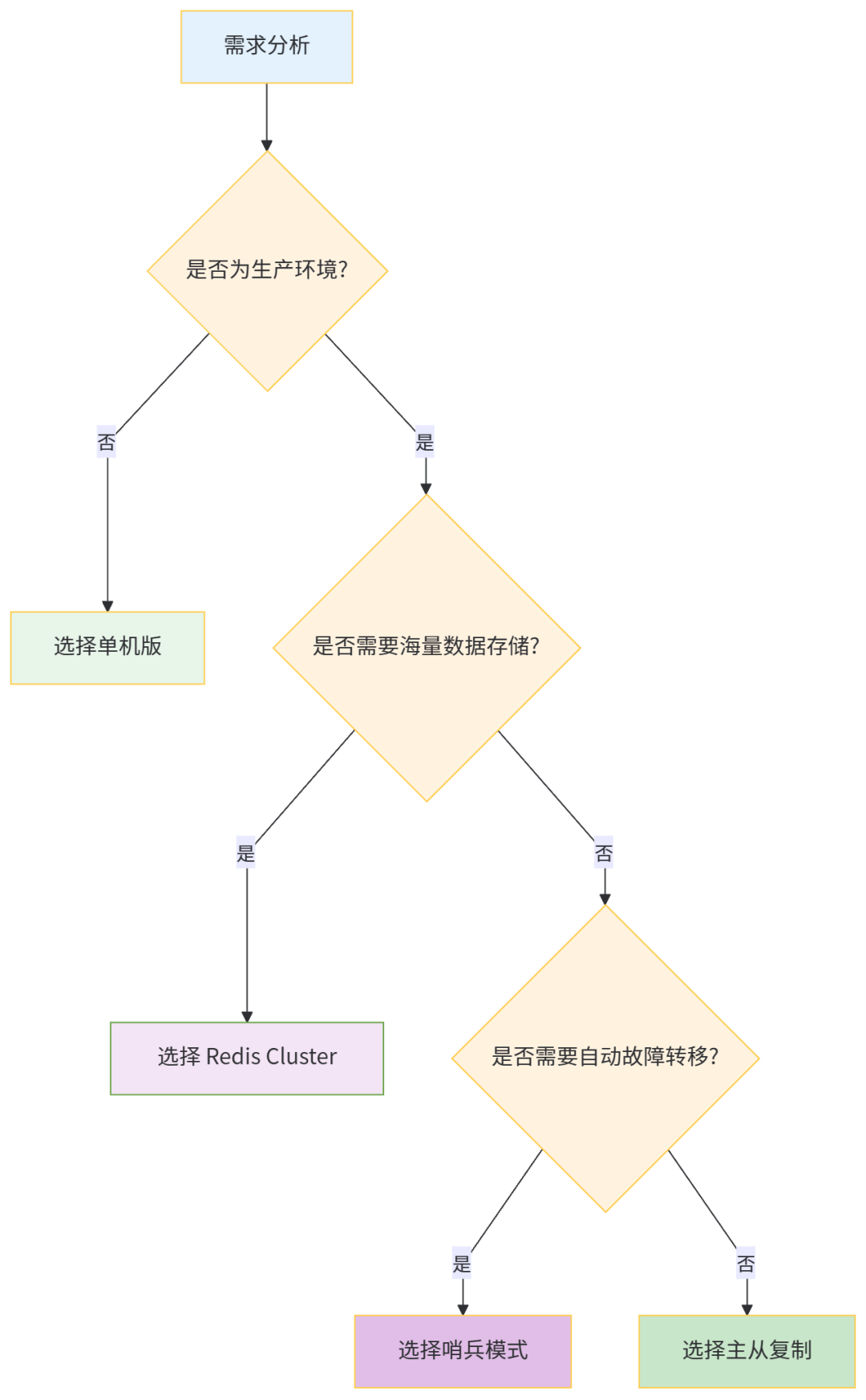
6.2 选型决策流程
6.3 生产环境最佳实践
- 小型应用(QPS < 1 万,数据量 < 10GB):
- 选型:哨兵模式(1 主 2 从 + 3 哨兵);
- 理由:自动故障转移,部署成本适中,满足高可用需求。
- 中大型应用(QPS 1-10 万,数据量 10-100GB):
- 选型:Redis Cluster(3 主 3 从);
- 理由:支持横向扩展,满足高并发和海量数据需求,自动高可用。
- 超大型应用(QPS > 10 万,数据量 > 100GB):
- 选型:Redis Cluster 集群 + 读写分离代理(如 Codis、Twemproxy);
- 理由:代理层解决跨槽操作限制,支持更灵活的负载均衡和运维管理。
七、总结
Redis 的四种部署方式各有侧重,从简单到复杂,从单节点到分布式,覆盖了从开发测试到大型生产环境的全场景需求:
- 单机版是入门基础,适合非生产环境;
- 主从复制是高可用的基石,核心解决读写分离和数据备份;
- 哨兵模式在主从复制基础上实现自动故障转移,提升系统可用性;
- Redis Cluster 是分布式解决方案,核心解决分片存储和横向扩展,适合海量数据和高并发场景。
选型的核心是匹配业务需求:无需过度设计(如小型应用无需 Cluster),也不可忽视风险(如生产环境不可用单机版)。同时,无论选择哪种部署方式,都需关注持久化配置、主从同步、故障转移等核心要点,确保数据安全和服务稳定。
本文参与 腾讯云自媒体同步曝光计划,分享自微信公众号。
原始发表:2025-12-24,如有侵权请联系 cloudcommunity@tencent.com 删除
评论
登录后参与评论
推荐阅读
目录
腾讯云开发者

Copyright © 2013 - 2026 Tencent Cloud. All Rights Reserved. 腾讯云 版权所有
深圳市腾讯计算机系统有限公司 ICP备案/许可证号:粤B2-20090059  粤公网安备44030502008569号
腾讯云计算(北京)有限责任公司 京ICP证150476号 | 京ICP备11018762号