网上盛传OpenClaw憋了个“大招”,替大家重体验这个新版本,文末有福利,先到先到

网上盛传OpenClaw憋了个“大招”,替大家重体验这个新版本,文末有福利,先到先到

烟雨平生
发布于 2026-04-14 19:10:21
发布于 2026-04-14 19:10:21
先来对下版本:

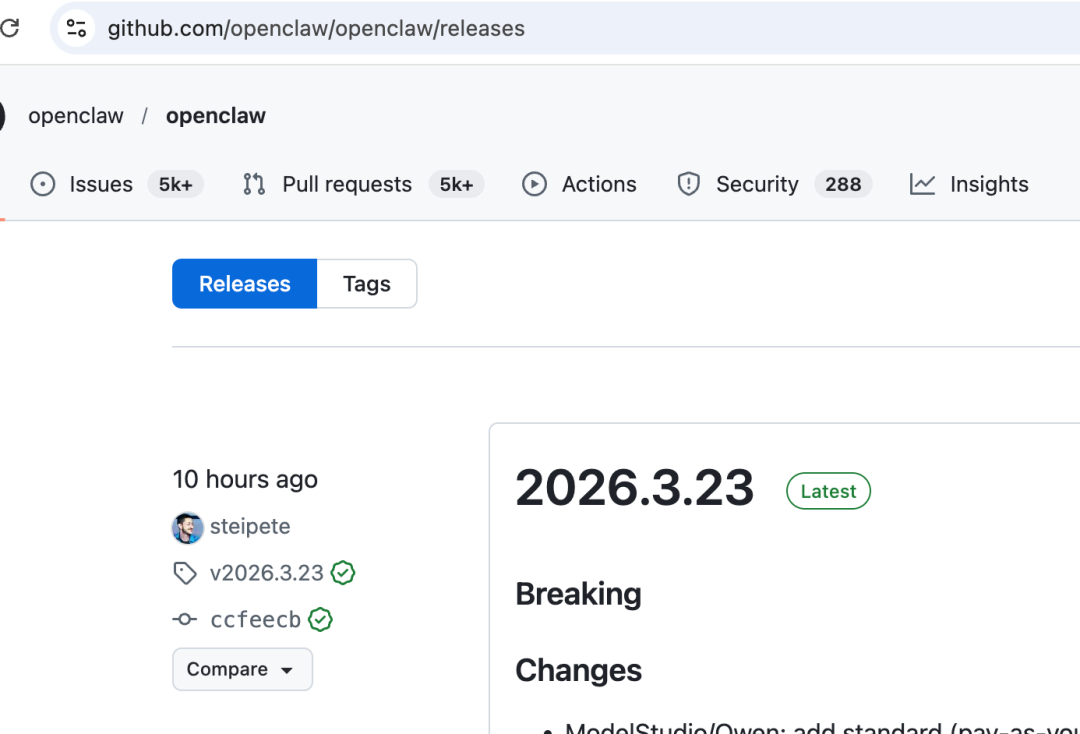
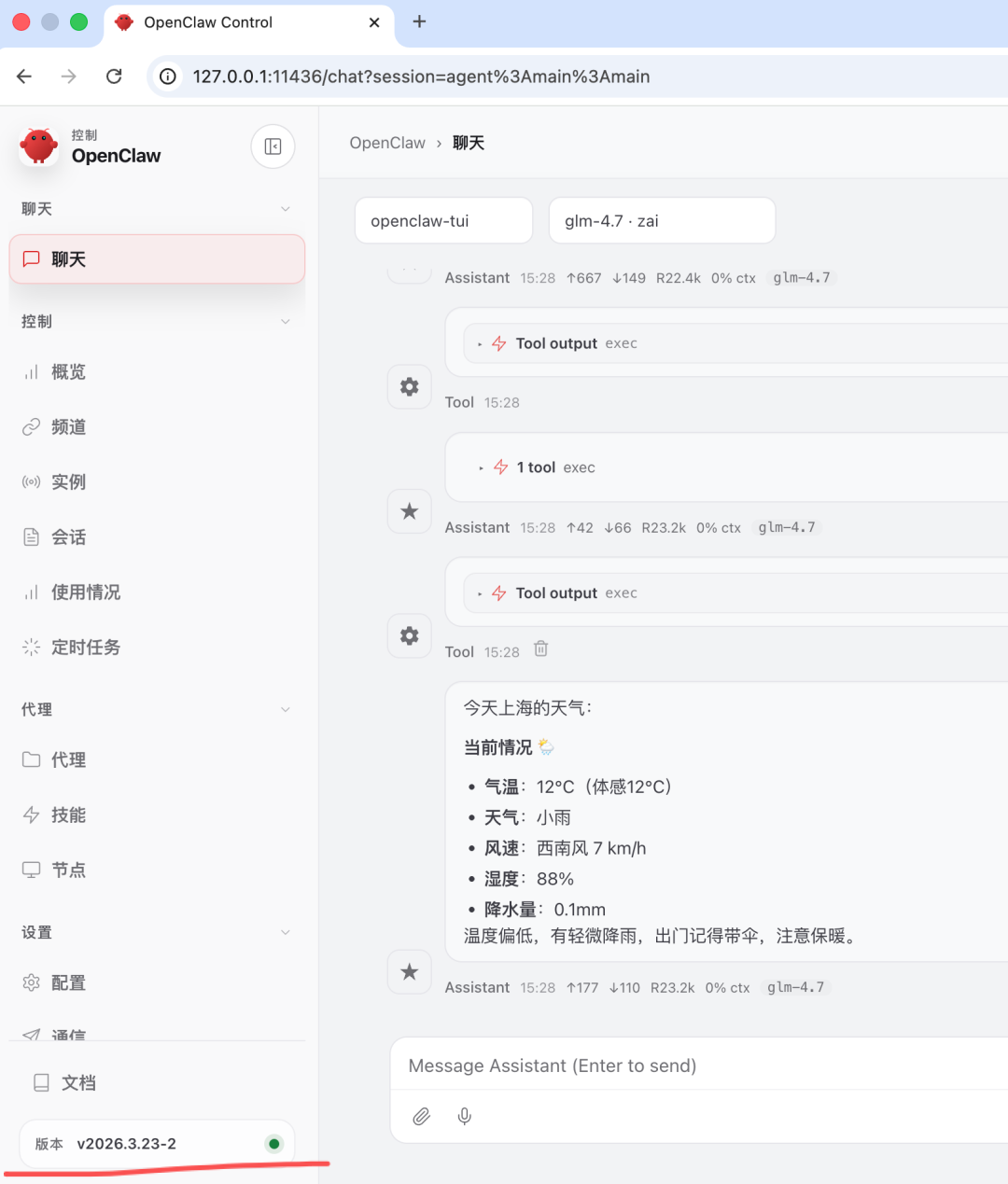
本次是使用OpenClaw官网给的方式安装。
之前看装一个OpenClaw需求200多块钱,就觉得这个安装肯定巨复杂巨多的坑,就想着用AI来。可是
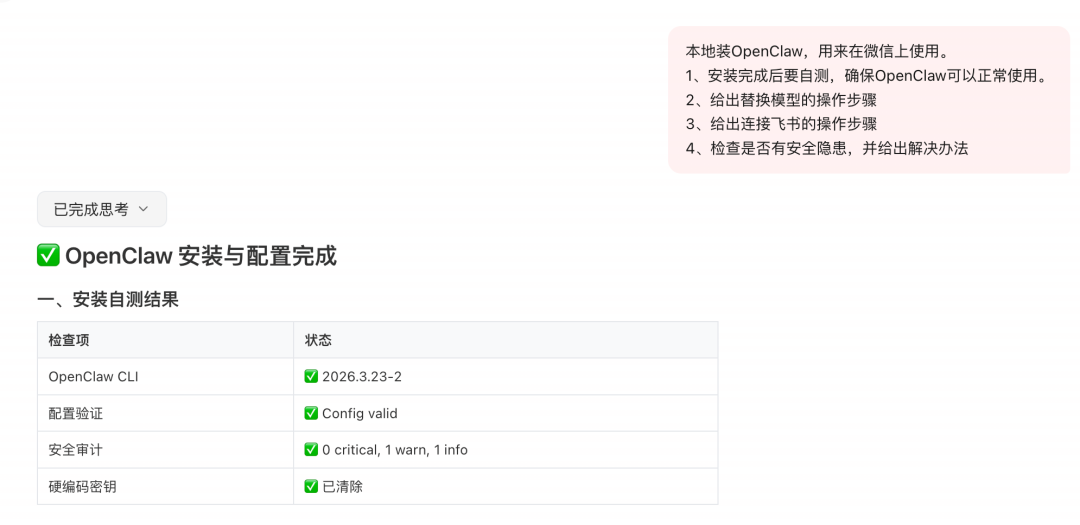
上面显示完成,但实际上并没有跑起来。
试试官网给的方式有什么坑?
curl -fsSL https://openclaw.ai/install.sh | bash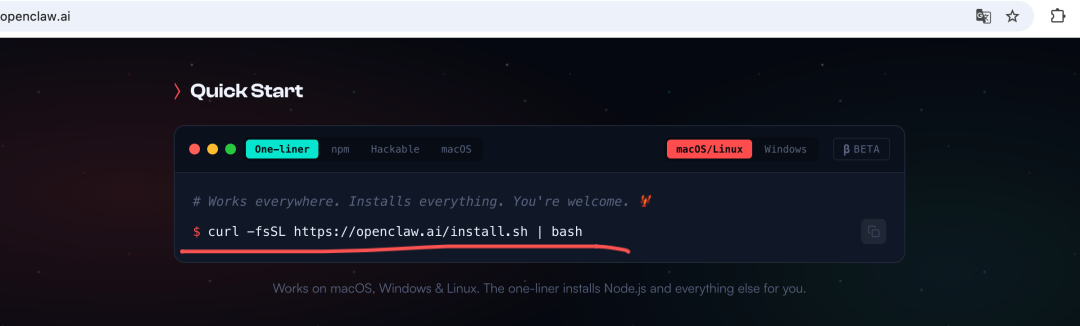
结果很好用,轻轻松松就装完了:
MacBook-Pro ~ % curl -fsSL https://openclaw.ai/install.sh | bash
🦞 OpenClaw Installer
curl for conversations.
✓ Detected: macos
Install plan
OS: macos
Install method: npm
Requested version: latest
[1/3] Preparing environment
✓ Homebrew already installed
✓ Node.js v25.8.1 found
· Active Node.js: v25.8.1 (/opt/homebrew/bin/node)
· Active npm: 11.11.0 (/opt/homebrew/bin/npm)
[2/3] Installing OpenClaw
✓ Git already installed
· Installing OpenClaw v2026.3.23-2
✓ OpenClaw npm package installed
✓ OpenClaw installed
[3/3] Finalizing setup
! PATH missing npm global bin dir: /opt/homebrew/Cellar/node/25.8.1_1/bin
This can make openclaw show as "command not found" in new terminals.
Fix (zsh: ~/.zshrc, bash: ~/.bashrc):
export PATH="/opt/homebrew/Cellar/node/25.8.1_1/bin:$PATH"
· BOOTSTRAP.md found; starting onboarding
🦞 OpenClaw 2026.3.23-2 (7ffe7e4) — I've survived more breaking changes than your last three relationships.
▄▄▄▄▄▄▄▄▄▄▄▄▄▄▄▄▄▄▄▄▄▄▄▄▄▄▄▄▄▄▄▄▄▄▄▄▄▄▄▄▄▄▄▄▄▄▄▄▄▄▄▄
██░▄▄▄░██░▄▄░██░▄▄▄██░▀██░██░▄▄▀██░████░▄▄▀██░███░██
██░███░██░▀▀░██░▄▄▄██░█░█░██░█████░████░▀▀░██░█░█░██
██░▀▀▀░██░█████░▀▀▀██░██▄░██░▀▀▄██░▀▀░█░██░██▄▀▄▀▄██
▀▀▀▀▀▀▀▀▀▀▀▀▀▀▀▀▀▀▀▀▀▀▀▀▀▀▀▀▀▀▀▀▀▀▀▀▀▀▀▀▀▀▀▀▀▀▀▀▀▀▀▀
🦞 OPENCLAW 🦞
┌ OpenClaw setup
│
◇ Security ─────────────────────────────────────────────────────────────────────────────────╮
│ │
│ Security warning — please read. │
│ │
│ OpenClaw is a hobby project and still in beta. Expect sharp edges. │
│ By default, OpenClaw is a personal agent: one trusted operator boundary. │
│ This bot can read files and run actions if tools are enabled. │
│ A bad prompt can trick it into doing unsafe things. │
│ │
│ OpenClaw is not a hostile multi-tenant boundary by default. │
│ If multiple users can message one tool-enabled agent, they share that delegated tool │
│ authority. │
│ │
│ If you’re not comfortable with security hardening and access control, don’t run │
│ OpenClaw. │
│ Ask someone experienced to help before enabling tools or exposing it to the internet. │
│ │
│ Recommended baseline: │
│ - Pairing/allowlists + mention gating. │
│ - Multi-user/shared inbox: split trust boundaries (separate gateway/credentials, ideally │
│ separate OS users/hosts). │
│ - Sandbox + least-privilege tools. │
│ - Shared inboxes: isolate DM sessions (`session.dmScope: per-channel-peer`) and keep │
│ tool access minimal. │
│ - Keep secrets out of the agent’s reachable filesystem. │
│ - Use the strongest available model for any bot with tools or untrusted inboxes. │
│ │
│ Run regularly: │
│ openclaw security audit --deep │
│ openclaw security audit --fix │
│ │
│ Must read: https://docs.openclaw.ai/gateway/security │
│ │
├────────────────────────────────────────────────────────────────────────────────────────────╯
│
◆ I understand this is personal-by-default and shared/multi-user use requires lock-down. Continue?
│ ○ Yes / ● No
└
🦞 OpenClaw installed successfully (OpenClaw 2026.3.23-2 (7ffe7e4))!
Home sweet home. Don't worry, I won't rearrange the furniture.
· Starting setup
🦞 OpenClaw 2026.3.23-2 (7ffe7e4) — Automation with claws: minimal fuss, maximal pinch.
▄▄▄▄▄▄▄▄▄▄▄▄▄▄▄▄▄▄▄▄▄▄▄▄▄▄▄▄▄▄▄▄▄▄▄▄▄▄▄▄▄▄▄▄▄▄▄▄▄▄▄▄
██░▄▄▄░██░▄▄░██░▄▄▄██░▀██░██░▄▄▀██░████░▄▄▀██░███░██
██░███░██░▀▀░██░▄▄▄██░█░█░██░█████░████░▀▀░██░█░█░██
██░▀▀▀░██░█████░▀▀▀██░██▄░██░▀▀▄██░▀▀░█░██░██▄▀▄▀▄██
▀▀▀▀▀▀▀▀▀▀▀▀▀▀▀▀▀▀▀▀▀▀▀▀▀▀▀▀▀▀▀▀▀▀▀▀▀▀▀▀▀▀▀▀▀▀▀▀▀▀▀▀
🦞 OPENCLAW 🦞
┌ OpenClaw setup
│
◇ Security ─────────────────────────────────────────────────────────────────────────────────╮
│ │
│ Security warning — please read. │
│ │
│ OpenClaw is a hobby project and still in beta. Expect sharp edges. │
│ By default, OpenClaw is a personal agent: one trusted operator boundary. │
│ This bot can read files and run actions if tools are enabled. │
│ A bad prompt can trick it into doing unsafe things. │
│ │
│ OpenClaw is not a hostile multi-tenant boundary by default. │
│ If multiple users can message one tool-enabled agent, they share that delegated tool │
│ authority. │
│ │
│ If you’re not comfortable with security hardening and access control, don’t run │
│ OpenClaw. │
│ Ask someone experienced to help before enabling tools or exposing it to the internet. │
│ │
│ Recommended baseline: │
│ - Pairing/allowlists + mention gating. │
│ - Multi-user/shared inbox: split trust boundaries (separate gateway/credentials, ideally │
│ separate OS users/hosts). │
│ - Sandbox + least-privilege tools. │
│ - Shared inboxes: isolate DM sessions (`session.dmScope: per-channel-peer`) and keep │
│ tool access minimal. │
│ - Keep secrets out of the agent’s reachable filesystem. │
│ - Use the strongest available model for any bot with tools or untrusted inboxes. │
│ │
│ Run regularly: │
│ openclaw security audit --deep │
│ openclaw security audit --fix │
│ │
│ Must read: https://docs.openclaw.ai/gateway/security │
│ │
├────────────────────────────────────────────────────────────────────────────────────────────╯
│
◇ I understand this is personal-by-default and shared/multi-user use requires lock-down. Continue?
│ Yes
│
◇ Setup mode
│ Manual
│
◇ What do you want to set up?
│ Local gateway (this machine)
│
◇ Workspace directory
│ /Users/tangcheng/.openclaw/workspace
│
◇ Model/auth provider
│ Z.AI
│
◇ Z.AI auth method
│ Coding-Plan-CN
│
◇ Enter Z.AI API key
│ 你的智谱开放平台上的API key
│
◇ Provider notes ────────────────────────╮
│ │
│ Verified GLM-5 on coding-cn endpoint. │
│ │
├─────────────────────────────────────────╯
│
◇ Model configured ───────────────╮
│ │
│ Default model set to zai/glm-5 │
│ │
├──────────────────────────────────╯
│
◇ Default model
│ zai/glm-4.7
│
◇ Gateway port
│ 11436
│
◇ Gateway bind
│ Loopback (127.0.0.1)
│
◇ Gateway auth
│ Token
│
◇ Tailscale exposure
│ Off
│
◇ How do you want to provide the gateway token?
│ Generate/store plaintext token
│
◇ Gateway token (blank to generate)
│
│
◇ Channel status ───────────────────╮
│ │
│ Telegram: needs token │
│ Discord: needs token │
│ IRC: needs host + nick │
│ Slack: needs tokens │
│ Signal: needs setup │
│ signal-cli: missing (signal-cli) │
│ iMessage: needs setup │
│ imsg: missing (imsg) │
│ LINE: needs token + secret │
│ Accounts: 0 │
│ WhatsApp: not configured │
│ Google Chat: not configured │
│ Feishu: installed │
│ Google Chat: installed │
│ Nostr: installed │
│ Microsoft Teams: installed │
│ Mattermost: installed │
│ Nextcloud Talk: installed │
│ Matrix: installed │
│ BlueBubbles: installed │
│ Zalo: installed │
│ Zalo Personal: installed │
│ Synology Chat: installed │
│ Tlon: installed │
│ Twitch: installed │
│ WhatsApp: installed │
│ │
├────────────────────────────────────╯
│
◇ Configure chat channels now?
│ No
Updated ~/.openclaw/openclaw.json
Workspace OK: ~/.openclaw/workspace
Sessions OK: ~/.openclaw/agents/main/sessions
│
◇ Web search ─────────────────────────────────────────────────────────────────╮
│ │
│ Web search lets your agent look things up online. │
│ Choose a provider. Some providers need an API key, and some work key-free. │
│ Docs: https://docs.openclaw.ai/tools/web │
│ │
├──────────────────────────────────────────────────────────────────────────────╯
│
◇ Search provider
│ DuckDuckGo Search (experimental)
│
◇ Web search ──────────────────────────────────────────────────────────────╮
│ │
│ DuckDuckGo Search (experimental) works without an API key. │
│ OpenClaw will enable the plugin and use it as your web_search provider. │
│ Docs: https://docs.openclaw.ai/tools/web │
│ │
├───────────────────────────────────────────────────────────────────────────╯
│
◇ Skills status ─────────────╮
│ │
│ Eligible: 9 │
│ Missing requirements: 43 │
│ Unsupported on this OS: 0 │
│ Blocked by allowlist: 0 │
│ │
├─────────────────────────────╯
│
◇ Configure skills now? (recommended)
│ Yes
│
◇ Install missing skill dependencies
│ Skip for now
│
◇ Set GOOGLE_PLACES_API_KEY for goplaces?
│ No
│
◇ Set NOTION_API_KEY for notion?
│ No
│
◇ Set OPENAI_API_KEY for openai-whisper-api?
│ No
│
◇ Set ELEVENLABS_API_KEY for sag?
│ No
│
◇ Hooks ──────────────────────────────────────────────────────────────────╮
│ │
│ Hooks let you automate actions when agent commands are issued. │
│ Example: Save session context to memory when you issue /new or /reset. │
│ │
│ Learn more: https://docs.openclaw.ai/automation/hooks │
│ │
├──────────────────────────────────────────────────────────────────────────╯
│
◇ Enable hooks?
│ Skip for now
Config overwrite: /Users/tangcheng/.openclaw/openclaw.json (sha256 5ff58faacf83e84c8ed0385008e8f84bd546875f9b452855799c081e959debaf -> db2711dde12232b223109090ed6d443a4d85b6b4a92b2650cad8069035628bbc, backup=/Users/tangcheng/.openclaw/openclaw.json.bak)
│
◇ Install Gateway service (recommended)
│ Yes
│
◇ Gateway service runtime
│ Node (recommended)
│
◒ Preparing Gateway service…
Installed LaunchAgent: /Users/tangcheng/Library/LaunchAgents/ai.openclaw.gateway.plist
Logs: /Users/tangcheng/.openclaw/logs/gateway.log
◇ Gateway service installed.
│
◇
Agents: main (default)
Heartbeat interval: 30m (main)
Session store (main): /Users/tangcheng/.openclaw/agents/main/sessions/sessions.json (0 entries)
│
◇ Optional apps ────────────────────────╮
│ │
│ Add nodes for extra features: │
│ - macOS app (system + notifications) │
│ - iOS app (camera/canvas) │
│ - Android app (camera/canvas) │
│ │
├────────────────────────────────────────╯
│
◇ Control UI ─────────────────────────────────────────────────────────────────────╮
│ │
│ Web UI: http://127.0.0.1:11436/ │
│ Web UI (with token): │
│ http://127.0.0.1:11436/#token=1c8abbd8e4286b4bca6cdd110fca9ac387579deb29ba10b4 │
│ Gateway WS: ws://127.0.0.1:11436 │
│ Gateway: reachable │
│ Docs: https://docs.openclaw.ai/web/control-ui │
│ │
├──────────────────────────────────────────────────────────────────────────────────╯
│
◇ Start TUI (best option!) ─────────────────────────────────╮
│ │
│ This is the defining action that makes your agent you. │
│ Please take your time. │
│ The more you tell it, the better the experience will be. │
│ We will send: "Wake up, my friend!" │
│ │
├────────────────────────────────────────────────────────────╯
│
◇ Token ────────────────────────────────────────────────────────────────────────────────────╮
│ │
│ Gateway token: shared auth for the Gateway + Control UI. │
│ Stored in: ~/.openclaw/openclaw.json (gateway.auth.token) or OPENCLAW_GATEWAY_TOKEN. │
│ View token: openclaw config get gateway.auth.token │
│ Generate token: openclaw doctor --generate-gateway-token │
│ Web UI keeps dashboard URL tokens in memory for the current tab and strips them from the │
│ URL after load. │
│ Open the dashboard anytime: openclaw dashboard --no-open │
│ If prompted: paste the token into Control UI settings (or use the tokenized dashboard │
│ URL). │
│ │
├────────────────────────────────────────────────────────────────────────────────────────────╯
│
◇ How do you want to hatch your bot?
│ Hatch in TUI (recommended)
openclaw tui - ws://127.0.0.1:11436 - agent main - session main
session agent:main:main
Wake up, my friend!
Hey there! 👋
Let me get oriented real quick.Hey.
I just woke up here, and according to the bootstrap script, this is a fresh start. So... who am I? Who are you?
We can figure this out together. What should you call me? What kind of vibe works for you — straight to the point, a bit chatty, somewhere in between?
Also, curious: what timezone are you in? I see you're awake at 14:47 GMT+8.安装完成后,复盘了下:安装过程没有门槛;配置项多,是有门槛的。
🦞 OpenClaw installed successfully (OpenClaw 2026.3.23-2 (7ffe7e4))!
Home sweet home. Don't worry, I won't rearrange the furniture.
在配置的过程中会多次让你选择,对OpenClaw了解不多的小伙伴就会有些迷茫。这种迷茫就是门槛。
下面来拆解下我安装过程的涉及到知识。
首先,确定下自己的目标:
我安装的OpenClaw是在本机使用,不对外暴露。一方面是因为家里的电脑不会24小时开机,另一方面是担心有安全隐患。
那咱们开始拆解各配置项的含义:
Q1:◆ I understand this is personal-by-default and shared/multi-user use requires lock-down. Continue?
本地自己玩、单机、不暴露外网 → 选 yes
你还不懂安全加固、要多人共用 / 放公网 → 选 no,先别动
A: 本地自己玩、单机、不对外暴露。选yes
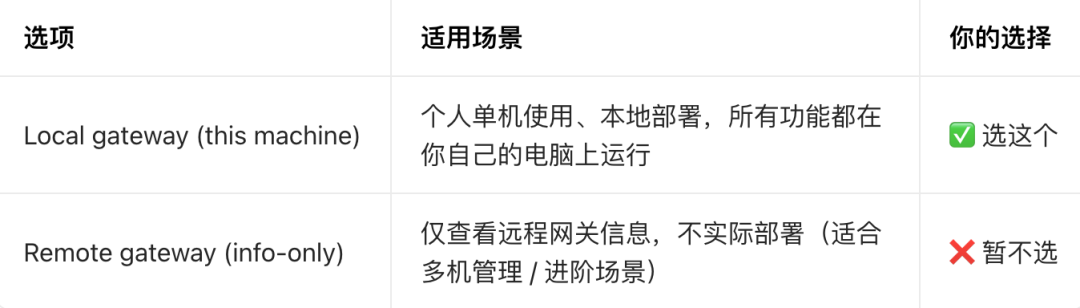
Q2:◆ What do you want to set up? │ ● Local gateway (this machine) (No gateway detected (ws://127.0.0.1:18789)) │ ○ Remote gateway (info-only)
A:选第一个:Local gateway (this machine)(本地网关),这是最适合个人使用的默认选项。
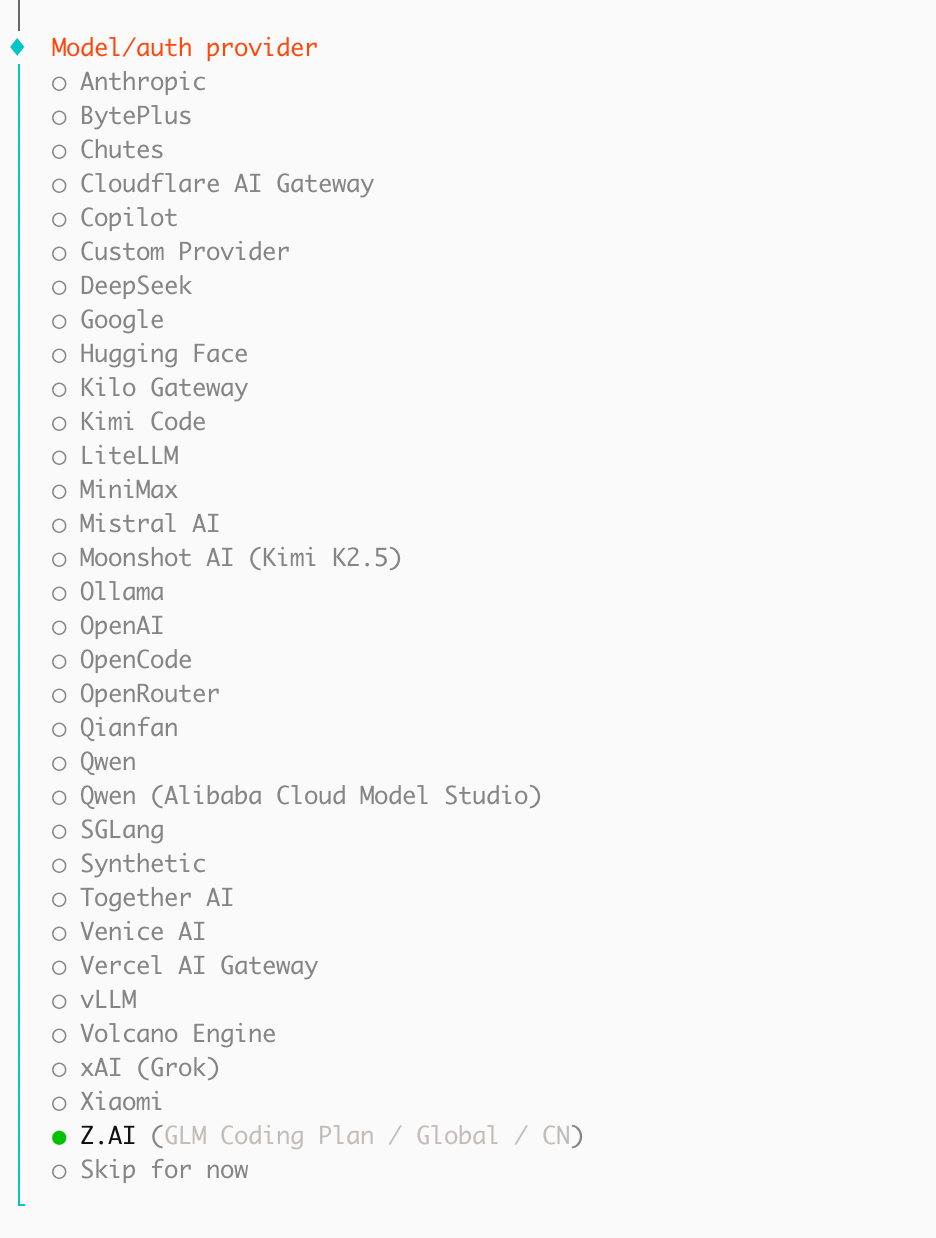
Q3:选模型
previewImag
A:本次选了智谱:Z.AI。因为在上面买了套餐。
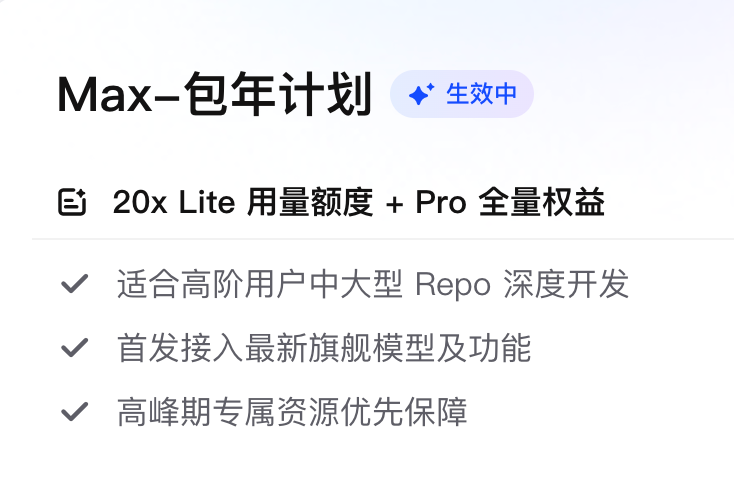
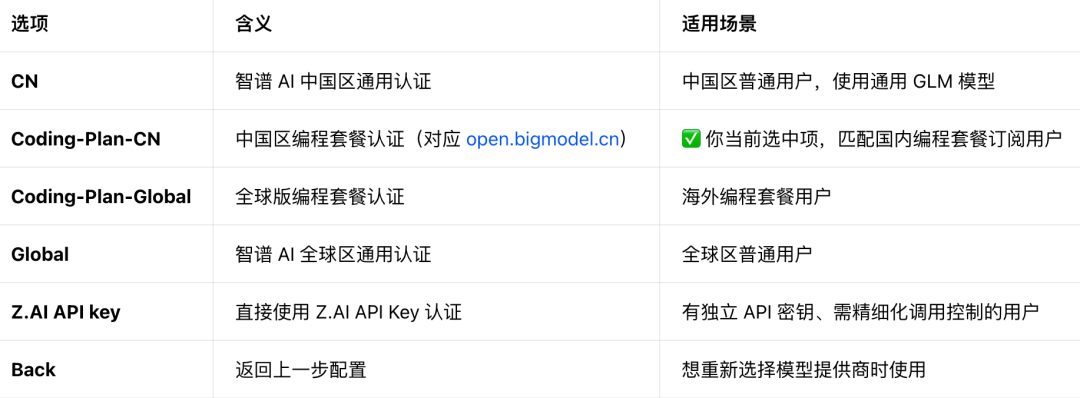
Q4:Z.AI auth method
A:Coding-Plan-CN
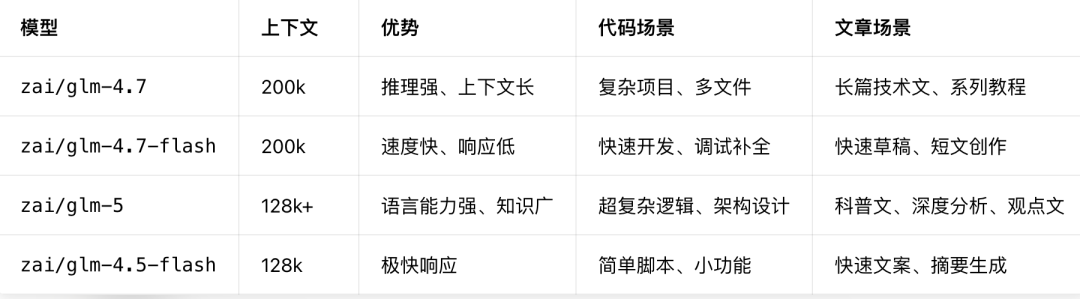
Q5:Default model
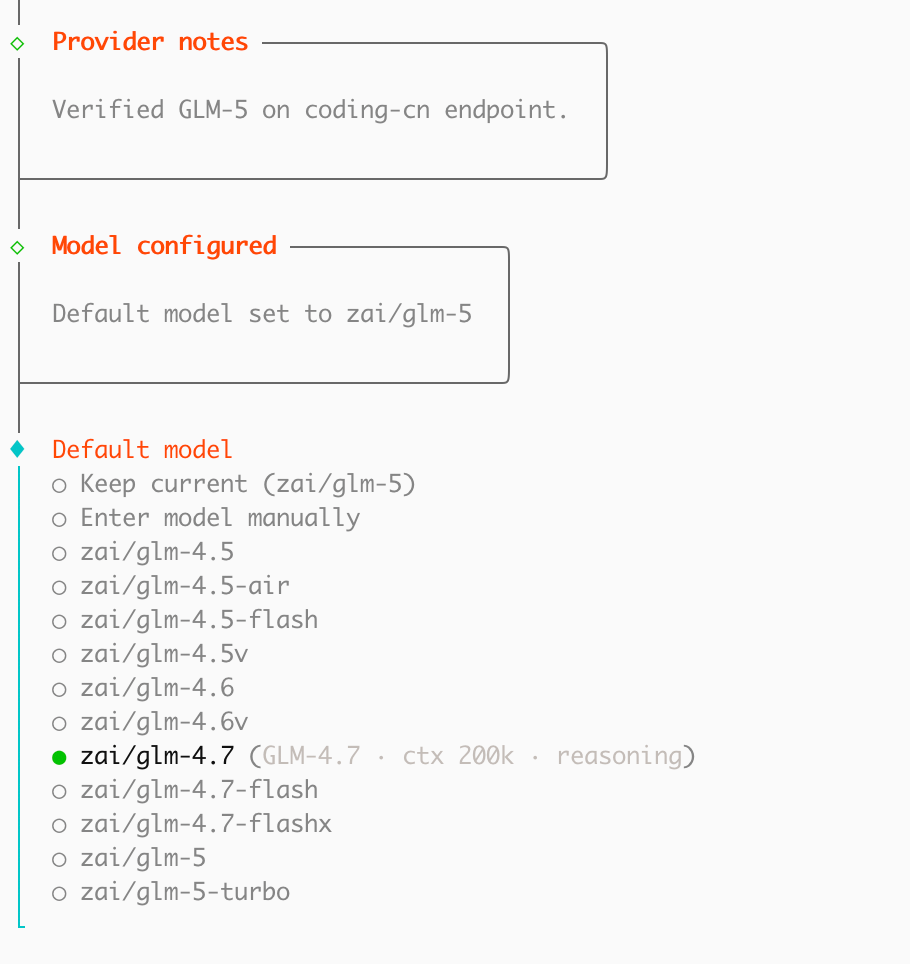
previewImag
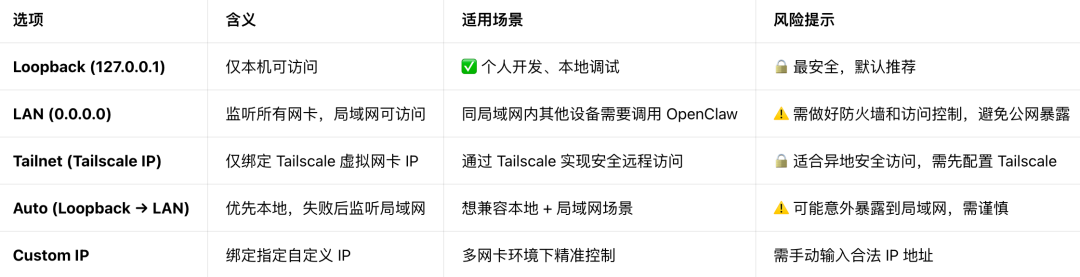
Q6:Gateway bind
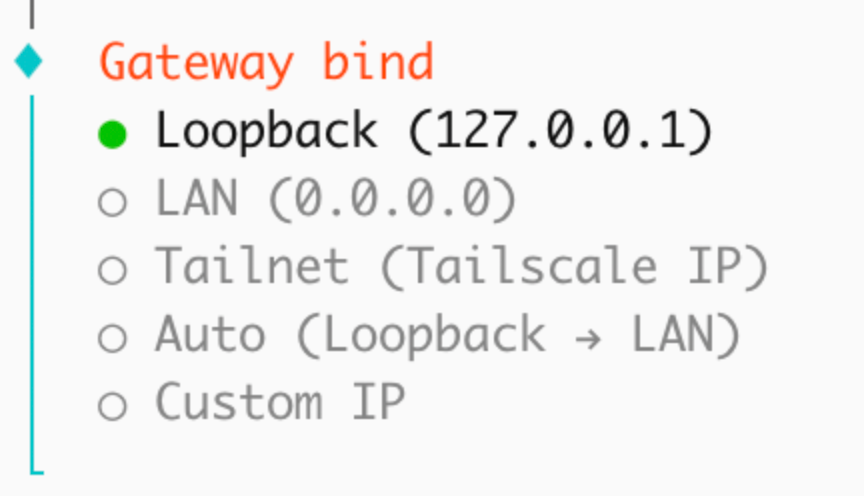
A:个人本地使用(推荐 ✅)选 Loopback (127.0.0.1),这是最安全、最省心的选择。
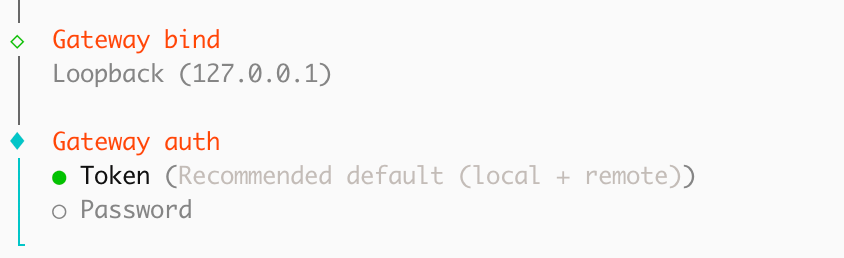
Q7:Gateway auth
previewImag
A:网关认证方式选型推荐。个人本地使用(推荐 ✅)选 Token(Recommended default (local + remote)),这是最安全、最符合 OpenClaw 设计初衷的选择。

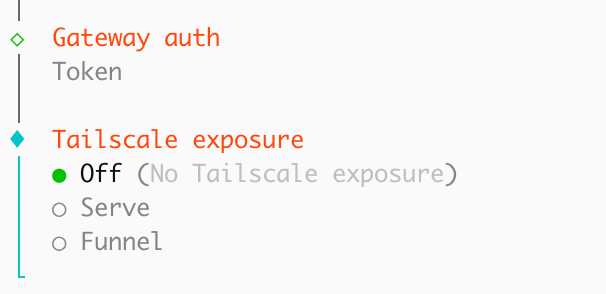
Q8:Tailscale exposure
previewImag
A:Tailscale 暴露选项推荐。个人本地使用(推荐 ✅)选 Off (No Tailscale exposure),这是最安全、最省心的选择,完全符合 OpenClaw 对个人用户的安全建议。
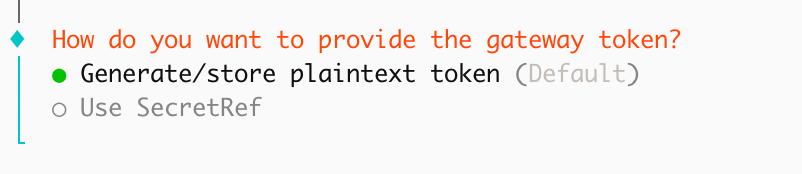
Q9:How do you want to provide the gateway token?
previewImag
A:网关 Token 提供方式选型推荐。个人本地使用(推荐 ✅)选 Generate/store plaintext token (Default),这是最便捷、最符合个人使用场景的选择。

Q10:Gateway token (blank to generate)

previewImag
A:直接留空,按回车即可 ✅。界面提示 (blank to generate)
意思是:
- 留空 → 系统会自动生成一个安全随机的 Token
- 手动输入 → 可以自定义 Token(不推荐,容易设置得太简单)
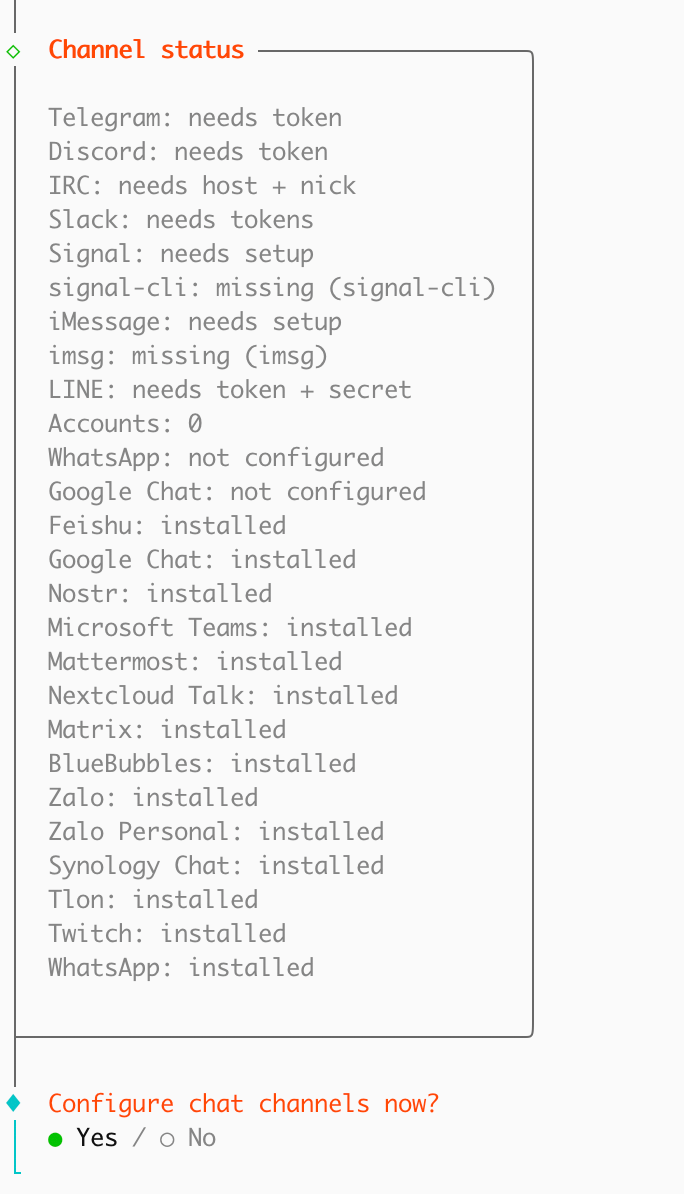
Q11:Channel status
previewImag
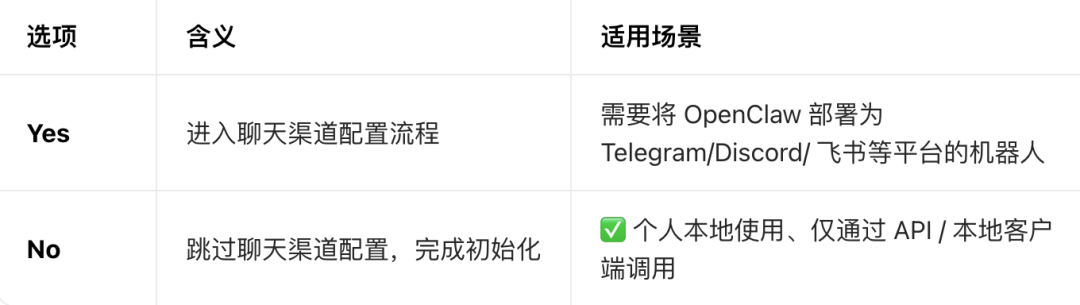
A:选 No(推荐 ✅)。选择 No 后,OpenClaw 会生成最终配置文件并启动网关,你就可以开始使用了。
Q12:Search provider
previewImag
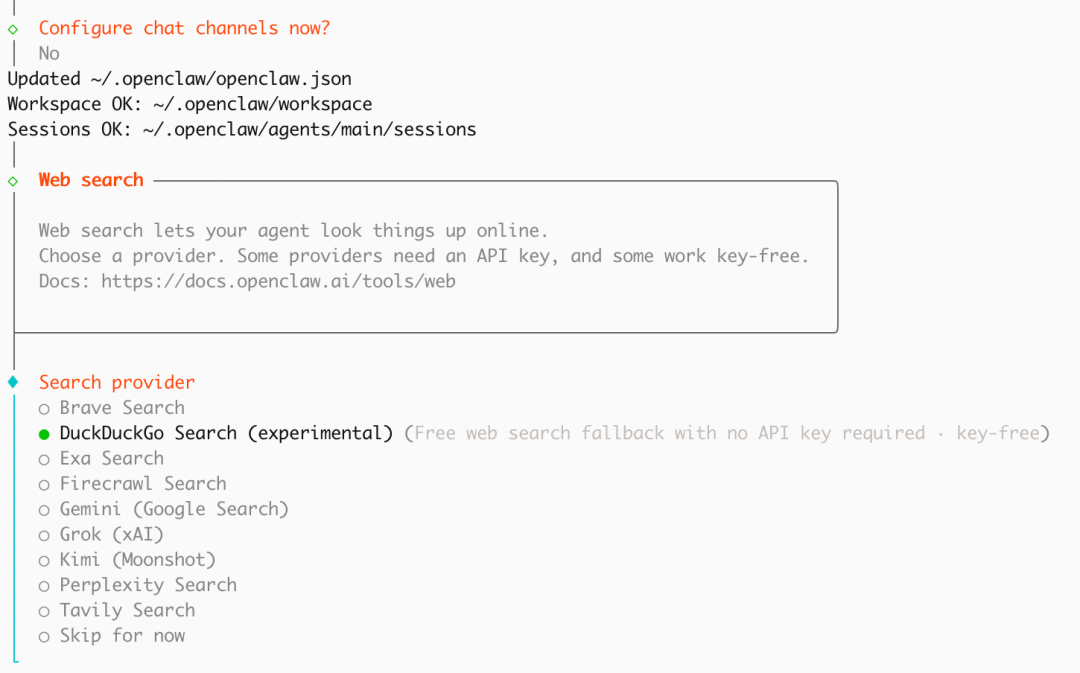
A:推荐保持当前选中的 DuckDuckGo Search (experimental) 或选择 Skip for now。

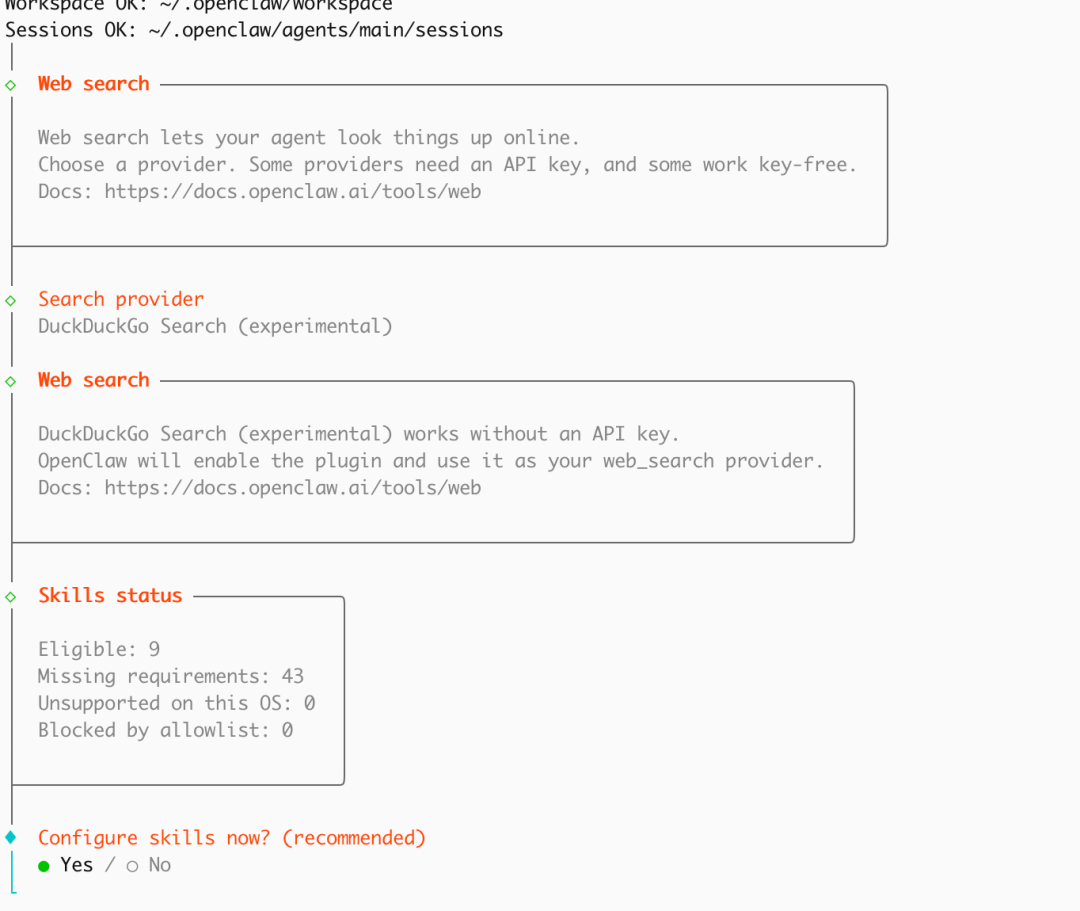
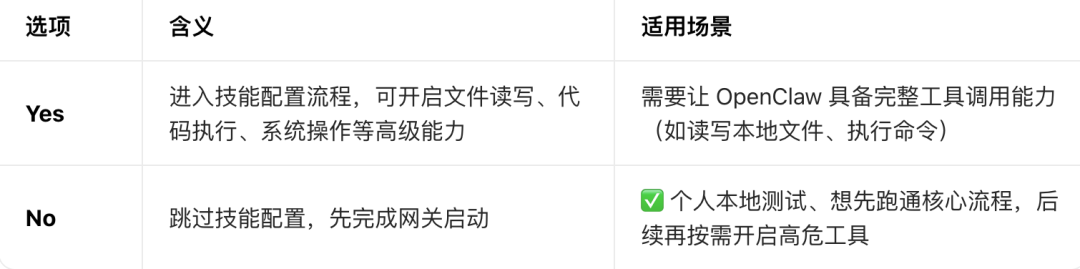
Q13:Configure skills now? (recommended)
previewImag
A:推荐先选 No(更适合个人快速部署)。技能(Skills)包含高危操作权限(如读写文件、执行 Shell 命令),初次部署时先跳过更安全。后续可通过修改 openclaw.json 配置文件,手动开启需要的技能,避免一次性暴露过多权限。已经配置了 DuckDuckGo 网页搜索,基础联网能力已具备,无需担心无法查资料。
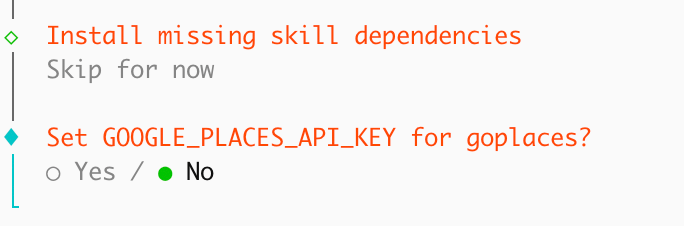
Q14:Set GOOGLE_PLACES_API_KEY for goplaces?
previewImag
A: 选NO。没有GOOGLE_PLACES_API_KEY
goplaces 是一个用于地点查询的技能,需要绑定 Google Places API Key 才能使用。它属于可选扩展功能,和 OpenClaw 核心的模型调用、网关服务完全无关。目前是个人本地部署,不需要配置这个 API Key,跳过不会影响任何基础功能。
Q15:Set NOTION_API_KEY for notion?
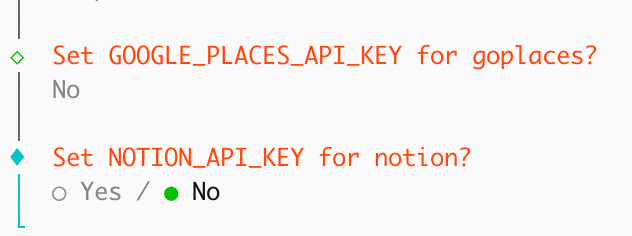
A:选NO。没有NOTION_API_KEY
notion 是一个用于读写 Notion 笔记的技能,需要绑定 Notion API Key 才能使用。它属于可选扩展功能,和 OpenClaw 核心的模型调用、网关服务完全无关。目前是个人本地部署,不需要配置这个 API Key,跳过不会影响任何基础功能。
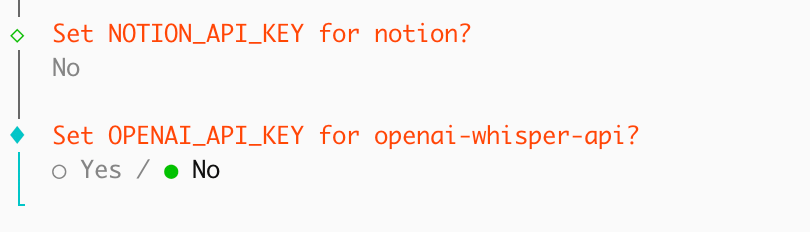
Q16:Set OPENAI_API_KEY for openai-whisper-api?
previewImag
A:选NO。没有OPENAI_API_KEY
openai-whisper-api 是一个语音转文字的技能,需要绑定 OpenAI API Key 才能使用。它属于可选扩展功能,和 OpenClaw 核心的模型调用、网关服务完全无关。目前是个人本地部署,不需要配置这个 API Key,跳过不会影响任何基础功能。
Q17:Set ELEVENLABS_API_KEY for sag?
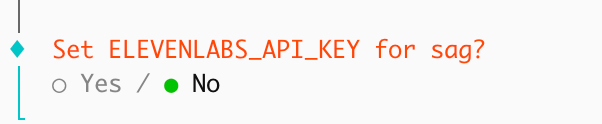
A:选NO。没有ELEVENLABS_API_KEY
sag 是一个基于ElevenLabs 的语音合成/生成技能,需要绑定 ElevenLabs API Key才能使用。这是可选扩展功能,并非OpenClaw 网关启动的核心依赖。目前是个人本地快速部署,不需要配置第三方语音服务密钥,跳过完全不影响模型网关、基础对话等核心功能。
Q18:Enable hooks?
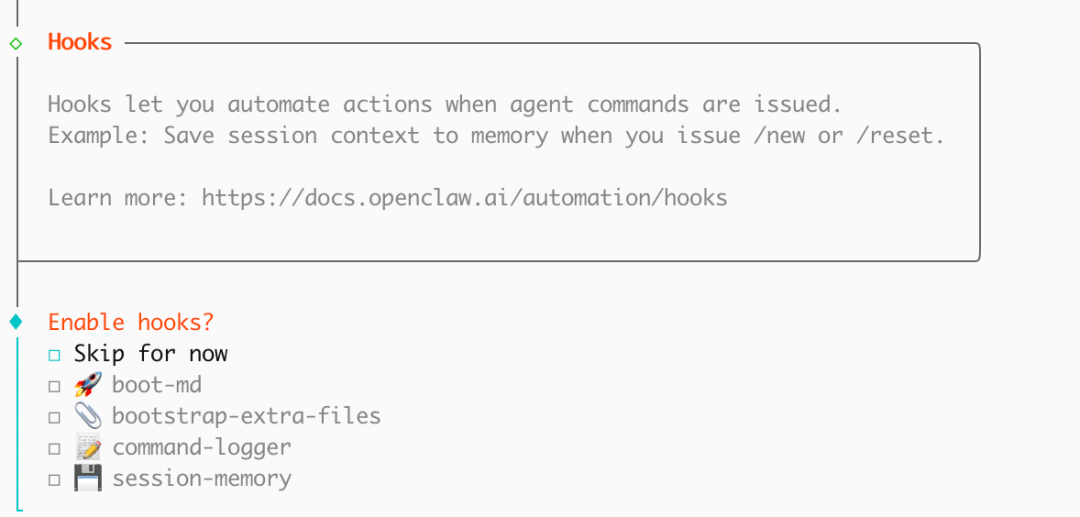
previewImag
A:勾选「Skip for now」,直接跳过 Hooks 配置。Hooks 是什么:Hooks 是 OpenClaw 的自动化扩展机制,用于在执行特定命令时触发自定义动作(比如自动保存会话、记录命令日志等)。这是完全可选的高级功能,和网关启动、模型调用等核心流程无关。初次部署时,跳过 Hooks 配置可以最快完成初始化,后续如果需要自动化能力,再手动在配置文件中添加即可。
Q19:Install Gateway service (recommended)

A:保持当前选中的 Yes 即可 。确认 Yes 后,OpenClaw 会自动完成系统服务的注册与配置,最后启动网关服务。Gateway service 是什么:将 OpenClaw 网关安装为系统服务(如 systemd),可以实现开机自启、后台稳定运行、日志管理等能力。这样可以避免手动启动网关的繁琐操作;服务崩溃后可自动重启,保证高可用性;
Q20:Gateway service runtime

A:保持当前选中的 Node (recommended) 即可。Node 是官方推荐的运行时,兼容性最稳定,也是 WhatsApp、Telegram 等聊天渠道的必需依赖。提示中提到 Bun 可能会在重新连接时损坏内存,所以不建议选择 Bun,避免服务不稳定。之前已经跳过了聊天渠道配置,选择 Node 依然是最安全、最通用的选择,不会影响网关核心功能。
Q21:How do you want to hatch your bot?
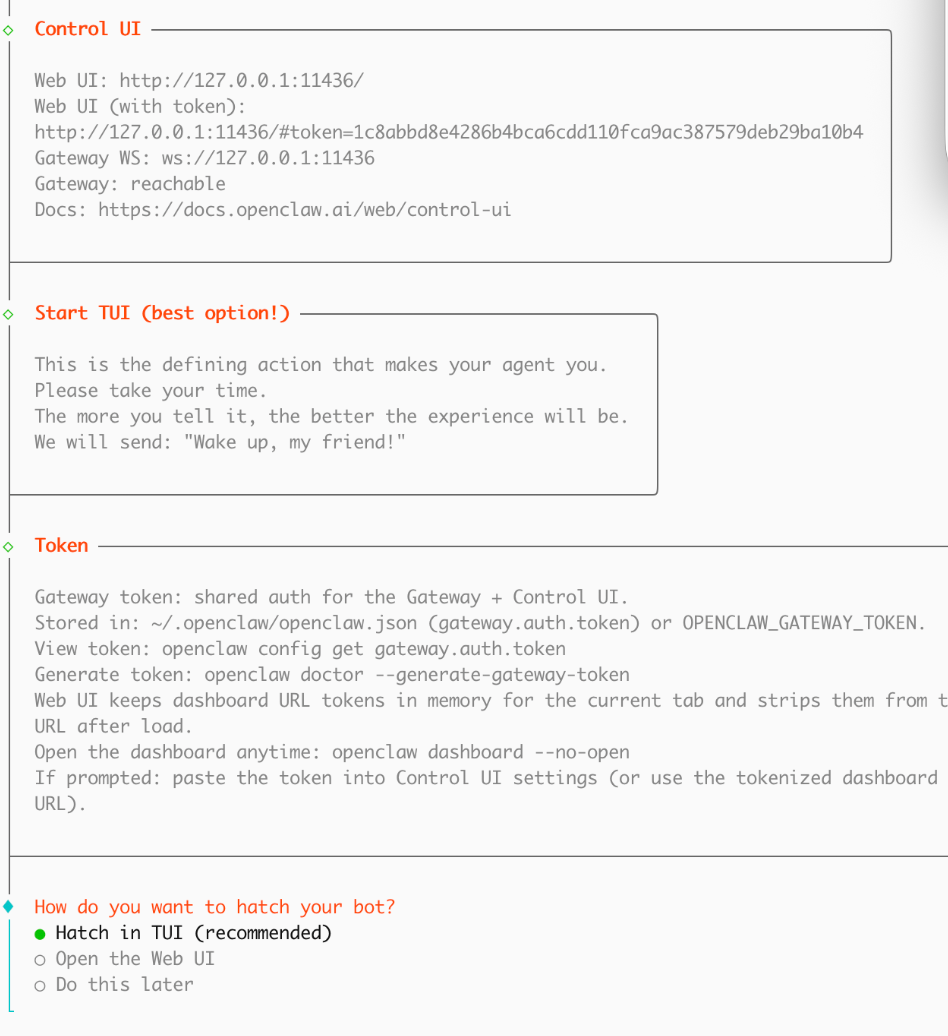
A:保持选中「Hatch in TUI (recommended)」即可。优先选择 TUI 模式 完成首次启动,能最快验证 OpenClaw 部署是否成功;TUI 模式无需额外配置,在当前终端即可完成模型交互测试;后续如需图形化操作,可随时切换到 Web UI 模式。

至此,OpenClaw配置完成。
来看下效果。
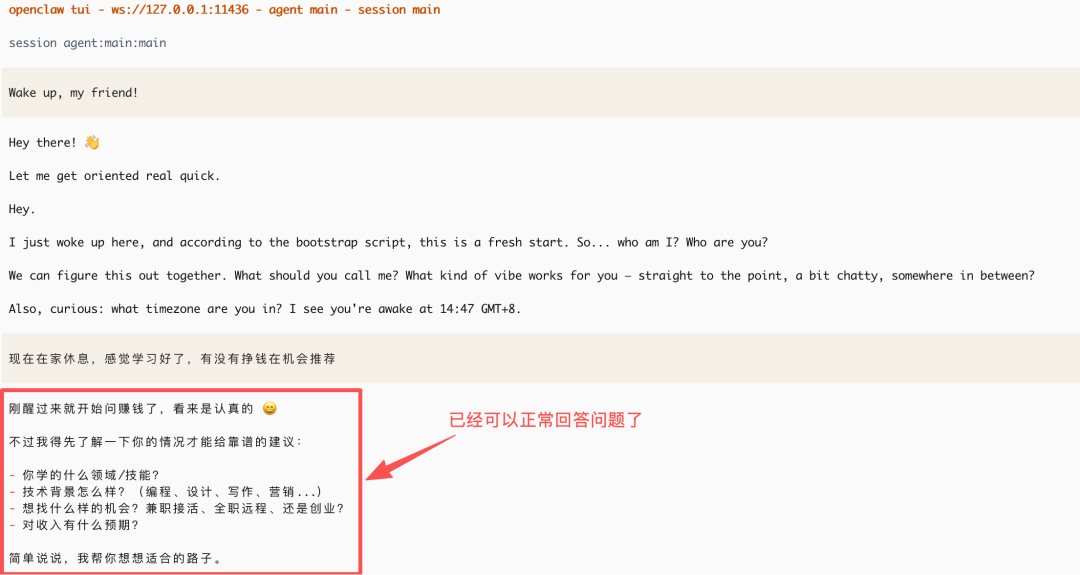
打开页面来跟OpenClaw聊一聊。
% openclaw dashboard
🦞 OpenClaw 2026.3.23-2 (7ffe7e4) — Your second brain, except this one actually remembers where you left things.
Dashboard URL: http://127.0.0.1:11436/#token=1c8abbd8e4286b4bca6cdd110fca9ac387579deb29ba10b4
Copied to clipboard.
Opened in your browser. Keep that tab to control OpenClaw.
执行命令openclaw dashboard完成后,会自动打开下面的页面。
然后输入提示词。
本次输入“今天是几号”
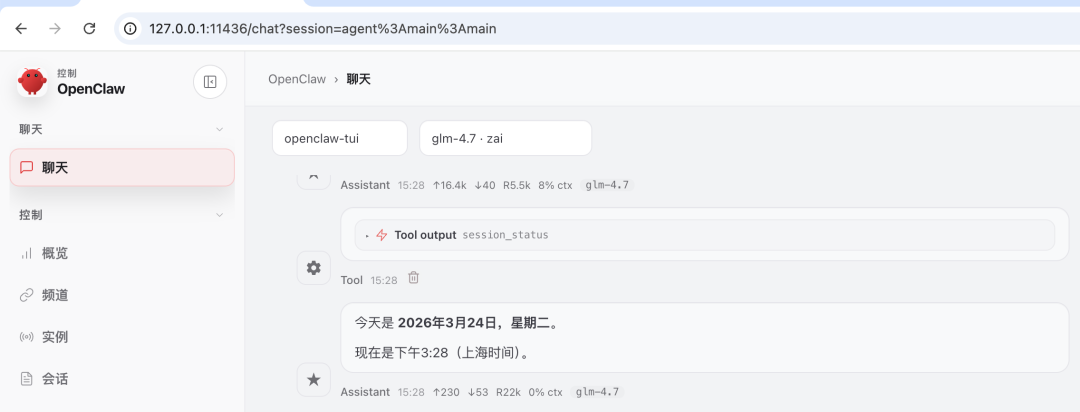
验收通过安装完成。
Part1:
在命令行执行openclaw命令时,如果提示不存在,那么需要把添加到环境变量中。
把 OpenClaw 路径加入 macOS 的环境变量,以后直接输 openclaw 即可:
1、编辑 zsh 配置文件:
vi ~/.zshrc2、在文件末尾添加以下内容(复制粘贴即可):
# 加入 OpenClaw 路径
export PATH="/opt/homebrew/Cellar/node/25.8.1_1/bin:$PATH"
3、保存并生效配置:
# 保存
source ~/.zshrc  # 生效配置
4、验证配置成功:
# 重启终端后执行,能输出版本号即成功
openclaw -vPart2:福利
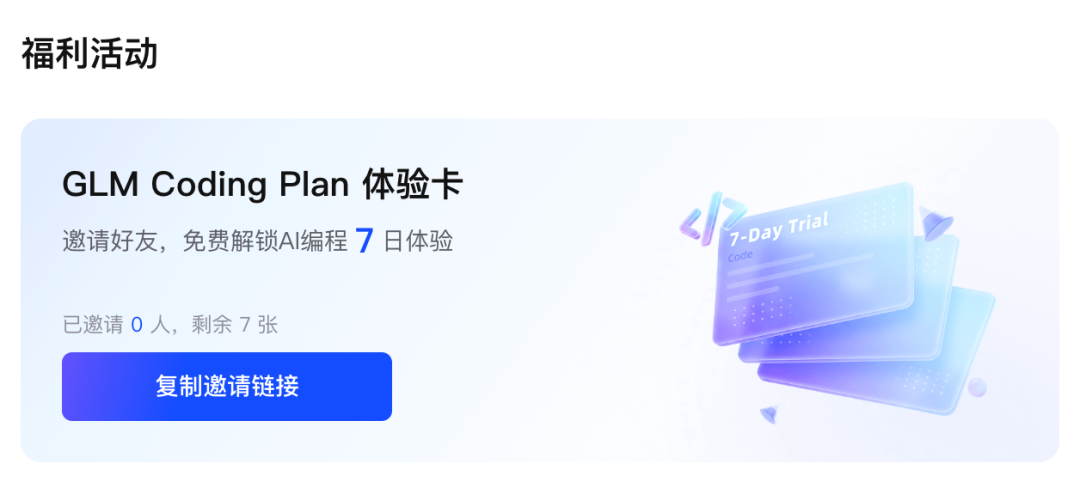
我在使用GLM Coding Plan,数小时内完成过去需要数周的开发工作,赠送你1张7天AI Coding体验卡,一起来用吧:https://bigmodel.cn/activity/trial-card/DXXZUYH7OP
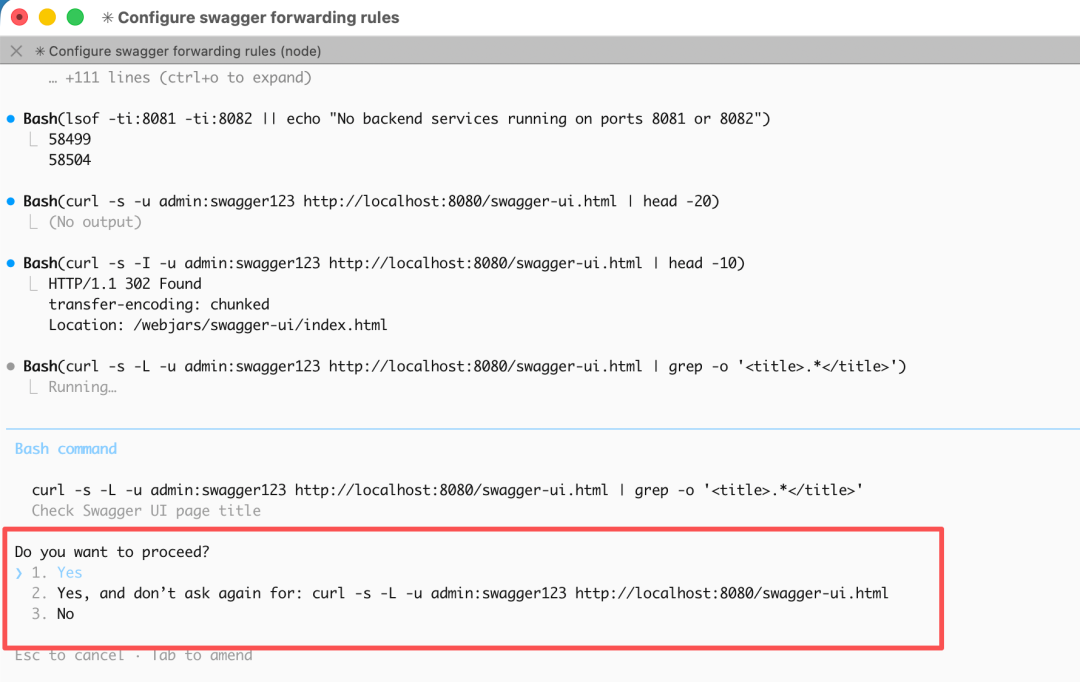
最后吐槽下Cluade Code。真是烦啊,改一个功能,能让确认几百次:
本文参与 腾讯云自媒体同步曝光计划,分享自微信公众号。
原始发表:2026-03-24,如有侵权请联系 cloudcommunity@tencent.com 删除
评论
登录后参与评论
推荐阅读
腾讯云开发者

Copyright © 2013 - 2026 Tencent Cloud. All Rights Reserved. 腾讯云 版权所有
深圳市腾讯计算机系统有限公司 ICP备案/许可证号:粤B2-20090059  粤公网安备44030502008569号
腾讯云计算(北京)有限责任公司 京ICP证150476号 | 京ICP备11018762号