Python自动化测试:JSON文件从读取到更新,一步不落

Python自动化测试:JSON文件从读取到更新,一步不落

大飞记Python
发布于 2026-04-14 20:22:47
发布于 2026-04-14 20:22:47
小伙伴们,大家好~
我们平时无论在做自动化测试还是项目开发都免不了要与 Json文件打交道,有时仅需要读取文件,有时需要读取并更新保存文件。今天小编教会大家如何使用Python读取、更新、保存 Json文件。那么话不都多说,直接上干货。
首先呢,万事第一步,使用命令安装 Json模块pip install json(一般Python自带Json模块,无需安装)。这是一个第三方集成模块,也就意味着我们只需要下载安装模块,就可以直接使用别人编写好的代码进行后续的操作
json.load() - 从文件读取 Json
json.load():从文件读取 Json(通常也叫做解码)。将 Json文件解码成Python可以读取的字典或列表形式with open(file_path, 'r', encoding='utf-8') as f::r(read)读取的意思。使用read和编码格式为utf-8的方式打开路径为file_path的json文件json.load(f):加载并读取 Json文件数据
import json

with open('your_file.json', 'r', encoding='utf-8') as f: # 1. 打开文件
    data = json.load(f) # 2. 从文件对象 f 中加载数据

print(data) # data 现在是一个 Python 字典或列表
print(type(data)) # 验证类型,通常是 <class 'dict'> 或 <class 'list'>
json.dump() - 将 Json 写入文件
json.dump():将 Json 写入文件(通常也叫做编码),将Python中的列表或字典转化为Json并写入文件。与上面的json.load(f)是逆向过程with open(file_path, 'w', encoding='utf-8') as f::w(write)写入的意思。将我们处理好的Python数据以编码格式为utf-8的方式写入路径为file_path的 json文件
import json

my_data = {
    "name": "大飞",
    "age": 28
}

with open('output_pretty.json', 'w', encoding='utf-8') as f:
    json.dump(
        my_data,
        f,
        indent=4,       # 缩进4个空格,让结构清晰好看
        ensure_ascii=False # 确保中文字符正常显示,而不是 Unicode 转义序列
    )
完整代码实现
try..except..:Python的异常处理机制,即使文件不存在或者格式有问题,它也不会因此停止运行影响后续代码,加强代码健壮性FileNotFoundError:文件不存在json.JSONDecodeError:文件内容不是有效的 JSON 格式
import os
import json


class WriteJson:

    def update_json_value(self, file_path, key, value):
        """更新JSON文件中指定键的值"""
        try:
            # 读取现有JSON数据或创建新文件
            try:
                with open(file_path, 'r', encoding='utf-8') as f:
                    temp_data = json.load(f)
            except (FileNotFoundError, json.JSONDecodeError):
                temp_data = {}
                print(f"文件 {file_path} 不存在或格式错误,将创建新文件")

            # 更新指定键的值
            temp_data[key] = value

            # 写回JSON文件
            with open(file_path, 'w', encoding='utf-8') as f:
                json.dump(temp_data, f, indent=4, ensure_ascii=False)
                print(f"已更新 {file_path} 中的 {key} 为 {value}")

            returnTrue
        except Exception as e:
            print(f"更新JSON失败: {e}")
            returnFalse

    def read_json_value(self, file_path, key):
        """读取JSON文件中指定键的值"""
        try:
            with open(file_path, 'r', encoding='utf-8') as f:
                data = json.load(f)
                return data.get(key, None)
        except (FileNotFoundError, json.JSONDecodeError) as e:
            print(f"读取JSON失败: {e}")
            returnNone


if __name__ == '__main__':
    # 创建实例
    wj = WriteJson()

    # 定义文件路径
    json_file = os.path.join('example.json')

    # 读取原始值
    hu = wj.read_json_value(json_file, "name")
    print(f"原始 hu 值: {hu}")

    # 更新值为 "password"
    wj.update_json_value(json_file, "name", "password")

    # 读取更新后的值
    ss = wj.read_json_value(json_file, "name")
    print(f"更新后的 ss 值: {ss}")
我们的原来json文件如下
{
    "name": "name"
}
这是我们执行代码更新后的 Json文件
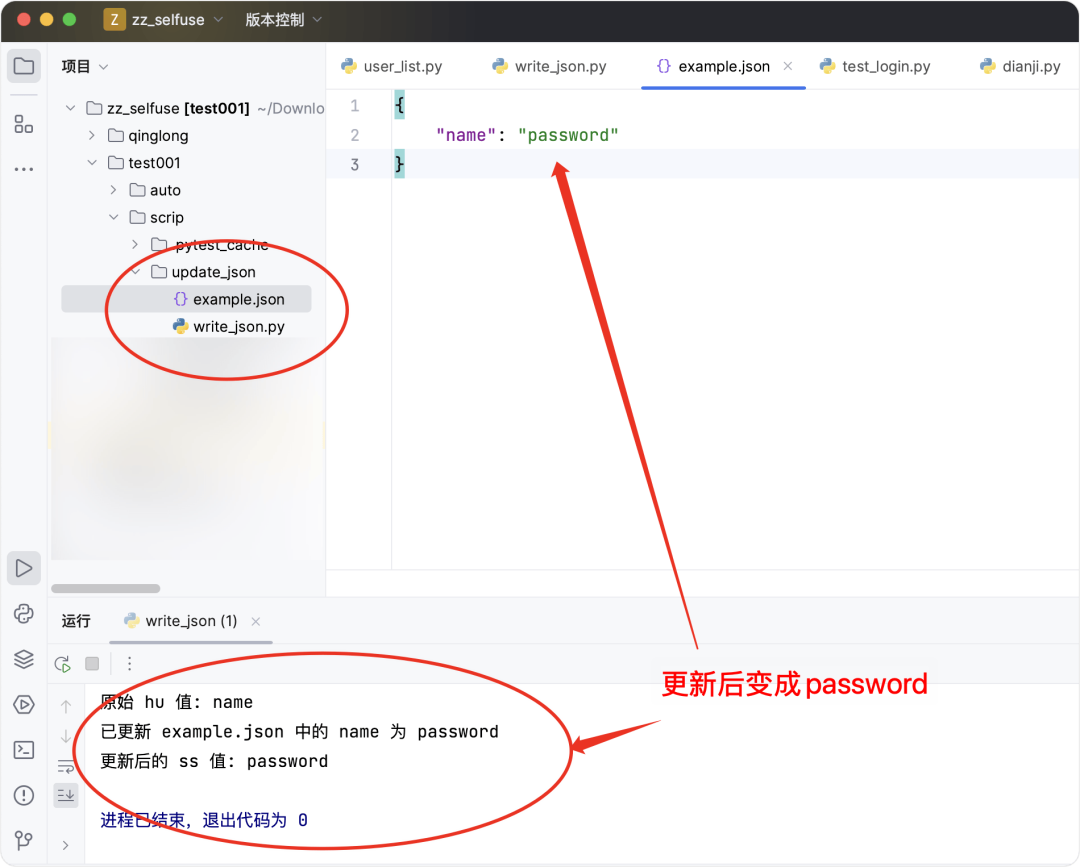
image-20250909上午113731568
大功告成~
这里有一个混淆的知识点需要额外注意,关于json模块,还有另外两个方法json.loads()和json.dumps()特别容易与上面的json.load()和json.dump()造成混淆,这里有个小技巧:
load/dump: 和文件(file)打交道loads/dumps: 和字符串(string)打交道
如果觉得有帮助,请积极点赞、收藏、转发哦~
本文参与 腾讯云自媒体同步曝光计划,分享自微信公众号。
原始发表:2025-09-09,如有侵权请联系 cloudcommunity@tencent.com 删除
评论
登录后参与评论
推荐阅读
目录
腾讯云开发者

Copyright © 2013 - 2026 Tencent Cloud. All Rights Reserved. 腾讯云 版权所有
深圳市腾讯计算机系统有限公司 ICP备案/许可证号:粤B2-20090059  粤公网安备44030502008569号
腾讯云计算(北京)有限责任公司 京ICP证150476号 | 京ICP备11018762号