YOLO26 | C# 上位机部署推理,CPU加速FPS140+

YOLO26 | C# 上位机部署推理,CPU加速FPS140+

OpenCV学堂
发布于 2026-04-15 18:18:15
发布于 2026-04-15 18:18:15
YOLO26介绍
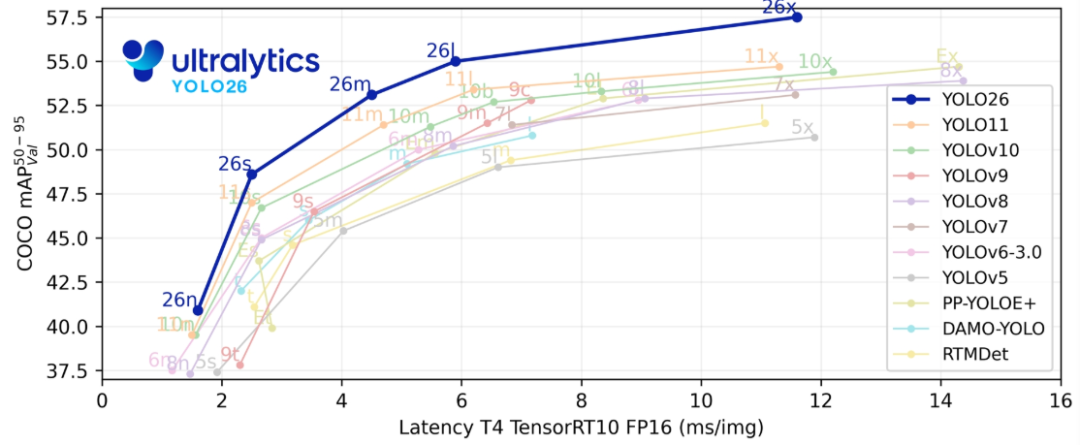
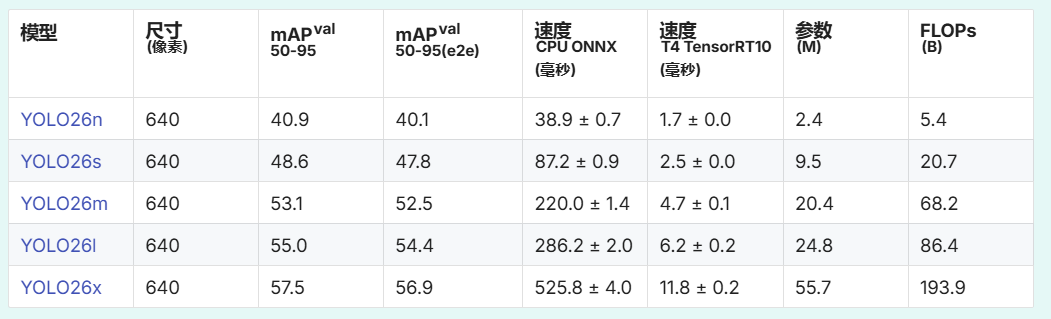
YOLO26是Ultralytics于2025年9月发布的最新目标检测模型,专为边缘和低功耗设备设计,在速度和部署效率上实现重大突破。
三大核心优势:
- 极速CPU推理:通过原生端到端设计,移除NMS后处理步骤,CPU推理速度比前代提升高达43%,可在无GPU设备上实时运行。
- 部署极简:移除Distribution Focal Loss模块,支持TensorRT、ONNX、CoreML等格式一键导出,硬件兼容性更强。
- 小目标检测精准:引入ProgLoss渐进式损失平衡和STAL小目标感知标签分配,显著提升复杂场景下小物体的识别能力。
OpenVINO C#支持
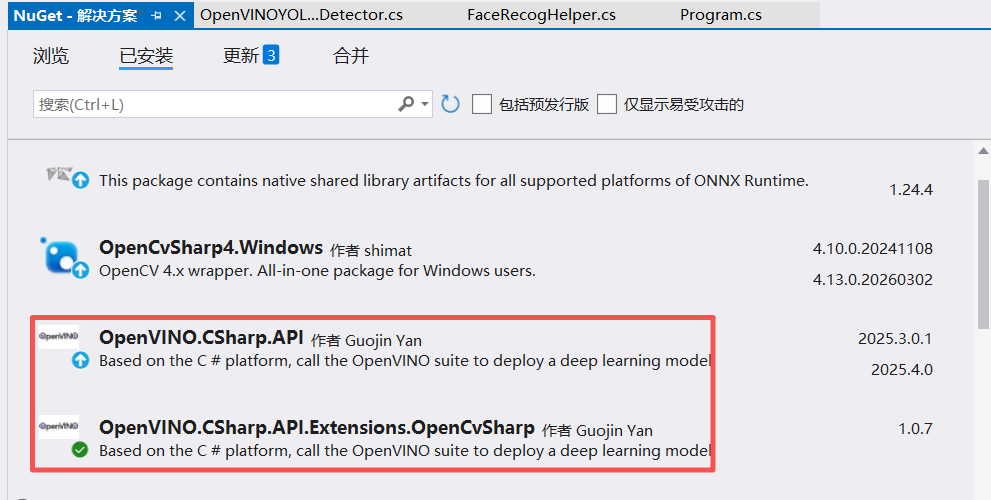
OpenVINO支持C#高效部署YOLO模型,通过官方NuGet包OpenVINO.CSharp.API即可集成。其优势包括:
1)异步推理大幅提升吞吐率,适合视频流处理;
2)支持CPU、iGPU及NPU等多硬件加速,实时推理;
3)提供C# API,便于.NET开发者快速落地
代码实践与演示
第一步:构建C# SDK支持,客户端调用代码
OpenVINOYOLO26Detector detector = new OpenVINOYOLO26Detector();
detector.Detect();
第二步:完整代码 - 构建YOLO26 OpenVINO C# 推理演示代码。
using System;
using System.Collections.Generic;
using System.Diagnostics;
using System.Linq;
using System.Text;
using System.Threading.Tasks;
using OpenCvSharp.Dnn;
using OpenCvSharp;
using OpenVinoSharp.Extensions.process;
using OpenVinoSharp.Extensions.result;
using OpenVinoSharp;
using OpenCvSharp.Flann;
namespace csharp_opencv410
{
    public class OpenVINOYOLO26Detector
    {
        public void Detect()
        {
            // Set the video path and model path
            string video_path = "D:/images/video/deeppose.mp4";
            string model_path = "D:/python/yolov5-7.0/yolo26n.onnx";
            // Create a new Core object and read the model
            Core core = new Core();
            Model model = core.read_model(model_path);
            CompiledModel compiled_model = core.compile_model(model, "GPU");
            // Create a list of InferRequest objects
            List<InferRequest> requests = new List<InferRequest> { compiled_model.create_infer_request(), compiled_model.create_infer_request() };
            // Create a new VideoCapture object and read the video
            VideoCapture capture = new VideoCapture(video_path);
            if (!capture.IsOpened())
            {
                Console.WriteLine("Error: Video not found!");
                return;
            }
            Mat frame = new Mat();
            Mat next_frame = new Mat();
            capture.Read(frame);
            float scale = 0.0f;
            float[] input_data = preprocess(frame, out scale);
            requests[0].get_input_tensor().set_data(input_data);
            requests[0].start_async();
            Stopwatch sw = new Stopwatch();
            float[] total_infs = new float[3];
            List<string> classList = File.ReadAllLines("D:/python/yolov5-7.0/classes.txt").Select(line => line.Trim()).ToList();
            while (true)
            {
                if (!capture.Read(next_frame))
                {
                    break;
                }
                sw.Restart();
                input_data = preprocess(frame, out scale);
                requests[1].get_input_tensor().set_data(input_data);
                requests[1].start_async();
                requests[0].wait();
                float[] output_data = requests[0].get_output_tensor().get_data<float>(300 * 6);
                DetResult result = postprocess(output_data, scale);
                sw.Stop();
                total_infs[0] = sw.ElapsedMilliseconds;
                Cv2.PutText(frame, "Inference: " + (1000.0 / total_infs[0]).ToString("0.00") + "FPS " + (total_infs[0]).ToString("0.00") + "ms", new OpenCvSharp.Point(20, 40), HersheyFonts.HersheyPlain, 2, new Scalar(255, 0, 255), 2);
                result.update_lable(classList);
                Mat res_mat = Visualize.draw_det_result(result, frame);
                Cv2.ImShow("YOLO26对象检测+OpenCV学堂", frame);
                // Press 'ESC' to exit the program
                if (Cv2.WaitKey(1) == 27)
                {
                    break;
                }
                swap(requests);
                frame = next_frame;
            }
        }
        public static float[] preprocess(Mat frame, out float scale)
        {
            Mat mat = new Mat();
            Cv2.CvtColor(frame, mat, ColorConversionCodes.BGR2RGB);
            mat = Resize.letterbox_img(mat, 640, out scale);
            mat = Normalize.run(mat, true);
            return Permute.run(mat);
        }
        public static void swap(List<InferRequest> requests)
        {
            var temp = requests[0];
            requests[0] = requests[1];
            requests[1] = temp;
        }
    }
}
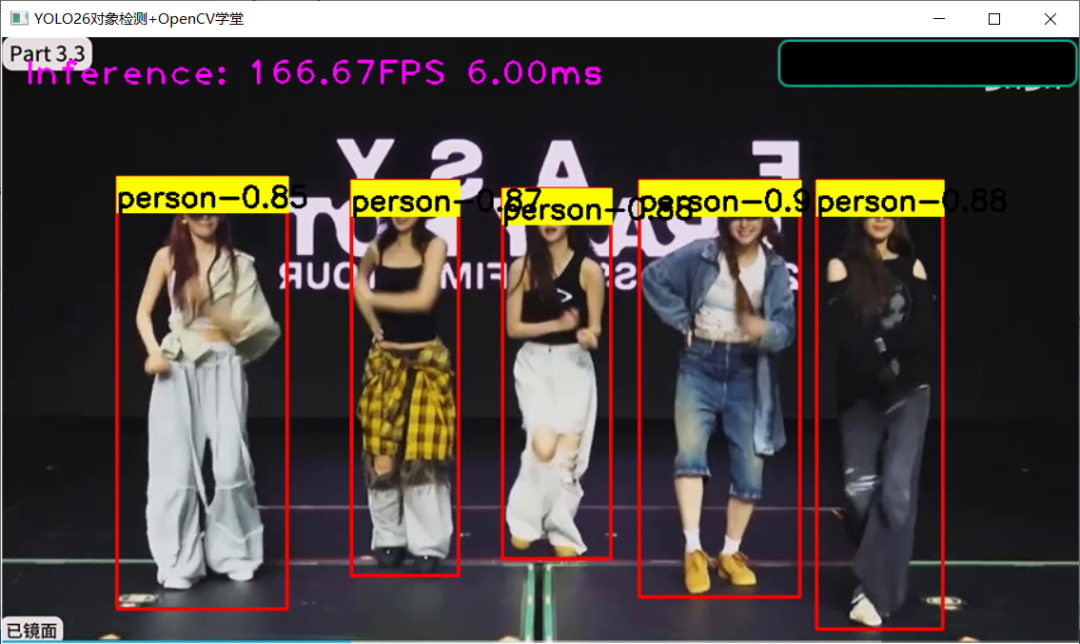
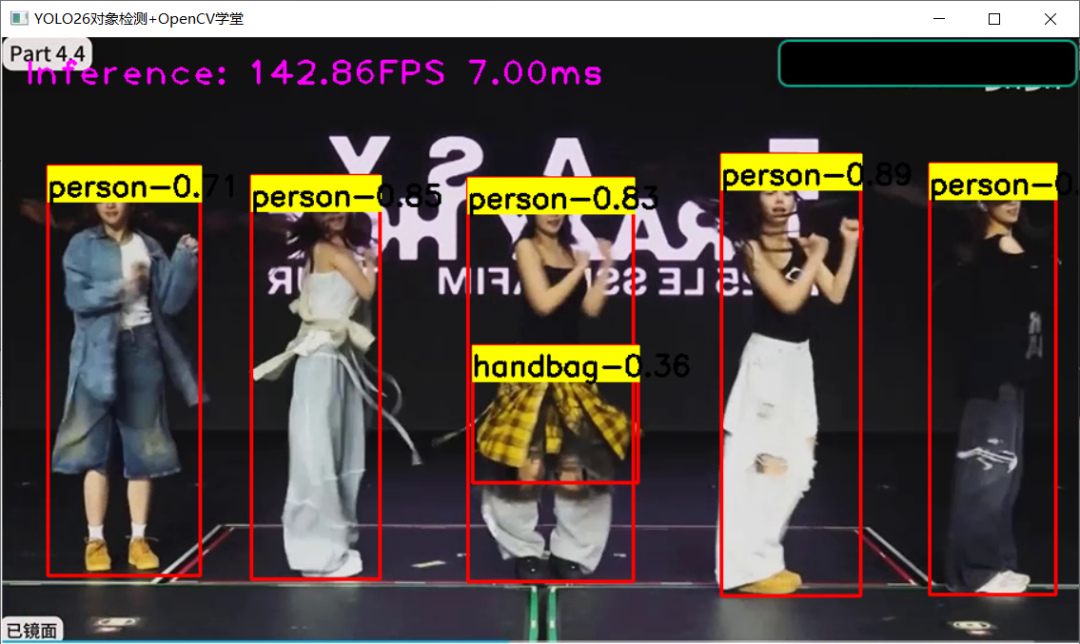
运行与演示效果:
本文参与 腾讯云自媒体同步曝光计划,分享自微信公众号。
原始发表:2026-04-07,如有侵权请联系 cloudcommunity@tencent.com 删除
腾讯云开发者

Copyright © 2013 - 2026 Tencent Cloud. All Rights Reserved. 腾讯云 版权所有
深圳市腾讯计算机系统有限公司 ICP备案/许可证号:粤B2-20090059  粤公网安备44030502008569号
腾讯云计算(北京)有限责任公司 京ICP证150476号 | 京ICP备11018762号