OceanBase 单机也能玩,安装中会遇到些什么?

OceanBase 单机也能玩,安装中会遇到些什么?

AustinDatabases
发布于 2026-05-26 15:00:55
发布于 2026-05-26 15:00:55
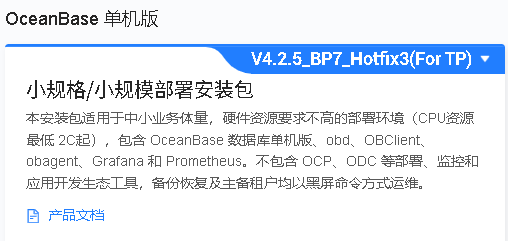
咱们开始正事最近一些项目要研究OceanBase单机版,一些项目中的MySQL要被替换,如何安全方便的替换MySQL线下产品,是要攻克的难题,这个系列就是来搞这件事情的,在搞这个事情前,我们要做的是对比数据库的兼容性。
这里兼容性对比从两个版本从MySQL 8.025和OceanBase 企业单机版,为避免二者在使用层次上的差距,

image
image

image
image
image
这次选择 的是小规格部署的OceanBase的数据包,单机安装中可选择两种安装方式
1 交互部署安装 2 配置文件部署安装
下面我们通过交互方式进行安装

image
image
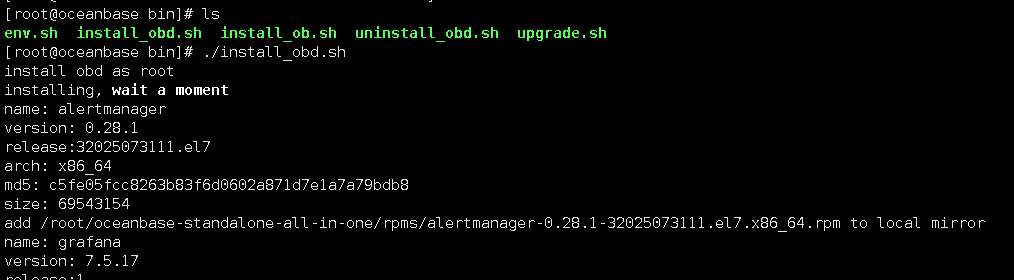
首先我们第一要安装obd通过安装后的obd来进行交互安装单机
1 安装obd ./install_obd.sh
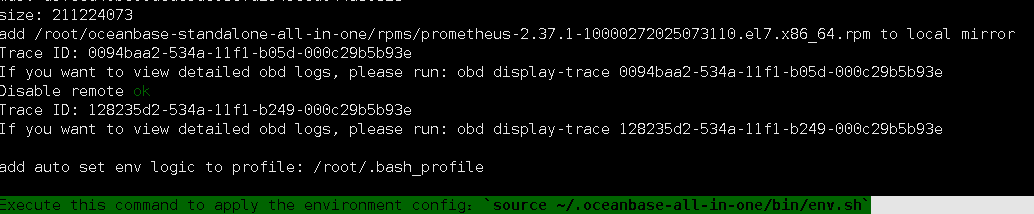
Execute this command to apply the environment config:source ~/.oceanbase-all-in-one/bin/env.sh
image
image
image
image
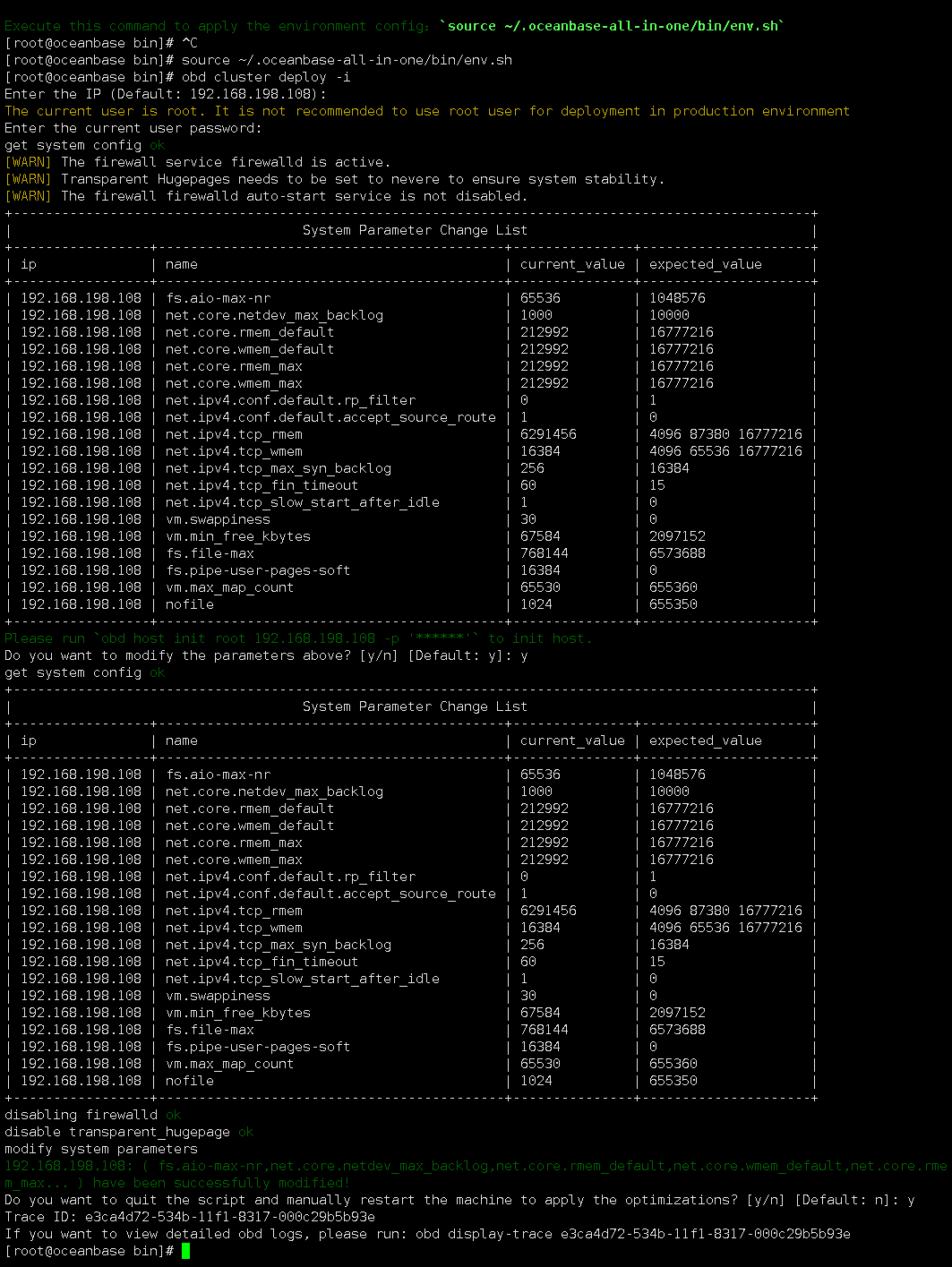
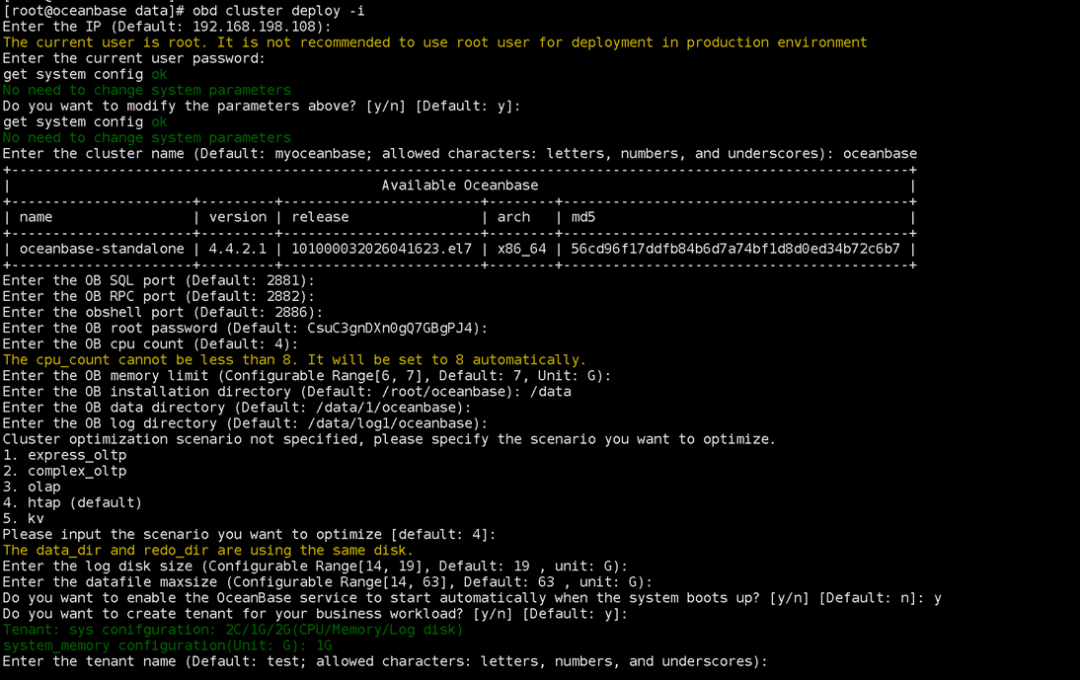
obd cluster deploy -i
image
image
在安装中我们可已选择Do you want to quit the script and manually restart the machine to apply the optimizations? [y/n] [Default: n]: n 来继续安装系统,或者选择y重启系统后继续安装。
image
image
image
image
image
image
image
image
image
image
image
image
image
image
image
image
[root@oceanbase data]#
[root@oceanbase data]#
[root@oceanbase data]# obd cluster deploy -i
Enter the IP (Default: 192.168.198.108):
The current user is root. It is not recommended to use root user for deployment in production environment
Enter the current user password:
get system config ok
No need to change system parameters
Do you want to modify the parameters above? [y/n] [Default: y]:
get system config ok
No need to change system parameters
Enter the cluster name (Default: myoceanbase; allowed characters: letters, numbers, and underscores): oceanbase
+-------------------------------------------------------------------------------------------------------------+
|                                             Available Oceanbase                                             |
+----------------------+---------+------------------------+--------+------------------------------------------+
| name                 | version | release                | arch   | md5                                      |
+----------------------+---------+------------------------+--------+------------------------------------------+
| oceanbase-standalone | 4.4.2.1 | 101000032026041623.el7 | x86_64 | 56cd96f17ddfb84b6d7a74bf1d8d0ed34b72c6b7 |
+----------------------+---------+------------------------+--------+------------------------------------------+
Enter the OB SQL port (Default: 2881):
Enter the OB RPC port (Default: 2882):
Enter the obshell port (Default: 2886):
Enter the OB root password (Default: CsuC3gnDXn0gQ7GBgPJ4):
Enter the OB cpu count (Default: 4):
The cpu_count cannot be less than 8. It will be set to 8 automatically.
Enter the OB memory limit (Configurable Range[6, 7], Default: 7, Unit: G):
Enter the OB installation directory (Default: /root/oceanbase): /data
Enter the OB data directory (Default: /data/1/oceanbase):
Enter the OB log directory (Default: /data/log1/oceanbase):
Cluster optimization scenario not specified, please specify the scenario you want to optimize.
1. express_oltp
2. complex_oltp
3. olap
4. htap (default)
5. kv
Please input the scenario you want to optimize [default: 4]:
The data_dir and redo_dir are using the same disk.
Enter the log disk size (Configurable Range[14, 19], Default: 19 , unit: G):
Enter the datafile maxsize (Configurable Range[14, 63], Default: 63 , unit: G):
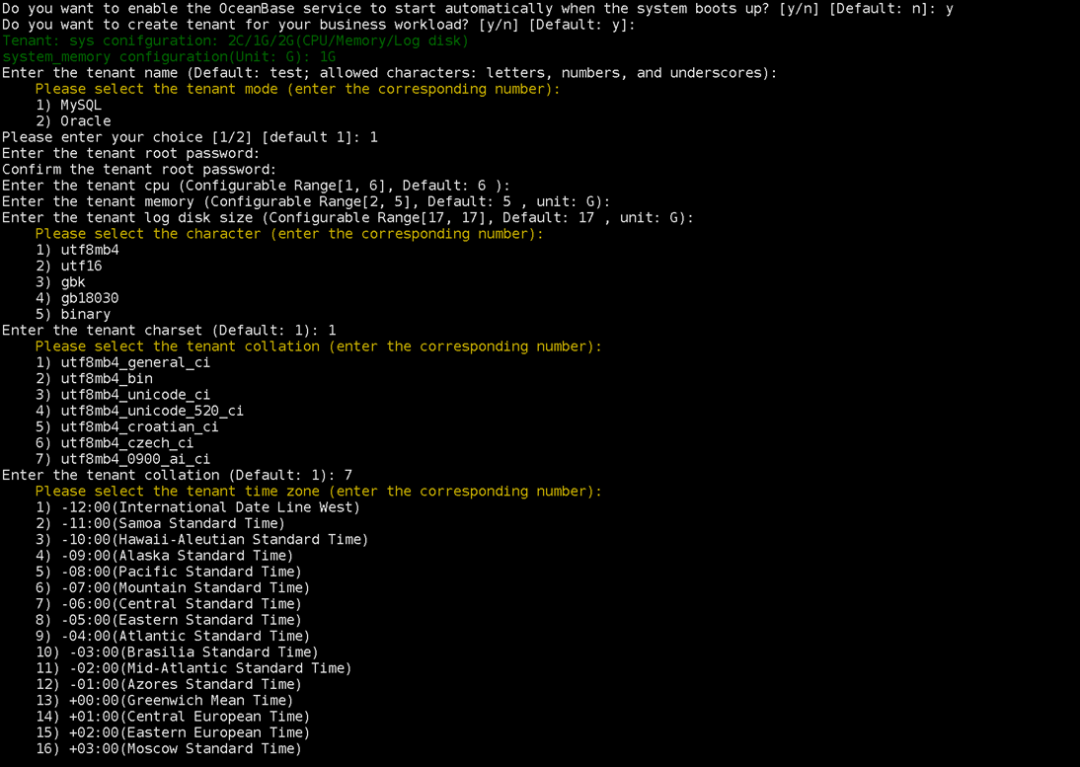
Do you want to enable the OceanBase service to start automatically when the system boots up? [y/n] [Default: n]: y
Do you want to create tenant for your business workload? [y/n] [Default: y]:
Tenant: sys conifguration: 2C/1G/2G(CPU/Memory/Log disk)
system_memory configuration(Unit: G): 1G
Enter the tenant name (Default: test; allowed characters: letters, numbers, and underscores):
    Please select the tenant mode (enter the corresponding number):
    1) MySQL
    2) Oracle
Please enter your choice [1/2] [default 1]: 1
Enter the tenant root password:
Confirm the tenant root password:
Enter the tenant cpu (Configurable Range[1, 6], Default: 6 ):
Enter the tenant memory (Configurable Range[2, 5], Default: 5 , unit: G):
Enter the tenant log disk size (Configurable Range[17, 17], Default: 17 , unit: G):
    Please select the character (enter the corresponding number):
    1) utf8mb4
    2) utf16
    3) gbk
    4) gb18030
    5) binary
Enter the tenant charset (Default: 1): 1
    Please select the tenant collation (enter the corresponding number):
    1) utf8mb4_general_ci
    2) utf8mb4_bin
    3) utf8mb4_unicode_ci
    4) utf8mb4_unicode_520_ci
    5) utf8mb4_croatian_ci
    6) utf8mb4_czech_ci
    7) utf8mb4_0900_ai_ci
Enter the tenant collation (Default: 1): 7
    Please select the tenant time zone (enter the corresponding number):
    1) -12:00(International Date Line West)
    2) -11:00(Samoa Standard Time)
    3) -10:00(Hawaii-Aleutian Standard Time)
    4) -09:00(Alaska Standard Time)
    5) -08:00(Pacific Standard Time)
    6) -07:00(Mountain Standard Time)
    7) -06:00(Central Standard Time)
    8) -05:00(Eastern Standard Time)
    9) -04:00(Atlantic Standard Time)
    10) -03:00(Brasilia Standard Time)
    11) -02:00(Mid-Atlantic Standard Time)
    12) -01:00(Azores Standard Time)
    13) +00:00(Greenwich Mean Time)
    14) +01:00(Central European Time)
    15) +02:00(Eastern European Time)
    16) +03:00(Moscow Standard Time)
    17) +04:00(Gulf Standard Time)
    18) +05:00(Pakistan Standard Time)
    19) +06:00(Bangladesh Standard Time)
    20) +07:00(Indochina Time)
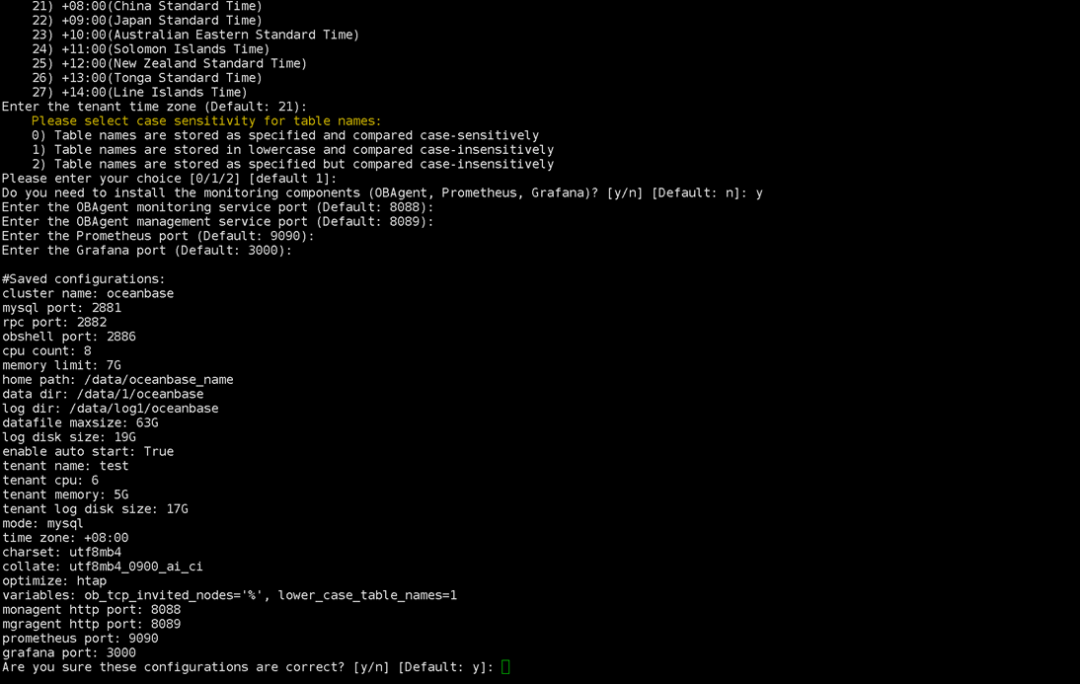
    21) +08:00(China Standard Time)
    22) +09:00(Japan Standard Time)
    23) +10:00(Australian Eastern Standard Time)
    24) +11:00(Solomon Islands Time)
    25) +12:00(New Zealand Standard Time)
    26) +13:00(Tonga Standard Time)
    27) +14:00(Line Islands Time)
Enter the tenant time zone (Default: 21):
    Please select case sensitivity for table names:
    0) Table names are stored as specified and compared case-sensitively
    1) Table names are stored in lowercase and compared case-insensitively
    2) Table names are stored as specified but compared case-insensitively
Please enter your choice [0/1/2] [default 1]:
Do you need to install the monitoring components (OBAgent, Prometheus, Grafana)? [y/n] [Default: n]: y
Enter the OBAgent monitoring service port (Default: 8088):
Enter the OBAgent management service port (Default: 8089):
Enter the Prometheus port (Default: 9090):
Enter the Grafana port (Default: 3000):

#Saved configurations:
cluster name: oceanbase
mysql port: 2881
rpc port: 2882
obshell port: 2886
cpu count: 8
memory limit: 7G
home path: /data/oceanbase_name
data dir: /data/1/oceanbase
log dir: /data/log1/oceanbase
datafile maxsize: 63G
log disk size: 19G
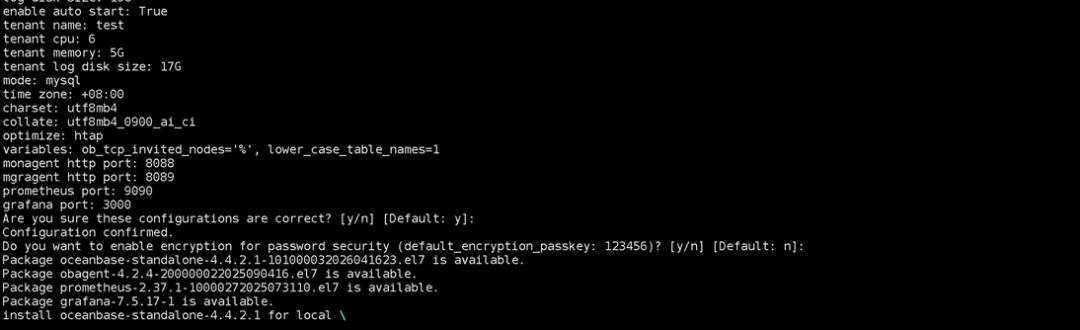
enable auto start: True
tenant name: test
tenant cpu: 6
tenant memory: 5G
tenant log disk size: 17G
mode: mysql
time zone: +08:00
charset: utf8mb4
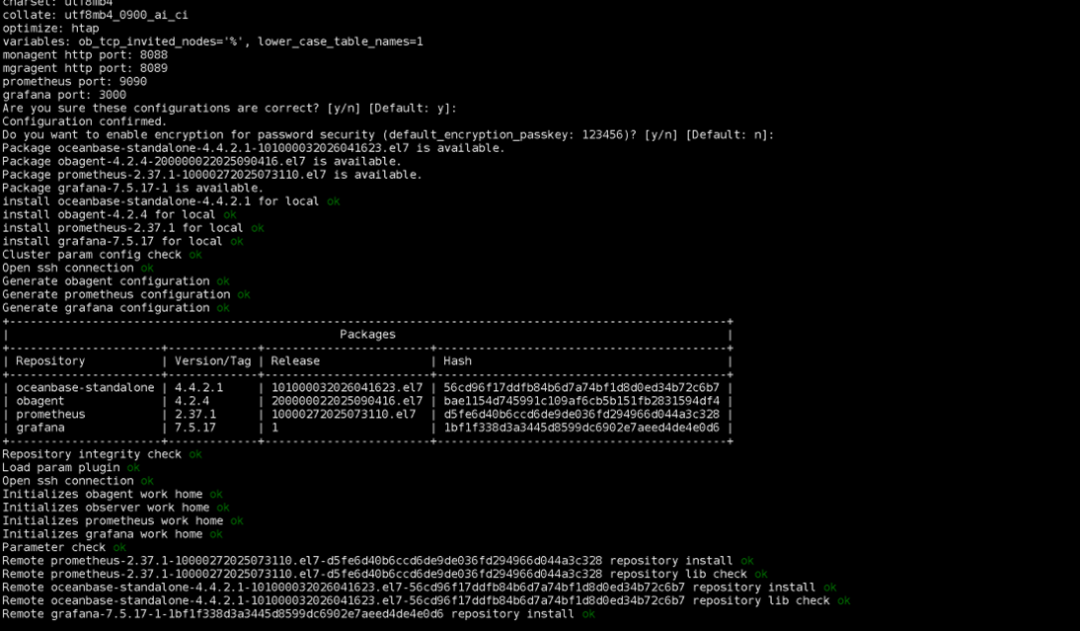
collate: utf8mb4_0900_ai_ci
optimize: htap
variables: ob_tcp_invited_nodes='%', lower_case_table_names=1
monagent http port: 8088
mgragent http port: 8089
prometheus port: 9090
grafana port: 3000
Are you sure these configurations are correct? [y/n] [Default: y]:
Configuration confirmed.
Do you want to enable encryption for password security (default_encryption_passkey: 123456)? [y/n] [Default: n]:
Package oceanbase-standalone-4.4.2.1-101000032026041623.el7 is available.
Package obagent-4.2.4-200000022025090416.el7 is available.
Package prometheus-2.37.1-10000272025073110.el7 is available.
Package grafana-7.5.17-1 is available.
install oceanbase-standalone-4.4.2.1 forlocal ok
install obagent-4.2.4 forlocal ok
install prometheus-2.37.1 forlocal ok
install grafana-7.5.17 forlocal ok
Cluster param config check ok
Open ssh connection ok
Generate obagent configuration ok
Generate prometheus configuration ok
Generate grafana configuration ok
+--------------------------------------------------------------------------------------------------------+
|                                                Packages                                                |
+----------------------+-------------+------------------------+------------------------------------------+
| Repository           | Version/Tag | Release                | Hash                                     |
+----------------------+-------------+------------------------+------------------------------------------+
| oceanbase-standalone | 4.4.2.1     | 101000032026041623.el7 | 56cd96f17ddfb84b6d7a74bf1d8d0ed34b72c6b7 |
| obagent              | 4.2.4       | 200000022025090416.el7 | bae1154d745991c109af6cb5b151fb2831594df4 |
| prometheus           | 2.37.1      | 10000272025073110.el7  | d5fe6d40b6ccd6de9de036fd294966d044a3c328 |
| grafana              | 7.5.17      | 1                      | 1bf1f338d3a3445d8599dc6902e7aeed4de4e0d6 |
+----------------------+-------------+------------------------+------------------------------------------+
Repository integrity check ok
Load param plugin ok
Open ssh connection ok
Initializes obagent work home ok
Initializes observer work home ok
Initializes prometheus work home ok
Initializes grafana work home ok
Parameter check ok
Remote prometheus-2.37.1-10000272025073110.el7-d5fe6d40b6ccd6de9de036fd294966d044a3c328 repository install ok
Remote prometheus-2.37.1-10000272025073110.el7-d5fe6d40b6ccd6de9de036fd294966d044a3c328 repository lib check ok
Remote oceanbase-standalone-4.4.2.1-101000032026041623.el7-56cd96f17ddfb84b6d7a74bf1d8d0ed34b72c6b7 repository install ok
Remote oceanbase-standalone-4.4.2.1-101000032026041623.el7-56cd96f17ddfb84b6d7a74bf1d8d0ed34b72c6b7 repository lib check ok
Remote grafana-7.5.17-1-1bf1f338d3a3445d8599dc6902e7aeed4de4e0d6 repository install ok
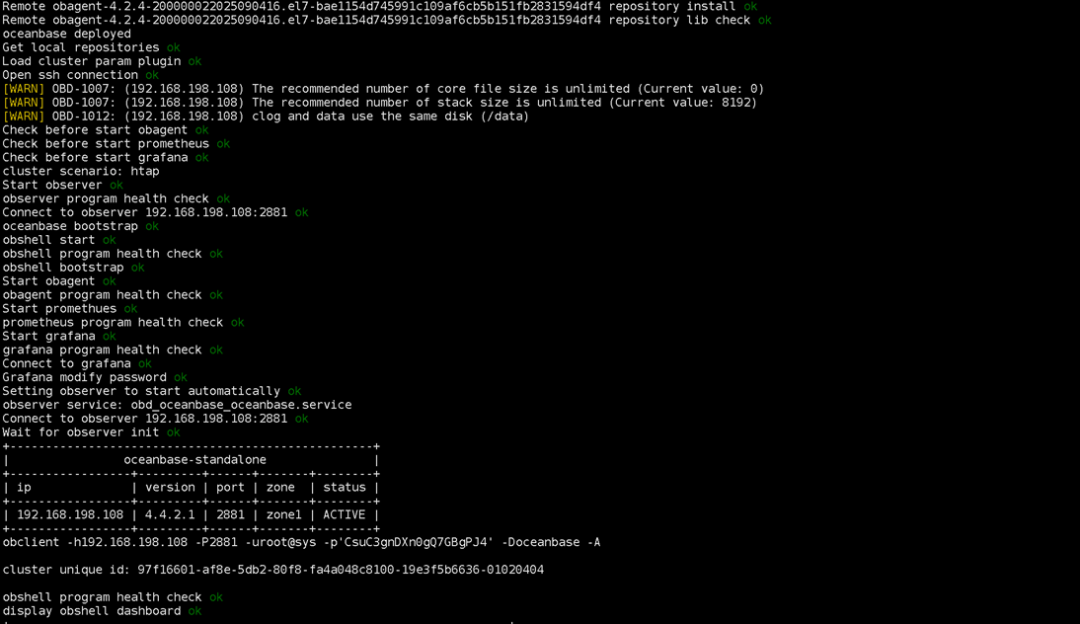
Remote grafana-7.5.17-1-1bf1f338d3a3445d8599dc6902e7aeed4de4e0d6 repository lib check ok
Remote obagent-4.2.4-200000022025090416.el7-bae1154d745991c109af6cb5b151fb2831594df4 repository install ok
Remote obagent-4.2.4-200000022025090416.el7-bae1154d745991c109af6cb5b151fb2831594df4 repository lib check ok
oceanbase deployed
Get local repositories ok
Load cluster param plugin ok
Open ssh connection ok
[WARN] OBD-1007: (192.168.198.108) The recommended number of core file size is unlimited (Current value: 0)
[WARN] OBD-1007: (192.168.198.108) The recommended number of stack size is unlimited (Current value: 8192)
[WARN] OBD-1012: (192.168.198.108) clog and data use the same disk (/data)
Check before start obagent ok
Check before start prometheus ok
Check before start grafana ok
cluster scenario: htap
Start observer ok
observer program health check ok
Connect to observer 192.168.198.108:2881 ok
oceanbase bootstrap ok
obshell start ok
obshell program health check ok
obshell bootstrap ok
Start obagent ok
obagent program health check ok
Start promethues ok
prometheus program health check ok
Start grafana ok
grafana program health check ok
Connect to grafana ok
Grafana modify password ok
Setting observer to start automatically ok
observer service: obd_oceanbase_oceanbase.service
Connect to observer 192.168.198.108:2881 ok
Wait for observer init ok
+---------------------------------------------------+
|                oceanbase-standalone               |
+-----------------+---------+------+-------+--------+
| ip              | version | port | zone  | status |
+-----------------+---------+------+-------+--------+
| 192.168.198.108 | 4.4.2.1 | 2881 | zone1 | ACTIVE |
+-----------------+---------+------+-------+--------+
obclient -h192.168.198.108 -P2881 -uroot@sys -p'CsuC3gnDXn0gQ7GBgPJ4' -Doceanbase -A

cluster unique id: 97f16601-af8e-5db2-80f8-fa4a048c8100-19e3f5b6636-01020404

obshell program health check ok
display obshell dashboard ok
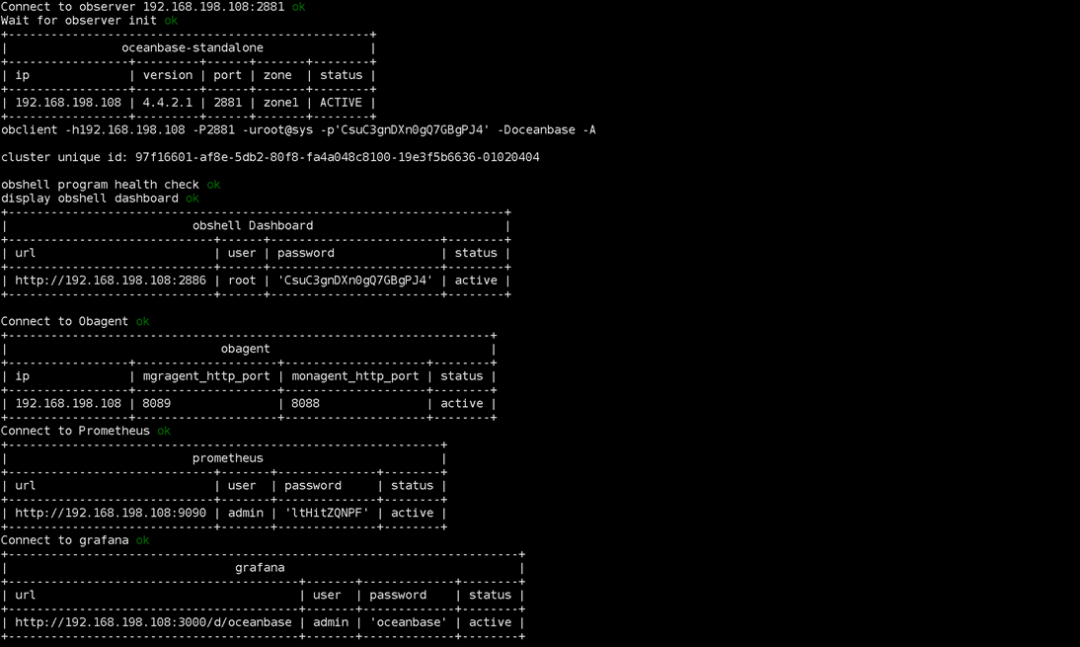
+----------------------------------------------------------------------+
|                          obshell Dashboard                           |
+-----------------------------+------+------------------------+--------+
| url                         | user | password               | status |
+-----------------------------+------+------------------------+--------+
| http://192.168.198.108:2886 | root | 'CsuC3gnDXn0gQ7GBgPJ4' | active |
+-----------------------------+------+------------------------+--------+

Connect to Obagent ok
+--------------------------------------------------------------------+
|                              obagent                               |
+-----------------+--------------------+--------------------+--------+
| ip              | mgragent_http_port | monagent_http_port | status |
+-----------------+--------------------+--------------------+--------+
| 192.168.198.108 | 8089               | 8088               | active |
+-----------------+--------------------+--------------------+--------+
Connect to Prometheus ok
+-------------------------------------------------------------+
|                          prometheus                         |
+-----------------------------+-------+--------------+--------+
| url                         | user  | password     | status |
+-----------------------------+-------+--------------+--------+
| http://192.168.198.108:9090 | admin | 'ltHitZQNPF' | active |
+-----------------------------+-------+--------------+--------+
Connect to grafana ok
+------------------------------------------------------------------------+
|                                grafana                                 |
+-----------------------------------------+-------+-------------+--------+
| url                                     | user  | password    | status |
+-----------------------------------------+-------+-------------+--------+
| http://192.168.198.108:3000/d/oceanbase | admin | 'oceanbase' | active |
+-----------------------------------------+-------+-------------+--------+
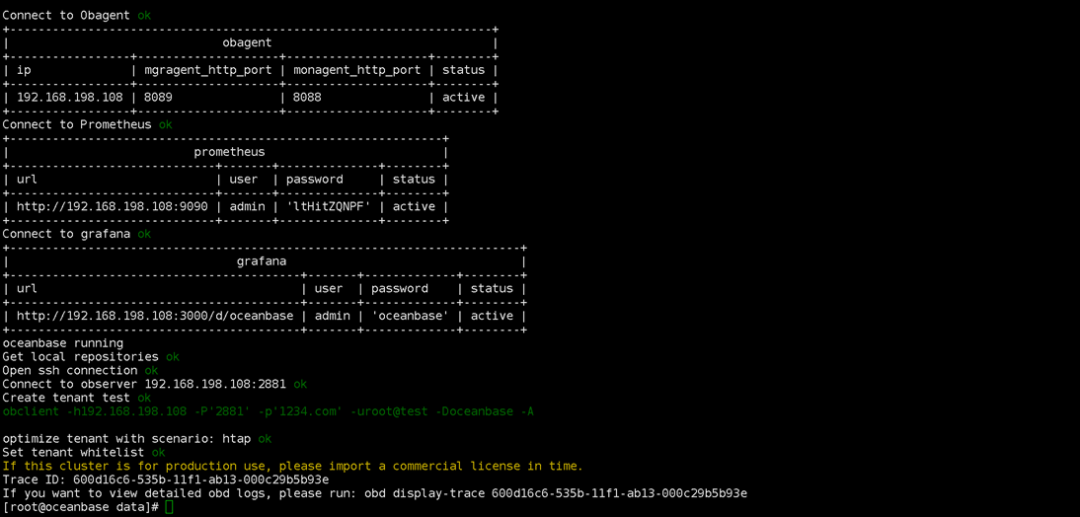
oceanbase running
Get local repositories ok
Open ssh connection ok
Connect to observer 192.168.198.108:2881 ok
Create tenant test ok
obclient -h192.168.198.108 -P'2881' -p'1234.com' -uroot@test -Doceanbase -A

optimize tenant with scenario: htap ok
Set tenant whitelist ok
If this cluster is for production use, please import a commercial license in time.
Trace ID: 600d16c6-535b-11f1-ab13-000c29b5b93e
If you want to view detailed obd logs, please run: obd display-trace 600d16c6-535b-11f1-ab13-000c29b5b93e
[root@oceanbase data]#
[root@oceanbase data]#
[root@oceanbase data]# obclient -h192.168.198.108 -P'2881' -p'1234.com' -uroot@test -Doceanbase -A
Welcome to the OceanBase.  Commands end with ; or \g.
Your OceanBase connection id is 3221533622
Server version: OceanBase 4.4.2.1 (r101000032026041623-15dd15e98293949d37b4413fd6a4aa509b5470c1) (Built Apr 16 2026 23:50:35)

Copyright (c) 2000, 2018, OceanBase and/or its affiliates. All rights reserved.

Type 'help;' or '\h'forhelp. Type '\c' to clear the current input statement.

obclient(root@test)[oceanbase]> show databases;
+--------------------+
| Database           |
+--------------------+
| information_schema |
| mysql              |
| oceanbase          |
| test               |
+--------------------+
4 rows inset (0.015 sec)

obclient(root@test)[oceanbase]>
项目 | 信息 |
|---|---|
数据库版本 | OceanBase |
部署模式 | Standalone 单机版 |
部署工具 | OBD(OceanBase Deployer) |
操作系统 | Linux(EL7 兼容环境) |
主机 IP | 192.168.198.108 |
部署用户 | root |
部署场景 | HTAP |
安装时间 | 2026-05-19 |
软件 | 版本 |
|---|---|
oceanbase-standalone | 4.4.2.1 |
obagent | 4.2.4 |
prometheus | 2.37.1 |
grafana | 7.5.17 |
类型 | 路径 |
|---|---|
安装目录 | /data/oceanbase_name |
数据目录 | /data/1/oceanbase |
日志目录 | /data/log1/oceanbase |
服务 | 端口 |
|---|---|
SQL Port | 2881 |
RPC Port | 2882 |
OBShell Port | 2886 |
配置项 | 数值 |
|---|---|
CPU Count | 8 Core |
Memory Limit | 7G |
Log Disk Size | 19G |
Datafile Maxsize | 63G |
配置项 | 参数 |
|---|---|
Tenant 名称 | test |
Tenant 模式 | MySQL |
Tenant CPU | 6 Core |
Tenant Memory | 5G |
Tenant Log Disk | 17G |
配置项 | 参数 |
|---|---|
Charset | utf8mb4 |
Collation | utf8mb4_0900_ai_ci |
时区 | +08:00 |
lower_case_table_names | 1 |
obclient -h192.168.198.108 -P2881 -uroot@test -p'1234.com' -Doceanbase -A
组件 | 端口 |
|---|---|
OBAgent 管理端口 | 8089 |
OBAgent 监控端口 | 8088 |
Prometheus | 9090 |
Grafana | 3000 |
http://192.168.198.108:3000/d/oceanbase
http://192.168.198.108:2886
用户 | 密码 |
|---|---|
root | CsuC3gnDXn0gQ7GBgPJ4 |
整体安装情况,比较顺利,这里要说一点关于OceanBase的单机安装中的一些感受。
1 安装中每一步都有明确的指示和说明,非常的细致,没有使用中文我想应该是怕在一些系统中出现乱码的情况
2 安装中给了安装这很多的可选择项,比如是否安装监控系统,等等用户密码的也给用户以选择
3 安装中给我印象最深的是其中的安装给出的对数据库服务器的定位,非常的实用,同时也说明单体OB数据库的可伸缩性较大,可以在不同的业务当中担当不同的角色。
4 最暖心的是安装后给出了明确的登录的命令和方式,给新手很多便利
后续将继续这个系列来学习单机OceanBase 在与MySQL兼容性方面的对比和知识。

本文参与 腾讯云自媒体同步曝光计划,分享自微信公众号。
原始发表:2026-05-24,如有侵权请联系 cloudcommunity@tencent.com 删除
腾讯云开发者

Copyright © 2013 - 2026 Tencent Cloud. All Rights Reserved. 腾讯云 版权所有
深圳市腾讯计算机系统有限公司 ICP备案/许可证号:粤B2-20090059  粤公网安备44030502008569号
腾讯云计算(北京)有限责任公司 京ICP证150476号 | 京ICP备11018762号