参数发现神器-Arjun


Arjun 是一款 HTTP 参数发现工具。它可以自动探测 Web 端点上隐藏的 GET/POST 参数,广泛应用于渗透测试、漏洞挖掘和 API 安全评估中。
项目地址:https://github.com/s0md3v/Arjun
它能做什么?
- • 扫描 URL 发现隐藏的 GET 参数
- • 扫描端点发现隐藏的 POST 参数
- • 支持 JSON / XML 格式的参数发现
- • 从 Wayback Machine、CommonCrawl、AlienVault OTX 等被动源收集参数名
- • 从 HTTP 响应中启发式提取参数名(表单、JS 变量、JSON 键等)
- • 自动过滤无效参数,只输出真正影响响应的参数
安装
Arjun 用 Python 3 编写,安装非常简单:
# 方式一:pip 安装
pip3 install arjun
# 方式二:Kali Linux 直接安装
sudo apt install arjun
安装后验证:
arjun --help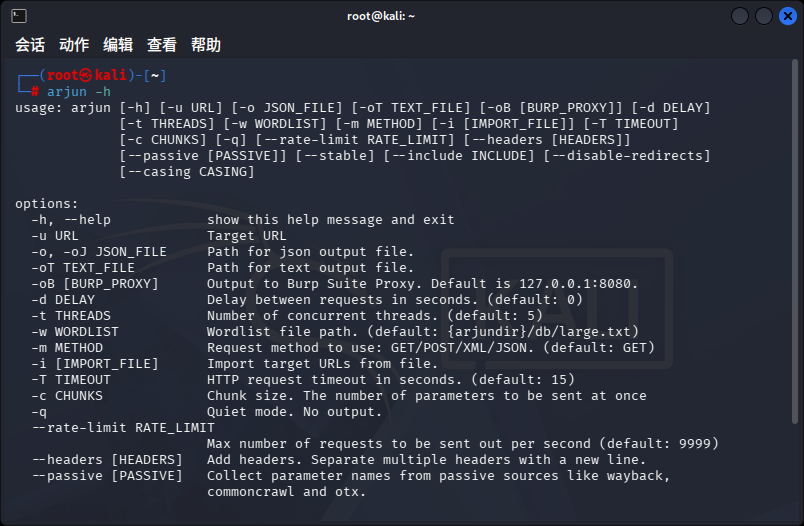
快速上手
基础用法
接下来,我们来看看它的基本用法。
# 扫描单个 URL
arjun -u https://example.com/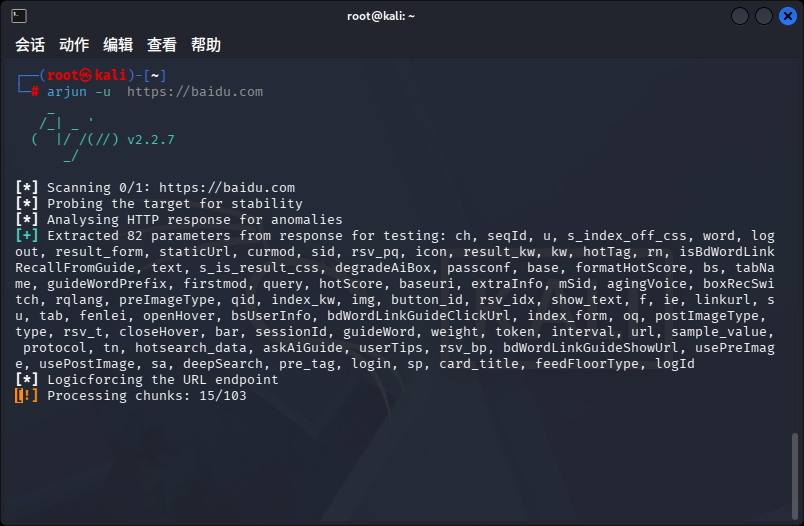
Arjun 会分析目标 HTTP 响应本身,从中提取潜在的参数名:
- • 解析 HTML 表单元素(
<input>、<textarea>的 id/name) - • 提取 JavaScript 中的变量声明(
var、let) - • 解析 JSON/Map 对象的 key
- • 如果响应包含"required/missing/parameter"等关键词,说明该端点需要特定参数才能正常工作
提取到的参数会优先插入到字典的最前面进行测试。
内置字典
Arjun 自带三套参数字典 + 一套特殊参数:
字典 | 参数数量 | 适用场景 |
|---|---|---|
small | 835 条 | 快速扫描,浅尝辄止 |
medium | 10,984 条 | 日常使用,平衡速度与覆盖 |
large | 25,889 条 | 深度挖掘,不留死角 |
使用方法:
# 指定字典大小
arjun -u https://target.com -w small
arjun -u https://target.com -w medium
arjun -u https://target.com -w large
此外还有一个 special.json,包含了 40 个特殊/调试参数,例如:
debug=on, test=on, source=on, admin=on, env=uat,
waf=no, security=disable, bot=on, captcha=nil,
signing=nil, sso=1, singlesignon=1
这些参数通常与应用程序的调试模式、WAF 配置、SSO 认证等有关,价值很高。
能力提升
匹配不同请求方法
利用-m参数,可以支持四种请求方法:
# GET 方式(默认)
arjun -u https://target.com/api -m GET
# POST 方式
arjun -u https://target.com/api -m POST
# JSON 格式
arjun -u https://target.com/api -m JSON
# XML 格式
arjun -u https://target.com/api -m XML
passive 被动模式
# 自动从目标 URL 的域名收集参数
arjun -u https://target.com --passive
# 指定域名收集(可与不同 URL 组合)
arjun -u https://target.com/page --passive api.target.com
-t 线程数
# 使用 10 个线程(默认 5)
arjun -u https://target.com -t 10
--stable 稳定模式
arjun -u https://target.com --stable在稳定模式下,线程数自动设为 1,每次请求间随机延迟 3-10 秒。适合 WAF 严格或对频率敏感的目标。
--rate-limit 速率限制
# 每秒最多发 20 个请求
arjun -u https://target.com --rate-limit 20
-d 请求延迟
# 每次请求间隔 2 秒
arjun -u https://target.com -d 2
--headers 自定义请求头
arjun -u https://target.com --headers执行后会提示你输入请求头,支持多行输入。可以用这个选项来添加 Cookie、Authorization 等认证信息。
--include 附加数据
这个选项可以在每个请求中都附带一些固定参数,适合需要 Token 或 session 的场景:
arjun -u https://target.com/api --include '{"token":"abc123"}'对于 JSON 和 XML 方法,可以用 arjun 占位符指定参数插入位置:
arjun -u https://target.com/api -m JSON \
  --include '{"auth":"xyz","params":{$arjun$}}'
--disable-redirects 禁用重定向
arjun -u https://target.com --disable-redirects-T 超时设置
# 设置超时 30 秒(默认 15)
arjun -u https://target.com -T 30
-c 分块大小
# 每批发送 500 个参数(默认 250)
arjun -u https://target.com -c 500
-q 静默模式
arjun -u https://target.com -q -o result.json只输出结果,不显示过程信息,适合脚本中使用。
总结
利用Arjun可以便捷的扫描URL端点中的参数,更好的做到数据整理。感兴趣的小伙伴可以试试!
更多精彩文章 欢迎关注我们
本文参与 腾讯云自媒体同步曝光计划,分享自微信公众号。
原始发表:2026-05-25,如有侵权请联系 cloudcommunity@tencent.com 删除
目录
腾讯云开发者

Copyright © 2013 - 2026 Tencent Cloud. All Rights Reserved. 腾讯云 版权所有
深圳市腾讯计算机系统有限公司 ICP备案/许可证号:粤B2-20090059  粤公网安备44030502008569号
腾讯云计算(北京)有限责任公司 京ICP证150476号 | 京ICP备11018762号