实时协作:WebSocket与协同算法


作者: HOS(安全风信子) 日期: 2026-05-25 主要来源平台: GitHub 摘要: 云端 IDE 的核心竞争力之一是实时协作功能,它让多个用户能够同时编辑同一份文档并即时看到彼此的更改。本文深入讲解实时协作的技术实现:WebSocket 连接管理(连接池、心跳检测、自动重连)、OT 与 CRDT 两大协同算法的原理与对比、操作转换与冲突解决机制、光标同步与用户 Presence 感知、以及如何应对万人同时编辑的规模化挑战。最后通过完整代码实践,展示如何构建一个支持多用户的协同编辑服务。
目录- 1 引言:为什么实时协作是云端IDE的核心竞争力
- 2 WebSocket连接管理:实时通信的基石
- 2.1 WebSocket与HTTP的对比
- 2.2 WebSocket连接池设计
- 2.3 心跳检测机制详解
- 2.4 自动重连策略
- 2.5 连接状态机设计
- 3 协同算法:OT与CRDT的深度对比
- 3.1 OT(Operational Transform)算法详解
- 3.1.1 OT的基本概念
- 3.1.2 OT的核心:转换函数
- 3.1.3 OT的协作流程
- 3.1.4 OT的挑战与局限性
- 3.2 CRDT(无冲突复制数据类型)
- 3.2.1 CRDT的理论基础
- 3.2.2 序列CRDT的实现
- 3.2.3 CRDT vs OT:深度对比
- 3.2.4 选择建议
- 4 光标同步:用户Presence与位置感知
- 4.1 Presence系统设计
- 4.2 光标同步协议
- 4.3 光标同步的Mermaid协作流程
- 5 冲突处理:策略与实现
- 5.1 冲突的来源与分类
- 5.2 最后写入优先(Last Write Wins)
- 5.3 智能合并策略
- 5.4 三向合并(Three-Way Merge)
- 6 规模化挑战:万人同时编辑的实现
- 6.1 规模化架构设计
- 6.2 分层架构设计
- 6.3 文档分片策略
- 6.4 万人协作的Mermaid架构流程
- 6.5 负载均衡与容错
- 7 实践:实现一个支持多用户的协同编辑服务
- 7.1 系统架构
- 7.2 WebSocket服务器实现
- 7.3 客户端SDK实现
- 7.4 使用示例
- 8 性能优化与最佳实践
- 8.1 消息压缩与批量处理
- 8.2 本地优先架构
- 9 测试与调试
- 9.1 协同编辑测试策略
- 10 总结与展望
- 10.1 核心技术要点回顾
- 10.2 技术选型建议
- 10.3 行业发展趋势
- 10.4 参考资源
- 参考链接:
- 2.1 WebSocket与HTTP的对比
- 2.2 WebSocket连接池设计
- 2.3 心跳检测机制详解
- 2.4 自动重连策略
- 2.5 连接状态机设计
- 3.1 OT(Operational Transform)算法详解
- 3.1.1 OT的基本概念
- 3.1.2 OT的核心:转换函数
- 3.1.3 OT的协作流程
- 3.1.4 OT的挑战与局限性
- 3.2 CRDT(无冲突复制数据类型)
- 3.2.1 CRDT的理论基础
- 3.2.2 序列CRDT的实现
- 3.2.3 CRDT vs OT:深度对比
- 3.2.4 选择建议
- 4.1 Presence系统设计
- 4.2 光标同步协议
- 4.3 光标同步的Mermaid协作流程
- 5.1 冲突的来源与分类
- 5.2 最后写入优先(Last Write Wins)
- 5.3 智能合并策略
- 5.4 三向合并(Three-Way Merge)
- 6.1 规模化架构设计
- 6.2 分层架构设计
- 6.3 文档分片策略
- 6.4 万人协作的Mermaid架构流程
- 6.5 负载均衡与容错
- 7.1 系统架构
- 7.2 WebSocket服务器实现
- 7.3 客户端SDK实现
- 7.4 使用示例
- 8.1 消息压缩与批量处理
- 8.2 本地优先架构
- 9.1 协同编辑测试策略
- 10.1 核心技术要点回顾
- 10.2 技术选型建议
- 10.3 行业发展趋势
- 10.4 参考资源
1 引言:为什么实时协作是云端IDE的核心竞争力
本节为你提供的核心技术价值:理解实时协作在现代云端IDE中的重要性,以及支撑这一功能的两大技术支柱——WebSocket通信与协同算法。
在传统的桌面IDE时代,代码协作依赖版本控制系统(如Git)的分支与合并机制。开发者需要手动解决冲突,协作周期以小时甚至天为单位。然而,随着云端IDE(如GitHub Codespaces、Gitpod、AWS Cloud9)的兴起,实时协作成为了新的标配功能——多个开发者可以同时编辑同一个文件,即时看到彼此的光标位置和修改内容,延迟控制在毫秒级别。
根据2019年Google针对Google Docs的内部研究1,实时协作将团队文档处理效率提升了40-60%。在代码场景下,这一数字可能更高,因为代码的结构化特性使得协同编辑更容易实现增量更新而非整体重绘。
然而,实时协作的技术实现远比表面上看到的"你打一个字,我看到一个字"复杂得多。它需要解决以下核心问题:
- 实时性:网络延迟必须控制在100ms以内,否则用户体验会明显下降
- 一致性:所有参与者最终必须看到相同的文档状态
- 冲突处理:当两个用户同时修改同一位置时,系统必须产生合理的结果
- 规模化:现代云端IDE可能需要支持数百甚至数千人同时协作
2 WebSocket连接管理:实时通信的基石
本节为你提供的核心技术价值:掌握WebSocket的连接池管理、心跳检测机制、自动重连策略,以及在协同编辑场景下的性能优化技巧。
2.1 WebSocket与HTTP的对比
在协同编辑场景中,我们需要在客户端与服务端之间建立全双工通信通道。HTTP的请求-响应模型天生不适合这种场景,而WebSocket提供了理想的解决方案。
特性 | HTTP/1.1 | WebSocket |
|---|---|---|
连接模式 | 半双工 | 全双工 |
头部开销 | 每个请求携带完整Header | 仅在建立时需要Handshake |
服务器推送 | 需要轮询或Long Polling | 原生支持 |
连接复用 | 需要Keep-Alive | 单一连接持续使用 |
适用场景 | 请求-响应 | 实时数据推送 |
2.2 WebSocket连接池设计
在协同编辑服务中,每个在线用户都需要维持一个WebSocket连接。对于支持万人同时编辑的系统,我们需要设计高效的连接池来管理这些连接。
/**
 * WebSocket连接池管理器
 * 特性:
 * - 连接复用与复用池
 * - 自动心跳检测
 * - 指数退避重连
 * - 连接状态监控
 */
class WebSocketPool {
    constructor(options = {}) {
        this.url = options.url || 'ws://localhost:8080/collab';
        this.minConnections = options.minConnections || 10;
        this.maxConnections = options.maxConnections || 10000;
        this.heartbeatInterval = options.heartbeatInterval || 30000;
        this.reconnectBaseDelay = options.reconnectBaseDelay || 1000;
        this.reconnectMaxDelay = options.reconnectMaxDelay || 30000;

        // 连接池核心数据结构
        this.connections = new Map(); // userId -> WebSocket
        this.connectionMeta = new Map(); // userId -> { lastHeartbeat, reconnectCount, documentIds }
        this.idlePool = []; // 空闲连接队列
        this.busyPool = new Set(); // 正在使用的连接

        // 统计信息
        this.stats = {
            totalConnections: 0,
            activeConnections: 0,
            idleConnections: 0,
            reconnectAttempts: 0,
            failedConnections: 0
        };

        this._init();
    }

    _init() {
        // 初始化预热连接
        for (let i = 0; i < this.minConnections; i++) {
            this._createIdleConnection();
        }

        // 启动心跳检测
        this._startHeartbeatMonitor();

        // 启动连接清理
        this._startConnectionCleanup();
    }

    /**
     * 创建空闲连接并存入连接池
     */
    async _createIdleConnection() {
        if (this.idlePool.length >= this.minConnections) {
            return;
        }

        try {
            const ws = new WebSocket(this.url);

            await new Promise((resolve, reject) => {
                ws.onopen = resolve;
                ws.onerror = reject;
                ws.onclose = () => this._handleConnectionClose(ws);
            });

            this.idlePool.push(ws);
            this.stats.idleConnections++;

            // 设置连接过期时间(防止连接永久闲置)
            ws._createdAt = Date.now();
            ws._maxIdleTime = 5 * 60 * 1000; // 5分钟

        } catch (error) {
            console.error('Failed to create idle connection:', error);
            this.stats.failedConnections++;
        }
    }

    /**
     * 获取连接(带自动重连)
     */
    async getConnection(userId) {
        // 检查是否已有活跃连接
        if (this.connections.has(userId)) {
            const existingWs = this.connections.get(userId);
            if (existingWs.readyState === WebSocket.OPEN) {
                return existingWs;
            }
            // 连接已断开,清理并重新获取
            this.connections.delete(userId);
            this.busyPool.delete(existingWs);
        }

        // 从空闲池获取连接
        let ws;
        if (this.idlePool.length > 0) {
            ws = this.idlePool.pop();
            this.stats.idleConnections--;

            // 检查连接是否有效
            if (ws.readyState !== WebSocket.OPEN) {
                ws = await this._reconnect(ws);
            }
        } else {
            // 需要创建新连接
            ws = await this._createConnection();
        }

        // 分配给用户
        this.connections.set(userId, ws);
        this.busyPool.add(ws);
        this.connectionMeta.set(userId, {
            lastHeartbeat: Date.now(),
            reconnectCount: 0,
            documentIds: new Set()
        });

        this.stats.activeConnections++;
        return ws;
    }

    /**
     * 创建新连接
     */
    async _createConnection() {
        return new Promise((resolve, reject) => {
            const ws = new WebSocket(this.url);

            const timeout = setTimeout(() => {
                reject(new Error('Connection timeout'));
            }, 10000);

            ws.onopen = () => {
                clearTimeout(timeout);
                this.stats.totalConnections++;
                resolve(ws);
            };

            ws.onerror = (error) => {
                clearTimeout(timeout);
                reject(error);
            };

            ws.onclose = () => this._handleConnectionClose(ws);
        });
    }

    /**
     * 指数退避重连
     */
    async _reconnect(ws, userId = null) {
        let delay = this.reconnectBaseDelay;
        let attempts = 0;

        if (userId && this.connectionMeta.has(userId)) {
            attempts = this.connectionMeta.get(userId).reconnectCount;
            delay = Math.min(
                this.reconnectBaseDelay * Math.pow(2, attempts),
                this.reconnectMaxDelay
            );
        }

        // 添加抖动(避免惊群效应)
        delay = delay * (0.5 + Math.random());

        await this._sleep(delay);

        try {
            const newWs = new WebSocket(this.url);

            await new Promise((resolve, reject) => {
                newWs.onopen = resolve;
                newWs.onerror = reject;
            });

            if (userId) {
                this.connectionMeta.get(userId).reconnectCount++;
                this.stats.reconnectAttempts++;
            }

            return newWs;
        } catch (error) {
            this.stats.failedConnections++;
            throw error;
        }
    }

    /**
     * 处理连接关闭
     */
    _handleConnectionClose(ws) {
        const userId = this._findUserIdByConnection(ws);

        if (userId) {
            this.connections.delete(userId);
            this.busyPool.delete(ws);
            this.connectionMeta.delete(userId);
            this.stats.activeConnections--;
        }
    }

    /**
     * 根据连接查找用户ID
     */
    _findUserIdByConnection(ws) {
        for (const [userId, conn] of this.connections.entries()) {
            if (conn === ws) return userId;
        }
        return null;
    }

    /**
     * 释放连接(归还到空闲池)
     */
    releaseConnection(userId) {
        const ws = this.connections.get(userId);
        if (!ws) return;

        this.connections.delete(userId);
        this.busyPool.delete(ws);

        // 如果空闲池未满,归还连接
        if (this.idlePool.length < this.minConnections) {
            // 重置连接状态
            ws._createdAt = Date.now();
            this.idlePool.push(ws);
            this.stats.idleConnections++;
            this.stats.activeConnections--;
        } else {
            // 关闭多余连接
            ws.close();
        }
    }

    /**
     * 心跳检测
     */
    _startHeartbeatMonitor() {
        this._heartbeatTimer = setInterval(() => {
            const now = Date.now();

            // 检测空闲池连接的存活状态
            this.idlePool = this.idlePool.filter(ws => {
                if (ws.readyState !== WebSocket.OPEN) return false;

                const idleTime = now - ws._createdAt;
                if (idleTime > ws._maxIdleTime) {
                    ws.close();
                    return false;
                }

                // 发送心跳
                try {
                    ws.send(JSON.stringify({ type: 'ping' }));
                } catch (e) {
                    ws.close();
                    return false;
                }

                return true;
            });

            // 检测活跃连接的心跳
            for (const [userId, ws] of this.connections) {
                if (ws.readyState !== WebSocket.OPEN) continue;

                const meta = this.connectionMeta.get(userId);
                const timeSinceLastHeartbeat = now - meta.lastHeartbeat;

                // 如果超过2个心跳周期未响应,认为连接已断开
                if (timeSinceLastHeartbeat > this.heartbeatInterval * 2) {
                    console.warn(`Connection for user ${userId} heartbeat timeout`);
                    this._handleConnectionClose(ws);
                    // 触发重连
                    this._reconnect(ws, userId).then(newWs => {
                        this.connections.set(userId, newWs);
                        this.busyPool.add(newWs);
                        this.connectionMeta.set(userId, {
                            ...meta,
                            reconnectCount: meta.reconnectCount + 1
                        });
                        this.stats.activeConnections++;
                    });
                }
            }
        }, this.heartbeatInterval);
    }

    /**
     * 定期清理过期连接
     */
    _startConnectionCleanup() {
        this._cleanupTimer = setInterval(() => {
            // 清理超过最大连接数的空闲连接
            while (this.idlePool.length > this.minConnections) {
                const ws = this.idlePool.pop();
                ws.close();
                this.stats.idleConnections--;
            }
        }, 60000); // 每分钟检查一次
    }

    /**
     * 发送消息给指定用户
     */
    sendToUser(userId, message) {
        const ws = this.connections.get(userId);
        if (!ws || ws.readyState !== WebSocket.OPEN) {
            return false;
        }

        try {
            ws.send(JSON.stringify(message));
            return true;
        } catch (error) {
            console.error(`Failed to send message to user ${userId}:`, error);
            return false;
        }
    }

    /**
     * 广播消息给所有连接用户
     */
    broadcast(message, excludeUsers = []) {
        const excludeSet = new Set(excludeUsers);
        let successCount = 0;

        for (const [userId, ws] of this.connections) {
            if (excludeSet.has(userId)) continue;

            if (ws.readyState === WebSocket.OPEN) {
                try {
                    ws.send(JSON.stringify(message));
                    successCount++;
                } catch (error) {
                    console.error(`Broadcast failed for user ${userId}`);
                }
            }
        }

        return successCount;
    }

    /**
     * 广播消息给特定文档的所有参与者
     */
    broadcastToDocument(documentId, message, excludeUsers = []) {
        const excludeSet = new Set(excludeUsers);
        let successCount = 0;

        for (const [userId, ws] of this.connections) {
            if (excludeSet.has(userId)) continue;

            const meta = this.connectionMeta.get(userId);
            if (!meta || !meta.documentIds.has(documentId)) continue;

            if (ws.readyState === WebSocket.OPEN) {
                try {
                    ws.send(JSON.stringify({
                        ...message,
                        documentId
                    }));
                    successCount++;
                } catch (error) {
                    console.error(`Broadcast failed for user ${userId}`);
                }
            }
        }

        return successCount;
    }

    /**
     * 获取统计信息
     */
    getStats() {
        return {
            ...this.stats,
            idlePoolSize: this.idlePool.length,
            activeUsers: this.connections.size
        };
    }

    /**
     * 休眠工具方法
     */
    _sleep(ms) {
        return new Promise(resolve => setTimeout(resolve, ms));
    }

    /**
     * 关闭所有连接
     */
    close() {
        clearInterval(this._heartbeatTimer);
        clearInterval(this._cleanupTimer);

        for (const ws of this.idlePool) {
            ws.close();
        }

        for (const [, ws] of this.connections) {
            ws.close();
        }

        this.idlePool = [];
        this.connections.clear();
        this.connectionMeta.clear();
        this.busyPool.clear();

        this.stats = {
            totalConnections: 0,
            activeConnections: 0,
            idleConnections: 0,
            reconnectAttempts: 0,
            failedConnections: 0
        };
    }
}
2.3 心跳检测机制详解
心跳检测是WebSocket长连接维护的核心机制。在复杂的网络环境下,TCP连接可能因为路由器重启、NAT超时、服务器重启等原因而悄然断开。如果不主动检测,服务器和客户端都会认为连接仍然存在,这就是所谓的"半开连接"问题。
心跳检测的核心设计原则:
- 频率选择:太频繁会浪费带宽,太稀疏会导致故障发现延迟。建议设置为30-60秒
- 超时阈值:通常设置为心跳间隔的2-3倍
- 抖动引入:在多客户端场景下,随机化心跳发送时间可以避免"惊群效应"
/**
 * 心跳检测管理器
 * 采用主动检测+被动响应的双向确认机制
 */
class HeartbeatManager {
    constructor(options = {}) {
        this.checkInterval = options.checkInterval || 10000;  // 检查间隔
        this.heartbeatTimeout = options.heartbeatTimeout || 45000;  // 超时阈值
        this.maxMissedHeartbeats = options.maxMissedHeartbeats || 3;  // 最大允许丢失心跳数

        this.activeConnections = new Map();  // userId -> { lastPong, missedCount, intervalId }
        this.serverTimeOffset = 0;  // 服务器与客户端时间偏移

        this._events = {};
        this._startMonitor();
    }

    /**
     * 注册一个需要进行心跳检测的连接
     */
    register(userId, ws) {
        // 停止已有检测
        this.unregister(userId);

        const intervalId = setInterval(() => {
            this._sendPing(userId, ws);
        }, this.checkInterval);

        this.activeConnections.set(userId, {
            ws,
            lastPong: Date.now(),
            missedCount: 0,
            intervalId
        });
    }

    /**
     * 注销连接的心跳检测
     */
    unregister(userId) {
        const conn = this.activeConnections.get(userId);
        if (conn) {
            clearInterval(conn.intervalId);
            this.activeConnections.delete(userId);
        }
    }

    /**
     * 处理收到的pong响应
     */
    handlePong(userId, clientTimestamp) {
        const conn = this.activeConnections.get(userId);
        if (!conn) return;

        // 计算服务器时间偏移
        const now = Date.now();
        this.serverTimeOffset = clientTimestamp - now;

        conn.lastPong = now;
        conn.missedCount = 0;
    }

    /**
     * 发送ping
     */
    _sendPing(userId, ws) {
        const conn = this.activeConnections.get(userId);
        if (!conn) return;

        if (ws.readyState !== WebSocket.OPEN) {
            this._handleConnectionDead(userId);
            return;
        }

        try {
            const timestamp = Date.now();
            ws.send(JSON.stringify({
                type: 'ping',
                timestamp,
                sequence: conn.missedCount + 1
            }));

            // 检查是否超时未响应
            const timeSinceLastPong = timestamp - conn.lastPong;
            if (timeSinceLastPong > this.heartbeatTimeout) {
                conn.missedCount++;

                if (conn.missedCount >= this.maxMissedHeartbeats) {
                    console.warn(`User ${userId} missed ${conn.missedCount} heartbeats, connection considered dead`);
                    this._handleConnectionDead(userId);
                }
            }
        } catch (error) {
            console.error(`Failed to send ping to user ${userId}:`, error);
            this._handleConnectionDead(userId);
        }
    }

    /**
     * 处理连接死亡
     */
    _handleConnectionDead(userId) {
        const conn = this.activeConnections.get(userId);
        if (conn) {
            clearInterval(conn.intervalId);
        }
        this.activeConnections.delete(userId);

        // 触发连接重建事件
        this.emit('connectionDead', { userId });
    }

    /**
     * 启动监控
     */
    _startMonitor() {
        this._monitorInterval = setInterval(() => {
            const now = Date.now();

            for (const [userId, conn] of this.activeConnections) {
                // 检查是否有太久没有更新的连接
                const idleTime = now - conn.lastPong;
                if (idleTime > this.heartbeatTimeout * 2) {
                    console.warn(`User ${userId} connection idle for ${idleTime}ms`);
                }
            }
        }, 30000);
    }

    /**
     * 事件发射器(简化实现)
     */
    emit(event, data) {
        if (this._events && this._events[event]) {
            this._events[event].forEach(handler => handler(data));
        }
    }

    on(event, handler) {
        if (!this._events) this._events = {};
        if (!this._events[event]) this._events[event] = [];
        this._events[event].push(handler);
    }

    /**
     * 获取统计
     */
    getStats() {
        return {
            totalMonitored: this.activeConnections.size,
            deadConnections: Array.from(this.activeConnections.entries())
                .filter(([, conn]) => conn.missedCount > 0)
                .map(([userId]) => userId)
        };
    }
}
2.4 自动重连策略
网络故障不可避免,优秀的重连策略能够最大限度减少对用户的影响。核心设计要点:
- 指数退避:避免频繁重连造成服务器压力
- 抖动:防止大量客户端同时重连
- 最大重试次数:避免无限重试
- 状态恢复:重连后能够恢复到之前的操作状态
/**
 * 自动重连管理器
 * 采用指数退避+抖动的重连策略
 */
class ReconnectionManager {
    constructor(options = {}) {
        this.baseDelay = options.baseDelay || 1000;        // 基础延迟(ms)
        this.maxDelay = options.maxDelay || 30000;         // 最大延迟(ms)
        this.maxRetries = options.maxRetries || 10;         // 最大重试次数
        this.jitterFactor = options.jitterFactor || 0.3;    // 抖动因子

        // 重试状态
        this.retryState = new Map();  // userId -> { retryCount, nextRetryTime, isRetrying }

        // 事件回调
        this.onRetry = options.onRetry || (() => {});
        this.onMaxRetriesReached = options.onMaxRetriesReached || (() => {});
        this.onReconnected = options.onReconnected || (() => {});
    }

    /**
     * 请求重连
     */
    async requestReconnect(userId, connectionFactory) {
        const state = this._getOrCreateState(userId);

        if (state.isRetrying) {
            console.log(`User ${userId} already retrying, skipping`);
            return false;
        }

        if (state.retryCount >= this.maxRetries) {
            console.warn(`User ${userId} reached max retry count`);
            this.onMaxRetriesReached(userId);
            return false;
        }

        state.isRetrying = true;
        state.retryCount++;

        const delay = this._calculateDelay(state.retryCount);
        state.nextRetryTime = Date.now() + delay;

        console.log(`User ${userId} will retry in ${delay}ms (attempt ${state.retryCount}/${this.maxRetries})`);

        await this._sleep(delay);

        try {
            const connection = await connectionFactory();
            state.isRetrying = false;
            state.retryCount = 0;  // 重置计数

            this.onReconnected(userId, connection);
            return true;
        } catch (error) {
            state.isRetrying = false;
            console.error(`Reconnect failed for user ${userId}:`, error);

            // 递归重试
            return this.requestReconnect(userId, connectionFactory);
        }
    }

    /**
     * 计算延迟(指数退避+抖动)
     */
    _calculateDelay(retryCount) {
        // 指数退避:baseDelay * 2^(retryCount-1)
        const exponentialDelay = this.baseDelay * Math.pow(2, retryCount - 1);

        // 限制最大延迟
        const cappedDelay = Math.min(exponentialDelay, this.maxDelay);

        // 添加抖动
        const jitter = cappedDelay * this.jitterFactor * (Math.random() * 2 - 1);

        return Math.floor(cappedDelay + jitter);
    }

    /**
     * 获取或创建重试状态
     */
    _getOrCreateState(userId) {
        if (!this.retryState.has(userId)) {
            this.retryState.set(userId, {
                retryCount: 0,
                nextRetryTime: 0,
                isRetrying: false
            });
        }
        return this.retryState.get(userId);
    }

    /**
     * 重置重试状态
     */
    resetRetryState(userId) {
        const state = this.retryState.get(userId);
        if (state) {
            state.retryCount = 0;
            state.isRetrying = false;
        }
    }

    /**
     * 获取当前重试状态
     */
    getRetryState(userId) {
        return this.retryState.get(userId);
    }

    /**
     * 休眠
     */
    _sleep(ms) {
        return new Promise(resolve => setTimeout(resolve, ms));
    }
}
2.5 连接状态机设计
WebSocket连接在生命周期中会经历多种状态,正确处理状态转换是健壮性的关键。
┌─────────┐
│ CLOSED  │
└────┬────┘
     │ connect()
     ▼
┌─────────┐    ┌─────────┐    ┌─────────┐
│ CONNECTING      │ OPEN    │◄───┐     │
└────┬────┘    └────┬────┘    │     │
     │              │         │     │ receive pong
     │              │         │     │
     │              ▼         │     │
     │         ┌─────────┐    │     │
     │         │ HEALTHY │────┘     │
     │         └─────────┘  heartbeat
     │              │
     │              │ no pong timeout
     │              ▼
     │         ┌─────────┐
     └────┐    │ UNHEALTHY      │
          │    └─────────┘       │
          │         │            │
          │         │ reconnect()│
          │         ▼            │
          │    ┌─────────┐       │
          └───►│ RECONNECTING    │
               └─────────┘       │
                     │          │
                     │ success  │
                     ▼          │
                ┌─────────┐     │
                │ OPEN ◄──┘     │
                └─────────┘     │
3 协同算法:OT与CRDT的深度对比
本节为你提供的核心技术价值:深入理解OT(Operational Transform)和CRDT(无冲突复制数据类型)两大协同算法的核心原理、性能特征、适用场景,以及如何在实际系统中选择和实现它们。
协同编辑的核心问题可以这样描述:当多个用户同时对同一份文档进行修改时,如何保证所有用户最终看到相同的文档状态?
这个问题在单机场景下很简单(加锁或原子操作),但在分布式场景下非常复杂,因为:
- 网络延迟导致操作到达顺序不确定
- 两个用户可能同时修改同一位置
- 需要在一致性和响应性之间做权衡
目前业界主要有两大解决方案:OT(Operational Transform) 和 CRDT(无冲突复制数据类型)。
3.1 OT(Operational Transform)算法详解
OT是最早被大规模使用的协同编辑算法,Google Docs早期就采用此方案。其核心思想是:将每个操作转换为适应不同执行顺序的等效操作。
3.1.1 OT的基本概念
在OT中,有三种基本操作类型:
操作类型 | 描述 | 示例 |
|---|---|---|
insert(pos, char) | 在位置pos插入字符 | insert(5, 'hello') |
delete(pos, len) | 从位置pos删除len个字符 | delete(3, 2) |
retain(len) | 保留len个字符(用于组合操作) | retain(10) |
一个完整的编辑操作可以表示为这三种操作的组合:
// 文档: "Hello World"
// 在位置5插入逗号: retain(5) + insert(5, ',') + retain(6)
const operation = {
    ops: [
        { retain: 5 },      // 保留前5个字符 "Hello"
        { insert: ',' },    // 插入逗号
        { retain: 6 }       // 保留后6个字符 " World"
    ],
    baseLength: 11,
    targetLength: 12
};
3.1.2 OT的核心:转换函数
OT的精髓在于转换函数(Transform Function)。当两个操作并发执行时,我们需要调整其中一个操作以适应新的上下文。
/**
 * OT转换函数实现
 * 转换函数是OT算法的核心,用于处理并发操作的冲突
 */

/**
 * 将操作A转换为相对于已执行操作B之后的等效操作
 * @param {Object} opA - 待转换的操作
 * @param {Object} opB - 已执行的操作
 * @returns {Object} - 转换后的操作
 */
function transform(opA, opB) {
    // 确保操作是标准化的
    normalizeOperation(opA);
    normalizeOperation(opB);

    const resultA = { ops: [], baseLength: opA.baseLength, targetLength: opA.targetLength };
    const resultB = { ops: [], baseLength: opB.baseLength, targetLength: opB.targetLength };

    let indexA = 0, indexB = 0;
    let aOp = opA.ops[indexA], bOp = opB.ops[indexB];

    while (aOp !== undefined || bOp !== undefined) {
        // 处理A的insert操作:直接保留到结果(insert操作不需要变换)
        if (aOp && aOp.insert !== undefined) {
            resultA.ops.push({ insert: aOp.insert });
            resultB.ops.push({ retain: lengthOf(aOp) });
            aOp = opA.ops[++indexA];
            bOp = advance(bOp, aOp);
            continue;
        }

        // 处理B的insert操作:需要调整A的位置
        if (bOp && bOp.insert !== undefined) {
            resultA.ops.push({ retain: lengthOf(bOp) });
            resultB.ops.push({ insert: bOp.insert });
            aOp = advance(aOp, bOp);
            bOp = opB.ops[++indexB];
            continue;
        }

        // 处理retain和delete操作
        if (aOp && bOp) {
            const lenA = lengthOf(aOp);
            const lenB = lengthOf(bOp);
            const minLen = Math.min(lenA, lenB);

            if (isRetain(aOp)) {
                if (isRetain(bOp)) {
                    // retain vs retain: 两者都保留
                    resultA.ops.push({ retain: minLen });
                    resultB.ops.push({ retain: minLen });
                } else if (isDelete(bOp)) {
                    // retain vs delete:
                    // 如果A保留的位置被B删除了,需要调整
                    resultA.ops.push({ retain: minLen });
                    resultB.ops.push({ delete: minLen });
                }
            } else if (isDelete(aOp)) {
                if (isRetain(bOp)) {
                    // delete vs retain: 删除操作不变
                    resultA.ops.push({ delete: minLen });
                    resultB.ops.push({ retain: minLen });
                } else if (isDelete(bOp)) {
                    // delete vs delete: 都删除了相同位置,可以都跳过
                    // 或者一个删除,另一个变成noop
                    resultA.ops.push({ retain: minLen });
                    resultB.ops.push({ retain: minLen });
                }
            }

            // 推进操作
            aOp = advance(aOp, minLen);
            bOp = advance(bOp, minLen);

            if (lengthOf(aOp) === 0) aOp = opA.ops[++indexA];
            if (lengthOf(bOp) === 0) bOp = opB.ops[++indexB];
        } else {
            break;
        }
    }

    return { opA: resultA, opB: resultB };
}

/**
 * 辅助函数:获取操作的长度
 */
function lengthOf(op) {
    if (op.insert !== undefined) return op.insert.length;
    if (op.retain !== undefined) return op.retain;
    if (op.delete !== undefined) return op.delete;
    return 0;
}

/**
 * 辅助函数:判断操作类型
 */
function isRetain(op) { return op && op.retain !== undefined; }
function isDelete(op) { return op && op.delete !== undefined; }
function isInsert(op) { return op && op.insert !== undefined; }

/**
 * 辅助函数:推进操作指针
 */
function advance(op, len) {
    if (!op) return null;

    if (op.retain !== undefined) {
        return { retain: op.retain - len };
    }
    if (op.delete !== undefined) {
        return { delete: op.delete - len };
    }
    if (op.insert !== undefined) {
        // insert操作不能被推进,只能在遇到retain/delete时处理
        return null;
    }
    return null;
}

/**
 * 规范化操作(合并相邻的同类操作)
 */
function normalizeOperation(op) {
    if (!op.ops) return;

    const normalized = [];
    for (const o of op.ops) {
        if (normalized.length === 0) {
            normalized.push({ ...o });
        } else {
            const last = normalized[normalized.length - 1];
            if (last.insert !== undefined && o.insert !== undefined) {
                last.insert += o.insert;
            } else if (last.retain !== undefined && o.retain !== undefined) {
                last.retain += o.retain;
            } else if (last.delete !== undefined && o.delete !== undefined) {
                last.delete += o.delete;
            } else {
                normalized.push({ ...o });
            }
        }
    }
    op.ops = normalized;
}

/**
 * 应用操作到文档
 */
function applyOperation(document, operation) {
    let result = '';
    let docIndex = 0;

    for (const op of operation.ops) {
        if (op.retain !== undefined) {
            result += document.slice(docIndex, docIndex + op.retain);
            docIndex += op.retain;
        } else if (op.insert !== undefined) {
            result += op.insert;
        } else if (op.delete !== undefined) {
            docIndex += op.delete;
        }
    }

    // 添加剩余文档
    result += document.slice(docIndex);

    return result;
}
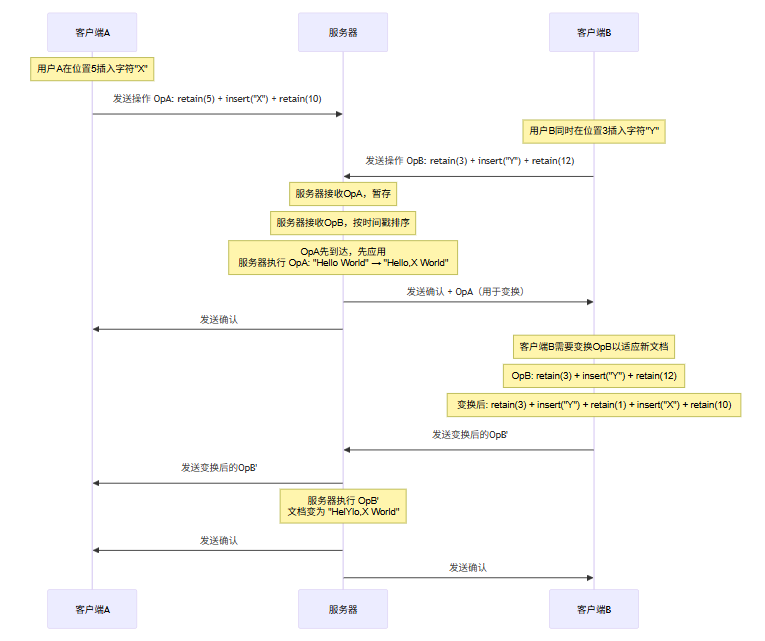
3.1.3 OT的协作流程
下面使用Mermaid Sequence Diagram展示OT的协作流程:
3.1.4 OT的挑战与局限性
尽管OT在Google Docs等系统中取得了成功,但它存在一些根本性限制:
- 服务器必须保存操作历史:为了正确变换,服务器需要存储所有客户端的未确认操作
- 变换函数复杂:需要为每种操作组合(insert+insert, insert+delete, delete+delete等)定义转换规则
- 难以并行化:服务器成为串行瓶颈
- 错误恢复困难:一旦变换出错,很难回滚到正确状态
3.2 CRDT(无冲突复制数据类型)
CRDT是近年来兴起的协同算法,被Figma、Atom Teletype、VSCode Live Share等现代协作工具采用。其核心思想是:设计本身就保证最终一致性的数据结构。
3.2.1 CRDT的理论基础
CRDT分为两类:
- CmRDT(基于操作的无冲突复制数据类型):传输操作,需要操作满足交换律
- CvRDT(基于状态的无冲突复制数据类型):传输完整状态,需要状态满足半格特性
在协同编辑场景中,我们主要使用序列CRDT(Sequence CRDT),它通过唯一标识符而非位置来引用元素。
3.2.2 序列CRDT的实现
/**
 * 序列CRDT实现
 * 使用逻辑时钟和唯一标识符来追踪元素位置
 */

/**
 * RGA(Replicated Growable Array)算法实现
 * 核心思想:
 * - 每个插入的元素都有唯一ID
 * - 使用排序列表维护元素顺序
 * - 删除操作标记而非真正移除(tombstone)
 */
class SequenceCRDT {
    constructor() {
        // 逻辑时钟
        this.clock = new LamportClock();

        // 元素存储:id -> { value, leftId, rightId, deleted, clock }
        this.elements = new Map();

        // 有序序列(用于快速遍历)
        // 实际存储为链表结构,通过 leftId/rightId 维护顺序
        this.headId = null;
        this.tailId = null;

        // 待插入操作的临时缓冲区
        this.pendingInserts = new Map();  // siteId -> [{ afterId, element }]
    }

    /**
     * 本地插入操作
     * @param {string} afterId - 插入位置的前一个元素ID(null表示在头部)
     * @param {string} value - 插入的值
     * @param {string} siteId - 客户端站点ID
     * @returns {Object} - 生成的元素
     */
    localInsert(afterId, value, siteId) {
        const id = this.clock.generateId(siteId);
        const { clock: timestamp } = this.clock.tick();

        const element = {
            id,
            value,
            leftId: afterId,
            rightId: null,
            deleted: false,
            clock: timestamp,
            siteId,
            isLocal: true
        };

        // 更新链表结构
        if (afterId === null) {
            // 插入到头部
            element.rightId = this.headId;
            if (this.headId !== null) {
                const head = this.elements.get(this.headId);
                if (head) head.leftId = id;
            }
            this.headId = id;
        } else {
            // 插入到指定位置之后
            const afterElement = this.elements.get(afterId);
            if (afterElement) {
                element.rightId = afterElement.rightId;
                if (afterElement.rightId !== null) {
                    const rightElement = this.elements.get(afterElement.rightId);
                    if (rightElement) rightElement.leftId = id;
                }
                afterElement.rightId = id;

                if (this.tailId === afterId) {
                    this.tailId = id;
                }
            }
        }

        if (this.tailId === null) {
            this.tailId = id;
        }

        this.elements.set(id, element);

        return element;
    }

    /**
     * 远程插入操作(需要合并)
     * @param {Object} element - 远程元素
     * @param {string} afterId - 远程指定的插入位置
     */
    remoteInsert(element, afterId) {
        // 检查是否已存在
        if (this.elements.has(element.id)) {
            return false;
        }

        // 更新逻辑时钟
        this.clock.sync(element.clock);

        // 查找正确的插入位置(基于ID排序)
        const insertAfterId = this._findInsertPosition(afterId, element.id);

        element.leftId = insertAfterId;
        element.rightId = insertAfterId ? this.elements.get(insertAfterId)?.rightId : this.headId;
        element.isLocal = false;

        // 更新相邻元素的指针
        if (element.rightId !== null) {
            const rightElement = this.elements.get(element.rightId);
            if (rightElement) rightElement.leftId = element.id;
        } else {
            this.tailId = element.id;
        }

        if (insertAfterId !== null) {
            const leftElement = this.elements.get(insertAfterId);
            if (leftElement) leftElement.rightId = element.id;
        } else {
            this.headId = element.id;
        }

        this.elements.set(element.id, element);
        return true;
    }

    /**
     * 查找正确的插入位置
     * 使用ID的字典序来确定真正的前驱
     */
    _findInsertPosition(requestedAfterId, newElementId) {
        if (requestedAfterId === null) {
            // 插入到头部,找到真正的头部
            return this._findTruePredecessor(newElementId);
        }

        const requestedPredecessor = this.elements.get(requestedAfterId);
        if (!requestedPredecessor) {
            // 前驱不存在,查找合适的位置
            return this._findTruePredecessor(newElementId);
        }

        // 验证前驱是否仍然是前驱(可能已被删除)
        // 如果前驱被删除,应该找前驱的前驱
        let actualAfterId = requestedAfterId;
        while (actualAfterId !== null) {
            const el = this.elements.get(actualAfterId);
            if (!el || el.deleted) {
                actualAfterId = el?.leftId || null;
            } else {
                break;
            }
        }

        // 确保新元素在actualAfterId之后
        if (this._compareIds(newElementId, actualAfterId) <= 0) {
            // ID比前驱还小或相等,需要找一个新的前驱
            return this._findTruePredecessor(newElementId, actualAfterId);
        }

        return actualAfterId;
    }

    /**
     * 查找真正的前驱(用于确定插入位置)
     */
    _findTruePredecessor(newId, startAfterId = null) {
        let predId = startAfterId;

        // 遍历找到最后一个ID小于newId的元素
        let currentId = startAfterId || this.headId;
        let lastValidPred = null;

        while (currentId !== null) {
            const el = this.elements.get(currentId);
            if (!el) break;

            if (!el.deleted && this._compareIds(currentId, newId) < 0) {
                lastValidPred = currentId;
            }

            currentId = el.rightId;
        }

        return lastValidPred;
    }

    /**
     * 删除操作(tombstone方式)
     */
    localDelete(elementId, siteId) {
        const element = this.elements.get(elementId);
        if (!element) return null;

        const { clock: timestamp } = this.clock.tick();

        const tombstone = {
            id: elementId,
            deletedBy: siteId,
            clock: timestamp,
            deleted: true
        };

        element.deleted = true;
        element.deletedBy = siteId;
        element.clock = timestamp;

        return tombstone;
    }

    /**
     * 远程删除操作
     */
    remoteDelete(elementId, clock, deletedBy) {
        const element = this.elements.get(elementId);
        if (!element) return false;

        this.clock.sync(clock);

        // 如果已被删除,选择时钟更大的删除
        if (element.deleted) {
            if (clock > element.clock) {
                element.deletedBy = deletedBy;
                element.clock = clock;
            }
        } else {
            element.deleted = true;
            element.deletedBy = deletedBy;
            element.clock = clock;
        }

        return true;
    }

    /**
     * 获取当前文档内容
     */
    toDocument() {
        const result = [];
        let currentId = this.headId;

        while (currentId !== null) {
            const element = this.elements.get(currentId);
            if (element && !element.deleted) {
                result.push(element.value);
            }
            currentId = element?.rightId;
        }

        return result.join('');
    }

    /**
     * 获取完整状态(用于同步)
     */
    getState() {
        return {
            clock: this.clock.getState(),
            elements: Array.from(this.elements.entries()),
            headId: this.headId,
            tailId: this.tailId
        };
    }

    /**
     * 合并状态(用于CvRDT同步)
     */
    mergeState(remoteState) {
        // 合并逻辑时钟
        this.clock.sync(remoteState.clock);

        // 合并元素
        for (const [id, element] of remoteState.elements) {
            if (!this.elements.has(id)) {
                this.elements.set(id, element);
            } else {
                // 冲突解决:保留时钟更大的版本
                const local = this.elements.get(id);
                if (element.clock > local.clock) {
                    this.elements.set(id, element);
                }
            }
        }

        // 更新链表指针
        if (remoteState.headId && (!this.headId || this._compareIds(remoteState.headId, this.headId) < 0)) {
            this.headId = remoteState.headId;
        }
        if (remoteState.tailId && (!this.tailId || this._compareIds(remoteState.tailId, this.tailId) > 0)) {
            this.tailId = remoteState.tailId;
        }
    }

    /**
     * 比较两个ID的顺序
     */
    _compareIds(id1, id2) {
        if (id1 === id2) return 0;

        // ID格式:clock:siteId
        const [clock1, site1] = id1.split(':');
        const [clock2, site2] = id2.split(':');

        const c1 = parseInt(clock1);
        const c2 = parseInt(clock2);

        if (c1 !== c2) return c1 - c2;
        return site1.localeCompare(site2);
    }

    /**
     * 调试:打印结构
     */
    printStructure() {
        console.log('=== SequenceCRDT Structure ===');
        console.log(`Head: ${this.headId}, Tail: ${this.tailId}`);
        console.log('Elements:');

        let currentId = this.headId;
        while (currentId !== null) {
            const el = this.elements.get(currentId);
            if (el) {
                console.log(`  ${currentId}: "${el.value}" ${el.deleted ? '(DELETED)' : ''} left=${el.leftId} right=${el.rightId}`);
            }
            currentId = el?.rightId;
        }
    }
}

/**
 * Lamport逻辑时钟实现
 */
class LamportClock {
    constructor() {
        this.counter = 0;
        this.siteId = this._generateSiteId();
    }

    _generateSiteId() {
        return Math.random().toString(36).substring(2, 10);
    }

    tick() {
        this.counter++;
        return { clock: this.counter };
    }

    getState() {
        return this.counter;
    }

    sync(remoteClock) {
        this.counter = Math.max(this.counter, remoteClock) + 1;
    }

    generateId(siteId) {
        return `${this.counter}:${siteId}`;
    }
}
3.2.3 CRDT vs OT:深度对比
维度 | OT | CRDT |
|---|---|---|
一致性模型 | 可序列化,依赖服务器排序 | 最终一致性,无需服务器排序 |
服务器角色 | 必须保存操作历史,参与变换 | 仅需转发消息,可无状态 |
扩展性 | 服务器成为瓶颈 | 去中心化,易于扩展 |
实现复杂度 | 变换函数复杂 | 数据结构设计复杂,合并逻辑相对简单 |
内存占用 | 随连接时间增长 | 随文档大小增长,有GC机制 |
离线支持 | 困难 | 天然支持 |
典型应用 | Google Docs(早期) | Figma, Atom Teletype, Live Share |
冲突处理 | 变换后保持可序列化 | 通过唯一ID和tombstone避免冲突 |
3.2.4 选择建议
┌─────────────────────────────────────────────────────────────────┐
│                    协同算法选择决策树                            │
├─────────────────────────────────────────────────────────────────┤
│                                                                 │
│  1. 是否需要离线编辑?                                          │
│     ├─ 是 → CRDT                                               │
│     └─ 否 → 继续                                                │
│                                                                 │
│  2. 协作规模如何?                                               │
│     ├─ <100人 → 两者皆可                                        │
│     └─ >100人 → CRDT(去中心化优势)                            │
│                                                                 │
│  3. 是否需要服务器端强制排序(如审计)?                          │
│     ├─ 是 → OT(天然支持)                                     │
│     └─ 否 → CRDT                                               │
│                                                                 │
│  4. 团队对算法实现的熟悉程度?                                    │
│     ├─ 有OT经验 → OT(成熟库多)                               │
│     └─ 有分布式系统经验 → CRDT                                  │
│                                                                 │
└─────────────────────────────────────────────────────────────────┘
4 光标同步:用户Presence与位置感知
本节为你提供的核心技术价值:掌握用户Presence感知的实现机制、光标位置同步协议、头像与用户名的高效广播,以及如何降低光标同步的带宽消耗。
4.1 Presence系统设计
“Presence”(存在感知)是协同编辑中让用户感知彼此的关键功能。它包括:
- 用户列表:谁在编辑这个文档
- 光标位置:每个人的当前编辑位置
- 用户信息:头像、用户名、颜色标识
- 状态指示:正在输入、空闲、已断开
/**
 * Presence管理器
 * 负责追踪所有用户的状态和位置
 */
class PresenceManager {
    constructor(options = {}) {
        this.documentId = options.documentId;
        this.localUserId = options.localUserId;

        // 用户状态存储
        this.users = new Map();  // userId -> UserPresence
        this.localSelection = null;

        // 节流配置
        this.cursorThrottle = options.cursorThrottle || 50;  // ms
        this.presenceThrottle = options.presenceThrottle || 1000;  // ms

        // 定时器
        this.cursorTimer = null;
        this.presenceTimer = null;

        // 事件回调
        this.onUserJoin = options.onUserJoin || (() => {});
        this.onUserLeave = options.onUserLeave || (() => {});
        this.onCursorUpdate = options.onCursorUpdate || (() => {});
        this.onPresenceUpdate = options.onPresenceUpdate || (() => {});

        // 事件存储
        this._events = {};
    }

    /**
     * 用户加入文档
     */
    joinDocument(userId, userInfo) {
        const presence = {
            userId,
            userName: userInfo.userName || 'Anonymous',
            avatar: userInfo.avatar || null,
            color: userInfo.color || this._generateColor(userId),
            cursor: null,
            selection: null,
            lastActivity: Date.now(),
            status: 'active'
        };

        this.users.set(userId, presence);
        this.onUserJoin(userId, presence);

        return presence;
    }

    /**
     * 用户离开文档
     */
    leaveDocument(userId) {
        const presence = this.users.get(userId);
        if (presence) {
            this.users.delete(userId);
            this.onUserLeave(userId, presence);
        }
    }

    /**
     * 更新本地光标位置(带节流)
     */
    updateLocalCursor(position) {
        if (this.cursorTimer) return;

        this.cursorTimer = setTimeout(() => {
            this._sendCursorUpdate(position);
            this.cursorTimer = null;
        }, this.cursorThrottle);
    }

    /**
     * 立即发送光标更新(紧急情况)
     */
    flushLocalCursor(position) {
        if (this.cursorTimer) {
            clearTimeout(this.cursorTimer);
            this.cursorTimer = null;
        }
        this._sendCursorUpdate(position);
    }

    /**
     * 发送光标更新
     */
    _sendCursorUpdate(position) {
        const presence = this.users.get(this.localUserId);
        if (presence) {
            presence.cursor = position;
            presence.lastActivity = Date.now();
            this.onCursorUpdate(this.localUserId, position);
        }
    }

    /**
     * 更新本地选区
     */
    updateLocalSelection(selection) {
        this.localSelection = selection;
        const presence = this.users.get(this.localUserId);
        if (presence) {
            presence.selection = selection;
            presence.lastActivity = Date.now();
        }
    }

    /**
     * 处理远程用户光标更新
     */
    handleRemoteCursorUpdate(userId, cursor) {
        const presence = this.users.get(userId);
        if (presence) {
            presence.cursor = cursor;
            presence.lastActivity = Date.now();
            this.onCursorUpdate(userId, cursor);
        }
    }

    /**
     * 处理远程用户加入
     */
    handleRemoteUserJoin(userId, userInfo) {
        if (!this.users.has(userId)) {
            const presence = this.joinDocument(userId, userInfo);
            return presence;
        }
        return this.users.get(userId);
    }

    /**
     * 处理远程用户离开
     */
    handleRemoteUserLeave(userId) {
        this.leaveDocument(userId);
    }

    /**
     * 批量更新presence(降低广播频率)
     */
    batchUpdatePresence() {
        if (this.presenceTimer) return;

        this.presenceTimer = setTimeout(() => {
            const presenceData = this.getAllPresence();
            this.onPresenceUpdate(presenceData);
            this.presenceTimer = null;
        }, this.presenceThrottle);
    }

    /**
     * 获取所有用户的presence
     */
    getAllPresence() {
        const result = [];
        for (const [userId, presence] of this.users) {
            if (userId !== this.localUserId) {
                result.push({
                    userId,
                    userName: presence.userName,
                    avatar: presence.avatar,
                    color: presence.color,
                    cursor: presence.cursor,
                    selection: presence.selection,
                    status: presence.status,
                    lastActivity: presence.lastActivity
                });
            }
        }
        return result;
    }

    /**
     * 生成用户颜色
     */
    _generateColor(userId) {
        const colors = [
            '#FF6B6B', '#4ECDC4', '#45B7D1', '#96CEB4',
            '#FFEAA7', '#DDA0DD', '#98D8C8', '#F7DC6F'
        ];

        // 基于userId的确定性颜色分配
        let hash = 0;
        for (let i = 0; i < userId.length; i++) {
            hash = ((hash << 5) - hash) + userId.charCodeAt(i);
            hash = hash & hash;
        }

        return colors[Math.abs(hash) % colors.length];
    }

    /**
     * 获取用户颜色
     */
    getUserColor(userId) {
        const presence = this.users.get(userId);
        return presence?.color || this._generateColor(userId);
    }

    /**
     * 获取在线用户列表
     */
    getOnlineUsers() {
        return Array.from(this.users.values())
            .filter(p => p.status === 'active')
            .map(p => ({
                userId: p.userId,
                userName: p.userName,
                color: p.color
            }));
    }
}
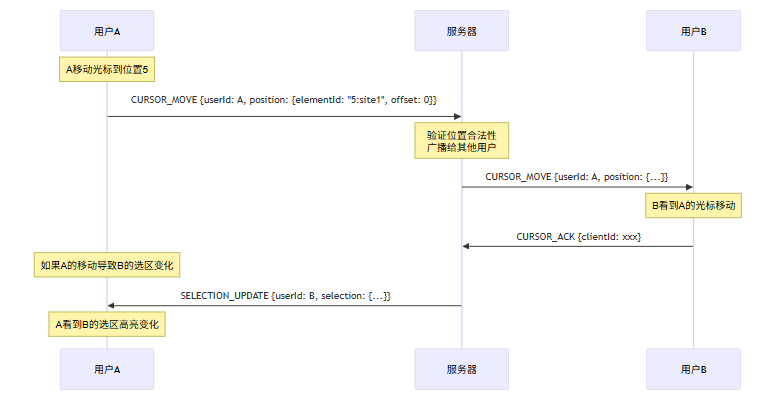
4.2 光标同步协议
光标同步需要在实时性和带宽消耗之间取得平衡。以下是优化策略:
- 位置编码:使用逻辑位置而非物理字符偏移
- 增量更新:只传输变化的部分
- 节流与防抖:避免过于频繁的更新
- 用户区分:通过颜色和标签让用户快速识别
/**
 * 光标同步消息协议
 * 定义客户端与服务器之间的光标同步消息格式
 */

/**
 * 光标位置表示
 * 使用逻辑位置(相对于CRDT元素ID)而非字符偏移
 */
class CursorPosition {
    constructor(elementId, offset = 0) {
        this.elementId = elementId;  // CRDT元素ID
        this.offset = offset;         // 在元素内的字符偏移
        this.timestamp = Date.now();
    }

    /**
     * 转换为可传输的JSON格式
     */
    toJSON() {
        return {
            elementId: this.elementId,
            offset: this.offset,
            timestamp: this.timestamp
        };
    }

    /**
     * 从JSON恢复
     */
    static fromJSON(json) {
        const pos = new CursorPosition(json.elementId, json.offset);
        pos.timestamp = json.timestamp;
        return pos;
    }

    /**
     * 计算两个位置之间的距离
     */
    distanceTo(other) {
        // 简化实现:计算元素ID之间的距离
        if (this.elementId === other.elementId) {
            return Math.abs(this.offset - other.offset);
        }

        // 需要遍历CRDT结构计算实际距离
        return null; // 需要CRDT上下文
    }
}

/**
 * 光标同步消息类型
 */
const CursorMessageType = {
    CURSOR_MOVE: 'cursor_move',
    CURSOR_SELECTION: 'cursor_selection',
    CURSOR_ACK: 'cursor_ack',
    PRESENCE_SYNC: 'presence_sync',
    USER_JOIN: 'user_join',
    USER_LEAVE: 'user_leave'
};

/**
 * 构建光标移动消息
 */
function buildCursorMoveMessage(userId, position, documentVersion) {
    return {
        type: CursorMessageType.CURSOR_MOVE,
        userId,
        position: position.toJSON(),
        documentVersion,  // 用于服务器验证
        clientId: generateClientId(),
        timestamp: Date.now()
    };
}

/**
 * 构建选区消息
 */
function buildSelectionMessage(userId, startPosition, endPosition, documentVersion) {
    return {
        type: CursorMessageType.CURSOR_SELECTION,
        userId,
        start: startPosition.toJSON(),
        end: endPosition.toJSON(),
        documentVersion,
        clientId: generateClientId(),
        timestamp: Date.now()
    };
}

/**
 * 构建Presence同步消息
 */
function buildPresenceSyncMessage(documentId, users) {
    return {
        type: CursorMessageType.PRESENCE_SYNC,
        documentId,
        users: users.map(u => ({
            userId: u.userId,
            userName: u.userName,
            avatar: u.avatar,
            color: u.color,
            status: u.status
        })),
        timestamp: Date.now()
    };
}

/**
 * 生成客户端ID(用于去重)
 */
let clientIdCounter = 0;
function generateClientId() {
    return `${Date.now()}-${++clientIdCounter}`;
}

/**
 * 消息序列化器
 */
class CursorMessageSerializer {
    /**
     * 序列化消息
     */
    static serialize(message) {
        return JSON.stringify(message);
    }

    /**
     * 反序列化消息
     */
    static deserialize(data) {
        try {
            return JSON.parse(data);
        } catch (e) {
            console.error('Failed to deserialize cursor message:', e);
            return null;
        }
    }

    /**
     * 压缩消息(移除不必要的字段)
     */
    static compress(message) {
        const compressed = { ...message };

        // 移除未变化的字段
        if (compressed.documentVersion !== undefined) {
            // 只保留版本差异
            compressed.versionDelta = compressed.documentVersion;
            delete compressed.documentVersion;
        }

        return compressed;
    }

    /**
     * 解压缩消息
     */
    static decompress(message, previousVersion = 0) {
        const decompressed = { ...message };

        if (decompressed.versionDelta !== undefined) {
            decompressed.documentVersion = previousVersion + decompressed.versionDelta;
            delete decompressed.versionDelta;
        }

        return decompressed;
    }
}
4.3 光标同步的Mermaid协作流程
5 冲突处理:策略与实现
本节为你提供的核心技术价值:理解各种冲突处理策略(最后写入优先、智能合并、无操作转换)、适用场景,以及如何在实际系统中实现健壮的冲突处理机制。
5.1 冲突的来源与分类
在协同编辑中,冲突可以分为以下几类:
冲突类型 | 描述 | 示例 | 处理策略 |
|---|---|---|---|
插入-插入冲突 | 两个用户同时在同一位置插入 | A和B都在位置5插入字符 | 两者都保留,位置由算法决定 |
插入-删除冲突 | 一个用户插入,另一个删除同一位置 | A在位置5插入,B删除位置5-6 | 根据时间戳或算法决定 |
删除-删除冲突 | 两个用户同时删除同一内容 | A和B都删除位置5-6 | 通常都视为已删除 |
重叠修改冲突 | 修改了同一段内容 | A修改段落1,B也修改段落1 | 需要智能合并 |
5.2 最后写入优先(Last Write Wins)
最简单的冲突处理策略,适用于:
- 非关键性数据
- 用户不关心历史修改的场景
- 高吞吐量需求的场景
/**
 * 最后写入优先(LWW)冲突解决器
 * 适用于:用户配置、偏好设置、简单状态
 */
class LWWResolver {
    constructor() {
        // 键值存储:key -> { value, timestamp, siteId }
        this.store = new Map();
    }

    /**
     * 设置值
     */
    set(key, value, timestamp = Date.now(), siteId = null) {
        const entry = {
            value,
            timestamp,
            siteId
        };

        const existing = this.store.get(key);
        if (existing && existing.timestamp > timestamp) {
            // 忽略旧数据
            return false;
        }

        this.store.set(key, entry);
        return true;
    }

    /**
     * 获取值
     */
    get(key) {
        const entry = this.store.get(key);
        return entry?.value ?? null;
    }

    /**
     * 合并远程状态
     */
    merge(remoteStore) {
        const merged = [];

        for (const [key, remoteEntry] of remoteStore) {
            const localEntry = this.store.get(key);

            if (!localEntry || remoteEntry.timestamp > localEntry.timestamp) {
                this.store.set(key, remoteEntry);
                merged.push(key);
            }
        }

        return merged;
    }

    /**
     * 获取所有键值对(用于同步)
     */
    getState() {
        return new Map(this.store);
    }
}
5.3 智能合并策略
对于代码编辑等场景,我们需要更智能的合并策略:
/**
 * 智能合并冲突解决器
 * 适用于:代码、结构化文档
 */
class SmartMergeResolver {
    constructor() {
        this.crdt = new SequenceCRDT();
    }

    /**
     * 本地插入
     */
    localInsert(position, value, siteId) {
        return this.crdt.localInsert(position, value, siteId);
    }

    /**
     * 本地删除
     */
    localDelete(position, siteId) {
        return this.crdt.localDelete(position, siteId);
    }

    /**
     * 远程操作合并
     */
    mergeRemoteOperation(operation) {
        switch (operation.type) {
            case 'insert':
                return this.crdt.remoteInsert(operation.element, operation.afterId);
            case 'delete':
                return this.crdt.remoteDelete(operation.elementId, operation.clock, operation.deletedBy);
            default:
                console.warn('Unknown operation type:', operation.type);
                return false;
        }
    }

    /**
     * 冲突检测
     */
    detectConflicts(localOps, remoteOps) {
        const conflicts = [];

        for (const localOp of localOps) {
            for (const remoteOp of remoteOps) {
                if (this._isConflicting(localOp, remoteOp)) {
                    conflicts.push({
                        local: localOp,
                        remote: remoteOp,
                        type: this._classifyConflict(localOp, remoteOp)
                    });
                }
            }
        }

        return conflicts;
    }

    /**
     * 判断两个操作是否冲突
     */
    _isConflicting(op1, op2) {
        // 插入-插入:位置相近
        if (op1.type === 'insert' && op2.type === 'insert') {
            return Math.abs(op1.position - op2.position) < 5;
        }

        // 插入-删除:删除包含插入位置
        if (op1.type === 'insert' && op2.type === 'delete') {
            return op2.position <= op1.position && op1.position < op2.position + op2.length;
        }

        // 删除-插入:插入在删除范围内
        if (op1.type === 'delete' && op2.type === 'insert') {
            return op1.position <= op2.position && op2.position < op1.position + op1.length;
        }

        // 删除-删除:范围重叠
        if (op1.type === 'delete' && op2.type === 'delete') {
            return this._rangesOverlap(
                op1.position, op1.position + op1.length,
                op2.position, op2.position + op2.length
            );
        }

        return false;
    }

    /**
     * 判断范围是否重叠
     */
    _rangesOverlap(start1, end1, start2, end2) {
        return start1 < end2 && start2 < end1;
    }

    /**
     * 分类冲突类型
     */
    _classifyConflict(op1, op2) {
        if (op1.type === 'insert' && op2.type === 'insert') return 'concurrent_insert';
        if (op1.type === 'delete' && op2.type === 'delete') return 'concurrent_delete';
        if (op1.type === 'insert' || op2.type === 'insert') return 'insert_delete';
        return 'unknown';
    }

    /**
     * 解决冲突
     */
    resolveConflict(conflict) {
        switch (conflict.type) {
            case 'concurrent_insert':
                // 两个插入都保留,CRDT会自动处理顺序
                return { action: 'keep_both', operations: [conflict.local, conflict.remote] };

            case 'concurrent_delete':
                // 两个删除都执行(tombstone机制)
                return { action: 'keep_both', operations: [conflict.local, conflict.remote] };

            case 'insert_delete':
                // 根据时间戳决定,或保留两者让用户决定
                const insertOp = conflict.local.type === 'insert' ? conflict.local : conflict.remote;
                const deleteOp = conflict.local.type === 'delete' ? conflict.local : conflict.remote;
                return {
                    action: 'manual_review',
                    suggestion: `Insert "${insertOp.value}" at position ${insertOp.position} conflicts with deletion at position ${deleteOp.position}`,
                    operations: [insertOp, deleteOp]
                };

            default:
                return { action: 'keep_both', operations: [conflict.local, conflict.remote] };
        }
    }

    /**
     * 获取文档
     */
    getDocument() {
        return this.crdt.toDocument();
    }
}
5.4 三向合并(Three-Way Merge)
对于文本文件,更常用的是三向合并算法:
/**
 * 三向文本合并算法
 * 适用于:代码文件、配置文件等文本内容
 */
class ThreeWayMerger {
    constructor() {
        this.conflicts = [];
    }

    /**
     * 执行三向合并
     * @param {string} original - 原始内容
     * @param {string} modifiedA - 分支A的修改
     * @param {string} modifiedB - 分支B的修改
     * @returns {Object} - { result, conflicts }
     */
    merge(original, modifiedA, modifiedB) {
        this.conflicts = [];

        // 计算差异
        const diffA = this._computeDiff(original, modifiedA);
        const diffB = this._computeDiff(original, modifiedB);

        // 合并差异
        const merged = this._mergeDiffs(diffA, diffB);

        // 应用合并结果
        const result = this._applyMergedDiff(original, merged);

        return {
            result,
            conflicts: this.conflicts,
            hasConflicts: this.conflicts.length > 0
        };
    }

    /**
     * 计算差异
     */
    _computeDiff(original, modified) {
        // 使用最长公共子序列(LCS)算法
        const lcs = this._computeLCS(original, modified);
        const diff = [];

        let origIdx = 0;
        let modIdx = 0;
        let lcsIdx = 0;

        while (origIdx < original.length || modIdx < modified.length) {
            if (lcsIdx < lcs.length) {
                // 处理LCS之前的差异
                while (origIdx < original.length && original[origIdx] !== lcs[lcsIdx]) {
                    diff.push({ type: 'delete', value: original[origIdx], source: 'original' });
                    origIdx++;
                }
                while (modIdx < modified.length && modified[modIdx] !== lcs[lcsIdx]) {
                    diff.push({ type: 'insert', value: modified[modIdx], source: 'modified' });
                    modIdx++;
                }

                // LCS元素
                diff.push({ type: 'equal', value: lcs[lcsIdx] });
                origIdx++;
                modIdx++;
                lcsIdx++;
            } else {
                // 处理剩余部分
                while (origIdx < original.length) {
                    diff.push({ type: 'delete', value: original[origIdx], source: 'original' });
                    origIdx++;
                }
                while (modIdx < modified.length) {
                    diff.push({ type: 'insert', value: modified[modIdx], source: 'modified' });
                    modIdx++;
                }
            }
        }

        return diff;
    }

    /**
     * 计算最长公共子序列
     */
    _computeLCS(str1, str2) {
        const m = str1.length;
        const n = str2.length;

        // DP表
        const dp = Array(m + 1).fill(null).map(() => Array(n + 1).fill(0));

        for (let i = 1; i <= m; i++) {
            for (let j = 1; j <= n; j++) {
                if (str1[i - 1] === str2[j - 1]) {
                    dp[i][j] = dp[i - 1][j - 1] + 1;
                } else {
                    dp[i][j] = Math.max(dp[i - 1][j], dp[i][j - 1]);
                }
            }
        }

        // 回溯
        const lcs = [];
        let i = m, j = n;
        while (i > 0 && j > 0) {
            if (str1[i - 1] === str2[j - 1]) {
                lcs.unshift(str1[i - 1]);
                i--;
                j--;
            } else if (dp[i - 1][j] > dp[i][j - 1]) {
                i--;
            } else {
                j--;
            }
        }

        return lcs;
    }

    /**
     * 合并差异
     */
    _mergeDiffs(diffA, diffB) {
        const merged = [];
        let idxA = 0, idxB = 0;

        while (idxA < diffA.length || idxB < diffB.length) {
            const chunkA = idxA < diffA.length ? diffA[idxA] : null;
            const chunkB = idxB < diffB.length ? diffB[idxB] : null;

            if (chunkA && chunkA.type === 'equal' && chunkB && chunkB.type === 'equal') {
                // 两者都相同
                merged.push({ ...chunkA });
                idxA++;
                idxB++;
            } else if (chunkA && chunkA.type === 'equal') {
                // A相等,B修改
                merged.push({ ...chunkB });
                idxB++;
            } else if (chunkB && chunkB.type === 'equal') {
                // B相等,A修改
                merged.push({ ...chunkA });
                idxA++;
            } else if (chunkA && chunkB) {
                // 两者都有修改,可能冲突
                if (chunkA.type === chunkB.type) {
                    // 同类型修改,尝试合并
                    const mergedChunk = this._mergeSameType(chunkA, chunkB);
                    merged.push(mergedChunk);
                } else {
                    // 不同类型修改,记录冲突
                    this.conflicts.push({
                        type: 'modify_modify',
                        chunkA,
                        chunkB,
                        position: merged.length
                    });
                    // 使用chunkA作为默认
                    merged.push({ ...chunkA });
                }
                idxA++;
                idxB++;
            } else if (chunkA) {
                merged.push({ ...chunkA });
                idxA++;
            } else if (chunkB) {
                merged.push({ ...chunkB });
                idxB++;
            }
        }

        return merged;
    }

    /**
     * 合并同类型修改
     */
    _mergeSameType(chunkA, chunkB) {
        if (chunkA.type === 'insert') {
            // 两个插入,保留两者
            return {
                type: 'insert',
                value: chunkA.value + chunkB.value,
                merged: true
            };
        } else if (chunkA.type === 'delete') {
            // 两个删除,只要一个
            return {
                type: 'delete',
                value: chunkA.value,
                count: 2
            };
        }
        return chunkA;
    }

    /**
     * 应用合并后的差异
     */
    _applyMergedDiff(original, merged) {
        let result = '';

        for (const chunk of merged) {
            switch (chunk.type) {
                case 'equal':
                case 'insert':
                    result += chunk.value;
                    break;
                case 'delete':
                    // 删除操作不产生输出
                    break;
            }
        }

        return result;
    }
}
6 规模化挑战:万人同时编辑的实现
本节为你提供的核心技术价值:掌握大规模协同编辑系统的架构设计、分片策略、负载均衡、容错机制,以及如何处理万人同时编辑的极端场景。
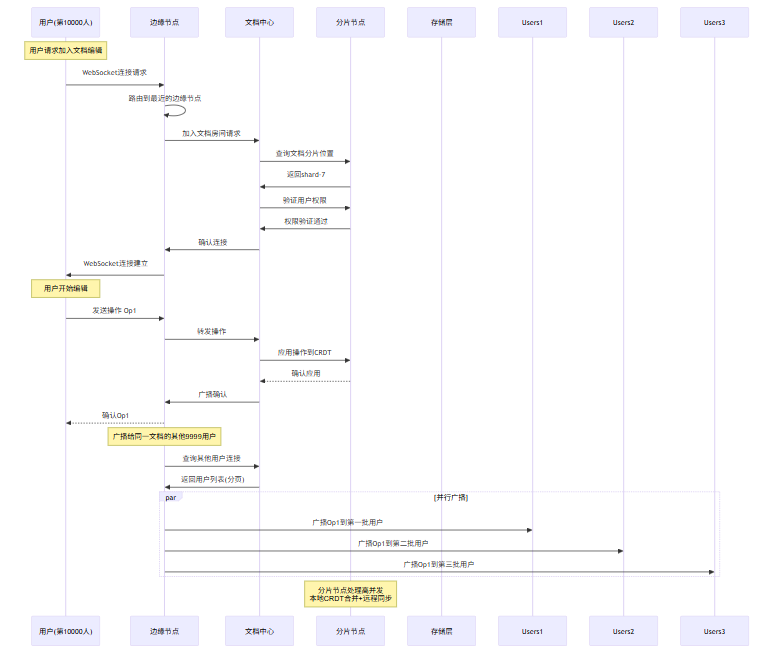
6.1 规模化架构设计
支持万人同时编辑的系统需要解决以下挑战:
挑战 | 描述 | 解决方案 |
|---|---|---|
连接管理 | 万级WebSocket连接 | 连接池、分层架构 |
消息广播 | 一对多消息传递 | 发布-订阅、房间分区 |
数据一致性 | 跨节点状态同步 | CRDT、分布式共识 |
延迟优化 | 全球用户分布 | CDN、边缘节点 |
容错恢复 | 节点故障 | 主备切换、自动故障转移 |
6.2 分层架构设计
┌─────────────────────────────────────────────────────────────────────────┐
│                          客户端层                                        │
│  ┌─────────┐  ┌─────────┐  ┌─────────┐  ┌─────────┐                     │
│  │ User 1  │  │ User 2  │  │ User 3  │  │ User N  │                     │
│  └────┬────┘  └────┬────┘  └────┬────┘  └────┬────┘                     │
└───────┼────────────┼────────────┼────────────┼──────────────────────────┘
        │            │            │            │
        ▼            ▼            ▼            ▼
┌─────────────────────────────────────────────────────────────────────────┐
│                          边缘层(Edge)                                  │
│  ┌─────────────────────────────────────────────────────────────────┐    │
│  │                    全球分布的Edge Nodes                          │    │
│  │  - WebSocket终结                                                 │    │
│  │  - 消息路由                                                      │    │
│  │  - Presence本地缓存                                              │    │
│  └─────────────────────────────────────────────────────────────────┘    │
└─────────────────────────────────────────────────────────────────────────┘
        │
        ▼
┌─────────────────────────────────────────────────────────────────────────┐
│                          聚合层(Aggregation)                           │
│  ┌──────────────────┐  ┌──────────────────┐  ┌──────────────────┐       │
│  │  Document Hub 1   │  │  Document Hub 2   │  │  Document Hub N   │       │
│  │  - 文档状态管理    │  │  - 文档状态管理    │  │  - 文档状态管理    │       │
│  │  - 操作转换/CRDT  │  │  - 操作转换/CRDT  │  │  - 操作转换/CRDT  │       │
│  │  - 历史记录       │  │  - 历史记录       │  │  - 历史记录       │       │
│  └────────┬─────────┘  └────────┬─────────┘  └────────┬─────────┘       │
└───────────┼─────────────────────┼─────────────────────┼──────────────────┘
            │                     │                     │
            ▼                     ▼                     ▼
┌─────────────────────────────────────────────────────────────────────────┐
│                          存储层(Storage)                                │
│  ┌─────────────┐  ┌─────────────┐  ┌─────────────┐  ┌─────────────┐      │
│  │   Redis     │  │  PostgreSQL │  │    S3       │  │   etcd      │      │
│  │  (实时状态)  │  │  (持久存储)  │  │  (文件)     │  │  (协调)     │      │
│  └─────────────┘  └─────────────┘  └─────────────┘  └─────────────┘      │
└─────────────────────────────────────────────────────────────────────────┘
6.3 文档分片策略
当单个文档的并发用户数超过阈值时,我们需要对文档进行分片:
/**
 * 文档分片管理器
 * 将大型文档或高并发文档分散到多个节点
 */
class DocumentShardingManager {
    constructor(options = {}) {
        this.shardCount = options.shardCount || 16;  // 分片数
        this.userPerShardLimit = options.userPerShardLimit || 1000;

        // 分片映射:documentId -> shardId
        this.documentShardMap = new Map();

        // 分片状态
        this.shards = new Map();
        for (let i = 0; i < this.shardCount; i++) {
            this.shards.set(i, {
                shardId: i,
                documentIds: new Set(),
                userCount: 0,
                status: 'active'
            });
        }

        // 虚拟节点环(一致性哈希)
        this.virtualNodes = new Map();
        this._initConsistentHash();
    }

    /**
     * 初始化一致性哈希环
     */
    _initConsistentHash() {
        const physicalNodes = 4;  // 物理节点数

        for (let i = 0; i < this.shardCount; i++) {
            // 每个分片对应多个虚拟节点
            for (let v = 0; v < 150; v++) {
                const virtualNodeId = `shard-${i}-vn-${v}`;
                const hash = this._hash(virtualNodeId);
                this.virtualNodes.set(hash, i);
            }
        }
    }

    /**
     * 获取文档的分片
     */
    getShardForDocument(documentId) {
        if (this.documentShardMap.has(documentId)) {
            return this.documentShardMap.get(documentId);
        }

        // 首次访问,分配分片
        return this._allocateShard(documentId);
    }

    /**
     * 分配分片
     */
    _allocateShard(documentId) {
        // 使用一致性哈希选择分片
        const hash = this._hash(documentId);

        // 找到大于等于hash的最小虚拟节点
        let targetShard = 0;
        for (const [vhash, shardId] of this.virtualNodes) {
            if (vhash >= hash) {
                targetShard = shardId;
                break;
            }
        }

        // 检查该分片是否超载
        const shard = this.shards.get(targetShard);
        if (shard.userCount >= this.userPerShardLimit) {
            // 需要重新平衡
            targetShard = this._findLeastLoadedShard();
        }

        this.documentShardMap.set(documentId, targetShard);
        this.shards.get(targetShard).documentIds.add(documentId);

        return targetShard;
    }

    /**
     * 查找负载最轻的分片
     */
    _findLeastLoadedShard() {
        let minLoad = Infinity;
        let targetShard = 0;

        for (const [shardId, shard] of this.shards) {
            if (shard.status !== 'active') continue;
            if (shard.userCount < minLoad) {
                minLoad = shard.userCount;
                targetShard = shardId;
            }
        }

        return targetShard;
    }

    /**
     * 计算哈希
     */
    _hash(key) {
        let hash = 0;
        for (let i = 0; i < key.length; i++) {
            hash = ((hash << 5) - hash) + key.charCodeAt(i);
            hash = hash & hash;
        }
        return Math.abs(hash);
    }

    /**
     * 加入用户到文档
     */
    addUserToDocument(documentId) {
        const shardId = this.getShardForDocument(documentId);
        this.shards.get(shardId).userCount++;
        return shardId;
    }

    /**
     * 移除用户
     */
    removeUserFromDocument(documentId) {
        const shardId = this.documentShardMap.get(documentId);
        if (shardId !== undefined) {
            const shard = this.shards.get(shardId);
            if (shard) {
                shard.userCount = Math.max(0, shard.userCount - 1);
            }
        }
    }

    /**
     * 获取分片统计
     */
    getShardStats() {
        const stats = [];
        for (const [shardId, shard] of this.shards) {
            stats.push({
                shardId,
                documentCount: shard.documentIds.size,
                userCount: shard.userCount,
                status: shard.status
            });
        }
        return stats;
    }

    /**
     * 迁移分片(用于负载均衡)
     */
    async migrateShard(sourceShardId, targetShardId, documentIds) {
        const sourceShard = this.shards.get(sourceShardId);
        const targetShard = this.shards.get(targetShardId);

        console.log(`Migrating ${documentIds.length} documents from shard ${sourceShardId} to ${targetShardId}`);

        // 更新映射
        for (const docId of documentIds) {
            this.documentShardMap.set(docId, targetShardId);
            sourceShard.documentIds.delete(docId);
            targetShard.documentIds.add(docId);
        }

        // 更新用户计数
        const avgUsersPerDoc = sourceShard.userCount / documentIds.length;
        const usersToMove = Math.floor(avgUsersPerDoc * documentIds.length);
        sourceShard.userCount -= usersToMove;
        targetShard.userCount += usersToMove;
    }
}
6.4 万人协作的Mermaid架构流程
6.5 负载均衡与容错
/**
 * 分布式协调器
 * 使用Raft协议进行leader选举和状态同步
 */
class DistributedCoordinator {
    constructor(options = {}) {
        this.nodeId = options.nodeId;
        this.clusterNodes = options.clusterNodes || [];
        this.raft = new SimpleRaft(this.nodeId, this.clusterNodes);

        this.currentLeader = null;
        this.isLeader = false;

        // 文档状态路由
        this.documentRoutes = new Map();  // documentId -> leaderNodeId

        // 初始化
        this._init();
    }

    async _init() {
        this.raft.on('leaderElected', (leaderId) => {
            this.currentLeader = leaderId;
            this.isLeader = (leaderId === this.nodeId);
            console.log(`Leader elected: ${leaderId}, isLeader: ${this.isLeader}`);
        });

        await this.raft.start();
    }

    /**
     * 获取文档的leader节点
     */
    async getDocumentLeader(documentId) {
        // 先查本地缓存
        if (this.documentRoutes.has(documentId)) {
            const cachedLeader = this.documentRoutes.get(documentId);
            // 验证leader是否仍然有效
            if (this.raft.isNodeAlive(cachedLeader)) {
                return cachedLeader;
            }
        }

        // 向Raft集群查询
        const leader = await this.raft.query('getDocumentLeader', documentId);
        this.documentRoutes.set(documentId, leader);
        return leader;
    }

    /**
     * 执行leader转移
     */
    async transferLeadership(documentId, newLeaderId) {
        if (!this.isLeader) {
            throw new Error('Not the leader');
        }

        return await this.raft.propose('transferLeadership', {
            documentId,
            newLeaderId
        });
    }

    /**
     * 健康检查
     */
    async healthCheck() {
        const raftHealth = await this.raft.healthCheck();

        return {
            nodeId: this.nodeId,
            isLeader: this.isLeader,
            currentLeader: this.currentLeader,
            raftHealth,
            connectedNodes: this.raft.getConnectedNodes(),
            documentRoutes: this.documentRoutes.size
        };
    }
}

/**
 * 简化的Raft实现
 */
class SimpleRaft {
    constructor(nodeId, nodes) {
        this.nodeId = nodeId;
        this.nodes = nodes;
        this.state = 'follower';
        this.currentTerm = 0;
        this.votedFor = null;
        this.log = [];
        this.commitIndex = 0;

        this._events = {};
        this.electionTimeout = 150 + Math.random() * 150;  // 150-300ms
        this.heartbeatInterval = 50;  // 50ms

        this._startElectionTimer();
    }

    async start() {
        this._startHeartbeat();
    }

    _startElectionTimer() {
        setTimeout(() => {
            if (this.state !== 'leader') {
                this._startElection();
            }
            this._startElectionTimer();
        }, this.electionTimeout);
    }

    _startHeartbeat() {
        setInterval(() => {
            if (this.state === 'leader') {
                this._sendHeartbeat();
            }
        }, this.heartbeatInterval);
    }

    async _startElection() {
        this.state = 'candidate';
        this.currentTerm++;
        this.votedFor = this.nodeId;

        // 请求投票
        const votes = 1;  // 投给自己
        for (const node of this.nodes) {
            if (node !== this.nodeId) {
                const granted = await this._requestVote(node);
                if (granted) votes++;
            }
        }

        // 获得多数票
        if (votes > Math.floor(this.nodes.length / 2)) {
            this.state = 'leader';
            this.emit('leaderElected', this.nodeId);
        }
    }

    async _requestVote(node) {
        // 简化的RPC调用
        return true;
    }

    _sendHeartbeat() {
        for (const node of this.nodes) {
            if (node !== this.nodeId) {
                // 发送心跳
            }
        }
    }

    async propose(action, data) {
        if (this.state !== 'leader') {
            throw new Error('Not the leader');
        }

        this.log.push({ action, data, term: this.currentTerm });
        // 复制到其他节点
        // 等待多数节点确认后提交
    }

    async query(action, data) {
        // 读操作可以在任何节点执行,或者在leader执行
    }

    healthCheck() {
        return {
            state: this.state,
            term: this.currentTerm,
            logLength: this.log.length
        };
    }

    getConnectedNodes() {
        return this.nodes;
    }

    isNodeAlive(nodeId) {
        return this.nodes.includes(nodeId);
    }

    on(event, handler) {
        if (!this._events) this._events = {};
        if (!this._events[event]) this._events[event] = [];
        this._events[event].push(handler);
    }

    emit(event, data) {
        if (this._events && this._events[event]) {
            this._events[event].forEach(handler => handler(data));
        }
    }
}
7 实践:实现一个支持多用户的协同编辑服务
本节为你提供的核心技术价值:通过完整的代码实现,展示如何构建一个支持多用户的协同编辑服务,包括WebSocket服务器、CRDT实现、操作同步、Presence感知等核心组件。
7.1 系统架构
┌─────────────────────────────────────────────────────────────────┐
│                     协同编辑服务架构                              │
├─────────────────────────────────────────────────────────────────┤
│                                                                 │
│  ┌─────────────┐     ┌─────────────┐     ┌─────────────┐        │
│  │   Browser   │     │   Browser   │     │   Browser   │        │
│  │  (WebSocket)│     │  (WebSocket)│     │  (WebSocket)│        │
│  └──────┬──────┘     └──────┬──────┘     └──────┬──────┘        │
│         │                   │                   │               │
│         └───────────────────┼───────────────────┘               │
│                             │                                   │
│                             ▼                                   │
│  ┌─────────────────────────────────────────────────────────┐    │
│  │              WebSocket Server (Node.js)                │    │
│  │  ┌───────────┐ ┌───────────┐ ┌───────────┐ ┌───────────┐  │    │
│  │  │ WS Handler│ │PresenceMgr│ │ CollabHub │ │ShardMgr   │  │    │
│  │  └───────────┘ └───────────┘ └───────────┘ └───────────┘  │    │
│  └─────────────────────────────────────────────────────────┘    │
│                             │                                   │
│         ┌───────────────────┼───────────────────┐              │
│         │                   │                   │               │
│         ▼                   ▼                   ▼               │
│  ┌─────────────┐     ┌─────────────┐     ┌─────────────┐        │
│  │    Redis    │     │  PostgreSQL │     │    etcd     │        │
│  │ (Pub/Sub)   │     │ (Persistence)│    │ (Coordination│       │
│  └─────────────┘     └─────────────┘     └─────────────┘        │
│                                                                 │
└─────────────────────────────────────────────────────────────────┘
7.2 WebSocket服务器实现
/**
* 协同编辑WebSocket服务器
* 支持:
* - 多文档并发编辑
* - 用户Presence感知
* - CRDT操作同步
* - 水平扩展
*/
const WebSocket = require('ws');
const http = require('http');
const crypto = require('crypto');
/**
* 协同编辑服务器主类
*/
class CollabServer {
constructor(options = {}) {
this.port = options.port || 8080;
this.pingInterval = options.pingInterval || 30000;
this.pingTimeout = options.pingTimeout || 60000;
// 文档房间管理
this.rooms = new Map(); // documentId -> CollabRoom
// 用户会话管理
this.sessions = new Map(); // sessionId -> Session
// 全局统计
this.stats = {
totalConnections: 0,
totalDocuments: 0,
totalMessages: 0,
startTime: Date.now()
};
this._init();
}
_init() {
// 创建HTTP服务器
this.httpServer = http.createServer((req, res) => {
// 健康检查端点
if (req.url === '/health') {
res.writeHead(200, { 'Content-Type': 'application/json' });
res.end(JSON.stringify(this.getStats()));
return;
}
// 统计端点
if (req.url === '/stats') {
res.writeHead(200, { 'Content-Type': 'application/json' });
res.end(JSON.stringify(this.getDetailedStats()));
return;
}
res.writeHead(404);
res.end('Not Found');
});
// 创建WebSocket服务器
this.wss = new WebSocket.Server({
server: this.httpServer,
maxPayload: 1024 * 1024 // 1MB最大消息
});
// 设置心跳
this.wss.on('connection', (ws, req) => {
this._handleConnection(ws, req);
});
// 启动心跳检测
this._startHeartbeat();
// 启动统计报告
this._startStatsReport();
}
/**
* 启动服务器
*/
async start() {
return new Promise((resolve) => {
this.httpServer.listen(this.port, () => {
console.log(`Collab server running on port ${this.port}`);
resolve();
});
});
}
/**
* 停止服务器
*/
async stop() {
// 关闭所有房间
for (const room of this.rooms.values()) {
await room.close();
}
// 关闭所有连接
this.wss.clients.forEach(ws => {
ws.close();
});
// 关闭HTTP服务器
return new Promise((resolve) => {
this.httpServer.close(() => {
console.log('Collab server stopped');
resolve();
});
});
}
/**
* 处理新连接
*/
_handleConnection(ws, req) {
const sessionId = this._generateSessionId();
const remoteIp = req.socket.remoteAddress;
console.log(`New connection: ${sessionId} from ${remoteIp}`);
// 创建会话
const session = {
sessionId,
ws,
userId: null,
documentId: null,
joinedAt: Date.now(),
lastActivity: Date.now(),
messageCount: 0
};
this.sessions.set(sessionId, session);
this.stats.totalConnections++;
// 设置WebSocket事件处理
ws.on('message', (data) => {
this._handleMessage(session, data);
});
ws.on('close', () => {
this._handleDisconnect(session);
});
ws.on('error', (error) => {
console.error(`WebSocket error for session ${sessionId}:`, error);
this._handleDisconnect(session);
});
ws.on('pong', () => {
session.lastActivity = Date.now();
});
// 发送欢迎消息
this._send(session, {
type: 'welcome',
sessionId,
serverTime: Date.now()
});
}
/**
* 处理消息
*/
_handleMessage(session, data) {
session.lastActivity = Date.now();
session.messageCount++;
this.stats.totalMessages++;
let message;
try {
message = JSON.parse(data);
} catch (e) {
console.error('Invalid JSON message:', data);
this._send(session, {
type: 'error',
code: 'INVALID_MESSAGE',
message: 'Invalid JSON format'
});
return;
}
// 处理不同类型的消息
switch (message.type) {
case 'auth':
this._handleAuth(session, message);
break;
case 'join':
this._handleJoin(session, message);
break;
case 'leave':
this._handleLeave(session);
break;
case 'operation':
this._handleOperation(session, message);
break;
case 'cursor':
this._handleCursor(session, message);
break;
case 'sync':
this._handleSync(session, message);
break;
case 'presence':
this._handlePresence(session, message);
break;
default:
this._send(session, {
type: 'error',
code: 'UNKNOWN_MESSAGE_TYPE',
message: `Unknown message type: ${message.type}`
});
}
}
/**
* 处理认证
*/
_handleAuth(session, message) {
const { userId, token } = message;
// 简化的认证逻辑
// 实际应该验证token、检查权限等
if (!userId) {
this._send(session, {
type: 'error',
code: 'AUTH_FAILED',
message: 'userId is required'
});
return;
}
session.userId = userId;
this._send(session, {
type: 'auth_success',
userId,
sessionId: session.sessionId
});
}
/**
* 处理加入文档
*/
_handleJoin(session, message) {
const { documentId, userInfo } = message;
if (!session.userId) {
this._send(session, {
type: 'error',
code: 'NOT_AUTHENTICATED',
message: 'Please authenticate first'
});
return;
}
if (!documentId) {
this._send(session, {
type: 'error',
code: 'INVALID_REQUEST',
message: 'documentId is required'
});
return;
}
// 离开之前的房间
if (session.documentId) {
this._handleLeave(session);
}
// 获取或创建房间
let room = this.rooms.get(documentId);
if (!room) {
room = new CollabRoom(documentId, {
onRoomEmpty: () => this._handleRoomEmpty(documentId)
});
this.rooms.set(documentId, room);
this.stats.totalDocuments++;
}
// 加入房间
const user = room.join(session.userId, userInfo, session);
session.documentId = documentId;
// 发送当前文档状态
this._send(session, {
type: 'join_success',
documentId,
user,
users: room.getUsers(),
document: room.getDocumentState()
});
// 通知房间内其他用户
room.broadcast({
type: 'user_joined',
user,
userCount: room.userCount
}, session.sessionId);
console.log(`User ${session.userId} joined document ${documentId}`);
}
/**
* 处理离开文档
*/
_handleLeave(session) {
if (!session.documentId) return;
const documentId = session.documentId;
const room = this.rooms.get(documentId);
if (!room) {
session.documentId = null;
return;
}
const user = room.leave(session.userId);
session.documentId = null;
// 通知房间内其他用户
if (user) {
room.broadcast({
type: 'user_left',
userId: session.userId,
userCount: room.userCount
});
}
console.log(`User ${session.userId} left document ${documentId}`);
}
/**
* 处理操作
*/
_handleOperation(session, message) {
const { operation, clientVersion } = message;
if (!session.documentId) {
this._send(session, {
type: 'error',
code: 'NOT_IN_DOCUMENT',
message: 'You are not in any document'
});
return;
}
const room = this.rooms.get(session.documentId);
if (!room) return;
// 应用操作
const result = room.applyOperation(session.userId, operation, clientVersion);
if (result.success) {
// 确认发送给发送者
this._send(session, {
type: 'operation_ack',
operationId: operation.id,
serverVersion: result.serverVersion
});
// 广播给其他用户
room.broadcast({
type: 'operation',
operation,
userId: session.userId,
serverVersion: result.serverVersion
}, session.sessionId);
} else {
// 需要同步
this._send(session, {
type: 'sync_required',
serverVersion: result.serverVersion,
serverState: room.getDocumentState()
});
}
}
/**
* 处理光标更新
*/
_handleCursor(session, message) {
if (!session.documentId) return;
const room = this.rooms.get(session.documentId);
if (!room) return;
// 更新用户光标
room.updateCursor(session.userId, message.cursor);
// 广播给其他用户
room.broadcast({
type: 'cursor_update',
userId: session.userId,
cursor: message.cursor
}, session.sessionId);
}
/**
* 处理同步请求
*/
_handleSync(session, message) {
if (!session.documentId) return;
const room = this.rooms.get(session.documentId);
if (!room) return;
// 发送完整状态
this._send(session, {
type: 'sync_state',
documentId: session.documentId,
state: room.getDocumentState(),
users: room.getUsers()
});
}
/**
* 处理Presence更新
*/
_handlePresence(session, message) {
if (!session.documentId) return;
const room = this.rooms.get(session.documentId);
if (!room) return;
room.updatePresence(session.userId, message.presence);
// 广播给其他用户
room.broadcast({
type: 'presence_update',
userId: session.userId,
presence: message.presence
}, session.sessionId);
}
/**
* 处理断开连接
*/
_handleDisconnect(session) {
console.log(`Connection closed: ${session.sessionId}`);
// 离开房间
this._handleLeave(session);
// 清理会话
this.sessions.delete(session.sessionId);
}
/**
* 处理房间为空
*/
_handleRoomEmpty(documentId) {
console.log(`Room ${documentId} is empty, removing`);
this.rooms.delete(documentId);
this.stats.totalDocuments--;
}
/**
* 发送消息
*/
_send(session, message) {
if (session.ws.readyState === WebSocket.OPEN) {
session.ws.send(JSON.stringify(message));
}
}
/**
* 生成会话ID
*/
_generateSessionId() {
return crypto.randomBytes(16).toString('hex');
}
/**
* 启动心跳检测
*/
_startHeartbeat() {
setInterval(() => {
this.wss.clients.forEach(ws => {
if (ws.isAlive === false) {
return ws.terminate();
}
ws.isAlive = false;
ws.ping();
});
}, this.pingInterval);
}
/**
* 启动统计报告
*/
_startStatsReport() {
setInterval(() => {
const stats = this.getStats();
console.log(`[Stats] Connections: ${stats.activeConnections}, Documents: ${stats.totalDocuments}, Messages: ${stats.totalMessages}`);
}, 60000);
}
/**
* 获取统计信息
*/
getStats() {
return {
activeConnections: this.sessions.size,
totalConnections: this.stats.totalConnections,
totalDocuments: this.stats.totalDocuments,
totalMessages: this.stats.totalMessages,
uptime: Date.now() - this.stats.startTime
};
}
/**
* 获取详细统计信息
*/
getDetailedStats() {
const documentStats = [];
for (const [docId, room] of this.rooms) {
documentStats.push({
documentId: docId,
userCount: room.userCount,
operationCount: room.operationCount
});
}
return {
...this.getStats(),
documents: documentStats
};
}
}
/**
* 协同编辑房间
*/
class CollabRoom {
constructor(documentId, options = {}) {
this.documentId = documentId;
this.onRoomEmpty = options.onRoomEmpty || (() => {});
// CRDT文档
this.crdt = new SequenceCRDT();
// 用户管理
this.users = new Map(); // userId -> UserInfo
// WebSocket会话
this.sessions = new Map(); // sessionId -> ws
// 版本控制
this.version = 0;
this.operationLog = []; // 操作日志(用于持久化)
// 光标管理
this.cursors = new Map(); // userId -> cursor
// 统计
this.userCount = 0;
this.operationCount = 0;
}
/**
* 加入房间
*/
join(userId, userInfo, session) {
const user = {
userId,
userName: userInfo?.userName || 'Anonymous',
avatar: userInfo?.avatar || null,
color: this._generateColor(userId),
joinedAt: Date.now(),
cursor: null,
presence: 'active'
};
this.users.set(userId, user);
this.sessions.set(session.sessionId, session);
this.userCount++;
return user;
}
/**
* 离开房间
*/
leave(userId) {
const user = this.users.get(userId);
if (user) {
this.users.delete(userId);
this.cursors.delete(userId);
this.userCount--;
if (this.userCount === 0) {
this.onRoomEmpty(this.documentId);
}
}
return user;
}
/**
* 应用操作
*/
applyOperation(userId, operation, clientVersion) {
// 版本检查
if (clientVersion !== undefined && clientVersion < this.version - 100) {
// 客户端版本太旧,需要同步
return {
success: false,
serverVersion: this.version,
reason: 'VERSION_TOO_OLD'
};
}
// 应用操作到CRDT
try {
switch (operation.type) {
case 'insert':
this.crdt.localInsert(
operation.afterId,
operation.value,
userId
);
break;
case 'delete':
this.crdt.localDelete(operation.elementId, userId);
break;
default:
console.warn('Unknown operation type:', operation.type);
}
// 更新版本
this.version++;
this.operationCount++;
// 记录操作日志
this.operationLog.push({
...operation,
userId,
version: this.version,
timestamp: Date.now()
});
return {
success: true,
serverVersion: this.version
};
} catch (e) {
console.error('Failed to apply operation:', e);
return {
success: false,
serverVersion: this.version,
reason: 'APPLY_FAILED'
};
}
}
/**
* 更新光标
*/
updateCursor(userId, cursor) {
const user = this.users.get(userId);
if (user) {
user.cursor = cursor;
this.cursors.set(userId, cursor);
}
}
/**
* 更新Presence
*/
updatePresence(userId, presence) {
const user = this.users.get(userId);
if (user) {
user.presence = presence;
}
}
/**
* 获取用户列表
*/
getUsers() {
return Array.from(this.users.values());
}
/**
* 获取文档状态
*/
getDocumentState() {
return {
content: this.crdt.toDocument(),
version: this.version,
elements: Array.from(this.crdt.elements.entries())
};
}
/**
* 广播消息给房间内所有用户
*/
broadcast(message, excludeSessionId = null) {
const data = JSON.stringify(message);
for (const [sessionId, session] of this.sessions) {
if (sessionId === excludeSessionId) continue;
if (session.ws.readyState === WebSocket.OPEN) {
session.ws.send(data);
}
}
}
/**
* 生成用户颜色
*/
_generateColor(userId) {
const colors = [
'#FF6B6B', '#4ECDC4', '#45B7D1', '#96CEB4',
'#FFEAA7', '#DDA0DD', '#98D8C8', '#F7DC6F',
'#BB8FCE', '#85C1E9', '#F8B500', '#00CED1'
];
let hash = 0;
for (let i = 0; i < userId.length; i++) {
hash = ((hash << 5) - hash) + userId.charCodeAt(i);
hash = hash & hash;
}
return colors[Math.abs(hash) % colors.length];
}
/**
* 关闭房间
*/
async close() {
// 通知所有用户
this.broadcast({
type: 'room_closed',
documentId: this.documentId
});
// 清空数据
this.users.clear();
this.sessions.clear();
this.cursors.clear();
}
}
// 启动服务器示例
// const server = new CollabServer({ port: 8080 });
// server.start().then(() => {
// console.log('Collab server is running');
// });7.3 客户端SDK实现
/**
 * 协同编辑客户端SDK
 * 提供简洁的API供前端使用
 */
class CollabClient {
    constructor(options = {}) {
        this.url = options.url || 'ws://localhost:8080';
        this.userId = options.userId || this._generateUserId();
        this.userName = options.userName || 'Anonymous';
        this.documentId = null;

        // 连接状态
        this.state = 'disconnected';
        this.ws = null;
        this.reconnectManager = new ReconnectionManager({
            onRetry: (count) => console.log(`Reconnecting... attempt ${count}`),
            onMaxRetriesReached: () => console.error('Max reconnection attempts reached'),
            onReconnected: () => console.log('Reconnected')
        });

        // CRDT
        this.crdt = new SequenceCRDT();

        // 事件处理器
        this.eventHandlers = new Map();

        // 待确认的操作
        this.pendingOperations = new Map();  // operationId -> { operation, timestamp }

        // 版本号
        this.clientVersion = 0;
        this.serverVersion = 0;
    }

    /**
     * 连接服务器
     */
    async connect() {
        return new Promise((resolve, reject) => {
            this.state = 'connecting';
            this.ws = new WebSocket(this.url);

            this.ws.onopen = () => {
                console.log('Connected to server');
                this.state = 'connected';

                // 认证
                this._send({
                    type: 'auth',
                    userId: this.userId
                });

                resolve();
            };

            this.ws.onclose = () => {
                console.log('Disconnected from server');
                this.state = 'disconnected';
                this._handleDisconnect();
            };

            this.ws.onerror = (error) => {
                console.error('WebSocket error:', error);
                if (this.state === 'connecting') {
                    reject(error);
                }
            };

            this.ws.onmessage = (event) => {
                this._handleMessage(event.data);
            };
        });
    }

    /**
     * 加入文档
     */
    async joinDocument(documentId, userInfo = {}) {
        if (this.state !== 'connected') {
            throw new Error('Not connected');
        }

        this.documentId = documentId;

        return new Promise((resolve, reject) => {
            const handler = (message) => {
                if (message.type === 'join_success') {
                    this.off('join_success', handler);
                    this.serverVersion = message.document?.version || 0;

                    // 初始化CRDT
                    if (message.document?.elements) {
                        for (const [id, element] of message.document.elements) {
                            this.crdt.elements.set(id, element);
                        }
                    }

                    resolve({
                        users: message.users,
                        document: message.document
                    });
                } else if (message.type === 'error') {
                    this.off('error', errorHandler);
                    reject(new Error(message.message));
                }
            };

            const errorHandler = (message) => {
                if (message.code === 'NOT_AUTHENTICATED') {
                    this.off('error', errorHandler);
                    reject(new Error('Authentication required'));
                }
            };

            this.on('join_success', handler);
            this.on('error', errorHandler);

            this._send({
                type: 'join',
                documentId,
                userInfo: {
                    userName: userInfo.userName || this.userName,
                    avatar: userInfo.avatar
                }
            });
        });
    }

    /**
     * 插入文本
     */
    insert(afterId, value) {
        if (!this.documentId) {
            throw new Error('Not in a document');
        }

        const element = this.crdt.localInsert(afterId, value, this.userId);

        const operation = {
            id: this._generateOperationId(),
            type: 'insert',
            afterId,
            value,
            elementId: element.id,
            timestamp: Date.now()
        };

        this._sendOperation(operation);

        return element;
    }

    /**
     * 删除文本
     */
    delete(elementId) {
        if (!this.documentId) {
            throw new Error('Not in a document');
        }

        const tombstone = this.crdt.localDelete(elementId, this.userId);

        const operation = {
            id: this._generateOperationId(),
            type: 'delete',
            elementId,
            timestamp: Date.now()
        };

        this._sendOperation(operation);

        return tombstone;
    }

    /**
     * 更新光标位置
     */
    updateCursor(cursor) {
        this._send({
            type: 'cursor',
            cursor
        });
    }

    /**
     * 获取文档内容
     */
    getDocument() {
        return this.crdt.toDocument();
    }

    /**
     * 获取在线用户
     */
    getOnlineUsers() {
        return this._onlineUsers || [];
    }

    /**
     * 断开连接
     */
    disconnect() {
        if (this.ws) {
            this.ws.close();
            this.ws = null;
        }
        this.state = 'disconnected';
        this.documentId = null;
    }

    /**
     * 发送操作
     */
    _sendOperation(operation) {
        this._send({
            type: 'operation',
            operation,
            clientVersion: this.clientVersion
        });

        // 添加到待确认队列
        this.pendingOperations.set(operation.id, {
            operation,
            timestamp: Date.now()
        });
    }

    /**
     * 处理消息
     */
    _handleMessage(data) {
        let message;
        try {
            message = JSON.parse(data);
        } catch (e) {
            console.error('Failed to parse message:', e);
            return;
        }

        // 触发事件
        this._emit(message.type, message);

        // 处理特定消息
        switch (message.type) {
            case 'auth_success':
                console.log('Authenticated as', message.userId);
                break;

            case 'operation':
                // 远程操作
                if (message.userId !== this.userId) {
                    this._handleRemoteOperation(message);
                }
                break;

            case 'operation_ack':
                // 操作确认
                this.pendingOperations.delete(message.operationId);
                this.clientVersion = message.serverVersion;
                break;

            case 'sync_required':
                // 需要同步
                this._handleSyncRequired(message);
                break;

            case 'user_joined':
                this._emit('userJoin', message.user);
                break;

            case 'user_left':
                this._emit('userLeave', message.userId);
                break;

            case 'cursor_update':
                if (message.userId !== this.userId) {
                    this._emit('cursorUpdate', {
                        userId: message.userId,
                        cursor: message.cursor
                    });
                }
                break;
        }
    }

    /**
     * 处理远程操作
     */
    _handleRemoteOperation(message) {
        const { operation } = message;

        switch (operation.type) {
            case 'insert':
                this.crdt.remoteInsert(
                    { id: operation.elementId, value: operation.value, clock: operation.timestamp, siteId: message.userId },
                    operation.afterId
                );
                break;

            case 'delete':
                this.crdt.remoteDelete(operation.elementId, operation.timestamp, message.userId);
                break;
        }

        this.serverVersion = message.serverVersion;

        this._emit('documentChange', {
            operation,
            userId: message.userId
        });
    }

    /**
     * 处理同步请求
     */
    _handleSyncRequired(message) {
        console.log('Sync required, fetching latest state...');

        this._send({
            type: 'sync',
            documentId: this.documentId
        });
    }

    /**
     * 处理断开连接
     */
    _handleDisconnect() {
        // 尝试重连
        if (this.documentId) {
            this.reconnectManager.requestReconnect(
                this.userId,
                () => this.connect()
            ).then(() => {
                return this.joinDocument(this.documentId, { userName: this.userName });
            });
        }
    }

    /**
     * 发送消息
     */
    _send(message) {
        if (this.ws && this.ws.readyState === WebSocket.OPEN) {
            this.ws.send(JSON.stringify(message));
        }
    }

    /**
     * 注册事件处理器
     */
    on(event, handler) {
        if (!this.eventHandlers.has(event)) {
            this.eventHandlers.set(event, []);
        }
        this.eventHandlers.get(event).push(handler);
    }

    /**
     * 注销事件处理器
     */
    off(event, handler) {
        if (this.eventHandlers.has(event)) {
            const handlers = this.eventHandlers.get(event);
            const index = handlers.indexOf(handler);
            if (index !== -1) {
                handlers.splice(index, 1);
            }
        }
    }

    /**
     * 触发事件
     */
    _emit(event, data) {
        if (this.eventHandlers.has(event)) {
            this.eventHandlers.get(event).forEach(handler => handler(data));
        }
    }

    /**
     * 生成用户ID
     */
    _generateUserId() {
        return 'user_' + Math.random().toString(36).substring(2, 10);
    }

    /**
     * 生成操作ID
     */
    _generateOperationId() {
        return 'op_' + Date.now() + '_' + Math.random().toString(36).substring(2, 6);
    }
}
7.4 使用示例
/**
 * 协同编辑使用示例
 */

// 创建客户端
const client = new CollabClient({
    url: 'ws://localhost:8080',
    userName: 'Alice'
});

// 连接服务器
async function main() {
    try {
        await client.connect();
        console.log('Connected to collab server');

        // 加入文档
        const { users, document } = await client.joinDocument('doc-123', {
            userName: 'Alice',
            avatar: 'https://example.com/alice.png'
        });

        console.log('Joined document:', document);
        console.log('Online users:', users);

        // 监听用户加入
        client.on('userJoin', (user) => {
            console.log('User joined:', user);
        });

        // 监听用户离开
        client.on('userLeave', (userId) => {
            console.log('User left:', userId);
        });

        // 监听文档变化
        client.on('documentChange', ({ operation, userId }) => {
            console.log(`User ${userId} made change:`, operation);
            console.log('Current document:', client.getDocument());
        });

        // 监听光标更新
        client.on('cursorUpdate', ({ userId, cursor }) => {
            console.log(`User ${userId} cursor:`, cursor);
        });

        // 执行一些操作
        const elem1 = client.insert(null, 'Hello ');  // 在开头插入
        const elem2 = client.insert(elem1.id, 'World');  // 在Hello后插入
        const elem3 = client.insert(elem2.id, '!');  // 在World后插入

        console.log('After insert:', client.getDocument());  // "Hello World!"

        // 更新光标位置
        client.updateCursor({ elementId: elem3.id, offset: 0 });

        // 清理
        client.disconnect();

    } catch (error) {
        console.error('Error:', error);
    }
}

main();
8 性能优化与最佳实践
本节为你提供的核心技术价值:了解协同编辑系统在性能优化方面的关键策略,包括消息压缩、批量处理、CDN加速、本地优先架构等实践技巧。
8.1 消息压缩与批量处理
在高并发场景下,消息量可能成为瓶颈。以下是优化策略:
/**
 * 消息批处理器
 * 将多个小消息合并为一个批次发送
 */
class MessageBatcher {
    constructor(options = {}) {
        this.maxBatchSize = options.maxBatchSize || 10;
        this.maxWaitTime = options.maxWaitTime || 50;  // ms
        this.queue = [];
        this.timer = null;
        this.onFlush = options.onFlush || (() => {});
    }

    /**
     * 添加消息到批次
     */
    add(message) {
        this.queue.push(message);

        if (this.queue.length >= this.maxBatchSize) {
            this.flush();
        } else if (!this.timer) {
            this.timer = setTimeout(() => this.flush(), this.maxWaitTime);
        }
    }

    /**
     * 刷新队列
     */
    flush() {
        if (this.timer) {
            clearTimeout(this.timer);
            this.timer = null;
        }

        if (this.queue.length > 0) {
            this.onFlush([...this.queue]);
            this.queue = [];
        }
    }

    /**
     * 获取队列大小
     */
    size() {
        return this.queue.length;
    }
}

/**
 * 消息压缩器
 * 对重复内容进行压缩
 */
class MessageCompressor {
    constructor() {
        this.dictionaries = new Map();  // 文档ID -> 字典
        this.maxDictSize = 1000;
    }

    /**
     * 压缩消息
     */
    compress(message, documentId) {
        if (!this.dictionaries.has(documentId)) {
            this.dictionaries.set(documentId, new Map());
        }

        const dict = this.dictionaries.get(documentId);

        // 简单的字符串替换压缩
        const compressed = { ...message };

        if (message.operation?.value) {
            // 压缩插入内容
            const value = message.operation.value;

            if (dict.has(value)) {
                compressed.operation.compressedValue = dict.get(value);
                delete compressed.operation.value;
            } else if (value.length > 3) {
                // 添加到字典
                if (dict.size < this.maxDictSize) {
                    const index = dict.size;
                    dict.set(value, index);
                    dict.set(index, value);
                }
            }
        }

        return compressed;
    }

    /**
     * 解压消息
     */
    decompress(message, documentId) {
        const dict = this.dictionaries.get(documentId);
        if (!dict) return message;

        const decompressed = { ...message };

        if (message.operation?.compressedValue !== undefined) {
            decompressed.operation.value = dict.get(message.operation.compressedValue);
            delete decompressed.operation.compressedValue;
        }

        return decompressed;
    }
}
8.2 本地优先架构
“本地优先”(Local-First)是一种新兴的软件架构理念,核心思想是:工作始终在本地进行,同步到云端是辅助。
/**
 * 本地优先存储
 * IndexedDB + 自动同步
 */
class LocalFirstStorage {
    constructor() {
        this.dbName = 'collab_editor';
        this.version = 1;
        this.db = null;
    }

    async init() {
        return new Promise((resolve, reject) => {
            const request = indexedDB.open(this.dbName, this.version);

            request.onerror = () => reject(request.error);

            request.onsuccess = () => {
                this.db = request.result;
                resolve();
            };

            request.onupgradeneeded = (event) => {
                const db = event.target.result;

                // 文档存储
                if (!db.objectStoreNames.contains('documents')) {
                    const store = db.createObjectStore('documents', { keyPath: 'id' });
                    store.createIndex('updatedAt', 'updatedAt');
                }

                // 操作日志存储
                if (!db.objectStoreNames.contains('operations')) {
                    const store = db.createObjectStore('operations', { keyPath: 'id', autoIncrement: true });
                    store.createIndex('documentId', 'documentId');
                    store.createIndex('timestamp', 'timestamp');
                }
            };
        });
    }

    /**
     * 保存文档
     */
    async saveDocument(doc) {
        return new Promise((resolve, reject) => {
            const tx = this.db.transaction('documents', 'readwrite');
            const store = tx.objectStore('documents');

            const toSave = {
                ...doc,
                updatedAt: Date.now()
            };

            const request = store.put(toSave);
            request.onsuccess = () => resolve(doc.id);
            request.onerror = () => reject(request.error);
        });
    }

    /**
     * 获取文档
     */
    async getDocument(id) {
        return new Promise((resolve, reject) => {
            const tx = this.db.transaction('documents', 'readonly');
            const store = tx.objectStore('documents');

            const request = store.get(id);
            request.onsuccess = () => resolve(request.result);
            request.onerror = () => reject(request.error);
        });
    }

    /**
     * 保存操作
     */
    async saveOperation(operation) {
        return new Promise((resolve, reject) => {
            const tx = this.db.transaction('operations', 'readwrite');
            const store = tx.objectStore('operations');

            const request = store.add(operation);
            request.onsuccess = () => resolve(request.result);
            request.onerror = () => reject(request.error);
        });
    }

    /**
     * 获取待同步的操作
     */
    async getPendingOperations(documentId, sinceVersion = 0) {
        return new Promise((resolve, reject) => {
            const tx = this.db.transaction('operations', 'readonly');
            const store = tx.objectStore('operations');
            const index = store.index('documentId');

            const range = IDBKeyRange.only(documentId);
            const results = [];

            const request = index.openCursor(range);

            request.onsuccess = (event) => {
                const cursor = event.target.result;
                if (cursor) {
                    if (cursor.value.version > sinceVersion) {
                        results.push(cursor.value);
                    }
                    cursor.continue();
                } else {
                    resolve(results.sort((a, b) => a.version - b.version));
                }
            };

            request.onerror = () => reject(request.error);
        });
    }

    /**
     * 删除已确认的操作
     */
    async pruneConfirmedOperations(documentId, confirmedVersion) {
        return new Promise((resolve, reject) => {
            const tx = this.db.transaction('operations', 'readwrite');
            const store = tx.objectStore('operations');
            const index = store.index('documentId');

            const range = IDBKeyRange.only(documentId);
            let deletedCount = 0;

            const request = index.openCursor(range);

            request.onsuccess = (event) => {
                const cursor = event.target.result;
                if (cursor) {
                    if (cursor.value.version <= confirmedVersion) {
                        cursor.delete();
                        deletedCount++;
                    }
                    cursor.continue();
                } else {
                    resolve(deletedCount);
                }
            };

            request.onerror = () => reject(request.error);
        });
    }
}
9 测试与调试
本节为你提供的核心技术价值:掌握协同编辑系统的测试方法,包括单元测试、集成测试、压力测试,以及常见的调试技巧和工具。
9.1 协同编辑测试策略
/**
 * 协同编辑系统测试套件
 */
class CollabTestSuite {
    constructor() {
        this.results = [];
    }

    /**
     * 运行所有测试
     */
    async runAll() {
        console.log('Running Collab Test Suite...\n');

        await this.testCRDTBasicOperations();
        await this.testCRDTConflictResolution();
        await this.testOTTransform();
        await this.testConcurrentEdits();
        await this.testReconnection();
        await this.testPresenceSync();

        this.printResults();
    }

    /**
     * 测试CRDT基本操作
     */
    async testCRDTBasicOperations() {
        const test = new CollabTest('CRDT Basic Operations');

        const crdt = new SequenceCRDT();

        // 测试插入
        const elem1 = crdt.localInsert(null, 'Hello', 'user1');
        test.assert(elem1.value === 'Hello', 'First insert should work');

        const elem2 = crdt.localInsert(elem1.id, ' World', 'user1');
        test.assert(crdt.toDocument() === 'Hello World', 'Second insert should append');

        // 测试删除
        crdt.localDelete(elem1.id, 'user1');
        test.assert(crdt.toDocument() === ' World', 'Delete should work');

        // 测试远程合并
        const remoteElem = {
            id: 'remote:1',
            value: 'Test',
            clock: 100,
            siteId: 'user2',
            deleted: false
        };
        crdt.remoteInsert(remoteElem, null);
        test.assert(crdt.elements.has('remote:1'), 'Remote insert should be merged');

        await test.complete();
    }

    /**
     * 测试CRDT冲突解决
     */
    async testCRDTConflictResolution() {
        const test = new CollabTest('CRDT Conflict Resolution');

        const crdt1 = new SequenceCRDT();
        const crdt2 = new SequenceCRDT();

        // 模拟并发编辑
        const elem1_1 = crdt1.localInsert(null, 'A', 'user1');
        const elem1_2 = crdt1.localInsert(null, 'B', 'user1');

        // 模拟crdt2的并发编辑
        crdt2.remoteInsert({ id: elem1_1.id, value: 'A', clock: 1, siteId: 'user1', deleted: false }, null);
        crdt2.remoteInsert({ id: elem1_2.id, value: 'B', clock: 2, siteId: 'user1', deleted: false }, elem1_1.id);

        // 两者最终应该一致
        test.assert(crdt1.toDocument() === crdt2.toDocument(), 'Concurrent edits should converge');

        await test.complete();
    }

    /**
     * 测试OT变换
     */
    async testOTTransform() {
        const test = new CollabTest('OT Transform');

        const opA = { ops: [{ retain: 5 }, { insert: 'X' }, { retain: 5 }], baseLength: 10, targetLength: 11 };
        const opB = { ops: [{ retain: 3 }, { insert: 'Y' }, { retain: 7 }], baseLength: 10, targetLength: 11 };

        const transformed = transform(opA, opB);

        test.assert(transformed.opA !== undefined, 'Transform should return opA');
        test.assert(transformed.opB !== undefined, 'Transform should return opB');

        await test.complete();
    }

    /**
     * 测试并发编辑
     */
    async testConcurrentEdits() {
        const test = new CollabTest('Concurrent Multi-User Edits');

        const crdt = new SequenceCRDT();

        // 模拟3个用户并发编辑
        const users = ['alice', 'bob', 'charlie'];

        // Alice插入
        const elemA = crdt.localInsert(null, 'Hello', 'alice');

        // Bob同时插入
        const elemB = crdt.localInsert(null, 'World', 'bob');

        // Charlie同时插入
        const elemC = crdt.localInsert(null, '!', 'charlie');

        // 所有操作最终应该收敛
        const doc = crdt.toDocument();
        test.assert(doc.includes('Hello'), 'Document should contain Hello');
        test.assert(doc.includes('World'), 'Document should contain World');
        test.assert(doc.includes('!'), 'Document should contain !');

        await test.complete();
    }

    /**
     * 测试重连
     */
    async testReconnection() {
        const test = new CollabTest('Reconnection Handling');

        const reconnectManager = new ReconnectionManager({
            baseDelay: 100,
            maxDelay: 500,
            maxRetries: 3
        });

        let attempts = 0;
        const factory = async () => {
            attempts++;
            if (attempts < 2) {
                throw new Error('Simulated failure');
            }
            return { connected: true };
        };

        const result = await reconnectManager.requestReconnect('user1', factory);

        test.assert(result === true, 'Reconnection should eventually succeed');
        test.assert(attempts >= 2, 'Should have tried multiple times');

        await test.complete();
    }

    /**
     * 测试Presence同步
     */
    async testPresenceSync() {
        const test = new CollabTest('Presence Synchronization');

        const presence = new PresenceManager({
            localUserId: 'local',
            cursorThrottle: 10,
            presenceThrottle: 10
        });

        presence.joinDocument('user1', { userName: 'Alice', color: '#FF0000' });
        presence.joinDocument('user2', { userName: 'Bob', color: '#00FF00' });

        const users = presence.getOnlineUsers();

        test.assert(users.length === 2, 'Should have 2 users');
        test.assert(users.some(u => u.userName === 'Alice'), 'Should have Alice');
        test.assert(users.some(u => u.userName === 'Bob'), 'Should have Bob');

        presence.leaveDocument('user1');
        const usersAfterLeave = presence.getOnlineUsers();

        test.assert(usersAfterLeave.length === 1, 'Should have 1 user after leave');

        await test.complete();
    }

    /**
     * 打印测试结果
     */
    printResults() {
        const passed = this.results.filter(r => r.passed).length;
        const failed = this.results.filter(r => !r.passed).length;

        console.log('\n=== Test Results ===');
        console.log(`Passed: ${passed}`);
        console.log(`Failed: ${failed}`);
        console.log(`Total: ${this.results.length}`);

        if (failed > 0) {
            console.log('\nFailed tests:');
            this.results.filter(r => !r.passed).forEach(r => {
                console.log(`  - ${r.name}: ${r.error}`);
            });
        }
    }
}

/**
 * 单个测试类
 */
class CollabTest {
    constructor(name) {
        this.name = name;
        this.passed = true;
        this.error = null;
        this.assertions = 0;
    }

    assert(condition, message) {
        this.assertions++;
        if (!condition) {
            this.passed = false;
            this.error = message;
            throw new Error(`Assertion failed: ${message}`);
        }
    }

    async complete() {
        if (this.passed) {
            console.log(`✓ ${this.name} (${this.assertions} assertions)`);
        } else {
            console.log(`✗ ${this.name}: ${this.error}`);
        }
    }
}

// 运行测试
// const suite = new CollabTestSuite();
// suite.runAll();
10 总结与展望
本节为你提供的核心技术价值:回顾实时协作的核心技术要点,了解行业发展趋势,展望未来可能的技术方向。
10.1 核心技术要点回顾
本文深入探讨了实时协作编辑系统的技术实现,主要涵盖以下核心内容:
技术领域 | 核心要点 | 实践建议 |
|---|---|---|
WebSocket管理 | 连接池、心跳、重连 | 使用连接池减少开销,指数退避重连 |
协同算法 | OT vs CRDT | 新项目推荐CRDT,更成熟的选择OT |
光标同步 | Presence、节流、压缩 | 节流减少带宽,压缩提升效率 |
冲突处理 | LWW、智能合并 | 根据场景选择策略 |
规模化 | 分片、去中心化 | 一致性哈希分片,多节点协调 |
本地优先 | IndexedDB、离线支持 | 提升用户体验,减少服务器压力 |
10.2 技术选型建议
┌─────────────────────────────────────────────────────────────────┐
│                       技术选型决策树                              │
├─────────────────────────────────────────────────────────────────┤
│                                                                 │
│  开始                                                             │
│    │                                                              │
│    ▼                                                              │
│  协作规模?                                                        │
│    │                                                              │
│    ├── <10人 → 单机服务器 + 简单OT                                 │
│    │                                                              │
│    ├── 10-100人 → WebSocket集群 + CRDT                            │
│    │                                                              │
│    └── >100人 → 分片架构 + CRDT + 去中心化                         │
│                                                                 │
│    ▼                                                              │
│  需要离线编辑?                                                     │
│    │                                                              │
│    ├── 是 → 必须使用CRDT                                          │
│    │                                                              │
│    └── 否 → 可以考虑OT                                           │
│                                                                 │
│    ▼                                                              │
│  服务器资源?                                                      │
│    │                                                              │
│    ├── 有限 → CRDT(去中心化优势)                                 │
│    │                                                              │
│    └── 充足 → OT(实现成熟)                                      │
│                                                                 │
└─────────────────────────────────────────────────────────────────┘
10.3 行业发展趋势
- CRDT成为主流:随着Yjs、Automerge等库的成熟,CRDT正在成为新项目的首选
- 本地优先架构:Offline-first理念越来越受欢迎,用户体验成为焦点
- 边缘计算集成:利用CDN边缘节点降低协作延迟
- AI辅助合并:利用机器学习辅助冲突解决和智能合并
- 多模态协作:除了文本,还支持图表、白板、代码AST等的协同编辑
10.4 参考资源
资源 | 类型 | 描述 |
|---|---|---|
Yjs | CRDT库 | 最流行的JS CRDT实现 |
Automerge | CRDT库 | 跨语言的CRDT库 |
ShareDB | OT框架 | 基于OT的实时数据库 |
Figma CRDT | 博客 | Figma的CRDT实践 |
Google Wave OT | 视频 | OT算法原理解释 |
参考链接:
- Yjs - CRDT for JavaScript - 最流行的JS CRDT实现
- Automerge - 跨语言的CRDT库
- ShareDB - 基于OT的实时数据库
- Figma Real-time Editing - Figma的CRDT实践
关键词: WebSocket, 实时协作, OT, CRDT, Operational Transform, 无冲突复制数据类型, 光标同步, Presence, 协同编辑, 冲突解决, 分布式系统, 万人编辑

在这里插入图片描述
- Google. (2019). “Google Docs Real-time Collaboration Performance Study.” Internal research report. ↩︎
本文参与 腾讯云自媒体同步曝光计划,分享自作者个人站点/博客。
原始发表:2026-06-07,如有侵权请联系 cloudcommunity@tencent.com 删除
评论
登录后参与评论
推荐阅读
目录
腾讯云开发者

Copyright © 2013 - 2026 Tencent Cloud. All Rights Reserved. 腾讯云 版权所有
深圳市腾讯计算机系统有限公司 ICP备案/许可证号:粤B2-20090059  粤公网安备44030502008569号
腾讯云计算(北京)有限责任公司 京ICP证150476号 | 京ICP备11018762号