[slf4j-log4j2] 日志输出到MySql数据

[slf4j-log4j2] 日志输出到MySql数据

master336
发布于 2026-06-15 18:38:04
发布于 2026-06-15 18:38:04
参考资料:
https://logging.apache.org/log4j/2.x/manual/appenders.html#JDBCAppender
环境:
Springboot:2.2.3.RELEASE
特殊依赖:org.springframework.boot:spring-boot-starter-log4j2:2.2.2.RELEASE
日志框架:
门面框架:self4j :1.7.30
实现框架:JUL、log4j :2.12.1 (自带logback已去除)
桥接: log4j-slf4j :2.12.1
实现:
参考官方资料

官方文档指出:[需要一个java.sql.Connection]
且已经给出实例:
配置Appenders
<?xml version="1.0" encoding="UTF-8"?>
<Configuration status="error">
  <Appenders>
    <!-- tableName:表名,class:实现获取Connect的类 method:对应获取Connect方法 -->
    <JDBC name="databaseAppender" tableName="LOGGING.APPLICATION_LOG">
      <ConnectionFactory class="net.example.db.ConnectionFactory" method="getDatabaseConnection" />
       <!-- literal:原样映射到SQL中,可以理解为你写了啥,sql语句该字段的值就是啥,
        举例:
           literal="current_timestamp",翻译后的SQL为:
            insert into 表名 (EVENT_ID,...) values (current_timestamp,...)
        -->
      <Column name="EVENT_ID" literal="LOGGING.APPLICATION_LOG_SEQUENCE.NEXTVAL" />
      <Column name="EVENT_DATE" isEventTimestamp="true" />
      <Column name="LEVEL" pattern="%level" />
      <Column name="LOGGER" pattern="%logger" />
      <Column name="MESSAGE" pattern="%message" />
      <Column name="THROWABLE" pattern="%ex{full}" />
    </JDBC>
  </Appenders>
  <Loggers>
    <Root level="warn">
      <AppenderRef ref="databaseAppender"/>
    </Root>
  </Loggers>
</Configuration>
获取Connection
package net.example.db;

import java.sql.Connection;
import java.sql.SQLException;
import java.util.Properties;

import javax.sql.DataSource;

import org.apache.commons.dbcp.DriverManagerConnectionFactory;
import org.apache.commons.dbcp.PoolableConnection;
import org.apache.commons.dbcp.PoolableConnectionFactory;
import org.apache.commons.dbcp.PoolingDataSource;
import org.apache.commons.pool.impl.GenericObjectPool;

public class ConnectionFactory {
    private static interface Singleton {
        final ConnectionFactory INSTANCE = new ConnectionFactory();
    }

    private final DataSource dataSource;

    private ConnectionFactory() {
        Properties properties = new Properties();
        properties.setProperty("user", "logging");
        properties.setProperty("password", "abc123"); // or get properties from some configuration file

        GenericObjectPool<PoolableConnection> pool = new GenericObjectPool<PoolableConnection>();
        DriverManagerConnectionFactory connectionFactory = new DriverManagerConnectionFactory(
                "jdbc:mysql://example.org:3306/exampleDb", properties
        );
        new PoolableConnectionFactory(
                connectionFactory, pool, null, "SELECT 1", 3, false, false, Connection.TRANSACTION_READ_COMMITTED
        );

        this.dataSource = new PoolingDataSource(pool);
    }

    public static Connection getDatabaseConnection() throws SQLException {
        /**
        建议在对Connection进行判断,如果其已经closed就进行重连
        */
        return Singleton.INSTANCE.dataSource.getConnection();
    }
}
需要注意:
1. Log4j虽然提供了连接池等建议,但是其本身并不管理连接池、事务及自动重连,在获取Connect时应充分考虑这些因素
2. 一般来说,框架中已经集成了如durid等链接数据库的套件,需要注意的时,Log4j在实际需要写入日志的时候,这些框架可能并未加载(或未完成),使用时应注意。
参考实例:
import java.sql.Connection;
import java.sql.DriverManager;
import java.sql.SQLException;

public class ConnectionFactory  {
    private static Connection connection = null;
    public static Connection getDatabaseConnection() {
        try {
            if (connection == null || connection.isClosed()) {
                synchronized (ConnectionFactory.class) {
                    if (connection == null || connection.isClosed()) {
                        // 修改为需要存储的目标数据库配置,也可以考虑使用连接池等提高可用性及效率
                        connection = DriverManager.getConnection("jdbc:mysql://**.**.cn:3306/**?useUnicode=true&characterEncoding=utf8&serverTimezone=Asia/Shanghai", "**", "**");
                    }
                }
            }
        } catch (SQLException e) {
            e.printStackTrace();
        }
        return connection;
    }
}
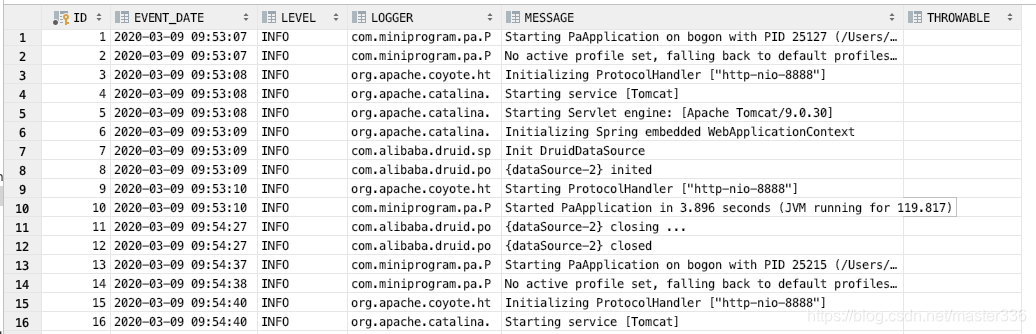
参考SQL:
create table tbl_log
(
	ID int auto_increment
		primary key,
	EVENT_DATE datetime null,
	LEVEL varchar(20) null,
	LOGGER varchar(20) null,
	MESSAGE text null,
	THROWABLE text null
);
效果:
本文参与 腾讯云自媒体同步曝光计划,分享自作者个人站点/博客。
原始发表:2026-06-15,如有侵权请联系 cloudcommunity@tencent.com 删除
目录
腾讯云开发者

Copyright © 2013 - 2026 Tencent Cloud. All Rights Reserved. 腾讯云 版权所有
深圳市腾讯计算机系统有限公司 ICP备案/许可证号:粤B2-20090059  粤公网安备44030502008569号
腾讯云计算(北京)有限责任公司 京ICP证150476号 | 京ICP备11018762号