Redis集群部署及Springboot架构下应用(sentinel哨兵集群模式)

Redis集群部署及Springboot架构下应用(sentinel哨兵集群模式)

master336
发布于 2026-06-15 18:46:10
发布于 2026-06-15 18:46:10
导航
主从集群 哨兵集群 分区集群
环境:
redis:5.0.8 Springboot: 2.2.3.RELEASE redis安装参见:CentOS7下安装Redis(单机版) redis主从部署参见:Redis集群部署及Springboot架构下应用(主从集群模式)
集群方式及配置
基础配置集群配置:
后台运行(守护进程)
daemonize yes
去除保护模式(允许远程访问)
protected-mode no
#去除绑定(远程访问)
#bind 127.0.0.1
# 设置密码
requirepass redispwd
本次配置基于同一机器不通端口做集群,当redis位于不同机器时,部分配置可以省去(以下配置过程中会说明/【单机非必须】:当前机器仅运行一个redis实例)
sentinel哨兵集群
sentinel哨兵集群表现形式为主节点由sentinel决策,为较为常见的部署模式。 哨兵模式主要是为了解决在主从复制集群中宕机带来的节点维护问题。 主从配置(略) Redis集群部署及Springboot架构下应用(主从集群模式) 哨兵16379配置 复制一份配置文件命名为sentinel16379.conf(来源安装目录:redis-5.0.8/sentinel.conf) 修改如下配置
#哨兵服务端口,注意不能跟redis服务端口冲突,且每个哨兵端口不一样
port 16379
#后台运行(守护进程)
daemonize yes
#pid写入路径
pidfile /var/run/redis-sentinel16379.pid
#log目录
logfile "./sentinel/16379.log"
#工作目录
dir ./sentinel/16379
#关闭保护模式(取消该行前注释即可)
protected-mode no
#设置监控主节点信息(参考一下该项的配置 )
sentinel monitor mymaster 192.168.1.17 6379 2
#设置redis密码
sentinel auth-pass mymaster redispwd
哨兵16380配置 复制sentinel16379.conf 重命名为sentinel16380.conf( 修改如下配置
#哨兵服务端口,注意不能跟redis服务端口冲突,且每个哨兵端口不一样
port 16380
#pid写入路径
pidfile /var/run/redis-sentinel16380.pid
#log目录
logfile "./sentinel/16380.log"
#工作目录
dir ./sentinel/16380
哨兵16381配置 复制sentinel16379.conf 重命名为sentinel16381.conf( 修改如下配置
#哨兵服务端口,注意不能跟redis服务端口冲突,且每个哨兵端口不一样
port 16381
#pid写入路径
pidfile /var/run/redis-sentinel16381.pid
#log目录
logfile "./sentinel/16381.log"
#工作目录
dir ./sentinel/16381
哨兵16382配置 复制sentinel16379.conf 重命名为sentinel16382.conf( 修改如下配置
#哨兵服务端口,注意不能跟redis服务端口冲突,且每个哨兵端口不一样
port 16382
#pid写入路径
pidfile /var/run/redis-sentinel16382.pid
#log目录
logfile "./sentinel/16382.log"
#工作目录
dir ./sentinel/16382
注意:
- sentinel monitor mymaster 192.168.1.17 6379 2配置说明 mymaster: 监控主数据的名称,可自定义,如果修改记得同步修改如下配置中的mymaster
#判定master节点失活时间(单位毫秒)
sentinel down-after-milliseconds mymaster 30000
#主备切换时,slave最大同时同步个数(1:即主备切换每次一个slave节点向master同步)
sentinel parallel-syncs mymaster 1
#sentinel故障转移超时时间(单位毫秒)
sentinel failover-timeout mymaster 180000192.168.1.17:master节点的地址
6379:master节点的端口
2 :最低通过票数- 哨兵个数不可低于最低通过票数 启动哨兵
./bin/redis-sentinel sentinel16379.conf
./bin/redis-sentinel sentinel16380.conf
./bin/redis-sentinel sentinel16381.conf
./bin/redis-sentinel sentinel16382.conf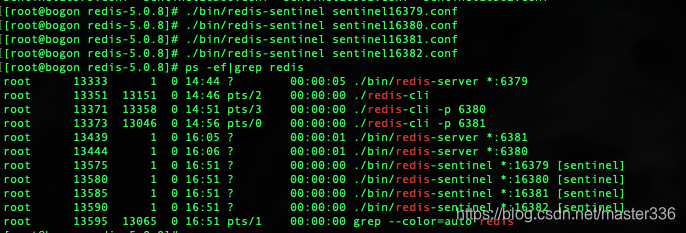
在这里插入图片描述
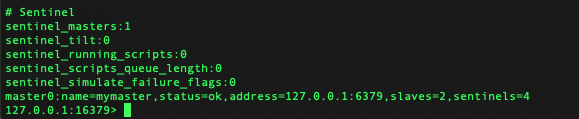
查看一下状态(info)
在这里插入图片描述
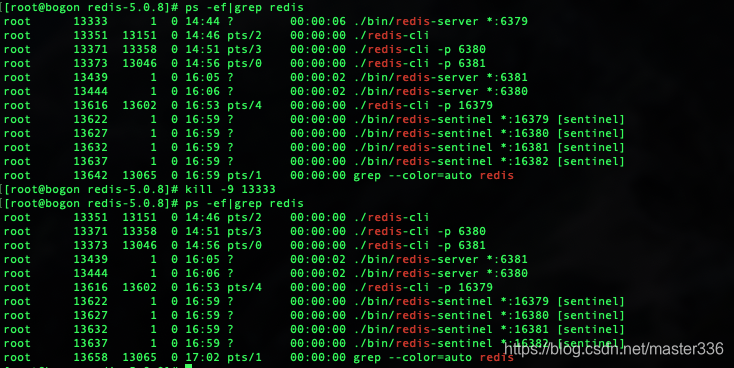
master节点状态、ip端口、丛节点个数、哨兵个数4 kill master节点,查看主备切换
在这里插入图片描述
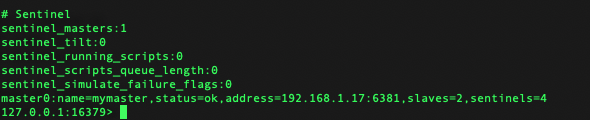
再次查看一下状态
在这里插入图片描述
主节点切换至6381 查看新的master节点信息
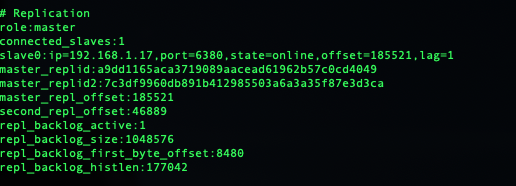
在这里插入图片描述
检查主写:
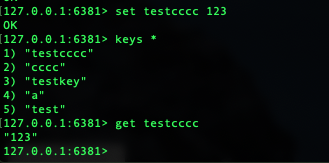
在这里插入图片描述
从节点读写
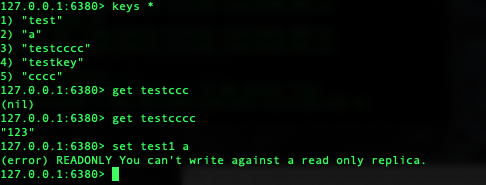
在这里插入图片描述
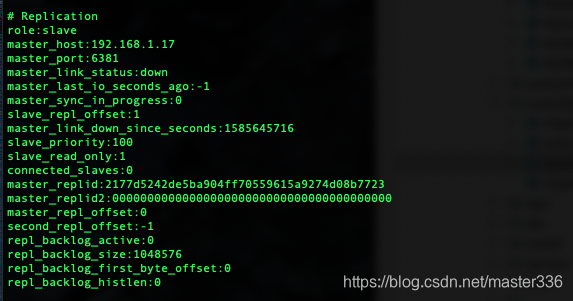
重启kill 掉的master节点,查看其状态

在这里插入图片描述
在这里插入图片描述
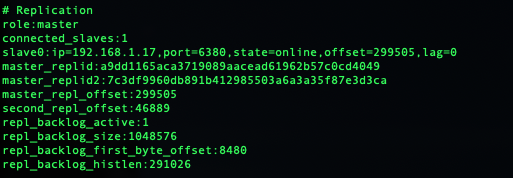
已经识别了master信息,但是未加入到slave列表里,查看master节点信息:
在这里插入图片描述
还是一个slave节点 此时新启动的节点无法正常集群工作,那么为什呢?分析一下 首先,因为这个节点时人为down掉的,所以网络时通的,这时候如果是个新的slave节点,那么差了什么呢?思考一下主从配置
#主节点地址(ip 端口)
slaveof 192.168.1.17 6379
#master节点密码 ,(打开注释,修改master的密码即可)
masterauth redispwd
从info信息上来看,master节点的ip和端口是正确的,那么应该是密码错了吧?想想好像原来的master节点并未配置masterauth,配置masterauth并重启看一下
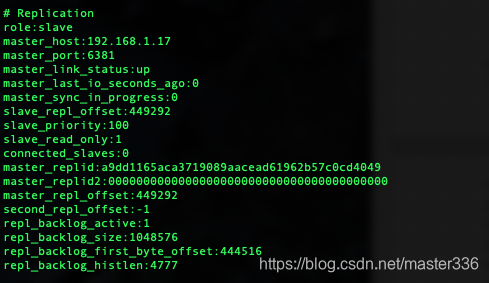
在这里插入图片描述
看一下master节点状态:
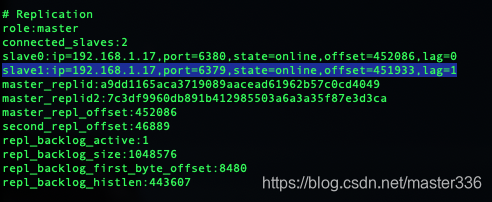
在这里插入图片描述
正常了
sentinel哨兵集群在Springboot中的配置
1. pom引入
        <!-- springboot整合redis -->
        <dependency>
            <groupId>org.springframework.boot</groupId>
            <artifactId>spring-boot-starter-data-redis</artifactId>
        </dependency>
2.yml配置(properties配置文件类型自行转换)
spring:
  redis:
     # 集群(哨兵)模式
    sentinel:
      nodes:
        - 192.168.1.17:16379
        - 192.168.1.17:16380
        - 192.168.1.17:16381
        - 192.168.1.17:16382
      master: mymaster
3.封装RedisTemplate MyRedisConfig.java
import com.fasterxml.jackson.annotation.JsonAutoDetect;
import com.fasterxml.jackson.annotation.PropertyAccessor;
import com.fasterxml.jackson.databind.ObjectMapper;
import org.springframework.boot.autoconfigure.data.redis.RedisProperties;
import org.springframework.cache.annotation.EnableCaching;
import org.springframework.context.annotation.Bean;
import org.springframework.context.annotation.Configuration;
import org.springframework.data.redis.connection.RedisConnectionFactory;
import org.springframework.data.redis.connection.RedisNode;
import org.springframework.data.redis.connection.RedisSentinelConfiguration;
import org.springframework.data.redis.core.RedisTemplate;
import org.springframework.data.redis.core.StringRedisTemplate;
import org.springframework.data.redis.core.ValueOperations;
import org.springframework.data.redis.serializer.Jackson2JsonRedisSerializer;
import org.springframework.data.redis.serializer.StringRedisSerializer;

@Configuration
@EnableCaching
public class MyRedisConfig {
    @Bean
    public RedisSentinelConfiguration redisSentinelConfiguration(RedisProperties redisProperties){
         RedisSentinelConfiguration configuration = new RedisSentinelConfiguration(redisProperties.getSentinel().getMaster(),new HashSet<>(redisProperties.getSentinel().getNodes()));
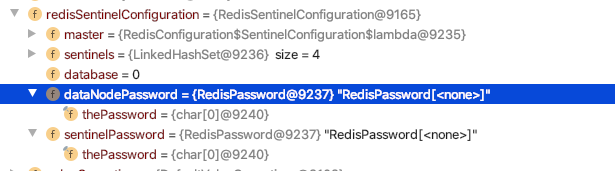
        // 实际使用过程中发现,yml中的密码并不会赋值到 检查RedisSentinelConfiguration发现nodepasswd仅有get和set方法,需要手动加入
        configuration.setPassword(redisProperties.getPassword().toCharArray());
        return configuration;
    }
    @Bean
    public RedisTemplate<Object, Object> redisTemplate(RedisConnectionFactory redisConnectionFactory) {
        RedisTemplate<Object, Object> redisTemplate = new RedisTemplate<>();
        redisTemplate.setConnectionFactory(redisConnectionFactory);
        // 使用Jackson2JsonRedisSerialize 替换默认的jdkSerializeable序列化
        Jackson2JsonRedisSerializer jackson2JsonRedisSerializer = new Jackson2JsonRedisSerializer(Object.class);
        ObjectMapper objectMapper = new ObjectMapper();
        objectMapper.setVisibility(PropertyAccessor.ALL, JsonAutoDetect.Visibility.ANY);
        objectMapper.enableDefaultTyping(ObjectMapper.DefaultTyping.NON_FINAL);
        jackson2JsonRedisSerializer.setObjectMapper(objectMapper);
        // 设置value的序列化规则和 key的序列化规则
        redisTemplate.setKeySerializer(new StringRedisSerializer());
        redisTemplate.setValueSerializer(jackson2JsonRedisSerializer);
        redisTemplate.afterPropertiesSet();
        return redisTemplate;
    }
    /**
     * 对redis字符串类型数据操作
     *
     * @param stringRedisTemplate
     * @return
     */
    @Bean({"valueoperations"})
    public ValueOperations<String, String> valueOperations(StringRedisTemplate stringRedisTemplate) {
        return stringRedisTemplate.opsForValue();
    }
}
4.测试Controller SysController.java
import com.platform.test.common.exception.BusinessException;
import com.platform.test.service.SysService;
import com.platform.test.vo.BaseRespVo;
import org.slf4j.Logger;
import org.slf4j.LoggerFactory;
import org.springframework.beans.factory.annotation.Autowired;
import org.springframework.beans.factory.annotation.Qualifier;
import org.springframework.data.redis.core.RedisTemplate;
import org.springframework.data.redis.core.ValueOperations;
import org.springframework.web.bind.annotation.RequestMapping;
import org.springframework.web.bind.annotation.RestController;

import javax.servlet.http.HttpSession;
import java.text.SimpleDateFormat;
import java.util.Date;
import java.util.HashMap;
import java.util.concurrent.TimeUnit;

@RestController
@RequestMapping("/sys")
public class SysController {
    static final Logger logger = LoggerFactory.getLogger(SysController.class);
    @Autowired
    @Qualifier("valueoperations")
    ValueOperations<String, String> valueOperations;
    @Autowired
    RedisTemplate<Object,Object> redisTemplate;
    @Autowired
    SysService sysService;
    final static String REDIS_TEST_KEY_VALUE = "__REDIS_TEST_KEY_VALUE";

    @RequestMapping("/health")
    public BaseRespVo health(HttpSession session) throws BusinessException {
        SimpleDateFormat sf = new SimpleDateFormat("yyyy-MM-dd hh:mm:ss");
        HashMap<String, Object> data = new HashMap<>();
        data.put("time-server",sf.format(new Date()));
        data.put("status-redis",checkRedis());
        return new BaseRespVo(data);
    }

    private boolean checkRedis() {
        long time = System.currentTimeMillis();
        if(valueOperations == null){
            return false;
        }
        try {
            valueOperations.set(REDIS_TEST_KEY_VALUE+time,REDIS_TEST_KEY_VALUE,300, TimeUnit.MILLISECONDS);
            logger.info("写入redis key: "+ REDIS_TEST_KEY_VALUE+time +" value:"+REDIS_TEST_KEY_VALUE);
            Thread.sleep(100);
            String value = valueOperations.get(REDIS_TEST_KEY_VALUE+time);
            if (value!=null && REDIS_TEST_KEY_VALUE.equals(value)) {
                logger.info("读取redis key: "+ REDIS_TEST_KEY_VALUE+time +" value:"+value);
                return true;
            }
        }catch (Exception e){
            logger.error("redis test exception!",e);
        }
        return false;
    }
}
执行结果:

在这里插入图片描述
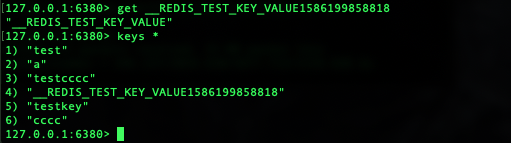
slave节点:
在这里插入图片描述
附:
RedisSentinelConfiguration不自动覆盖yml密码现象(解决办法在MyRedisConfig.java,有更好解决办法欢迎留言交流):
在这里插入图片描述
【补充】 sentinel模式下,无需对每个节点(master/slave)进行监视,启动时,主从关系由redis的主从配置决定,sentinel会自动从redis的master(slave)节点读取现有配置,当监视对象不可达时,根据(sentinel monitor )配置选举主节点并重新维护主从信息(自动修改sentinel配置文件)。
本文参与 腾讯云自媒体同步曝光计划,分享自作者个人站点/博客。
原始发表:2026-06-15,如有侵权请联系 cloudcommunity@tencent.com 删除
目录
腾讯云开发者

Copyright © 2013 - 2026 Tencent Cloud. All Rights Reserved. 腾讯云 版权所有
深圳市腾讯计算机系统有限公司 ICP备案/许可证号:粤B2-20090059  粤公网安备44030502008569号
腾讯云计算(北京)有限责任公司 京ICP证150476号 | 京ICP备11018762号