深入 GitHub Copilot SDK:架构设计与进阶应用

深入 GitHub Copilot SDK:架构设计与进阶应用

乱世不浮生
发布于 2026-06-18 09:06:01
发布于 2026-06-18 09:06:01
TL;DR
在完成了 GitHub Copilot SDK 入门:五分钟构建你的第一个 AI Agent 后,本文将带你深入理解 SDK 的底层设计:
核心架构:
- Client vs Session:连接管理器与对话上下文的职责分离,支持多会话并发和资源复用
- 事件驱动模型:从“请求 - 响应”到“订阅 - 推送”,实现进度感知、提前中断、细粒度控制
- 工具调用机制:LLM 通过工具描述和参数 schema 自主决策,无需硬编码调用逻辑
进阶能力:
- MCP 服务器集成:接入 GitHub、Slack、Notion 等预构建工具生态
- 自定义 Agent:构建专业化角色,携带长期记忆和特定工具集
- 性能优化:精简工具描述、控制返回值、选择合适模型,降低 token 成本
SDK 的价值不在于“简化 API 调用”,而是提供了一套经过生产验证的 Agent 运行时。理解其架构设计,才能在构建复杂应用时做出正确的技术选型。
引言:从入门到深入
如果你已经完成了 《GitHub Copilot SDK 入门:五分钟构建你的第一个 AI Agent》,你应该已经掌握了:
- 如何启动 SDK 客户端并创建会话
- 如何使用流式输出和事件监听
- 如何定义自定义工具并让 AI 调用
- 如何构建一个交互式命令行助手
但你可能还有这些疑问:
- 为什么要区分 Client 和 Session? 直接用一个类不行吗?
- 事件驱动模型的本质是什么? 为什么不用简单的回调函数?
- AI 是如何“决定”调用工具的? 背后的推理机制是什么?
- 如何将 SDK 应用于生产环境? 需要考虑哪些性能和成本问题?
本文将从架构设计的角度,解答这些问题。我们不会重复入门教程的代码示例,而是聚焦于为什么这样设计和如何用好这些设计。
阅读本文后,你将能够:
- 理解 SDK 的核心架构和设计哲学
- 在复杂场景中做出正确的技术决策
- 优化应用性能和成本
- 将 SDK 能力扩展到生产级应用
深入理解:核心概念梳理
经过四个步骤的实战,现在回到架构层面,梳理关键概念的设计逻辑。
Client vs Session:职责边界
Client 是“连接管理器”,职责单一:
- 启动/停止 CLI 进程(或连接到已有 CLI 服务器)
- 管理 JSON-RPC 通信通道
- 创建多个 Session(支持并发对话)
client = CopilotClient()
await client.start()  # Start once

# Can create multiple independent sessions
session1 = await client.create_session({"model": "gpt-4.1"})
session2 = await client.create_session({"model": "gpt-4o-mini"})

# session1 and session2 are completely isolated
Session 是“对话上下文”,承载:
- 模型配置(使用哪个 LLM)
- 工具注册(这个会话可以调用哪些函数)
- 对话历史(多轮对话的上下文)
- 事件监听器(如何处理流式输出)
为什么这样设计?
- 资源复用:一个 CLI 进程可以服务多个会话,降低启动开销
- 隔离性:不同会话的上下文独立,避免“串台”
- 灵活性:每个会话可以配置不同的模型、工具、系统提示词
年轻的读者可能知道“串台”,估计只有上了年纪的才了解,就是一个频道播放了另一个频道的节目。
事件驱动模型的设计哲学
传统的同步调用模式:
# Traditional way: blocking wait for complete response
response = llm.generate("Write an article")
print(response)  # Output after 30 seconds
SDK 的事件驱动模式:
# SDK way: subscribe to event stream
session.on(lambda event:
    print(event.data.delta_content, end="")
    if event.type == SessionEventType.ASSISTANT_MESSAGE_DELTA
    else None
)
await session.send_and_wait({"prompt": "Write an article"})
核心差异:从“请求 - 响应”变为“订阅 - 推送”。
这种设计让你的应用能够:
- 感知进度:实时显示 AI 思考过程
- 提前中断:检测到错误方向时立即停止
- 并发处理:在等待 AI 响应时处理其他任务
- 细粒度控制:区分“工具调用开始”、“工具结果返回”、“最终响应”等不同阶段
事件类型的层次结构
SDK 定义了 39 种标准化事件类型[1],让你能够精确控制 Agent 的行为,可按功能分为 4 大类:
- 助手消息:流式输出、完整消息、意图识别、推理过程、使用统计等
- 工具调用:工具执行的完整生命周期,执行开始、执行进度、部分结果、执行完成
- 会话状态:会话生命周期管理,如启动、空闲、错误、关闭、恢复、模型切换等
- 子智能体:多智能体协作编排,智能体选中、启动/完成/失败
- 其他:如技能调用、钩子机制、用户/系统消息
关键事件说明:
事件类型 | 触发时机 | 典型用途 |
|---|---|---|
ASSISTANT_MESSAGE_DELTA | AI 生成流式内容 | 实时显示输出 |
ASSISTANT_REASONING_DELTA | AI 推理过程(如果启用) | 调试 AI 决策逻辑 |
TOOL_EXECUTION_START | 工具开始执行 | 显示加载状态 |
TOOL_EXECUTION_PROGRESS | 工具执行中 | 进度条更新 |
TOOL_EXECUTION_COMPLETE | 工具执行完成 | 记录执行结果 |
SESSION_IDLE | 会话进入空闲 | 标记任务完成 |
SESSION_ERROR | 会话错误 | 错误处理和重试 |
SESSION_COMPACTION_START | 上下文压缩开始 | 长对话内存管理 |
SUBAGENT_STARTED | 子智能体启动 | 多智能体协作 |
你可以选择监听全部事件,或只关注特定类型:
def handle_event(event):
    if event.type == SessionEventType.ASSISTANT_MESSAGE_DELTA:
        # Only handle streaming output
        print(event.data.delta_content, end="")
    elif event.type == SessionEventType.TOOL_CALL:
        # Log tool usage
        log_tool_usage(event.data.tool_name)
BYOK 模式:跳出 GitHub 生态的可能性
默认情况下,SDK 使用你的 GitHub Copilot 订阅调用模型。但 BYOK(Bring Your Own Key) 模式允许你直接使用自己的 API 密钥:
session = await client.create_session({
    "model": "moonshot-v1-8k",  # Model must be specified when using BYOK
    "provider": {
        "type": "openai",  # Supports: "openai", "azure", "anthropic"
        "base_url": "https://api.moonshot.cn/v1",
        "api_key": os.environ["MOONSHOT_API_KEY"],
        # Optional: wire_api controls API format
        # "completions" (default) - Standard Chat Completions API
        # "responses" - New Responses API (for GPT-5 series)
    }
})
适用场景:
- 企业部署:使用私有部署的模型(Azure AI Foundry、本地 Ollama)
- 成本自主控制:直接使用自己的账户计费
- 模型选择灵活:接入 OpenAI、Azure、Anthropic、vLLM 等任何 OpenAI 兼容端点
关键限制:
- 身份认证限制:
为什么不支持 Entra ID? Entra ID 令牌有效期短(通常 1 小时),需要通过 Azure Identity SDK 自动刷新。SDK 的
bearer_token参数仅接受静态字符串,没有回调机制来请求新令牌。对于长期运行的工作负载,需要自行实现令牌刷新逻辑并创建新会话。- 不支持 Microsoft Entra ID(Azure AD):无法使用托管身份或服务主体
- 不支持联合身份:无 OIDC、SAML 等第三方身份提供商
- 仅支持静态凭证:API 密钥或静态 Bearer Token
- 功能限制:
- 模型可用性受服务提供商限制
- 速率限制由服务提供商控制,而非 Copilot
- 使用情况由服务提供商跟踪,不计入 GitHub Copilot 的使用量
- 高级请求不计入 Copilot 高级请求配额
- 配置注意事项:
- Azure 原生端点(
*.openai.azure.com):使用type: "azure",base_url只需主机(不含/openai/v1) - Azure AI Foundry(OpenAI 兼容端点):使用
type: "openai",base_url需包含/openai/v1/ - 本地 Ollama:使用
type: "openai",base_url为http://localhost:11434/v1,无需 API 密钥 - 国内提供商(如 Moonshot):使用
type: "openai"(OpenAI 兼容协议),配置对应的base_url和 API 密钥
- Azure 原生端点(
工具调用的 " 智能 " 在哪里?
关键问题:AI 如何知道该调用哪个工具?
答案:你提供的 description 和 parameters 会被注入到 LLM 的上下文中。
实际发送给 LLM 的 prompt 类似:
System: You can use the following tools:

1. get_weather
   Description: Get current weather for a specified city
   Parameters: {"city": "string (City name)"}

2. get_stock_price
   Description: Query real-time stock price
   Parameters: {"symbol": "string (Stock symbol)"}

User: What's the weather in Beijing today?

[AI Reasoning]
→ User asks about weather, should call get_weather
→ Parameters: {"city": "Beijing"}
LLM 返回一个结构化的函数调用请求,CLI 解析后触发你的 handler。
这就是为什么工具描述必须清晰:它是 AI 决策的唯一依据。
工具调用流程图
完整的工具调用流程如下:
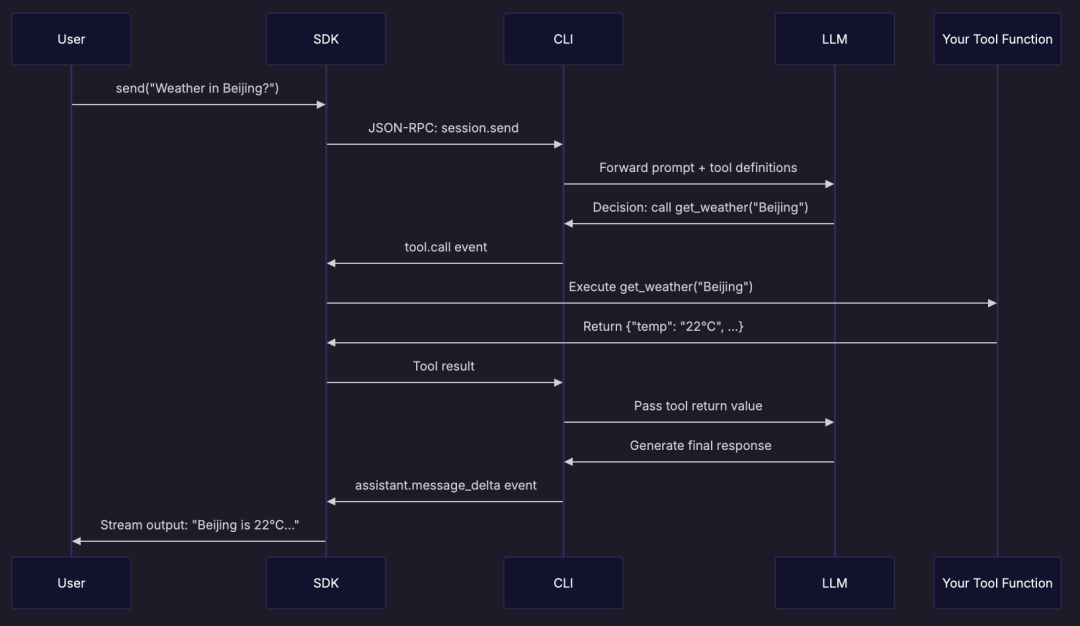
关键步骤解析:
- 工具定义注入:CLI 将你的工具描述转换为 LLM 可理解的 schema 跟随 Prompt 一起发送给 LLM
- AI 决策:LLM 分析用户问题,决定调用哪个工具及所需要的参数
- 工具执行:SDK 接收工具调用事件,执行你的 Python 函数
- 结果回传:工具返回值被送回 LLM,用于生成最终回答
- 流式输出:LLM 的响应通过消息事件逐步返回
性能与成本考量
每次对话的实际成本:
- 基础成本 = prompt tokens + completion tokens
- 工具调用成本 = 工具定义 schema tokens + 工具结果 tokens
优化(成本控制)建议:
- 精简工具描述:删除冗余的解释文字
- 控制工具返回值大小:只返回必要字段
- 使用更小的模型:
gpt-4o-mini适合简单任务 - 缓存常见查询:避免重复调用相同的工具
进阶应用:扩展 SDK 能力
掌握了核心概念后,让我们看看如何扩展 SDK 的应用场景。
1. MCP 服务器集成:接入预构建工具生态
MCP(Model Context Protocol)[2] 是一个标准化协议,让 AI Agent 可以连接到各种外部服务。GitHub 提供了官方的 MCP 服务器,可以直接访问仓库、Issues、Pull Requests:
session = await client.create_session({
    "model": "gpt-4.1",
    "mcp_servers": {
        "github": {
            "type": "http",
            "url": "https://api.githubcopilot.com/mcp/",
            "headers": {"Authorization": "Bearer ${TOKEN}"},
            "tools": ["*"],
        }
    }
})

# AI can now interact with GitHub directly
await session.send_and_wait({
    "prompt": "List the last 10 Issues from kubernetes/kubernetes repository"
})
2. 自定义 Agent:构建专业化角色
为不同场景创建定制化的 AI 角色:
session = await client.create_session({
    "custom_agents": [{
        "name": "code-reviewer",
        "display_name": "Code Review Expert",
        "description": "Focus on code quality, security, and performance optimization",
        "prompt": """You are a senior code review expert. Review criteria:
1. Security vulnerabilities (SQL injection, XSS, etc.)
2. Performance bottlenecks (N+1 queries, memory leaks)
3. Maintainability (naming, comments, test coverage)
Always point out specific issues and provide improvement suggestions."""
    }]
})
Agent 可以携带长期记忆、专业词汇表、特定工具集,成为你团队的“虚拟专家”。
3. 多客户端协作与调试
开发阶段,可以手动启动 CLI 服务器,多个 SDK 客户端连接到同一服务器:
# Terminal 1: Start CLI server
copilot --headless --log-level debug --port 9999

# Terminal 2: Python client
# Terminal 3: Node.js client
# Both connect to the same server
client = CopilotClient({
    'cli_url': 'http://localhost:9999',
})
await client.start()  # Connects directly, doesn't start new process
适用场景:
- 跨语言协作:Python 客户端 + Node.js 客户端连接同一服务器
- 调试工具调用逻辑:观察 CLI 日志,理解工具调用链路
- 节省启动时间:多个脚本共享同一 CLI 进程
注意:这种模式主要用于开发和调试。生产环境建议每个应用独立管理 CLI 进程,避免单点故障。
参考资料
[1]
39 种标准化事件类型: https://github.com/github/copilot-sdk/blob/main/python/copilot/generated/session_events.py#L1108
[2]
MCP(Model Context Protocol): https://github.com/modelcontextprotocol
本文参与 腾讯云自媒体同步曝光计划,分享自微信公众号。
原始发表:2026-02-14,如有侵权请联系 cloudcommunity@tencent.com 删除
评论
登录后参与评论
推荐阅读
目录
腾讯云开发者

Copyright © 2013 - 2026 Tencent Cloud. All Rights Reserved. 腾讯云 版权所有
深圳市腾讯计算机系统有限公司 ICP备案/许可证号:粤B2-20090059  粤公网安备44030502008569号
腾讯云计算(北京)有限责任公司 京ICP证150476号 | 京ICP备11018762号