python: sql server insert record

python: sql server insert record

geovindu
发布于 2026-06-19 09:52:35
发布于 2026-06-19 09:52:35
sql script:
DROP TABLE InsuranceMoney
GO
create table InsuranceMoney
(
    ID INT IDENTITY(1,1) PRIMARY KEY,
    InsuranceName nvarchar(50),
    InsuranceCost float,
    IMonth int
 )
go"""
SQLServerDAL.py
SQL Server 数据库操作
date 2023-06-13
edit: Geovin Du,geovindu, 涂聚文
ide: PyCharm 2023.1 python 11
参考:https://learn.microsoft.com/zh-cn/sql/connect/python/pymssql/step-3-proof-of-concept-connecting-to-sql-using-pymssql?view=sql-server-ver16
"""
import os
import sys
from pathlib import Path
import re
import pymssql #sql server
import Insurance
class SQLclass(object):
"""
Sql server
"""
def select(self):
"""
查询所有记录
:return:
"""
conn = pymssql.connect(server='DESKTOP-NQK85G5\GEOVIN2008', user='sa', password='geovindu', database='Student')
cursor = conn.cursor()
cursor.execute('select * from InsuranceMoney;')
row = cursor.fetchone()
while row:
print(str(row[0]) + " " + str(row[1]) + " " + str(row[2]))
row = cursor.fetchone()
def insert(iobject):
"""
插入操作
param:iobject 输入保险类
:return:
"""
dubojd = Insurance.InsuranceMoney(iobject)
conn = pymssql.connect(server='DESKTOP-NQK85G5\GEOVIN2008', user='sa', password='geovindu', database='Student')
cursor = conn.cursor()
cursor.execute(
"insert into InsuranceMoney(InsuranceName,InsuranceCost,IMonth) OUTPUT INSERTED.ID VALUES ('{0}', {1}, {2})".format(
dubojd.getInsuranceName, dubojd.getInsuranceCost, dubojd.getIMonth))
row = cursor.fetchone()
while row:
print("Inserted InsuranceMoney ID : " + str(row[0]))
row = cursor.fetchone()
conn.commit()
conn.close()
def insertStr(InsuranceName, InsuranceCost, IMonth):
"""
插入操作
param:InsuranceName
param:InsuranceCost
param:IMonth
:return:
"""
conn = pymssql.connect(server='DESKTOP-NQK85G5\GEOVIN2008', user='sa', password='geovindu', database='Student')
cursor = conn.cursor()
cursor.execute(
"insert into InsuranceMoney(InsuranceName,InsuranceCost,IMonth) OUTPUT INSERTED.ID VALUES('{0}',{1},{2})".format(
InsuranceName, InsuranceCost, IMonth))
row = cursor.fetchone()
while row:
print("Inserted InsuranceMoney ID : " + str(row[0]))
row = cursor.fetchone()
conn.commit()
conn.close()调用:
"""
PythonAppReadExcel.py
edit: geovindu,Geovin Du,涂聚文
date 2023-06-13
ide: PyCharm 2023.1 python 11
保险
"""
# This is a sample Python script.
# python.exe -m pip install --upgrade pip
# Press Shift+F10 to execute it or replace it with your code.
# Press Double Shift to search everywhere for classes, files, tool windows, actions, and settings.

import xlrd
import xlwt
import xlwings as xw
import xlsxwriter
import openpyxl as ws
import pandas as pd
import pandasql
from pandasql import sqldf
import os
import sys
from pathlib import Path
import re
import Insurance
import ReadExcelData
import SQLServerDAL


def print_hi(name):
    # Use a breakpoint in the code line below to debug your script.
    print(f'Hi, {name}')  # Press Ctrl+F8 to toggle the breakpoint.


# Press the green button in the gutter to run the script.
if __name__ == '__main__':
    print_hi('PyCharm,geovindu,Geovin Du')
    #https://www.digitalocean.com/community/tutorials/pandas-read_excel-reading-excel-file-in-python
    #https://pandas.pydata.org/pandas-docs/stable/reference/api/pandas.DataFrame.convert_dtypes.html
    #https://www.geeksforgeeks.org/args-kwargs-python/
    insura=[]
    objlist=[]
    datalist = []
    dulist=[]
    # 查询某文件夹下的文件名
    folderPath = Path(r'C:\\Users\\geovindu\\PycharmProjects\\pythonProject2\\')
    fileList = folderPath.glob('*.xls')
    for i in fileList:
        stname = i.stem
        print(stname)
    # 查询文件夹下的文件  print(os.path.join(path, "User/Desktop", "file.txt"))
    dufile = ReadExcelData.ReadExcelData.ReadFileName(folderPath, 'xls')
    for f in dufile:
        fileurl = os.path.join(folderPath, f)
        dulist1 = ReadExcelData.ReadExcelData.ReadDataFile(fileurl)  # object is not callable 变量名称冲突的原因
        for duobj in dulist1:
            dulist.append(duobj)
        print(os.path.join(folderPath, f))

    ylsum = 0  # 养老
    llsum = 0  # 医疗
    totalsum = 0  # 一年费用
    for geovindu in dulist:
        # duobj = Insurance.Insurance
        print(geovindu)
        name = geovindu.getInsuranceName()
        duname = name.convert_dtypes()
        # yname = duname['Unnamed: 2']
        print(type(duname))
        print("保险类型:", duname)  # class 'pandas.core.series.Series
        strname = pd.Series(duname).values[0]
        coas1 = geovindu.getInsuranceCost()
        # coast = int(geovindu.getInsuranceCost())
        coas = coas1.convert_dtypes()
        coast = pd.Series(coas).values[0]  # int(coas)
        # print("casa",int(coas))
        totalsum = totalsum + coast
        if (strname == "养老"):
            ylsum = ylsum + coast
        if (strname == "医疗"):
            llsum = llsum + coast
        print("费用:", coast)
        month = int(geovindu.getIMonth())
        print("月份:", month)
        datalist.append([strname, coast, month])
        SQLServerDAL.SQLclass.insertStr(strname, coast, month)  # 插入数据库中
    print("一年养老", ylsum)
    print("一年医疗", llsum)
    print("一年费用", totalsum)
    # https: // pandas.pydata.org / pandas - docs / stable / reference / api / pandas.DataFrame.groupby.html
    # 导出数据生成EXCEL
    dataf = pd.DataFrame(datalist, columns=['保险类型', '交费金额', '交费月份'])  # 增加列名称
    dataf2 = pd.DataFrame({"统计类型": ["一年养老", "一年医疗", "一年费用"], "金额": [ylsum, llsum, totalsum]})
    dataf.sort_values('交费月份', inplace=True)  # 指定列排序
    print(sqldf('''SELECT 交费金额,交费月份 FROM dataf group by 交费月份 LIMIT 25'''))
    #staicmont=sqldf('''SELECT 交费金额,交费月份 FROM dataf group by 交费月份 LIMIT 25''')
    # 交费用分份统计
    # print(sqldf('''SELECT 交费金额,交费月份 FROM dataf group by 交费月份  LIMIT 25'''))
    staicmonth = sqldf('''SELECT 交费金额,交费月份 FROM dataf group by 交费月份 LIMIT 25''')

    with pd.ExcelWriter('geovindu.xlsx') as writer:
        dataf.to_excel(writer, sheet_name='2023年保险费用详情', index=False)
        dataf2.to_excel(writer, sheet_name='保险统计', index=False)
        staicmonth.to_excel(writer, sheet_name='月份统计', index=False)


# See PyCharm help at https://www.jetbrains.com/help/pycharm/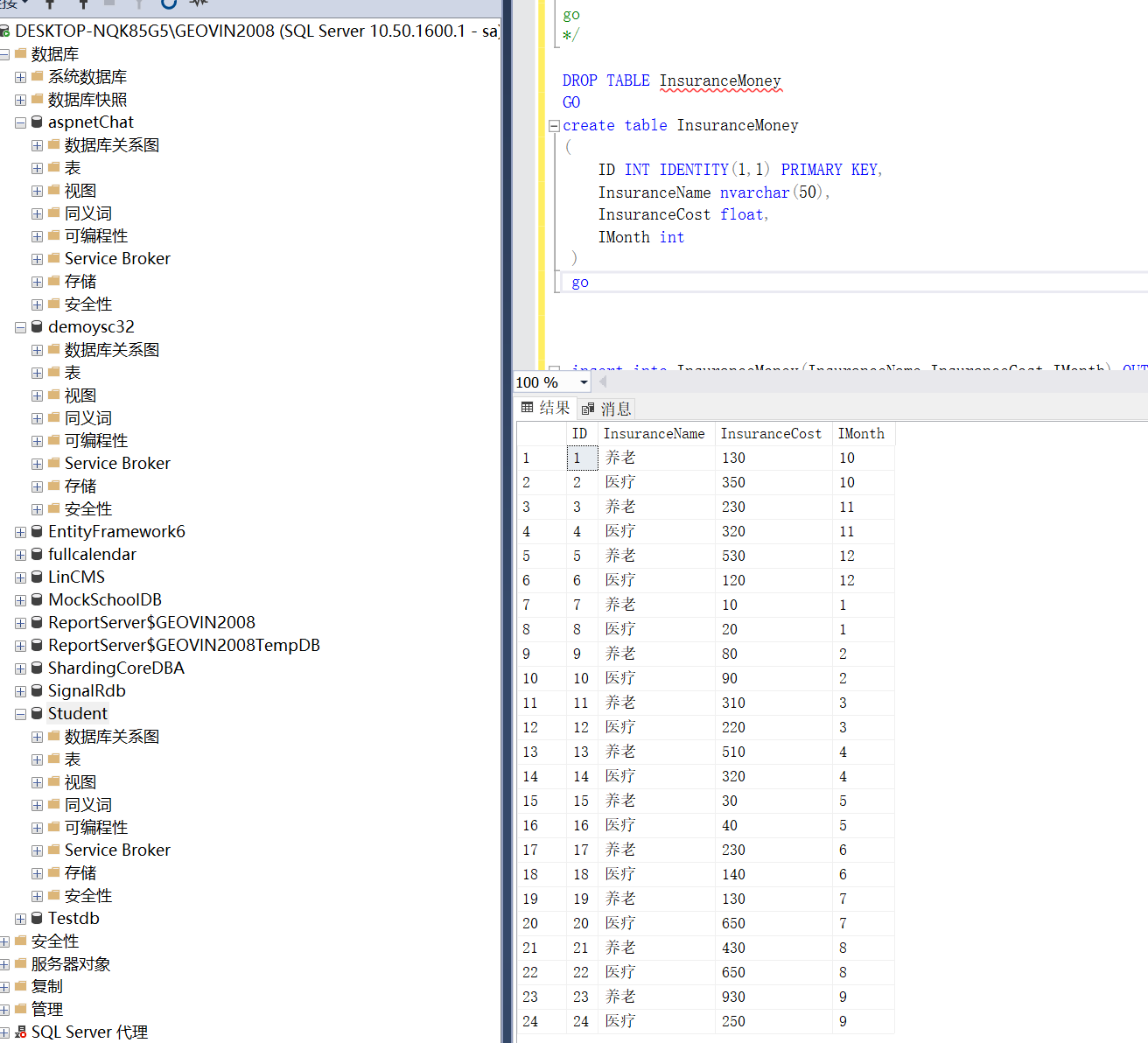
本文参与 腾讯云自媒体同步曝光计划,分享自作者个人站点/博客。
原始发表:2023-06-14,如有侵权请联系 cloudcommunity@tencent.com 删除
目录
腾讯云开发者

Copyright © 2013 - 2026 Tencent Cloud. All Rights Reserved. 腾讯云 版权所有
深圳市腾讯计算机系统有限公司 ICP备案/许可证号:粤B2-20090059  粤公网安备44030502008569号
腾讯云计算(北京)有限责任公司 京ICP证150476号 | 京ICP备11018762号