Tool系统设计精要

Tool系统设计精要

架构师部落
发布于 2026-06-22 13:35:46
发布于 2026-06-22 13:35:46
第4篇:Tool系统设计精要
构建可扩展的AI工具调用系统
Tool系统是 Claude Code 最核心的抽象之一,它定义了 AI 如何与外部世界交互。本篇将深入剖析 Tool 系统的设计哲学、接口定义和执行机制。
1. Tool系统架构概览
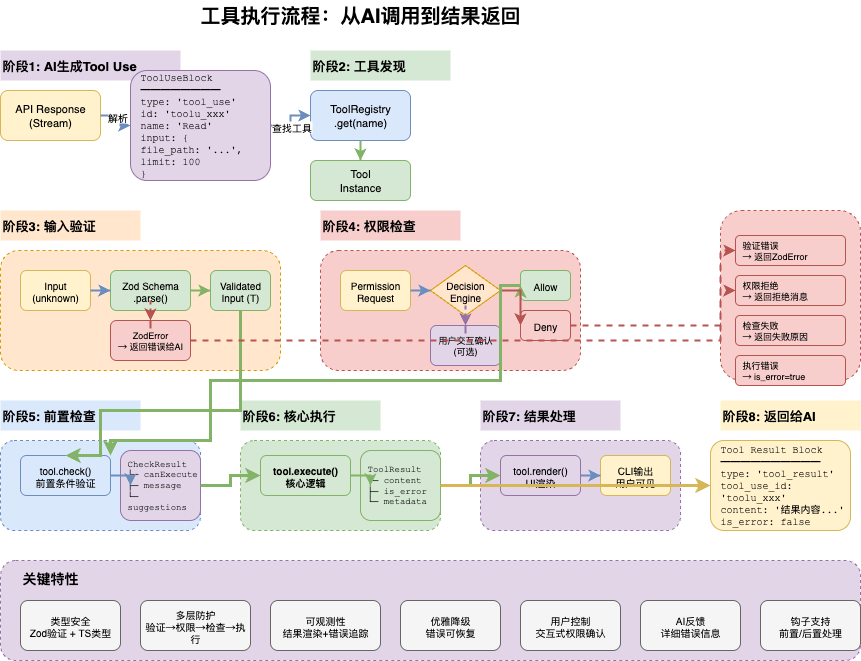
1.1 设计哲学
Claude Code 的 Tool 系统设计围绕以下核心原则:
原则 | 描述 | 实现方式 |
|---|---|---|
类型安全 | 输入输出完全类型化 | Zod Schema + TypeScript泛型 |
AI可理解 | 工具描述对AI友好 | 动态描述生成 |
安全可控 | 权限检查贯穿始终 | Permission系统 |
并发智能 | 自动判断并发安全性 | isConcurrencySafe |
可观测性 | 完整的执行追踪 | 渲染方法、日志 |
1.2 工具分类
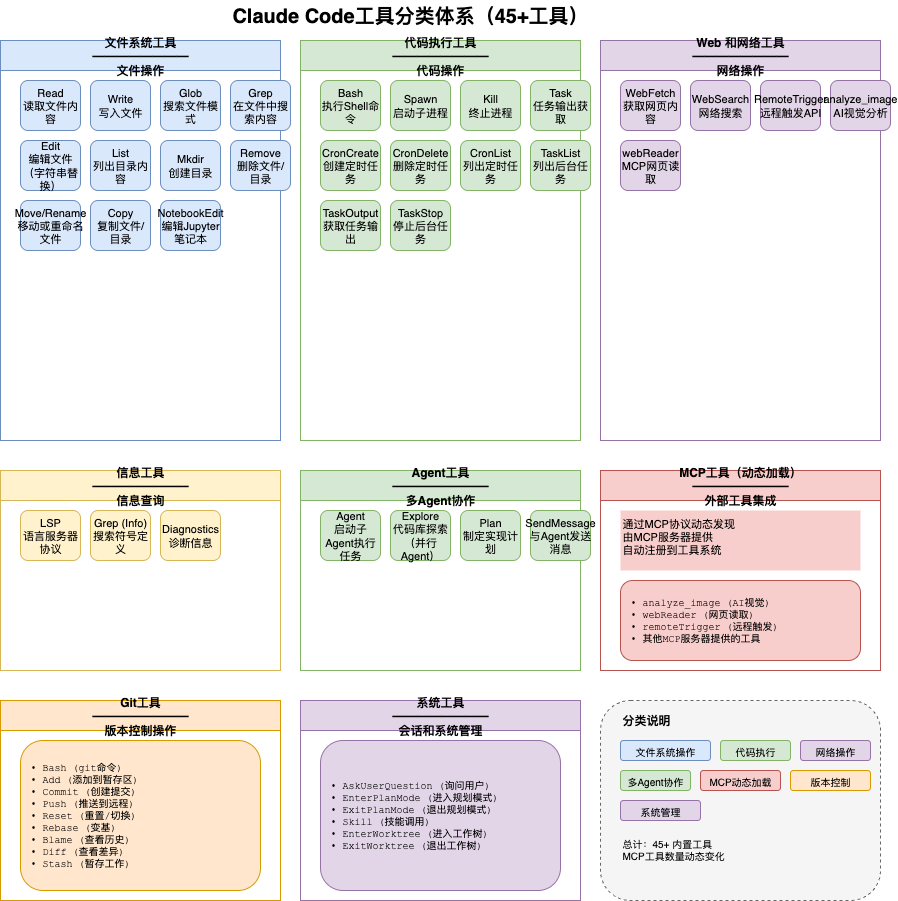
Claude Code 内置 45+ 工具,按功能分类:
工具分类
├── 文件操作 (File Operations)
│   ├── Read - 文件读取
│   ├── Write - 文件写入
│   ├── Edit - 文件编辑
│   └── MultiEdit - 批量编辑
│
├── 代码搜索 (Code Search)
│   ├── Glob - 文件模式匹配
│   ├── Grep - 内容搜索
│   └── LSP - 语言服务器协议
│
├── 执行 (Execution)
│   ├── Bash - Shell命令
│   ├── PowerShell - Windows命令
│   └── REPL - 代码执行
│
├── Web (Web)
│   ├── WebFetch - 网页获取
│   └── WebSearch - 网页搜索
│
├── AI功能 (AI Features)
│   ├── Agent - 子Agent调用
│   ├── Skill - 技能执行
│   └── Task - 任务管理
│
├── MCP (Model Context Protocol)
│   └── MCPTool - 外部工具集成
│
└── 系统 (System)
    ├── Config - 配置管理
    ├── Permission - 权限管理
    └── Hook - Hook管理
2. Tool接口设计
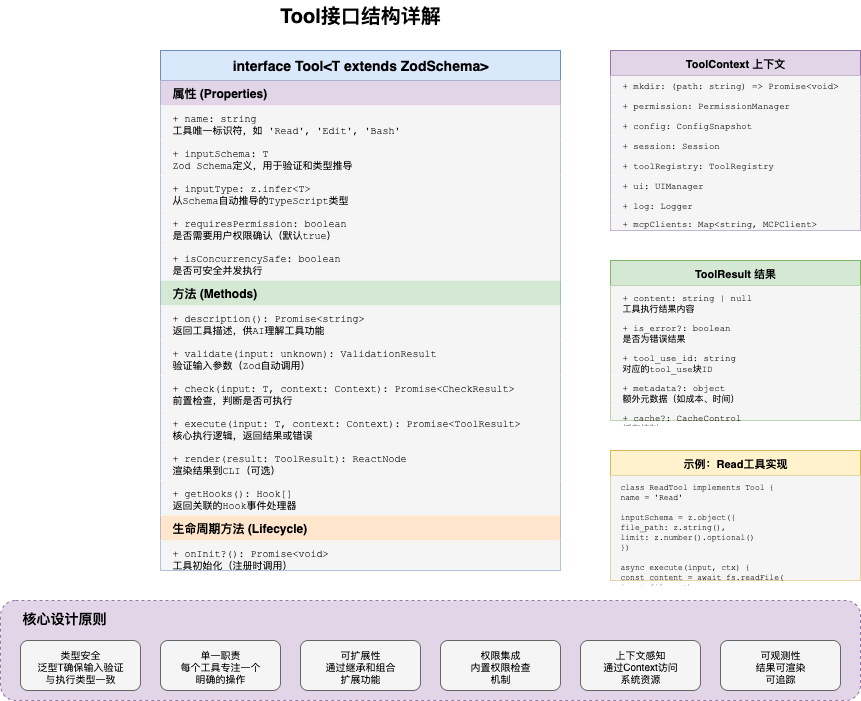
2.1 核心接口定义
Tool 接口是整个系统的基础:
// utils/Tool.ts - 核心接口
export interface Tool<TInput = unknown> {
  // 唯一标识
  name: string

  // 输入Schema(Zod)
  inputSchema: z.ZodType<TInput>

  // 描述生成(供AI理解)
  description: (input: TInput, options?: ToolOptions) => Promise<string>

  // 核心执行函数
  call: (input: TInput, context: ToolUseContext) => Promise<ToolResult>

  // 可选:权限检查
  checkPermissions?: (
    input: TInput,
    context: ToolUseContext
  ) => Promise<PermissionResult>

  // 可选:并发安全性判断
  isConcurrencySafe?: (input: TInput) => boolean

  // 可选:渲染方法
  renderToolUseMessage?: (input: TInput) => string
  renderToolResultMessage?: (result: ToolResult) => string

  // 可选:进度更新
  progress?: (input: TInput, context: ToolUseContext) => AsyncGenerator<string>

  // 可选:安全操作判断
  safeOperation?: (input: TInput, context: ToolUseContext) => boolean
}
2.2 泛型设计
泛型确保输入类型安全:
// 具体工具定义
interface ReadToolInput {
  file_path: string
  limit?: number
  offset?: number
}

const ReadTool: Tool<ReadToolInput> = {
  name: 'Read',
  inputSchema: z.object({
    file_path: z.string(),
    limit: z.number().optional(),
    offset: z.number().optional(),
  }),

  // description 自动推导 input 类型为 ReadToolInput
  description: async (input) => {
    return `Read file: ${input.file_path}`
  },

  // call 自动推导 input 类型为 ReadToolInput
  call: async (input, context) => {
    // TypeScript 知道 input.file_path 是 string
    const content = await readFile(input.file_path)
    return { type: 'success', value: content }
  },
}
2.3 上下文对象
ToolUseContext 提供执行上下文:
// ToolUseContext 定义
export interface ToolUseContext {
  // 权限
  toolPermissionContext: ToolPermissionContext

  // 会话信息
  sessionId: SessionId
  cwd: string

  // 回调函数
  onStatusUpdate: (status: string) => void
  requestPermission: (request: PermissionRequest) => Promise<boolean>

  // Agent
  agentDefinition?: AgentDefinition

  // 配置
  settings: SettingsJson

  // 日志
  logEvent: (event: string, data: object) => void
}
3. 工具描述系统
3.1 描述生成策略
工具描述对 AI 理解至关重要:
// description 方法设计
async description(input: TInput, options?: ToolOptions): Promise<string> {
  // 1. 基础描述
  let desc = this.baseDescription

  // 2. 输入摘要
  desc += `\nInput: ${JSON.stringify(input, null, 2)}`

  // 3. 动态信息
  if (options?.verbose) {
    desc += `\nWorking Directory: ${options.cwd}`
    desc += `\nAvailable Files: ${await this.getAvailableFiles()}`
  }

  return desc
}

// 示例:Read Tool 描述
const ReadTool = {
  name: 'Read',
  description: async (input) => {
    return `Read the contents of a file.

Parameters:
- file_path: ${input.file_path}
${input.limit ? `- limit: ${input.limit} lines` : ''}
${input.offset ? `- offset: start from line ${input.offset}` : ''}

Usage: Returns the file contents with line numbers.`
  },
}
3.2 AI友好的描述
// 为AI生成最佳描述
function generateToolDescription<TInput>(
  tool: Tool<TInput>,
  input: TInput
): Promise<string> {
  // 1. 工具名称和用途
  // 2. 输入参数说明
  // 3. 预期输出
  // 4. 使用示例
  // 5. 注意事项

  return `
Tool: ${tool.name}

Purpose: ${tool.purpose}

Input Schema:
${formatSchema(tool.inputSchema)}

Example Usage:
${generateExample(tool)}

Notes:
- ${tool.notes.join('\n- ')}
`
}
4. 权限集成
4.1 权限检查流程
// 工具执行时的权限检查
async function executeToolWithPermission<TInput>(
  tool: Tool<TInput>,
  input: TInput,
  context: ToolUseContext
): Promise<ToolResult> {
  // 1. 检查是否有权限检查方法
  if (tool.checkPermissions) {
    const result = await tool.checkPermissions(input, context)

    if (result.denied) {
      return {
        type: 'error',
        error: new PermissionDeniedError(result.reason),
      }
    }

    if (result.ask) {
      // 请求用户确认
      const approved = await context.requestPermission({
        tool: tool.name,
        input,
        reason: result.reason,
      })

      if (!approved) {
        return {
          type: 'error',
          error: new PermissionDeniedError('User denied'),
        }
      }
    }
  }

  // 2. 执行工具
  return tool.call(input, context)
}
4.2 权限规则示例
// Bash Tool 权限检查
const BashTool: Tool<BashInput> = {
  // ...

  checkPermissions: async (input, context) => {
    const command = input.command

    // 检查危险命令
    const dangerousPatterns = [
      /^rm\s+-rf/,
      /^sudo/,
      />\s*\/dev\/sd/,
    ]

    for (const pattern of dangerousPatterns) {
      if (pattern.test(command)) {
        return {
          denied: false,
          ask: true,
          reason: `Dangerous command detected: ${command}`,
        }
      }
    }

    // 检查权限规则
    const rules = context.toolPermissionContext.permissionRules
    const matchedRule = matchRules(command, rules)

    if (matchedRule?.deny) {
      return { denied: true, reason: 'Denied by policy' }
    }

    return { denied: false, ask: false }
  },
}
5. 并发执行策略
5.1 并发安全性判断
// services/tools/toolOrchestration.ts
function isConcurrencySafe<TInput>(
  tool: Tool<TInput>,
  input: TInput
): boolean {
  // 1. 工具自定义判断
  if (tool.isConcurrencySafe) {
    return tool.isConcurrencySafe(input)
  }

  // 2. 默认规则
  const readOnlyTools = ['Read', 'Glob', 'Grep', 'LSP']
  if (readOnlyTools.includes(tool.name)) {
    return true
  }

  // 3. 写操作默认不安全
  return false
}
5.2 工具分区执行
// 分区工具调用
async function* runTools(
  toolUseMessages: ToolUseBlock[],
  context: ToolUseContext
): AsyncGenerator<ToolResult> {
  // 分区:并发安全 vs 需串行
  const { safe, unsafe } = partitionByConcurrencySafety(toolUseMessages)

  // 并发执行安全工具
  if (safe.length > 0) {
    yield* Promise.all(
      safe.map(block => executeTool(block, context))
    )
  }

  // 串行执行不安全工具
  for (const block of unsafe) {
    yield await executeTool(block, context)
  }
}

// 分区逻辑
function partitionByConcurrencySafety(blocks: ToolUseBlock[]) {
  return {
    safe: blocks.filter(b => isConcurrencySafe(getTool(b.name), b.input)),
    unsafe: blocks.filter(b => !isConcurrencySafe(getTool(b.name), b.input)),
  }
}
5.3 执行策略图
工具执行策略
├── 只读工具 (并发安全)
│   ├── Read
│   ├── Glob
│   ├── Grep
│   └── LSP
│   └── → 可并行执行
│
├── 写入工具 (需串行)
│   ├── Write
│   ├── Edit
│   └── Bash
│   └── → 按顺序执行
│
└── 混合工具 (动态判断)
    ├── Agent (取决于子工具)
    └── MCP (取决于外部工具)
    └── → 根据输入判断
6. 工具注册与发现
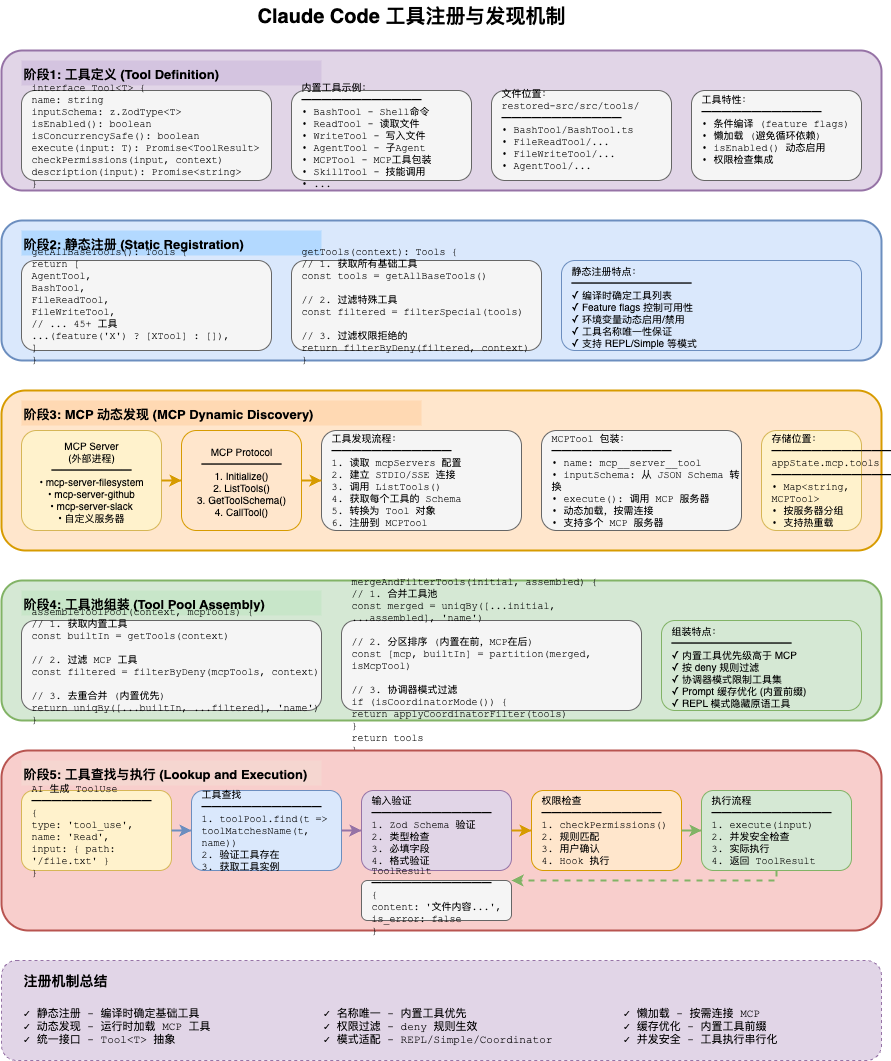
6.1 注册机制
// 工具注册表
const toolRegistry = new Map<string, Tool>()

function registerTool<TInput>(tool: Tool<TInput>): void {
  // 验证工具定义
  validateToolDefinition(tool)

  // 注册到全局表
  toolRegistry.set(tool.name, tool)

  // 更新工具描述缓存
  updateToolDescriptionCache(tool)
}

// 批量注册
function registerTools(tools: Tool[]): void {
  tools.forEach(registerTool)
}

// 获取工具
function getTool(name: string): Tool | undefined {
  return toolRegistry.get(name)
}

// 获取所有工具
function getAllTools(): Tool[] {
  return Array.from(toolRegistry.values())
}
6.2 动态工具发现
// MCP工具动态发现
async function discoverMCPTools(
  serverConfig: McpServerConfig
): Promise<Tool[]> {
  // 连接MCP服务器
  const client = await connectMcpServer(serverConfig)

  // 获取工具列表
  const tools = await client.listTools()

  // 转换为Tool接口
  return tools.map(mcpTool => ({
    name: `mcp_${serverConfig.name}_${mcpTool.name}`,
    inputSchema: convertMcpSchemaToZod(mcpTool.inputSchema),
    description: async (input) => mcpTool.description,
    call: async (input, context) => {
      return await client.callTool(mcpTool.name, input)
    },
  }))
}
7. 工具结果处理
7.1 结果类型
// 工具结果类型
export type ToolResult =
  | { type: 'success'; value: unknown }
  | { type: 'error'; error: Error }
  | { type: 'pending'; promise: Promise<unknown> }

// 结果处理
function handleToolResult(result: ToolResult): string {
  switch (result.type) {
    case 'success':
      return formatSuccessResult(result.value)

    case 'error':
      return formatErrorResult(result.error)

    case 'pending':
      return 'Operation in progress...'
  }
}
7.2 结果渲染
// 自定义渲染
const BashTool: Tool<BashInput> = {
  // ...

  renderToolUseMessage: (input) => {
    return `$ ${input.command}`
  },

  renderToolResultMessage: (result) => {
    if (result.type === 'success') {
      const { stdout, stderr, exitCode } = result.value
      return `
Exit Code: ${exitCode}
STDOUT:
${stdout}
${stderr ? `STDERR:\n${stderr}` : ''}
`
    }
    return `Error: ${result.error.message}`
  },
}
8. 实战:创建自定义工具
8.1 简单工具示例
// 创建一个简单的计算器工具
interface CalculatorInput {
  expression: string
}

const CalculatorTool: Tool<CalculatorInput> = {
  name: 'Calculator',
  inputSchema: z.object({
    expression: z.string().describe('Mathematical expression to evaluate'),
  }),

  description: async (input) => {
    return `Evaluate mathematical expression: ${input.expression}`
  },

  call: async (input, context) => {
    try {
      // 安全计算(实际应用中需要更严格的验证)
      const result = Function(
        '"use strict"; return (' + input.expression + ')'
      )()

      return {
        type: 'success',
        value: { expression: input.expression, result },
      }
    } catch (error) {
      return {
        type: 'error',
        error: new Error(`Failed to evaluate: ${error.message}`),
      }
    }
  },

  isConcurrencySafe: () => true,  // 计算是纯函数
}
8.2 复杂工具示例
// 创建一个数据库查询工具
interface DatabaseQueryInput {
  query: string
  database: string
  limit?: number
}

const DatabaseQueryTool: Tool<DatabaseQueryInput> = {
  name: 'DatabaseQuery',
  inputSchema: z.object({
    query: z.string().describe('SQL query to execute'),
    database: z.string().describe('Database connection name'),
    limit: z.number().max(1000).optional().describe('Max rows to return'),
  }),

  description: async (input) => {
    return `Execute SQL query on ${input.database}: ${input.query.substring(0, 100)}...`
  },

  checkPermissions: async (input, context) => {
    // 检查是否是SELECT查询
    if (!input.query.trim().toUpperCase().startsWith('SELECT')) {
      return {
        denied: true,
        reason: 'Only SELECT queries are allowed',
      }
    }

    // 检查数据库访问权限
    const allowedDatabases = context.settings.allowedDatabases ?? []
    if (!allowedDatabases.includes(input.database)) {
      return {
        denied: true,
        reason: `Database ${input.database} is not in allowed list`,
      }
    }

    return { denied: false, ask: false }
  },

  call: async (input, context) => {
    const db = getDatabaseConnection(input.database)

    try {
      const results = await db.query(input.query, {
        limit: input.limit ?? 100,
      })

      context.logEvent('database_query', {
        database: input.database,
        queryLength: input.query.length,
        rowCount: results.length,
      })

      return {
        type: 'success',
        value: {
          rows: results,
          rowCount: results.length,
          truncated: results.length === (input.limit ?? 100),
        },
      }
    } catch (error) {
      return {
        type: 'error',
        error: new Error(`Query failed: ${error.message}`),
      }
    }
  },

  isConcurrencySafe: () => true,  // 只读查询

  renderToolResultMessage: (result) => {
    if (result.type === 'success') {
      return `Query returned ${result.value.rowCount} rows${result.value.truncated ? ' (truncated)' : ''}`
    }
    return `Query failed: ${result.error.message}`
  },
}
9. 最佳实践总结
9.1 工具设计检查清单
- •输入Schema完整且有描述
- •描述方法返回有意义的信息
- •正确设置 isConcurrencySafe
- •实现权限检查(如需要)
- •提供友好的错误信息
- •记录关键操作日志
- •实现渲染方法(如需要)
9.2 性能优化建议
- 1. 延迟加载 - 大型工具按需加载
- 2. 结果缓存 - 只读工具结果可缓存
- 3. 流式输出 - 长时间操作提供进度更新
- 4. 并发执行 - 最大化并行度
实践练习
- 1. 创建简单工具 - 实现一个时间查询工具
- 2. 添加权限检查 - 为工具添加自定义权限逻辑
- 3. 实现并发安全 - 判断工具是否可并发执行
- 4. 自定义渲染 - 为工具结果创建自定义显示
下一篇预告
第5篇:权限与安全系统 - 深入理解 Claude Code 如何构建安全可控的 AI 权限系统。
本文参与 腾讯云自媒体同步曝光计划,分享自微信公众号。
原始发表:2026-04-02,如有侵权请联系 cloudcommunity@tencent.com 删除
目录
腾讯云开发者

Copyright © 2013 - 2026 Tencent Cloud. All Rights Reserved. 腾讯云 版权所有
深圳市腾讯计算机系统有限公司 ICP备案/许可证号:粤B2-20090059  粤公网安备44030502008569号
腾讯云计算(北京)有限责任公司 京ICP证150476号 | 京ICP备11018762号