40-Rust 教程 - Web 服务开发

40-Rust 教程 - Web 服务开发

LarryLan
发布于 2026-06-25 17:06:02
发布于 2026-06-25 17:06:02
Web 服务开发
从 CLI 到 HTTP:让你的程序学会"上网"——Axum/Actix-web 入门指南
🎬 引入
上篇咱们写了个 CLI 工具,只能在本地跑。但你想过没有,要是能让别人通过 HTTP 访问你的程序,那不就成 Web 服务了吗?
比如:
- 你写了个图片压缩工具,CLI 只能自己用
- 但要是做成 API,别人 POST 一张图片过来,你返回压缩后的,这不就能收费了吗?(资本家狂喜)
今天咱们就来聊聊怎么用 Rust 写 Web 服务。Rust 的 Web 生态现在相当成熟,主要有两个框架:
- Actix-web - 老牌劲旅,性能怪兽
- Axum - 后起之秀,tokio 官方出品
我的建议:新手学 Axum,API 设计更现代,错误处理更友好。老手随意,俩都挺好。
生活化类比:
- CLI 工具 = 实体店,客户得来店里
- Web 服务 = 网店,客户远程下单
咱们今天开网店!
📌 核心概念
Web 框架是啥?
简单说,Web 框架帮你处理那些"脏活累活":
- 解析 HTTP 请求
- 路由匹配(
/users去哪个函数) - 序列化响应
- 处理并发
类比: 开餐厅。Web 框架是厨房设备+服务员,你只管做菜(业务逻辑)。
Axum vs Actix-web
特性 | Axum | Actix-web |
|---|---|---|
背景 | tokio 官方出品 | 老牌框架 |
API 风格 | 函数组合,优雅 | 宏 + 构建器 |
性能 | 很快 | 飞快(性能怪兽) |
学习曲线 | 平缓 | 稍陡 |
生态 | 新但增长快 | 成熟完善 |
我的选择: Axum。为什么?因为它是 tokio 亲儿子,和 async 生态集成更好,代码写起来更像"正常 Rust"。
HTTP 基础回顾
别慌,我知道你可能忘了。快速复习:
请求:
GET /users/123 HTTP/1.1
Host: api.example.com

响应:
HTTP/1.1 200 OK
Content-Type: application/json

{"id": 123, "name": "Larry"}
核心概念:
- 方法:GET(查)、POST(增)、PUT/PATCH(改)、DELETE(删)
- 路径:
/users/123 - 状态码:200(成功)、404(没找到)、500(服务器炸了)
- Header:元数据(Content-Type、Authorization 等)
- Body:实际数据(JSON、HTML、文件等)
💻 代码示例
第一步:创建项目
cargo new my_web_service
cd my_web_service
修改 Cargo.toml:
[package]
name = "my_web_service"
version = "0.1.0"
edition = "2021"

[dependencies]
axum = "0.7"
tokio = { version = "1.35", features = ["full"] }
serde = { version = "1.0", features = ["derive"] }
serde_json = "1.0"
第二步:Hello World
// src/main.rs
use axum::{routing::get, Router};

#[tokio::main]
async fn main() {
    // 构建路由
    let app = Router::new()
        .route("/", get(root));

    // 启动服务
    let listener = tokio::net::TcpListener::bind("127.0.0.1:3000")
        .await
        .unwrap();

    println!("🚀 服务器运行在 http://127.0.0.1:3000");

    axum::serve(listener, app).await.unwrap();
}

// 处理函数
async fn root() -> &'static str {
    "Hello, Web!"
}
运行:
cargo run
访问: http://127.0.0.1:3000
输出: Hello, Web!
就这么简单? 对,就这么简单。Axum 的 API 设计就是让你少写样板代码。
第三步:返回 JSON
use axum::{routing::get, Router, Json};
use serde::Serialize;

#[derive(Serialize)]
struct User {
    id: u32,
    name: String,
    email: String,
}

async fn get_user() -> Json<User> {
    Json(User {
        id: ,
        name: "Larry".to_string(),
        email: "larry@example.com".to_string(),
    })
}

#[tokio::main]
async fn main() {
    let app = Router::new()
        .route("/user", get(get_user));

    // ... 启动代码
}
访问: http://127.0.0.1:3000/user
响应:
{
  "id": ,
  "name": "Larry",
  "email": "larry@example.com"
}
看到没? Json 包装器自动帮你序列化,连 Content-Type 都设好了。
第四步:路径参数
use axum::{routing::get, Router, Json, extract::Path};
use serde::{Serialize, Deserialize};

#[derive(Serialize)]
struct User {
    id: u32,
    name: String,
}

// 方式 1:Path 提取器
async fn get_user_by_id(Path(user_id): Path<u32>) -> Json<User> {
    Json(User {
        id: user_id,
        name: format!("User {}", user_id),
    })
}

// 方式 2:多个参数
async fn get_user_detail(Path((user_id, post_id)): Path<(u32, u32)>) -> &'static str {
    format!("User {} - Post {}", user_id, post_id)
}

#[tokio::main]
async fn main() {
    let app = Router::new()
        .route("/users/:id", get(get_user_by_id))
        .route("/users/:user_id/posts/:post_id", get(get_user_detail));

    // ... 启动代码
}
访问:
- http://127.0.0.1:3000/users/123 →
{"id": 123, "name": "User 123"} - http://127.0.0.1:3000/users/1/posts/2 →
User 1 - Post 2
吐槽: 看到 :id 没?这是路径参数占位符。Axum 自动帮你解析、类型转换。要是用户传 /users/abc?自动返回 404 + 错误信息,爽!
第五步:POST 请求 + 请求体
use axum::{routing::{get, post}, Router, Json, extract::Json as ExtractJson};
use serde::{Serialize, Deserialize};

#[derive(Serialize, Deserialize)]
struct CreateUser {
    name: String,
    email: String,
    age: Option<u32>,
}

#[derive(Serialize)]
struct UserResponse {
    id: u32,
    name: String,
    email: String,
    message: String,
}

async fn create_user(
    ExtractJson(payload): ExtractJson<CreateUser>,
) -> Json<UserResponse> {
    println!("收到创建用户请求:{:?}", payload);

    // 这里应该是数据库操作
    let user_id = ; // 模拟生成的 ID

    Json(UserResponse {
        id: user_id,
        name: payload.name,
        email: payload.email,
        message: "用户创建成功".to_string(),
    })
}

#[tokio::main]
async fn main() {
    let app = Router::new()
        .route("/users", post(create_user));

    // ... 启动代码
}
测试:
curl -X POST http://127.0.0.1:3000/users \
  -H "Content-Type: application/json" \
  -d '{"name": "Larry", "email": "larry@example.com", "age": 25}'
响应:
{
  "id": ,
  "name": "Larry",
  "email": "larry@example.com",
  "message": "用户创建成功"
}
第六步:查询参数
use axum::{routing::get, Router, extract::Query};
use serde::Deserialize;

#[derive(Deserialize)]
struct Pagination {
    page: Option<u32>,
    per_page: Option<u32>,
}

async fn list_users(Query(pagination): Query<Pagination>) -> &'static str {
    let page = pagination.page.unwrap_or();
    let per_page = pagination.per_page.unwrap_or();

    format!("第 {} 页,每页 {} 条", page, per_page)
}

#[tokio::main]
async fn main() {
    let app = Router::new()
        .route("/users", get(list_users));

    // ... 启动代码
}
访问:
- http://127.0.0.1:3000/users →
第 1 页,每页 10 条 - http://127.0.0.1:3000/users?page=2&per_page=20 →
第 2 页,每页 20 条
第七步:中间件(日志 + 认证)
use axum::{
    routing::{get, post},
    Router,
    Json,
    extract::State,
    middleware,
    response::IntoResponse,
    http::StatusCode,
};
use std::sync::Arc;
use tokio::sync::RwLock;

// 应用状态
#[derive(Clone)]
struct AppState {
    request_count: Arc<RwLock<u64>>,
}

// 日志中间件
async fn log_requests(
    method: String,
    uri: String,
    next: middleware::Next,
) -> impl IntoResponse {
    println!("📥 请求:{} {}", method, uri);

    let start = std::time::Instant::now();
    let response = next.run().await;
    let duration = start.elapsed();

    println!("📤 响应:{} {} (耗时:{:?})", method, uri, duration);

    response
}

// 简单认证中间件
async fn auth(
    auth_header: Option<String>,
    next: middleware::Next,
) -> Result<impl IntoResponse, (StatusCode, &'static str)> {
    match auth_header {
        Some(token) if token == "Bearer secret-token" => {
            Ok(next.run().await)
        }
        _ => Err((StatusCode::UNAUTHORIZED, "未授权")),
    }
}

async fn protected_handler() -> &'static str {
    "这是受保护的资源"
}

#[tokio::main]
async fn main() {
    let state = AppState {
        request_count: Arc::new(RwLock::new()),
    };

    let app = Router::new()
        .route("/public", get(|| async { "公开资源" }))
        .route("/protected", get(protected_handler))
        .layer(middleware::from_fn(log_requests))
        .route_layer(middleware::from_fn(auth)) // 只保护部分路由
        .with_state(state);

    // ... 启动代码
}
效果:
- 每个请求都打印日志
/protected需要Authorization: Bearer secret-token头/public不需要认证
🐛 常见坑点
坑 1:忘记加 #[tokio::main]
错误:
// 忘了 async 运行时
fn main() {
    let app = Router::new();
    // ...
}
编译错误:
error: future cannot be sent between threads safely
解决:
#[tokio::main]
async fn main() {
    // ...
}
吐槽: 这个错误信息跟天书似的。我查了半小时才发现是忘了 async 运行时。
坑 2:提取器顺序错了
错误:
async fn handler(
    body: String,  // ❌ 先 body
    path: Path<u32>, // ❌ 后 path
) {}
编译错误:
error: cannot use query/path/header extractor after body extractor
解决:
async fn handler(
    path: Path<u32>,  // ✅ 先 path/query/header
    body: String,     // ✅ 后 body
) {}
原因: body 会消费请求流,用了 body 就不能用其他提取器了。
坑 3:状态共享问题
错误:
// 直接用可变变量
let mut counter = ;

async fn handler() {
    counter += ; // ❌ 编译错误
}
解决:
use std::sync::Arc;
use tokio::sync::RwLock;

#[derive(Clone)]
struct AppState {
    counter: Arc<RwLock<u64>>,
}

async fn handler(State(state): State<AppState>) {
    let mut counter = state.counter.write().await;
    *counter += ;
}
原因: async 函数要能在线程间安全传递,得用 Arc + RwLock。
坑 4:CORS 问题(前端调用失败)
现象: 前端 fetch 报错:Access-Control-Allow-Origin
解决: 加 tower-http crate:
tower-http = { version = "0.5", features = ["cors"] }
use tower_http::cors::{CorsLayer, Any};

let app = Router::new()
    .route("/api", get(handler))
    .layer(
        CorsLayer::new()
            .allow_origin(Any) // 生产环境别用 Any!
            .allow_methods(Any)
            .allow_headers(Any)
    );
🎯 实战案例
案例:TODO API 服务
来个完整的:TODO 应用的 REST API。
use axum::{
    routing::{get, post, put, delete},
    Router,
    Json,
    extract::{Path, State},
    response::IntoResponse,
    http::StatusCode,
};
use serde::{Serialize, Deserialize};
use std::sync::Arc;
use tokio::sync::RwLock;
use std::collections::HashMap;

// 应用状态
#[derive(Clone)]
struct AppState {
    todos: Arc<RwLock<HashMap<u32, Todo>>>,
    next_id: Arc<RwLock<u32>>,
}

// 数据模型
#[derive(Serialize, Deserialize, Clone)]
struct Todo {
    id: u32,
    title: String,
    completed: bool,
}

#[derive(Deserialize)]
struct CreateTodo {
    title: String,
}

#[derive(Deserialize)]
struct UpdateTodo {
    title: Option<String>,
    completed: Option<bool>,
}

// 路由处理器
async fn list_todos(
    State(state): State<AppState>,
) -> Json<Vec<Todo>> {
    let todos = state.todos.read().await;
    let mut list: Vec<Todo> = todos.values().cloned().collect();
    list.sort_by_key(|t| t.id);
    Json(list)
}

async fn create_todo(
    State(state): State<AppState>,
    Json(payload): Json<CreateTodo>,
) -> impl IntoResponse {
    let mut todos = state.todos.write().await;
    let mut next_id = state.next_id.write().await;

    let id = *next_id;
    *next_id += ;

    let todo = Todo {
        id,
        title: payload.title,
        completed: false,
    };

    todos.insert(id, todo.clone());

    (StatusCode::CREATED, Json(todo))
}

async fn get_todo(
    Path(id): Path<u32>,
    State(state): State<AppState>,
) -> Result<Json<Todo>, (StatusCode, &'static str)> {
    let todos = state.todos.read().await;
    todos.get(&id)
        .cloned()
        .map(Json)
        .ok_or((StatusCode::NOT_FOUND, "TODO 不存在"))
}

async fn update_todo(
    Path(id): Path<u32>,
    State(state): State<AppState>,
    Json(payload): Json<UpdateTodo>,
) -> Result<Json<Todo>, (StatusCode, &'static str)> {
    let mut todos = state.todos.write().await;

    let todo = todos.get_mut(&id)
        .ok_or((StatusCode::NOT_FOUND, "TODO 不存在"))?;

    if let Some(title) = payload.title {
        todo.title = title;
    }
    if let Some(completed) = payload.completed {
        todo.completed = completed;
    }

    Ok(Json(todo.clone()))
}

async fn delete_todo(
    Path(id): Path<u32>,
    State(state): State<AppState>,
) -> Result<StatusCode, (StatusCode, &'static str)> {
    let mut todos = state.todos.write().await;

    if todos.remove(&id).is_some() {
        Ok(StatusCode::NO_CONTENT)
    } else {
        Err((StatusCode::NOT_FOUND, "TODO 不存在"))
    }
}

#[tokio::main]
async fn main() {
    let state = AppState {
        todos: Arc::new(RwLock::new(HashMap::new())),
        next_id: Arc::new(RwLock::new()),
    };

    let app = Router::new()
        .route("/todos", get(list_todos).post(create_todo))
        .route("/todos/:id", get(get_todo).put(update_todo).delete(delete_todo))
        .with_state(state);

    let listener = tokio::net::TcpListener::bind("127.0.0.1:3000")
        .await
        .unwrap();

    println!("🚀 TODO API 运行在 http://127.0.0.1:3000");

    axum::serve(listener, app).await.unwrap();
}
API 文档:
方法 | 路径 | 说明 |
|---|---|---|
GET | /todos | 获取所有 TODO |
POST | /todos | 创建 TODO |
GET | /todos/:id | 获取单个 TODO |
PUT | /todos/:id | 更新 TODO |
DELETE | /todos/:id | 删除 TODO |
测试:
# 创建
curl -X POST http://127.0.0.1:3000/todos \
  -H "Content-Type: application/json" \
  -d '{"title": "学习 Rust"}'

# 获取列表
curl http://127.0.0.1:3000/todos

# 更新
curl -X PUT http://127.0.0.1:3000/todos/1 \
  -H "Content-Type: application/json" \
  -d '{"completed": true}'

# 删除
curl -X DELETE http://127.0.0.1:3000/todos/1
🧠 思维导图
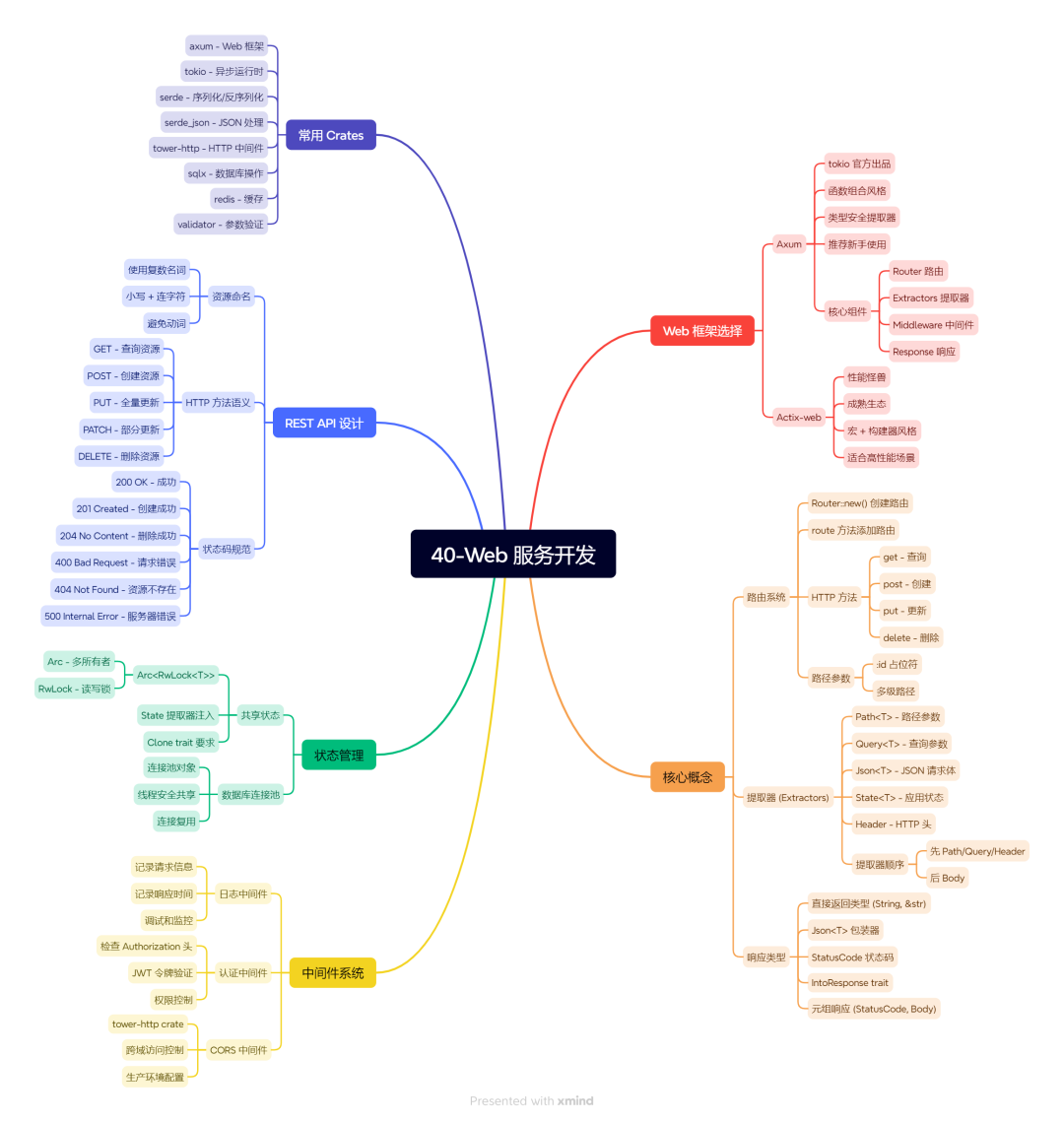
40-Web 服务开发
📝 小结
核心要点:
- Axum 是新手首选 - API 现代,文档友好,tokio 亲儿子
- 提取器是核心 - Path、Query、Json、State,类型安全又方便
- 中间件处理横切关注点 - 日志、认证、CORS,别写业务逻辑里
- 状态共享用 Arc - 线程安全,异步友好
- REST 设计有规范 - 资源命名、HTTP 方法、状态码,按套路来
金句:
Web 框架是厨房设备,你只管做菜。
提取器让参数解析像函数参数一样简单。
中间件是洋葱,请求一层层剥,响应一层层包。
下篇预告:
API 写好了,数据存哪?内存里?重启就没了!下篇咱们聊聊 数据库操作,用 SQLx 连接真实数据库,让你的数据持久化!
🔗 参考资料
- Axum 官方文档
- Axum 示例仓库
- Actix-web 文档
- Tower HTTP
- REST API 最佳实践
本文参与 腾讯云自媒体同步曝光计划,分享自微信公众号。
原始发表:2026-06-23,如有侵权请联系 cloudcommunity@tencent.com 删除
目录
腾讯云开发者

Copyright © 2013 - 2026 Tencent Cloud. All Rights Reserved. 腾讯云 版权所有
深圳市腾讯计算机系统有限公司 ICP备案/许可证号:粤B2-20090059  粤公网安备44030502008569号
腾讯云计算(北京)有限责任公司 京ICP证150476号 | 京ICP备11018762号