45-Rust 教程 - 性能优化

45-Rust 教程 - 性能优化

LarryLan
发布于 2026-06-30 14:59:13
发布于 2026-06-30 14:59:13
性能优化
让代码飞起来:基准测试、profiling 和零成本抽象
🎬 引入
你的 Rust 代码跑得太慢?别急着优化!
性能优化的第一原则: 先测量,再优化。
没有数据的优化都是瞎猜。今天咱们就聊聊 Rust 的性能优化全套流程:
- 📊 基准测试(benchmark)
- 🔍 Profiling(性能分析)
- ⚡ 零成本抽象
- 🎯 实战优化技巧
📌 核心概念
性能优化的黄金法则
法则 | 说明 |
|---|---|
先测量 | 没有数据别瞎优化 |
找瓶颈 | 80% 的时间花在 20% 的代码上 |
别过早优化 | 先让代码正确,再让它快 |
别优化冷路径 | 优化用户感知不到的地方没意义 |
生活化类比:
想象你要提速从家到公司:
- 瞎优化:换双更快的鞋(实际堵车才是瓶颈)
- 科学优化:先导航看哪段路最堵,再决定绕路还是换交通工具
基准测试工具
工具 | 用途 | 特点 |
|---|---|---|
criterion | 基准测试框架 | 统计严谨,图表丰富 |
cargo bench | 内置命令 | 需要 nightly |
iai | 指令数分析 | 不受系统负载影响 |
Profiling 工具
工具 | 平台 | 用途 |
|---|---|---|
perf | Linux | CPU 性能分析 |
Instruments | macOS | 全方位分析 |
VTune | 跨平台 | Intel 出品 |
samply | 跨平台 | Firefox 团队出品 |
cargo flamegraph | 跨平台 | 火焰图生成 |
💻 代码示例
基础示例:Criterion 基准测试
// Cargo.toml
[dev-dependencies]
criterion = "0.5"

[[bench]]
name = "my_benchmark"
harness = false

// benches/my_benchmark.rs
use criterion::{black_box, criterion_group, criterion_main, Criterion};

fn fibonacci(n: u64) -> u64 {
    match n {
         => ,
         => ,
        _ => {
            let mut a = ;
            let mut b = ;
            for _ in ..=n {
                let temp = a + b;
                a = b;
                b = temp;
            }
            b
        }
    }
}

fn fibonacci_recursive(n: u64) -> u64 {
    match n {
         => ,
         => ,
        _ => fibonacci_recursive(n - ) + fibonacci_recursive(n - ),
    }
}

fn criterion_benchmark(c: &mut Criterion) {
    c.bench_function("fib 20 iterative", |b| {
        b.iter(|| fibonacci(black_box()))
    });

    c.bench_function("fib 20 recursive", |b| {
        b.iter(|| fibonacci_recursive(black_box()))
    });
}

criterion_group!(benches, criterion_benchmark);
criterion_main!(benches);
运行:
cargo bench
输出:
fib 20 iterative      time:   [12.345 ns 12.456 ns 12.567 ns]
fib 20 recursive      time:   [1.234 ms 1.345 ms 1.456 ms]
说人话:
迭代版比递归版快 10 万倍!这就是为什么要基准测试。
比较不同实现
// benches/string_concat.rs
use criterion::{black_box, criterion_group, criterion_main, Criterion};

// 方法 1:+ 运算符
fn concat_with_plus(strings: &[&str]) -> String {
    let mut result = String::new();
    for s in strings {
        result = result + s;
    }
    result
}

// 方法 2:push_str
fn concat_with_push_str(strings: &[&str]) -> String {
    let mut result = String::new();
    for s in strings {
        result.push_str(s);
    }
    result
}

// 方法 3:预分配
fn concat_with_reserve(strings: &[&str]) -> String {
    let total_len: usize = strings.iter().map(|s| s.len()).sum();
    let mut result = String::with_capacity(total_len);
    for s in strings {
        result.push_str(s);
    }
    result
}

// 方法 4:join
fn concat_with_join(strings: &[&str]) -> String {
    strings.join("")
}

fn benchmark_concat(c: &mut Criterion) {
    let strings: Vec<&str> = vec!["hello"; ];

    c.bench_function("concat +", |b| {
        b.iter(|| concat_with_plus(black_box(&strings)))
    });

    c.bench_function("concat push_str", |b| {
        b.iter(|| concat_with_push_str(black_box(&strings)))
    });

    c.bench_function("concat reserve", |b| {
        b.iter(|| concat_with_reserve(black_box(&strings)))
    });

    c.bench_function("concat join", |b| {
        b.iter(|| concat_with_join(black_box(&strings)))
    });
}

criterion_group!(benches, benchmark_concat);
criterion_main!(benches);
Profiling:生成火焰图
# 安装 cargo-flamegraph
cargo install flamegraph

# 生成火焰图
cargo flamegraph --bin my_program

# 输出:flamegraph.svg
打开 flamegraph.svg,你就能看到哪个函数最耗时。
优化示例:减少分配
// ❌ 低效:每次都分配新 String
fn process_words_low_efficiency(words: &[&str]) -> Vec<String> {
    let mut result = Vec::new();
    for word in words {
        let processed = word.to_uppercase();
        result.push(processed);
    }
    result
}

// ✅ 高效:预分配容量
fn process_words_high_efficiency(words: &[&str]) -> Vec<String> {
    let mut result = Vec::with_capacity(words.len());
    for word in words {
        let processed = word.to_uppercase();
        result.push(processed);
    }
    result
}

// ✅ 更高效:用迭代器
fn process_words_iterator(words: &[&str]) -> Vec<String> {
    words.iter()
        .map(|word| word.to_uppercase())
        .collect()
}
优化示例:避免不必要的克隆
// ❌ 不必要的克隆
fn process_data_clone(data: Vec<i32>) -> i32 {
    let cloned = data.clone();  // 没必要
    cloned.iter().sum()
}

// ✅ 借用
fn process_data_borrow(data: &[i32]) -> i32 {
    data.iter().sum()
}

// ❌ 返回时克隆
fn get_data_clone() -> Vec<i32> {
    let data = vec![, , , , ];
    data.clone()  // 没必要
}

// ✅ 直接移动
fn get_data_move() -> Vec<i32> {
    vec![, , , , ]
}
优化示例:使用更合适的数据结构
// ❌ 用 Vec 做频繁查找
fn find_user_vec(users: &[(u32, &str)], id: u32) -> Option<&str> {
    users.iter().find(|(user_id, _)| *user_id == id).map(|(_, name)| *name)
}

// ✅ 用 HashMap
use std::collections::HashMap;

fn find_user_hashmap(users: &HashMap<u32, String>, id: u32) -> Option<&str> {
    users.get(&id).map(|s| s.as_str())
}
性能对比:
- Vec 查找:O(n)
- HashMap 查找:O(1)
零成本抽象示例
// Rust 的迭代器是零成本抽象
// 编译后和手写循环一样快

// ✅ 迭代器版本
fn sum_squares_iter(numbers: &[i32]) -> i32 {
    numbers.iter()
        .map(|&x| x * x)
        .sum()
}

// ✅ 手写循环版本
fn sum_squares_loop(numbers: &[i32]) -> i32 {
    let mut sum = ;
    for &x in numbers {
        sum += x * x;
    }
    sum
}

// 编译后两者性能一样!
SIMD 优化(自动向量化)
// Rust 编译器会自动使用 SIMD 优化
fn sum_array(arr: &[i32]) -> i32 {
    arr.iter().sum()  // 编译器可能生成 SIMD 指令
}

// 显式使用 SIMD(需要 nightly)
// #![feature(portable_simd)]
use std::simd::{i32x8, Simd};

fn sum_array_simd(arr: &[i32]) -> i32 {
    let chunks = arr.chunks_exact();
    let remainder = chunks.remainder();

    let mut sum = i32x8::splat();

    for chunk in chunks {
        let vec = i32x8::from_slice(chunk);
        sum += vec;
    }

    sum.reduce_sum() + remainder.iter().sum::<i32>()
}
🐛 常见坑点
坑点 1:过早优化
// ❌ 还没测量就优化
fn process(data: &[i32]) -> Vec<i32> {
    // 手动展开循环
    let mut result = Vec::with_capacity(data.len());
    let mut i = ;
    while i < data.len() {
        result.push(data[i] * );
        i += ;
    }
    result
}

// ✅ 先写清晰的代码
fn process(data: &[i32]) -> Vec<i32> {
    data.iter().map(|&x| x * ).collect()
}

// 然后测量,如果慢再优化
坑点 2:优化冷路径
// ❌ 优化用户感知不到的地方
fn format_error_message(code: i32) -> String {
    // 花了很多时间优化这个很少调用的函数
    // ...
}

// ✅ 优化热点代码
fn process_large_dataset(data: &[u8]) -> Vec<u8> {
    // 这个函数被调用几百万次,值得优化
    // ...
}
坑点 3:忽略算法复杂度
// ❌ O(n²) 的算法,再怎么微优化也没用
fn find_duplicates_slow(arr: &[i32]) -> Vec<i32> {
    let mut duplicates = Vec::new();
    for i in ..arr.len() {
        for j in (i + )..arr.len() {
            if arr[i] == arr[j] && !duplicates.contains(&arr[i]) {
                duplicates.push(arr[i]);
            }
        }
    }
    duplicates
}

// ✅ O(n) 的算法
use std::collections::HashSet;

fn find_duplicates_fast(arr: &[i32]) -> Vec<i32> {
    let mut seen = HashSet::new();
    let mut duplicates = HashSet::new();

    for &x in arr {
        if !seen.insert(x) {
            duplicates.insert(x);
        }
    }

    duplicates.into_iter().collect()
}
坑点 4:Release 模式和 Debug 模式
// ❌ 用 Debug 模式测性能
cargo run  // Debug 模式,没优化

// ✅ 用 Release 模式
cargo run --release  // 开启优化

// 基准测试自动用 Release 模式
cargo bench
🎯 实战案例
案例 1:Web 服务器性能优化
// 优化前
fn handle_request(request: &str) -> String {
    let mut response = String::new();
    response.push_str("HTTP/1.1 200 OK\r\n");
    response.push_str("Content-Type: text/html\r\n");
    response.push_str("\r\n");
    response.push_str("<html><body>Hello</body></html>");
    response
}

// 优化后:用 &str 字面量
fn handle_request_optimized(request: &str) -> &'static str {
    "HTTP/1.1 200 OK\r\n\
     Content-Type: text/html\r\n\
     \r\n\
     <html><body>Hello</body></html>"
}
案例 2:数据处理管道优化
// 优化前:多次遍历
fn process_pipeline(data: &[i32]) -> Vec<i32> {
    let filtered: Vec<_> = data.iter().filter(|&&x| x > ).collect();
    let mapped: Vec<_> = filtered.iter().map(|&x| x * ).collect();
    let sorted: Vec<_> = mapped.iter().copied().sorted().collect();
    sorted
}

// 优化后:单次遍历
fn process_pipeline_optimized(data: &[i32]) -> Vec<i32> {
    let mut result: Vec<_> = data.iter()
        .filter(|&&x| x > )
        .map(|&x| x * )
        .collect();
    result.sort();
    result
}
案例 3:内存池优化
// 频繁分配释放的场景,用内存池
use std::sync::Mutex;
use lazy_static::lazy_static;

lazy_static! {
    static ref STRING_POOL: Mutex<Vec<String>> = Mutex::new(
        (..).map(|_| String::with_capacity()).collect()
    );
}

fn get_string_from_pool() -> String {
    STRING_POOL.lock().unwrap().pop()
        .unwrap_or_else(|| String::with_capacity())
}

fn return_string_to_pool(mut s: String) {
    s.clear();
    STRING_POOL.lock().unwrap().push(s);
}
🧠 思维导图
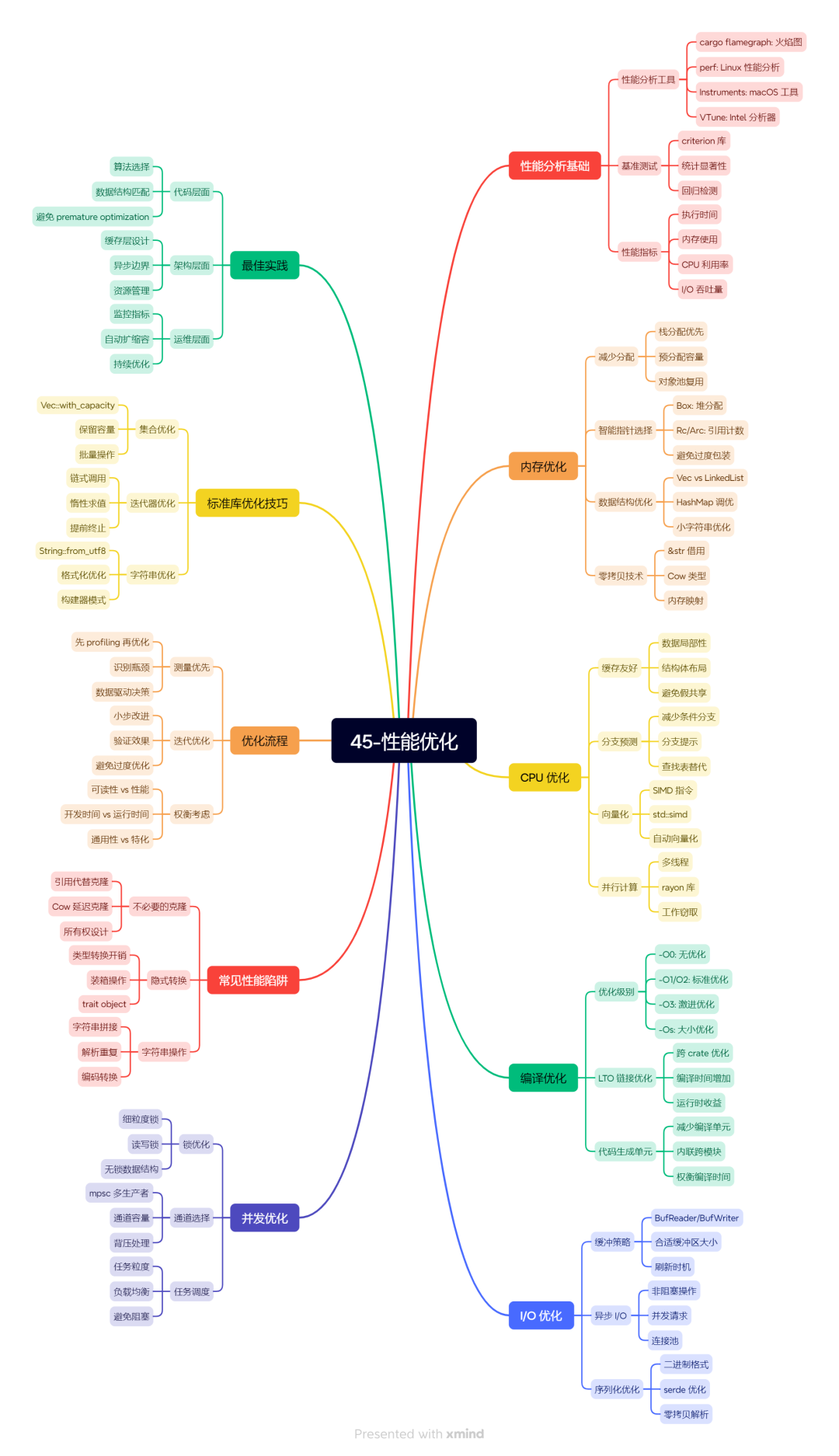
45-性能优化
📝 小结
金句回顾:
- 先测量再优化——没有数据的优化都是瞎猜
- 80/20 法则——80% 的时间花在 20% 的代码上
- 算法 > 微优化——O(n) 永远比 O(n²) 快
- 零成本抽象——迭代器、闭包编译后和手写一样快
- Release 模式——Debug 模式测性能没意义
下篇预告:
终于到了最后一篇!下篇是完整项目实战,咱们从零开始构建一个完整的 Rust 应用,把前面学的知识都用上!
🔗 参考资料
- Criterion 文档
- Flamegraph
- Rust Performance Book
本文参与 腾讯云自媒体同步曝光计划,分享自微信公众号。
原始发表:2026-06-23,如有侵权请联系 cloudcommunity@tencent.com 删除
目录
腾讯云开发者

Copyright © 2013 - 2026 Tencent Cloud. All Rights Reserved. 腾讯云 版权所有
深圳市腾讯计算机系统有限公司 ICP备案/许可证号:粤B2-20090059  粤公网安备44030502008569号
腾讯云计算(北京)有限责任公司 京ICP证150476号 | 京ICP备11018762号