PHP异步OpenAI客户端3.0发布,支持协程!


概述
OpenAI 客户端 3.0 发布,支持协程。webman/openai 是一个异步非阻塞的 openai 客户端,配合webman可以做到同一时刻支持上万并发调用,使用简单,返回如丝般的顺滑。
传统 php-fpm 架构调用openai等大模型接口时只能做到阻塞调用,由于大模型接口返回速度很慢,一个php-fpm进程一分钟只能调用几次,几个人一刷系统就会明显的卡顿甚至不可用状态,所以php-fpm不适合做大模型调用,而webman这类的常驻内存类型的框架非常适合大模型应用的开发。
安装
通过composer工具安装依赖包
composer require webman/openai
快速使用
启用协程
在 config/process.php 中设置
return [
    'webman' => [
        'handler' => \Webman\App::class,
        'listen'  => 'http://0.0.0.0:8787',
        'eventLoop' => \Workerman\Events\Fiber::class,     // 推荐(PHP 原生)
        // 'eventLoop' => \Workerman\Events\Swoole::class, // 或 Swoole
        // 'eventLoop' => \Workerman\Events\Swow::class,   // 或 Swow
    ],
];
服务端
控制器 ChatController.php
<?php
/**
 * @desc 阿里百炼
 * @author Tinywan(ShaoBo Wan)
 * @date 2026/5/5 12:04
 */

declare(strict_types=1);

namespaceapp\controller;

usesupport\Request;
usesupport\Response;
useWebman\Openai\Chat;
useWorkerman\Protocols\Http\Chunk;

class ChatController
{
    /**
     * @desc home
     * @param Request $request
     * @return Response
     * @author Tinywan(ShaoBo Wan)
     */
    publicfunction home(Request $request): Response
    {
        return view('chat/home');
    }

    /**
     * @desc completions
     * @param Request $request
     * @return Response
     * @author Tinywan(ShaoBo Wan)
     */
    publicfunction completions(Request $request): Response
    {
        $connection = $request->connection;
        $chat = new Chat(['apikey' => 'sk-xxxxxxxxxxxxxxxxxxxxxx', 'api' => 'https://dashscope.aliyuncs.com/compatible-mode']);
        $chat->completions(
            [
                'model' => 'qwen-turbo',
                'stream' => true,
                'messages' => [
                    ['role' => 'user', 'content' => '你是什么大模型?']
                ],
            ], [
            'stream' => function ($data) use ($connection) {
                $connection->send(new Chunk(json_encode($data, JSON_UNESCAPED_UNICODE) . "\n"));
            },
            'complete' => function ($result, $response) use ($connection) {
                var_dump($result);
                if (isset($result['error'])) {
                    $connection->send(new Chunk(json_encode($result, JSON_UNESCAPED_UNICODE) . "\n"));
                }
                $connection->send(new Chunk(''));
            },
        ]);
        return response()->withHeaders([
            "Transfer-Encoding" => "chunked",
        ]);
    }
}
对外提供服务地址:http://127.0.0.1:8787/chat/completions
客户端
视图文件chat/home.html
<!DOCTYPE html>
<html>
<head>
    <meta charset="UTF-8">
    <title>开源技术小栈</title>
</head>
<body>
<h1>Openai 异步客户端接入通义千问大模型API,3分钟入门AIGC!</h1>
<div id="data-container"></div>

<script>
    // 定义接收数据的URL
    const url = 'http://127.0.0.1:8787/chat/completions';

    // 发起请求并处理分块数据
    function fetchChunkedData() {
        fetch(url, {
            method: 'GET',
            headers: {
                'Accept': 'text/plain; chunks=true'// 某些服务器可能需要这个头来明确请求分块数据
            }
        })
            .then(response => {
                if (!response.ok) {
                    thrownewError('Network response was not ok ' + response.statusText);
                }
                return response.body;
            })
            .then(body => {
                // 将ReadableStream转换为阅读器
                const reader = body.getReader();
                processChunks(reader);
            })
            .catch(error => {
                console.error('There has been a problem with your fetch operation:', error);
            });
    }

    // 处理分块数据
    function processChunks(reader) {
        // 读取数据块
        reader.read().then(({done, value}) => {
            if (done) {
                console.log('Stream complete');
                return;
            }

            // 将Uint8Array转换为字符串
            const chunk = new TextDecoder('utf-8').decode(value);
            // 将数据块显示在页面上
            const dataContainer = document.getElementById('data-container');
            dataContainer.insertAdjacentHTML('beforeend', chunk);

            // 递归读取下一个数据块
            processChunks(reader);
        });
    }

    // 调用函数开始获取数据
    fetchChunkedData();
</script>
</body>
</html>
对外提供服务地址:http://127.0.0.1:8787/chat/home
启动webman
php start.php start
访问服务地址:http://127.0.0.1:8787/chat/home
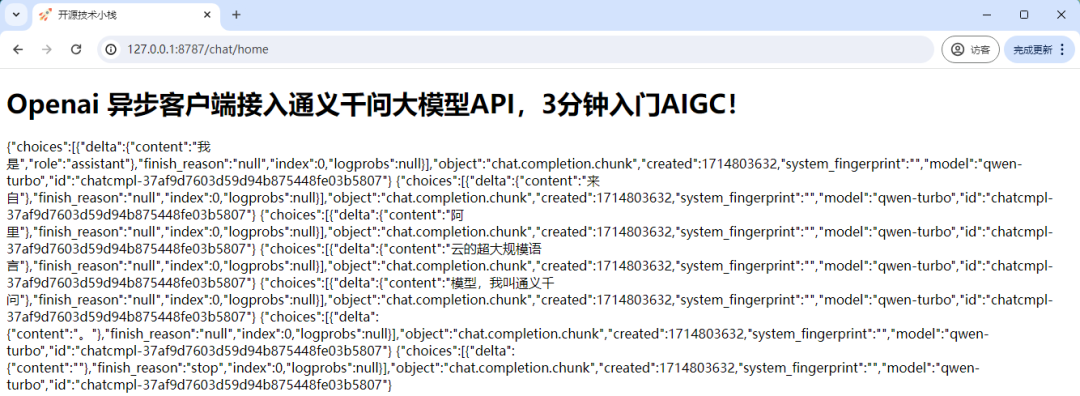
图片
Json响应数据
{
    "choices": [
        {
            "delta": {
                "content": "我是",
                "role": "assistant"
            },
            "finish_reason": "null",
            "index": 0,
            "logprobs": null
        }
    ],
    "object": "chat.completion.chunk",
    "created": 1714803699,
    "system_fingerprint": "",
    "model": "qwen-turbo",
    "id": "chatcmpl-650738c41d0794079829207a6bdfbec6"
}
...
更多:https://www.workerman.net/plugin/157
本文参与 腾讯云自媒体同步曝光计划,分享自微信公众号。
原始发表:2026-05-06,如有侵权请联系 cloudcommunity@tencent.com 删除
目录
腾讯云开发者

Copyright © 2013 - 2026 Tencent Cloud. All Rights Reserved. 腾讯云 版权所有
深圳市腾讯计算机系统有限公司 ICP备案/许可证号:粤B2-20090059  粤公网安备44030502008569号
腾讯云计算(北京)有限责任公司 京ICP证150476号 | 京ICP备11018762号