Elasticsearch DiskBBQ:通过原生 SIMD 块实现向量评分速度提升 40%

Elasticsearch DiskBBQ:通过原生 SIMD 块实现向量评分速度提升 40%

点火三周
发布于 2026-07-11 09:35:39
发布于 2026-07-11 09:35:39
Elasticsearch DiskBBQ:通过原生 SIMD 块实现向量评分速度提升 40%
通过这份自定进度的实践学习资料,亲自体验 Search AI 的向量搜索功能。您现在就可以开始免费的云试用,或者在您的本地机器上试用 Elastic。
Elasticsearch DiskBBQ 已经通过基于块的布局加速了 Better Binary Quantization (BBQ) 向量操作。Elasticsearch 9.4 新增了原生单指令多数据 (SIMD) 内核,将单向量操作的吞吐量提升了近 3 倍。下面我们将介绍这种格式的工作原理。
DiskBBQ 直接从内存映射的索引文件中读取向量字节,采用密集且连续的块布局。这不仅降低了堆内存的使用,还使得引擎能够处理远大于可用 RAM 的数据集。在这些块布局中,DiskBBQ 对文档 ID 块进行编码,以减少磁盘空间,同时保持较低的解码成本。本文将详细介绍倒排列表布局、文档 ID 封装模式以及为何批量评分速度更快。
DiskBBQ 如何在磁盘上存储向量倒排列表
在每个倒排列表的开头,我们首先写入一个质心评分校正值、向量计数以及整体的文档 ID 编码方法。然后,我们在后续的块中写入文档 ID 和向量。这些块及其内部数据都按照文档 ID 升序排列。这符合段(segment)的文档 ID 顺序,从而保留了索引排序顺序。与此顺序对齐的过滤器更有可能一次性包含或排除整个块。在文档 ID 之后,我们存储量化后的向量字节,然后是该块中所有向量的校正值。
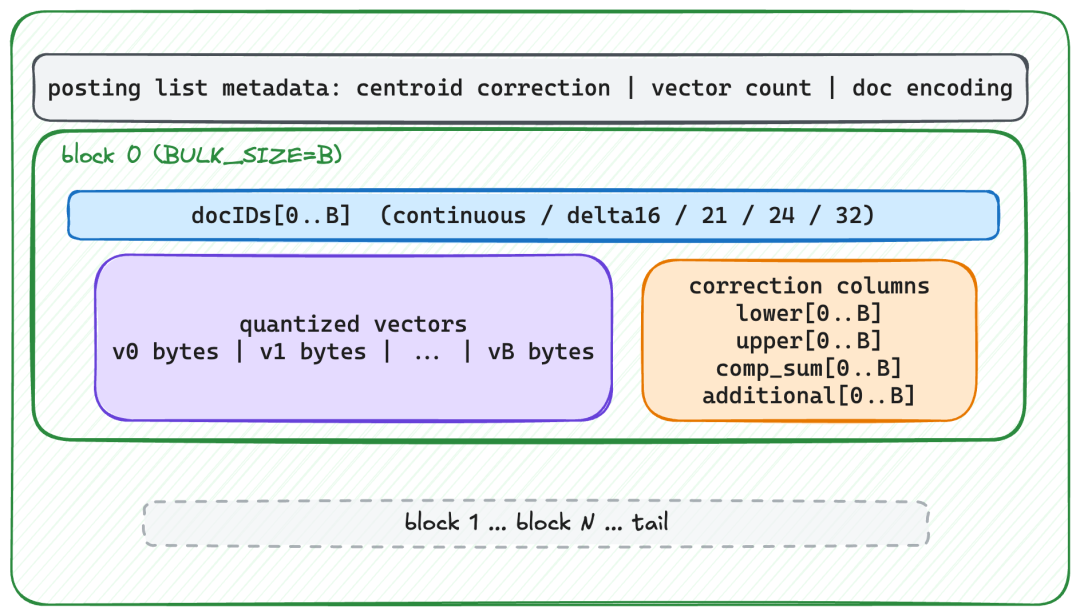
Diagram showing the structure of a posting list with labeled sections for metadata, document IDs, quantized vectors, and correction columns. The top box lists centroid correction, vector count, and document encoding. Below it, block 0 includes docIDs, quantized vectors, and correction columns labeled lower, upper, comp_sum, and additional. A dashed box at the bottom indicates continuation through block N and tail.
Diagram showing the structure of a posting list with labeled sections for metadata, document IDs, quantized vectors, and correction columns. The top box lists centroid correction, vector count, and document encoding. Below it, block 0 includes docIDs, quantized vectors, and correction columns labeled lower, upper, comp_sum, and additional. A dashed box at the bottom indicates continuation through block N and tail.
倒排列表的布局。从元数据头部开始,然后是每个块。每个块包含 bulk_size 个文档 ID,接着是量化向量字节,最后是量化校正值。
DiskBBQ 如何压缩文档 ID 以减少磁盘空间
为了确保文档 ID 块的快速解码,DiskBBQ 使用相同的编码格式对每个块进行编码。DiskBBQ 会计算每个块所需的编码,然后采用所有块中空间占用最大的编码作为该倒排列表的通用编码方式,并应用于所有文档块。截至目前,文档 ID 存储有五种压缩选项。每种选项都首先对文档 ID 值进行完整的增量编码 (delta encoding)。然后,在增量编码的文档 ID 之上应用以下编码类型之一。
编码类型 | 条件 | 节省的字节数(示例) |
|---|---|---|
Continuous | ID 连续(最大值−最小值+1 == 长度) | 16 字节 → 4 字节 |
Delta 16 | 所有增量值都适合 16 位 | 64 字节 → 33 字节 |
21 bits per value | 值适合 21 位 | 12 字节 → 8 字节 |
24 bits per value | 值适合 24 位 | 64 字节 → 48 字节 |
Fallback (full int) | 其他任何情况 | 无减少 |
效率最高的是 Continuous 编码。当 max(doc_block) - min(doc_block) + 1 == len(doc_block) 时使用,这意味着增量编码只需要存储最小值,后续的文档 ID 可以通过在前一个值上加一来重建。例如,ID [4858192, 4858193, 4858194, 4858195]。我们不需要写入四个单独的 int 值(共 16 字节),而只需要写入一个值:4858192。

Diagram showing continuous document identifiers represented as blue boxes labeled doc0 through doc3, followed by an arrow pointing to green boxes labeled VInt and byte. Text above indicates conversion from continuous doc_ids to a single variable integer value for the minimum document ID.
Diagram showing continuous document identifiers represented as blue boxes labeled doc0 through doc3, followed by an arrow pointing to green boxes labeled VInt and byte. Text above indicates conversion from continuous doc_ids to a single variable integer value for the minimum document ID.
Continuous 编码;只需要写入一个整数。
接下来是 Delta 16。它适用于所有增量值都适合 16 位(可以存储在两个字节中)的情况。假设我们有 doc_ids = [1000, 1003, 1010, 1020, 1041, 1055, 1070, 1090, 1100, 1125, 1200, 1300, 2000, 4000, 16000, 66000]。这意味着我们的 min = 1000,结果是 deltas = [0, 3, 10, 20, 41, 55, 70, 90, 100, 125, 200, 300, 1000, 3000, 15000, 65000]。这 16 个增量值可以打包成八个 int32 值(32 字节),再加上最小值,将字节使用量减少了近一倍。

Diagram showing a data encoding process with three color‑coded sections. On the left, green boxes labeled min, VInt, and ellipsis represent writing a minimum document value. In the center, two rows of blue boxes are marked as source delta bytes. Each row has an arrow pointing to orange boxes on the right with the same labels, illustrating packing of two 16‑bit deltas into each 32‑bit integer.
Diagram showing a data encoding process with three color‑coded sections. On the left, green boxes labeled min, VInt, and ellipsis represent writing a minimum document value. In the center, two rows of blue boxes are marked as source delta bytes. Each row has an arrow pointing to orange boxes on the right with the same labels, illustrating packing of two 16‑bit deltas into each 32‑bit integer.
Delta 16;写入最小值,然后将两个 16 位增量值打包到每个 32 位整数中。
下一个是 21 bits per value。这导致了一个相当复杂的方案,其中每组三个值被压缩成 64 位值,任何剩余的值则使用 3 字节的尾部。一个具体的例子是 doc_ids=[1000, 70000, 140000],它们被压缩成一个 64 位值 doc0 | (doc1 << 21) | (doc2 << 42)。最终结果是,三个原始整数值(共 12 字节)被压缩成 8 字节。

Diagram showing blue boxes labeled with letter‑number ranges representing source list ranges. Arrows point to two sets of purple boxes labeled encoded set #0 bytes and encoded set #1 bytes, each containing grouped values like A20..13 and B20..13. Notes on the right explain that the byte blocks are not byte‑aligned and that tail parts of three documents are packed into one 64‑bit word.
Diagram showing blue boxes labeled with letter‑number ranges representing source list ranges. Arrows point to two sets of purple boxes labeled encoded set #0 bytes and encoded set #1 bytes, each containing grouped values like A20..13 and B20..13. Notes on the right explain that the byte blocks are not byte‑aligned and that tail parts of three documents are packed into one 64‑bit word.
21 bits per value,一种相当复杂的方案,将三元组压缩的 64 位值与 3 字节尾部结合。
倒数第二个压缩选项是打包最多需要 24 位的整数值。由于一个 int 需要 32 位空间,24 位意味着一个完整的字节完全未被使用。我们不能浪费任何一个字节的空间。我们希望尽可能充分利用字节,因此这种方案通过填补那个空字节来进行压缩。例如,docs_ids = [1000, 70000, 140000, 300000, 500000, 800000, 1000000, 1300000, 1600000, 1900000, 2200000, 3000000, 4000000, 8000000, 12000000, 16000000] 会将最后四个整数值打包到前面整数的“空闲字节”中,从而将通常需要 64 字节的 16 个整数存储到 48 字节中。
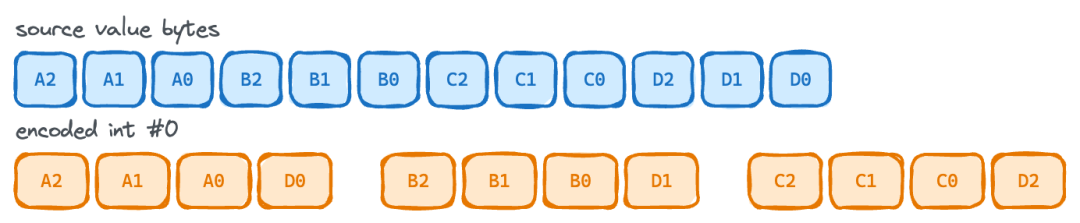
Diagram showing two rows of colored boxes representing source value bytes and their reordered form in an encoded integer. The top row is labeled “source value bytes,” and the bottom row “encoded int #0,” illustrating how multiple byte groups are packed together for 24‑bit values.
Diagram showing two rows of colored boxes representing source value bytes and their reordered form in an encoded integer. The top row is labeled “source value bytes,” and the bottom row “encoded int #0,” illustrating how multiple byte groups are packed together for 24‑bit values.
这展示了一个 24 bits per value 的例子,其中最后一组字节被打包到第一个字节中。它充分利用了那个空闲字节空间。
最后一个选项是 Fallback。DiskBBQ 会将每个文档 ID 存储为完整精度的整数,不进行任何磁盘空间减少。考虑到文档 ID 值在压缩前会进行增量编码,Fallback 的情况极其罕见。
为什么 DiskBBQ 批量评分更快:SIMD 和 CPU 缓存饱和
以块的形式存储向量允许进行 SIMD 优化的批量评分。这使得 CPU 缓存行能被向量字节充分填充,并允许使用 SIMD 优化的内核应用量化校正。如果向量与其校正值内联存储,那么在每个向量评分之后,都必须应用校正。这将损失宝贵的吞吐量,并失去优化校正应用的机会。
以下基准测试展示了不同优化方式如何提高吞吐量。这是一个在 M1Max MacBook 上使用 Java 25 运行的 JMH 基准测试。向量维度为 1024,基准测试中的每个操作都包含 10 个查询,每个查询处理 10 个包含 32 个向量的块。
1
2
3
4
5
6
7
Benchmark           (bits)  (dims)  (similarityFunction)   Mode  Cnt   Score   Error   Units
Float32Scalar            1    1024           DOT_PRODUCT  thrpt    5   0.348 ± 0.014  ops/ms
Float32PanamaVector      1    1024           DOT_PRODUCT  thrpt    5   1.106 ± 0.043  ops/ms
BBQIndividual            1    1024           DOT_PRODUCT  thrpt    5   8.420 ± 0.180  ops/ms
BBQBulkPartial           1    1024           DOT_PRODUCT  thrpt    5  15.306 ± 0.757  ops/ms
BBQBULK                  1    1024           DOT_PRODUCT  thrpt    5  16.672 ± 0.572  ops/ms
BBQBulkNative            1    1024           DOT_PRODUCT  thrpt    5  23.258 ± 2.273  ops/ms
以下是对上述每个基准测试的描述:
- • Float32Scalar:这是纯 JVM 执行浮点运算。没有经过手动优化的 SIMD。
- • Float32PanamaVector:这里实际编写并使用了一些 SIMD 优化的代码路径。
- • BBQIndividual:这是单独的位级 BBQ 操作。每个向量都被单独加载到 JVM 堆中进行评分和校正。
- • BBQBulkPartial:这是通过 Panama Vector 操作直接从内存映射文件段读取数据,进行堆外批量评分。校正值随后在 JVM 堆上应用。
- • BBQBULK:这是完全的堆外批量评分,向量和校正值都通过 SIMD 优化的 Java Vector API 函数直接从内存映射文件读取。
- • BBQBulkNative:这就是 Elasticsearch 9.4 中的实现。完整的原生批量向量操作,直接从索引文件读取字节。
这些结果展示了吞吐量的演变,从最基本的单个浮点运算开始。切换到 SIMD(通过 Vector API 手动优化)进行浮点运算,吞吐量提升了约 3 倍,但即便如此,它仍然比 BBQ 中自动向量化的单个位级操作慢。然后,切换到批量评分几乎使 BBQ 吞吐量提高了 2 倍。在 Elasticsearch 9.4 中,我们新增的优化原生 SIMD 内核带来了又一个显著的改进,相比单个位级评分总共提升了近 3 倍,并且比 float32 操作惊人地提升了 66 倍。
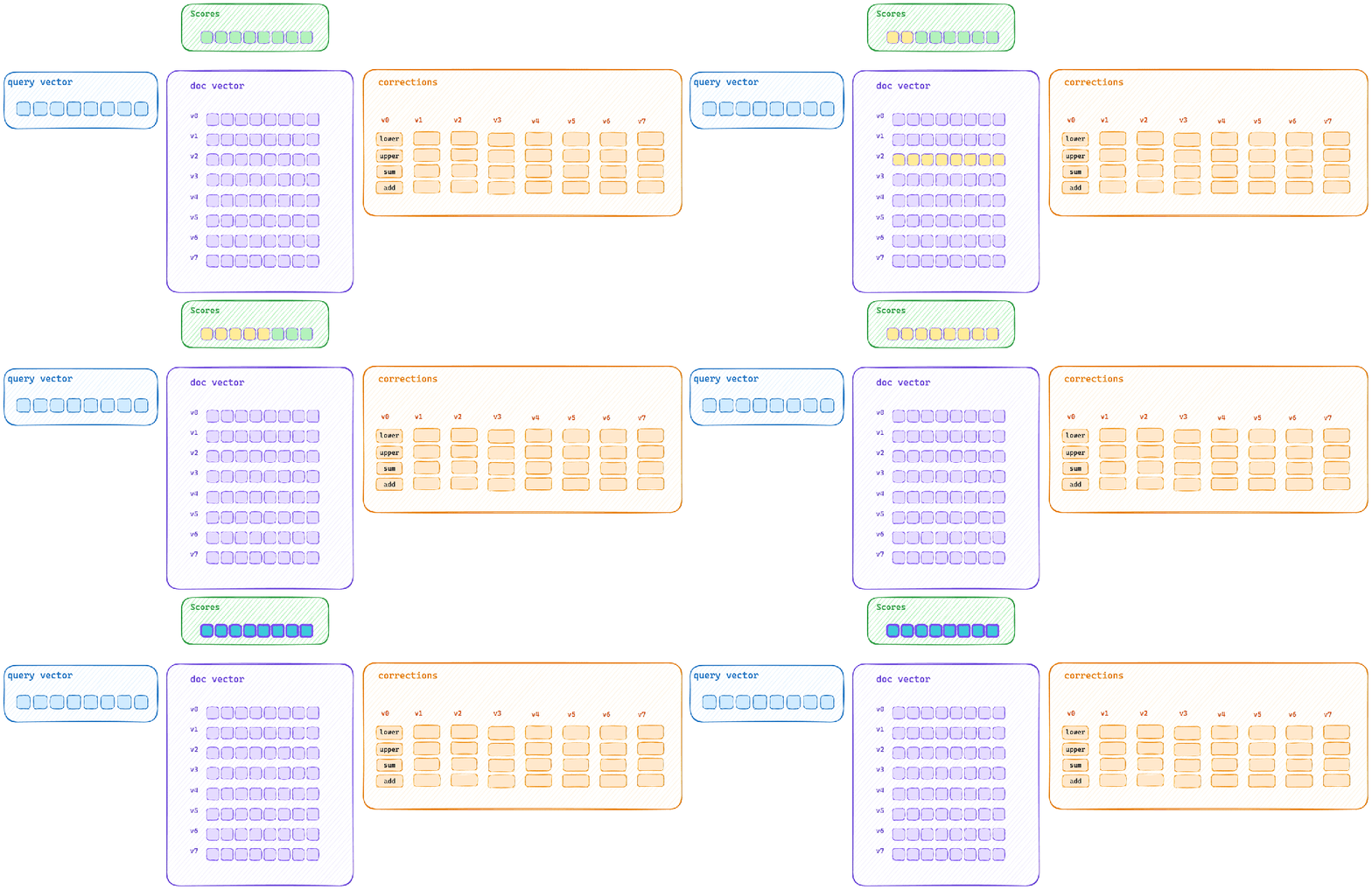
Animated diagram showing the bulk scoring path in Elasticsearch DiskBBQ. It includes a query vector, document vectors labeled v0–v7, correction operations (lower, upper, sum, add), and resulting scores, illustrating how the query vector and block of document vectors pass through SIMD‑optimized correction steps to produce scores.
Animated diagram showing the bulk scoring path in Elasticsearch DiskBBQ. It includes a query vector, document vectors labeled v0–v7, correction operations (lower, upper, sum, add), and resulting scores, illustrating how the query vector and block of document vectors pass through SIMD‑optimized correction steps to produce scores.
这展示了典型的批量评分路径。查询向量计算块中每个向量的初始评分信息,然后通过优化的 SIMD 块操作应用每个校正。
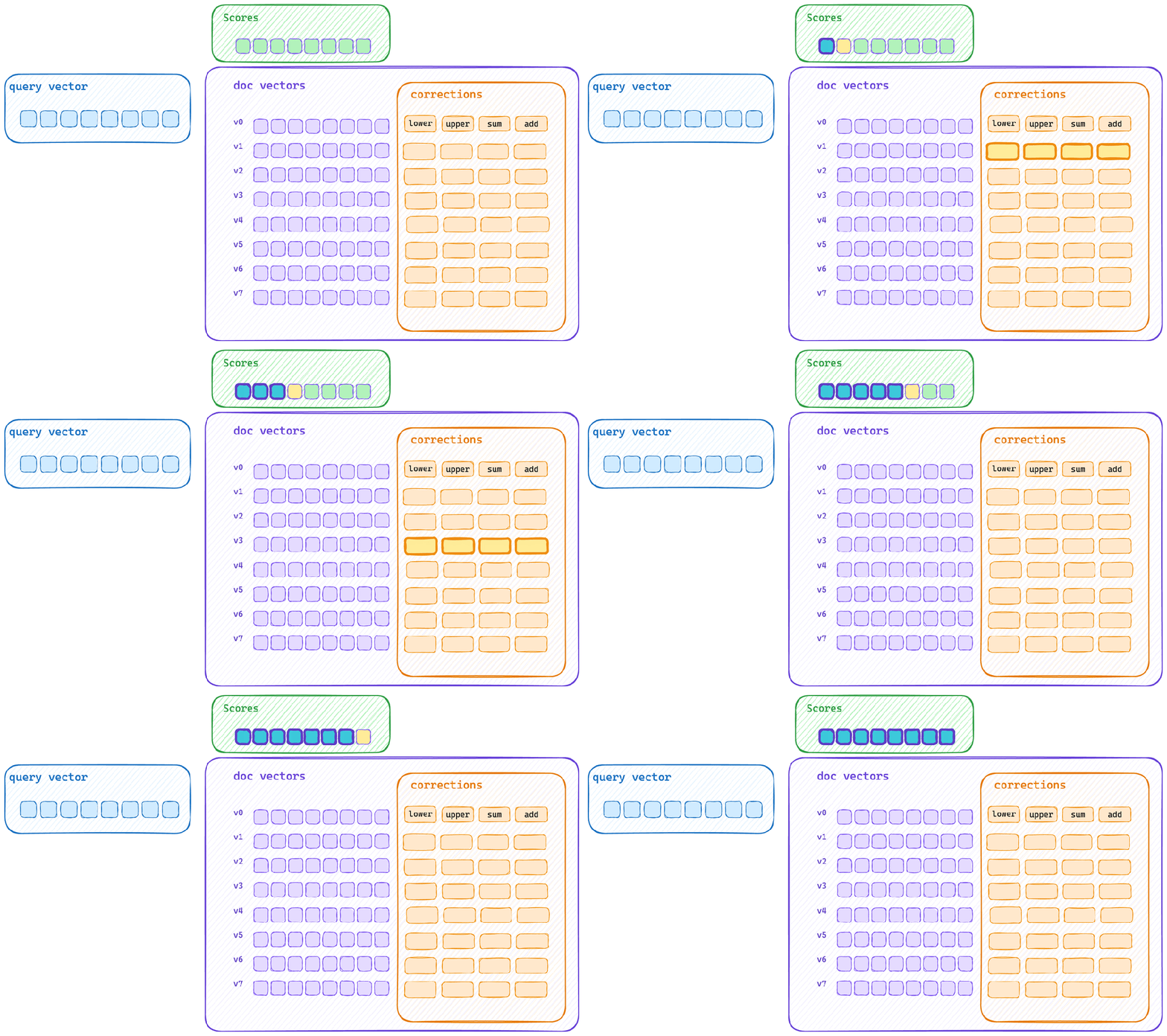
Animated diagram showing the typical single scoring path. It displays a query vector, document vectors labeled v0–v7, correction steps labeled lower, upper, sum, and add, and resulting scores, reflecting how each vector is scored individually and its corrections applied sequentially.
Animated diagram showing the typical single scoring path. It displays a query vector, document vectors labeled v0–v7, correction steps labeled lower, upper, sum, and add, and resulting scores, reflecting how each vector is scored individually and its corrections applied sequentially.
这是典型的单个评分路径。每个向量被独立评分,然后应用其校正。这意味着向量字节无法充分填充 CPU 缓存,并且校正应用无法使用相同的 SIMD 块操作。
DiskBBQ 向量搜索性能:原生 SIMD 的实际意义
Elasticsearch 9.4 中的原生 SIMD 内核使 BBQ 向量评分速度提高了近 3 倍,吞吐量是 float32 操作的 66 倍。我们不会止步于此;总有改进的空间,但这种原生 SIMD 块评分模式在所有 CPU 架构上都表现出色,使得 DiskBBQ 无论部署在哪里都能保持高速。
本文参与 腾讯云自媒体同步曝光计划,分享自微信公众号。
原始发表:2026-07-09,如有侵权请联系 cloudcommunity@tencent.com 删除
目录
腾讯云开发者

Copyright © 2013 - 2026 Tencent Cloud. All Rights Reserved. 腾讯云 版权所有
深圳市腾讯计算机系统有限公司 ICP备案/许可证号:粤B2-20090059  粤公网安备44030502008569号
腾讯云计算(北京)有限责任公司 京ICP证150476号 | 京ICP备11018762号