使用TensorRT 和多设备推理支持,跨多个 GPU 扩展 AI 推理

使用TensorRT 和多设备推理支持,跨多个 GPU 扩展 AI 推理

NVIDIA AI
修改于 2026-08-14 08:01:36
修改于 2026-08-14 08:01:36
生成式 AI 工作负载的显存和计算预算正迅速超出单个 GPU。对于构建媒体生成工作流的推理开发者而言,面临的挑战是在不牺牲 NVIDIA TensorRT 为生产部署提供的关键优化 (如内核融合、内存规划和量化) 的情况下跨多个设备进行扩展。
多设备推理支持是 TensorRT 11.0 中引入的一项新功能,可将原生高性能多 GPU 推理引入 TensorRT 运行时,从而实现针对边缘设备的多设备生产部署。
…
从 NVIDIA 开发者门户下载具有多设备推理支持的 TensorRT 11.0,为您的模型解锁原生的高性能多设备加速功能。访问 NVIDIA 开发者门户下载 TensorRT 11.0,解锁您的模型的原生高性能多设备加速功能。
NVIDIA NCCL:用于分布式推理的传输层
NVIDIA 集合通信库 (NCCL) 提供高性能的多 GPU 和多节点集合通信运算,支持跨数千个 GPU 进行大规模模型训练。NCCL 会自动为给定拓扑选择最佳传输,将 NVIDIA NVLink、NVIDIA NVSwitch、PCIe 和 InfiniBand 抽象化为统一接口。通过直接与 NCCL 集成,TensorRT 在运行多设备推理时继承了推理工作负载的这种传输优化。
新的多设备功能涵盖了全套 NVIDIA NCCL 分布式群集:AllReduce、Broadcast、Reduce、AllGather、ReduceScatter、AlltoAll、Gather和Scatter。
用于分布式推理的并行策略
分布式推理可以使用多种并行策略来表示,每种策略都需要在内存节省、计算扩展和通信开销之间进行不同的权衡。最常见的策略是张量并行和上下文并行。
张量并行
在张量并行中,单个层的权重在 GPU 之间进行分区。每个 GPU 计算该层的矩阵乘法分片,然后通过集合组合部分结果,以生成完整的输出。这降低了每个设备的显存权重,使其成为当单个层的权重超过单个 GPU 的显存时的自然选择 (通常是唯一的选择) ,而与输入序列长度或批量大小无关。
在 Transformer 块中,列并行投影 (例如,QKV 和 MLP 上投) 与行并行投影 (注意力输出和 MLP 下投) 配对,因此每个块只需要一个 AllReduce,从而保持通信开销边界。
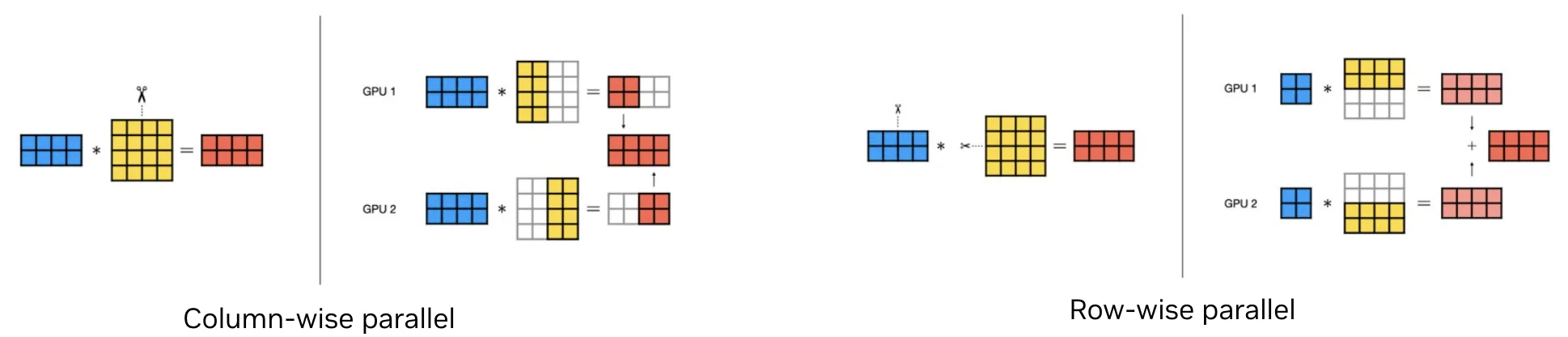
An image showing the side-by-side comparison of column-wise and row-wise parallel projections.
图 1. 逐列和逐行并行投影
上下文并行
在上下文并行中,输入序列沿序列维度在 GPU 上进行分区。每个 GPU 仅处理序列的一部分,而集合运算则可在需要时 (例如注意力期间) 提供全局序列。上下文并行对于长序列工作负载尤其有效,其中注意力随序列长度的二次扩展使其成为主要的计算和内存使用对象。
对于扩散和 DiT 模型来说,这也是一种特别自然的拟合,因为这些模型的双向注意力避开了因果遮罩引起的负载不平衡问题。
NVIDIA TensorRT 11.0 引入了对各种并行策略所需的`IDistCollectiveLayer` 基元的支持。本文的其余部分将重点介绍上下文并行,它直接解决了现代生成式媒体流程中的主要成本:长序列注意力。
生成式媒体的上下文并行
基于扩散的图像和视频生成工作流将其计算和内存预算的很大一部分用于在长标记序列上运行的注意力块内。高分辨率图像或多帧视频片段可以生成每个块包含数万个 token 的序列,并且注意力会随序列长度进行二次缩放。
AllGather KV
上下文并行将序列分割到 GPU 上。每个秩处理与其序列分区对应的查询 (Q) 片段。实现上下文并行的一种直接方法是 AllGather KV 方法,在计算局部注意力之前,秩通过 AllGather 集合交换其键 (K) 和值 (V) 分片,使每个秩能够处理整个序列。其结果是,以每个注意力块一个额外的集合为代价,输出的每秩注意力覆盖整个序列,而局部 Q = K 矩阵乘法则按比例缩小至秩数。
对于视频和高分辨率图像扩散而言,在降噪步骤中进行这种权衡取舍更为有利。每个步骤的通信用度仍受序列维度 AllGather 的限制,而计算和内存节省适用于每个步骤中的每个注意力层。
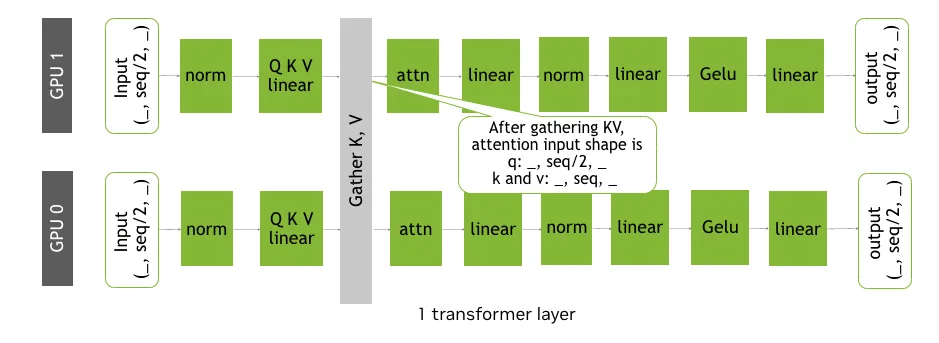
An image showing that context parallelism partitions a token sequence across GPUs along the sequence dimension. Each rank processes a slice of Q locally. Before attention, ranks run AllGather on K and V so every slice can attend over the full sequence.
图 2. 针对上下文并行的 AllGather KV 策略
环形注意力
上下文并行可以通过多种方式实现,每种方式都需要做出不同的权衡。
与 AllGather KV 方法相比,Ring Attention 方法的一个潜在改进是通信和计算重叠。这使得每个 GPU 能够同时处理其本地 Q,因为 K 和 V 在环形拓扑中不断流式传输。Ring Attention 还可减少内存占用:使用在线 Softmax 时,无需在任何 GPU 上实现全尺寸 K 和 V 张量。阅读 Ring Attention with Blockwise Transformer for Near-Infinite Context 文章,详细了解 Ring Attention。
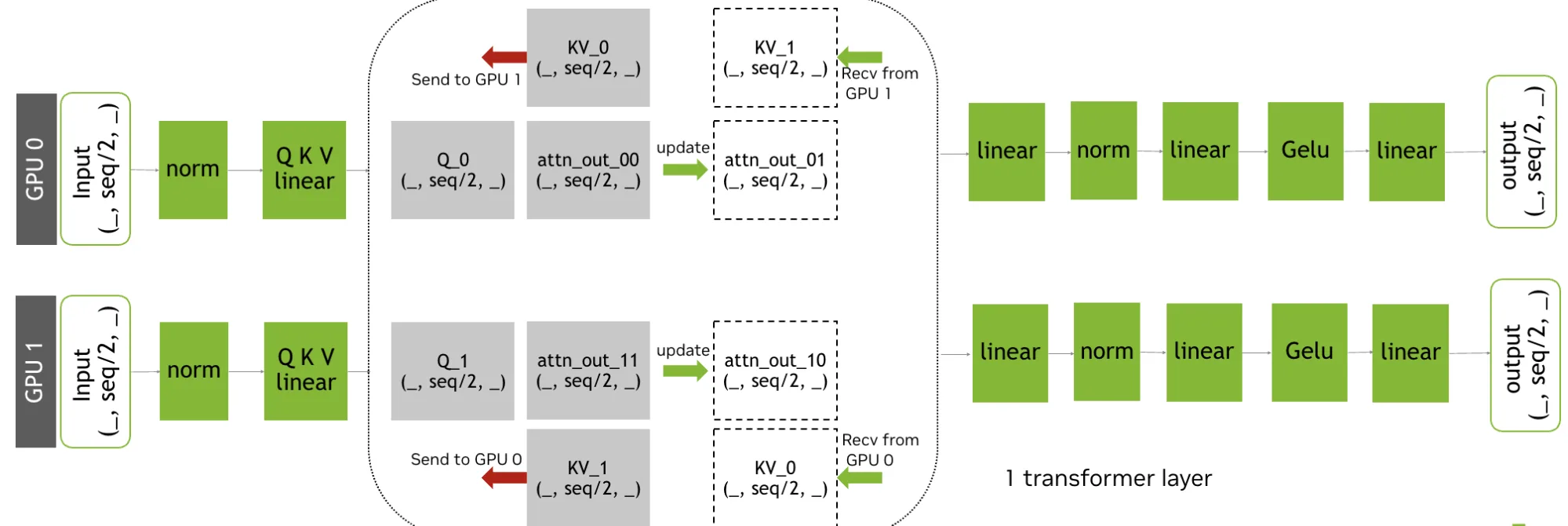
An image showing an alternative implementation of context parallelism, using Ring Attention. The image shows that only partial-sized K and V are present on any given GPU, resulting in peak memory reduction.
图 3. 针对上下文并行的环形注意力策略
DeepSpeed Ulysses
对于长上下文 (数万个 token) ,另一种上下文并行实现方法是 DeepSpeed Ulysses。它最初会沿序列维度在参与的 GPU 上划分单个样本。在进行注意力计算之前,它在分区的 Q、K 和 V 上使用 all-to-all 通信集合。
这可确保每个 GPU 接收完整的序列长度,但仅适用于注意力头的一个不重叠子集,使其能够并行计算注意力。最后,二次 all-to-all 通信会收集注意力头部的结果,同时沿序列维度重新分区。有关长上下文并行的更多信息,请参阅文章 DeepSpeed Ulysses:System Optimizations for Enabling Training of Extreme Long Sequence Transformer Models。
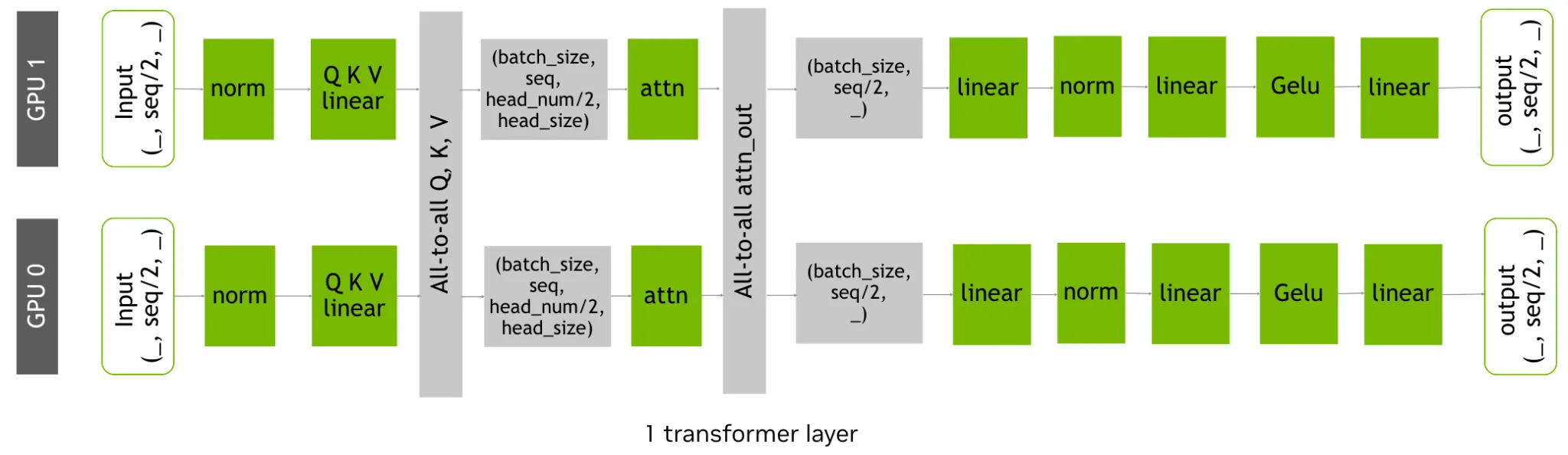
An image showing an alternative implementation of context parallelism, using DeepSpeed Ulysses. The image illustrates the dual all-to-all communication steps that swap the parallelism dimension from the sequence length to the attention heads right before the attention block, and then back to the sequence length immediately afterward.
图 4. 适用于上下文并行的 DeepSpeed Ulysses 策略
基准测试:在 C++ 中使用上下文并行生成媒体
以下基准测试针对用于 C++ 生产部署的媒体生成工作负载评估了多设备 TensorRT 推理。使用了两种具有代表性的生成式 AI 工作流:基于 NVIDIA Cosmos 3 的视频生成工作流和基于 FLUX.1 的图像生成工作流。
这些工作流首先在 PyTorch 中编写,然后使用 Torch-TensorRT 从框架中转换出来,以生成适合在 C++ 推理应用中部署的 NVIDIA TensorRT 引擎。此工作流使开发者能够保留 PyTorch 作为模型开发环境,同时在生产系统中部署经过优化的 TensorRT 引擎。
这些基准测试比较了不同上下文并行策略 ( AllGather KV、Ring Attention 和 Ulysses) 中的端到端延迟。所有结果均在具有 8 个 GPU 的单个节点上收集。
使用 NVIDIA Cosmos 3 生成视频
NVIDIA Cosmos 模型平台是一个世界基础模型平台,和 NVIDIA Cosmos 模型平台是世界基础模型平台,Cosmos3-Nano 模型可以基于多模态输入 (包括文本、图像和视频) 生成图像、视频、音频和其他格式。我们将 示例提示文件 用于我们的基准测试。基于这些基准测试,当扩散模型的上下文长度过长 (输入令牌数量级达到数万个) 时,Ulysses 显然是赢家。
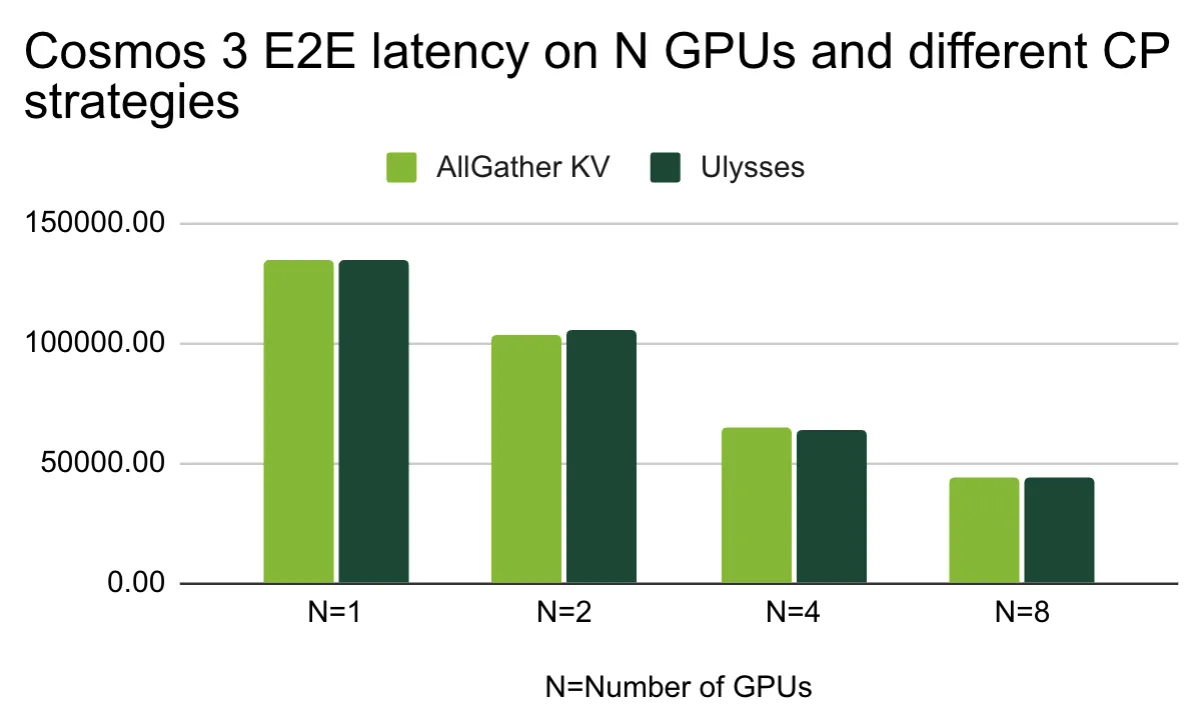
A column chart showing the latency of different context parallelism strategies on 1,2,4 and 8 GPUs. The image shows that the latency scales well using both the Ulysses and the AllGather KV strategy.
图 5. 采用不同 CP 策略的 N 个 GPU 上的 NVIDIA Cosmos 3 E2E 延迟 in 毫秒
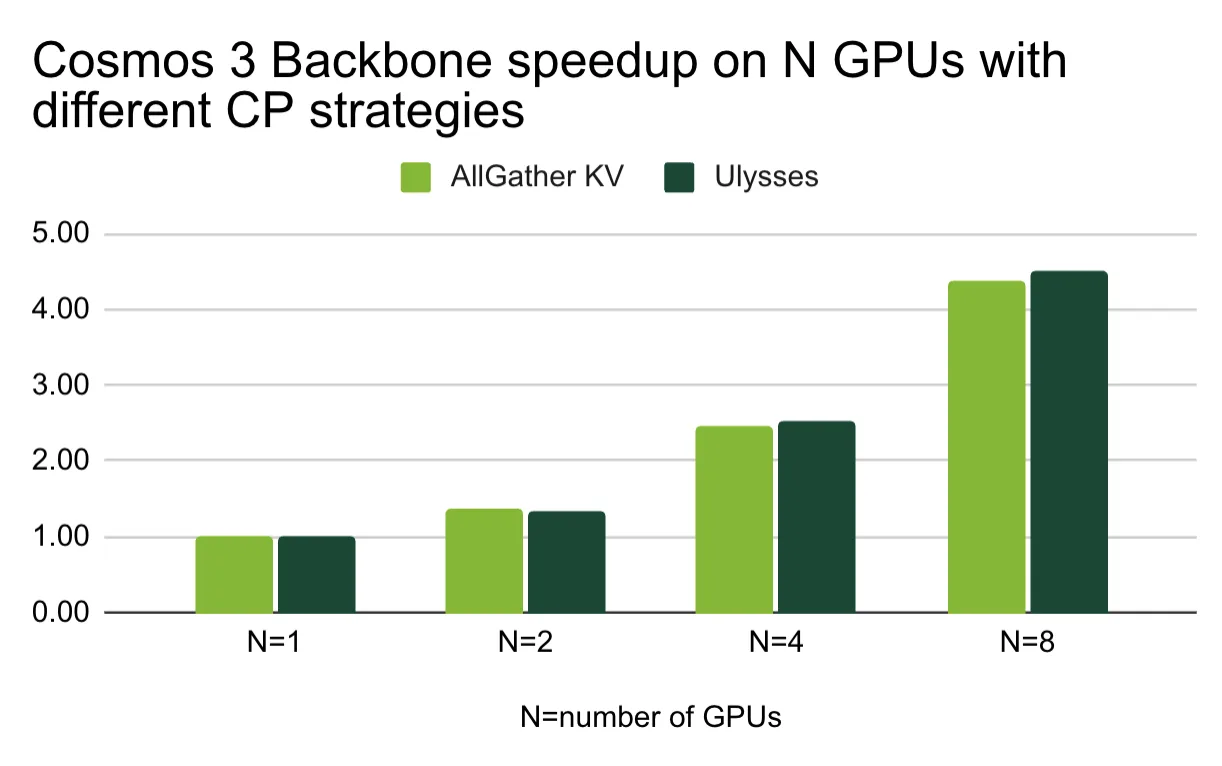
A column chart showing the scaling of different context parallelism strategies on 1,2,4 and 8 GPUs.
图 6. 采用不同上下文并行策略的 GPU 上的 NVIDIA Cosmos 3 主干加速
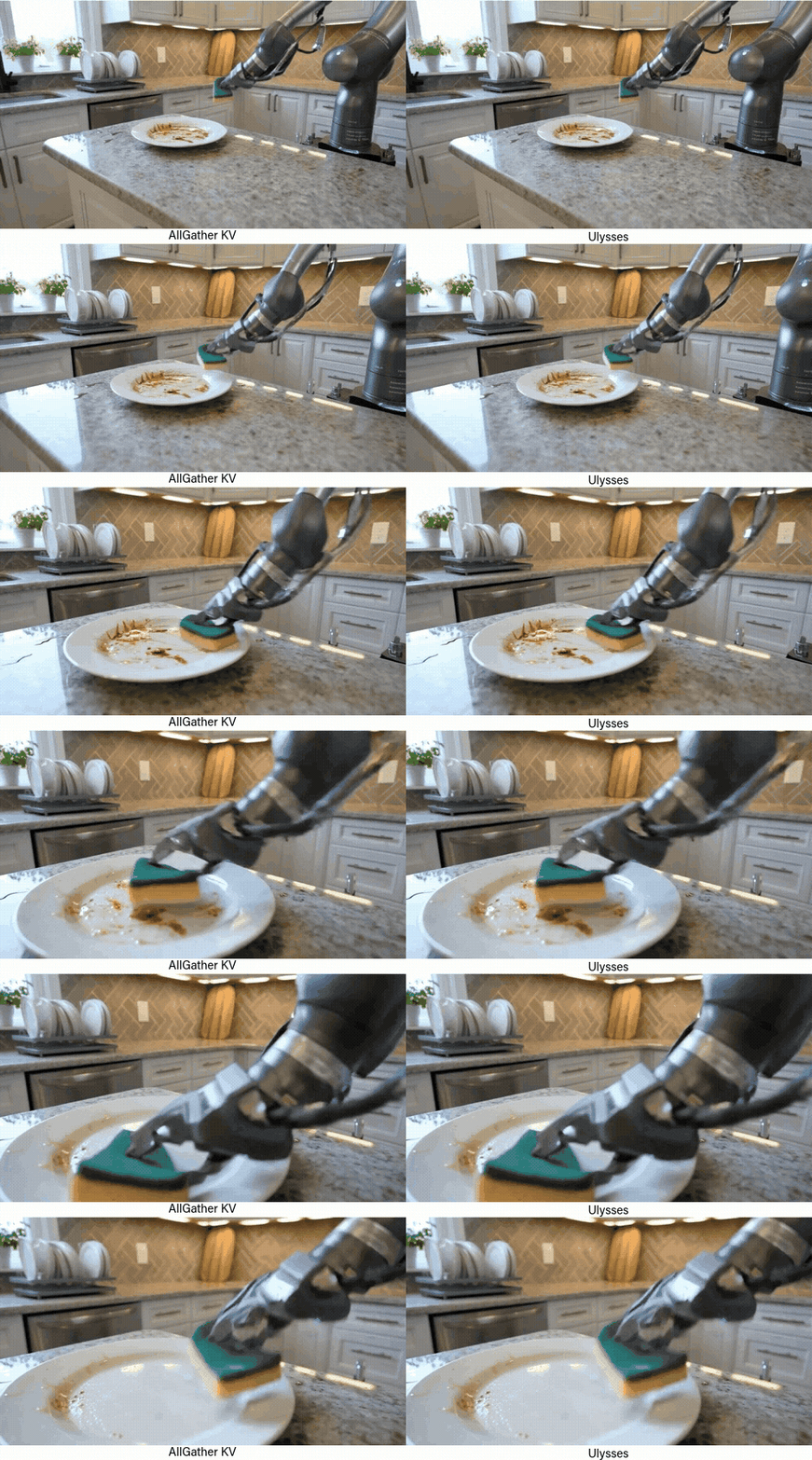
Side-by-side images of a robotic arm cleaning a dirty plate with a sponge, with some dishes visible in the background. The two images look similar.
图 7. NVIDIA Cosmos 3 模型在 8 个具有不同 CP 策略的 GPU 上的输出示例
使用 Flux 生成图像。1
Black Forest Labs 的 FLUX.1-dev 模型可以根据文本描述生成图像。我们使用了提示词:“山的精美照片。富士山赏花”,用于我们的基准测试。根据基准测试,Ulysses 策略在图像生成方面也是赢家,但值得注意的是,Ring Attention 也可以很好地扩展到 4 个 GPU。
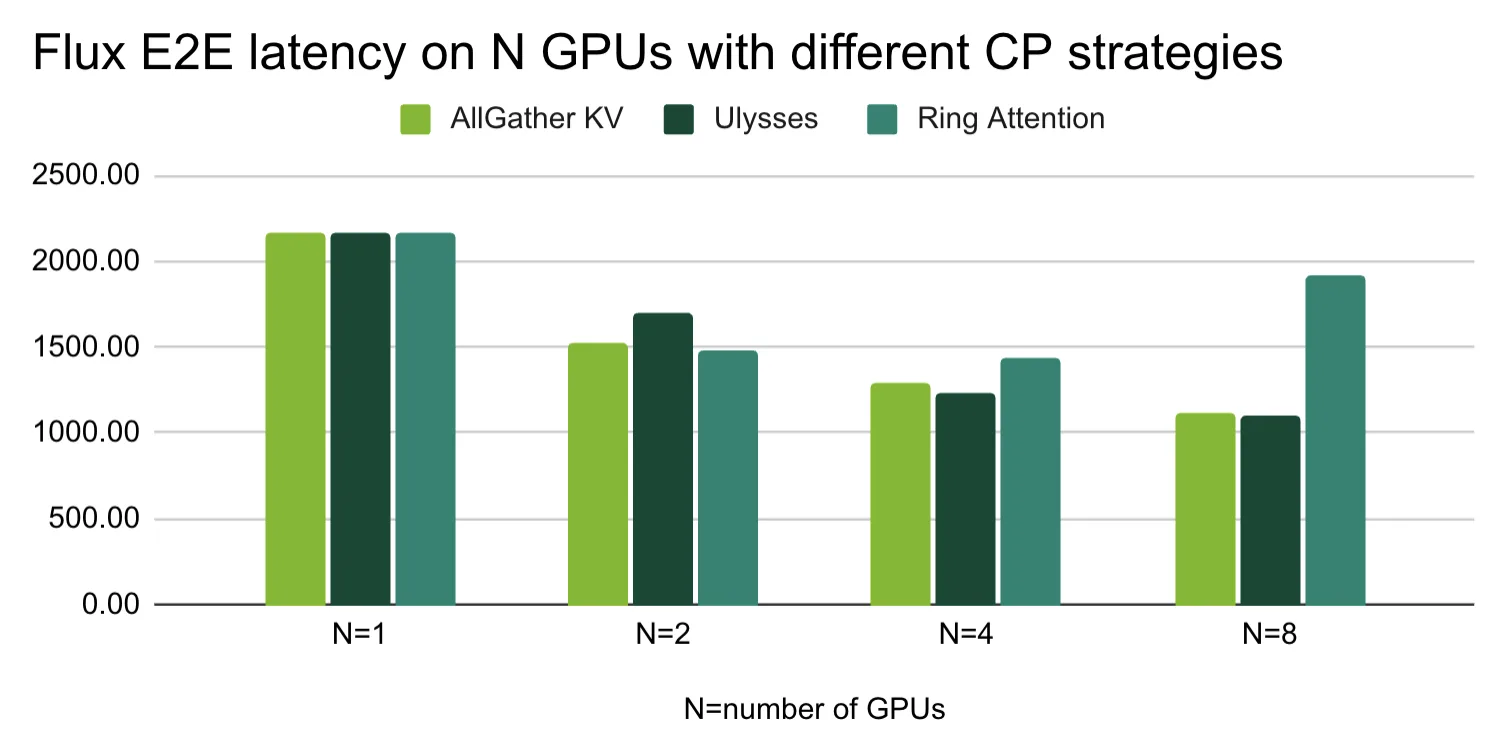
A column chart showing the latency of different context parallelism strategies on 1,2,4 and 8 GPUs. The image shows that the lowest latency is achieved by applying the Ulysses strategy.
图 8. 在具有不同 CP 策略的 N 个 GPU 上,以毫秒为单位减少 E2E 延迟
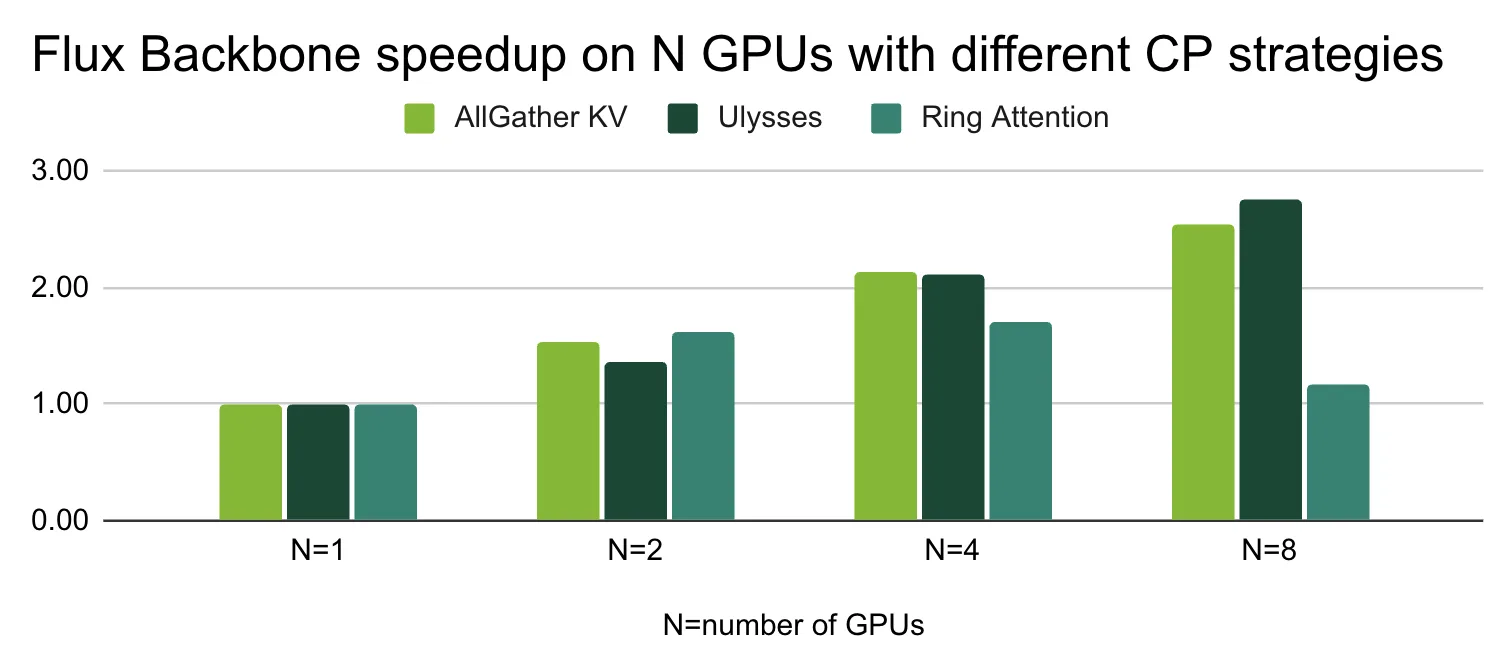
A column chart showing the scaling of different context parallelism strategies on 1,2,4 ,and 8 GPUs.
图 9. 采用不同 CP 策略的 GPU 上的 Flux 主干加速

A side-by-side comparison of the outputs of AllGather KV, Ring Attention ,and Ulysses CP strategies. The output images look very similar to each other. All 3 output images show Mt. Fuji with a cherry tree branch in the foreground.
图 10. Black Forest Lab Flux.1 模型在 8 个具有不同 CP 策略的 GPU 上的输出示例
开始使用 TensorRT 的多设备功能
TensorRT 支持多设备推理,使单个网络能够通过集成的分布式通信原语跨多个 GPU 执行推理。核心工作流程与单设备 TensorRT 类似。区别在于,网络现在可以包含分布式通信层。
在本指南中,我们假设在所有 GPU rank 上部署相同的网络,但这不是严格要求,理论上,每个 rank 可以运行不同的模型。
TensorRT 资源库中提供了一个工作示例,在 TensorRT。以下指南分步介绍了如何使用新的多设备功能。
预备知识
- 从 NVIDIA 开发者门户下载 TensorRT 11。
- 按照这些说明安装 TensorRT 11 这些说明。
- 获得单节点、多 GPU 计算机。
- 在您选择的开发环境(bare metal 或容器)中安装 OPENMPI
- 创建用于多设备推理的网络
在网络层面,多设备推理通过 IDistCollectiveLayer 实现跨 GPU 通信。可以使用 INetworkDefinition::addDistCollective 将集合运算直接添加到 TensorRT 网络中:
using namespace nvinfer1;// create empty networkauto network = std::unique_ptr<INetworkDefinition>(builder->createNetworkV2( 1U << static_cast<uint32_t>(kSTRONGLY_TYPED)));auto* input = network->addInput("input", DataType::kFLOAT, Dims2{3, 4});ITensor& inputTensor = *network->getInput(0);auto* collectiveLayer = network->addDistCollective( inputTensor, CollectiveOperation::kALL_REDUCE, ReduceOperation::kSUM, -1, // root: -1 for collectives without a root rank nullptr, // groups: nullptr means all ranks participate 0 // groupSize); // set the world size aka total number of GPUscollectiveLayer->setNbRanks(8); |
|---|
对于 ALL_REDUCE、REDUCE 和 REDUCE_SCATTER 等归约群集,请指定有效的 ReduceOperation,例如 kSUM。对于 ALL_GATHER、BROADCAST、ALL_TO_ALL、GATHER 和 SCATTER 等非归约群集,请使用 ReduceOperation::kNONE。基于根的操作 (包括 BROADCAST、REDUCE、GATHER 和 SCATTER) 需要有效的根秩。
- 构建引擎
// create builder configauto builderConfig = std::unique_ptr<IBuilderConfig>(builder->createBuilderConfig());// build engineauto serializedEngine = std::unique_ptr<IHostMemory>(builder->buildSerializedNetwork(*network, *builderConfig)); |
|---|
- 创建执行上下文
auto runtime = std::unique_ptr<IRuntime>(createInferRuntime(sample::gLogger.getTRTLogger())); |
|---|
- 绑定 IO 张量
char const* inputName = engine->getIOTensorName(0); char const* outputName = engine->getIOTensorName(1); std::vector<float> const& inputChunk = (rank == 0) ? config.rank0Input : config.rank1Input; std::vector<float> outputChunk(config.outputElementCount, 0.0F); size_t const inputBytes = inputChunk.size() * sizeof(float); size_t const outputBytes = outputChunk.size() * sizeof(float); void* dInput = nullptr; void* dOutput = nullptr; CHECK_CUDA(cudaMalloc(&dInput, inputBytes)); CHECK_CUDA(cudaMalloc(&dOutput, outputBytes)); // Copy input data to GPU asynchronously CHECK_CUDA(cudaMemcpyAsync(dInput, inputChunk.data(), inputBytes, cudaMemcpyHostToDevice, stream)); // Set input/output tensor addresses in the execution context context->setInputTensorAddress(inputName, dInput); context->setTensorAddress(outputName, dOutput); context->setInputShape(inputName, Dims2{kINPUT_ROWS, kINPUT_COLS}); |
|---|
- 设置通信器和队列推理
context->setCommunicator(comm);context->enqueueV3(stream); |
|---|
注意:NCCL 通信器还必须在使用它的执行上下文的整个生命周期内保持有效。
- 启动推理
在 8 个 GPU 上使用 OpenMPI 运行应用程序。每个秩选择其本地 CUDA 设备,初始化 NCCL,创建自己的 TensorRT 引擎,创建自己的执行上下文,并连接 NCCL 通信器。
mpirun -np 8 bash -lc 'export TRT_MY_RANK=$OMPI_COMM_WORLD_RANK; \export TRT_WORLD_SIZE=$OMPI_COMM_WORLD_SIZE; \export TRT_NCCL_ID_FILE=/tmp/nccl_id.txt; \./sample_dist_collective --op all_reduce' |
|---|
作者:Peter Kisfaludi, Zhaoyuan He, Daisy Chu, Joseph Loftin 和 Byungsoo Jeon
本文系转载,前往查看
如有侵权,请联系 cloudcommunity@tencent.com 删除。
目录
腾讯云开发者

Copyright © 2013 - 2026 Tencent Cloud. All Rights Reserved. 腾讯云 版权所有
深圳市腾讯计算机系统有限公司 ICP备案/许可证号:粤B2-20090059  粤公网安备44030502008569号
腾讯云计算(北京)有限责任公司 京ICP证150476号 | 京ICP备11018762号