嵌入式Linux:符号链接(软链接)和硬链接

嵌入式Linux:符号链接(软链接)和硬链接

不脱发的程序猿
发布于 2026-10-08 14:35:30
发布于 2026-10-08 14:35:30
在 Linux 系统中,符号链接(软链接)和硬链接是两种创建文件链接的方法。理解它们的区别和使用场景对于文件系统的管理非常重要。
符号链接与硬链接的区别如下:
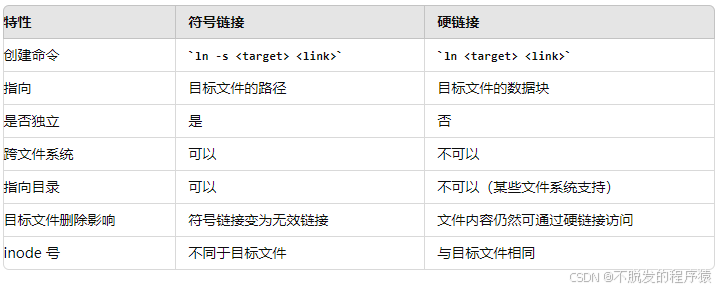
使用场景
- 符号链接:用于创建快捷方式或跨文件系统链接。例如,在
/usr/bin目录下创建一个指向某个脚本的符号链接,使其可以全局访问。 - 硬链接:用于在同一文件系统内创建多个引用同一文件的名称,适用于需要多个路径引用同一文件的场景,如备份文件时使用硬链接节省空间。
1、符号链接(软链接)
符号链接(Symbolic Link),也称软链接(Soft Link),是一个特殊类型的文件,它包含了另一个文件的路径。打开符号链接时,系统会重定向到它指向的文件。
特点
- 符号链接是一个独立的文件,包含指向目标文件的路径。
- 可以跨文件系统创建符号链接。
- 符号链接可以指向一个不存在的文件(即空链接)。
- 删除符号链接不会影响目标文件,但如果目标文件被删除,符号链接将变成无效链接。
使用 ln -s 命令创建符号链接。
软链接:ln -s 源文件 链接文件创建一个指向 /home/user/file.txt 的符号链接 link_to_file:
ln -s /home/user/file.txt link_to_file验证符号链接:
ls -l link_to_file
# 输出示例:lrwxrwxrwx 1 user user 16 Jul 8 12:00 link_to_file -> /home/user/file.txt
通过以下示例,进一步了解符号链接的使用:
# 创建一个目标文件
echo "Hello, World!" > /home/user/file.txt

# 创建一个符号链接
ln -s /home/user/file.txt /home/user/link_to_file

# 查看符号链接内容
cat /home/user/link_to_file
# 输出:Hello, World!

# 删除目标文件
rm /home/user/file.txt

# 尝试查看符号链接内容
cat /home/user/link_to_file
# 输出:cat: /home/user/link_to_file: No such file or directory
2、硬链接
硬链接(Hard Link)是指向同一个物理文件的数据块的多个文件名。所有硬链接共享同一个 inode 号。
特点
- 硬链接是指向同一个文件的数据块,因此文件内容不会重复存储。
- 硬链接只能在同一个文件系统中创建。
- 删除硬链接不会删除文件,只有所有硬链接都被删除后,文件才会被删除。
- 更新任何一个硬链接的内容,所有链接的内容都会更新。
使用 ln 命令创建硬链接。
硬链接:ln 源文件 链接文件创建一个指向 /home/user/file.txt 的硬链接 hardlink_to_file:
ln /home/user/file.txt hardlink_to_file验证硬链接:
ls -l /home/user/file.txt hardlink_to_file
# 输出示例:
# -rw-r--r-- 2 user user 0 Jul 8 12:00 /home/user/file.txt
# -rw-r--r-- 2 user user 0 Jul 8 12:00 hardlink_to_file

# 查看 inode 号
ls -i /home/user/file.txt hardlink_to_file
# 输出示例:
# 123456 /home/user/file.txt
# 123456 hardlink_to_file
通过以下示例,进一步了解硬链接的使用:
# 创建一个目标文件
echo "Hello, World!" > /home/user/file.txt

# 创建一个硬链接
ln /home/user/file.txt /home/user/hardlink_to_file

# 查看硬链接内容
cat /home/user/hardlink_to_file
# 输出:Hello, World!

# 删除目标文件
rm /home/user/file.txt

# 查看硬链接内容
cat /home/user/hardlink_to_file
# 输出:Hello, World!3、link()函数
link() 函数用于创建硬链接。硬链接是指向同一个文件的数据块的多个文件名。
函数原型如下:
#include <unistd.h>

int link(const char *oldpath, const char *newpath);
参数
oldpath:现有文件的路径。newpath:将要创建的新硬链接的路径。
返回值
- 成功时返回 0。
- 失败时返回 -1,并设置
errno来指示错误类型。
示例如下:
#include <stdio.h>
#include <unistd.h>

int main() {
    const char *oldpath = "/home/user/file.txt";
    const char *newpath = "/home/user/hardlink_to_file";

    if (link(oldpath, newpath) == 0) {
        printf("Hard link created successfully.\n");
    } else {
        perror("link");
    }

    return 0;
}4、symlink()函数
symlink() 函数用于创建符号链接。符号链接是一个特殊类型的文件,它包含指向另一个文件的路径。
函数原型如下:
#include <unistd.h>

int symlink(const char *target, const char *linkpath);
参数
target:符号链接指向的目标文件路径。linkpath:将要创建的新符号链接的路径。
返回值
- 成功时返回 0。
- 失败时返回 -1,并设置
errno来指示错误类型。
示例如下:
#include <stdio.h>
#include <unistd.h>

int main() {
    const char *target = "/home/user/file.txt";
    const char *linkpath = "/home/user/symlink_to_file";

    if (symlink(target, linkpath) == 0) {
        printf("Symbolic link created successfully.\n");
    } else {
        perror("symlink");
    }

    return 0;
}5、readlink()函数
readlink() 函数用于读取符号链接文件的目标路径。
函数原型如下:
#include <unistd.h>

ssize_t readlink(const char *restrict path, char *restrict buf, size_t bufsize);
参数
path:指向符号链接的路径。buf:用于存储符号链接目标路径的缓冲区。bufsize:缓冲区的大小。
返回值
- 成功时返回读取的字节数(目标路径的长度)。
- 失败时返回 -1,并设置
errno来指示错误类型。
示例如下:
#include <stdio.h>
#include <unistd.h>
#include <stdlib.h>

#define BUF_SIZE 1024

int main() {
    const char *linkpath = "/home/user/symlink_to_file";
    char buf[BUF_SIZE];
    ssize_t len;

    len = readlink(linkpath, buf, BUF_SIZE - 1);
    if (len == -1) {
        perror("readlink");
        exit(EXIT_FAILURE);
    }

    buf[len] = '\0';  // Null-terminate the string
    printf("Symbolic link %s points to %s\n", linkpath, buf);

    return 0;
}
注意事项:
readlink()函数不会在缓冲区末尾添加空字符 (\0),因此需要手动添加以形成一个有效的 C 字符串。- 缓冲区大小 (
bufsize) 应足够大以容纳符号链接的目标路径。如果缓冲区太小,目标路径将被截断。 readlink()只能用于读取符号链接的内容,不能用于读取普通文件。
作者:不脱发的程序猿。来源:CSDN 原文(CC BY-SA 4.0)。
本文系转载,前往查看
如有侵权,请联系 cloudcommunity@tencent.com 删除。
目录
腾讯云开发者

Copyright © 2013 - 2026 Tencent Cloud. All Rights Reserved. 腾讯云 版权所有
深圳市腾讯计算机系统有限公司 ICP备案/许可证号:粤B2-20090059  粤公网安备44030502008569号
腾讯云计算(北京)有限责任公司 京ICP证150476号 | 京ICP备11018762号