
在VS代码中,为什么启用捕获的异常时在cli.js处停止Yarn调试?
在VS代码中,为什么启用捕获的异常时在cli.js处停止Yarn调试?
提问于 2022-10-11 17:11:05
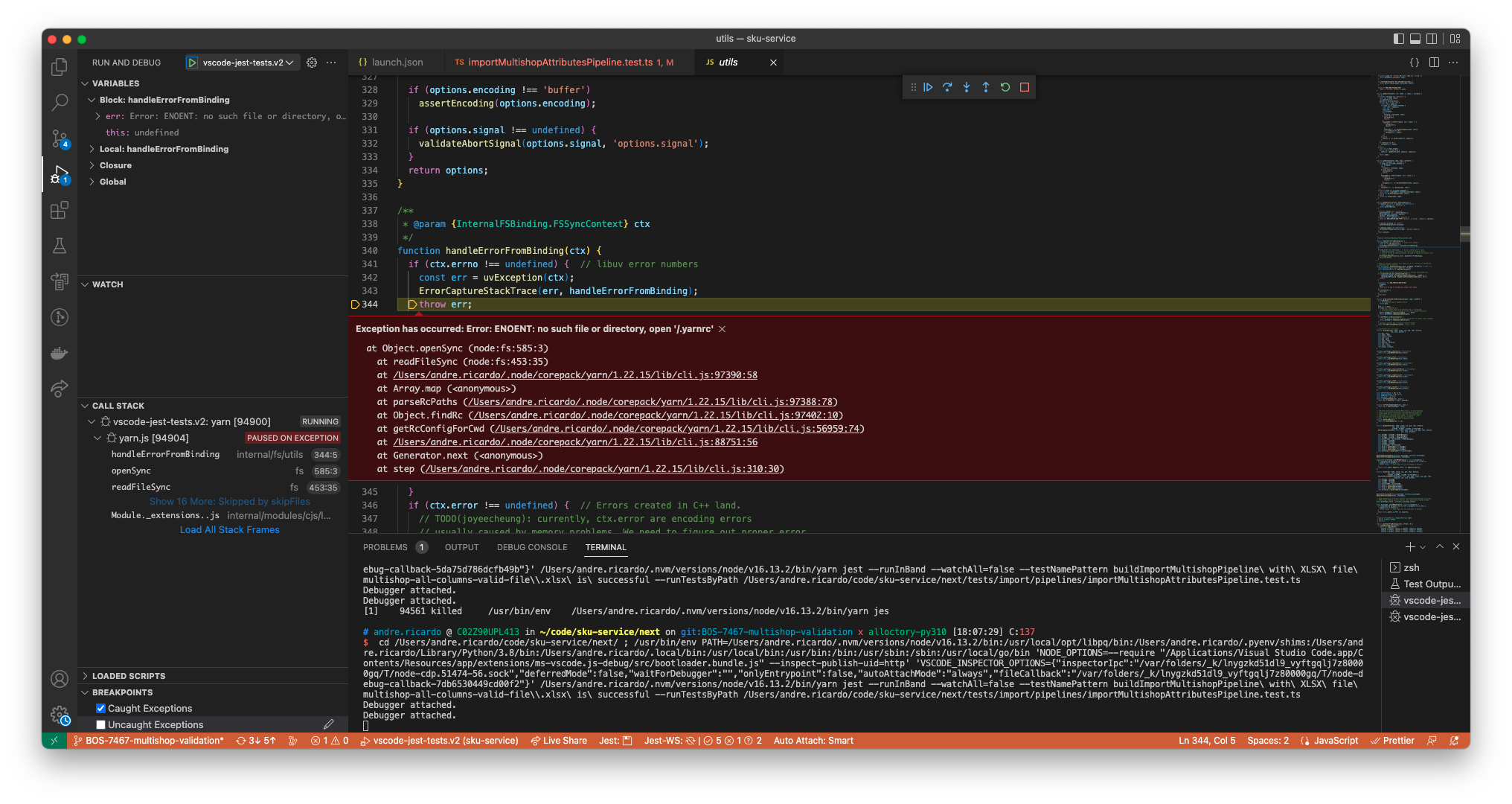
我试图在VS代码中的“捕获异常”处调试Jest测试和断点,但是它停在与我无关的/.node/corepack/yarn/1.22.15/lib/cli.js上。
我尝试在skipFiles中添加几个launch.json路径,但到目前为止还没有成功。
如何忽略Yarn/节点核心文件?
Launch.json
{
    "version": "0.2.0",
    "configurations": [
        {
            "type": "node",
            "name": "vscode-jest-tests.v2",
            "request": "launch",
            "runtimeExecutable": "yarn",
            "runtimeVersion": "16.13.2",
            "program": "jest",
            "args": [
                "--runInBand",
                "--watchAll=false",
                "--testNamePattern",
                "${jest.testNamePattern}",
                "--runTestsByPath",
                "${jest.testFile}"
            ],
            "cwd": "${workspaceFolder}/next/",
            "console": "integratedTerminal",
            "internalConsoleOptions": "neverOpen",
            "windows": {
                "program": "jest"
            },
            "skipFiles": [
                "<node_internals>/**/*.js",
                "~/.node/**/*.js",
                "**/.yarn/**",
                "**/node_modules/**",
                "**/yarn/**",
             ]
        },
    ]
}回答 1
Stack Overflow用户
回答已采纳
发布于 2022-10-11 17:22:37
添加**/.node/corepack/yarn/**使它忽略了这些文件。
            "skipFiles": [
                "<node_internals>/**",
                "**/node_modules/**",
                "**/.node/corepack/yarn/**"
]页面原文内容由Stack Overflow提供。腾讯云小微IT领域专用引擎提供翻译支持
原文链接:
https://stackoverflow.com/questions/74031776
复制相关文章
相似问题
腾讯云开发者

Copyright © 2013 - 2026 Tencent Cloud. All Rights Reserved. 腾讯云 版权所有
深圳市腾讯计算机系统有限公司 ICP备案/许可证号:粤B2-20090059  粤公网安备44030502008569号
腾讯云计算(北京)有限责任公司 京ICP证150476号 | 京ICP备11018762号