
循环ProgressBar视图不再使用iOS15动画
使用Swift5.5 5.5,iOS15.0.1,15.0.1,
我不得不意识到,我的循环ProgressBar在更新到iOS15之后不再有生命了。
下面的
- 是我的代码-有人能告诉我怎么做才能使循环的ProgressBar-View再次显示动画吗?
在这个例子中,
- 能告诉我如何规避反建议警告
animation' was deprecated in iOS 15.0: Use withAnimation or animation(_:value:) instead.?
吗?
import SwiftUI

struct ContentView: View {

    @State var progressValue: Float = 0.28

    var body: some View {
        ProgressBar(progress: $progressValue)
    }
}

struct ContentView_Previews: PreviewProvider {
    static var previews: some View {
        ContentView()
    }
}

struct ProgressBar: View {
    @Binding var progress: Float

    var body: some View {
        ZStack {
            Circle()
                .stroke(lineWidth: 20.0)
                .opacity(0.3)
                .foregroundColor(Color.red)

            Circle()
                .trim(from: 0.0, to: CGFloat(min(self.progress, 1.0)))
                .stroke(style: StrokeStyle(lineWidth: 20.0, lineCap: .round, lineJoin: .round))
                .foregroundColor(Color.red)
                .rotationEffect(Angle(degrees: 270.0))
                .animation(.linear)
            Text(String(format: "%.0f %%", min(self.progress, 1.0)*100.0))
                .font(.largeTitle)
                .bold()
        }
    }
}
我最初的版本如下:
Circle()
.trim(from: 0, to: showFreespaceRing ? CGFloat(Double(freeDiskspace) / Double(totalDiskspace)) : 0)
.stroke(Color.green.opacity(0.7), style: StrokeStyle(lineWidth: 10, lineCap: .round))
.frame(width: circleDiam, height: circleDiam)
.animation(.easeIn(duration: 1))
.onAppear() {
    showFreespaceRing = true
}回答 2
Stack Overflow用户
发布于 2021-10-12 15:36:00
value参数接受一个表示动画值的Equatable。在本例中:progress。
我还把.animation移出了ZStack --否则,我在动画上看到了一个有趣的抖动。
struct ContentView: View {

    @State var progressValue: Float = 0.28

    let timer = Timer.publish(every: 1.0, on: .main, in: .default).autoconnect()

    var body: some View {
        ProgressBar(progress: $progressValue)
            .onReceive(timer) { _ in
                progressValue += 0.1
            }
    }
}

struct ProgressBar: View {
    @Binding var progress: Float

    var body: some View {
        ZStack {
            Circle()
                .stroke(lineWidth: 20.0)
                .opacity(0.3)
                .foregroundColor(Color.red)

            Circle()
                .trim(from: 0.0, to: CGFloat(min(self.progress, 1.0)))
                .stroke(style: StrokeStyle(lineWidth: 20.0, lineCap: .round, lineJoin: .round))
                .foregroundColor(Color.red)
                .rotationEffect(Angle(degrees: 270.0))
            Text(String(format: "%.0f %%", min(self.progress, 1.0)*100.0))
                .font(.largeTitle)
                .bold()
        }
        .animation(.linear, value: progress)
    }
}Stack Overflow用户
发布于 2021-10-13 10:00:59
我终于发现出了问题:
在我最初的版本中,我
Circle()
    .trim(from: 0, to: showFreespaceRing ? CGFloat(Double(freeDiskspace) / Double(totalDiskspace)) : 0)
    .stroke(Color.green.opacity(0.7), style: StrokeStyle(lineWidth: 10, lineCap: .round))
    .frame(width: circleDiam, height: circleDiam)
    .animation(.easeIn(duration: 1))
    .onAppear() {
        showFreespaceRing = true
    }
现在我有了:
Circle()
    .trim(from: 0, to: showFreespaceRing ? 0 : CGFloat(Double(freeDiskspace) / Double(totalDiskspace)))
    .stroke(Color.green.opacity(0.7), style: StrokeStyle(lineWidth: 10, lineCap: .round))
    .frame(width: circleDiam, height: circleDiam)
    .animation(.easeIn(duration: 1), value: showFreespaceRing)
    .onAppear() {
        showFreespaceRing.toggle()
    }
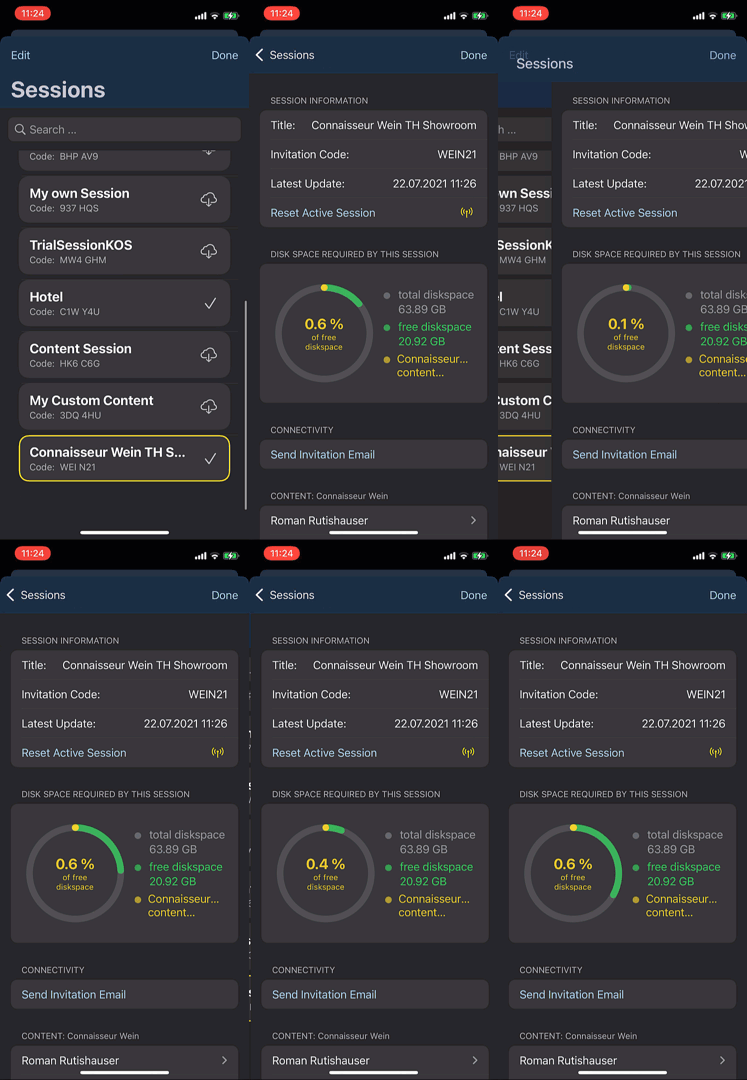
有了这个,动画作品再来一次(看下面的视频,还有一个问题).
诀窍是在.toggle()方法中使用onAppear。
真正不起作用的是让showFreespaceRing = true在onAppear()方法中(而是showFreespaceRing.toggle()!
当然,在animation中实现iOS15 15的新的animation。
.animation(.easeIn(duration: 1), value: showFreespaceRing)然而,对于目前的解决方案,仍然有一个烦恼:
动画不是光滑的!!
请看这段视频:
如果你仔细看,你可以看到动画不是光滑的,而是很糟糕的闪烁。(也就是说,动画片看起来仍然是灾难性的)。我怎样才能获得流畅的动画??
=================================================
经过一天的调查,我发现:
动画中抖动的根本原因似乎是.sheet!
这里是一个完整的例子,紧张!
import SwiftUI

enum THSheetSelection: Hashable, Identifiable {

    case trialSheet

    var id: THSheetSelection { self }
}


struct ContentView: View {

    @State private var sheetState: THSheetSelection?

    var body: some View {
        Text("Hello")
            .onAppear {
                DispatchQueue.main.asyncAfter(deadline: .now() + .milliseconds(2000)) {
                    sheetState = .trialSheet
                }
            }
            .sheet(item: $sheetState) { state in
                switch state {
                case .trialSheet:
                    SessionDiskspaceStatisticsView()
                }
            }
    }
}

struct SessionDiskspaceStatisticsView: View {

    @State private var neededDiskSpace: Int64 = 0
    @State private var freeDiskspace: Int64 = 0
    @State private var totalDiskspace: Int64 = 0

    @State private var showFreespaceRing = false

    let deviceIdiom = UIScreen.main.traitCollection.userInterfaceIdiom

    var body: some View {
        ZStack {
            VStack(alignment: .center) {
                Spacer().frame(height: 30)
                ZStack {
                    HStack {
                        Spacer().frame(width: 50)
                        ZStack{
                            Circle()
                                .trim(from: 0, to: 1)
                                .stroke(Color.gray.opacity(0.2), lineWidth: 10)
                                .frame(width: 137.5, height: 137.5)

                                if neededDiskSpace < freeDiskspace {
                                    Circle()
                                        .trim(from: 0, to: showFreespaceRing ? 0 : CGFloat(Double(freeDiskspace) / Double(totalDiskspace)))
                                        .stroke(Color.green.opacity(0.7), style: StrokeStyle(lineWidth: 10, lineCap: .round))
                                        .frame(width: 137.5, height: 137.5)
                                        .animation(.easeIn(duration: 1), value: showFreespaceRing)
                                        .onAppear() {
                                            showFreespaceRing.toggle()
                                        }
                                    .rotationEffect(.init(degrees: 90))
                                } else {
                                    Text(LocalizedStringKey("NotEnoughSpaceKey"))
                                        .font(.system(size: 16))
                                        .fontWeight(.regular)
                                        .foregroundColor(Color.red)
                                        .frame(width: 137.5 - 10)
                                        .multilineTextAlignment(.center)
                                        .rotationEffect(.init(degrees: 90))
                                }
                        }
                        .rotationEffect(.init(degrees: -90))
                        Spacer()
                    }
                }
                Spacer().frame(height: 30)
            }
        }
        .onAppear {

            neededDiskSpace = 20000
            freeDiskspace = 130000
            totalDiskspace = 150000
        }
    }
}对于如何在没有抖动的.sheet中动画圆形进度栏,有什么想法吗?
https://stackoverflow.com/questions/69541087
复制相似问题
腾讯云开发者

Copyright © 2013 - 2026 Tencent Cloud. All Rights Reserved. 腾讯云 版权所有
深圳市腾讯计算机系统有限公司 ICP备案/许可证号:粤B2-20090059  粤公网安备44030502008569号
腾讯云计算(北京)有限责任公司 京ICP证150476号 | 京ICP备11018762号