
如何判断元素是否可点击?
如何判断元素是否可点击?
提问于 2021-09-08 08:42:14
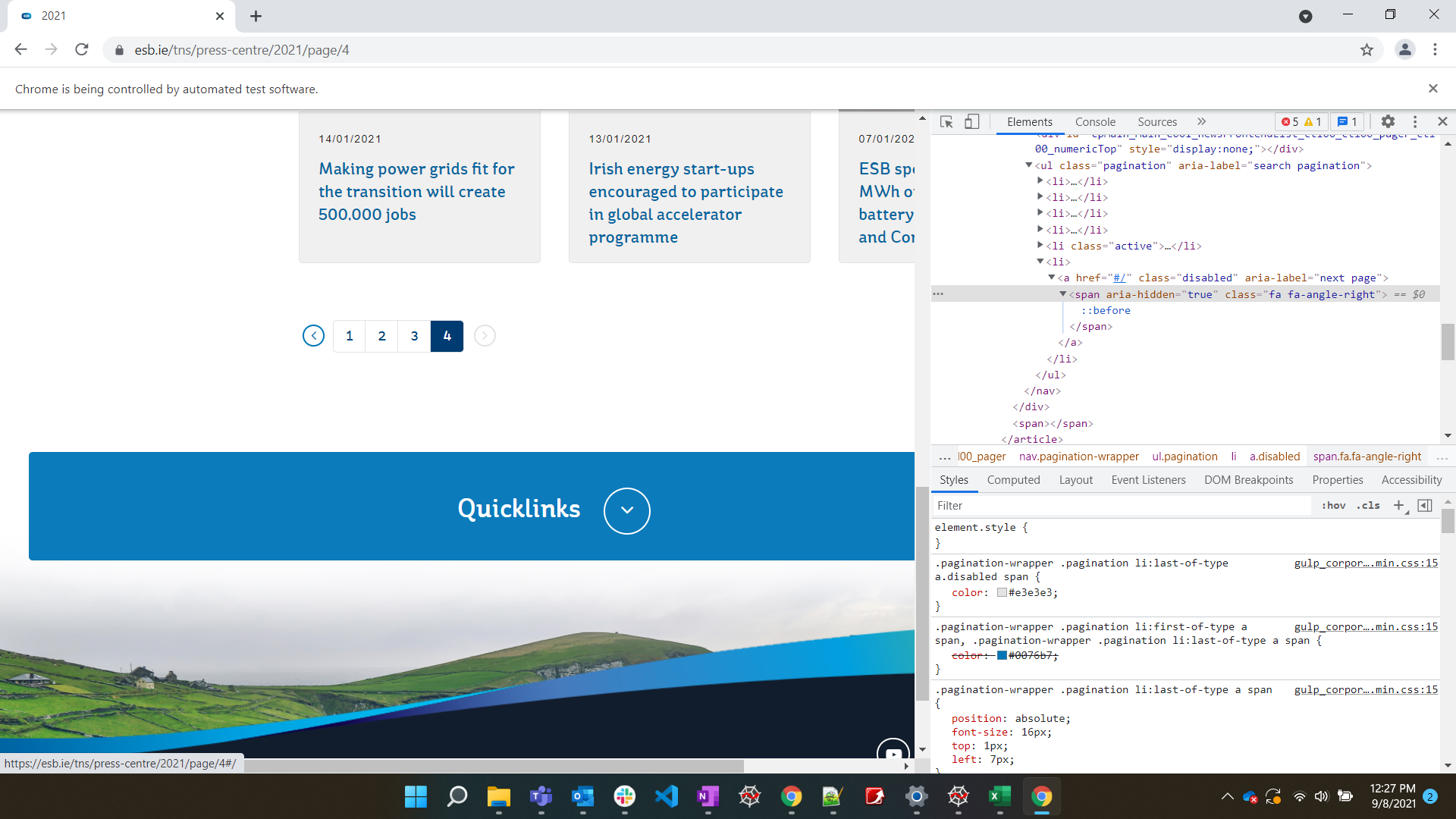
对于URL,我试图诱导单击next页面按钮。为了确保按钮是否可点击,我尝试以下操作:
WebDriverWait(driver,10).until(EC.element_to_be_clickable((By.CSS_SELECTOR, '.fa.fa-angle-right')))但就连最后一页也是如此。我的理解哪里出了问题?我怎么能判断按钮是否可以点击呢?在最后一页上,下一页按钮是灰色的。
回答 3
Stack Overflow用户
回答已采纳
发布于 2021-09-08 09:15:59
如果您注意,当按钮是getting grayed out时,它有一个class attribute,其属性值为,将更改为disabled。
您可能可以创建一个function,并将下面的代码放入其中,可以按照您的requirement进行call。
示例代码:
wait = WebDriverWait(driver, 20)
next_button = wait.until(EC.element_to_be_clickable((By.XPATH, "//a[@aria-label='next page']")))
try:
    if next_button.get_attribute('class') == "disabled":
        print('Next button is not clickable anymore')
    else:
        print('Next button is available')
        next_button.click()
except:
    print('Something went wrong')
    pass
导入:
from selenium.webdriver.support.ui import WebDriverWait
from selenium.webdriver.common.by import By
from selenium.webdriver.support import expected_conditions as ECStack Overflow用户
发布于 2021-09-08 10:14:56
.element_to_be_clickable甚至可以单击禁用元素,因此寻找实现目标的其他方法。
在最后一页中有唯一的元素,这个选择器:
a.disabled .fa.fa-angle-right可以使用.find_elements_by_*方法检查元素的大小以确保是否存在,这将返回列表。
看看这个简单的循环:
driver.get("https://esb.ie/tns/press-centre/2021")

try:
    # Here I face cookie setting, accept
    WebDriverWait(driver,10).until(EC.element_to_be_clickable((By.ID, 'onetrust-accept-btn-handler'))).click()
except:
    print('no cookie setting appear')

while True:
    WebDriverWait(driver,10).until(EC.element_to_be_clickable((By.CSS_SELECTOR, '.fa.fa-angle-right'))).click()
    #check last page
    if(len(driver.find_elements_by_css_selector('a.disabled .fa.fa-angle-right')) > 0):
break;Stack Overflow用户
发布于 2021-09-08 10:20:23
你也可以这样做:
try:
    while True:
        if driver.find_element_by_xpath("//a[@aria-label='next page']").get_attribute("class")=='disabled':
            print("Disabled")
            break
        driver.find_element_by_xpath("//a[@aria-label='next page']").click()
        print("Clickable")
        time.sleep(5)
except Exception as e:
print(e)Clickable
Clickable
Clickable
Disabled页面原文内容由Stack Overflow提供。腾讯云小微IT领域专用引擎提供翻译支持
原文链接:
https://stackoverflow.com/questions/69099773
复制相关文章
相似问题
腾讯云开发者

Copyright © 2013 - 2026 Tencent Cloud. All Rights Reserved. 腾讯云 版权所有
深圳市腾讯计算机系统有限公司 ICP备案/许可证号:粤B2-20090059  粤公网安备44030502008569号
腾讯云计算(北京)有限责任公司 京ICP证150476号 | 京ICP备11018762号