
滚动时不能用模糊过滤器使肚脐粘稠,没有身体内容重叠的导航?
滚动时不能用模糊过滤器使肚脐粘稠,没有身体内容重叠的导航?
提问于 2021-07-27 06:51:35
我想做一个有模糊效果的粘性肚脐,比如https://headlessui.dev/react/menu (尝试滚动以查看导航上的模糊效果)。看起来应该是:
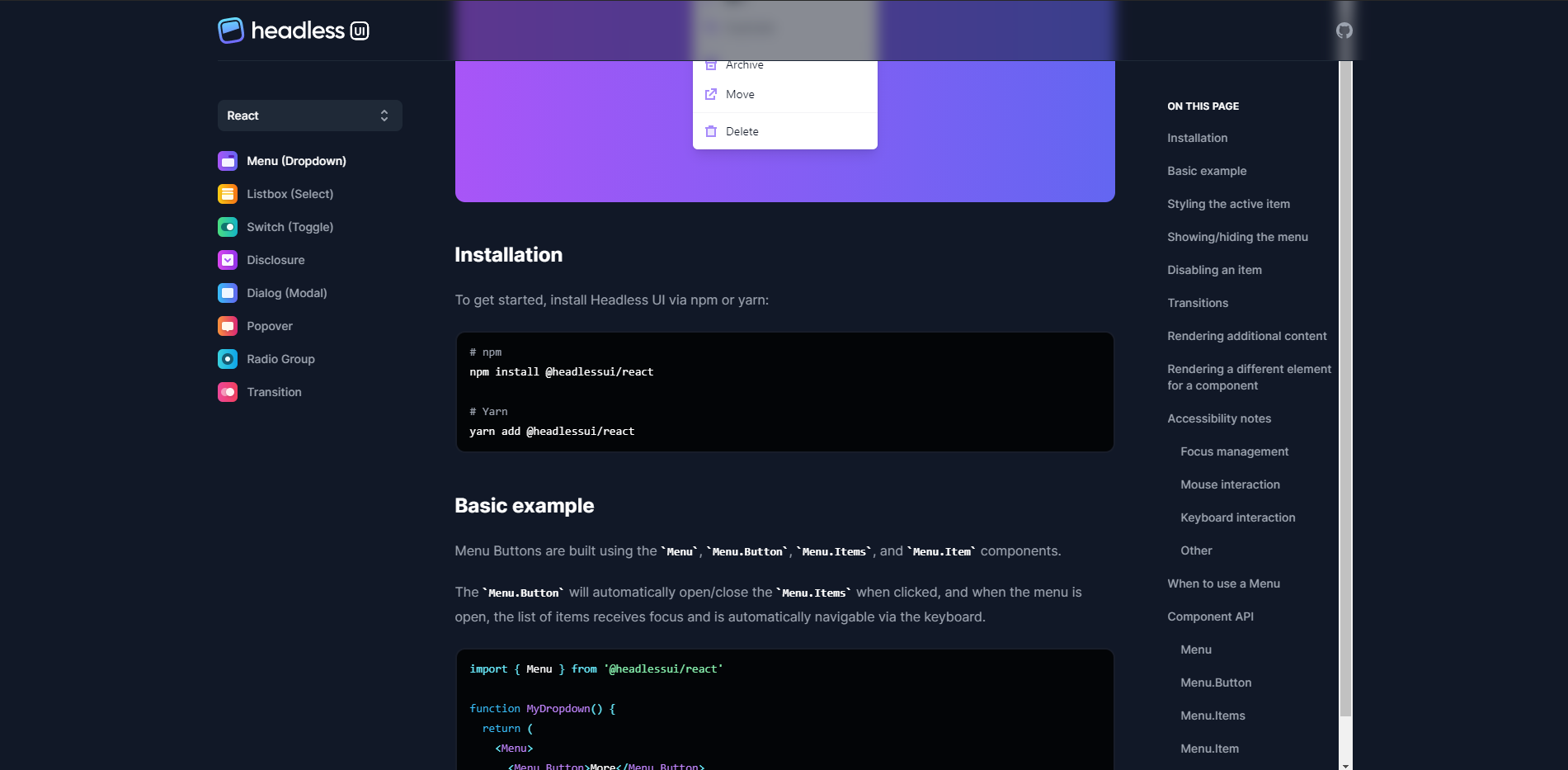
下面是我的HTML的样子:
<header class="sticky z-10 top-10">
  <nav class="backdrop-filter backdrop-blur flex items-center justify-center h-16 font-semibold text-sm after:absolute after:inset-x-0 after:w-full after:h-12 after:shadow-hr after:z-[-1] mt-12">
    <section class="h-full">
      <a class="flex items-center justify-center h-full pl-4" href="/"
        ><svg width="176" height="177" viewBox="0 0 176 177" xmlns="http://www.w3.org/2000/svg" class="w-4 h-4 fill-current dark:text-white -rotate-6"><path d="M56.576.872h4.352l20.224 70.144L51.712 177H.512L56.576.872zm57.6 144.896H71.424l10.752-39.424h20.48L72.448.872h46.848L175.36 177h-52.224l-8.96-31.232z" fill="currentColor"></path></svg><span class="text-lg sr-only">Home</span></a
      >
    </section>
    <section class="h-full">
      <ul class="flex items-center justify-center h-full">
        <li class="mx-4"><a class="text-lg font-bold text-gray-700/75 hover:text-gray-900 dark:text-white/50 dark:hover:text-white" href="/essays">Essays</a></li>
        <li class="mx-4"><a class="text-lg font-bold text-gray-700/75 hover:text-gray-900 dark:text-white/50 dark:hover:text-white" href="/tutorials">Tutorials</a></li>
        <li class="mx-4"><a class="text-lg font-bold text-gray-700/75 hover:text-gray-900 dark:text-white/50 dark:hover:text-white" href="/snippets">Snippets</a></li>
        <li class="mx-4"><a class="text-lg font-bold text-gray-700/75 hover:text-gray-900 dark:text-white/50 dark:hover:text-white" href="/tips">Tips</a></li>
        <li class="mx-4"><a class="text-lg font-bold text-gray-700/75 hover:text-gray-900 dark:text-white/50 dark:hover:text-white" href="/feed.xml">RSS</a></li>
        <li class="mx-4"><a class="text-lg font-bold text-gray-700/75 hover:text-gray-900 dark:text-white/50 dark:hover:text-white" href="/about">About</a></li>
      </ul>
    </section>
  </nav>
</header>

<h1 class="text-5xl font-bold text-center font-serif mt-20">All Essays By Date</h1>
<h2 class="w-3/4 mx-auto mt-4 mb-8 text-lg font-semibold text-center text-gray-700 dark:text-gray-300 sm:w-2/4">Scroll down to browse all of my essays by date and title. Essays are listed in reverse chronological order with my newest essay at the top and my oldest essay at the bottom.</h2>

<main class="prose block mx-auto">
  <p>Have you ever visited a website and been completely in awe of the elegance and simplicity of its design? For me, that website is <a target="_blank" rel="noopener noreferrer" href="https://stripe.com/">Stripe</a>. Stripe is a company that allows people and businesses to accept payments online and in mobile apps. That doesn't sound like a company that would have an exquisite website design, but look at how Stripe describes themselves on their about page.</p>
  <blockquote>
    <p>"We think that building an internet business is a problem rooted in code and design, not finance."</p>
  </blockquote>
  <p>Rather than making design an afterthought, it's treated as a first-class citizen at Stripe. You can almost feel the hours of work spent iterating over designs and making minor tweaks when viewing the website's pages. In this article, I'm going to break down how Stripe creates these beautiful designs and give some tips and tricks to web designers and developers alike.</p>
  <h3 id="the-design">
    <a href="#the-design" class="anchor"><span class="icon icon-link"></span></a>The Design
  </h3>
  <div style="display: inline-block; max-width: 100%; overflow: hidden; position: relative; box-sizing: border-box; margin: 0px;">
    <div style="box-sizing: border-box; display: block; max-width: 100%;"></div>
  </div>
  <p>Pictured above is the design for Stripe's main landing page. At first glance, here's what really sticks out to me:</p>
  <ol>
    <li>Crisp typography</li>
    <li>Stunning color palette</li>
    <li>High-quality images</li>
    <li>Bold call-to-action buttons</li>
  </ol>
  <p>Let's start with the first observation: the font.</p>
  <h3 id="typography">
    <a href="#typography" class="anchor"><span class="icon icon-link"></span></a>Typography
  </h3>
  <p>Stripe uses a font called <a target="_blank" rel="noopener noreferrer" href="https://www.fontshop.com/families/camphor">Camphor</a>. It's a modern, uncluttered, sans serif font designed by Nick Job in 2010. It <em>really</em> shines here and looks great in a variety of weights.</p>
  <div style="display: inline-block; max-width: 100%; overflow: hidden; position: relative; box-sizing: border-box; margin: 0px;">
    <div style="box-sizing: border-box; display: block; max-width: 100%;">  </div>
  <p>Let's see how we can make our font as crisp and clear as possible. First, we'll define our font family to be Camphor along with some fallback fonts. <strong>Note:</strong> Camphor is not free and should be purchased if you're planning to use it in production. However, I did find a <a target="_blank" rel="noopener noreferrer" href="https://gist.github.com/bdno86/d1f49b6f533df3f832b39d6cc3194303">gist containing the font</a> which you can mess around with.</p>
  <p>We can utilize the <code>text-rendering</code> CSS property to allow us to choose quality over speed, as well as some vendor specific properties to make our font sharper. <strong>Note:</strong> These should work for Chrome, Safari, and Firefox on Mac.</p>
  <pre class="language-css"><code class="language-css"><span class="token selector">body</span> <span class="token punctuation">{</span>
  <span class="token property">font-family</span><span class="token punctuation">:</span> Camphor<span class="token punctuation">,</span> Open Sans<span class="token punctuation">,</span> Segoe UI<span class="token punctuation">,</span> sans-serif<span class="token punctuation">;</span>
  <span class="token property">text-rendering</span><span class="token punctuation">:</span> optimizeLegibility<span class="token punctuation">;</span>
  <span class="token property">-webkit-font-smoothing</span><span class="token punctuation">:</span> antialiased<span class="token punctuation">;</span>
  <span class="token property">-moz-osx-font-smoothing</span><span class="token punctuation">:</span> grayscale<span class="token punctuation">;</span>
<span class="token punctuation">}</span>
</code></pre>
  <h3 id="example">
    <a href="#example" class="anchor"><span class="icon icon-link"></span></a>Example
  </h3>
  <p>In this example, I apply <code>-webkit-font-smoothing</code> followed by <code>text-rendering</code>.</p>
</main>相关部分仅为nav部分。样板的其余部分是添加内容,从而启用滚动。
我创建了一个顺风游戏复制。
基本上,我想滚动一个粘性的导航和重叠内容。我怎样才能达到这个效果呢?
我将backdrop-filter backdrop-blur添加到nav中以添加模糊效果,但内容在nav上方滚动,因为我的height可能还不够。
我将一些height添加到header &其他一些属性中,如:
height: 92px;
background: darkred;
position: relative;
top: 0;但它并不能完全传递给top。我想我需要添加一个简单的div,其背景颜色类似于body,但我很困惑该把它放在哪里呢?或者应该在header上
我希望导航是突出的,内容滚动在它下面,如果有意义的话。我该怎么做呢?
回答 1
Stack Overflow用户
回答已采纳
发布于 2021-07-27 08:56:23
我设法让它变得粘稠,内容变得模糊,使用了一些技巧:
- 将
margin改为padding,使mt-12变为pt-12 - 添加
pb-10 - 将
backdrop-filter backdrop-blur从nav更改为header
这是已更改的代码:
<header
  className="sticky top-0 z-10 pt-12 pb-10 backdrop-filter backdrop-blur
                   dark:bg-primary dark:text-white"
>
  <nav
    className="flex items-center justify-center h-16 font-semibold text-sm
       after:absolute after:inset-x-0 after:w-full after:h-12 after:shadow-hr after:z-[-1]"
  ></nav>
</header>页面原文内容由Stack Overflow提供。腾讯云小微IT领域专用引擎提供翻译支持
原文链接:
https://stackoverflow.com/questions/68540186
复制相关文章
相似问题
腾讯云开发者

Copyright © 2013 - 2026 Tencent Cloud. All Rights Reserved. 腾讯云 版权所有
深圳市腾讯计算机系统有限公司 ICP备案/许可证号:粤B2-20090059  粤公网安备44030502008569号
腾讯云计算(北京)有限责任公司 京ICP证150476号 | 京ICP备11018762号