
类星体文件选择器更改q文件中选定文件名的文本颜色。
类星体文件选择器更改q文件中选定文件名的文本颜色。
提问于 2020-10-06 11:11:52
类星体文件选择器组件,以在<q-file>中更改选定文件名的文本颜色。
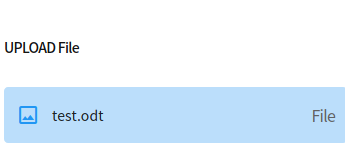
所选择的文本文件为test.odt,如何更改它的文本颜色,例如Red
<q-file
  standout
  class="registration-field text-red"
  bg-color="blue-2"
  v-model="registrationNumber"
  color="red"
>
  <template v-slot:prepend>
    <q-icon name="o_insert_photo" size="24px" color="blue" />
  </template>
  <template v-slot:append>
    <div class="attachment text-grey-14">File</div>
  </template>
</q-file>我试过使用风格道具color="red",但它不起作用。
有人知道怎么做吗?
回答 1
Stack Overflow用户
回答已采纳
发布于 2020-10-21 10:05:35
您可以使用file插槽并添加text-red类,它可以工作。
<q-file
  standout
  class="registration-field text-red"
  bg-color="blue-2"
  v-model="registrationNumber"
  color="red"
>
  <template v-slot:prepend>
    <q-icon name="photo" size="24px" color="blue"/>
  </template>
  <template v-slot:append>
    <div class="attachment text-grey-14">File</div>
  </template>
  <template v-slot:file="{ index, file }">
    <div class="ellipsis text-red relative-position">
      {{ file.name }}
    </div>

    <q-tooltip>
      {{ file.name }}
    </q-tooltip>
  </template>
</q-file>页面原文内容由Stack Overflow提供。腾讯云小微IT领域专用引擎提供翻译支持
原文链接:
https://stackoverflow.com/questions/64224621
复制相关文章
相似问题
腾讯云开发者

Copyright © 2013 - 2026 Tencent Cloud. All Rights Reserved. 腾讯云 版权所有
深圳市腾讯计算机系统有限公司 ICP备案/许可证号:粤B2-20090059  粤公网安备44030502008569号
腾讯云计算(北京)有限责任公司 京ICP证150476号 | 京ICP备11018762号