
为什么setDuration不在QSequentialAnimationGroup内部工作?
为什么setDuration不在QSequentialAnimationGroup内部工作?
提问于 2020-03-06 20:24:32
我把两个QVariantAnimation塞进了一个QSequentialAnimationGroup里,我正试着把其中一个倒过来。我试着这样做
self.animation_1 = QtCore.QVariantAnimation()
self.animation_2 = QtCore.QVariantAnimation()

self.animation_1.setDirection(QtCore.QVariantAnimation.Backward)
self.animation_2.setDirection(QtCore.QVariantAnimation.Forward)

self.group = QtCore.QSequentialAnimationGroup(self)
self.group.addAnimation(self.animation_1)
self.group.addAnimation(self.animation_2)
但没起作用。我试过了
self.group.setDirection(QtCore.QVariantAnimation.Backward)但整个动画都是倒置的。我只需要把其中一个倒过来。我试图通过引用索引来做到这一点。
self.group.animationAt(0).setDirection(QtCore.QVariantAnimation.Backward)没有反应。我也试过这样做
self.group.animationAt(self.group.indexOfAnimation(animation_1)).setDirection(QtCore.QVariantAnimation.Backward)还是没什么用。
该怎么做呢?
我的代码
import sys

from PyQt5 import QtCore, QtGui, QtWidgets


class Main(QtWidgets.QWidget):
    def __init__(self):
        super().__init__()
        block = QtWidgets.QWidget(self)
        block.setObjectName(u"block")
        block.setMinimumSize(QtCore.QSize(300, 300))
        self.block_but = QtWidgets.QWidget(block)
        self.block_but.setObjectName(u"block_but")
        self.block_but.setGeometry(QtCore.QRect(110, 20, 111, 111))
        move_blur_button_lay = QtWidgets.QVBoxLayout(self.block_but)
        move_blur_button_lay.setObjectName(u"move_blur_button_lay")
        self.menu_arr = []

        radio = QtWidgets.QPushButton(self.block_but)
        radio.setText('click me')
        radio.setObjectName("mv_radio_but")
        radio.pressed.connect(self.menu_animation)
        move_blur_button_lay.addWidget(radio)
        for x in range(2):
            menu = QtWidgets.QWidget(block)
            menu.resize(50, 60)
            menu._expand = False
            self.menu_arr.append(menu)
        self.menu_arr[0].setStyleSheet("""background:#ff0""")

        self.animation = []
        for i in range(2):
            menuAnimation = QtCore.QVariantAnimation()
            menuAnimation.setDuration(500)
            menuAnimation.setEasingCurve(QtCore.QEasingCurve.OutQuart)
            menuAnimation.setStartValue(QtCore.QPoint(-20, 10))
            menuAnimation.setEndValue(QtCore.QPoint(0, 10))
            self.animation.append(menuAnimation)
        self.group = QtCore.QSequentialAnimationGroup(self)

    def menu_animation(self):
        for c in range(2):
            pos1 = QtCore.QPoint(0, 0)
            pos2 = QtCore.QPoint(100, 0)
            self.animation[c].setStartValue(pos1)
            self.animation[c].setEndValue(pos2)
            self.animation[c].setDirection(QtCore.QAbstractAnimation.Backward)
            self.animation[c].valueChanged.connect(
                lambda value, val=c: self.fun(value, val)
            )
        #self.animation[0].setDirection(QtCore.QVariantAnimation.Backward)
        #self.animation[1].setDirection(QtCore.QVariantAnimation.Forward)

        self.animation[0].setStartValue(pos1)
        self.animation[0].setEndValue(pos2)
        self.animation[1].setStartValue(pos2)
        self.animation[1].setEndValue(pos1)


        self.group.addAnimation(self.animation[0])
        self.group.addAnimation(self.animation[1])
        self.group.start()

    def fun(self, value, val=""):
        self.menu_arr[val].move(value.x(), 0)


StyleSheet = """
QWidget QWidget,
QWidget QWidget QWidget QWidget,
QWidget QWidget QWidget QWidget QWidget QWidget,
QWidget QWidget QWidget QWidget QWidget QWidget QWidget QWidget,
QWidget QWidget QWidget QWidget QWidget QWidget QWidget QWidget QWidget QWidget{
background:#000;
color:#fff;
}
QWidget,
QWidget QWidget QWidget,
QWidget QWidget QWidget QWidget QWidget,
QWidget QWidget QWidget QWidget QWidget QWidget QWidget,
QWidget QWidget QWidget QWidget QWidget QWidget QWidget QWidget QWidget{
background:#fff;
color:#000;
}
"""

if __name__ == "__main__":
    app = QtWidgets.QApplication(sys.argv)
    app.setStyleSheet(StyleSheet)
    w = Main()
    w.resize(640, 570)
    w.show()
    sys.exit(app.exec_())
我想要的
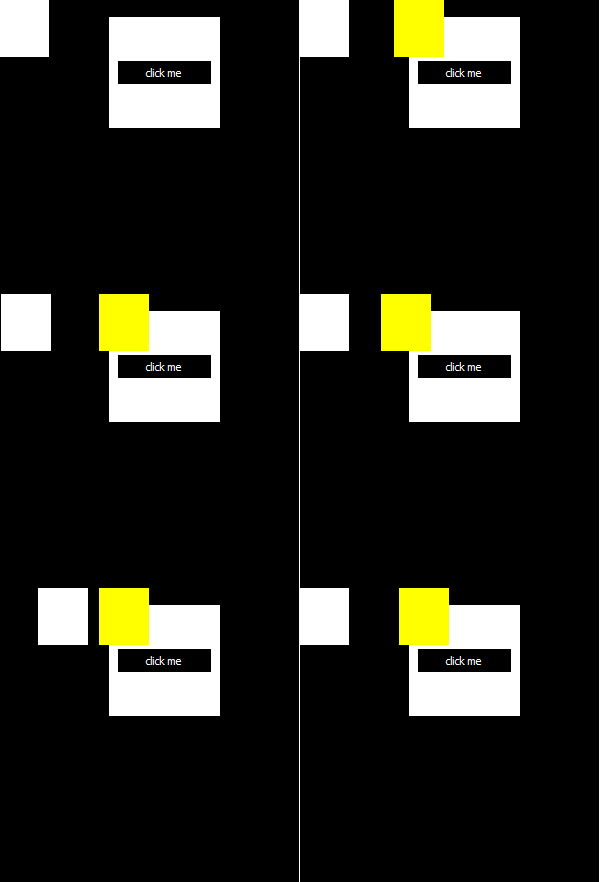
回答 1
Stack Overflow用户
回答已采纳
发布于 2020-03-08 10:01:50
似乎没有记录QSequentialAnimationGroup的方向是如何影响动画的方向的,但是如果对源代码进行了审查:
void QSequentialAnimationGroup::updateDirection(QAbstractAnimation::Direction direction)
{
    Q_D(QSequentialAnimationGroup);
    // we need to update the direction of the current animation
    if (state() != Stopped && d->currentAnimation)
        d->currentAnimation->setDirection(direction);
}
需要注意的是,QSequentialAnimationGroup的地址应用于动画。解决方案是重写该方法并覆盖该行为,但不幸的是,无法从python访问该方法。
解决方法是通过将clicked信号与第一动画的start()方法以及第一动画的finished信号连接到第二动画的start()方法来实现逻辑。
class Main(QtWidgets.QWidget):
    def __init__(self):
        super().__init__()
        block = QtWidgets.QWidget(self)
        block.setMinimumSize(300, 300)
        self.block_but = QtWidgets.QWidget(block)
        self.block_but.setGeometry(QtCore.QRect(110, 20, 111, 111))

        radio = QtWidgets.QPushButton("click me", self.block_but)
        move_blur_button_lay = QtWidgets.QVBoxLayout(self.block_but)
        move_blur_button_lay.addWidget(radio)

        first_widget = QtWidgets.QWidget(block)
        first_widget.resize(50, 60)
        first_widget.setStyleSheet("""background:#ff0""")

        second_widget = QtWidgets.QWidget(block)
        second_widget.resize(50, 60)

        pos1 = QtCore.QPoint(0, 0)
        pos2 = QtCore.QPoint(100, 0)

        self.first_animation = QtCore.QVariantAnimation(
            self,
            duration=500,
            easingCurve=QtCore.QEasingCurve.OutQuart,
            startValue=pos1,
            endValue=pos2,
            direction=QtCore.QVariantAnimation.Forward,
            valueChanged=first_widget.move,
        )

        self.second_animation = QtCore.QVariantAnimation(
            self,
            duration=500,
            easingCurve=QtCore.QEasingCurve.OutQuart,
            startValue=pos1,
            endValue=pos2,
            direction=QtCore.QVariantAnimation.Backward,
            valueChanged=second_widget.move,
        )

        radio.clicked.connect(self.first_animation.start)
self.first_animation.finished.connect(self.second_animation.start)页面原文内容由Stack Overflow提供。腾讯云小微IT领域专用引擎提供翻译支持
原文链接:
https://stackoverflow.com/questions/60571121
复制相关文章
相似问题
腾讯云开发者

Copyright © 2013 - 2026 Tencent Cloud. All Rights Reserved. 腾讯云 版权所有
深圳市腾讯计算机系统有限公司 ICP备案/许可证号:粤B2-20090059  粤公网安备44030502008569号
腾讯云计算(北京)有限责任公司 京ICP证150476号 | 京ICP备11018762号