
WPF、简单注入器和MaterialDesignThemes静态资源无效
我有用WPF编写的示例应用程序,使用简单的喷油器和材料设计主题。这是我的程序文件:
private static Container Bootstrap()
{
    // Create the container as usual.
    var container = new Container();

    container.Options.DefaultScopedLifestyle = new AsyncScopedLifestyle();

    // Register your types, for instance:
    container.Register<IFreewayReviewCreatorDbContext, FreewayReviewCreatorDbContext>(Lifestyle.Scoped);
    container.Register<IUnitOfWorkFactory, UnitOfWorkFactory>(Lifestyle.Transient);
    container.Register<IUnitOfWork, UnitOfWork>(Lifestyle.Scoped);
    container.Register<IReviewBodyBLL, ReviewBodyBLL>(Lifestyle.Transient);

    // Register your windows and view models:
    container.Register<MainWindow>();
    container.Register<MainWindowViewModel>();

    container.Verify();

    return container;
}

private static void RunApplication(Container container)
{
    try
    {
        var app = new App();
        //app.InitializeComponent();
        var mainWindow = container.GetInstance<MainWindow>();
        app.Run(mainWindow);
    }
    catch (Exception ex)
    {
        //Log the exception and exit
    }
}
在上面的代码中,视图模型添加到Simple中注册。
现在在MainWindow,我想使用来自材料设计的StaticResource。这是我的密码:
<Window x:Class="FreewayReviewCreator.MainWindow"
        xmlns="http://schemas.microsoft.com/winfx/2006/xaml/presentation"
        xmlns:x="http://schemas.microsoft.com/winfx/2006/xaml"
        xmlns:d="http://schemas.microsoft.com/expression/blend/2008"
        xmlns:mc="http://schemas.openxmlformats.org/markup-compatibility/2006"
        xmlns:local="clr-namespace:FreewayReviewCreator"
        xmlns:localvm="clr-namespace:FreewayReviewCreator.ViewModel"
        xmlns:materialDesign="http://materialdesigninxaml.net/winfx/xaml/themes"
        mc:Ignorable="d" Loaded="MainWindow_OnLoaded"
        Title="MainWindow" Height="450" Width="800">
    <Grid>
        <StackPanel HorizontalAlignment = "Left">

            <TextBox
                    Name="tbxPassword"
                 Text="{Binding Password, Mode = TwoWay}"
                    HorizontalContentAlignment="Center"
                    Style="{StaticResource MaterialDesignFloatingHintTextBox}"
                    MaxLength="28"
                    materialDesign:HintAssist.Hint="Enter your username"
/>错误出现在这一行:Style="{StaticResource MaterialDesignFloatingHintTextBox}"
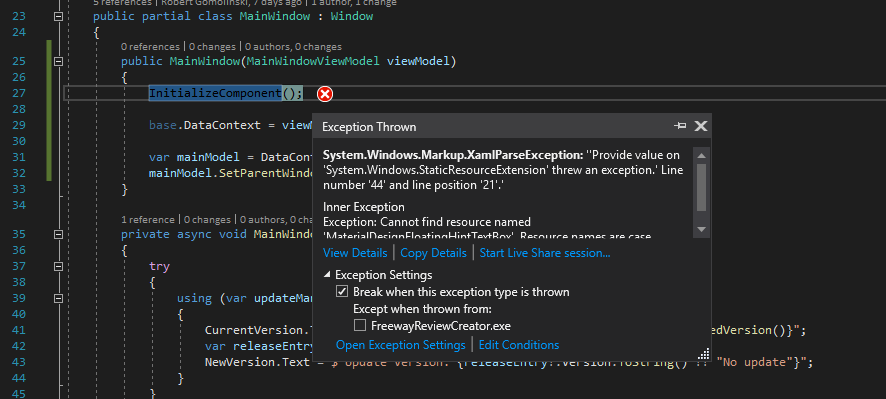
System.Windows.Markup.XamlParseException:‘’提供'System.Windows.StaticResourceExtension‘的价值’抛出了一个例外。‘行号'44‘和线位置’21‘。异常:无法找到名为“MaterialDesignFloatingHintTextBox”的资源。资源名称区分大小写。
在这个网页上是使用StaticResource的示例应用程序(我从这个应用程序中获取代码):
https://www.c-sharpcorner.com/article/wpf-application-with-googles-material-design/ 而且起作用了。我能看到的唯一不同之处是,我的应用程序有简单的Injector,而示例中的应用程序没有。两个应用程序中的引用都是相同的:
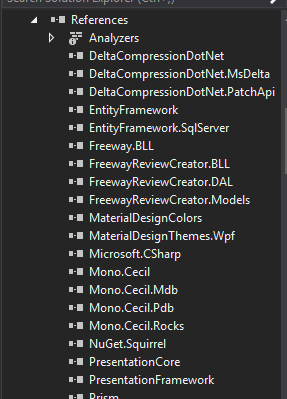
回答 2
Stack Overflow用户
发布于 2019-12-16 21:51:32
假设您按照@mm8 8的答案向App类提供了App,那么您应该通过在App类的构造函数中调用InitializeComponent()来加载和应用ResourceDictionaries。
如下所示:
public partial class App : Application
{
    public App()
    {
        this.InitializeComponent();
    }
}
我从你的问题中看出了这句话的意思。这可能是遵循简单Injector文档中提供的启动代码并在此之后添加Material主题的结果。
但是,在向MergedDictionaries添加App.xaml时,此代码是必要的。所以你得把它加回去。
Stack Overflow用户
发布于 2019-12-16 14:38:51
您应该安装MaterialDesignThemes NuGet包,并将以下资源字典添加到App.xaml文件中,如文档中所述
<?xml version="1.0" encoding="UTF-8"?>
<Application . . .>
    <Application.Resources>
        <ResourceDictionary>
            <ResourceDictionary.MergedDictionaries>
                <ResourceDictionary Source="pack://application:,,,/MaterialDesignThemes.Wpf;component/Themes/MaterialDesignTheme.Light.xaml" />
                <ResourceDictionary Source="pack://application:,,,/MaterialDesignThemes.Wpf;component/Themes/MaterialDesignTheme.Defaults.xaml" />
                <ResourceDictionary Source="pack://application:,,,/MaterialDesignColors;component/Themes/Recommended/Primary/MaterialDesignColor.DeepPurple.xaml" />
                <ResourceDictionary Source="pack://application:,,,/MaterialDesignColors;component/Themes/Recommended/Accent/MaterialDesignColor.Lime.xaml" />
            </ResourceDictionary.MergedDictionaries>
        </ResourceDictionary>
    </Application.Resources>
</Application>
这与简单的注入器或您正在使用的任何IoC容器无关。
您需要将资源导入应用程序才能使用它们。
https://stackoverflow.com/questions/59358716
复制相似问题
腾讯云开发者

Copyright © 2013 - 2026 Tencent Cloud. All Rights Reserved. 腾讯云 版权所有
深圳市腾讯计算机系统有限公司 ICP备案/许可证号:粤B2-20090059  粤公网安备44030502008569号
腾讯云计算(北京)有限责任公司 京ICP证150476号 | 京ICP备11018762号