
为什么AnyChart返回空对象引用异常?
我已经尝试了几个教程来使用AnyChart和MPAndroidChart创建一个简单的饼图:
但是,当我运行上述所有示例时,都会得到一个异常:
     Caused by: java.lang.NullPointerException: Attempt to invoke virtual method 'com.anychart.AnyChartView$JsListener com.anychart.AnyChartView.getJsListener()' on a null object reference
        at com.anychart.APIlib.addJSLine(APIlib.java:27)
        at com.anychart.charts.Pie.<init>(Pie.java:34)
        at com.anychart.AnyChart.pie(AnyChart.java:130)
        at com.mpereira.savingstrackerapp.Activities.TestActivity.setupPieChart(TestActivity.java:37)
        at com.mpereira.savingstrackerapp.Activities.TestActivity.onCreate(TestActivity.java:33)
我相应地添加了依赖项,下面是xml代码:
<?xml version="1.0" encoding="utf-8"?>
<RelativeLayout xmlns:android="http://schemas.android.com/apk/res/android"
    xmlns:app="http://schemas.android.com/apk/res-auto"
    xmlns:tools="http://schemas.android.com/tools"
    android:layout_width="match_parent"
    android:layout_height="match_parent"
    android:padding="10dp"
    tools:context=".Activities.TestActivity">

    <com.anychart.AnyChartView
        android:id="@+id/any_chart_view"
        android:layout_width="match_parent"
        android:layout_height="match_parent"
        />
</RelativeLayout>下面是活动的代码:(来自https://www.youtube.com/watch?v=qWBA2ikLJjU)
public class TestActivity extends AppCompatActivity {

    private static String TAG = "MainActivity";
    AnyChartView anyChartView;
    String[] months = {"Jan", "Feb", "Mar"};
    int[] earnings = {500, 800, 350};

    @Override
    protected void onCreate(Bundle savedInstanceState) {
        super.onCreate(savedInstanceState);
        setContentView(R.layout.activity_main);
        Log.d(TAG, "onCreate: starting to create chart");
        anyChartView = (AnyChartView) findViewById(R.id.any_chart_view);

        setupPieChart();
    }

    void setupPieChart(){
        Pie pie = AnyChart.pie();
        List<DataEntry> dataEntries = new ArrayList<>();
        for (int i=0;i<months.length; ++i){
            dataEntries.add(new ValueDataEntry(months[i], earnings[i]));
        }
        pie.data(dataEntries);
        anyChartView.setChart(pie);
    }
}这是截图:异常

我知道创建对象通常需要关键字new,但是根据教程https://github.com/AnyChart/AnyChart-Android/wiki/Getting-started,我们在Pie pie = AnyChart.pie();中不需要关键字
感谢任何关于如何修复它的提示。
回答 3
Stack Overflow用户
发布于 2019-11-25 04:48:40
根据https://www.anychart.com/technical-integrations/samples/android-charts/教程,您的布局代码应该如下所示
  <com.anychart.anychart.AnyChartView
    android:id="@+id/any_chart_view"
    android:layout_width="match_parent"
    android:layout_height="match_parent"
/>
你也这么说过
<com.anychart.AnyChartView
    android:id="@+id/any_chart_view"
    android:layout_width="match_parent"
    android:layout_height="match_parent"
    />
这是不正确的,这就是为什么要获得空指针异常。
Stack Overflow用户
发布于 2019-11-26 03:05:07
检查您的XML (您使用的是相对布局)、在主活动中导入、正在使用的API级别,并确保根据Gettings开始指南正确添加了Gettings开始库。您的主要活动代码是好的,我已经成功地建立了基于您的代码的图表。
结果如下:
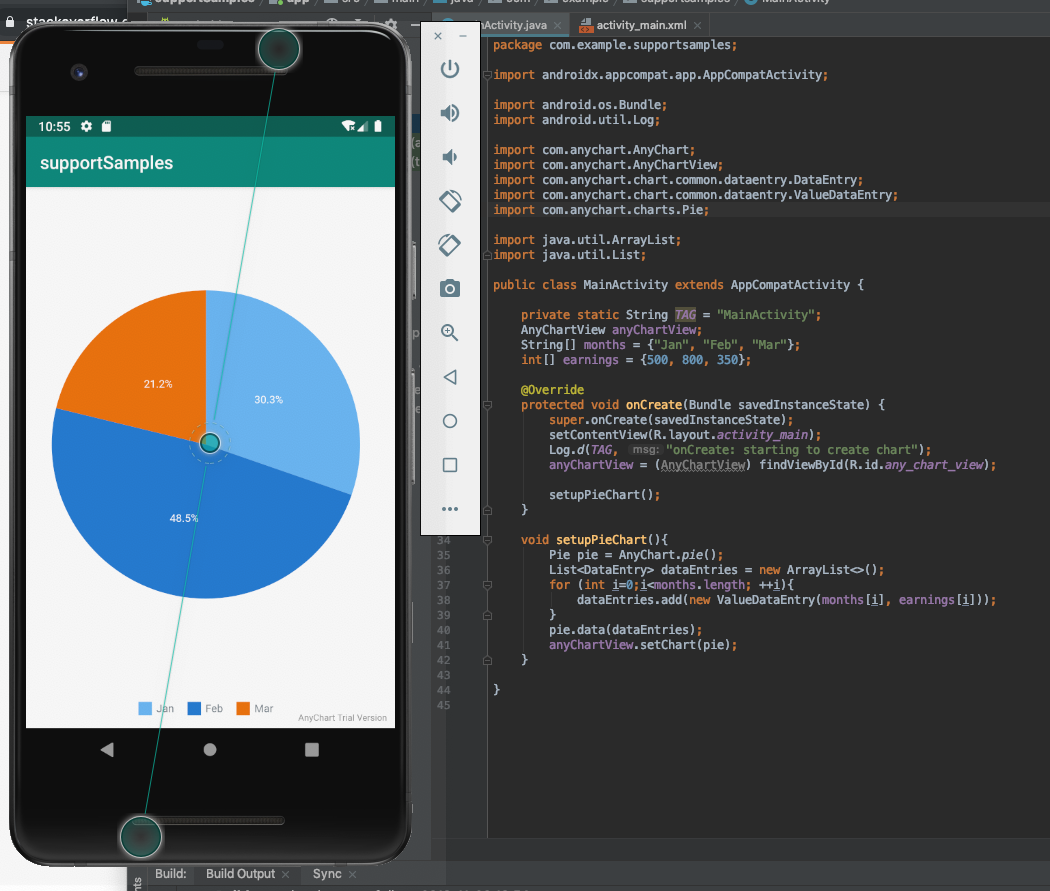
xml文件内容如下:
<?xml version="1.0" encoding="utf-8"?>
<androidx.constraintlayout.widget.ConstraintLayout xmlns:android="http://schemas.android.com/apk/res/android"
    xmlns:app="http://schemas.android.com/apk/res-auto"
    xmlns:tools="http://schemas.android.com/tools"
    android:layout_width="match_parent"
    android:layout_height="match_parent"
    tools:context=".MainActivity">

    <com.anychart.AnyChartView
        android:id="@+id/any_chart_view"
        android:layout_width="match_parent"
        android:layout_height="match_parent"
        />

</androidx.constraintlayout.widget.ConstraintLayout>
将您的xml与上面提供的xml进行比较。
Stack Overflow用户
发布于 2020-08-17 20:43:05
根据这个https://www.youtube.com/watch?v=qWBA2ikLJjU)
不需要添加强制转换AnyChart视图
@Override
    protected void onCreate(Bundle savedInstanceState) {
        super.onCreate(savedInstanceState);
        setContentView(R.layout.activity_main);
        Log.d(TAG, "onCreate: starting to create chart");
        anyChartView = findViewById(R.id.any_chart_view);

        setupPieChart();
}https://stackoverflow.com/questions/59025210
复制相似问题
腾讯云开发者

Copyright © 2013 - 2026 Tencent Cloud. All Rights Reserved. 腾讯云 版权所有
深圳市腾讯计算机系统有限公司 ICP备案/许可证号:粤B2-20090059  粤公网安备44030502008569号
腾讯云计算(北京)有限责任公司 京ICP证150476号 | 京ICP备11018762号