
通过和Azure DevOps部署舵机图表,同时从ACR获取舵图
通过和Azure DevOps部署舵机图表,同时从ACR获取舵图
提问于 2020-01-02 15:00:35
我正在尝试使用和Azure DevOps容器作业将舵图从ACR部署到AKS集群,但在从ACR获取舵图时失败了。请告诉我出了什么问题。
舵机提供者tf模块:
data "helm_repository" "cluster_rbac_helm_chart_repo" {
  name = "mcp-rbac-cluster"
  url  = "https://mcpshareddcr.azurecr.io"
}
# Deploy Cluster RBAC helm chart onto the cluster
resource "helm_release" "cluster_rbac_helm_chart_release" {
  name  = "mcp-rbac-cluster"
  repository = data.helm_repository.cluster_rbac_helm_chart_repo.metadata[0].name
  chart = "mcp-rbac-cluster"
}
提供者:
  version                    = "=1.36.0"
  tenant_id                  = var.ARM_TENANT_ID
  subscription_id            = var.ARM_SUBSCRIPTION_ID
  client_id                  = var.ARM_CLIENT_ID
  client_secret              = var.ARM_CLIENT_SECRET
  skip_provider_registration = true
}

data "azurerm_kubernetes_cluster" "aks_cluster" {
  name                = var.aks_cluster
  resource_group_name = var.resource_group_aks
}

locals {
  kubeconfig_path = "/tmp/kubeconfig"
}

resource "local_file" "kubeconfig" {
  filename = local.kubeconfig_path
  content  = data.azurerm_kubernetes_cluster.aks_cluster.kube_admin_config_raw
}

provider "helm" {
  home = "resources/.helm"
  kubernetes {
    load_config_file = true
    config_path = local.kubeconfig_path
  }
}

module "aks_resources" {
  source = "./modules/helm/aks-resources"
}错误:错误:看起来"“不是一个有效的图表存储库,或者无法到达:未能获取/index.yaml : 404未找到
回答 3
Stack Overflow用户
发布于 2020-11-10 03:05:27
到目前为止,Helm仍然不支持从OCI注册中心直接安装图表。
建议的步骤是:
helm chart remove mycontainerregistry.azurecr.io/helm/hello-world:v1helm chart pull mycontainerregistry.azurecr.io/helm/hello-world:v1helm chart export mycontainerregistry.azurecr.io/helm/hello-world:v1 --destination ./installcd install & helm install myhelmtest ./hello-world
所以我的解决办法是:
resource "null_resource" "download_chart" {
  provisioner "local-exec" {
    command = <<-EOT
      export HELM_EXPERIMENTAL_OCI=1
      helm registry login mycontainerregistry.azurecr.io --username someuser --password somepass
      helm chart remove mycontainerregistry.azurecr.io/helm/hello-world:v1
      helm chart pull mycontainerregistry.azurecr.io/helm/hello-world:v1
      helm chart export mycontainerregistry.azurecr.io/helm/hello-world:v1 --destination ./install
    EOT
  }
}

resource "helm_release" "chart" {
  name             = "hello_world"
  repository       = "./install"
  chart            = "hello-world"
  version          = "v1"

  depends_on = [null_resource.download_chart]
}
不完美,但有效。
Stack Overflow用户
发布于 2020-01-03 06:13:15
问题是您在Terraform helm_repository中使用了错误的helm_repository。ACR的正确url如下所示:
https://acrName.azurecr.io/helm/v1/repoACR是一个私有注册中心,因此它意味着您需要为它添加用户名和密码。最后,您的Terraform代码应该与helm provider的版本2.0+相似:
resource "helm_release" "my-chart" {
  name  = "my-chart"
  chart = "my/chart"
  repository  = "https://${var.acr_name}.azurecr.io/helm/v1/repo"
  repository_username = var.acr_user_name
  repository_password = var.acr_user_password
}
或者使用1.x头盔提供商:
data "helm_repository" "cluster_rbac_helm_chart_repo" {
  name = "mcp-rbac-cluster"
  url  = "https://mcpshareddcr.azurecr.io/helm/v1/repo"

  username = "xxxxx"
  password = "xxxxx"
}

# Deploy Cluster RBAC helm chart onto the cluster
resource "helm_release" "cluster_rbac_helm_chart_release" {
  name  = "mcp-rbac-cluster"
  repository = data.helm_repository.cluster_rbac_helm_chart_repo.metadata[0].name
  chart = "mcp-rbac-cluster"
}
更新
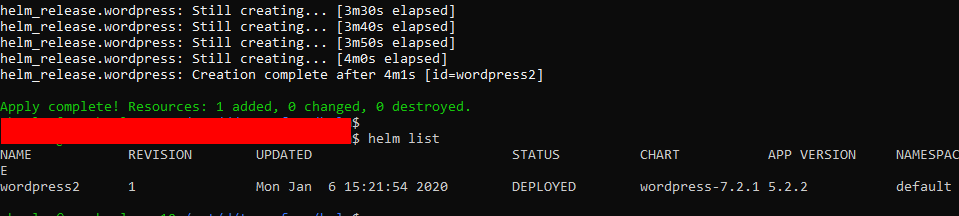
下面是屏幕截图,它运行良好,并在AKS中部署了图表:
Stack Overflow用户
发布于 2021-04-08 14:00:07
对上述解决方案的小增强。包括一个触发器,以强制下载图表每次。否则,它希望您总是在第一个部署后维护图表的本地副本。
resource "null_resource" "download_chart" {
  triggers = {
    always_run = timestamp()
  }

  provisioner "local-exec" {
    command = <<-EOT
      export HELM_EXPERIMENTAL_OCI=1
      helm registry login ${var.registry_fqdn} --username ${var.acr_client_id} --password ${var.acr_client_secret}
      helm chart remove ${var.registry_fqdn}/helm/${var.chart_name}:${var.chart_tag}
      helm chart pull ${var.registry_fqdn}/helm/${var.chart_name}:${var.chart_tag}
      helm chart export ${var.registry_fqdn}/helm/${var.chart_name}:${var.chart_tag} --destination ./install
    EOT
  }
}页面原文内容由Stack Overflow提供。腾讯云小微IT领域专用引擎提供翻译支持
原文链接:
https://stackoverflow.com/questions/59565463
复制相关文章
相似问题
腾讯云开发者

Copyright © 2013 - 2026 Tencent Cloud. All Rights Reserved. 腾讯云 版权所有
深圳市腾讯计算机系统有限公司 ICP备案/许可证号:粤B2-20090059  粤公网安备44030502008569号
腾讯云计算(北京)有限责任公司 京ICP证150476号 | 京ICP备11018762号