
Javascript树搜索功能
Javascript树搜索功能
提问于 2020-12-30 04:50:44
我正在使用jquery树插件来显示树类别。Sim树
我已经向筛选树数据添加了一个搜索栏。我想要的是扩展内在的ul元素。
我的代码-> https://jsfiddle.net/yveLp6cs/
预期产出->
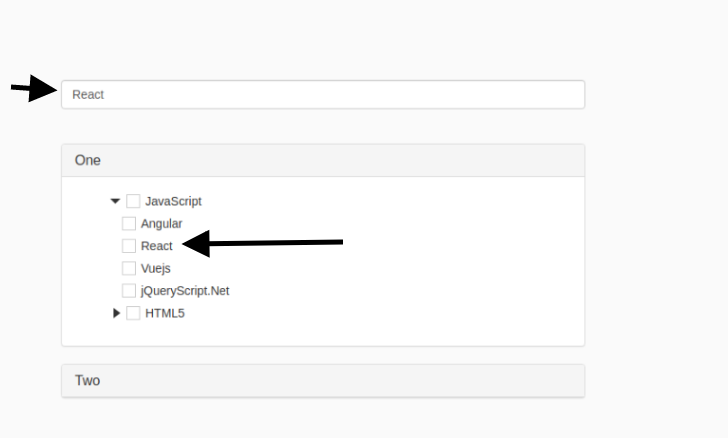
<!DOCTYPE html>
<html lang="en">
   <head>
      <meta charset="UTF-8">
      <meta name="viewport" content="width=device-width, initial-scale=1.0">
      <meta http-equiv="X-UA-Compatible" content="ie=edge">
      <link rel="stylesheet" href="https://www.jqueryscript.net/demo/Checkable-Hierarchical-Tree/dist/simTree.css">
      <link href="https://www.jqueryscript.net/css/jquerysctipttop.css" rel="stylesheet" type="text/css">
      <link rel="stylesheet" href="https://maxcdn.bootstrapcdn.com/bootstrap/3.4.1/css/bootstrap.min.css">
      <script src="https://ajax.googleapis.com/ajax/libs/jquery/3.5.1/jquery.min.js"></script>
      <!-- Latest compiled JavaScript -->
      <title>sim-tree: Checkable Hierarchical Tree Demo</title>
      <style>
         body { min-height: 100vh; background-color: #fafafa;}
         .container { margin: 150px auto; max-width: 640px; }
      </style>
   </head>
   <body>
      </script>
      <div class="container">
         <input type="text" name="search" class="form-control" value="" id="demo_2" placeholder="" autofocus style="margin-top:10px;"/>
         <br/><br/>
         <div class="panel-group" id="accordion">
            <div class="panel panel-default">
               <div class="panel-heading">
                  <h4 class="panel-title">
                     <a data-toggle="collapse" class="ul-laspe" data-parent="#accordion" href="#collapse1">
                     One
                     </a>
                  </h4>
               </div>
               <div id="collapse1" class="panel-collapse collapse">
                  <div class="panel-body">
                     <div class="tree">
                        <div id="tree"></div>
                     </div>
                  </div>
               </div>
            </div>
         </div>
         <div class="panel panel-default">
            <div class="panel-heading">
               <h4 class="panel-title">
                  <a data-toggle="collapse" class="ul-laspe" data-parent="#accordion" href="#collapse2">
                  Two
                  </a>
               </h4>
            </div>
            <div id="collapse2" class="panel-collapse collapse">
               <div class="panel-body">
                  <div class="tree">
                     <div id="tree2"></div>
                  </div>
               </div>
            </div>
         </div>
      </div>
      </div>
      <script src="https://code.jquery.com/jquery-3.3.1.slim.min.js" integrity="sha384-q8i/X+965DzO0rT7abK41JStQIAqVgRVzpbzo5smXKp4YfRvH+8abtTE1Pi6jizo" crossorigin="anonymous"></script>
      <script src="https://www.jqueryscript.net/demo/Checkable-Hierarchical-Tree/dist/simTree.js"></script>
      <script>
         var list = [{
         "id": '1',
         "pid": '',
         "name": "JavaScript",
         },
         {
         "id": '11',
         "pid": '1', // parent ID
         "name": "Angular"
         },
         {
         "id": '12',
         "pid": '1',
         "name": "React"
         },{
         "id": '13',
         "pid": '1',
         "name": "Vuejs"
         },{
         "id": '14',
         "pid": '1',
         "name": "jQueryScript.Net"
         },
         {
         "id": '2',
         "pid": '',
         "name": "HTML5"
         },
         {
         "id": '21',
         "pid": '2',
         "name": ""
         }

         ];

         var list2 = [{
         "id": '1',
         "pid": '',
         "name": "X JavaScript",
         },
         {
         "id": '11',
         "pid": '1', // parent ID
         "name": "X Angular"
         },
         {
         "id": '12',
         "pid": '1',
         "name": "X React"
         },{
         "id": '13',
         "pid": '1',
         "name": "X Vuejs"
         },{
         "id": '14',
         "pid": '1',
         "name": "XY jQueryScript.Net"
         },
         {
         "id": '2',
         "pid": '',
         "name": "X HTML5"
         },
         {
         "id": '21',
         "pid": '2',
         "name": ""
         }

         ];
         var tree = simTree({
             el: '#tree',
             data: list,
             check: true,
             linkParent: true,
             //check: true,
             onClick: function (item) {
                 console.log(item)
             },
             onChange: function (item) {
                 console.log(item)
             }
         });
         var tree = simTree({
             el: '#tree2',
             data: list2,
             check: true,
             linkParent: true,
             //check: true,
             onClick: function (item) {
                 console.log(item)
             },
             onChange: function (item) {
                 console.log(item)
             }
         });


         $('.sim-tree li').each(function(){
             $(this).attr('data-search-term', $(this).text().toLowerCase());
         });

         $('#demo_2').on('keyup keypress blur change', function() {
         console.log($('.panel-collapse'));
             $('.panel-collapse').collapse('hide');
             var searchVal = $(this).val();
             var searchTerm = $(this).val().toLowerCase();
             if (searchTerm != ''){
                 $('.sim-tree li').each(function(){
                     if ($(this).filter('[data-search-term *= "' + searchTerm + '"]').length > 0 || searchTerm.length < 1) {
                         console.log(this)
                         $(this).closest('.panel-collapse').collapse('show');
                     } else {
                         $(this).closest('.panel-collapse').collapse('hide');
                         $('.panel-collapse').collapse('hide');
                     }
                 });
             }
             if (searchTerm == ''){
                 $('.panel-collapse').collapse('hide');
             }
         });


      </script>
      <script src="https://maxcdn.bootstrapcdn.com/bootstrap/3.4.1/js/bootstrap.min.js"></script>
   </body>
</html>
回答 1
Stack Overflow用户
回答已采纳
发布于 2020-12-30 05:30:42
展开li时,sim tree库将show类添加到li内部的ul中,以便每当找到匹配时都可以使用.addClass('show'),还可以将icon(箭头)方向layui-icon-r更改为layui-icon-d。
演示代码:
var list = [{
    "id": '1',
    "pid": '',
    "name": "JavaScript",
  },
  {
    "id": '11',
    "pid": '1', // parent ID
    "name": "Angular"
  },
  {
    "id": '12',
    "pid": '1',
    "name": "React"
  }, {
    "id": '13',
    "pid": '1',
    "name": "Vuejs"
  }, {
    "id": '14',
    "pid": '1',
    "name": "jQueryScript.Net"
  },
  {
    "id": '2',
    "pid": '',
    "name": "HTML5"
  },
  {
    "id": '21',
    "pid": '2',
    "name": ""
  }

];

var list2 = [{
    "id": '1',
    "pid": '',
    "name": "X JavaScript",
  },
  {
    "id": '11',
    "pid": '1', // parent ID
    "name": "X Angular"
  },
  {
    "id": '12',
    "pid": '1',
    "name": "X React"
  }, {
    "id": '13',
    "pid": '1',
    "name": "X Vuejs"
  }, {
    "id": '14',
    "pid": '1',
    "name": "XY jQueryScript.Net"
  },
  {
    "id": '2',
    "pid": '',
    "name": "X HTML5"
  },
  {
    "id": '21',
    "pid": '2',
    "name": ""
  }

];
var tree = simTree({
  el: '#tree',
  data: list,
  check: true,
  linkParent: true,
  //check: true,
  onClick: function(item) {
    console.log(item)
  },
  onChange: function(item) {
    console.log(item)
  }
});
var tree = simTree({
  el: '#tree2',
  data: list2,
  check: true,
  linkParent: true,
  //check: true,
  onClick: function(item) {
    console.log(item)
  },
  onChange: function(item) {
    console.log(item)
  }
});


$('.sim-tree li').each(function() {
  $(this).attr('data-search-term', $(this).text().toLowerCase());
});

$('#demo_2').on('keyup keypress blur change', function() {
  $('.panel-collapse').collapse('hide');
  var searchVal = $(this).val();
  var searchTerm = $(this).val().toLowerCase();
  if (searchTerm != '') {
    $('.sim-tree li').each(function() {
      if ($(this).filter('[data-search-term *= "' + searchTerm + '"]').length > 0 || searchTerm.length < 1) {
        $(this).closest('.panel-collapse').collapse('show');
        $(this).children("i").addClass("layui-icon-d").removeClass("layui-icon-r") //change icon
        $(this).find("ul").addClass("show"); //show ul inside li
      } else {

        $(this).closest('.panel-collapse').collapse('hide');
        $('.panel-collapse').collapse('hide');
        $(this).children("i").addClass("layui-icon-r").removeClass("layui-icon-d")
        $(this).find("ul").removeClass("show");
      }
    });
  } else {
    $('.panel-collapse').collapse('hide');
    $(".sim-tree").find("ul").removeClass("show") //find any ul has show class remove it
    $(".sim-tree").children("li").children("i").addClass("layui-icon-r").removeClass("layui-icon-d") //find li children `i` change icon
  }
});<link rel="stylesheet" href="https://www.jqueryscript.net/demo/Checkable-Hierarchical-Tree/dist/simTree.css">
<link href="https://www.jqueryscript.net/css/jquerysctipttop.css" rel="stylesheet" type="text/css">
<link rel="stylesheet" href="https://maxcdn.bootstrapcdn.com/bootstrap/3.4.1/css/bootstrap.min.css">
<script src="https://ajax.googleapis.com/ajax/libs/jquery/3.5.1/jquery.min.js"></script>
<div class="container">
<input type="text" name="search" class="form-control" value="" id="demo_2" placeholder="" autofocus style="margin-top:10px;" />
<br/><br/>
<div class="panel-group" id="accordion">
<div class="panel panel-default">
<div class="panel-heading">
<h4 class="panel-title">
<a data-toggle="collapse" class="ul-laspe" data-parent="#accordion" href="#collapse1">
One
</a>
</h4>
</div>
<div id="collapse1" class="panel-collapse collapse">
<div class="panel-body">
<div class="tree">
<div id="tree"></div>
</div>
</div>
</div>
</div>
</div>
<div class="panel panel-default">
<div class="panel-heading">
<h4 class="panel-title">
<a data-toggle="collapse" class="ul-laspe" data-parent="#accordion" href="#collapse2">
Two
</a>
</h4>
</div>
<div id="collapse2" class="panel-collapse collapse">
<div class="panel-body">
<div class="tree">
<div id="tree2"></div>
</div>
</div>
</div>
</div>
</div>
</div>
<script src="https://code.jquery.com/jquery-3.3.1.slim.min.js" integrity="sha384-q8i/X+965DzO0rT7abK41JStQIAqVgRVzpbzo5smXKp4YfRvH+8abtTE1Pi6jizo" crossorigin="anonymous"></script>
<script src="https://www.jqueryscript.net/demo/Checkable-Hierarchical-Tree/dist/simTree.js"></script>
<script src="https://maxcdn.bootstrapcdn.com/bootstrap/3.4.1/js/bootstrap.min.js"></script>
页面原文内容由Stack Overflow提供。腾讯云小微IT领域专用引擎提供翻译支持
原文链接:
https://stackoverflow.com/questions/65502188
复制相关文章
相似问题
腾讯云开发者

Copyright © 2013 - 2026 Tencent Cloud. All Rights Reserved. 腾讯云 版权所有
深圳市腾讯计算机系统有限公司 ICP备案/许可证号:粤B2-20090059  粤公网安备44030502008569号
腾讯云计算(北京)有限责任公司 京ICP证150476号 | 京ICP备11018762号