
Blazor Server:强制文件下载
在我的网站MySpector.com开发的背景下,我想给用户下载文件的可能性,这些文件存储在机器的磁盘上。要做到这一点,我想要创建一个Blazor组件/页面(我不知道是什么),它将:
- 以数据库ID作为输入,
- 获取数据库以定位磁盘中的文件
- 动态地将要下载的数据传输到the浏览器。
我很难理解如何用Blazor编程http响应头和内容。我在下载微软上看到了一个潜在的解决方案,但我不喜欢在BLAZOR解决方案中创建剃须刀页面的想法,因为这引入了一个与其他组件不同的组织方式( 2文件:.cshtml + .cshtml.cs,而不是1 .razor文件)。
参见下面的文件层次结构中的Downloader.cshtml,它看起来与其他页面不同。
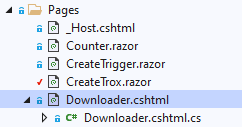
我还知道blazor服务器的“不同层”,其中页面只是更大html上下文的一个子部分,所以我看到了问题,但我希望找到一种简单的方法,只通过.razor单个文件覆盖http .如果有可能的话。
致以问候。
回答 1
Stack Overflow用户
发布于 2021-11-01 17:06:35
您可以通过使用Asp来控制带有头的http响应。这与Blazor服务器技术是兼容的。要做到这一点,您可以跟踪以下两个链接:
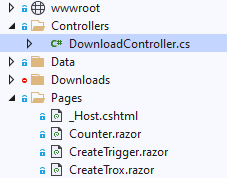
我添加了一个带有下载机控制器的控制器目录:
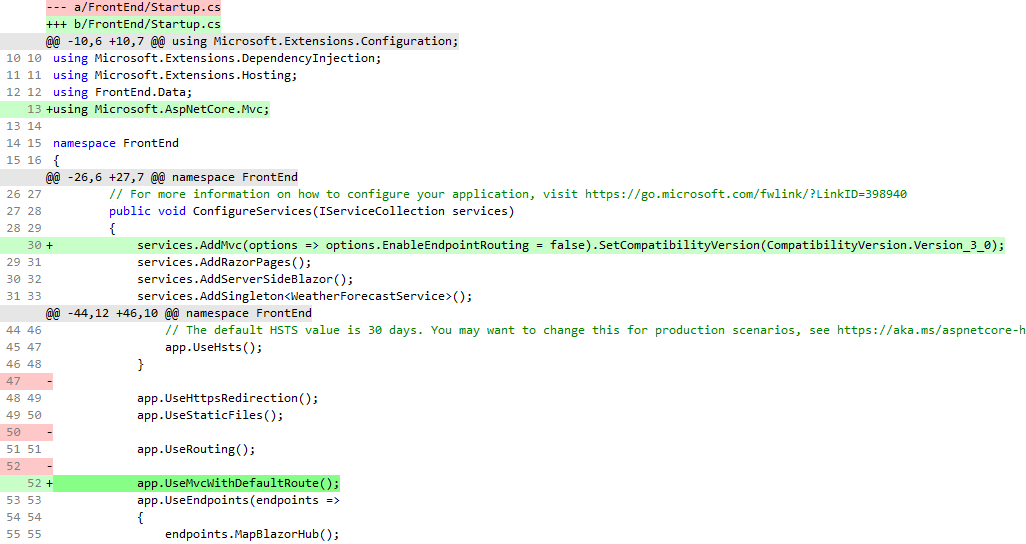
我用这个diff来修补启动代码:
然后,我为下载机控制器添加代码:
using Microsoft.AspNetCore.Http;
using Microsoft.AspNetCore.Mvc;
using System;
using System.Collections.Generic;
using System.Linq;
using System.Threading.Tasks;
using System.Net.Mime;
using System.Web;
using NLog;
using MySpector.Core;
using MySpector.Objects;

//https://chanmingman.wordpress.com/2020/07/12/add-web-api-controller-to-blazor-project-asp-net/
//https://stackoverflow.com/questions/5826649/returning-a-file-to-view-download-in-asp-net-mvc


namespace FrontEnd.Pages
{
    [Route("api/[controller]")]
    [ApiController]
    public class DownloadController : Controller
    {
        private static Logger _log = LogManager.GetCurrentClassLogger();
        private ResultStorage _resultStorage;
    // GET /api/Download/3
    [HttpGet("{resultDbId:int}")]
    public ActionResult Get(int resultDbId)
    {
        bool isConnected = ServiceLocator.Instance.Repo.Connect();
        if (!isConnected)
        {
            _log.Error("Cannot connect");
            _log.Error("Returning Http 404");
            return NotFound();
        }
        else
        {
            _log.Debug("Connected to db");
            _log.Debug("Input: ResultDbId=" + resultDbId);
            _resultStorage = ServiceLocator.Instance.Repo.GetSingleResult(resultDbId);
        }
        if(_resultStorage==null)
        {
            _log.Error("Returning Http 404");
            return NotFound();
        }
        string filename = _resultStorage.File.FilePath;
        var cd = new ContentDisposition
        {
            FileName = filename,
            Inline = true,
        };
        Response.Headers.Add("Content-Disposition", cd.ToString());
        byte[] filedata = System.IO.File.ReadAllBytes(filename);
        string contentType = "application/octet-stream";
        return File(filedata, contentType);
    }
}
}
然后,您可以使用以下方法调用此模块:
        string downloadUri = "api/Download/" + @_report.Result.DbId;
<NavLink href="@downloadUri">Download raw file</NavLink><br />https://stackoverflow.com/questions/69779683
复制相似问题
腾讯云开发者

Copyright © 2013 - 2026 Tencent Cloud. All Rights Reserved. 腾讯云 版权所有
深圳市腾讯计算机系统有限公司 ICP备案/许可证号:粤B2-20090059  粤公网安备44030502008569号
腾讯云计算(北京)有限责任公司 京ICP证150476号 | 京ICP备11018762号