
关于ActionListener.image编辑的几个问题
我得到了一个任务,我必须用Java编写一个Image.Creates 3按钮,这个按钮名为(对齐左、右、中).2文本字段的宽度和高度,我可以在那里输入数字,而resize.The 4按钮(对齐左、右、中心和调整大小)必须将图像位置更改为左、右或中间,并根据给定的数字调整图像的大小。
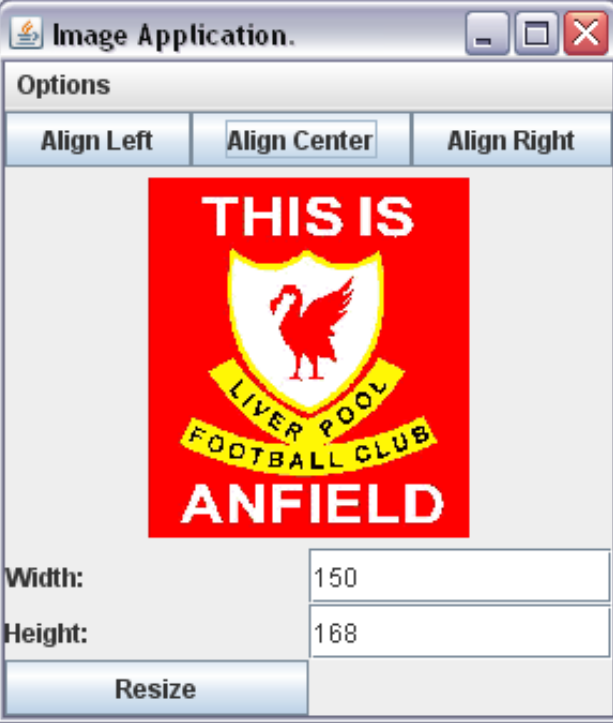
我只为离开而写了代码,但我不知道该怎么做.我也不知道在resizing...Can上该做什么,有人帮我吗?
import java.awt.*;
import javax.swing.*;
import java.awt.event.*;
import java.awt.Graphics;
import java.awt.image.BufferedImage;
import java.io.File;
import java.io.IOException;
import java.util.logging.Level;
import java.util.logging.Logger;
import javax.imageio.ImageIO;
import javax.swing.JPanel;

public class Destructor extends JFrame implements ActionListener {

    private JButton red, blue, white, resize;

    public Destructor(String title) {
        super(title);
        Container contentPane = this.getContentPane();
        this.setDefaultCloseOperation(WindowConstants.EXIT_ON_CLOSE);
        red = new JButton("Align Left");
        //red.addActionListener(this);
        blue = new JButton("Align Center");
        blue.addActionListener(this);
        white = new JButton("Align Right");
        white.addActionListener(this);
        //read the Image
        // try {
        // BufferedImage pic1 = ImageIO.read(new File("PewPew.jpg"));
        //JLabel picLabel = new JLabel(new ImageIcon( pic1 ));
        //add( picLabel );
        ImageIcon pic1 = new ImageIcon("PewPew.jpg");
        add(new JLabel(pic1));
        // } catch (IOException ex) {
        // handle exception...
        // }

        //Action LIsteners
        //add the buttons to the frame
        JPanel north = new JPanel();
        north.add(red);
        north.add(blue);
        north.add(white);
        contentPane.add(north, BorderLayout.NORTH);
        //THe Under Panel
        JPanel south = new JPanel();
        south.setLocation(250, 30);
        resize = new JButton("Resize");
        JLabel Width = new JLabel("Width :");
        JLabel Height = new JLabel("Height :");
        //The text field
        JTextField times = new JTextField();
        JTextField times2 = new JTextField();
        Width.setLabelFor(times);
        Height.setLabelFor(times2);
        Width.setLocation(120, 0);

        south.add(Width);
        south.add(times, BorderLayout.NORTH);
        south.add(Height);
        south.add(times2, BorderLayout.SOUTH);
        south.add(resize);
        contentPane.add(south, BorderLayout.SOUTH);
        GridLayout lay2 = new GridLayout(3, 2);
        south.setLayout(lay2);

        //create a menu bar and attach it to this JFrame
        JMenuBar menuBar = new JMenuBar();
        this.setJMenuBar(menuBar);

        JMenu fileMenu = new JMenu("Options");

        menuBar.add(fileMenu);

        JMenuItem redMenuItem = new JMenuItem("Reset");

        fileMenu.add(redMenuItem);


    }
//Trying to move the picture to the left
    public void actionPerformed(ActionEvent a) {
        contentPane.add(pic1, BorderLayout.NORTH);
    }

    public static void main(String[] args) {
        Destructor f = new Destructor("Image App");
        f.setSize(600, 600);
        f.setVisible(true);
    }
}编辑:我在垃圾神的帮助下制作了一个改变网站标志的程序,我还试图通过通过执行imageLabel = new JLabel(new ImageIcon("PewPew.jpg"));更改带有图像的URL图像来稍微改变它,而too.The调整大小的方式与其左对齐的方式差不多,但我应该“链接”文本字段号,对吗?我还需要做一个setPreferedSize,并以某种方式获得文本字段的宽度和高度?
import java.awt.*;
import java.awt.event.*;
import java.net.MalformedURLException;
import java.net.URL;
import javax.swing.*;

/** @see http://stackoverflow.com/a/10610126/230513 */
public class AlignImage extends JPanel {

    private JPanel controlPanel = new JPanel();
    private JLabel imageLabel;

    public AlignImage() {
        super(new GridLayout());
        try {
            imageLabel = new JLabel(new ImageIcon(new URL(
                "http://sstatic.net/stackoverflow/img/logo.png")));
        } catch (MalformedURLException ex) {
            ex.printStackTrace(System.err);
        }
        this.add(imageLabel);
        controlPanel.add(new JButton(new AbstractAction("Align Left") {

            @Override
            public void actionPerformed(ActionEvent e) {
                align(JLabel.LEFT);
            }
        }));
          controlPanel.add(new JButton(new AbstractAction("Align Center") {

            @Override
            public void actionPerformed(ActionEvent e) {
                align(JLabel.CENTER);
            }
        }));
        controlPanel.add(new JButton(new AbstractAction("Align Right") {

            @Override
            public void actionPerformed(ActionEvent e) {
                align(JLabel.RIGHT);
            }
        }));


    }

    @Override
    public Dimension getPreferredSize() {
        int w = 3 * imageLabel.getIcon().getIconWidth() / 2;
        int h = 3 * imageLabel.getIcon().getIconHeight() / 2;
        System.out.println(w + " " + h);
        return new Dimension(w, h);
    }

    private void align(int alignment) {
        imageLabel.setHorizontalAlignment(alignment);
    }

    public static void main(String[] args) {
        EventQueue.invokeLater(new Runnable() {

            @Override
            public void run() {
                JFrame f = new JFrame("Align Left");
                f.setDefaultCloseOperation(WindowConstants.EXIT_ON_CLOSE);
                AlignImage ai = new AlignImage();
                f.add(ai, BorderLayout.CENTER);
                f.add(ai.controlPanel, BorderLayout.NORTH);
                f.pack();
                f.setLocationRelativeTo(null);
                f.setVisible(true);
                JFrame f1 = new JFrame("Align Center");
                f1.setDefaultCloseOperation(WindowConstants.EXIT_ON_CLOSE);
                 JFrame f2 = new JFrame("Align Right");
                f.setDefaultCloseOperation(WindowConstants.EXIT_ON_CLOSE);

                f2.add(ai, BorderLayout.CENTER);
                f2.add(ai.controlPanel, BorderLayout.NORTH);
                f2.pack();
                f2.setLocationRelativeTo(null);
                f2.setVisible(true);
                f1.add(ai, BorderLayout.CENTER);
                f1.add(ai.controlPanel, BorderLayout.NORTH);
                f1.pack();
                f1.setLocationRelativeTo(null);
                f1.setVisible(true);
               ;

            }
        });

    }
}
编辑2:我制作了一个更接近我需要做的东西的程序,我尝试添加菜单,就像原始的程序MenuBar menuBar =新的JMenuBar();
this.setJMenuBar(menuBar);
   JMenu fileMenu = new JMenu("Options");
      menuBar.add(fileMenu);
     JMenuItem redMenuItem = new JMenuItem("Reset");
    fileMenu.add(redMenuItem);
我得到了一个不认识this.setJMenuBar.Also的错误,我尝试了很多方法,我不能让这3个按钮向北移动,调整大小和文本框south...What,我做错了吗?代码:
import java.awt.*;
import java.awt.event.*;
import java.net.MalformedURLException;
import java.net.URL;
import javax.swing.*;

/** @see http://stackoverflow.com/a/10610126/230513 */
public class AlignImage extends JPanel {

    private JPanel controlPanel = new JPanel();
    private JLabel imageLabel;

    public AlignImage() {
        super(new GridLayout());

            imageLabel = new JLabel(new ImageIcon("PewPew.jpg"));

        this.add(imageLabel);
        controlPanel.add(new JButton(new AbstractAction("Align Left") {

            @Override
            public void actionPerformed(ActionEvent e) {
                align(JLabel.LEFT);
            }
        }));
          controlPanel.add(new JButton(new AbstractAction("Align Center") {

            @Override
            public void actionPerformed(ActionEvent e) {
                align(JLabel.CENTER);
            }
        }));
        controlPanel.add(new JButton(new AbstractAction("Align Right") {

            @Override
            public void actionPerformed(ActionEvent e) {
                align(JLabel.RIGHT);
            }
        }));

        JPanel south= new JPanel();

    JButton resize=new JButton("Resize");
   JLabel Width = new JLabel("Width :");
   JLabel Height = new JLabel("Height :");
   //The text field
   JTextField times= new JTextField();
   JTextField times2= new JTextField();
   Width.setLabelFor(times);
   Height.setLabelFor(times2);


  south.add(Width);
  south.add(times, BorderLayout.NORTH);
  south.add(Height);
  south.add(times2, BorderLayout.SOUTH);
  south.add(resize);
   controlPanel.add(south, BorderLayout.SOUTH);
    GridLayout lay2 = new GridLayout(3,2); south.setLayout(lay2);
        JMenuBar menuBar = new JMenuBar();

    }

    @Override
    public Dimension getPreferredSize() {
        int w = 3 * imageLabel.getIcon().getIconWidth() / 2;
        int h = 3 * imageLabel.getIcon().getIconHeight() / 2;
        System.out.println(w + " " + h);
        return new Dimension(w, h);
    }

    private void align(int alignment) {
        imageLabel.setHorizontalAlignment(alignment);
    }

    public static void main(String[] args) {
        EventQueue.invokeLater(new Runnable() {

            @Override
            public void run() {
                JFrame f = new JFrame("Align Left");
                f.setDefaultCloseOperation(WindowConstants.EXIT_ON_CLOSE);
                AlignImage ai = new AlignImage();
                f.add(ai, BorderLayout.CENTER);
                f.add(ai.controlPanel, BorderLayout.NORTH);
                f.pack();
                f.setLocationRelativeTo(null);
                f.setVisible(true);
                JFrame f1 = new JFrame("Align Center");
                f1.setDefaultCloseOperation(WindowConstants.EXIT_ON_CLOSE);
                 JFrame f2 = new JFrame("Align Right");
                f2.setDefaultCloseOperation(WindowConstants.EXIT_ON_CLOSE);

                f2.add(ai, BorderLayout.CENTER);
                f2.add(ai.controlPanel, BorderLayout.NORTH);
                f2.pack();
                f2.setLocationRelativeTo(null);
                f2.setVisible(true);
                f1.add(ai, BorderLayout.CENTER);
                f1.add(ai.controlPanel, BorderLayout.NORTH);
                f1.pack();
                f1.setLocationRelativeTo(null);
                f1.setVisible(true);
               JFrame f3 = new JFrame("Res");
                f3.setDefaultCloseOperation(WindowConstants.EXIT_ON_CLOSE);

                f3.add(ai, BorderLayout.CENTER);
                f3.add(ai.controlPanel, BorderLayout.SOUTH);
                f3.pack();
                f3.setLocationRelativeTo(null);
                f3.setVisible(true);

            }
        });

    }
}回答 1
Stack Overflow用户
发布于 2012-05-15 23:19:49
有两种方法是常见的:
- 给定一个合适的布局管理器,在调用
setHorizontalAlignment()时使用一个常量JLabel.LEFT、JLabel.CENTER或JLabel.RIGHT;如果需要,可以使用validate()和repaint()。 - 重写
paintComponent(),并使用drawImage()在所需的坐标下呈现Image。缩放是自动的。左对齐很容易: int w= Integer.valueOf(width.getText());//以前为int h= Integer.valueOf(height.getText());//以前为times2 g.drawImage(图像,0,0,w,h,null); 中间、右和异常处理作为练习向左进行。
增编:下面的斯考斯演示了第一种单一对齐方法;尝试使用现有按钮作为指南添加其他两个按钮。
import java.awt.*;
import java.awt.event.*;
import java.net.MalformedURLException;
import java.net.URL;
import javax.swing.*;

/** @see http://stackoverflow.com/a/10610126/230513 */
public class AlignImage extends JPanel {

    private JPanel controlPanel = new JPanel();
    private JLabel imageLabel;

    public AlignImage() {
        super(new GridLayout());
        try {
            imageLabel = new JLabel(new ImageIcon(new URL(
                "http://sstatic.net/stackoverflow/img/logo.png")));
        } catch (MalformedURLException ex) {
            ex.printStackTrace(System.err);
        }
        this.add(imageLabel);
        controlPanel.add(new JButton(new AbstractAction("Align Left") {

            @Override
            public void actionPerformed(ActionEvent e) {
                align(JLabel.LEFT);
            }
        }));
    }

    @Override
    public Dimension getPreferredSize() {
        int w = 3 * imageLabel.getIcon().getIconWidth() / 2;
        int h = 3 * imageLabel.getIcon().getIconHeight() / 2;
        System.out.println(w + " " + h);
        return new Dimension(w, h);
    }

    private void align(int alignment) {
        imageLabel.setHorizontalAlignment(alignment);
    }

    public static void main(String[] args) {
        EventQueue.invokeLater(new Runnable() {

            @Override
            public void run() {
                JFrame f = new JFrame("Align Left");
                f.setDefaultCloseOperation(WindowConstants.EXIT_ON_CLOSE);
                AlignImage ai = new AlignImage();
                f.add(ai, BorderLayout.CENTER);
                f.add(ai.controlPanel, BorderLayout.SOUTH);
                f.pack();
                f.setLocationRelativeTo(null);
                f.setVisible(true);
            }
        });

    }
}https://stackoverflow.com/questions/10604638
复制相似问题
腾讯云开发者

Copyright © 2013 - 2026 Tencent Cloud. All Rights Reserved. 腾讯云 版权所有
深圳市腾讯计算机系统有限公司 ICP备案/许可证号:粤B2-20090059  粤公网安备44030502008569号
腾讯云计算(北京)有限责任公司 京ICP证150476号 | 京ICP备11018762号