
绘制MKPolyline填充颜色
我正试图在一个MKPolyline上画一个漂亮的MKPolylineView。到目前为止,一切都进行得很好-- polyline就像我想要的那样绘制,并且当我希望它使用以下代码时:
[[self map] addOverlay:routeLine];这个方法告诉应用程序如何绘制它:
- (MKOverlayView *)mapView:(MKMapView *)mapView viewForOverlay:(id <MKOverlay>)overlay {
    MKOverlayView* overlayView = nil;
    self.routeLineView = [[MKPolylineView alloc] initWithPolyline:[self routeLine]];
    [[self routeLineView] setFillColor:[UIColor colorWithRed:167/255.0f green:210/255.0f blue:244/255.0f alpha:1.0]];
    [[self routeLineView] setStrokeColor:[UIColor colorWithRed:0/255.0f green:136/255.0f blue:255/255.0f alpha:1.0]];
    [[self routeLineView] setLineWidth:15.0];
    [[self routeLineView] setLineCap:kCGLineCapRound];
    overlayView = [self routeLineView];
    return overlayView;
}结果,我得到了一条蓝色的线条。然而,我看到的蓝色并不是我所期待的笔画的填充颜色--它是笔画颜色的蓝色。当我使用这种方法时,没有填充颜色。为什么不在折线上画填充颜色呢?
在进一步研究之后,我在Xcode的“快速帮助”部分中找到了以下信息:
MKPolylineView类为MKPolyline注释对象提供可视化表示。此视图笔画注释所表示的路径。(这个类不填充路径所包围的区域。)您可以通过修改从MKOverlayPathView类继承的属性来更改路径的颜色和其他绘图属性。
听起来太荒谬了。我必须用这个类来设置填充颜色,但是我不能用这个类来绘制填充颜色吗?考虑到这已经引起了人们的注意,这似乎很奇怪。文档中这个解释的最后一行有点不清楚,但似乎提供了一个答案--我只是很难编码/找到答案。我的项目中没有MKOverlayPathView (那是什么?)但是,它似乎是解决方案--有人知道如何使用它吗?
回答 4
Stack Overflow用户
发布于 2013-02-16 22:21:58
如果您想要一种颜色的行,另一种颜色的填充,请使用MKPolygon而不是MKPolyline。因此,相应地修改您最初创建的注释。然后修改您的viewForOverlay (或者,对于iOS 7,rendererForOverlay)来识别MKPolygon,并执行如下操作:
// for iOS7+; see `viewForOverlay` for earlier versions

- (MKOverlayRenderer *)mapView:(MKMapView *)mapView rendererForOverlay:(id<MKOverlay>)overlay
{
    if ([overlay isKindOfClass:[MKPolygon class]])
    {
        MKPolygonRenderer *renderer = [[MKPolygonRenderer alloc] initWithPolygon:overlay];

        renderer.fillColor   = [[UIColor cyanColor] colorWithAlphaComponent:0.2];
        renderer.strokeColor = [[UIColor blueColor] colorWithAlphaComponent:0.7];
        renderer.lineWidth   = 3;

        return renderer;
    }

    return nil;
}

// for iOS versions prior to 7; see `rendererForOverlay` for iOS7 and later

- (MKOverlayView *)mapView:(MKMapView *)mapView viewForOverlay:(id <MKOverlay>)overlay
{
    if ([overlay isKindOfClass:[MKPolygon class]])
    {
        MKPolygonView *overlayView = [[MKPolygonView alloc] initWithPolygon:overlay];

        overlayView.fillColor      = [[UIColor cyanColor] colorWithAlphaComponent:0.2];
        overlayView.strokeColor    = [[UIColor blueColor] colorWithAlphaComponent:0.7];
        overlayView.lineWidth      = 3;

        return overlayView;
    }

    return nil;
}注意,这里不需要引用任何类属性,因为覆盖被传递给您的viewForOverlay。这是一个更灵活的情况下,如果您有多个覆盖添加到您的地图。
顺便说一句,这些是我的标准viewForOverlay (7.0之前的iOS版本)和rendererForOverlay (iOS 7+),它们将处理MKPolygon、MKPolyline和MKCircle覆盖:
// for iOS7+; see `viewForOverlay` for earlier versions

- (MKOverlayRenderer *)mapView:(MKMapView *)mapView rendererForOverlay:(id<MKOverlay>)overlay
{
    if ([overlay isKindOfClass:[MKPolygon class]])
    {
        MKPolygonRenderer *renderer = [[MKPolygonRenderer alloc] initWithPolygon:overlay];

        renderer.fillColor   = [[UIColor cyanColor] colorWithAlphaComponent:0.2];
        renderer.strokeColor = [[UIColor blueColor] colorWithAlphaComponent:0.7];
        renderer.lineWidth   = 3;

        return renderer;
    }

    if ([overlay isKindOfClass:[MKCircle class]])
    {
        MKCircleRenderer *renderer = [[MKCircleRenderer alloc] initWithCircle:overlay];

        renderer.fillColor   = [[UIColor cyanColor] colorWithAlphaComponent:0.2];
        renderer.strokeColor = [[UIColor blueColor] colorWithAlphaComponent:0.7];
        renderer.lineWidth   = 3;

        return renderer;
    }

    if ([overlay isKindOfClass:[MKPolyline class]])
    {
        MKPolylineRenderer *renderer = [[MKPolylineRenderer alloc] initWithPolyline:overlay];

        renderer.strokeColor = [[UIColor blueColor] colorWithAlphaComponent:0.7];
        renderer.lineWidth   = 3;

        return renderer;
    }

    return nil;
}

// for iOS versions prior to 7; see `rendererForOverlay` for iOS7 and later

- (MKOverlayView *)mapView:(MKMapView *)mapView viewForOverlay:(id <MKOverlay>)overlay
{
    if ([overlay isKindOfClass:[MKPolygon class]])
    {
        MKPolygonView *overlayView = [[MKPolygonView alloc] initWithPolygon:overlay];

        overlayView.fillColor      = [[UIColor cyanColor] colorWithAlphaComponent:0.2];
        overlayView.strokeColor    = [[UIColor blueColor] colorWithAlphaComponent:0.7];
        overlayView.lineWidth      = 3;

        return overlayView;
    }

    if ([overlay isKindOfClass:[MKCircle class]])
    {
        MKCircleView *overlayView = [[MKCircleView alloc] initWithCircle:overlay];

        overlayView.fillColor     = [[UIColor cyanColor] colorWithAlphaComponent:0.2];
        overlayView.strokeColor   = [[UIColor blueColor] colorWithAlphaComponent:0.7];
        overlayView.lineWidth     = 3;

        return overlayView;
    }

    if ([overlay isKindOfClass:[MKPolyline class]])
    {
        MKPolylineView *overlayView = [[MKPolylineView alloc] initWithPolyline:overlay];

        overlayView.strokeColor     = [[UIColor blueColor] colorWithAlphaComponent:0.7];
        overlayView.lineWidth       = 3;

        return overlayView;
    }

    return nil;
}
通过这种方式,我可以将这三种类型的覆盖添加到我的地图中,并且可以正确地呈现它们。
Stack Overflow用户
发布于 2017-03-10 10:04:57
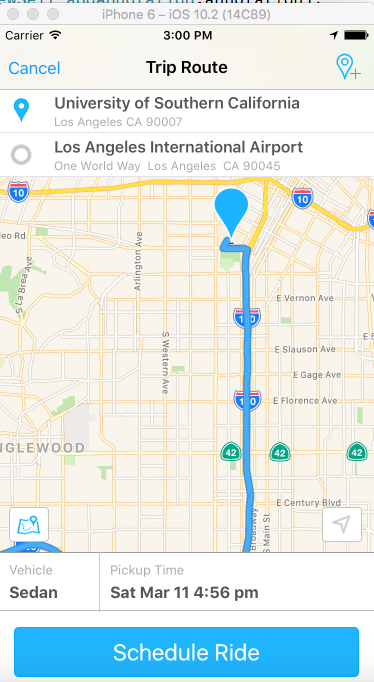
您可以通过实现自己的MKOverlayPathView子类来实现这一点,该子类在map rect中两次绘制路径。一次用黑色变厚,一次用另一种颜色在顶部变薄。
我创建了一个简单的替代MKPolylineView的插件,它允许您这样做: ASPolylineView。
- (void)drawMapRect:(MKMapRect)mapRect
          zoomScale:(MKZoomScale)zoomScale
          inContext:(CGContextRef)context
{
    UIColor *darker = [UIColor blackColor];
    CGFloat baseWidth = self.lineWidth / zoomScale;

    // draw the dark colour thicker
    CGContextAddPath(context, self.path);
    CGContextSetStrokeColorWithColor(context, darker.CGColor);
    CGContextSetLineWidth(context, baseWidth * 1.5);
    CGContextSetLineCap(context, self.lineCap);
    CGContextStrokePath(context);

    // now draw the stroke color with the regular width
    CGContextAddPath(context, self.path);
    CGContextSetStrokeColorWithColor(context, self.strokeColor.CGColor);
    CGContextSetLineWidth(context, baseWidth);
    CGContextSetLineCap(context, self.lineCap);
    CGContextStrokePath(context);

    [super drawMapRect:mapRect zoomScale:zoomScale inContext:context];
}

- (void)createPath
{
    // turn the polyline into a path

    CGMutablePathRef path = CGPathCreateMutable();
    BOOL pathIsEmpty = YES;

    for (int i = 0; i < self.polyline.pointCount; i++) {
        CGPoint point = [self pointForMapPoint:self.polyline.points[i]];

        if (pathIsEmpty) {
            CGPathMoveToPoint(path, nil, point.x, point.y);
            pathIsEmpty = NO;
        } else {
            CGPathAddLineToPoint(path, nil, point.x, point.y);
        }
    }

    self.path = path;
}或者您可以从链接https://github.com/nighthawk/ASPolylineView下面下载代码。
我用过它,看了一下这个屏幕截图。
Stack Overflow用户
发布于 2014-05-28 14:06:32
我有另一种方法。
如果你没有一个坐标数组,你可以画两条线。
绘制特定line1_width的第一行,然后用line2_width = line1_width - 1.0绘制另一条线。
这将画两条线,而在第二条线中,你只会看到它的边距,成为第一行的笔画。
https://stackoverflow.com/questions/14915226
复制相似问题
腾讯云开发者

Copyright © 2013 - 2026 Tencent Cloud. All Rights Reserved. 腾讯云 版权所有
深圳市腾讯计算机系统有限公司 ICP备案/许可证号:粤B2-20090059  粤公网安备44030502008569号
腾讯云计算(北京)有限责任公司 京ICP证150476号 | 京ICP备11018762号