
MainWindow Widget Resize (Pyside)
MainWindow Widget Resize (Pyside)
提问于 2014-01-26 21:46:36


回答 1
Stack Overflow用户
回答已采纳
发布于 2014-01-26 22:58:42
如果希望调整大小而不修改QGridLayout的中心,则需要在周围的一些行上放置不同的长度。
我在内容的上方和下面添加了一行,在内容的左边和右边添加了一列,并添加了一个拉伸。
http://doc.qt.io/qt-4.8/qgridlayout.html#setRowStretch
http://doc.qt.io/qt-4.8/qgridlayout.html#setColumnStretch
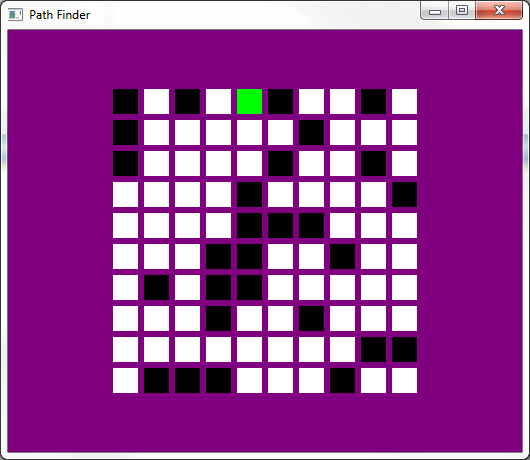
def setupGridUI(self):
    widget = QWidget()
    layout = QGridLayout()
    width, height = 10, 10

    root_x, root_y = random.randrange(width), random.randrange(height)

    for x in range(width):
        for y in range(height):
            random_wall = random.randrange(3)
            if x == root_x and y == root_y:
                label = ClickableLabel(x, y, False, True)
            else:
                if random_wall == 0:
                    label = ClickableLabel(x, y, True)
                else:
                    label = ClickableLabel(x, y)

            layout.addWidget(label, x+1, y+1) # modified

    # added the following 4 lines
    layout.setRowStretch(0, 1);
    layout.setRowStretch(height+2, 1);
    layout.setColumnStretch(0, 1);
    layout.setColumnStretch(width+2, 1);

    widget.setLayout(layout)
    self.setCentralWidget(widget)

    self.setStyleSheet("QMainWindow {background: 'purple'}")
希望这能有所帮助。
页面原文内容由Stack Overflow提供。腾讯云小微IT领域专用引擎提供翻译支持
原文链接:
https://stackoverflow.com/questions/21369683
复制相关文章
相似问题
腾讯云开发者

Copyright © 2013 - 2026 Tencent Cloud. All Rights Reserved. 腾讯云 版权所有
深圳市腾讯计算机系统有限公司 ICP备案/许可证号:粤B2-20090059  粤公网安备44030502008569号
腾讯云计算(北京)有限责任公司 京ICP证150476号 | 京ICP备11018762号