
使用eID和PKCS#11签署PDF文件
遵循http://itextpdf.com/book/digitalsignatures中的“使用智能卡和http://itextpdf.com/book/digitalsignatures签名文档”主题并创建与提供的签名示例类似的代码示例后,签名文件签名在Adobe中无效,签名外观具有不可否认证书的名称(即eID所有者的名称),但在Adobe的签名面板中显示:
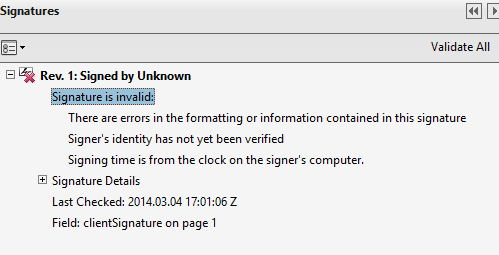
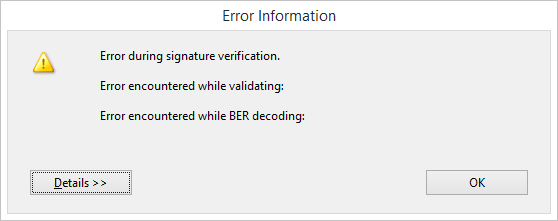
验证时发生了错误:
我使用的是Gemalto PinPad和安装在C:\Windows\System32 32中的eID中间件软件安装的葡萄牙eID pteidpkcs11.dll。
我试过:
- 空检查
- 手动创建证书链,因为由Certificate[]返回的
ks.getCertificateChain("CITIZEN SIGNATURE CERTIFICATE");只有签名证书
回答 4
Stack Overflow用户
发布于 2014-03-04 19:35:29
提供的代码示例试图获取签名证书的PrivateKey,我发现它很奇怪,但我认为它只是用作引用。在用户取消PinPad中的进程时触发的异常堆栈跟踪中导航给了我以下想法,幸运的是,它解决了这个问题:
- 创建自定义
com.itextpdf.text.pdf.security.ExternalSignature实现 - 实现一个实用工具类,该类使用pteidpkcs11.dll)包装器与您的eID pkcs11 dll进行交互(在我的示例中,它提供了一个签名方法,该方法接收一个byte[]消息,然后发送给要签名的SmartCard读取器,并返回此操作的byte[]结果)。
- 在CustomExternalSignature.sign(.)中使用实用程序类
如果您正在开发葡萄牙语eID Cart o Cart o,可以使用一些技巧。
Stack Overflow用户
发布于 2014-03-06 23:29:26
作为另一种选择,您可以使用www.poreid.org上可用的java组件与葡萄牙eid卡(Cart O de can O)签署协议。它也可在带有artifactid poreid的maven中央存储库上使用。
下面是一个基于图文文件中提供的示例的示例
public void createPdf(String filename) throws IOException, DocumentException {
    Document document = new Document();
    PdfWriter.getInstance(document, new FileOutputStream(filename));
    document.open();
    document.add(new Paragraph("Assinado com o Cartão de Cidadão!"));
    document.close();
}

public void signPdf(String src, String dest)
    throws IOException, DocumentException, GeneralSecurityException {
    KeyStore ks = KeyStore.getInstance(POReIDConfig.POREID);
    ks.load(null);
    PrivateKey pk = (PrivateKey) ks.getKey(POReIDConfig.AUTENTICACAO, null);
    Certificate[] chain = ks.getCertificateChain(POReIDConfig.AUTENTICACAO);

    // reader and stamper
    PdfReader reader = new PdfReader(src);
    FileOutputStream os = new FileOutputStream(dest);
    PdfStamper stamper = PdfStamper.createSignature(reader, os, '\0');

    // appearance
    PdfSignatureAppearance appearance = stamper .getSignatureAppearance();
    appearance.setReason("qualquer motivo");
    appearance.setLocation("qualquer localização");
    appearance.setVisibleSignature(new Rectangle(72, 732, 144, 780), 1, "primeira assinatura");

    // digital signature
    ExternalSignature es = new PrivateKeySignature(pk, "SHA-256", POReIDConfig.POREID);
    ExternalDigest digest = new ProviderDigest(null); // find provider
    MakeSignature.signDetached(appearance, digest, es, chain, null, null, null, 0, CryptoStandard.CMS);
}


public static void main(String[] args) throws DocumentException, IOException, GeneralSecurityException {
    Security.addProvider(new POReIDProvider());

    App exemplo = new App();
    exemplo.createPdf("/home/quim/exemplo.pdf");
    exemplo.signPdf("/home/quim/exemplo.pdf","/home/quim/exemplo.assinado.pdf");
}Stack Overflow用户
发布于 2014-11-20 10:56:14
我一直在用葡萄牙公民卡为PDF文件做数字签名,下面是我所拥有的:
public void signCAdES(...) {
    String pkcs11Config = "name=GemPC" + "\n" + "library=C:\\WINDOWS\\SysWOW64\\pteidpkcs11.dll";
    ByteArrayInputStream configStream = new ByteArrayInputStream(pkcs11Config.getBytes());
    Provider pkcs11Provider = new sun.security.pkcs11.SunPKCS11(configStream);

    //provider_name: SunPKCS11-GemPC
    Security.addProvider(pkcs11Provider);

    javax.security.auth.callback.CallbackHandler cmdLineHdlr = new DialogCallbackHandler();

    KeyStore.Builder builder = KeyStore.Builder.newInstance("PKCS11", pkcs11Provider,
            new KeyStore.CallbackHandlerProtection(cmdLineHdlr));
    KeyStore ks= builder.getKeyStore();

    PdfReader reader = new PdfReader(src);
    FileOutputStream os = new FileOutputStream(dest);

    PdfStamper stamper = PdfStamper.createSignature(reader, os, '\0', new File(tempPath), true);
    PdfSignatureAppearance appearance = stamper.getSignatureAppearance();

    appearance.setReason(reason);
    appearance.setLocation(location);
    appearance.setCertificationLevel(level);

    String alias = "CITIZEN SIGNATURE CERTIFICATE";

    //certificates from electronic card and resources folder
    Certificate[] certs = getSignatureCertificatesChain(ks);

    PrivateKey pk = (PrivateKey) ks.getKey(alias, null);

    ExternalSignature es = new PrivateKeySignature(pk, "SHA-1", pkcs11Provider.getName());
    ExternalDigest digest = new BouncyCastleDigest();

    MakeSignature.signDetached(appearance, digest, es, certs, null, null, null, 0, MakeSignature.CryptoStandard.CADES);
}我也必须构建证书链(getSignatureCertificatesChain(ks)),因为ks.getCertificateChain("CITIZEN签名证书“)只提供一个证书,然后卡本身没有所有证书,所以我必须在pki.cartaodecidadao.pt网站上获取丢失的证书,并将它们放在一个资源文件夹中。基本上,我使用卡片中的证书和资源文件夹中的证书构建我的链,方法是将它们与certificate.getIssuerX500Principal().getName()和certificate.getSubjecX500Principal().getName()中的值链接起来(不同的卡片可以具有相同类型的不同证书,因为有效性可能会在同一类型中发生变化,例如,在一种类型中可以有004或008 )。
据我所知,对(MakeSignature.CryptoStandard.CADES)的itext支持是最近的,但是您需要使用它,因为使用MakeSignature.CryptoStandard.CMS可能会导致一个不能满足CAdES所有标准的签名(例如,缺少signing-certificate属性-请参见Drafts/prEN-319122-1v003-CAdES-core-STABLE-DRAFT.pdf)。
这段代码唯一的小问题是,可能缺少一些可选属性。我使用了来自这个工具https://github.com/arhs/sd-dss的验证器,虽然生成的签名通过了验证,但它仍然给出了属性https://github.com/arhs/sd-dss丢失的警告。我创建了一个帖子,希望任何人都知道如何在这里包含属性:CAdES数字签名
https://stackoverflow.com/questions/22178665
复制相似问题
腾讯云开发者

Copyright © 2013 - 2026 Tencent Cloud. All Rights Reserved. 腾讯云 版权所有
深圳市腾讯计算机系统有限公司 ICP备案/许可证号:粤B2-20090059  粤公网安备44030502008569号
腾讯云计算(北京)有限责任公司 京ICP证150476号 | 京ICP备11018762号