
向hostView CorePlot添加长手势识别器
向hostView CorePlot添加长手势识别器
提问于 2014-04-21 07:04:14
我需要将手势识别器添加到饼图的中心
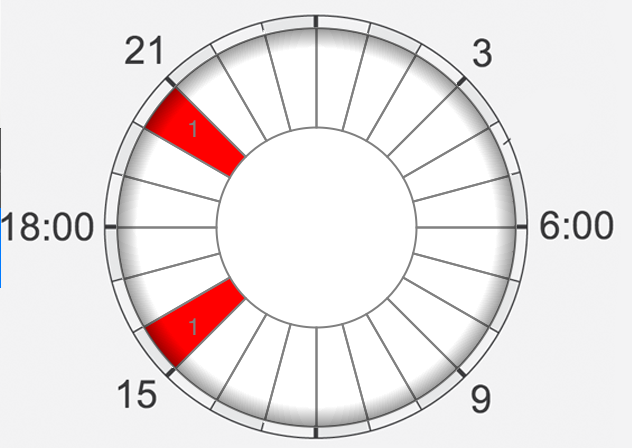
这里我读到它可以将我的手势决定添加到HostView中。我用了next:
UILongPressGestureRecognizer *longPressGesture = [[[UILongPressGestureRecognizer alloc]
                                                       initWithTarget:self
                                                       action:@selector(centerBtnDblPrsd)]
                                                      autorelease];
    [longPressGesture setMinimumPressDuration:1];
    [self.hostView addGestureRecognizer:longPressGesture];
(我已经添加到.h文件中)
但是这不起作用,我如何在hostView中添加手势rec?
编辑:我的CorePlot代码:
-(void)configureHost {

    // 1 - Set up view frame
    CGRect parentRect = self.firstPieChartView.bounds;
    //CGSize toolbarSize = self.myPieChartPlaceholder.bounds.size;


    parentRect = CGRectMake(0, 80,
                            parentRect.size.width,
                            parentRect.size.height);


    // 2 - Create host view
    self.hostView = [(CPTGraphHostingView *) [CPTGraphHostingView alloc] initWithFrame:parentRect];
    self.hostView.allowPinchScaling = YES;

    self.hostView.backgroundColor = [UIColor clearColor];
    [self.view addSubview:self.hostView];


}

-(void)configureGraph {

    // 1 - Create and initialize graph
    graph = [[CPTXYGraph alloc] initWithFrame:self.hostView.bounds];
    self.hostView.hostedGraph = graph;

    self.hostView.backgroundColor = [UIColor clearColor];

    graph.paddingLeft = 0.0f;
    graph.paddingTop = 0.0f;
    graph.paddingRight = 0.0f;
    graph.paddingBottom = 0.0f;
    graph.axisSet = nil;


    // 2 - Set up text style
    CPTMutableTextStyle *textStyle = [CPTMutableTextStyle textStyle];
    textStyle.color = [CPTColor grayColor];
    textStyle.fontName = @"Helvetica-Thin";
    textStyle.fontSize = 17.0f;

    // 3 - Configure title
    NSString *title =  @"";         //_infoLabel.text;
    graph.title = title;
    graph.titleTextStyle = textStyle;
    graph.titlePlotAreaFrameAnchor = CPTRectAnchorTop;
    graph.titleDisplacement = CGPointMake(0.0f, -12.0f);

    UIImage *img = [UIImage imageNamed:@"hostViewPlchldr.png"];
    CPTImage *cptImg=[CPTImage imageWithCGImage:img.CGImage scale:img.scale*2];
    graph.fill = [CPTFill fillWithImage:cptImg];
}

-(void)configureChart {

    // 1 - Get reference to graph
    graph = self.hostView.hostedGraph;
    // 2 - Create chart
    CPTPieChart *pieChart = [[CPTPieChart alloc] init];

    CPTMutableLineStyle *line=[CPTMutableLineStyle lineStyle];
    line.lineColor=[CPTColor grayColor];
    line.lineWidth = 1.0;


    pieChart.borderLineStyle = line;

    //Положение надписей на секторах
    pieChart.labelOffset = -30;

    pieChart.dataSource = self;
    pieChart.delegate = self;

    pieChart.pieRadius = (self.hostView.bounds.size.height * 1.3) / 3;
    pieChart.pieInnerRadius = 35.0;
    pieChart.identifier = graph.title;
    pieChart.startAngle = M_PI/2;
    pieChart.sliceDirection = CPTPieDirectionClockwise;

    // 3 - Create gradient
    CPTGradient *overlayGradient = [[CPTGradient alloc] init];
    overlayGradient.gradientType = CPTGradientTypeRadial;
    overlayGradient = [overlayGradient addColorStop:[[CPTColor blackColor] colorWithAlphaComponent:0.0] atPosition:0.9];
    overlayGradient = [overlayGradient addColorStop:[[CPTColor blackColor] colorWithAlphaComponent:0.4] atPosition:1.0];
    pieChart.overlayFill = [CPTFill fillWithGradient:overlayGradient];
    // 4 - Add chart to graph
    [graph addPlot:pieChart];

}


-(void)viewDidLoad
{

    _firstPieChartView.backgroundColor = [UIColor clearColor];
    [super viewDidLoad];

      UILongPressGestureRecognizer *longPressGesture = [[UILongPressGestureRecognizer alloc] initWithTarget:self action:@selector(longTap)];
    [longPressGesture setMinimumPressDuration:1];
    [self.hostView addGestureRecognizer:longPressGesture];
    [self.hostView setUserInteractionEnabled:YES];
}回答 1
Stack Overflow用户
回答已采纳
发布于 2014-04-21 08:07:11
我也测试了你的代码
-(void)viewDidLoad
{
  UILongPressGestureRecognizer *longPressGesture = [[UILongPressGestureRecognizer alloc] initWithTarget:self action:@selector(longTap)];
  [longPressGesture setMinimumPressDuration:1];
  [self.tempView addGestureRecognizer:longPressGesture];
  [self.tempView setUserInteractionEnabled:YES];
}

-(void)longTap
{
 NSLog(@"tapped");
}
我的longTap方法正在被调用..。如果你仍然不工作,你可以提供更多的代码,这样我就可以对你的问题有更多的了解。
页面原文内容由Stack Overflow提供。腾讯云小微IT领域专用引擎提供翻译支持
原文链接:
https://stackoverflow.com/questions/23192564
复制相关文章
相似问题
腾讯云开发者

Copyright © 2013 - 2026 Tencent Cloud. All Rights Reserved. 腾讯云 版权所有
深圳市腾讯计算机系统有限公司 ICP备案/许可证号:粤B2-20090059  粤公网安备44030502008569号
腾讯云计算(北京)有限责任公司 京ICP证150476号 | 京ICP备11018762号