
在它们之间有点的水平线
在它们之间有点的水平线
提问于 2014-06-12 16:49:18
我可以在不使用<hr>的情况下实现这一点吗?我要有圆点的横线和垂直线。这是我做的卧式的,它看起来不太好不知道如何做垂直的一个甚至。请加一把小提琴。
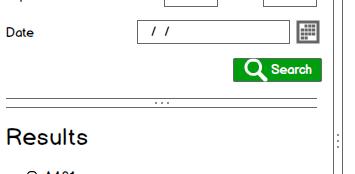
<div class="horizontaltop" runat="server"></div>
<div align="center">...</div>
<div class="horizontalRule" runat="server"></div>div.horizontaltop{
clear:both;
width:100%;
background-color:#d1d1d1;
height:1px;
margin-top:10px;
margin-bottom:0px;
}
div.horizontalRule{
clear:both;
width:100%;
background-color:#d1d1d1;
height:1px;
margin-top:1px;
margin-bottom:1px;
}回答 2
Stack Overflow用户
回答已采纳
发布于 2014-06-12 16:58:46
对于伪元素来说,这是非常简单的:
<div class="dotted-border">Your content</div>

.dotted-border {
    border-bottom: 1px solid #d1d1d1;
}

.dotted-border:after {
    border-top: 1px solid #d1d1d1;
    content: "\2022\2022\2022";
    display: block;
    font-size: 8px;
    letter-spacing: 3px;
    text-align: center;
}编辑-这是一个垂直的。css并不是很漂亮,但它能工作。http://jsfiddle.net/b5U5M/1/
.dotted-border-vertical {
    border-right: 1px solid #d1d1d1;
    height: 200px;
    position: relative;
}

.dotted-border-vertical:after {
    border-left: 1px solid #d1d1d1;
    content: "\2022\A\2022\A\2022";
    display: inline-block;
    font-size: 8px;
    height: 120px;
    line-height: 0.8;
    padding-top: 80px;
    position: absolute; right: 0; top: 0;
    text-align: center;
    width: 5px;
}Stack Overflow用户
发布于 2014-06-12 16:55:26
向中心div添加一个类dots,并添加以下CSS:
div.dots {
  border-bottom: 3px dotted #aaa;
  width: 20px;
}这将给你更真实的点,你可以混乱的大小和颜色。然后,您将需要将.dots包装在以其为中心的父div中。
页面原文内容由Stack Overflow提供。腾讯云小微IT领域专用引擎提供翻译支持
原文链接:
https://stackoverflow.com/questions/24189821
复制相关文章
相似问题
腾讯云开发者

Copyright © 2013 - 2026 Tencent Cloud. All Rights Reserved. 腾讯云 版权所有
深圳市腾讯计算机系统有限公司 ICP备案/许可证号:粤B2-20090059  粤公网安备44030502008569号
腾讯云计算(北京)有限责任公司 京ICP证150476号 | 京ICP备11018762号