
垂直移动<hr>
垂直移动<hr>
提问于 2014-09-20 17:21:35
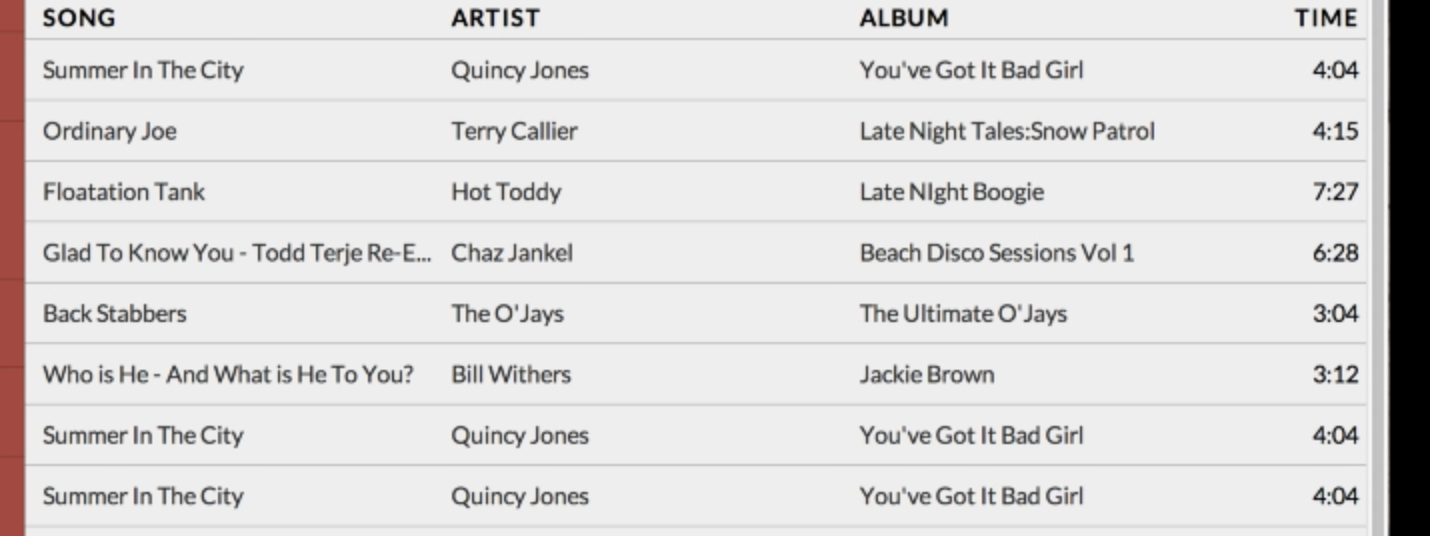
我想在html里放一条线。我找到了'hr‘标签,但是它看起来在html中有一个默认位置。有没有一种方法来移动它(或多或少像单词)最接近文本?这是我的密码。hr标记位于div中。
 <h5 style="color: black; text-align: left; margin-top: 1px; margin-left: 5px">SONG</h5>
 <h5 style="color: black; text-align: left; margin-top: -46px; margin-left:       280px">ARTIST</h5>
 <h5 style="color: black; text-align: left; margin-top: -46px; margin-left: 555px">ALBUM</h5>
 <h5 style="color: black; text-align: right; margin-top: -46px;">TIME</h5>
 <hr>
 <p color="black" face="verdana" style="margin-top: -20px; margin-left: 5px; font-size:15px">Live like theres no tomorrow</p>
 <hr>
基本上我想用现场直播来划分不同的歌曲。为了确保我没有使用JavaScript,而且我处于HTML的基础上。
回答 2
Stack Overflow用户
回答已采纳
发布于 2014-09-20 17:44:48
听起来你只是想要个html表。我在这里给你举了一个例子:http://jsfiddle.net/b2boteLj/3/
html:
<table style="width:100%">
  <tr>
      <th><h5>SONG</h5></th>
      <th><h5>ARTIST</h5></th>
      <th><h5>ALBUM</h5></th>
      <th><h5>TIME</h5></th>
  </tr>
  <tr>
      <td>Live like theres no tomorrow</td>
      <td>some artist</td>
      <td>some album</td>
      <td>some time</td>
  </tr>
</table>
css:
table, th, td {
    border-top: 1px solid black;
    border-collapse: collapse;
    text-align: left;
}
th {
    background-color: gray;
    color: white;
}
td {
    background-color: red;
    color: white;
}
th,td {
     padding: 5px;
}此结构也可用于条带交替行等。此外,请注意,<td>是表单元格,<th>是表标题单元格-如果要将不同的css参数应用于列的标题,这可能会有所帮助。有关html表及其样式的更多信息,请参阅此处:tables.asp
如果不是你想要的,让我知道,我再举一个例子。
Stack Overflow用户
发布于 2014-09-20 17:26:34
现在,使用hr通常被认为是一种不太好的做法,因为它只是作为一个视觉元素使用,没有任何上下文意义。我们使用border代替。
P.S.:在代码中加入内联样式也是一种糟糕的做法。也许您这样做只是为了这个例子,但在现实生活中,只要有可能,您就更喜欢外部css文件。
页面原文内容由Stack Overflow提供。腾讯云小微IT领域专用引擎提供翻译支持
原文链接:
https://stackoverflow.com/questions/25951371
复制相关文章
相似问题
腾讯云开发者

Copyright © 2013 - 2026 Tencent Cloud. All Rights Reserved. 腾讯云 版权所有
深圳市腾讯计算机系统有限公司 ICP备案/许可证号:粤B2-20090059  粤公网安备44030502008569号
腾讯云计算(北京)有限责任公司 京ICP证150476号 | 京ICP备11018762号