
Javafx KeyEvent和MouseEvent
我正在努力学习javafx。我做了大部分的代码,但我的开始方法有问题。
我想做的是通过点击屏幕来添加点。如果我按下任何一个或0未来的斑点,将被添加将更改为一些不同的颜色。因此,我知道我必须使用setOnMouseClicked和setOnKeyPressed方法,但在互联网上没有太多。
import javafx.application.Application;
import javafx.stage.Stage;
import javafx.scene.Group;
import javafx.scene.Scene;
import javafx.scene.paint.Color;
import javafx.scene.shape.Circle;


public class Spots extends Application {

    public static final int SIZE = 500;
    public static final int SPOT_RADIUS = 20;
    private LinkedList<Spot> spotList;
    private Color color;

    public static void main(String...args) {
        launch(args);
    }

    public void start(Stage stage) {

        stage.setTitle("Spots");
        dotList = new SinglyLinkedList<>();
        Group root = new Group();
        Scene scene = new Scene(root, 500, 500, Color.BLACK);
        Spot r;

        // ...

        stage.show();
    }

    private class Spot extends Circle {

        public Spot(double xPos, double yPos) {
            super(xPos, yPos, SPOT_RADIUS);
            setFill(color);
        }

        public boolean contains(double xPos, double yPos) {
            double dx = xPos - getCenterX();
            double dy = yPos - getCenterY();
            double distance = Math.sqrt(Math.pow(dx, 2) + Math.pow(dy, 2));
            return distance <= SPOT_RADIUS;
        }
    }
}回答 3
Stack Overflow用户
发布于 2015-04-18 22:52:22
圆圈不接受的原因是它没有集中注意力。对于要响应关键事件的节点,它们应该是focusTraversable。您可以通过在节点上调用setFocusTraversable(true)来做到这一点。我编辑了start()方法,下面是我最后得到的代码。
public void start(Stage primaryStage) throws Exception {

    Pane pane = new Pane();
    final Scene scene = new Scene(pane, 500, 500);
    final Circle circle = new Circle(250, 250, 20);
    circle.setFill(Color.WHITE);
   circle.setStroke(Color.BLACK);
    pane.getChildren().add(circle);
     circle.setFocusTraversable(true);
    circle.setOnKeyPressed(new EventHandler<KeyEvent>() {
        @Override
        public void handle(KeyEvent e) {
            if ((e.getCode() == KeyCode.UP) && (circle.getCenterY() >= 5)) {
                circle.setCenterY(circle.getCenterY() - 5);
            }

            else if ((e.getCode() == KeyCode.DOWN && (circle.getCenterY() <= scene.getHeight() - 5))) {
                circle.setCenterY(circle.getCenterY() + 5);
            }
            else if ((e.getCode() == KeyCode.RIGHT) && (circle.getCenterX() <= scene.getWidth() - 5)) {
                circle.setCenterX(circle.getCenterX() + 5);
            }
            else if ((e.getCode() == KeyCode.LEFT && (circle.getCenterX() >= 5))) {

                circle.setCenterX(circle.getCenterX()-5);
            }
        }
    });

  //creates new spots by clicking anywhere on the pane
    pane.setOnMouseClicked(new EventHandler<MouseEvent>() {
      public void handle(MouseEvent event) {
            double newX = event.getX(); //getting the x-coordinate of the clicked area
            double newY = event.getY(); //getting the y-coordinate of the clicked area

            Circle newSpot = new Circle(newX, newY,20);
            newSpot.setFill(Color.WHITE);
            newSpot.setStroke(Color.BLACK);
            pane.getChildren().add(newSpot);

        }
    });

    primaryStage.setTitle("Move the circle");
    primaryStage.setScene(scene);
    primaryStage.show();
}
还请查看下列链接的答案:
- 处理键盘事件
- 无法在KeyEvent中收听JavaFX
Stack Overflow用户
发布于 2015-04-18 23:49:20
解方法
您可以监视关键类型事件的场景,并在此基础上切换颜色模式。当用户单击窗格中的任何位置时,您可以将鼠标事件处理程序放置在场景根窗格上,并在场景中添加一个圆圈(当前颜色模式的适当颜色)。
样本码
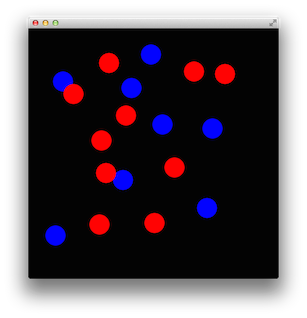
import javafx.application.Application;
import javafx.scene.Scene;
import javafx.scene.layout.Pane;
import javafx.scene.paint.Color;
import javafx.scene.shape.Circle;
import javafx.stage.Stage;

// Java 8+ code.
public class Spots extends Application {

    private static final int SIZE = 500;
    private static final int SPOT_RADIUS = 20;

    private Color color = Color.BLUE;

    public void start(Stage stage) {
        Pane root = new Pane();

        root.setOnMouseClicked(event ->
                root.getChildren().add(
                        new Spot(
                                event.getX(),
                                event.getY(),
                                color
                        )
                )
        );

        Scene scene = new Scene(root, SIZE, SIZE, Color.BLACK);
        scene.setOnKeyTyped(event -> {
            switch (event.getCharacter()) {
                case "0":
                    color = Color.BLUE;
                    break;
                case "1":
                    color = Color.RED;
                    break;
            }
        });

        stage.setScene(scene);
        stage.show();
    }

    private class Spot extends Circle {
        public Spot(double xPos, double yPos, Color color) {
            super(xPos, yPos, SPOT_RADIUS);
            setFill(color);
        }
    }

    public static void main(String... args) {
        launch(args);
    }
}
进一步信息
- 有关JavaFX中事件处理的详细信息,请参阅Oracle JavaFX事件教程。
Stack Overflow用户
发布于 2015-04-18 22:27:49
通常,您将使用setOnAction,如Oracle教程中所示。
示例:
    btn.setOnAction(new EventHandler<ActionEvent>() {

        public void handle(ActionEvent event) {
            System.out.println("Hello World");
        }
});如果您试图使用的特定节点没有clickHandler方法,请尝试这样做(例如,在Group上):
    group.addEventHandler(MouseEvent.MOUSE_CLICKED, new EventHandler<MouseEvent>() {
        @Override
        public void handle(MouseEvent event) {
            System.out.println("Hello!");
        }
});https://stackoverflow.com/questions/29722840
复制相似问题
腾讯云开发者

Copyright © 2013 - 2026 Tencent Cloud. All Rights Reserved. 腾讯云 版权所有
深圳市腾讯计算机系统有限公司 ICP备案/许可证号:粤B2-20090059  粤公网安备44030502008569号
腾讯云计算(北京)有限责任公司 京ICP证150476号 | 京ICP备11018762号