
在科多瓦的Vue js
我正努力在科多瓦实现一个简单的Vue.js应用程序。一切正常,除了我不知道如何拦截科多瓦事件(设备阅读,暂停,.)进入我的vue申请。我用了vue-cli的Webpack模板。
这是我的文件js/index.js:
const app = {
  initialize: function () {
    console.log('initialize')
    this.bindEvents()
  },
  bindEvents: function () {
    document.addEventListener('deviceready', this.onDeviceReady, false)
  },
  onDeviceReady: function () {
    app.receivedEvent('deviceready')
  },
  receivedEvent: function (id) {
    console.log('Received Event: ' + id)
  }
}

app.initialize()src/main.js:
import Vue from 'vue'
import App from './App'

/* eslint-disable no-new */
const app = new Vue({
  template: '<App/>',
  components: { App }
})

app.$mount('#app')
config/index.js:
module.exports = {
  build: {
    env: require('./prod.env'),
    index: path.resolve(__dirname, '../dist/index.html'),
    assetsRoot: path.resolve(__dirname, '../dist'),
    assetsSubDirectory: 'static',
    //assetsPublicPath: '/',
    productionSourceMap: true,
    productionGzip: false,
    productionGzipExtensions: ['js', 'css']
  },
  dev: {
    env: require('./dev.env'),
    port: 8080,
    assetsSubDirectory: 'static',
    assetsPublicPath: '/',
    proxyTable: {},
    cssSourceMap: false
  }
}
webpack.base.conf.js:
module.exports = {
  entry: {
    app: './src/main.js'
  },
  output: {
    path: config.build.assetsRoot,
    publicPath: process.env.NODE_ENV === 'production' ? config.build.assetsPublicPath : config.dev.assetsPublicPath,
    filename: '[name].js'
  },
  resolve: {
    extensions: ['', '.js', '.vue', '.json'],
    fallback: [path.join(__dirname, '../node_modules')],
    alias: {
      'vue$': 'vue/dist/vue.common.js',
      'src': path.resolve(__dirname, '../src'),
      'assets': path.resolve(__dirname, '../src/assets'),
      'components': path.resolve(__dirname, '../src/components'),
      'semantic': path.resolve(__dirname, '../node_modules/semantic-ui-css/semantic.min.js')
    }
  },
  resolveLoader: {
    fallback: [path.join(__dirname, '../node_modules')]
  },
  plugins: [
    new webpack.ProvidePlugin({
        // jquery
        $: 'jquery',
        jQuery: 'jquery',
        'window.jQuery': 'jquery',
        semantic: 'semantic-ui-css',
        'semantic-ui': 'semantic-ui-css'
    })
  ],
  module: {
    preLoaders: [
      {
        test: /\.vue$/,
        loader: 'eslint',
        include: projectRoot,
        exclude: /node_modules/
      },
      {
        test: /\.js$/,
        loader: 'eslint',
        include: projectRoot,
        exclude: /node_modules/
      }
    ],
    loaders: [
      {
        test: /\.vue$/,
        loader: 'vue'
      },
      {
        test: /\.js$/,
        loader: 'babel',
        include: projectRoot,
        exclude: /node_modules/
      },
      {
        test: /\.json$/,
        loader: 'json'
      },
      {
        test: /\.(png|jpe?g|gif|svg)(\?.*)?$/,
        loader: 'url',
        query: {
          limit: 10000,
          name: utils.assetsPath('img/[name].[hash:7].[ext]')
        }
      },
      {
        test: /\.(woff2?|eot|ttf|otf)(\?.*)?$/,
        loader: 'url',
        query: {
          limit: 10000,
          name: utils.assetsPath('fonts/[name].[hash:7].[ext]')
        }
      }
    ]
  },
  eslint: {
    formatter: require('eslint-friendly-formatter')
  },
  vue: {
    loaders: utils.cssLoaders({ sourceMap: useCssSourceMap }),
    postcss: [
      require('autoprefixer')({
        browsers: ['last 2 versions']
      })
    ]
  }
}
webpack.prod.conf:
var webpackConfig = merge(baseWebpackConfig, {
  module: {
    loaders: utils.styleLoaders({ sourceMap: config.build.productionSourceMap, extract: true })
  },
  devtool: config.build.productionSourceMap ? '#source-map' : false,
  output: {
    path: config.build.assetsRoot,
    filename: utils.assetsPath('js/[name].[chunkhash].js'),
    chunkFilename: utils.assetsPath('js/[id].[chunkhash].js')
  },
  vue: {
    loaders: utils.cssLoaders({
      sourceMap: config.build.productionSourceMap,
      extract: true
    })
  },
  plugins: [
    // http://vuejs.github.io/vue-loader/en/workflow/production.html
    new webpack.DefinePlugin({
      'process.env': env
    }),
    new webpack.optimize.UglifyJsPlugin({
      compress: {
        warnings: false
      }
    }),
    new webpack.optimize.OccurrenceOrderPlugin(),
    // extract css into its own file
    new ExtractTextPlugin(utils.assetsPath('css/[name].[contenthash].css')),
    // generate dist index.html with correct asset hash for caching.
    // you can customize output by editing /index.html
    // see https://github.com/ampedandwired/html-webpack-plugin
    new HtmlWebpackPlugin({
      filename: process.env.NODE_ENV === 'testing'
        ? 'index.html'
        : config.build.index,
      template: 'index.html',
      inject: true,
      minify: {
        removeComments: true,
        collapseWhitespace: true,
        removeAttributeQuotes: true
        // more options:
        // https://github.com/kangax/html-minifier#options-quick-reference
      },
      // necessary to consistently work with multiple chunks via CommonsChunkPlugin
      chunksSortMode: 'dependency'
    }),
    // split vendor js into its own file
    new webpack.optimize.CommonsChunkPlugin({
      name: 'vendor',
      minChunks: function (module, count) {
        // any required modules inside node_modules are extracted to vendor
        return (
          module.resource &&
          /\.js$/.test(module.resource) &&
          module.resource.indexOf(
            path.join(__dirname, '../node_modules')
          ) === 0
        )
      }
    }),
    // extract webpack runtime and module manifest to its own file in order to
    // prevent vendor hash from being updated whenever app bundle is updated
    new webpack.optimize.CommonsChunkPlugin({
      name: 'manifest',
      chunks: ['vendor']
    })
  ]
})

if (config.build.productionGzip) {
  var CompressionWebpackPlugin = require('compression-webpack-plugin')

  webpackConfig.plugins.push(
    new CompressionWebpackPlugin({
      asset: '[path].gz[query]',
      algorithm: 'gzip',
      test: new RegExp(
        '\\.(' +
        config.build.productionGzipExtensions.join('|') +
        ')$'
      ),
      threshold: 10240,
      minRatio: 0.8
    })
  )
}
这是我的项目结构:
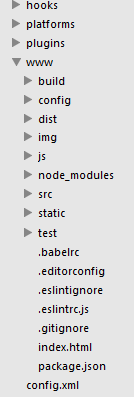
我该怎么做才能得到从科多瓦到我的Vue组件的事件?
回答 2
Stack Overflow用户
发布于 2016-12-30 16:57:45
看起来问题在于浏览器中没有包含Cordova.js,您需要在物理设备上进行测试。
但这并不意味着你不能在浏览器中进行原型。在JS中,如果cordova已经加载,window.cordova将被定义。这样您就可以像这样设置您的初始化。
if(window.cordova){
  //add deviceready event to start app
} else {
  //call starting function
}
对于需要物理设备的东西:振动、加速度计等,你必须构建并部署到一个设备上,浏览器本身是不够的。
Stack Overflow用户
发布于 2017-07-25 12:08:01
看这篇文章,它对我有用:
https://coligo.io/building-a-mobile-app-with-cordova-vuejs/
为了允许应用程序访问Vue.js库,我们还需要在www/index.html中的元标记的末尾添加以下内容:
; script-src 'self' http://cdn.jsdelivr.net/vue/1.0.16/vue.js 'unsafe-eval'https://stackoverflow.com/questions/41399038
复制相似问题
腾讯云开发者

Copyright © 2013 - 2026 Tencent Cloud. All Rights Reserved. 腾讯云 版权所有
深圳市腾讯计算机系统有限公司 ICP备案/许可证号:粤B2-20090059  粤公网安备44030502008569号
腾讯云计算(北京)有限责任公司 京ICP证150476号 | 京ICP备11018762号